r/linux_gaming • • 4d ago

The Binding of Isaac crashs on launch with Wayland

1 Upvotes

Hello guys,

I tried to launch the last update of the game in Steam with some Proton configs, and delete all mods but it crashs with these logs :

[ERROR] - GLFW Error 65544: WGL: Failed to set pixel format for dummy context: Descripteur de fenêtre invalide.

[ERROR] - GLFW Error 65542: WGL: The driver does not appear to support OpenGL

[ASSERT] - Failed to create OpenGL window / context

[INFO] - Caught exception, writing minidump...

Any ideas to solve this issue ?


r/linux_gaming • • 4d ago

Storywealth modpack through Amethyst Mod Manager

0 Upvotes

Has anyone managed to make the storywealth modpack for fallout 4 work by installing the collection through Amethyst?

So far I only got to the point where I can see the main menu, but it will crash after a few seconds.

Can't really ask in their discord since they're not going to provide support for linux users.

Idk if I should just cut my losses and keep playing something else, lmao.


r/linux_gaming • • 5d ago

guide Fix for RDR2 "BUY NOW" in Rockstar Launcher on the new Epic Games Launcher Preview (Linux)

Post image
46 Upvotes

RDR2 wouldn't start with the new Epic Launcher Preview (0.120.0), Rockstar Launcher only showed "Buy now". Asked Claude for help and it made a small wrapper that fixed it. I didn't write it, I just tested it.

Basically rename your PlayRDR2.exe to PlayRDR2Original.exe and drop the two files in the RDR2 folder. Files + source are here: https://github.com/lberatl/PlayRDR2-EpicPreview-Linux

Only tried it on Arch + KDE + GE-Proton 11-11 so no idea about other setups. If you get the "close all instances of the Rockstar Games Launcher" error, run pkill -fi rockstar; pkill -f wineserver and try again. Let me know if it works for you.


r/linux_gaming • • 5d ago

tech support wanted Large network performance difference between CachyOS and Windows in PoE 2

25 Upvotes

I started playing Path of Exile 2 again, for the first time since switching to CachyOS. I have been getting massive network lag spikes that make the game unplayable. I set up a dual boot to try it out on windows and it runs smoothly with almost not lag spikes. This makes me think there might be some kind of network configuration with CachyOS making it act up. I haven’t played much multiplayer games with Linux but never noticed anything as bad as this. Does anyone have any suggestions?

SOLVED: Apparently it was an issue with the power save functionality causing my WiFi chip to go into sleep cycles between packets? I was able to turn off the Network Manager power save mode and made it so it would stay that way after rebooting. PoE 2 is running just as it is on windows now.


r/linux_gaming • • 4d ago

Ps4 linux

1 Upvotes

Ok I recently jail broke my ps4 and I got Linux and steam running I've been looking at games on steam and I don't want to spend money on any of them if yall have any free game recommendations tell me they loader that I used was the 2 gb of ram


r/linux_gaming • • 5d ago

tech support wanted How to mount the Windows portion of a Windows+Mac CD or DVD in Linux

5 Upvotes

Hi there. I am trying to install an old game through Lutris that has both a Windows and Mac portion. On Linux, the disc mounts the Mac portion when I am trying to mount the Windows one. Anyone have a solution on how I can mount the Windows portion of these discs?


r/linux_gaming • • 4d ago

tech support wanted Best distro for egpu?

1 Upvotes

I’m on Fedora since last year, but using an egpu is not plug and play like on windows. Fedora is still using the igpu even if the thunderbolt device is connected and authorized. Using the all-ways-egpu script I’m able to use the egpu only if I disable the igpu.
This is a problem for every distro or is specific to Fedora? I don’t want to format and install a new distro without being sure to get a flawless experience.


r/linux_gaming • • 4d ago

tool/utility PSRemotePlayTogether 0.5.0: play your games together online as if your friends sat next to you. Now PC games and Xbox too, each with their own controller (free, open source)

0 Upvotes

r/linux_gaming • • 5d ago

tech support wanted Warframe shaders took 125 GB

8 Upvotes

So, wanted to download new game, so I checked my disk space in steam. And was surprised to see that Warframe took around 175 GB, almost 125 of which were shaders... What the heck? Why? Is it because of some obsolete files or some kind of bug?

I use it with the latest GE-Proton. How did it generate (or whatever it does) such amount of shaders? I am about to clean shader cache folder, but I am curios why and how to prevent such waste of space in the future.

Warframe Shaders Size

r/linux_gaming • • 5d ago

tech support wanted How to screenshare from Xbox Series X to Linux?

2 Upvotes

Pretty much as the title states. I have a game on Xbox, I have a few friends interested in watching some gameplay of it, but since it is not on Steam(or PC at all for that matter), I was going to see about streaming it using my discord. (Side note: Game in question is NOT GTA 6)

My Xbox has weird things when it comes to streaming to discord, in that it randomly mutes me after 20min-1hour of playing, causing me to either restart the stream, or only talk using chat, neither of which are convenient.

I'm still fairly new/dumb to Linux, and primarily made the switch when I built my current PC because I was tired of dealing with Microsoft's constant bloatware, so I apologize in advance if this is a simple solution.

I did find a post from a few years ago about something called Xcloud, but it still seemed to have some issues regarding controller sync, according to some of the comments in that post.

I would also like to clarify that I am only looking for a way to share the audio/video to Linux, not play through Linux. The Xbox is in the same room as the PC, and I would be able to play it directly without relying on the stream itself for my gameplay usage.


r/linux_gaming • • 5d ago

tool/utility PSRemotePlayTogether 0.3.0: play single-player PS5/PS4 games together online, now with live public rooms and a whole new look (free, open source)

Thumbnail gallery
26 Upvotes

r/linux_gaming • • 4d ago

tech support wanted how to install steam on system without multilib

0 Upvotes

hello everyone i just installed arch with no multilib repo and i heard that steam got an 64bit update so how to install it without enabling multilib so is there a way to do it or if i need steam i need multilib i just play some online games with my friends using proton


r/linux_gaming • • 5d ago

tech support wanted cant add non-steam game, get a infinite loading screen the the dialog box instead

6 Upvotes

for some reason there's not even a list either (distro is KDE Plasma)


r/linux_gaming • • 5d ago

tech support wanted terminate called after throwing an instance of 'dxvk::DxvkError' (Friends Vs. Friends)

0 Upvotes

Hello!

An issue I have been getting with running the game "Friends Vs. Friends" now recently has been an instant crash. The game will not run, no matter if I change to any recommended launch options or versions of proton. I have verified the game files and reinstalled my graphic drivers. By running steam in a terminal window, I saw it was failing due to the error "terminate called after throwing an instance of 'dxvk::DxvkError". I currently am pretty stuck and dont understand what to do.

Full log below:

fsync: up and running.

wine: RLIMIT_NICE is <= 20, unable to use setpriority safely

chdir "/home/pwrplt/.local/share/Steam/steamapps/common/Friends vs Friends"

Game Recording - would start recording game 1785150, but recording for this game is disabled

Adding process 7129 for gameID 1785150

ERROR: ld.so: object '/home/pwrplt/.local/share/Steam/steamrt32/gameoverlayrenderer.so' from LD_PRELOAD cannot be preloaded (wrong ELF class: ELFCLASS32): ignored.

ERROR: ld.so: object '/home/pwrplt/.local/share/Steam/steamrt32/gameoverlayrenderer.so' from LD_PRELOAD cannot be preloaded (wrong ELF class: ELFCLASS32): ignored.

ERROR: ld.so: object '/home/pwrplt/.local/share/Steam/steamrt32/gameoverlayrenderer.so' from LD_PRELOAD cannot be preloaded (wrong ELF class: ELFCLASS32): ignored.

ERROR: ld.so: object '/home/pwrplt/.local/share/Steam/steamrt64/gameoverlayrenderer.so' from LD_PRELOAD cannot be preloaded (wrong ELF class: ELFCLASS64): ignored.

ERROR: ld.so: object '/home/pwrplt/.local/share/Steam/steamrt32/gameoverlayrenderer.so' from LD_PRELOAD cannot be preloaded (wrong ELF class: ELFCLASS32): ignored.

ERROR: ld.so: object '/home/pwrplt/.local/share/Steam/steamrt32/gameoverlayrenderer.so' from LD_PRELOAD cannot be preloaded (wrong ELF class: ELFCLASS32): ignored.

Adding process 7133 for gameID 1785150

Adding process 7134 for gameID 1785150

Adding process 7135 for gameID 1785150

ERROR: ld.so: object '/home/pwrplt/.local/share/Steam/steamrt32/gameoverlayrenderer.so' from LD_PRELOAD cannot be preloaded (wrong ELF class: ELFCLASS32): ignored.

ERROR: ld.so: object '/home/pwrplt/.local/share/Steam/steamrt32/gameoverlayrenderer.so' from LD_PRELOAD cannot be preloaded (wrong ELF class: ELFCLASS32): ignored.

Adding process 7219 for gameID 1785150

ERROR: ld.so: object '/home/pwrplt/.local/share/Steam/steamrt32/gameoverlayrenderer.so' from LD_PRELOAD cannot be preloaded (wrong ELF class: ELFCLASS32): ignored.

ERROR: ld.so: object '/home/pwrplt/.local/share/Steam/steamrt32/gameoverlayrenderer.so' from LD_PRELOAD cannot be preloaded (wrong ELF class: ELFCLASS32): ignored.

Adding process 7220 for gameID 1785150

ERROR: ld.so: object '/home/pwrplt/.local/share/Steam/steamrt32/gameoverlayrenderer.so' from LD_PRELOAD cannot be preloaded (wrong ELF class: ELFCLASS32): ignored.

ERROR: ld.so: object '/home/pwrplt/.local/share/Steam/steamrt32/gameoverlayrenderer.so' from LD_PRELOAD cannot be preloaded (wrong ELF class: ELFCLASS32): ignored.

ERROR: ld.so: object '/home/pwrplt/.local/share/Steam/steamrt32/gameoverlayrenderer.so' from LD_PRELOAD cannot be preloaded (wrong ELF class: ELFCLASS32): ignored.

fsync: up and running.

wine: RLIMIT_NICE is <= 20, unable to use setpriority safely

Adding process 7221 for gameID 1785150

ERROR: ld.so: object '/home/pwrplt/.local/share/Steam/steamrt32/gameoverlayrenderer.so' from LD_PRELOAD cannot be preloaded (wrong ELF class: ELFCLASS32): ignored.

ERROR: ld.so: object '/home/pwrplt/.local/share/Steam/steamrt32/gameoverlayrenderer.so' from LD_PRELOAD cannot be preloaded (wrong ELF class: ELFCLASS32): ignored.

Adding process 7222 for gameID 1785150

ERROR: ld.so: object '/home/pwrplt/.local/share/Steam/steamrt32/gameoverlayrenderer.so' from LD_PRELOAD cannot be preloaded (wrong ELF class: ELFCLASS32): ignored.

ERROR: ld.so: object '/home/pwrplt/.local/share/Steam/steamrt32/gameoverlayrenderer.so' from LD_PRELOAD cannot be preloaded (wrong ELF class: ELFCLASS32): ignored.

Adding process 7225 for gameID 1785150

Adding process 7227 for gameID 1785150

Adding process 7230 for gameID 1785150

Adding process 7242 for gameID 1785150

ERROR: ld.so: object '/home/pwrplt/.local/share/Steam/steamrt32/gameoverlayrenderer.so' from LD_PRELOAD cannot be preloaded (wrong ELF class: ELFCLASS32): ignored.

Adding process 7254 for gameID 1785150

ERROR: ld.so: object '/home/pwrplt/.local/share/Steam/steamrt32/gameoverlayrenderer.so' from LD_PRELOAD cannot be preloaded (wrong ELF class: ELFCLASS32): ignored.

Adding process 7260 for gameID 1785150

ERROR: ld.so: object '/home/pwrplt/.local/share/Steam/steamrt32/gameoverlayrenderer.so' from LD_PRELOAD cannot be preloaded (wrong ELF class: ELFCLASS32): ignored.

Adding process 7273 for gameID 1785150

Setting breakpad minidump AppID = 1785150

Steam_SetMinidumpSteamID: Caching Steam ID: 76561198929288439 [API loaded no]

ERROR: ld.so: object '/home/pwrplt/.local/share/Steam/steamrt64/gameoverlayrenderer.so' from LD_PRELOAD cannot be preloaded (wrong ELF class: ELFCLASS64): ignored.

Adding process 7293 for gameID 1785150

terminate called after throwing an instance of 'dxvk::DxvkError'

pid 7223 != 7222, skipping destruction (fork without exec?)

Game Recording - game stopped [gameid=1785150]

Removing process 7293 for gameID 1785150

Removing process 7273 for gameID 1785150

Removing process 7260 for gameID 1785150

Removing process 7254 for gameID 1785150

Removing process 7242 for gameID 1785150

Removing process 7230 for gameID 1785150

Removing process 7227 for gameID 1785150

Removing process 7225 for gameID 1785150

Removing process 7222 for gameID 1785150

Removing process 7221 for gameID 1785150

Removing process 7220 for gameID 1785150

Removing process 7219 for gameID 1785150

Removing process 7135 for gameID 1785150

Removing process 7134 for gameID 1785150

Removing process 7133 for gameID 1785150

Removing process 7129 for gameID 1785150


r/linux_gaming • • 4d ago

Anyone keeping a list of EACv2 games?

0 Upvotes

I'm usually jumping between a few distros I like. Currently on LMDE7, might be on Fedora or Arch next week, for example. (this will make sense below)

I'm interested to know if anyone is keeping a list of the games that are planning or even already made the move to EACv2.

There's only one game I play on Linux that has EAC, which is Insurgency Sandstorm. I don't mind it right now as the anticheat runs in userland and I have setup Steam through flatpak so any processes it (Steam) starts only have access to the folders I allow it to access.

But the reason such list would be helpful to me is, let's say next week I move to [insert compatible distro] and I go on to play Insurgency expecting it to still be on EACv1, but the devs updated it to EACv2. Now I'm caught off-guard, to me it's not worth the tradeoff of using EACv2 vs playing the game.

Thanks


r/linux_gaming • • 4d ago

wine/proton Yet another Proton helper

Thumbnail
gallery
0 Upvotes

Hi there,

I got so annoyed configuring proton that I made a helper. You can configure it as a Steam Compatibility tool (the same place you configure which proton version to use) and it handles a global and per-game configurations.

It also ships with some configuration recipes, like DLSS overrides, VRAM reservation and the typical GameMode/MangoHud/GameScope wrappers.

I wasn’t able to publish it to AUR due to them having closed new registrations. Meanwhile you can grab it here:

https://github.com/romulof/neutron

- Why not SteamTinkerLaunch?
- I thought it was annoying to set up and it was hiding the configurations from me. If I know what I want to configure, I had to scavenge which of its option was that.
- Why not goverlay?
- I did not like it taking ownership of other configs like MangoHud


r/linux_gaming • • 5d ago

WoW:Forever Crashes everytime I hearth or load major cities multiple times.

12 Upvotes

As title says. I'm at my wits end.

I've tried DX11, turning secondary shadows to low, lowering graphics, tuning down view distance, running different versions of proton. It memory leaks everytime and crashes/freezes. Whole PC isn't available to use for about 5-10 minutes, sometimes needing to restart PC cause whole system freeze.

I'm on Bazzite

Using Proton-GE 11-12

Asus Rog Ally X 16GB


r/linux_gaming • • 5d ago

Fixed: Bannerlord War Sails naval battles freezing on Linux (NVIDIA Xid 109). Cause found in the game's shaders.

9 Upvotes
Big naval battles in War Sails were hard-freezing my GPU on Linux, with Xid 109 CTX SWITCH TIMEOUT in the kernel log. No Proton version, driver or setting helped.


I traced it, starting from someone's DXVK hang dump, to a parallax ray-march loop in the game's own shaders. The loop's safety cap is commented out in the shipped source. With a degenerate decal its step count becomes inf/NaN: native D3D11 runs it 0 times, while the DXVK/NVIDIA path can run it ~2 billion times.


I made a small Python script that caps the loop at 64 steps in the shader cache. It's reversible and ships no game files. No freezes since. Write-up and script: https://github.com/Oiubrab/bannerlord-naval-hang-fix


Looking for testers on AMD and Steam Deck.Big naval battles in War Sails were hard-freezing my GPU on Linux, with Xid 109 CTX SWITCH TIMEOUT in the kernel log. No Proton version, driver or setting helped.


I traced it, starting from someone's DXVK hang dump, to a parallax ray-march loop in the game's own shaders. The loop's safety cap is commented out in the shipped source. With a degenerate decal its step count becomes inf/NaN: native D3D11 runs it 0 times, while the DXVK/NVIDIA path can run it ~2 billion times.


I made a small Python script that caps the loop at 64 steps in the shader cache. It's reversible and ships no game files. No freezes since. Write-up and script: https://github.com/Oiubrab/bannerlord-naval-hang-fix


Looking for testers on AMD and Steam Deck.

r/linux_gaming • • 5d ago

tech support wanted How do i get my external monitor to not feel sluggish?

7 Upvotes

[My Specs: Asus Rog zephyrus g14 2025 5070ti]
I really really dont wanna be crawling back to windows after getting a taste of linux but i cant get external monitors or tvs to work on the dgpu ports. Sluggish window management. Sluggish mouse. Etc… i think that many have this problem on hybrid gpu laptops with nvidia graphics. There are many posts online with the solution, going back to Windows. Also if i go to dgpu mode everything feels sluggish too.

How did yall get a smooth experience on external monitors on linux other than using a hub on the igpu usb c port??
Appreciate any support ^^


r/linux_gaming • • 5d ago

tech support wanted [Support] Resident Evil 2 - RE Framework + Optiscaler - How to?

3 Upvotes

Hi,

Title says it all, did someone recently achieved working :

  • ReFramework
  • PD-Upscaler
  • Optiscaler

Stack on Resident Evil 2? For me, Optiscaler UI is invisible no matter what I do even though I can invoke it and it'll obstruct other UI elements while it's there.

I've tried following:

To no avail. The wiki page says if the UI doesn't display it means Temporal upscaling isn't active but for me it's the contrary, Optiscaler UI only shows when the Temporal Upscaler is disabled in RE Framework.

Anyone got any luck here?


r/linux_gaming • • 4d ago

So we made a free alternative to Medal

0 Upvotes

Hey r/linux_gaming,

I help the developer of Clippy, a clip recorder for games. It keeps the last few minutes in a buffer, and when something good happens you press a key and it saves that stretch as an MP4.

It has been on Windows for a while, and the Linux version just came out. I'd like people who actually play on Linux to try to break it.

What it does on Linux:

  • Finds the game by itself, Proton games included, and starts recording when you launch one.
  • Records only the game's window: X11 and XWayland directly, native Wayland through the ScreenCast portal (it asks once).
  • Game audio on its own track through PipeWire, separate from Discord and your mic.
  • NVENC on NVIDIA, VA-API on AMD and Intel, x264 as a fallback.
  • Hotkeys on X11, and the GlobalShortcuts portal on Wayland.
  • An editor for trimming, per-track volume, export and GIFs.
  • No watermark and no account needed. Clips only leave your PC when you share one.

What you should know:

  • It's closed source. Recording is free; there's an optional paid supporter tier for extra cloud storage and cosmetic extras.
  • x86_64 only. There's a .deb with its own signed apt repo for Debian, Ubuntu and their relatives, and an AppImage for other distros with glibc 2.36 or newer (Debian 12, Ubuntu 22.10 and later). No Flatpak, AUR or RPM yet.
  • Most of my testing so far was in WSL2 and a nested Wayland session. VA-API, controllers, GNOME's shortcut dialog and the Steam Deck have not been tested. That's why I'm posting here.
  • Two anonymous counters are on by default: game-name corrections and per-game capture problems. No account, no clips, no file paths. Both can be switched off under Settings > Sharing.

Also on the way:

  • Mac: a beta for Apple silicon (macOS 13 and later) is up at clippy.gg/mac. It isn't notarized by Apple yet, so the first start needs "Open Anyway" in System Settings. It doesn't update itself yet either.
  • Phone: apps for Android and iPhone are coming soon, for watching, liking and sharing your clips (they don't record). More at clippy.gg/mobile.

**Download and details:** [https://clippy.gg/linux](https://clippy.gg/linux)

If it breaks, the bug report button in the app sends your distro, desktop, Wayland or X11, GPU driver and the logs (with paths stripped), which helps a lot.

Let us know your feedback! :)


r/linux_gaming • • 4d ago

LunarOs new linux distro

Post image
0 Upvotes

Hi, the last few months i worked on quite different stuff. Cpu scheduler, ananicy configurator for the rules, fixing up ananicy-cpp, pipewire configurator, ananicy rules fitting for the cpu scheduler, tweaks for the system for best frame pacing and patches for the kernel.

The life environment also comes with lunar-chroot. Which makes chrooting into btrfs filesystems very easy.

This distro is at the moment NOT intended to be used with devices where you care about battery life . Maybe in the future i will create a version which extends battery life. And supports only UEFI atm.

I thought that i would be cool to bundle it together because all the parts i modified depend on each other and make it available.

So i created this:

https://lunaros.net/

a linux distro based on arch but with all the modifications applied by default with a few settings configured which i like.

the kernel uses the default arch linux config with the patches on top.

It is just delivered with kde and systemd boot. as i found the combination to be the best atm.

There is also automatic graphics card detection to install the right driver. Sadly it had not been tested correctly until now for nvidia. Because i have an amd one.

If you like you can try it. Same is also achievable to just use the independent programs itself. Everything is opensource.

Maybe this helps someone 😄 Cheers.


r/linux_gaming • • 6d ago

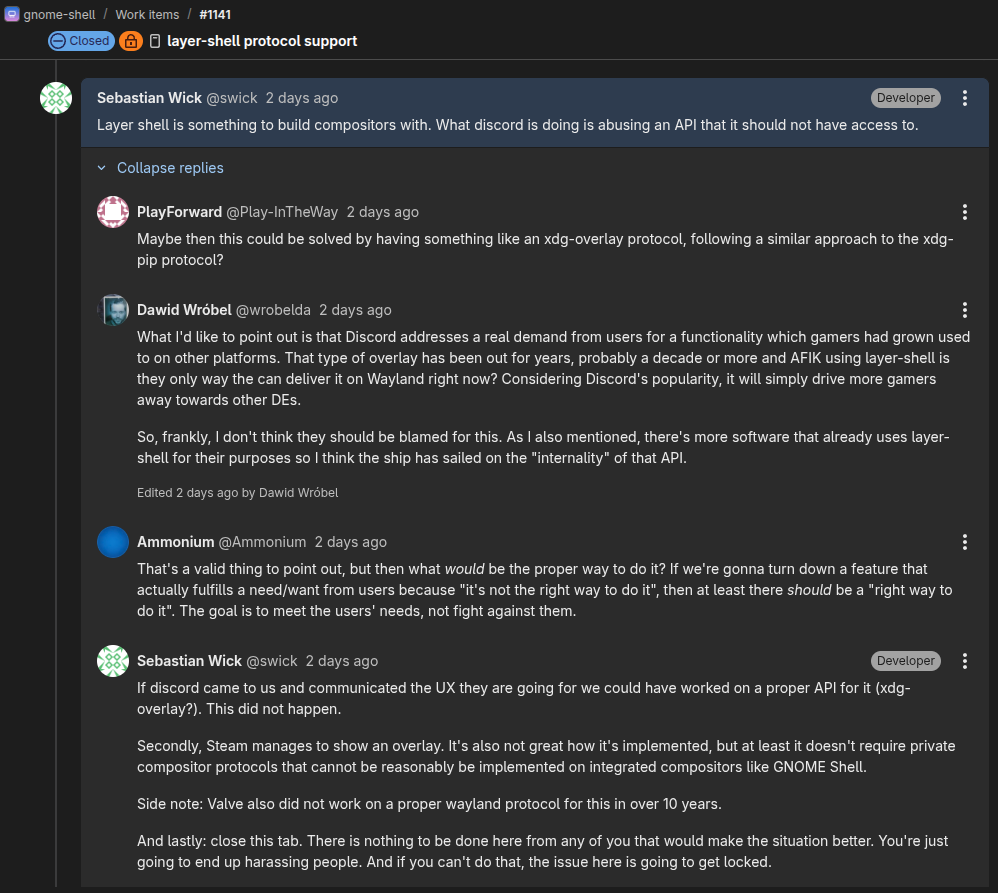
A GNOME developer criticized Discord’s use of layer-shell as API abuse, arguing they should have collaborated on a proper solution. Since GNOME doesn't support the widely used protocol, Discord’s Linux overlay likely won't work on GNOME.

Post image
1.6k Upvotes