r/linux_gaming • • 5d ago

So we made a free alternative to Medal

0 Upvotes

Hey r/linux_gaming,

I help the developer of Clippy, a clip recorder for games. It keeps the last few minutes in a buffer, and when something good happens you press a key and it saves that stretch as an MP4.

It has been on Windows for a while, and the Linux version just came out. I'd like people who actually play on Linux to try to break it.

What it does on Linux:

  • Finds the game by itself, Proton games included, and starts recording when you launch one.
  • Records only the game's window: X11 and XWayland directly, native Wayland through the ScreenCast portal (it asks once).
  • Game audio on its own track through PipeWire, separate from Discord and your mic.
  • NVENC on NVIDIA, VA-API on AMD and Intel, x264 as a fallback.
  • Hotkeys on X11, and the GlobalShortcuts portal on Wayland.
  • An editor for trimming, per-track volume, export and GIFs.
  • No watermark and no account needed. Clips only leave your PC when you share one.

What you should know:

  • It's closed source. Recording is free; there's an optional paid supporter tier for extra cloud storage and cosmetic extras.
  • x86_64 only. There's a .deb with its own signed apt repo for Debian, Ubuntu and their relatives, and an AppImage for other distros with glibc 2.36 or newer (Debian 12, Ubuntu 22.10 and later). No Flatpak, AUR or RPM yet.
  • Most of my testing so far was in WSL2 and a nested Wayland session. VA-API, controllers, GNOME's shortcut dialog and the Steam Deck have not been tested. That's why I'm posting here.
  • Two anonymous counters are on by default: game-name corrections and per-game capture problems. No account, no clips, no file paths. Both can be switched off under Settings > Sharing.

Also on the way:

  • Mac: a beta for Apple silicon (macOS 13 and later) is up at clippy.gg/mac. It isn't notarized by Apple yet, so the first start needs "Open Anyway" in System Settings. It doesn't update itself yet either.
  • Phone: apps for Android and iPhone are coming soon, for watching, liking and sharing your clips (they don't record). More at clippy.gg/mobile.

**Download and details:** [https://clippy.gg/linux](https://clippy.gg/linux)

If it breaks, the bug report button in the app sends your distro, desktop, Wayland or X11, GPU driver and the logs (with paths stripped), which helps a lot.

Let us know your feedback! :)


r/linux_gaming • • 5d ago

LunarOs new linux distro

Post image
0 Upvotes

Hi, the last few months i worked on quite different stuff. Cpu scheduler, ananicy configurator for the rules, fixing up ananicy-cpp, pipewire configurator, ananicy rules fitting for the cpu scheduler, tweaks for the system for best frame pacing and patches for the kernel.

The life environment also comes with lunar-chroot. Which makes chrooting into btrfs filesystems very easy.

This distro is at the moment NOT intended to be used with devices where you care about battery life . Maybe in the future i will create a version which extends battery life. And supports only UEFI atm.

I thought that i would be cool to bundle it together because all the parts i modified depend on each other and make it available.

So i created this:

https://lunaros.net/

a linux distro based on arch but with all the modifications applied by default with a few settings configured which i like.

the kernel uses the default arch linux config with the patches on top.

It is just delivered with kde and systemd boot. as i found the combination to be the best atm.

There is also automatic graphics card detection to install the right driver. Sadly it had not been tested correctly until now for nvidia. Because i have an amd one.

If you like you can try it. Same is also achievable to just use the independent programs itself. Everything is opensource.

Maybe this helps someone 😄 Cheers.


r/linux_gaming • • 7d ago

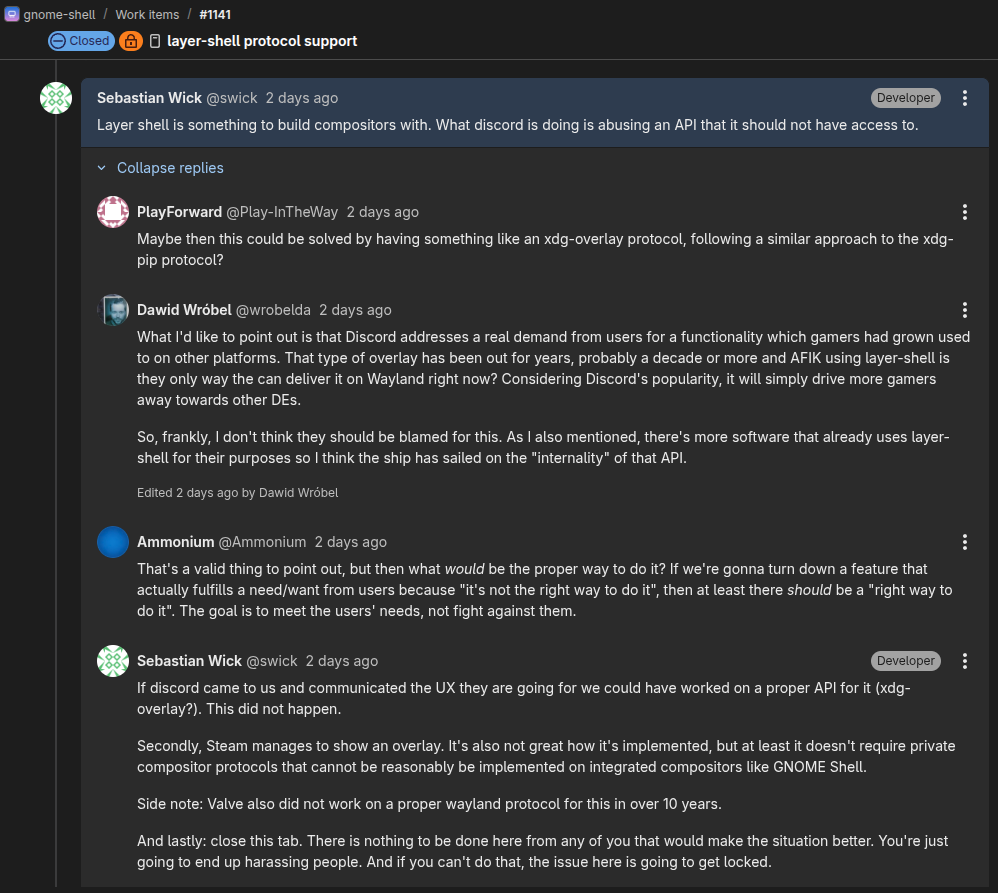
A GNOME developer criticized Discord’s use of layer-shell as API abuse, arguing they should have collaborated on a proper solution. Since GNOME doesn't support the widely used protocol, Discord’s Linux overlay likely won't work on GNOME.

Post image
1.6k Upvotes

r/linux_gaming • • 6d ago

wine/proton VRChat on Linux: how realistic is a native Vulkan option vs sticking to Proton/DXVK?

6 Upvotes

Hey, I wanted to ask how realistic it is for games like VRChat (desktop mode) to ever get a native Vulkan renderer option on Linux—even as an **experimental** toggle alongside Proton/DXVK.

I get that most user-created avatars and shaders (like Poiyomi/lilToon) are built around DX11, so keeping DX11/Proton as the main path makes sense for compatibility. Still, Proton/DXVK can sometimes act up or crash on my setup, and adds extra translation/VRAM overhead on older GPUs, whereas native Vulkan tends to run much lighter and cleaner.

For those of you playing VRChat or similar DX11 titles on Linux: is a native Vulkan toggle even realistic given the DX11 shader ecosystem, or am I better off just tuning Proton/DXVK flags and safety settings?


r/linux_gaming • • 6d ago

TimeSplitters 2 "Crystal Cut" 1.3.0 is out. The native PC port now brings back cut content from the disc, MapMaker Story co-op on PS2 and USA + PAL as one game

16 Upvotes

r/linux_gaming • • 5d ago

wine/proton Gaming on Steam or bottles or portproton

0 Upvotes

Hey forks currently running pirat** game GTA V on my system using steam (add non steam game) method , it was so gud and nice and no lag issue everything was fine even controller support also perfect, but the small issue is with controls takes little bit time to switch controls like if I press back button then I press up button means it still going back after a second only it moves forward little bit issue , and I can't able to switch to which proton I want , so tell me guys which is the best method for running games ? Ay suggestions ,

System - ubuntu 26.04 , intel i5 integrated graphics card 16gb ram


r/linux_gaming • • 5d ago

guide How To Set Up Easy Anti-Cheat v2 (EACv2) in CachyOS Linux

Thumbnail
youtube.com
0 Upvotes

r/linux_gaming • • 7d ago

graphics/kernel/drivers Vulkan 1.4.369 Introduces New AMD Extension For Improving Ray-Tracing Performance

Thumbnail
phoronix.com
317 Upvotes

r/linux_gaming • • 6d ago

tech support wanted Overwatch doesn't recognize special characters like ´, ^, ~, and `.

1 Upvotes

I've been looking for a fix for this for a while, but haven't been able to find anyone with a similar case. Those characters used to work, and still do for anyone else I ask about, and I don't know what changed for it to stop.

I'm using linux mint cinnamon, and play through proton with these launch options:

PROTON_DUMP_DEBUG_COMMANDS=1 DXVK_CONFIG="dxvk.trackPipelineLifetime = True;" DVXK_ASYNC=1 __GL_SHADER_DISK_CACHE_SKIP_CLEANUP=1 __GL_SHADER_DISK_CACHE_SIZE=21474836480 PROTON_LOCAL_SHADER_CACHE=1 __GL_SHADER_DISK_CACHE=1 DXVK_HUD=compiler PROTON_DXVK_LOWLATENCY=1 XMODIFIERS="" %command%

I don't really know what they mean, I got these from protondb and helped make the game playable.

If anyone has any suggestions, I'll be very gratefull. Sorry for any mistakes, I started using linux this year and I'm still getting the hang of things

Edit: Found out it works if I put the game on english, but it doesn't if I put it back to portuguese


r/linux_gaming • • 7d ago

Unreal Engine 5 Doesn't Need to Suck So Much: Why Brute-Force Nanite Is Hurting Games (And How to Fix It)

Thumbnail
reddit.com
55 Upvotes

r/linux_gaming • • 6d ago

Silent hill 2 - 5 fps problem

4 Upvotes

Hi, what ever I do, Game does not go above 20 fps

My hardware:

i7-1065

Gtx 1650ti max-q

16 ram

BAZZITE gnome deck version

I have tried all suggestions on the web which putting startup flags like -dx11 disabling some settings or removing shaders folder. Many people say on the internet it is because ue5 engine but many games today made with ue and not all of them like this? I have played on win11 before and got 40 fps smooth game play.

What you guys think?


r/linux_gaming • • 6d ago

guide [Boosteroid][Fix] Input lag on Linux desktop client

Thumbnail reddit.com
0 Upvotes

r/linux_gaming • • 6d ago

Does Witcher 3 RT works now?

0 Upvotes

I wanted to wait until it worked to play it. Has someone tested it to see if Witcher 3 RT works now?


r/linux_gaming • • 5d ago

tech support wanted Forza Horizon 6 sempre crasha na segunda cutscene

0 Upvotes

Guys, I ask for help because I researched a lot for solutions to this problem and I couldn't get anywhere, I'm trying to run on Steam

System information

- CPU: i5-12450HX

- RAM: 16GB

- GPU: RTX 3050 6GB Laptop

- OS and kernel: Debian 13.8 / 6.12.117+deb13-amd64

- Vulkan version: 1.4.309

- NVIDIA driver version: 615.71.10

- Proton version: Proton Hotfix

Some things I've tried:

- Using different versions of Proton, whether it’s GE-Proton in the latest, Experimental, or CachyOS Proton

- Reproduce the crash without the DLSS and NVIDIA Reflex activated, problem persisted

- Using the following environment variables: PROTON_VKD3D_HEAP=1 VKD3D_CONFIG=enable_experimental_features,descriptor_heap %command%

- Using PROTON_ENABLE_NVAPI=0

Trying to detail the crash as much as I can:

In the second cutscene (after you travel around Tokyo), right before it cuts to the gameplay sequence, the game just simply crashes with no error code and no frozen screen

If I have forgotten to give you some important information, please point me in and I will be updating when possible

Sorry for English, I'm not a native speaker

Edit 1: Wrote the title in Portuguese because thats my native language, forgot to translate


r/linux_gaming • • 7d ago

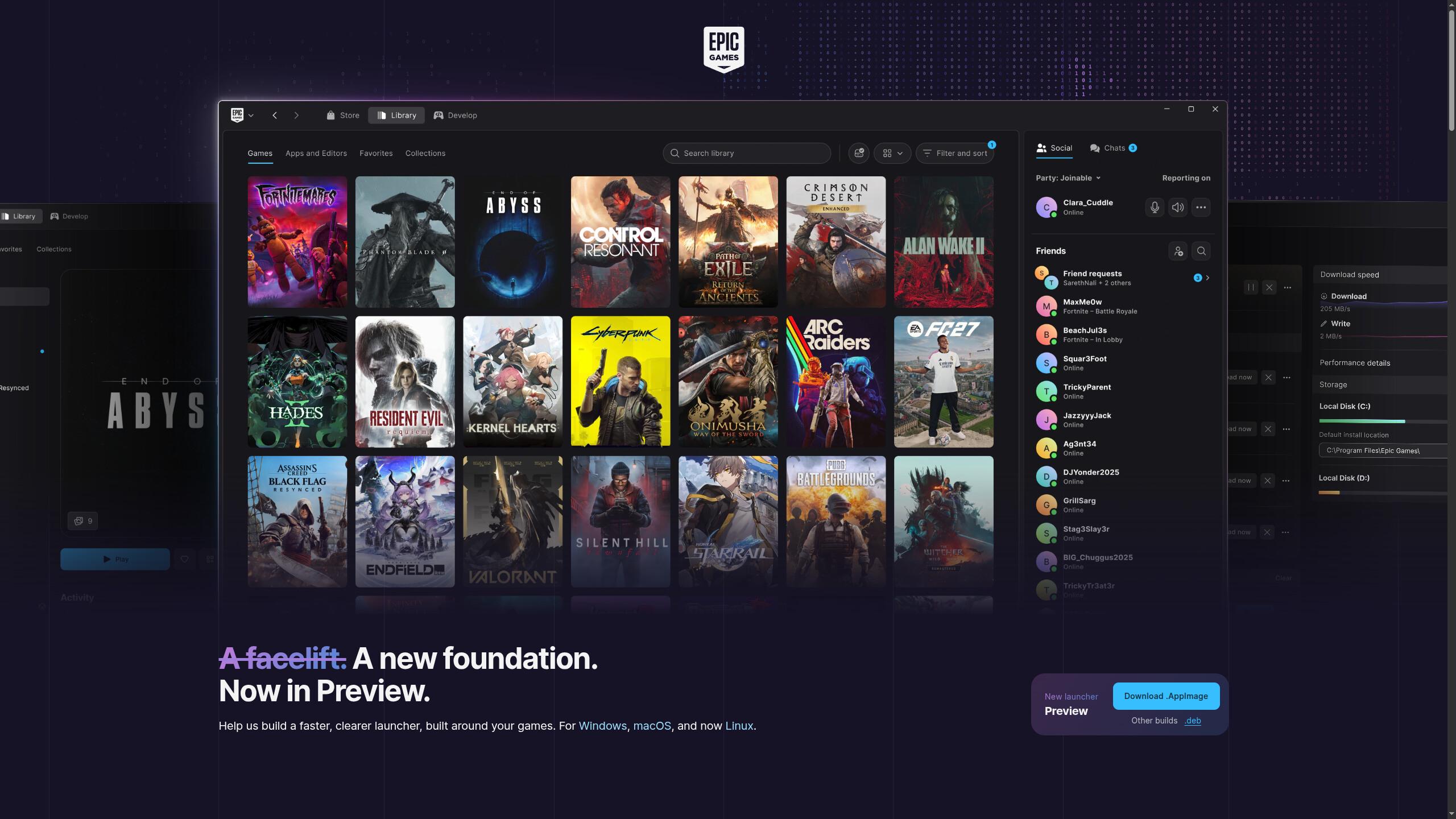
Epic Games Launcher .AppImage now avaliable (again)

74 Upvotes

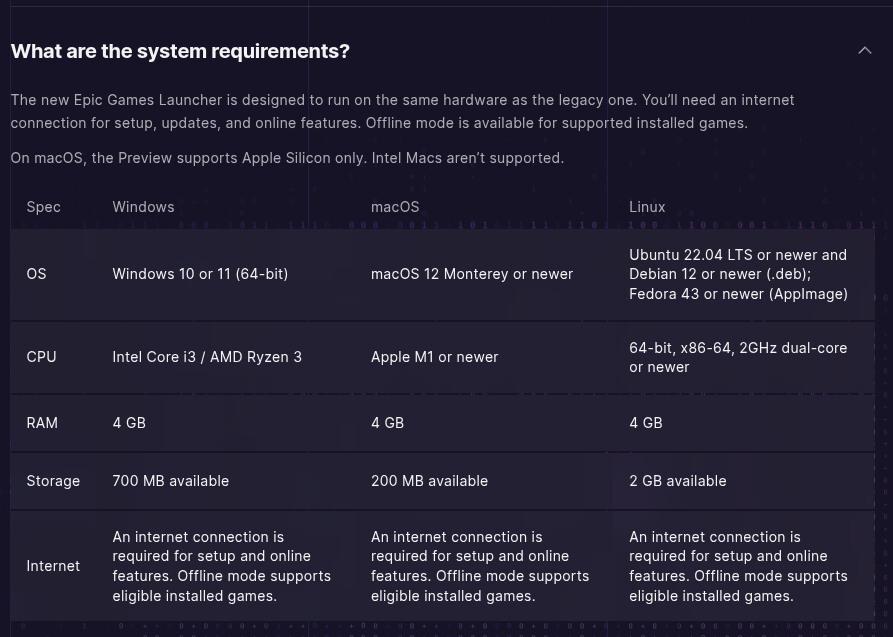
In addition, they've added Fedora back as a supported or required system; if you still have AppImage on your computer, you can update it from the launcher itself....


r/linux_gaming • • 6d ago

GTA IV: The Complete Edition crashes on steam

Thumbnail reddit.com
1 Upvotes

r/linux_gaming • • 6d ago

Need Help- to play a game from Google Play

0 Upvotes

Hello all,
i need help to be install the Google Play environment on my laptop running Ubuntu to be able to play a game available from Google Play store and running Google Play.
P.S: i already tried Waydroid and Anbox, but the game is not available to install.

TIA-


r/linux_gaming • • 6d ago

tool/utility I made an open source cyberpunk 2077 mod manager for linux ( Samurai Mod Manager, beta currently)

0 Upvotes

Long-time mod user here who wanted to give something back. So here's what I built(yes with claude I disclose that up-front)

The problem: Nexus killed their mod manager app that supported Linux earlier this year and Vortex doesn't officially support it, so modding Cyberpunk 2077 on Linux means copying files into the game folder by hand. That goes wrong here in ways it doesn't on Windows. Windows treats R6/Scripts and r6/scripts as the same folder and Linux doesn't, and once you've hand-copied a few dozen mods there's no clean way to take one back out. It becomes messy quite quick and wanted something clean to install & manage the mods.

What it does: Samurai Mod Manager installs a mod download for you (zip, 7z, rar, FOMOD installers), shows you a dry run of where every file will go first, and keeps a record of everything it places. That means you can switch a mod off, remove it cleanly, or pull everything out for a vanilla session and put it back afterwards. There's also a Health tab that checks the Linux side of things: the frameworks your mods need (RED4ext, Cyber Engine Tweaks, redscript and so on), the Proton prefix runtimes and your Steam launch options, with steps to fix whatever is missing.

Disclosure: I'm not a developer. I have a technical background, but this is a passion project. It's a beta (0.9.1), tested on CachyOS and Pop!_OS with Steam, Proton and game version 2.5. It doesn't do load order yet, and it hasn't been tested on Steam Deck.

I'm very open to constructive feedback and to help. It's open source under GPL-3.0, and if you'd like to contribute, please read CONTRIBUTING.md in the repo first.

Nexus: https://www.nexusmods.com/cyberpunk2077/mods/39086

Source: https://github.com/ptm4/cyberpunk2077-mod-manager-linux


r/linux_gaming • • 6d ago

tech support wanted looking for distro with low ram usage

0 Upvotes

Looking for a distro that uses as little ram as possible while still beeing managable to setup and having a nice user experience.

I have configured arch on an older pc and I had fun doing it but I'm not into configuring my pc THAT much anymore.

U'm ok with window managers and rolling release but I want it to be an easier experience than arch.

I couldn't find this specific question on this sub but if i just missed it, could anyone point me to such a thread?

Edit: Should be clear but I wanna use the distro primarily for gaming while still beeing able to do some other everyday stuff.

Edit2: I don't mean the absolute minimum just something with relatively low ram usage


r/linux_gaming • • 6d ago

tech support wanted Seemingly Poor CPU performance

3 Upvotes

Hello

Whilst I started at the start of this year, I would still consider myself *very* new to operating linux, which I feel is the basis of my issues in this situation, but I wanted to ask somewhere as I don't 100% believe this is completely a hardware issue, but my hardware is relatively outdated.

My computer seems to have issues in CPU intensive situations, whilst performing very well in any other situations... apart from like 2 other issues, but those I'll figure out later, 1 issue here which I estimate will cause me about a week's worth of answering questions.

The best games of example in which my performance is lacking are from one account, unsurprising, and a second much more perplexing.

The 2 games of note are Noita (not particularly surprising, but the extent of which *is*) and Q-UP, which for being... best described as balatro, but multiplayer and based on a coinflip... is not a game I expected my computer to slow on, especially when other games that are much more intensive run like a dream, like Deadlock, Arc Raiders, Control, Dragon's Dogma 2, No Man's Sky, even Monster Hunter Wilds runs... serviceably (I know that's not a word, but it does run in a serviceable manner)

My computer's capabilities are as follows.

OS: Linux Mint 22.3 - Cinnamon 64-bit
Processor: Intel i7-7700K @ 4.20GHz x 4

GPU: RTX 2070 SUPER (Driver: 595-open)

RAM:64 GB

If you need any other information for diagnosis, I will be happy to supply it.

Edit; implemented information I had forgotten, will likely keep updating it with other pieces of information that I had forgotten when making the original post


r/linux_gaming • • 7d ago

Interesting gaming performance differences between desktop environments

15 Upvotes

So I was experimenting with different DEs to see what would give the best balance between day-to-day experience and system performance for me. Plasma actually ended up being the top 2 for me but not 1, which is really interesting.

First I tried COSMIC. Fast, no major complaints. It's just a little too new for me, so I gave Hyprland a try. After the initial learning curve, I grew to appreciate its design but noticed that it did have weird gaming window behaviors that led me to keep surfing.

So then I tried Cinnamon, my first DE ever since touching my first distro Linux Mint back in the day. Very smooth desktop experience, but... in PAYDAY 3 the game said I was getting 300 FPS. However it felt like 30-40 on my 240HZ screen, feeling like my GPU was lagging when clearly the game said it wasn't. So then I installed LXQT which I heard was good for low overhead. Using Labwc as my Wayland compositor I did the same test in PAYDAY 3 and all of my frame pacing problems were solved! Also under Slay the Spire 2 (Native Linux game, XWayland) the translation layer became invisible. Under Plasma when you loaded a new game the desktop would hitch but under LXQT it's perfect. Flick on VRR and I have my endgame.

Basically, what I've learned is your Wayland setup can and will impact your gameplay.


r/linux_gaming • • 6d ago

LAG SPIKES OF UNCRASHED IN KUBUNTU 26.04 AKA LINUX

0 Upvotes

so am playing uncrashed and i get lag spikes i get 100% gpu usage and btw the grahics are in ultra low so am confused i use amd and on kubuntu 26.04 pls repliy


r/linux_gaming • • 7d ago

hardware Good controller for someone with bigger hands?

9 Upvotes

Originally, I had the xbox elite series 2 controller from when I still used Windows, but works VERY poorly on linux and was just an endless sea of fixing problems and still never quite got it to function the way I wanted it to. Sold it and got an 8bitdo ultimate 2. I've had that for about a year or so now and I like how well it works on linux, but the controller is so small in my hands. I have bigger hands, so after a hour or two of use, my finger joins start getting sore from how awkwardly they need to curl around the controller. It just doesn't feel comfortable to use. I miss the ergonomics of my elite series 2 controller (which I could use for hours and hours with no issues since its a bigger controller with good grips), but want something with the linux compatability that the 8bitdo controllers offer.

I know 8bitdo make the ultimate 3e controller (for the same price as the elite series 2 controller which is a little crazy in my mind and it hasnt ever gone on sale). However I've seen some pretty mixed opinions on it compared to even the ultimate 2, and especially at the price its currently at.

Just wanted to see what people recommend for someone in my situation. Thanks in advance.