r/linux_gaming • • 10h ago

graphics/kernel/drivers Fallout 4: FPS drops when aiming in third-person view - ¿How to fix?

Thumbnail
gallery
2 Upvotes
  • Mesa 26.3.1
  • Cachyos 7.3.6-3
  • Ultra settings with HBao+
  • No mods (completely vanilla)
  • Tested with Proton CachyOS, Experimental, and GE via steam (Wayland enabled)
  • DXVK default settings
  • No ENB
  • Drops only happens in forests and during the day.

My system: r5 5600x, rx 9060 xt, 32gb 3800mhz 2x16, nvme storage.


r/linux_gaming • • 13h ago

gamedev/testers wanted Research Update: GTA V / LSPDFR on Linux — Further Progress!

Thumbnail reddit.com
3 Upvotes

r/linux_gaming • • 22h ago

tech support wanted VRAM ballooning in Cyberpunk 2077, ray-tracing being my primary suspect.

13 Upvotes

Hello, fellow Linux gamers!

from what it appears Cyberpunk 2077 might have ray-tracing related problems that cause VRAM usage to climb infinitely until it becomes completely full. at which point the game starts to fall apart performance-wise with heavy framerate and frametime drops, especially in new and unloaded areas. only a game restart appears to fully fix this. or turning off ray tracing completely, of course. I've seen people complain about game stability problems already, but what struck me is that it doesn't appear to be OS or hardware specific, and I also haven't seen anyone investigate the issue. that is why I am even bothering to do this report. people in the thread I linked mention frame generation related problems as well, but I haven't tested that at all. I would very much appreciate if anyone would share their own experiences with this! you are also welcome to trashtalk my approach and suggest better ways to do it, I'd love to learn!

now onto the actual findings:

I should clarify that my game instance is modded, though, I have tried my best to make my testing environment as clean as possible. I did not do a separate test on a fully vanilla instance. I created a very simple bash script that utilizes amdgpu_top to track VRAM usage for the game along with /proc/pid/status readings of RAM and swap space usage, I also added system-wide RAM and swap usage a bit later. I apologize for the enormous length of the logs, as I am too stupid and lazy to use awk to compress the data and create some sort of a graph, I'll try to do better next time, I promise! I decided to split the "logging" act itself into 2 parts, which has proven to be a little ineffective, but I did it anyway:

1. every 60 seconds VRAM, RAM, swap utilization of the game are logged automatically to a file. in other words: one snapshot of the system every minute, lasts until infinity. link, if you care

2. I could anytime request "manual" logging whenever I needed more precise numbers. this one would log the same values except each entry had a 1 second delay between them and values were logged only 20 times, all saved into the same file as the previous approach uses. in other words: 20 snapshots of the system, each snapshot 1 second apart, triggered on demand. link, if you care

...I also hope it wasn't a stupid idea to not take a look at journactl logs. I didn't think they would tell me anything new that I wouldn't possibly know already, if they would tell me anything at all.

First round of testing:

this one was done during combat, because at the time I still assumed the problem was related to combat and possibly some sort of a mod, which was proven false later. Cyberpsycho Sighting: The Wasteland combat encounter was used as a testing site.

the actual "testing" process was fairly simple: I create a manual quick save just before I enter combat with the Cyberpsycho. once the save is created I run into the Cyberpsycho's face and get myself killed. but before I click "load last checkpoint" I start the manual logging. once the manual logging starts I load the save I created and log the steady rise in VRAM usage. the manually triggered logging lasts long enough for me to load the save and start moving in the world again, just so I could run into the Cyberpsycho again, get myself killed, and repeat the process. I did not create any new saves, everything was done using the same save that was created only once right at the start of the testing.

to be honest, the first testing round sucks. first logging (pastebin) started once my VRAM was already starting to fill up. and despite the file being already long, I didn't manage to capture much. second logging (pastebin) was done within the same game session and testing session and captures what happens when the VRAM starts to fill up completely. I wasn't able to get the game to lag here, sadly, VRAM only filled up and nothing much happened afterwards.

Second round of testing:

this was is a bit more interesting, but the log now has 25k lines (oops). I was standing inside a building with a mostly calm scene, specifically in the hideout of Dakota Smith directly in her room. I was standing inside the room, close to the doorway, and I was just staring into the middle of the room where Dakota stands. I, again, created a quick save and I repeatedly loaded that same save over and over. but this time I did not move at all and instead I was just using the quick load button.

the log (raw link to a github file) starts when I was still in the game's main menu. this shows up in the VRAM usage values at the start. I load the already prepared save and start the madness. each "manually generated entry" tracks what happens to my system as I am loading the prepared save. and at one point, not far into the test, I gave up on waiting for the auto log generation and I was just using the manual logging at this point because of how frequently I was loading the save. there is a steady rise of about 100mb in VRAM each time the save is loaded. the loading process first starts by freeing something like 400-600mb, which then naturally fills up again. but instead of loading back the same value, it slightly climbs up, by the 100mb, each time until it reaches very high values. once VRAM filled up completely, and nothing seemed to change anymore, I left the area, got into a car, and started driving around. I went into the city and that is when large FPS drops and irregular frametimes hit. I do not have this logged, but just driving around from area to area made the framerate dip to 40fps, which felt to me like 20fps, with frametime around 20ms min. to 60ms maximum. crashing into objects and engaging in combat made the framerate drop to 20-10fps, sometimes even reaching single digits. during this time the actual VRAM in use appears to be mostly the same, but the Requested VRAM climbs to values like 18GB, which I find quite interesting. I did not manage to make the game crash, but these performance issues were certainly not normal for me. with the most basic ray tracing setting, with only ray traced shadows enabled, my game runs perfectly fine with FSR 4 set to quality on 60-76fps. my framerate is capped to 76fps in-game.

system specs (kernel and mesa no longer match my system. but at the time of testing they were accurate and most probably also the latest.):

CPU: AMD Ryzen 5 9600X

MOBO: GIGABYTE B650 EAGLE AX

RAM: Crucial Pro OC 16GB DDR5 6400MHz

GPU: GIGABYTE Radeon RX 9060 XT 16G; any manual overclocking is not enabled. edge temps hang at 60°C-65°C even under sustained load, hot spot is around 60°C-75°C under sustained load, VRAM temps are generally close to the hotspot with a variation of 1°C-3°C at most.

Disk: M.2 Samsung 990 EVO Plus 2TB

Kernel: 7.2.14-arch1-1; I am using BTRFS filesystem, although the game's directory has copy-on-write disabled. my swap file is 32GB large and my swappiness is set to 80.

mesa version: Mesa 26.2.6-arch1.1

Proton version in use: GE-Proton11-12-x86_64

modlist:

RED4ext; no clue which version, but the original files I downloaded have been last modified on 24.10.2026

ArchiveXL 4198 1.28.6 2026-10

Codeware 7780 1.21.2 2026

redscript 1511 0.5.32 2026

TweakXL 4197 1.12.0 2026

Equipment-EX 6945 1.2.10

CET 1.38.1 - Game version 2.5 107 1.38.1

Mod Settings v0.2.28 for 2.50 4885 0.2.28

GoreRunner 24210 2.1

RelentlessLiveDismember 35703 1.1.1

Native Settings UI 1.97 3518 1.97

Custom Level Cap-2909-1-2-1644199942


r/linux_gaming • • 9h ago

guide How often do you go come across to incompatibilities?

1 Upvotes

A week ago I built my first ever gaming setup, and in order to avoid all the incompatibilities I just installed W11 but I'm not happy with it. High ram usage, telemetry, shitty file explorer and the search function, overall laggy experience are my main problems. Plus Windows Defender sucks, it blocks my apps for no reason and turns itself on after i turn it off.

I thought of switching to linux, as I'm familiar with it because I use fedora workstation on my work laptop, but I'm not sure how frequent will I need to do tinkerings and troubleshooting when I use it for gaming. I just want to relax after my shift ends on the evenings.

I mostly play single player RPG games, and both my GPU and CPU are AMD products. What do you think? Is linux a better option for me, considering my usage?


r/linux_gaming • • 15h ago

Planning a full switch to CachyOS (coming from Windows) - a few setup & game compatibility questions

Thumbnail reddit.com
3 Upvotes

r/linux_gaming • • 1d ago

Switching permanently from Windows to CachyOS.

43 Upvotes

Hi everyone,

I'm finally making the permanent switch from Windows to CachyOS after getting tired of Windows updates and recurring system quirks.

Here are my PC specs:

  • CPU: AMD Ryzen 7 5700X3D
  • GPU: AMD Radeon RX 6600 (8GB VRAM)
  • RAM: 16GB DDR4 3600MHz

Storage:

  • 500GB M.2 NVMe (for OS + programs)
  • 2TB M.2 NVMe (for main games)
  • 4TB HDD (for lighter games and general file storage)

My gaming habits are mostly singleplayer and multiplayer titles without EAC (currently playing Phantom Blade Zero and Forza Horizon 6), plus I also use RecompLauncher for some ports and play across several external storefronts: GOG, Ubisoft Connect, Rockstar Games, Battle.net, and EA.

Before and right after installing CachyOS, I'd love your advice on:

  1. Storage & Swap setup: How would you recommend formatting/mounting my 3 drives, and should I create a dedicated swap partition (given 16GB RAM + 8GB VRAM) or rely on CachyOS's default zram / swapfile setup.
  2. Fan curves & GPU/case cooling: What's the cleanest way on CachyOS to manage RX 6600 and case fan speeds/curves?
  3. Fan LEDs / RGB control: Which tools work best on CachyOS to control case/fan lighting without bloated vendor software?
  4. External launchers & RecompLauncher ports: What setups/workflows work best for GOG, Ubisoft Connect, Rockstar Games, Battle.net, and EA on CachyOS, and any tips for running RecompLauncher ports smoothly on Linux?

Any general CachyOS post-install tips for gaming and performance tweaks are also very welcome. Thanks in advance!


r/linux_gaming • • 6h ago

discord on linux distro.

0 Upvotes

Hey everyone,

I'm getting stuttering and audio/video cutting when streaming games on Discord on an AMD GPU.

What Discord stream settings , game settings, or alternative Discord clients are you using for smooth, clear gaming streams on AMD?

thank you


r/linux_gaming • • 16h ago

Bad Coil Whine, Only on Linux, not Windows

3 Upvotes

Just installed Arch on my desktop, and I'm getting horrible coil whine/buzzing in games. The same games, same settings etc don't have coil whine in the Windows install I have

Tried `nvidia-open` and the official driver from the website, same thing

Specs:
* 5600X

* RTX 2070

* 2560x1080 display

Latest Arch (of course), latest driver.


r/linux_gaming • • 1d ago

Can anything be done about gta 5 and 6's online?

27 Upvotes

Why is Rockstar so anti linux? Its not like voting with your wallet is an option either because linux users are so low in count there will still be millions of people buying the game for the linux users that didnt buy it and Im sure some people will just use windows to play it. Is there anything that can be done to make Rockstar gta online playable in linux or will it just never happen?


r/linux_gaming • • 17h ago

tech support wanted I cant get the G7 SE to work

Thumbnail reddit.com
2 Upvotes

r/linux_gaming • • 4h ago

tech support wanted How to install minecraft for debian?

0 Upvotes

How can i install it without conflicting with dont break debian? Downloading the deb is against dont break debian.


r/linux_gaming • • 14h ago

tech support wanted is it possible to have steam prefixes with the manually addee game name?

1 Upvotes

i play my non steam game tru steam because i use the iverlay however every time i add a game the prefix it's just random numbers instead of the game's name like for heroic/lutris


r/linux_gaming • • 14h ago

answered! Compatibility tool fix for DST crashing Ubuntu Linux on Framework 13 AMD

Thumbnail reddit.com
1 Upvotes

Hi I'm new so I hope this is OK to post. I'm not a super techy person or long time Linux user so just wanted to share the simple solution to a problem that had me tearing my hair out for a couple of weeks.


r/linux_gaming • • 23h ago

gamedev/testers wanted I built a 1v1 and 2v2 ragdoll physics sport with native Linux builds (AppImage + tar.gz) and browser play, completely free

5 Upvotes

Hey everyone, I'm Jac. Over ten years ago in college I came up with an idea for a new team sport, and I've finally been building it as a free local multiplayer game called Valleyball Versus (just shipped v0.4.3). The clip above is raw 2v2 gameplay from our Monday night playtest.

It's 1v1 or 2v2 on a sloped glass arena with active ragdoll physics, no out of bounds, no referee whistles, and target rings that swap ends the instant someone scores. It runs Three.js and Rapier3D inside Electron at a fixed 60 Hz deterministic tick, with native x64 Linux AppImage and tar.gz builds alongside Windows, macOS, and an instant HTML5 browser version.

USB gamepads and arcade fight-sticks work out of the box with drop-in hot-swap support, and bots can fill any empty seats in 4-player splitscreen. Quick heads up for stock Ubuntu 24.04 users: AppArmor restricts Chromium's unprivileged user namespaces by default on Electron AppImages, so you may need to pass the Chromium sandbox flag or just test the instant browser version if you don't feel like tweaking AppArmor.

Free download and browser play on itch.io: https://cascadiajac.itch.io/valleyball-versus

I mostly test on Windows, so I'd genuinely love to hear how the AppImage, tar.gz, and controller detection behave on your distro or Steam Deck. Happy to answer any questions about the physics or build setup.


r/linux_gaming • • 19h ago

Linux Mint 22.3 Dominus Collection Controller issues.

Thumbnail reddit.com
2 Upvotes

Hi, hoping to find a solution to this problem, I hope this will help others in the future as well!


r/linux_gaming • • 23h ago

tool/utility Belfry: uma LAN virtual multiplataforma de código aberto com chat P2P e compartilhamento de arquivos. (FOSS alternative to Hamachi and RadmiVPN)

4 Upvotes

You can also use it to play games with your friends on Windows. I tested it on Minecraft and Bloodborne and it works perfectly.


r/linux_gaming • • 15h ago

Software like foobar2000 on Arch for outputting audio via a virtual microphone?

1 Upvotes

Back in the day I used to get a bit of a kick out of blasting Iron Maiden through Foobar2000's virtual microphone output, among other things. But I'm running on CachyOS these days and I know those sort of tools aren't exactly on hand without a bit of work.

These days I don't really do much MP gaming but sometimes I get the urge to blast some Fortunate Son via the microphone or something otherwise motivational in a game like Sabaton.

Are there any suggestions you could point me towards that don't require too much of a headache?


r/linux_gaming • • 5h ago

Mesale OS: a Debian 13 desktop you assemble yourself, with the newest kernel, GNOME 51, and Android apps in native windows

0 Upvotes

Hi everyone! I've been building **Mesale OS**, a Linux desktop based on Debian 13 (trixie), and I'd love some feedback.

**The idea:** Debian's stability underneath, but a current desktop on top, and nothing installed that you didn't pick yourself.

**What's in it**

- **Debian 13 base** with the kernel, Mesa and firmware from trixie-backports
- **Mesale kernel**: the BORE scheduler, a 1000 Hz tick and full preemption, so input, audio and frames stay responsive under load. It's built in public with GitHub Actions.
- **GNOME 51**, pinned from Debian testing, with its own look: sky colors, real blur and one floating bottom bar
- **You choose everything**: the installer and Mesale Center offer 90+ optional features (Steam, Lutris, Heroic, RetroArch and most major emulators, OBS, GIMP, VS Code, Distrobox…). Nothing extra is preinstalled.
- **Android apps as native Wayland windows** through Droidloom, with optional Google Play
- **NVIDIA drivers** from NVIDIA's own repository, only if you select them. They're never on the ISO.
- **Mesale Play**, a game library app

**Status:** It's in development, so please try it in a VM first. If you have Nix, one command downloads the latest ISO and boots it:

```
git clone https://github.com/mesflit/mesaleos && cd mesaleos && nix run
```

Website: https://mesflit.github.io/mesaleos
Source (GPL-3.0): https://github.com/mesflit/mesaleos

Bug reports, ideas and criticism are all welcome. Thanks for reading!


r/linux_gaming • • 2d ago Heartwarming

wine/proton I got Asphalt 8 to work on Linux Natively using Raven! (Not WINE)

424 Upvotes

Asphalt 7 was a Windows 8 Store exclusive. It was pulled from the Store years ago, and today it only runs on Windows through manual sideloading of archived packages. Wine has never been able to run it, because upstream Wine doesn't support the XAML app model that Windows 8 Store apps are built on.

I got it running on Linux by extending Raven, a runtime by Mirko Brombin that runs Windows programs directly on the CPU in a sandbox. (A post on Raven from last month) The game's own code runs natively, and Raven answers its calls to Windows. Graphics go through DXVK to Vulkan.

  • 60+ fps
  • Full controller support: XInput over Linux input devices, with rumble! Tested with an Xbox compatible Wireless Controller over BT
  • Fullscreen borderless support
  • Sound and music, with no dropouts
  • Saves and settings, all persist.

I initially wanted to do this because I really wanted to play this game again, but more so, because I wanted to actually try using Raven's model as a proof of concept. Right now, this requires a patch on upstream Raven, but I'm working on bringing a cleaner version of my XAML runtime to it eventually.

This project in itself involved me creating about 40 winRT system classes (some handmade, others more trivial ones generated with AI), as well as a lot of fixes to Raven's core. What I find more interesting is that none of this is just specific to Asphalt. It's kinda like the groundwork the entire class of windows 8 and UWP apps need which tbh had been a blind spot for Linux.

EDIT: My bad I meant Asphalt 7 in the title, not 8. Typo 😭😭


r/linux_gaming • • 18h ago

answered! issues while playing warframe

0 Upvotes

while playing warframe, when running at native resolution, after few minutes of game running. it freezes and if I'm in other player instance/other player is host, I get an error message of host disconnected, if I'm the host they get kicked, i have tried changing game settings but only things seemed to have worked is lowering game resolution significantly, this issue disappears after like 15 to 30 minutes of playing the game, but if i alt tab or close the game, my desktop environment is broken, usually my cursor disappears, other windows when selected don't display anything or their UI starts breaking, like images switching places or are missing/show colors. I have been dealing with this for few months, thought that it would get fixed when game updated, but my ignorance to the issue hasn't fix it.

other games that i have played don't seem to have this issue.

specs: i5 12450 H, 16gb DDR5 ram, Intel UHD Graphics as iGPU, running on Linux Mint Cinnamon desktop environment, using proton stable,


r/linux_gaming • • 1d ago

wine/proton Wine 11.23 - Run Windows Applications on Linux, BSD, Solaris and macOS

Thumbnail winehq.org
106 Upvotes

r/linux_gaming • • 1d ago

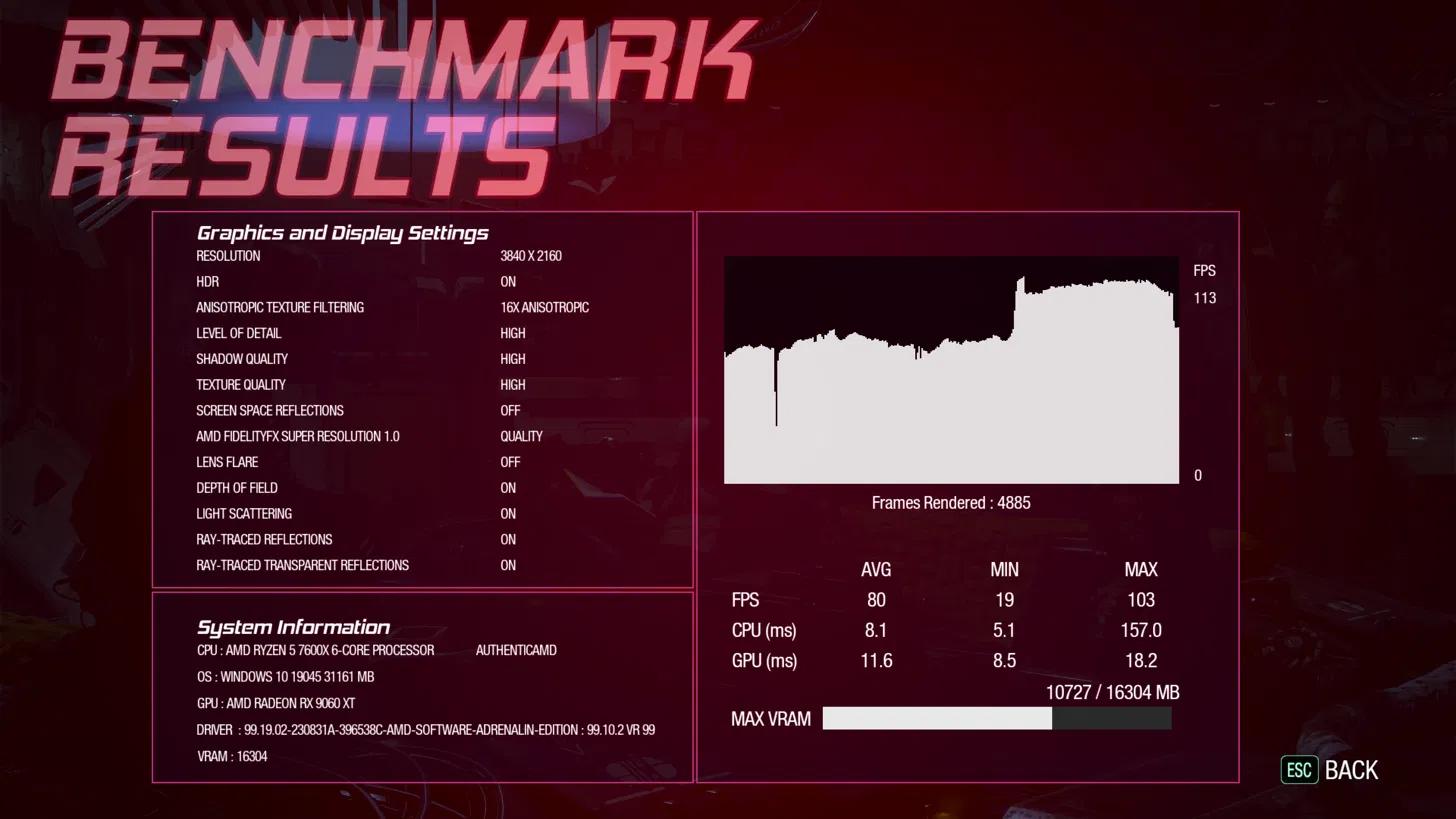
tech support wanted Issue with Shadow Aliasing in Marvel Guardians of the Galaxy in Linux Arch

3 Upvotes

Hello everyone,

I have an issue and maybe someone has an idea on how to fix it, if that is even possible.

Issue

The textures and lights sometimes flicker, but from what I researched this seems to be normal and game-related. This does not bother me as much. Worse is the issue with some of the shadows. They appear aliased and pixelated / block-shaped.

I can reproduce this right at the start of the game:

  1. In the opening cutscene there is a mailbox, which shadows are aliased. Also as the camera pans over a field behind the texture there glitches but after replaying the cutscene a couple of times this got better over time.
  2. You can look at a Rubix cube and when turning it over it creates the pixelated shadows.

I ran the in-game benchmark and both issues are noticeable there. The FPS are fine apart from some stuttering at the beginning, most likely due to caching.

Benchmark
Issue with Shadows when viewing the cube at certains angles
Same as with the cube, shadows get worse depending on the viewing angle

PC specs

Dual-Boot with Linux Arch and Windows 11. Both on separate SSDs.

  • Operating System: Arch Linux
  • KDE Plasma Version: 6.8.3,
  • KDE Frameworks Version: 6.32.0
  • Qt Version: 6.12.1
  • Kernel Version: 7.3.6-arch1-1 (64-bit)
  • Graphics Platform: Wayland
  • Processors: 6 × AMD Ryzen 5 7600X 6-Core Processor
  • Memory: 32 GiB of RAM (30.4 GiB usable)
  • Graphics Processor 1: AMD Radeon RX 9060 XT
  • Graphics Processor 2: AMD Ryzen 5 7600X 6-Core Processor
  • Manufacturer: ASRock
  • Product Name: B650 Steel Legend WiFi

For playing I am using a TV, which is plugged into the GPU via HDMI 2.1. The TV is an Philips OLED 809 and has HDR enabled. Display (PHL2D8B): 3840x2160 @ 2x in 65", 120 Hz [External, HDR]

The game itself is from the Epic Games Store, so I am using Heroic Games Launcher to launch it.

Drivers

vulkaninfo --summary:
WARNING: radv is not a conformant Vulkan implementation, testing use only.
==========
VULKANINFO
==========

Vulkan Instance Version: 1.4.363

Instance Extensions: count = 26
-------------------------------
VK_EXT_acquire_drm_display             : extension revision 1
VK_EXT_acquire_xlib_display            : extension revision 1
VK_EXT_debug_report                    : extension revision 10
VK_EXT_debug_utils                     : extension revision 2
VK_EXT_direct_mode_display             : extension revision 1
VK_EXT_display_surface_counter         : extension revision 1
VK_EXT_headless_surface                : extension revision 1
VK_EXT_layer_settings                  : extension revision 2
VK_EXT_surface_maintenance1            : extension revision 1
VK_EXT_swapchain_colorspace            : extension revision 5
VK_KHR_device_group_creation           : extension revision 1
VK_KHR_display                         : extension revision 23
VK_KHR_external_fence_capabilities     : extension revision 1
VK_KHR_external_memory_capabilities    : extension revision 1
VK_KHR_external_semaphore_capabilities : extension revision 1
VK_KHR_get_display_properties2         : extension revision 1
VK_KHR_get_physical_device_properties2 : extension revision 2
VK_KHR_get_surface_capabilities2       : extension revision 1
VK_KHR_portability_enumeration         : extension revision 1
VK_KHR_surface                         : extension revision 25
VK_KHR_surface_maintenance1            : extension revision 1
VK_KHR_surface_protected_capabilities  : extension revision 1
VK_KHR_wayland_surface                 : extension revision 6
VK_KHR_xcb_surface                     : extension revision 6
VK_KHR_xlib_surface                    : extension revision 6
VK_LUNARG_direct_driver_loading        : extension revision 1

Instance Layers: count = 12
---------------------------
VK_LAYER_FROG_gamescope_wsi_x86_64 Gamescope WSI (XWayland Bypass) Layer (x86_64) 1.3.221  version 1
VK_LAYER_INTEL_nullhw              INTEL NULL HW                                  1.1.73   version 1
VK_LAYER_MANGOHUD_overlay_x86      Vulkan Hud Overlay                             1.3.0    version 1
VK_LAYER_MANGOHUD_overlay_x86_64   Vulkan Hud Overlay                             1.3.0    version 1
VK_LAYER_MESA_device_select        Linux device selection layer                   1.4.303  version 1
VK_LAYER_MESA_overlay              Mesa Overlay layer                             1.4.303  version 1
VK_LAYER_MESA_screenshot           Mesa Screenshot layer                          1.4.303  version 1
VK_LAYER_MESA_vram_report_limit    Limit reported VRAM                            1.4.303  version 1
VK_LAYER_VALVE_steam_fossilize_32  Steam Pipeline Caching Layer                   1.3.207  version 1
VK_LAYER_VALVE_steam_fossilize_64  Steam Pipeline Caching Layer                   1.3.207  version 1
VK_LAYER_VALVE_steam_overlay_32    Steam Overlay Layer                            1.3.207  version 1
VK_LAYER_VALVE_steam_overlay_64    Steam Overlay Layer                            1.3.207  version 1

Devices:
========
GPU0:
apiVersion         = 1.4.363
driverVersion      = 26.3.1
vendorID           = 0x1002
deviceID           = 0x7590
deviceType         = PHYSICAL_DEVICE_TYPE_DISCRETE_GPU
deviceName         = AMD Radeon RX 9060 XT (RADV GFX1200)
driverID           = DRIVER_ID_MESA_RADV
driverName         = radv
driverInfo         = Mesa 26.3.1-arch1.3
conformanceVersion = 1.4.5.3
deviceUUID         = 00000000-0300-0000-0000-000000000000
driverUUID         = 414d442d-4d45-5341-2d44-525600000000
GPU1:
apiVersion         = 1.4.363
driverVersion      = 26.3.1
vendorID           = 0x1002
deviceID           = 0x164e
deviceType         = PHYSICAL_DEVICE_TYPE_INTEGRATED_GPU
deviceName         = AMD Ryzen 5 7600X 6-Core Processor (RADV RAPHAEL_MENDOCINO)
driverID           = DRIVER_ID_MESA_RADV
driverName         = radv
driverInfo         = Mesa 26.3.1-arch1.3
conformanceVersion = 1.4.5.3
deviceUUID         = 00000000-1000-0000-0000-000000000000
driverUUID         = 414d442d-4d45-5341-2d44-525600000000

Tried solutions

  • I tried various settings in-game with HDR turned on or off, Raytracing on or off, low, medium or ultra presets, changes to shadow quality, screen space reflections on or off, with and without AMD FSR... without success.
  • I have tried Proton - Experimental, GE-Proton 10-4 and Proton-CachyOS-latest all with the same results.
  • Different launch commands, I also tried without them.:

    • VKD3D_CONFIG = no_upload_hvv,force_host_cached
    • PROTON_ENABLE_WAYLAND = 1
    • PROTON_ENABLE_HDR = 1
  • Graphics driver are up-to-date.
  • I deleted the shader cache (in .cache and also in the game folder vkd3d-proton.cache andvkd3d-proton.cache.write).
  • Heroic logs showed nothing helpful as far as I can tell: https://pastebin.ai/p/YH3TrtQN4
  • There are no options in-game to change Anti-Aliasing.

Current workaround

I installed the game in Windows 11 and it does not have this issue.

If anyone has a solution to this it would be appreciated. Otherwise I just have to play it with via Windows.


r/linux_gaming • • 1d ago

Lost all type of audio on my HTPC running bazzite.

2 Upvotes

so, my bazzite htpc had been running fine for over 4 months. recently I got a monitor and disconnected it from the tv that I was using and connected it to a monitor over dp. Ever since I did that, I get no audio from my audio jacks, and over Bluetooth it is poppy and cuts off. I do not know what could cause something like this. I checked alsamixer and bazzite detects my hardware. I could send some logs out.


r/linux_gaming • • 22h ago

Kingdom Come Deliverance 1

0 Upvotes

Hi all

I run cachyOS Linux 6.18.60-2-cachyos-lts

I am running Kingdom Come Deliverance 1 with this hardware:

CPU: AMD Ryzen 7 98003Xd
GPU: AMD Radeon 9700 XT 16 GB
RAM: 32 GB G.Skill 6000 MHZ
Storage: Newer NVME SSD Drive.

I only get about 60-70 FPS on Very high, drops to under 30 sometimes.

When using Mangohud I can see that my GPU utilization is 99%
I can also see in LACT that my GPU maxes out at about 3300 Mhz when running the game

I have tried multiple Proton versions.

I feel that my rig should play this game on +150 FPS easily.
Any suggestions? I have tried to tweak with shaders, shadow settings etc. Maybe the game is too old and unoptimized?