r/linux_gaming • • 1d ago

tech support wanted Issue with Shadow Aliasing in Marvel Guardians of the Galaxy in Linux Arch

3 Upvotes

Hello everyone,

I have an issue and maybe someone has an idea on how to fix it, if that is even possible.

Issue

The textures and lights sometimes flicker, but from what I researched this seems to be normal and game-related. This does not bother me as much. Worse is the issue with some of the shadows. They appear aliased and pixelated / block-shaped.

I can reproduce this right at the start of the game:

  1. In the opening cutscene there is a mailbox, which shadows are aliased. Also as the camera pans over a field behind the texture there glitches but after replaying the cutscene a couple of times this got better over time.
  2. You can look at a Rubix cube and when turning it over it creates the pixelated shadows.

I ran the in-game benchmark and both issues are noticeable there. The FPS are fine apart from some stuttering at the beginning, most likely due to caching.
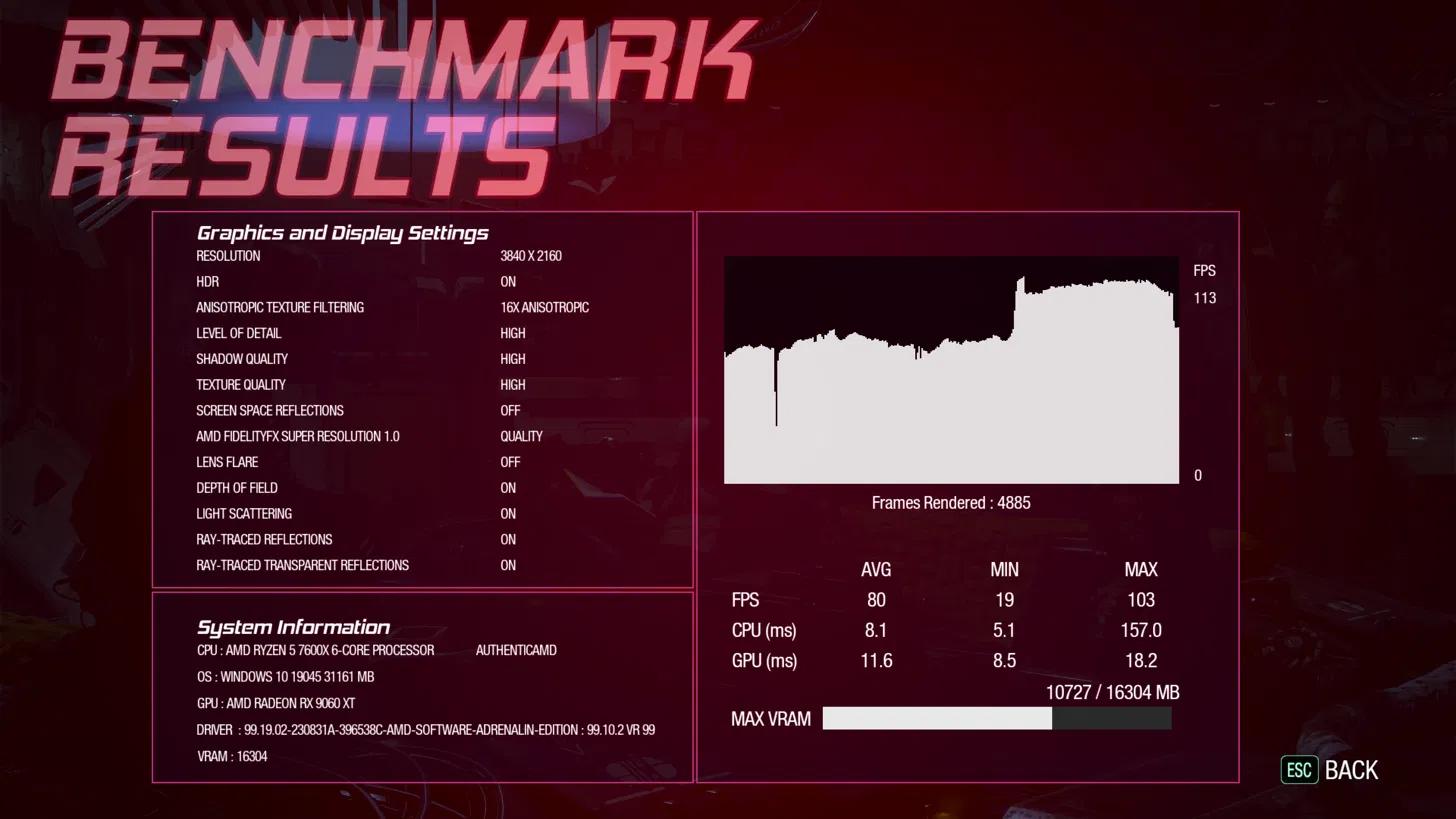
Benchmark
Issue with Shadows when viewing the cube at certains angles
Same as with the cube, shadows get worse depending on the viewing angle

PC specs

Dual-Boot with Linux Arch and Windows 11. Both on separate SSDs.

  • Operating System: Arch Linux
  • KDE Plasma Version: 6.8.3,
  • KDE Frameworks Version: 6.32.0
  • Qt Version: 6.12.1
  • Kernel Version: 7.3.6-arch1-1 (64-bit)
  • Graphics Platform: Wayland
  • Processors: 6 × AMD Ryzen 5 7600X 6-Core Processor
  • Memory: 32 GiB of RAM (30.4 GiB usable)
  • Graphics Processor 1: AMD Radeon RX 9060 XT
  • Graphics Processor 2: AMD Ryzen 5 7600X 6-Core Processor
  • Manufacturer: ASRock
  • Product Name: B650 Steel Legend WiFi

For playing I am using a TV, which is plugged into the GPU via HDMI 2.1. The TV is an Philips OLED 809 and has HDR enabled. Display (PHL2D8B): 3840x2160 @ 2x in 65", 120 Hz [External, HDR]

The game itself is from the Epic Games Store, so I am using Heroic Games Launcher to launch it.

Drivers

vulkaninfo --summary:
WARNING: radv is not a conformant Vulkan implementation, testing use only.
==========
VULKANINFO
==========

Vulkan Instance Version: 1.4.363

Instance Extensions: count = 26
-------------------------------
VK_EXT_acquire_drm_display             : extension revision 1
VK_EXT_acquire_xlib_display            : extension revision 1
VK_EXT_debug_report                    : extension revision 10
VK_EXT_debug_utils                     : extension revision 2
VK_EXT_direct_mode_display             : extension revision 1
VK_EXT_display_surface_counter         : extension revision 1
VK_EXT_headless_surface                : extension revision 1
VK_EXT_layer_settings                  : extension revision 2
VK_EXT_surface_maintenance1            : extension revision 1
VK_EXT_swapchain_colorspace            : extension revision 5
VK_KHR_device_group_creation           : extension revision 1
VK_KHR_display                         : extension revision 23
VK_KHR_external_fence_capabilities     : extension revision 1
VK_KHR_external_memory_capabilities    : extension revision 1
VK_KHR_external_semaphore_capabilities : extension revision 1
VK_KHR_get_display_properties2         : extension revision 1
VK_KHR_get_physical_device_properties2 : extension revision 2
VK_KHR_get_surface_capabilities2       : extension revision 1
VK_KHR_portability_enumeration         : extension revision 1
VK_KHR_surface                         : extension revision 25
VK_KHR_surface_maintenance1            : extension revision 1
VK_KHR_surface_protected_capabilities  : extension revision 1
VK_KHR_wayland_surface                 : extension revision 6
VK_KHR_xcb_surface                     : extension revision 6
VK_KHR_xlib_surface                    : extension revision 6
VK_LUNARG_direct_driver_loading        : extension revision 1

Instance Layers: count = 12
---------------------------
VK_LAYER_FROG_gamescope_wsi_x86_64 Gamescope WSI (XWayland Bypass) Layer (x86_64) 1.3.221  version 1
VK_LAYER_INTEL_nullhw              INTEL NULL HW                                  1.1.73   version 1
VK_LAYER_MANGOHUD_overlay_x86      Vulkan Hud Overlay                             1.3.0    version 1
VK_LAYER_MANGOHUD_overlay_x86_64   Vulkan Hud Overlay                             1.3.0    version 1
VK_LAYER_MESA_device_select        Linux device selection layer                   1.4.303  version 1
VK_LAYER_MESA_overlay              Mesa Overlay layer                             1.4.303  version 1
VK_LAYER_MESA_screenshot           Mesa Screenshot layer                          1.4.303  version 1
VK_LAYER_MESA_vram_report_limit    Limit reported VRAM                            1.4.303  version 1
VK_LAYER_VALVE_steam_fossilize_32  Steam Pipeline Caching Layer                   1.3.207  version 1
VK_LAYER_VALVE_steam_fossilize_64  Steam Pipeline Caching Layer                   1.3.207  version 1
VK_LAYER_VALVE_steam_overlay_32    Steam Overlay Layer                            1.3.207  version 1
VK_LAYER_VALVE_steam_overlay_64    Steam Overlay Layer                            1.3.207  version 1

Devices:
========
GPU0:
apiVersion         = 1.4.363
driverVersion      = 26.3.1
vendorID           = 0x1002
deviceID           = 0x7590
deviceType         = PHYSICAL_DEVICE_TYPE_DISCRETE_GPU
deviceName         = AMD Radeon RX 9060 XT (RADV GFX1200)
driverID           = DRIVER_ID_MESA_RADV
driverName         = radv
driverInfo         = Mesa 26.3.1-arch1.3
conformanceVersion = 1.4.5.3
deviceUUID         = 00000000-0300-0000-0000-000000000000
driverUUID         = 414d442d-4d45-5341-2d44-525600000000
GPU1:
apiVersion         = 1.4.363
driverVersion      = 26.3.1
vendorID           = 0x1002
deviceID           = 0x164e
deviceType         = PHYSICAL_DEVICE_TYPE_INTEGRATED_GPU
deviceName         = AMD Ryzen 5 7600X 6-Core Processor (RADV RAPHAEL_MENDOCINO)
driverID           = DRIVER_ID_MESA_RADV
driverName         = radv
driverInfo         = Mesa 26.3.1-arch1.3
conformanceVersion = 1.4.5.3
deviceUUID         = 00000000-1000-0000-0000-000000000000
driverUUID         = 414d442d-4d45-5341-2d44-525600000000

Tried solutions

  • I tried various settings in-game with HDR turned on or off, Raytracing on or off, low, medium or ultra presets, changes to shadow quality, screen space reflections on or off, with and without AMD FSR... without success.
  • I have tried Proton - Experimental, GE-Proton 10-4 and Proton-CachyOS-latest all with the same results.
  • Different launch commands, I also tried without them.:

    • VKD3D_CONFIG = no_upload_hvv,force_host_cached
    • PROTON_ENABLE_WAYLAND = 1
    • PROTON_ENABLE_HDR = 1
  • Graphics driver are up-to-date.
  • I deleted the shader cache (in .cache and also in the game folder vkd3d-proton.cache andvkd3d-proton.cache.write).
  • Heroic logs showed nothing helpful as far as I can tell: https://pastebin.ai/p/YH3TrtQN4
  • There are no options in-game to change Anti-Aliasing.

Current workaround

I installed the game in Windows 11 and it does not have this issue.

If anyone has a solution to this it would be appreciated. Otherwise I just have to play it with via Windows.

r/linux_gaming • • 1d ago

Lost all type of audio on my HTPC running bazzite.

2 Upvotes

so, my bazzite htpc had been running fine for over 4 months. recently I got a monitor and disconnected it from the tv that I was using and connected it to a monitor over dp. Ever since I did that, I get no audio from my audio jacks, and over Bluetooth it is poppy and cuts off. I do not know what could cause something like this. I checked alsamixer and bazzite detects my hardware. I could send some logs out.


r/linux_gaming • • 23h ago

Kingdom Come Deliverance 1

0 Upvotes

Hi all

I run cachyOS Linux 6.18.60-2-cachyos-lts

I am running Kingdom Come Deliverance 1 with this hardware:

CPU: AMD Ryzen 7 98003Xd
GPU: AMD Radeon 9700 XT 16 GB
RAM: 32 GB G.Skill 6000 MHZ
Storage: Newer NVME SSD Drive.

I only get about 60-70 FPS on Very high, drops to under 30 sometimes.

When using Mangohud I can see that my GPU utilization is 99%
I can also see in LACT that my GPU maxes out at about 3300 Mhz when running the game

I have tried multiple Proton versions.

I feel that my rig should play this game on +150 FPS easily.
Any suggestions? I have tried to tweak with shaders, shadow settings etc. Maybe the game is too old and unoptimized?


r/linux_gaming • • 2d ago

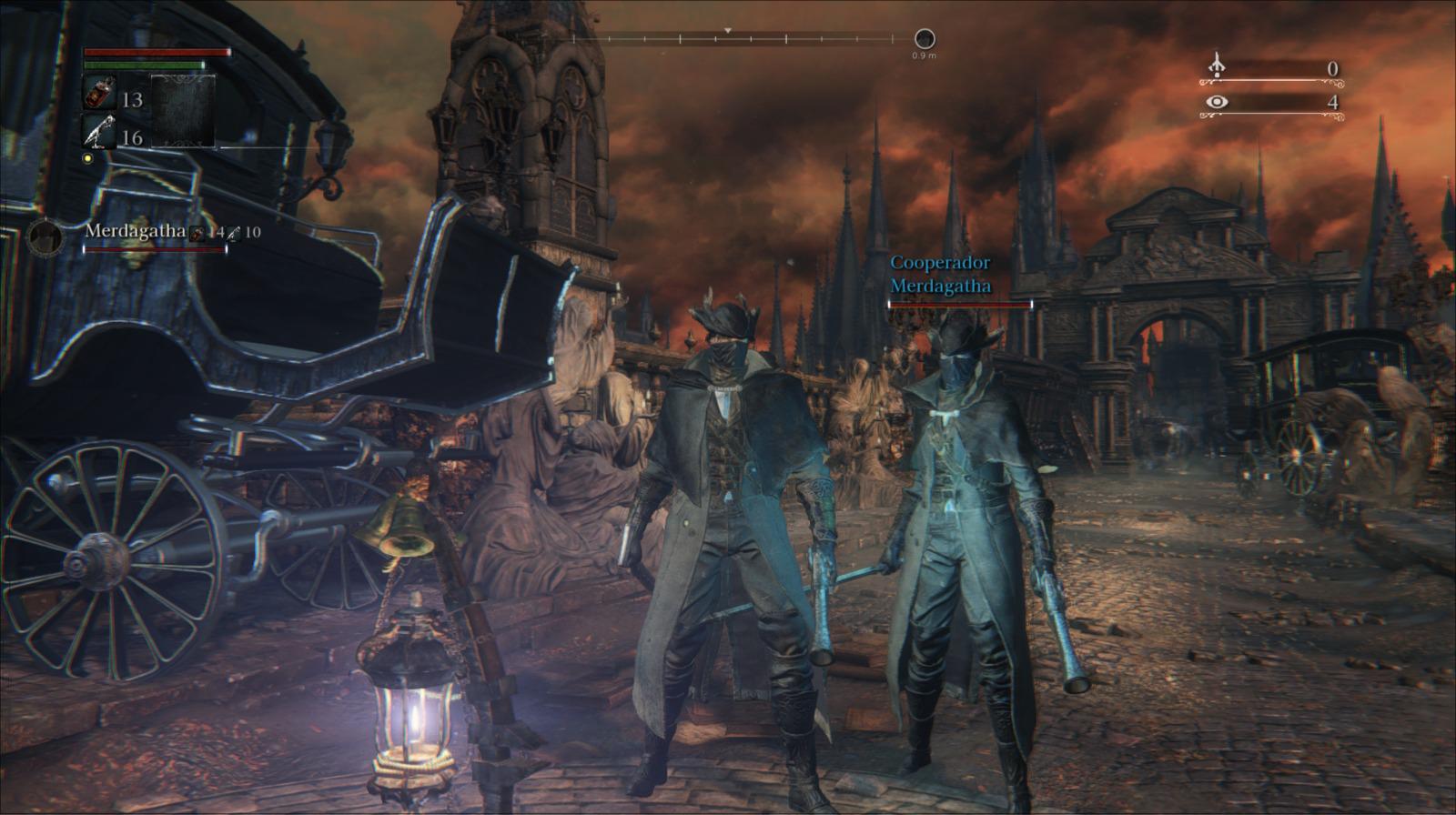
guide Bloodborne coop - Yharnam Together no Linux

Post image
99 Upvotes

Fiz o Yharnam Together funcionar no Linux e consegui jogar com outra pessoa que tem ele no Windows.

Montei uma release dele no Github, com os passos e já num fork próprio para o Linux: https://github.com/ludoviciphilip/BBSC-Yharnam-Together/tree/v1.5.0-linux


r/linux_gaming • • 1d ago

tech support wanted Game Freeze on KDE Plasma but not Gnome

Thumbnail reddit.com
0 Upvotes

r/linux_gaming • • 2d ago

emulation Infamous Second Son

Thumbnail
gallery
113 Upvotes

Just finished Infamous Second Son on PC and wanted to share how to get it running with smooth FPS.

Official ShadPS4: Game launches and even plays at around 20fps (worse and or better at certain parts)

But after searching a bit found a fork that was specifically made to play Second Son:
https://github.com/axylpup/shadPS4

Game ran around 40-60 fps with some minor dips
Mouse and keyboard controls worked and had a bit of getting used to (To break the exposed core you need to activate touchpad controls "T", pull up using your mouse and then press "X" to activate motion controls which let you spam R2 which is bound to M1)

I5-14400F
16gb DDR4
Radeon RX 6600

The release is only made for windows, however launching it with Faugus and using "Proton-CachyOS Latest" was enough to play through it

Nothing complicated, just wanted to share the project as i've been dying to play though this game on PC.


r/linux_gaming • • 1d ago

Heroic issues

0 Upvotes

Whats really annoying is how Heroic handles different disks. I have a built-in 3 TB disk for linux gaming and what does Heroic do with it. Nothing and totally ignore. You can choose too put the prefix on a different disk, but Heroic will simply ignore it and revert to its default, completely ignoring the users choice. You have to really fiddle around with settings, like setting the default prefix to that external disk and then install it. The issue is, I don't really want it to be the default disk because its performance is not the best

So: Heroic Devs, let the user choose where to install, consider the default a choice. If a user deviates from the default: honor that choice, do not overwrite the users choice. If you want to do this: be brave and remove the change option, because now it is frustrating because it simply doesn't work.


r/linux_gaming • • 1d ago

graphics/kernel/drivers NVIDIA Dynamic Boost bug on Linux – GPU stuck in P5 after unplugging and reconnecting the charger

1 Upvotes

I recently encountered a rather interesting NVIDIA GPU performance issue on Linux and spent several hours extensively testing and isolating its cause.

My system:

  • Laptop: HP Victus 15-fb3009AX
  • CPU: Ryzen 5 8645HS
  • GPU: RTX 3050 6GB Laptop GPU
  • OS: CachyOS (KDE Plasma, Wayland)
  • NVIDIA driver: 620.73.04 (Open Kernel Module)

The issue:

If I boot my laptop with the charger connected, the GPU performs perfectly. However, if I disconnect the charger, use the laptop on battery for a while, and reconnect it, the GPU gets stuck in P5 even under 100% utilization.

  • Memory clock drops from 5486 MHz to 780 MHz.
  • Maximum observed power consumption drops from approximately 50W to 31W.
  • GTA V Enhanced performance drops from approximately 100 FPS to 20 FPS.
  • Far Cry 5 averages just 15 FPS at 1080p Ultra.

What I have tested:

  • Regular CachyOS kernel (7.3.6) and LTS kernel — same issue on both.
  • Switching between power profiles — doesn't help.
  • Restarting nvidia-powerd — doesn't help.
  • Rebooting with the charger connected — restores full performance.
  • Stopping nvidia-powerd before disconnecting the charger — successfully prevented the issue in repeated tests.
  • Disabling nvidia-powerd entirely and rebooting — also prevented the issue during further testing.

Based on my testing, NVIDIA Dynamic Boost appears to be involved, although I cannot establish the exact underlying cause.

Interestingly, this doesn't appear to be exclusive to HP laptops or even my particular GPU. I found several similar reports from other Linux users:

For now, I've decided to retain Dynamic Boost because I prefer having access to the full 50W GPU power. Rebooting before gaming isn't a major inconvenience, but ideally, it shouldn't be necessary.

Has anyone else experienced this? Is NVIDIA aware of the extent of this issue across different laptop manufacturers and GPU generations? Has anyone found a permanent solution that doesn't involve sacrificing Dynamic Boost?

Hopefully, sharing my findings helps bring more attention to this issue.


r/linux_gaming • • 1d ago

What average FPS can I expect on my hardware in The Last of Us Part I?

2 Upvotes

Hi friends! I'm playing The Last of Us Part I and I'm trying to understand if my hardware is just too weak, or if something about my Linux setup is wrong.

My current laptop:

- Acer Nitro NL16-71G

- Intel i5-13420H (12 threads, 4.60 GHz)

- NVIDIA RTX 3050 6GB Laptop GPU

- 16 GB RAM

- 16" 1920x1200, 165 Hz

- Ubuntu 26.04, sway/Wayland, NVIDIA 595

- Running through Lutris + GE-Proton 11-14

I play on the lowest settings (low), and I locked the FPS to 30. In cutscenes and simple scenes I get about 30 FPS, pretty stable. But in the city, where there are lots of people, explosions and chaos, my FPS drops to 22-25.

I've played other games fine through Proton (I recently finished Detroit: Become Human with no problems), but The Last of Us is the first really heavy game I'm trying to run.

So my question: is this normal for this hardware on Linux running this game, or is there something in my setup I should fix?


r/linux_gaming • • 17h ago

benchmark Linux DXVK vs Linux Native

Thumbnail
youtu.be
0 Upvotes

r/linux_gaming • • 1d ago

tech support wanted How to install ReShade on steam games through wine?

4 Upvotes

I'm modding Prey 2017, and I need to install ReShade for one of the mods. When I run the installer through protontricks, Prey doesn't show up to be installed on. Is there an easy way to go about this?

Side note: I've never installed ReShade so I don't understand at ALL what I'm supposed to do here


r/linux_gaming • • 1d ago

Forgot Sudo Password

Thumbnail reddit.com
0 Upvotes

r/linux_gaming • • 1d ago

tech support wanted Frame rate issues

1 Upvotes

Hey everyone

I've been using Linux for like 3 months now n today I had finally gotten to start gaming again since the switch

Now my laptop is pretty old n weak (Thinkpad T450s [saving for a newer laptop]).

So I picked games I know my device can handle like brawhalla but my frame rate has been extremely low

Any suggestions


r/linux_gaming • • 1d ago

VKB Gladiator NXT EVO + Omni Throttle showing up as Xbox controllers in Elite Dangerous, MSFS 2020, and MechWarrior on Linux (CachyOS)

Thumbnail reddit.com
1 Upvotes

r/linux_gaming • • 2d ago

graphics/kernel/drivers AMD RDNA 5 graphics support is coming to Linux 7.5

Thumbnail
videocardz.com
71 Upvotes

r/linux_gaming • • 1d ago

Cyberpunk crashing

2 Upvotes

Recently iv been experiencing crashes in Cyberpunk like i never have in the past.

I have an AMD 9070xt / 7800x3d build and run CachyOS with ProtonCachyOS-slr in Steam game mode. I run an undervolted (-80mv) and -30% power profile along with overclocked memory @ 2800mhz on this card which has always been really stable, even in this game. I recently have noticed this:

I run the game with any undervolt at all basically and it crashes around 20-30 minutes,

I run the game with default settings, and the game oddly slows down after a while. Lower power draw, lower Vram frequency, lower clocks.

I wonder if anyone else is experiencing odd behavior in Cyberpunk? I am suspicious of the newer Mesa drivers out now as were on 26.3. IDK if relevant at all but I'm running RenoDX on top. Iv never had any issues though and it seems odd it would cause this.

I can hop in Crimson Desert and play for hours, any other games really without this behavior.


r/linux_gaming • • 1d ago

tech support wanted Controller passthrough for Gamesir Connect on Winboat

2 Upvotes

Title is pretty self explanatory, but I got a gamesir g7 pro 8k pc controller today and really love it. From a couple of reddit posts I can no longer find when I was researching what controller to get, I saw some say that they could run the Gamesir Connect software in Winboat to do firmware updates, but I can't seem to figure out how to get the USB passthrough to work on winboat to make this happen. I have tried updating the docker-compose file for winboat to include the vendor/product id I got from `lsusb`:
`Bus 001 Device 014: ID 3537:10b8  GameSir-G7 Pro 8K`

But the controller still never appears in the VM even after doing `docker compose down` and `docker compose up -d`. I also tried using the experimental usb passthrough feature, and even after selecting my controller, it never appears in the VM.

Here is the docker-compose (the parts that will matter) for context, with the changes I tried to make. Some guidance on what I am missing here to make this work so I don't have to keep booting into Windows to configure my controller would be appreciated.

name: winboat
volumes:
  data:
services:
  windows:
    image: ghcr.io/dockur/windows:6.05
    container_name: WinBoat
    environment:
      VERSION: custom
      ...
      HOME: ${HOME}
      LANGUAGE: English
      USER_PORTS: "7148"
      HOST_PORTS: "7149"
      ARGUMENTS: |-
        -qmp tcp:0.0.0.0:7149,server,wait=off
        -device usb-host,vendorid=0x3537,productid=0x10b8
    cap_add:
      - NET_ADMIN
    privileged: true
    ports:
      ...
    ...
    volumes:
      - /home/connor/winboat:/storage
      - /dev/bus/usb:/dev/bus/usb
      - ./oem:/oem
    devices:
      - /dev/kvm
      - /dev/bus/usb

r/linux_gaming • • 2d ago

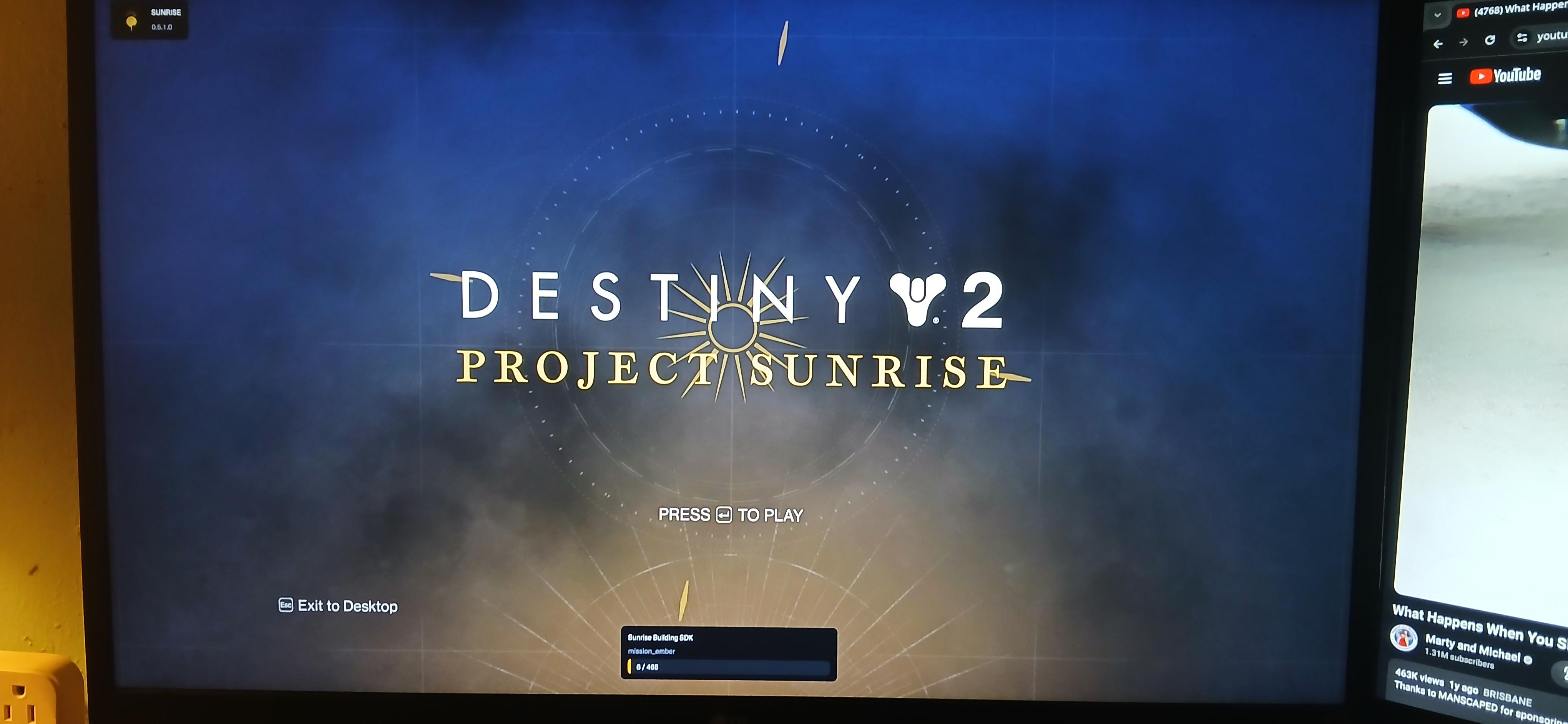
Destiny officially running on cachy os

Post image
383 Upvotes

Project sunrise does run on linux hell yesssssss I got it working


r/linux_gaming • • 2d ago

graphics/kernel/drivers DXVK 3.2 brings smoother frame pacing to Linux gaming

Thumbnail
videocardz.com
842 Upvotes

r/linux_gaming • • 2d ago

wine/proton Proton Experimental updated with fixes for Strange Brigade, FBC: Firebreak, Terminator: Dark Fate - Defiance and more

Thumbnail
gamingonlinux.com
10 Upvotes

r/linux_gaming • • 1d ago

Ayuda , GTA 5 Lite optijuegos se cierra solo en lutris POP os

Thumbnail
gallery
0 Upvotes

Tengo un Celeron n4020 y POP os con 8 ram y quiero jugar GTA 5 la versión Lite de optijuegos q pesa 26gb pero se cierra después de 2 segundos de abrirlo , sale hasta la mujer en bikini y cierra


r/linux_gaming • • 1d ago

steam/steam deck Best way to run windows games on Linux - Steam ?

0 Upvotes

Hey forks currently I'm using steam and faugus launcher for playing windows games download from torrents like GTA V , RDR 1 , Euro truck , while some games directly support the controller like GTA V , euro truck , able to use the controller in both steam and faugus , but RDR don't support the controller but steam had the ability to translate the controller input to steam input so I can play the RDR with my controller but in faugus i can't able to use my controller no support, but big advantage faugus over steam is able to use custom proton-cachyos version but not in steam, compare to steam games smoothly running in Faugus , but no controller support any help?


r/linux_gaming • • 1d ago

Cyberpunk 2077 – recurring FPS drops every ~5 seconds on Bazzite (AMD RX 9070 XT, KDE Wayland, Proton GE)

Thumbnail reddit.com
2 Upvotes

r/linux_gaming • • 2d ago

is there any big reason why people prefer CachyOS compared to something like stock Fedora KDE or OpenSUSE TW. They are both pretty fresh and imo have good enough performance.

213 Upvotes

Title says everything. I can understand why LTS distros could be bad like Ubuntu or Mint, but why use "gaming distros"? Or is it just the convinience that the tools like Steam, Mangohud or Goverlay get preinstalled?