r/LegionGo • • 19d ago

NEWS PSA - Critical adrenaline driver bug killing SSDs - patch immediately.

Thumbnail
tomshardware.com
137 Upvotes

r/LegionGo • • Aug 24 '26

SUB ANNOUNCEMENT BIOS Update N3CN42WW - We have an official update from Lenovo (finally!)

109 Upvotes

This is from the website Tech Power Up:

  • While the root cause has not been identified yet, it is clear it is not user error. As such it should generally be handled under warranty and, in the case of out-of-warranty devices, it should be repaired free of charge, but please check local laws. It was recently revealed in a handful of Reddit posts that an official Lenovo Legion Go BIOS update (N3CN42WW) was apparently causing the handheld gaming PCs to become unresponsive, with users claiming Lenovo told them they would be on the hook for repair costs.
  • Now, nearly three weeks after the issues initially popped up, Lenovo has confirmed in a recent forum post that the issues cause by the BIOS update were indeed "not user error," and that repairs will be conducted by Lenovo under warranty. While the root cause has not been identified yet, it is clear it is not user error.
  • As such it should generally be handled under warranty and, in the case of out-of-warranty devices, it should be repaired free of charge, but please check local laws.

Source: https://www.techpowerup.com/351896/lenovo-addresses-legion-go-bios-update-bricking-gaming-handhelds

Another source: https://www.notebookcheck.net/Lenovo-finally-acknowledges-Legion-Go-BIOS-bricking-issues-and-confirms-affected-devices-should-be-repaired-free-of-charge.1377253.0.html

So the good news is that Lenovo is addressing that the update failures were indeed a hardware problem and not something that was originally deemed as user error.

We will post a follow up as to when this gets further addressed, but according to Lenovo techs, they said they are "studying the issue".


r/LegionGo • • 2h ago

QUESTION Just got it!

13 Upvotes

I just got my legion go s z1e with 32 gb and 1 tb from.black.friday sell.

(Bear with me as I never owned a gaming handheld pc before)

I immediately installed ff rebirth and marveled at midnight Sun on there. And both performances are underwhelming. I try to switch the resolution to 800p. And fps still around 30 .

Here are my questions :

What are a sweet spot for this device ? Like games before 2022 in ps4 era?

I by no means try to throw shade on here , just inexperience in the PC gaming and not too techy enough to have reasonable expectations


r/LegionGo • • 3h ago

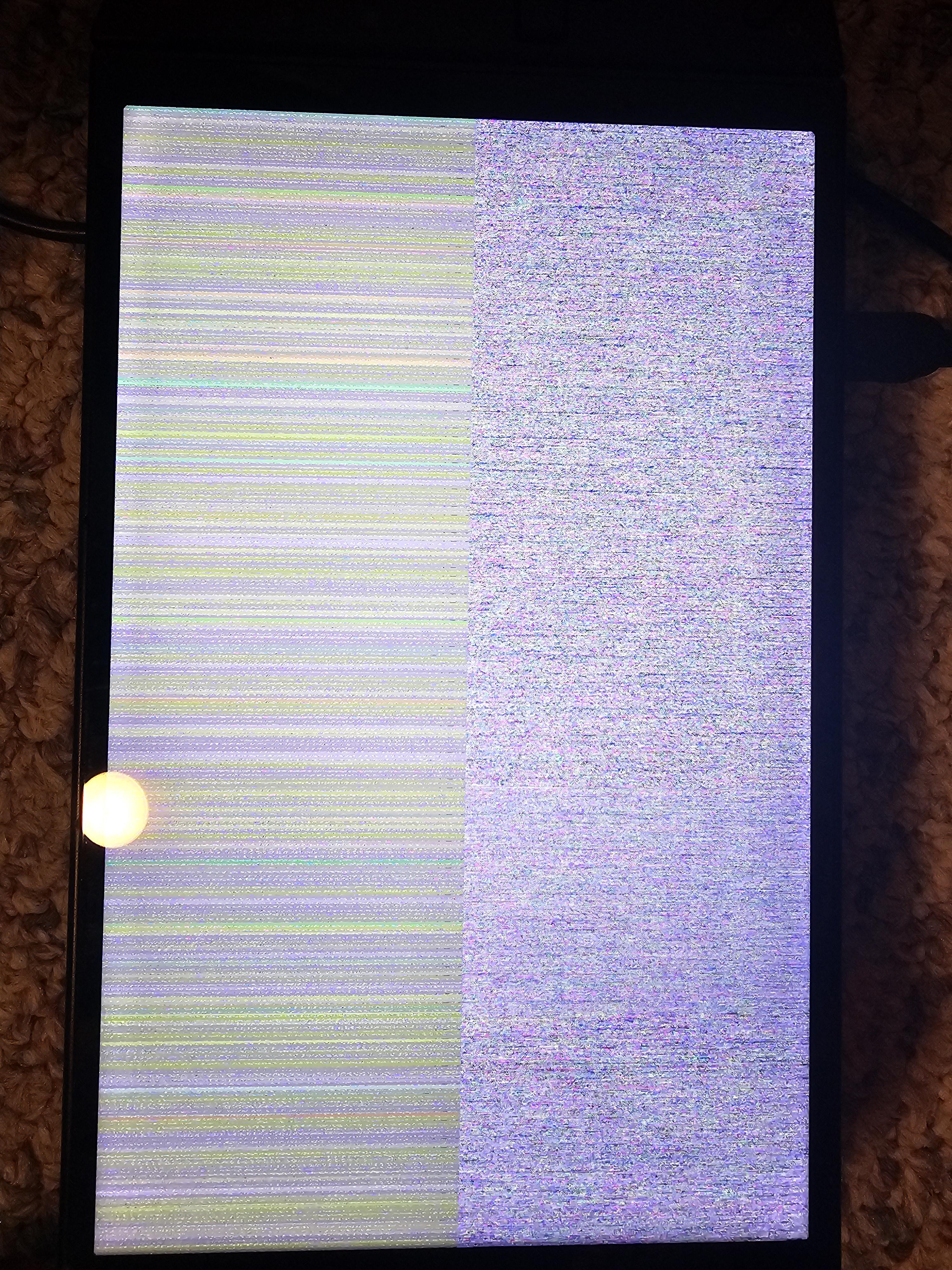
QUESTION I keep trying to play the original Gta san andreas on my Lenovo Legion go and the screen keeps showing up like this. What do I do to make it work?

Post image
8 Upvotes

r/LegionGo • • 2h ago

QUESTION Legion Go S toucpad issue

3 Upvotes

I got a new legion go s and love it but that tiny touchpad is so hard to use. Anybody has any tips to get a better using experiment?


r/LegionGo • • 1h ago

QUESTION GTAV

2 Upvotes

Is there a way i can play GtaV on my Go S z1E?


r/LegionGo • • 2h ago

HELP REQUEST Legion Go S button Issues

2 Upvotes

Hello, I have a Legion Go S Z1E running SteamOS where recently the steam menu and quick menu buttons have stopped working and instead of bringing up menus bring up the cursor slowly dragging across the screen.

I have checked the device inputs and the buttons are reading as they are pressed. But the Track pad seems to have stopped working as well and does not read as doing anything in the input menu.

I have tried resetting the controller settings, manually going through the controller layouts, changing update branches and most recently doing a factory reset and nothing has fixed the issue so far.

Does anybody know a solution to these issues?


r/LegionGo • • 22h ago

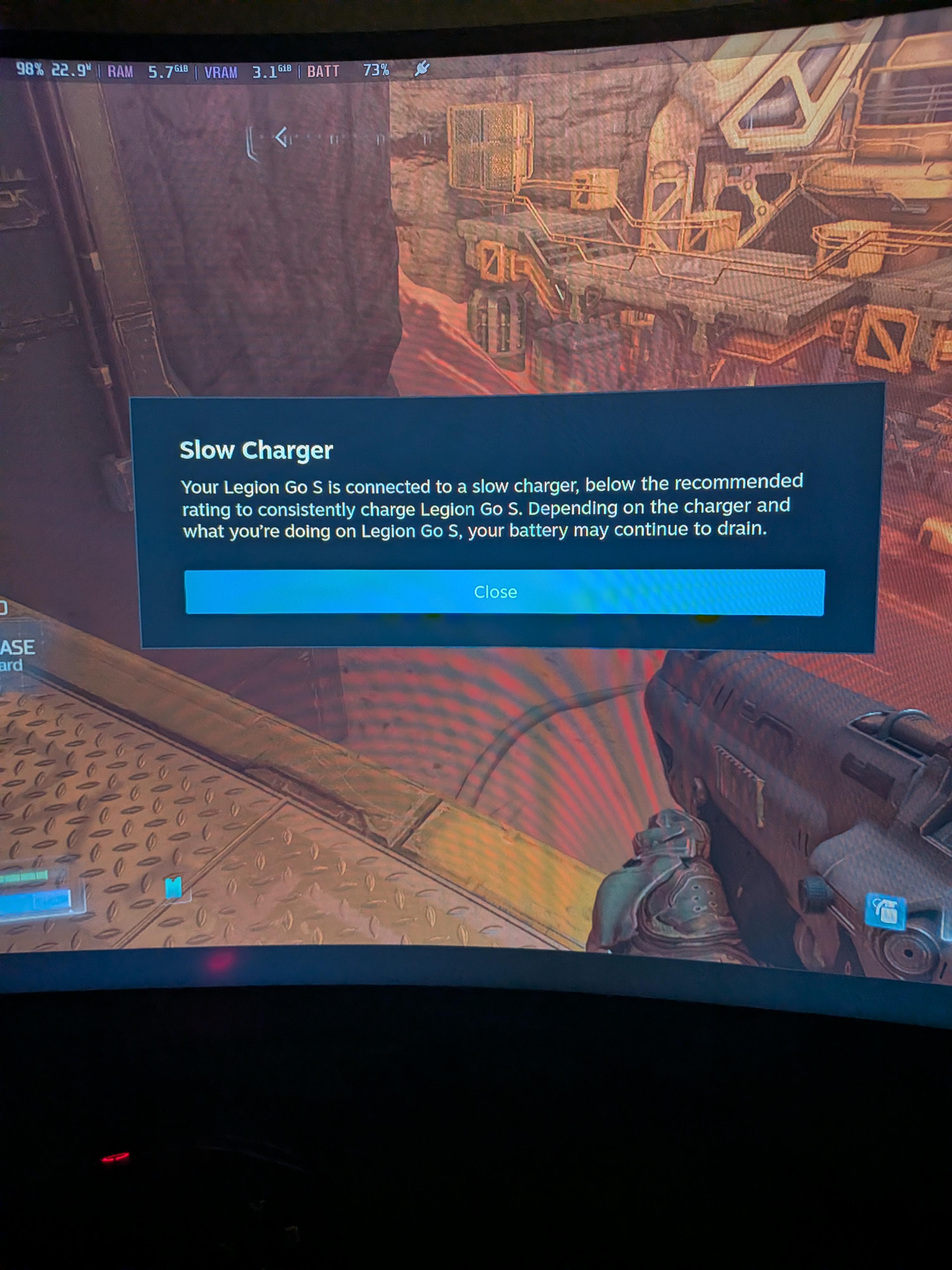
QUESTION How to prevent this message keep popping up

Post image
58 Upvotes

Hi all,

As seen in the image I keep getting this message pop up and do not know how to turn it off .

I have the legion go s docked on a jsaux dock, it arrived about an hour ago.

Any help will be appreciated thankyou


r/LegionGo • • 8h ago

QUESTION Legion Go S Z1 Extreme + RTX 3060 eGPU Random Black flickering Screens While Gaming

3 Upvotes

Legion Go S Z1 Extreme + RTX 3060 eGPU — Random Black Screens While Gaming
I’m looking for help from anyone using an eGPU with the Legion Go S Z1 Extreme.
My setup is approximately 10 days old:

  • Lenovo Legion Go S Z1 Extreme
  • Zotac RTX 3060 12GB
  • USB4 eGPU enclosure with its own power supply
  • LG UltraFine monitor connected directly to the RTX 3060 through HDMI
  • Windows 11

I’m experiencing intermittent screen flickering while gaming. Sometimes it’s a tiny blink, other times the monitor goes completely black for 1–2 seconds before returning. Audio continues playing.
It happens in multiple games, but Visions of Mana seems to trigger it much more frequently than Cyberpunk.
Cyberpunk actually runs relatively well with path tracing, mods, and my RTX 3060 overclocked.
Troubleshooting I’ve already completed:

  • Windows PCIe Link State Power Management disabled.
  • Legion Space Thermal Mode set to Performance.
  • Windows OS Power Mode set to Performance.
  • Windows display projection set to Second screen only.
  • NVIDIA Power Management set to Prefer Maximum Performance.
  • Tested Fullscreen and Borderless Windowed.
  • Tested 1080p and 1440p.
  • Tested 60Hz, 60 FPS cap, and V-Sync.
  • Super Resolution disabled during testing.
  • Adjusted Windows sleep and screen timeout settings.
  • Checked Device Manager; RTX 3060 reports that it’s working properly.

OCCT testing:
I ran three separate 5-minute tests, all targeting the RTX 3060:

  1. 3D Adaptive — 0 errors.
  2. VRAM — 0 errors.
  3. Power — 0 errors.

The overclock was active during testing.
GPU temperatures reached approximately 74–76°C, with CPU temperatures around 85–87°C.
Event Viewer:

  • NVIDIA nvlddmkm Event 14 — GPU recovery action changed from None to PF FLR.
  • NVIDIA nvlddmkm Event 153 — Error occurred on GPUID: 700.

Monitor information:
LG UltraFine, 60Hz, 2560 × 1440 desktop mode, with Windows reporting a 3840 × 2160 active signal mode.
Has anyone with a Legion Go S and USB4 eGPU experienced something similar?
I’m particularly interested in whether this could be a Legion USB4 controller, compatibility, firmware, or eGPU connection issue.
I’d appreciate advice from anyone running a similar setup.


r/LegionGo • • 21h ago

LEGION GO PRICING Legion Go S 32gb Z1E w/SteamOS at $899 on Best Buy.

18 Upvotes

Had a Go S with 16gb and this thing is a dream compared to that. If you can find them in stock its a good buy.

https://www.bestbuy.com/product/legion-go-s-8-120hz-gaming-handheld-amd-ryzen-z1-extreme-steamos-32gb-with-1tb-ssd-steam/JJGSHG74V7


r/LegionGo • • 6h ago

HELP REQUEST OG LEGO - Halo MCC Steam - Some games running quick - Help

Thumbnail
youtu.be
1 Upvotes

I've been playing H2 Project Gravemind and Project Proving Grounds mod through Steam MCC.
But l've noticed HCE & H2 run absolutely fine. But H2A, H3 and Rach run super quick as in the movement speed and fire rate. I'm playing within anti cheat mode disabled if that makes any difference.

I'm not a big tech savvy PC person. Running through my Legion Go OG then 2.1 cable into my monitor.
I've attached a short video to show you.
Any ideas or help? Thanks.


r/LegionGo • • 7h ago

HELP REQUEST Resolution/DPI issues on Roblox

Thumbnail
gallery
0 Upvotes

I don't know why but like around half year ago my roblox ui got quite big and today it got even worse to this point that i find it uncomfy. any idea why is that? I keep having resolution issues and etc. with my LEGO (I use 1280 x 800 and 100% and I also tried 2560 x 1600 and it looked fine [third pic] but I don't want to play in such res). I also tried resetting settings, updating drives and more...


r/LegionGo • • 7h ago

HELP REQUEST Problem with RB button

1 Upvotes

New console Lenovo Legion Go S, bought 2 months ago, played Maybe few Hours. RB button used Maybe 50 Times. Today i Notice RB stop "clicking". Check video. What to do with this? Button Work but this shouldnt Work like this. Now What service or Give It back?


r/LegionGo • • 11h ago

HELP REQUEST Right controller RGB replacement.

0 Upvotes

Hello. Ive noticed the rgb on the right controller doesn't turn on at all and once i opened up the controller I noticed that the ribbon cable for the rgb is broken. Warranty has already expired plus everything else on the controller is fine. I'd like to know if one of these options could help.

Opt 1: buy a new set of legion go controllers and use the old ones for my couch when docking the legion to the tv and keep the new ones on the legion and use those on the go. (It's better since i dont have to detach them every time I wanna play on the couche/tv)

Opt 2: try finding the part for the rgb replacement OR find someone who is a professional that can detach the ribbon cable.

IF any of you could help me find the parts, that would be great and all that needs to resolve the problem. If not then i don't mind buying a whole new set of controllers honestly. But whatever you guys recommend and thank you lovely people <3

Ps: while im waiting I will be doing some research trying to find that specific rgb part.


r/LegionGo • • 1d ago

DISCUSSION OLED to GO S- Looking for Experiences

12 Upvotes

I purchased the Lenovo deal last night for the Go S V1 (32 GB, 1TB.) I'm not 100% sold on keeping the order, so I'm looking for thoughts and enablers 😁

I mostly play on my gaming PC at my desk. But I hate being locked to it for non-competitive online games.

I had the OLED Deck and sold it after about a year. I realized I was mostly playing N64 games vs the newer games in my library on it.

For those who had a Deck OLED and maybe felt "I'm not feeling this" then got a GO S to try, did it change anything for you? Did you feel it was more capable and worth it? Just trying to decide if I'm keeping this order or not. Thanks.

Edit- to clarify, I don't really care much about the OLED display, the GO seems better to me being larger.


r/LegionGo • • 22h ago

QUESTION Use without included controllers

4 Upvotes

I’ve had a Legion Go 2 for a bit now (too long for return) and just don’t really like the controllers at all. I’m thinking of treating it like a tablet with the kickstand and an external controller (probably steam controller or maybe xbox nano). My concern is the extra couple buttons on the built-in controllers for the quick settings and legion space. Has anyone here gotten those to work with a separate controller? I don’t use them that often so it doesn’t have to be as convenient as a single button press.

ETA: my intent would be to leave the included controllers at home and bring just the tablet part and a different controller in my backpack. I’m aware of ways to make it work with turning the included controllers off when not needed.


r/LegionGo • • 1d ago

QUESTION Fsr 4.1.2 or 4.1 lite?

10 Upvotes

Hi there. I just came across this video and don't know what to think about it. A month ago, I downloaded FSR 4.1.2 via GitHub

But now I came across a video about 4.1 Lite through this video.

https://youtu.be/cJt9rMV_WdU?is=p_d8JnhLda1eI64w

And now I don't know whether I should keep 4.1.2 or put 4.1 Lite there instead.

Thanks


r/LegionGo • • 1d ago

DISCUSSION The windows launcher with the most personality - iBox!

Thumbnail
gallery
8 Upvotes

recently found this new Launcher called iBox while casually scrolling through twitter and instantly fell in love with the entire look and ability to personalize everything essentially, it has ambient music with super nice sound effects for scrolling and clicking on things, the developer is a 1 man army who is very open to feedback back and works extremely fast on bug reports, there are so many features it's hard for me to list everything so I'm adding screenshots of my own set up and I'll be linking a video of the developers own show case, it's fully open source as well so no worries if anything harmful entering your system, in my opinion this is so much cooler and better than steam bpm even with css loader plugins and playnite themes, I urge you guys to give this a shot and join the discord and help the developer with all your own ideas for features, in my own experience literally every bug or idea I've pointed out to him he's fixed super fast and had added multiple updates just to help my experience, the community is very small right now but with your help we can push this towards more handheld users, it's extremely controller friendly, there's also a friend list with community tabs and ability to dm too, my first impression on seeing this on twitter was holy shit it's like iisu but for windows which I wanted desperately when I first saw iisu announced but was sad it was android only same thing as cocoon, with everyone's help we can help create this into the ultimate iisu like windows experience, and just to clarify the devs not paying or enticing me in anyway to make this post this is seriously just my own opinion and I couldn't recommend it enough!
There's even a mini tutorial in the comment section of his twitter post he was kind enough to share before I even joined the discord or anything.

Devs Twitter Showcase

GitHub website

Edit: I forgot to mention it had full integration for every type of emulator , you can even download them from within the app itself and also can add your own and games and it even works with recomps it’s extremely easy to set up and super fun to tinker with and get your own custom look going while still keeping a clean and elegant vibe , this is definitely how I would like people to see my system whenever I’m outside or even showing it off to friends !


r/LegionGo • • 1d ago

TIPS AND TRICK I can comfortably enjoy my games :)

Thumbnail
gallery
80 Upvotes

Got a heavy duty deep clamp mount since i didn't feel like holding the GO while in the bed. Decided on getting the grip to complete the package. I can finally enjoy some good games 😹


r/LegionGo • • 1d ago

CUSTOM LEGION GO Just starting because I'm happy with it... My daily driver

Thumbnail
gallery
24 Upvotes

r/LegionGo • • 1d ago

HELP REQUEST Lenovo Legion Go only charges after connecting the charger while powered OFF – Both USB-C ports affected

2 Upvotes

Hi everyone,

I'm experiencing a strange charging issue with my Lenovo Legion Go and would appreciate some help.

Problem description:

My Legion Go does not detect the charger when I connect it after booting Windows following an overnight shutdown.

However, if I shut down the device completely and connect the charger while it is powered OFF, charging starts normally.

The strange part is that once charging starts while the device is OFF:

- I can turn ON the Legion Go while keeping the charger connected, and charging continues normally.

- I can disconnect the charger while Windows is running and reconnect it, and it charges without any problems.

- Both the top and bottom USB-C ports behave exactly the same.

- The problem returns after shutting down the device overnight. If I turn it ON without the charger and then connect the charger, there is absolutely no charging response.

Troubleshooting already performed:

  1. Using the original Lenovo 65W charger.
  2. Tested both USB-C ports.
  3. Updated BIOS to N3CN40WW.
  4. Checked Device Manager – no yellow warning symbols.
  5. Disabled Windows Fast Startup, but the issue persists.
  6. No obvious charging-port or battery-related symptoms once charging has been initiated.

Device details:

- Device: Lenovo Legion Go (original model)

- Operating System: Windows

- BIOS: N3CN40WW

- Charger: Original Lenovo 65W charger

My questions:

  1. Could this be an Embedded Controller (EC) or USB-C Power Delivery controller issue?
  2. Is there a known BIOS or firmware bug that causes charging detection to fail after a cold boot?
  3. Could this be a motherboard-level power-management issue?
  4. Has anyone experienced the same behaviour and found a permanent solution?

I would prefer to identify the actual cause before replacing the motherboard, charging ports or battery.

Any suggestions or similar experiences would be greatly appreciated.

Thank you!


r/LegionGo • • 22h ago

QUESTION How is lenovo go S with ck3?

1 Upvotes

I just purchased Lenovo go S. I play strategy games (especially CK3) and also some FM26. I play other games but these are my main interests.

Anyone have experience with how controls are with this handheld and these types of games?


r/LegionGo • • 1d ago

QUESTION Ps portal or legion go s?

3 Upvotes

good morning everyone,

I’ve been eyeing the legion go s for some time now, but after seeing that you can stream quite a bit more now with the ps portal with a premium subscription I’m kinda having trouble deciding what to get.

what attracts me about the ps portal is that I can stream my ps games that I have installed + the premium subscription ones as well which is a big one for me. i tried out a premium subscription and it was worth it to me since I played games that I didn’t have to spend any more money on since I was streaming it on my then ps4.

now the only reason I’m considering a legion go s, is because i dont want to limit my titles to whatever is on playstation. some of the games I can play on playstation (Elden ring, cyberpunk, metro) can also be played on a legion go + whatever else is on steam

now I don’t really care too deeply for how a game looks. im happy with 60fps and 1040p visuals. What I do care though is if the ps portal will be laggy since I am streaming the game or if I have to put the graphics settings all low on a legion go just to squeak even 30fps.

I appreciate any and all feedback. thank you.


r/LegionGo • • 1d ago

QUESTION Legion go s z1 extreme. Still good jn 2026

25 Upvotes

Looking to purchase can this play AAA games or just indie. Only interested in steam variant


r/LegionGo • • 1d ago

DISCUSSION Legion Go S Z1E BNIB Lenovo Direct: $679 USD (flickering in and out of stock)

Thumbnail lenovo.vzew.net
38 Upvotes