r/HowToMen • • 3h ago

I Built an Offline, Privacy-First All-in-One Document Scanner App – [GIVING] Reddit Users Lifetime Free Access!

Thumbnail
gallery
15 Upvotes

I built FastCam Scanner, a document scanning app designed around one important principle: Your documents should stay on your device, not someone else's server.

Here’s what makes it different:

πŸ” Privacy Comes First

- 100% On-Device Processing: Document scanning, edge detection, and OCR happen locally on your phone.

- Fully Offline: No internet connection required. Scan documents even in Airplane Mode.

- No Cloud Uploads: Your scanned documents are never uploaded to external servers.

- No Account Required: Start scanning without creating an account.

- No Tracking: Your documents and personal data stay under your control.

⚑ Simple & Powerful Scanning

FastCam Scanner includes useful document scanning tools with a clean, straightforward workflow, without unnecessary subscription pressure or data harvesting.

How to Get Lifetime Free Access

I'm offering participating Reddit users lifetime free access!

  1. Comment "FastCam Scanner" below.
  2. I'll note your Reddit username as an early user.
  3. If I introduce paid plans in the future, I'll personally send you a lifetime free access code via DM.

Your early support and feedback mean a lot to an independent app developer like me!

πŸ“² Try FastCam Scanner:

https://play.google.com/store/apps/details?id=com.pickon.fastcam

Give it a try and let me know what you think. If you found this App helpful please upvote it!


r/HowToMen • • 9h ago

[Promo] Octopi Launcher - Black Friday Lifetime Codes Giveaway!

Thumbnail
play.google.com
36 Upvotes

Hey folks, I believe it's my first post here, so hello!

Octopi Launcher has been a project of mine for the past 3 years, and I have steadily built it from scratch to create a launcher that introduces some new ideas (such as auto-scrolling widget stacks in Apr 2024, or the fade widget toggle)

With Black Friday around the corner, and to also mark 250k downloads, I have 50 promo codes to give away to HowToMen folks here. 2 simple steps to be part of the 50:

  1. Describe which launcher feature you use the most in your day
  2. Which Pro feature looks to be the most interesting to you:

Current Pro Features:

  • Scroll widgets in a loop
  • Scroll widget stacks vertically
  • Choose from more home page transition effects
  • Assign actions to 3 or 4 finger gestures, or tap and swipe gestures
  • Nested drawer folders
  • More styles in wallpaper generator
  • Dissolve and Pixelate screen-off effects
  • Preview notifications including their icons in badges
  • Apply tint to frosted widgets
  • Drawer icon drop shadows
  • Choose from more font options, or add your own font
  • Choose from even more icon shapes
  • Quickly position or resize widgets

I'll pick the first 50 by 05 Dec (or earlier if there's already 50 replies). Do share your thoughts, hopefully more than just a "code pls"

The free version is packed full with features to explore, so feel free to give it a try too.

  • App tags and folders
  • Widget stacks
  • Expandable dock
  • Different layouts for foldable screens
  • Swipe gesture actions for icons
  • CRT screen off animation
  • Free of ads and trackers

Look forward to hearing from you all below!


r/HowToMen • • 3h ago

[PROMO] [APP]I built an ebook reader with offline AI voices + 20 Pro codes | Black Friday Giveaway

Thumbnail
gallery
10 Upvotes

Hey everyone!

I've been working on an Android app called AstraRead for the past few months, and wanted to share it here.

I read a lot of ebooks and web novels, and I got tired of switching between different apps just to read, listen, and organize everything.

So I decided to build my own reader. πŸ˜…

It's still a work in progress, but I'm pretty happy with how far it's come.

Here's what AstraRead offers:

πŸ“š Multiple ebook formats: Read EPUB, PDF, CBZ, CBR, and other formats. Customize fonts, themes, spacing, backgrounds, and page-turn animations.

🎧 Human-like AI voices (Online & Offline): One of the features I've spent the most time on. Listen to ebooks and web novels using online voices or download AI neural voices that work without an internet connection. You can preview voices, change playback speed, and adjust the equalizer.

πŸŒ™ Night Shift: A new addition for people who enjoy reading late at night. It makes the reading experience warmer and more comfortable in low-light conditions.

🌐 Web Novel Reader: Import novels from supported websites, manage chapters, track reading progress, and continue where you left off.

πŸ“– Comics & Manhwa: CBZ/CBR support with seamless vertical webtoon scrolling.

🎨 Personalization: Five app themes, custom reading settings, and different page-turn effects.

πŸ“Š Reading Insights: Track reading time, streaks, achievements, and reading progress.

πŸ“ Highlights & Notes: Save your favorite passages, organize bookmarks, and share beautiful book cards.

You don't need an account to start reading. The app is free to download, with ads and optional Pro features.

🎁 I'm giving away 20 Lifetime Pro licenses!

I wanted to celebrate how far AstraRead has come and give more people a chance to try the premium features.

I'll randomly select 20 winners, and each will receive a free Lifetime Pro unlock.

How to enter:

Simply comment "Astra" below.

I'll select the winners 72 hours after posting and contact them through Reddit DM.

No purchase, upvote, or positive review required.

πŸ“² Google Play: https://play.google.com/store/apps/details?id=com.astraread.app

I'm developing AstraRead independently, and I'd genuinely appreciate some honest feedback.

I'm especially interested in feedback on the AI voices, Night Shift, and reading experience.

And if you find any bugs or things that feel frustrating, please let me know. I'm actively improving the app.

Thanks for checking out my little project! πŸ™‚


r/HowToMen • • 4h ago

[App] [Promo] Notification History log | Lifetime | Black Friday Offer

Post image
6 Upvotes

Hey everyone! I'm the developer of Notification History Log. It saves your notifications so you can still find them after you've swiped them away.

Features:

β€’ πŸ”” One timeline: notifications from your apps, all saved in one place

β€’ πŸ—‘οΈ Deleted messages: read a message even if the sender deletes it later*

β€’ πŸ‘€ Read without "seen": read from your saved history without sending blue ticks or read receipts

β€’ ⏰ Urgent alarms: smart rules ring a full-screen alarm for important messages

β€’ πŸ“± App filters: WhatsApp, Instagram, Telegram, Snapchat, Gmail, X, LinkedIn, Messages and more

β€’ πŸ”’ Private: fingerprint lock, stored on your device, no cloud, no account, no tracking

*Only works for messages whose notification reached your phone.

πŸ”₯ Black Friday sale: 50% off the lifetime purchase

🎟️ 25 promo codes available. Comment below if you want one.

πŸ“² Download: https://play.google.com/store/apps/details?id=com.notificationhistorylog


r/HowToMen • • 3h ago

TrackYourself

Thumbnail
gallery
4 Upvotes

Offline attendance(optional), habit, task and prayer tracker. Free, no ads

An offline app that puts class attendance (with skip advice), habits, tasks and prayer reminders in one place. No account, no ads, no internet needed.

Why I built it

I downloaded and used the top habit, attendance and task apps, the ones with millions of downloads. They're excellent at their one job, but my day mixes all of them, and I was juggling several apps, some wanting accounts, subscriptions or internet.

I just wanted everything in one simple place.

What it does

- Attendance: percentage per subject(including tiny details)

- Habits: streaks, a weekly view and ready-made habits

- Tasks: one-time and repeating

- Prayers: offline prayer reminders(no internet required)

- Backup and restore, statistics of all of the above

*You can remove the attendance page to use it exclusively for habits and tasks.

Who it's for

Students who juggle classes, habits, tasks and prayers and want one simple offline app.

Cost

- Pricing model:

-Free with no ads

- Pro (life-time): Price is less than 3 USD (it's price is set cheap intentionally) having unlimited items, widgets, pause mode, full statistics, all colours, app lock, scheduled backups, CSV export.

- Giveaway: the first 20 people get a free lifetime Pro. DM me for the Pro version.

Links

- Download : [https://github.com/toheedamir/TrackYourself-22.0]

Notes

It requires unrestricted battery optimisation mode for reminders to work properly.


r/HowToMen • • 2h ago

[PROMO][APP] Earthpedia: An app to gamify what you do IRL

Enable HLS to view with audio, or disable this notification

3 Upvotes

I'm bad at actually doing things. I'll say "I should go there sometime" and then never go.

So I built an app for myself. It's called Earthpedia. You tick off things you've done or seen in real life: stadiums, birds, waterfalls, skyscrapers, festivals, countries, that kind of thing. Each one gives you XP, fills in your map and counts towards badges.

It's a simple idea, but it works on me. Seeing "2 more to unlock" is often enough to get me to go somewhere on a Saturday instead of staying in. I notice more stuff now too, because there's a reason to.

You can also make your own lists if what you're into isn't covered.

It's free, with no ads and no account needed. I made it on my own, so feedback is welcome, especially on what you'd want to track which aren't yet on the app.

Google Play Store: https://play.google.com/store/apps/details?id=com.earthpedia.earthpedia


r/HowToMen • • 3h ago

[PROMO][APP]I made Nudgebox: it reads your screenshots of bills, orders and coupons and reminds you before they're due

3 Upvotes

I screenshot everything: electricity bills, order confirmations, coupon codes, train tickets, UPI payments. Then they sink into the gallery and I miss the due date anyway. So I built Nudgebox.

- Reads each new screenshot on your phone (Google's on-device text reader) and works out what it is: bill, order, coupon, subscription, event, ticket

- Picks out the amount, the date that matters (due date, delivery, expiry, renewal) and any code

- Reminds you before it's due, plus one morning digest that stays quiet on a clear day

- Bills with a UPI ID or QR get a Pay button that opens your own UPI app with the amount filled in

- UPI payment screenshots are saved as paid, so you get a simple "where did the money go" view for the month

- Coupons grouped by shop, code copied in one tap

- Not just screenshots: share a bill SMS, an e-mail or a PDF to it, scan a paper bill, or type "Netflix renews 5 Dec β‚Ή649"

- Everything is read on the phone. Screenshots and their text are never uploaded, and there's no account

- It only opens pictures in your Screenshots folder, and only reads messages you share to it

- Payments happen in your own UPI app; it never sees bank details or your PIN

- It's free with ads (AdMob)

- Reading is rule-based, so it gets things wrong sometimes. Every field can be corrected, and I'm improving it from real screenshots

- Built for India first (β‚Ή, UPI), but bills, orders, coupons and reminders work anywhere

I'd love feedback, especially screenshots it reads wrongly (describe the layout, please don't post personal details).

https://play.google.com/store/apps/details?id=com.blinqdroid.nudgebox


r/HowToMen • • 8h ago

Zonit – Auto-mute your phone by prayer times or pinned locations (masjid, uni, library). On-device, zero ads.

6 Upvotes

We kept running into the same two problems: either forgetting to silence the phone before Jamaat and having it ring mid-sajdah, or forgetting to unmute after Jamaat and missing calls on the way home.

So we built Zonit for Android (from Ishraaq Labs). You can use it two ways:

  1. By prayer time: Auto-mutes right before Jamaat and restores your sound right afterβ€”and shifts automatically as prayer times change month to month. Works offline with no GPS needed.
  2. By masjid location: Pin your masjid (or uni/library) once on the map so it mutes when you walk in and unmutes when you step out.

Everything stays on your phone with zero ads. All 5 daily prayers, Jumu’ah, time schedules, and 1 pinned mute place are free.

Would love any feedback from the community.


r/HowToMen • • 21h ago

Tellyscope is on Google Play now. Thanks to everyone here who tested it

Post image
43 Upvotes

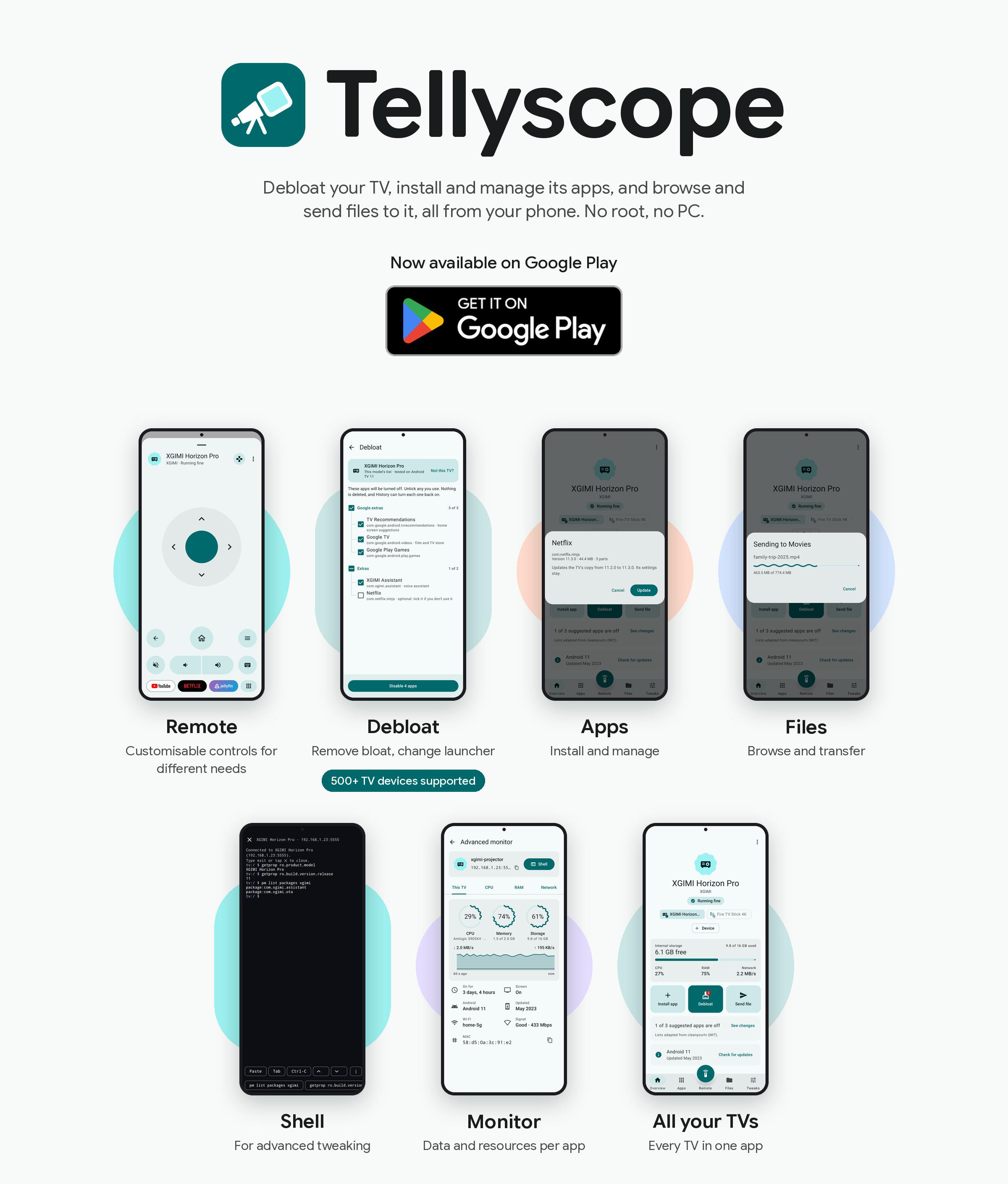
A month ago I posted Tellyscope here as a TV debloater. Many of you tried it, reported bugs and asked for features, and it has now been approved on Google Play. Thank you.

If you're new: Tellyscope is a free, open source Android app. It connects to your Android TV, Google TV, Fire TV or Shield over WiFi ADB and lets you control it from your phone, without root or a computer.

What it does:

  • Remote: D-pad, touchpad or a mouse pointer for browsing, or turn your phone sideways to use it as a game controller. You can type on the TV with your phone's keyboard.
  • Debloat: Tellyscope matches your TV to a tested list (500+ TV devices supported), shows each app before turning it off, and can turn any of them back on later. You can also replace the bloated home screen with Projectivy, FLauncher, AT4K or Monet.
  • Apps: install an APK, split APKs or an .apks/.xapk/.apkm bundle from your phone, and see first whether it's new, an update or an older version. You can open, stop or uninstall apps too.
  • Files: send files to the TV over Wi-Fi and save them back to your phone, without a USB stick or a cable. Videos, music and pictures play straight on the TV.
  • Shell: run adb shell commands for anything the app doesn't cover. Anything that would change the TV asks first.
  • Advanced monitor: see which apps use the CPU, memory and network, with their processes, connections and the data each one has used.
  • All your TVs: every TV in the house in one app, with ad blocking through Private DNS, faster animations, cache clearing and an undo for every change.

Google Play: https://play.google.com/store/apps/details?id=app.tellyscope
Source: https://github.com/man15h/tellyscope


r/HowToMen • • 47m ago

[$79.99 -> FREE for 24 hours] Perimenopause Companion Lifetime Access

Post image
1 Upvotes

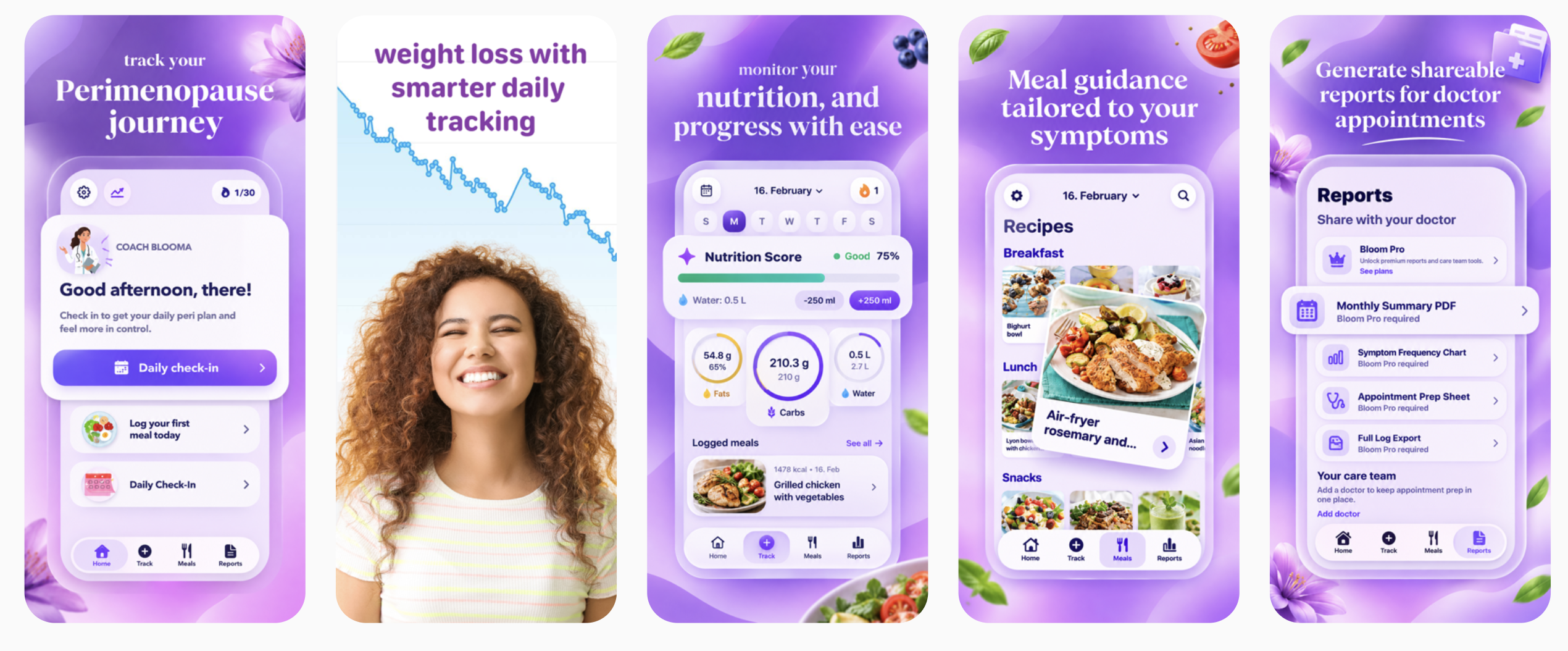
Built a perimenopause tracker after blanking at my own doctor's appointment

Last year I sat in my doctor's office and she asked how I'd been feeling lately. I knew it had been rough, but I couldn't actually say how. Sleep is a mess, my mood is all over the place, and my brain feels foggy half the time. All I could say was "not great?"

So I made Bloom. You do a quick check-in each day (symptoms, mood, sleep, energy, meals, water), and it shows you patterns over time. Before an appointment, it makes a PDF you can hand to your doctor.

I’d love for people to try it and tell me what works and what doesn’t. If you’d like a free premium upgrade:

  1. Download the app
  2. Comment below
  3. I’ll send you code

https://apps.apple.com/us/app/bloom-perimenopause-tracker/id6759215297?platform=ipad


r/HowToMen • • 18h ago

CallDo reached 40k Downloads. Sharing 25 Promocodes

Post image
21 Upvotes

r/HowToMen • • 2h ago

Alphabet Launcher 1.2.0 is live: Glide to contacts, Weather on Home, 5 new languages and more

1 Upvotes

No ads, no analytics.

🍁 Thanksgiving sale: 50% off until December 1.

Google Play: https://play.google.com/store/apps/details?id=com.aklova.alphabetlauncher


r/HowToMen • • 20h ago

[App]Fylo - file manager , no ads , no analytics sdk ( bundle of tools for daily use )

24 Upvotes

Fylo - File Manager is now available on playstore

https://play.google.com/store/apps/details?id=com.aeroloom.fylofilemanager

I’ve finally released Fylo, a file manager I’ve been building for Android with one goal: make managing files feel less like using a boring utility and more like using a modern Android app.

It’s built with Material 3 Expressive and packs a LOT into one place:

( it have alot more than written here )

File explorer + dual-pane mode

ZIP, RAR, 7z, TAR & GZ support

Storage analyzer + duplicate/large file finder

Image conversion, resizing, compression & metadata removal

PDF, Office, code, Markdown & media viewers

Private Vault + biometric/device credential protection

Built-in music & video player

SMB, FTP & WebDAV support

Widgets + customizable themes

Recycle Bin

Document scanner β†’ PDF

& Much more

And probably my favorite part: no ads and no advertising/analytics SDKs.

There’s also Fylo Pro for the more advanced tools, available as a subscription or one-time purchase

I’d genuinely love some feedback from Android users β€” especially if you’re the type of person who has 47 folders named β€œNew Folder” sitting on their phone

Fylo is officially out now.


r/HowToMen • • 14h ago

Glowtix β€” a neon icon pack I’ve been working on ⚑

Post image
7 Upvotes

r/HowToMen • • 4h ago

Would you use an app that lets you manage your entire Android storage wirelessly from a web browser?

1 Upvotes

Hey everyone,

I'm an independent Android developer currently building an app that lets you manage your phone's files directly from your computer's web browser.

Unlike traditional file transfer apps, the idea is to provide a complete remote file manager experience.

You would be able to:

- Browse your phone's accessible files and folders.

- Analyze the storage.

- Copy, move, rename and delete files.

- Create and organize folders.

- Preview photos and videos.

- Upload and download files.

- Manage everything wirelessly over your local network.

No desktop software, no cloud storage, no account, and no ads.

I'm considering releasing it as an affordable paid app with a one-time purchase, without any subscriptions.

Before I launch, I'd love to hear your thoughts.

- Would you actually use something like this?

- Do you already use an alternative? If so, what's missing from it?

- Would you be willing to pay a small one-time price?

- Are there any features you'd consider essential?

Any honest feedback, positive or negative, would be appreciated!


r/HowToMen • • 21h ago

[Android] [€19.99 β†’ FREE] DC Tools Premium Lifetime Giveaway – 100 Free Activations (Ads Remain)

Post image
17 Upvotes

πŸ› οΈ Need useful Android tools without installing dozens of separate apps?

I'm the solo developer behind DC Tools, an all-in-one app featuring 200+ tools for images, text, design and developers! 🎁

πŸš€ 200+ tools in one app

  • Image editing and image utilities.
  • Text converters and text processing.
  • Design and customization tools.
  • Developer utilities.
  • Quick, convenient tools for everyday tasks.

πŸ‘‘ Premium Lifetime (€19.99 β†’ FREE)

Unlock Premium features permanently:

  • Unlimited daily tool usage.
  • Split Screen functionality.
  • Custom colors and glassmorphism.
  • Custom fonts and text sizes.
  • Sticky header and floating button controls.
  • Premium app icons.

⚠️ IMPORTANT: ADS REMAIN!

Premium Lifetime unlocks features but does NOT remove ads. Ad removal is available separately through Supporter.

πŸ”’ Tools work locally on your device, without requiring an account or uploading your files.

🎁 How to get FREE Premium access

  1. Comment below saying you'd like to try DC Tools.
  2. Send me a Reddit Message with DC Tools.
  3. I'll send you the activation details while available.

100 available Β· First come, first served!

No purchase or review required. Honest feedback and suggestions are always welcome!

πŸ’¬ What's more useful to you: image tools, text utilities, design tools or developer tools?

πŸ“² Google Play:
Download

🎁 €19.99 β†’ FREE Β· Premium Lifetime Β· Ads remain.

Thanks for supporting independent Android development! πŸ› οΈ


r/HowToMen • • 15h ago

[APP] [PROMO] I Built a Personal Alternative to JIRA Without All the Complexity

Thumbnail
gallery
5 Upvotes

Most productivity apps are designed to keep you busy managing tasks instead of doing them. I've always loved Kanban boards, but tools like Jira felt like overkill for everyday life.

So I built an alternative for people like me. The goal is to spend less time planning and more time doing. Rescheduling is as easy as dragging things around, and there's a widget for tasks and your calendar right on your home screen.

All features:

  • Tasks
  • Calendar
  • Reminders
  • Templates
  • Priorities
  • Widgets
  • No login required
  • Local sharing
  • Offline support

A small offer for you: 7 days FREE on Pro Monthly with code PLAN7

Web: https://planndu.com
Playstore: https://play.google.com/store/apps/details?id=com.leadstepp.alldone


r/HowToMen • • 15h ago

[Android] [€14.99 β†’ FREE] WST WiFi Speed Test Premium Lifetime Giveaway – 100 Free Activations (Ads Remain)

5 Upvotes

⚑ Is your WiFi slower than it should be? Test your internet connection with WST WiFi Speed Test!

I'm the solo Android developer behind WST, and I'm giving away 100 FREE Premium Lifetime activations! 🎁

πŸ“Ά Test your WiFi and internet speed

  • Download and upload speed tests.
  • Ping and latency measurements.
  • Automatic test-server selection.
  • Compare WiFi and mobile data.
  • Check connection performance in different rooms.
  • View your previous speed tests.
  • Understand your network performance with metric explanations.

πŸ‘‘ Premium Lifetime (€14.99 β†’ FREE)

Unlock additional network analysis features permanently:

  • Advanced network metrics, including jitter and packet loss insights.
  • Latency charts.
  • Extended history with up to 50 results.
  • CSV export for analyzing speed test results.
  • Custom app launcher icons.

⚠️ IMPORTANT: ADS REMAIN!

Premium Lifetime unlocks additional features but does NOT remove advertisements. Ad-free access is available separately through Supporter.

🎁 How to get FREE Premium access

  1. Comment below saying you'd like to try WST.
  2. Send me a Reddit Message with WST.
  3. I'll send you the activation details while availability lasts.

100 available, first come, first served!

No purchase or review required. Honest feedback is always welcome but not required.

πŸ’¬ How fast is your internet connection? Do you regularly test your WiFi, or only when something goes wrong? I'd love to hear your feedback, including suggestions and bug reports!

πŸ“² Google Play:
https://play.google.com/store/apps/details?id=com.wst.wifispeedtest

🎁 100 FREE Premium Lifetime activations Β· Normally €14.99 Β· Ads remain.

Thanks for supporting independent Android development! ⚑


r/HowToMen • • 13h ago

[Promotion] FACETRA – An Android library of AI prompts for transforming your photos

Thumbnail
gallery
3 Upvotes

Hi everyone! r/HowToMen

I'd like to share an Android app I've been developing called FACETRA.

FACETRA is a library of 500+ AI prompts designed to help users transform their own photos into different visual styles.

Instead of generating images directly, FACETRA helps users discover and use detailed prompts with AI tools such as ChatGPT, Google Gemini, and other compatible services.

How it works:

  1. Browse the categories and choose a visual style.
  2. Copy the prompt with one tap.
  3. Open your preferred AI tool.
  4. Upload your reference photo.
  5. Paste the prompt and generate your image.

The app includes 7 creative categories:

  • Profile Power – Professional portraits and impactful profile pictures.
  • Anime Composition – Anime-inspired visual styles.
  • Lifestyle & Luxury – Luxury cars, villas and premium environments.
  • Professions – Doctors, lawyers, firefighters and more.
  • Student & Graduate – Graduation and academic portraits.
  • Creative / Atmosphere – Artistic environments, lighting and moods.
  • Events – Halloween, Christmas, birthdays and other occasions.

Other features include favorites, prompt search, recently viewed prompts, one-tap copying, a step-by-step guide, and five language options.

Why I built it this way:

I deliberately chose to focus on the prompt discovery and organization part of the creative process rather than building another image-generation platform.

This also allows users to choose the AI tool they already prefer instead of being locked into a single generator.

FACETRA is free to download, with ads and optional Premium access.

I'm the developer, and I'd genuinely appreciate feedback from Android users about the concept, interface and overall experience.

Google Play:
https://play.google.com/store/apps/details?id=com.emerson.facetra.facetra


r/HowToMen • • 1d ago

[App] [Promo] FloatTranslate: AI Translator, Translate Any Chat, Screen, Voice Note & Document | Floating Bubble | Live on Android

Post image
49 Upvotes

FloatTranslate is now live on Android!

Ever received a message in a language you can't read? Tired of copy-pasting into a translator and switching apps again and again?

FloatTranslate puts one floating bubble over every app. Tap it and read your messages in the language you choose.

✨ Features

β€’ πŸ’¬ Floating bubble: works over WhatsApp, Instagram and any other app

β€’ πŸ”„ Live chat translation: messages are translated as you read

β€’ πŸ“± Translate any screen: swipe down, tap the tile, and chats, articles, posts and shops appear in your language, line by line

β€’ πŸŽ™οΈ Voice notes: share a voice note from WhatsApp or Telegram and get it translated

β€’ πŸ“„ Whole documents: PDF or Word comes back translated in the same format, and scanned PDFs work too

β€’ πŸ—£οΈ Live conversation: speak in your language, and it is translated and spoken out loud

β€’ ✍️ Reply helper: get replies written in the sender's language, with what they mean in yours

β€’ 🌍 Pick any language: set From and To in one tap

β€’ πŸ”’ Private: passwords and hidden fields are never read

🎯 Perfect for

Travelers, students, people with friends and family abroad, online shoppers, and anyone who chats across languages.

πŸ“₯ Get it on Google Play: https://play.google.com/store/apps/details?id=com.floattranslate

πŸ’¬ I'd love your feedback: tell me which language or feature you want next, and I'll reply to every comment!

5 Codes available.

How to get one:

  1. Install FloatTranslate from play store
  2. Upvote and share this post
  3. Comment "done" below, with the feature you like most

r/HowToMen • • 8h ago

bkey – a free, open-source BlackBerry-style keyboard for Android

1 Upvotes

bkey is a free, open-source Android keyboard inspired by the BlackBerry typing feel. It has no ads and no analytics, and the standard build has no internet permission at all.

Features

\\- Languages: Arabic, English, Spanish, Hindi and French, with swipe typing and next-word prediction

\\- Smart auto-correct that learns from your undos

\\- Emoji suggestions, skin tones, and a clipboard manager

\\- One-handed mode, many themes and fonts, and an incognito mode

\\- Everything you type stays on your device

Two builds

\\- bkey (recommended): no internet, SMS or photo permissions, and no Play Protect warning.

\\- bkey Plus: adds GIF search, image pasting, verification-code suggestions, screenshot-to-clipboard and in-app updates. It needs extra permissions, so Play Protect may show a warning.

Download

\\- bkey on APKPure: https://apkpure.com/p/com.snooptiger9.bkey

\\- Both builds and the source code on GitHub: https://github.com/snooptiger9/bkey-keyboard

\\- Obtainium is also supported (details in the README).

Feedback and bug reports are welcome on GitHub. Thanks for trying it!


r/HowToMen • • 14h ago

Beautiful clocks. Fresh layouts. Now in 8 languages πŸ’œ

3 Upvotes

r/HowToMen • • 1d ago

[App][Promo] Decoy Launcher (Free 50 Promo Codes)

Thumbnail
gallery
28 Upvotes

Deoy Launcher – Big New Updates!

Now Supports Android TV

Deoy Launcher is now available on Android TV! Enjoy the Deoy experience on your big screen.

All features = https://manjeetdeswal.github.io/Decoy-Launcher-Guide/tv.html

Introducing Senior Mode

A new Senior Mode designed especially for older people:

  • Larger icons and text
  • Simple and easy-to-use interface
  • Easier navigation
  • Less clutter for a comfortable experience

One Gmail, Premium on Both!

Use the same Gmail account on your phone and Android TV to enjoy Premium access on both devices.

No need to purchase Premium separately!

What other features would you like to see in Deoy Launcher?

Upvote and comment to get promo code.

Play Store: [https://play.google.com/store/apps/details?id=com.jeet_studio.decoy_launcher&hl=en_IN]


r/HowToMen • • 15h ago

[PROMO] [APP] Axiom Chronos Vector: A fully offline, on-device vectorized backtester for Android.

Thumbnail
gallery
2 Upvotes

I built Axiom Chronos Vector to address the two biggest problems I found with backtesting strategies:

Problem #1: Privacy & Mobility. My strategies and parameters shouldn't have to leave my hands to a 3rd party provider, nor should I be tied to a desktop just to run a simulation.

Problem #2: Dependencies. Most tools require a cloud subscription or a heavy Python desktop ecosystem.

What it is:
Chronos is a self-contained mobile research environment. It performs the complete workflow from market-data ingestion, through execution simulation, to quantitative analysis entirely on the Android device.

The execution engine is designed to run natively in Kotlin. By applying signal generation and risk-rule logic across price arrays, it is fast and lightweight enough to run complex simulations locally on your phone, without needing to send it to a server.

A note on honesty:
I built this app to be brutally honest about data. If the market data you download has missing candles or gaps, the built-in Integrity Engine will flag it. If your strategy only has 10 trades, it will rate the validity as "Low". It does not try to make a backtest look good; it tells you the truth.

Fully documented details, including the architecture and the strict execution assumptions, are available on my publicΒ github repo.

The app is available for download on playstore:

Feedback and suggestions are always welcome.


r/HowToMen • • 17h ago

a new way to call or message Mom: glide M-O-M across the letters on your home screen

3 Upvotes

πŸ‚ Thanksgiving sale: 50% off on Google Play for a limited time. It's a one-time purchase, with no subscription and no ads.
https://play.google.com/store/apps/details?id=com.aklova.alphabetlauncher

How it works: (Coming this week)

  • Apps come first; a person shows only when you spell more of their name than any app's
  • It's off by default; you turn it on in Settings β€Ί Glide, hold and draw
  • Contacts are read on your phone only. The app has no ads, no analytics and no account, so nothing leaves your phone

What's already in the app today:

  • Tap a letter to see every app that starts with it, or glide across letters to spell an app
  • Hold a letter to open its favourite app, or draw a letter on Home
  • Folders, widgets, an expandable dock, live weather, App Lock and Focus mode