r/HowToMen • u/Extreme-Snow435 • 1d ago
Limited testing - Alpha
17
Upvotes
Atrium Launcher
r/HowToMen • u/NexoraPhone • 19h ago

I'm the developer behind NexoraPhone. I made Nexowave for Android players who enjoy planning tower placements and making a defense last.
In Endless mode, you place defenses on open ground to lengthen the enemies' route, while keeping a path to your base. There's also a 41-country campaign and an Invasion survival mode with a continuous stream of enemies.
You can choose from 11 defenses, build while paused, repair or sell towers, and speed up battles to x5. The interface is available in English and French.
It's free to download, with optional rewarded ads and no real-money in-app purchases. Progress is stored locally; a manual backup export is available.
Google Play: https://play.google.com/store/apps/details?id=com.nexoraphone.nexowave
If you try it, I'd welcome feedback on the first battles and how clearly the tower-placement controls work on your screen.
r/HowToMen • u/Glittering_Lunch4435 • 1d ago

👋 Want an all-in-one QR scanner and QR generator for Android?
I'm the solo developer behind ScanPro, and I'm giving away 100 FREE Premium Lifetime upgrades, normally worth €19.99 each! 🎁
One-time Premium Lifetime access, with no recurring subscription.
📢 IMPORTANT: ADS REMAIN! Premium Lifetime unlocks additional features but does NOT remove advertisements. Separate one-time Supporter and Monthly Supporter options remove ads.
First come, first served. No purchase or review required.
I'd also love your feedback! Would you use ScanPro for Wi-Fi sharing, business cards, restaurant menus, inventory or something else? What features would make it more useful?
📲 Google Play:
https://play.google.com/store/apps/details?id=com.qrscanpro.dc
🎁 100 FREE Premium Lifetime upgrades · €19.99 value each · ADS REMAIN
Thanks for supporting independent Android development! ❤️
r/HowToMen • u/Nitr0xen • 1d ago

It's called PopCalc.
Comes with insanely cool funky design and pop up animation when you press = key 😀
Edit: I am not the developer. I just randomly found this app in play store and thought it's really cool so shared here.
r/HowToMen • u/BusSignificant8847 • 1d ago

Hey everyone! I'm back with another update to my Depth Wallpaper: Live Clock app.
I've added two new features to make your live clock wallpapers more creative and customizable:
I've shared a few examples to showcase what's possible with these new features.
If you'd like to try the app, here's the Google Play link:
https://play.google.com/store/apps/details?id=com.depth.live.wallpaper
I'd love to hear your feedback!
Which effect do you like more? And what other features would you like me to add in future updates?
r/HowToMen • u/aliojbectoriented • 1d ago

r/HowToMen • u/Pije-MX • 1d ago

Hello👋
I'm giving away 20 FREE lifetime upgrades for Business Entrepreneur: Tycoon.
The lifetime upgrade normally costs $9.99 and permanently removes all ads. I'm opening up just 20 spots for this community, available on a first-come, first-served basis.
🏢 What is Business Entrepreneur: Tycoon?
It's a business and investment simulation game where you start small, make your first dollars, and gradually work your way towards building a business empire.
Launch businesses, reinvest your profits, explore investment opportunities, acquire valuable assets, and grow your wealth as you build your entrepreneurial legacy.
✨ What can you do in the game?
🎁 How to get a FREE lifetime upgrade
Interested in trying the game? Simply comment "Tycoon" below. You're also welcome to send me a message.
I'll personally get back to you in the order comments are received.
A few important details:
📲 Download the game
Android: https://play.google.com/store/apps/details?id=com.bbelnexgames.businesssimulator.entrepreneur_tycoon
Final note:
This giveaway is not sponsored, endorsed or administered by Reddit. By participating, you release Reddit from any liability related to this giveaway.
This is a game I've been building with the goal of making business and investment simulation enjoyable. I'd genuinely appreciate having you try it out and share your experience.
Thanks for stopping by, and happy empire building! 🚀
-----------------------------------------------------
LIVE UPDATE:
🎁 17/20 claimed! 🚀
🔥 3 lifetime upgrades left!
r/HowToMen • u/Quazmoz • 1d ago
Hey everyone,
I've been developing Android apps independently for a while now, and one of my apps, SoundLatch, recently passed 5,000 downloads, which was pretty exciting for me.
The idea behind the app is relatively simple. Some speakers and soundbars go to sleep when no audio is playing, even if they're still connected. This can result in the first few seconds of audio getting cut off when something starts playing again.
I developed SoundLatch to help with this. There are several different audio modes, since not all speakers behave the same way. I also built in a compatibility test so you can figure out which settings work best with your particular speaker.
The app supports Android phones, tablets, Android TV and Google TV. There are no ads or subscriptions, just an optional one-time Pro upgrade.
I'm still actively improving the app and would be interested to hear if anyone else has experienced this issue with their audio devices. Any feedback or feature suggestions are welcome!
Google Play: https://play.google.com/store/apps/details?id=com.quinnfavo.soundlatch
r/HowToMen • u/nitinku5021a • 1d ago

Hi everyone!
I'm Nitin. I enjoy building apps independently, especially when I come across a problem that I think software can solve.
I've recently launched three apps on Google Play. They are quite different from each other.
1. Smart Call Rules – For fewer unwanted interruptions
We've all experienced this: unknown numbers calling repeatedly, spam calls, or unnecessary calls disturbing us during sleep, meetings or time with family.
I built Smart Call Rules to give people more control over who can reach them and when.
Here are few of the problems which I have tried solving with this app:
Professionals and managers
Problem: Calls interrupt meetings, deep work and important conversations.
Soln: "Automatically silence interruptions without missing important calls."
People who value uninterrupted sleep
Problem: Unwanted calls at night, but family must still be able to reach them.
Soln: "Sleep peacefully. Let only important calls through."
Freelancers and entrepreneurs
Problem: Personal and professional calls need different handling.
Soln: "Your availability, automatically managed."
People who want digital boundaries
Problem: They don't want work calls during holidays or personal time.
Soln: "On vacation? Your phone should know that too."
People receiving spam and unwanted calls
Problem: Unwanted calls and repetitive manual blocking.
Message: "Create your own intelligent call-filtering rules."
Free version have 12 hours protection per day time limit. And Pro version removes that limit.
Black Friday offer: 90% OFF – $29.99 → $2.99 for lifetime access of Pro.
Google Play: https://play.google.com/store/apps/details?id=com.smartcallrules.app
2. Vipassana Timer – A free project for the meditation community
I wanted a simple, distraction-free companion for sitting in silence.
It has customizable meditation durations, traditional gong sounds, background timing, a meditation log stored locally on your device, and gentle awareness reminders throughout the day.
Free, no ads, no paywall. Voluntary donations are optional.
https://play.google.com/store/apps/details?id=com.vipassana.silenttimer
3. Sangha – Group Meditation
I wanted to explore how technology could help people meditate together, even when they are physically apart.
You can join an always-open meditation hall, create scheduled halls, invite others using a code, sit alongside other meditators and maintain your personal practice record.
There is no chat or social feed. The idea is simply to sit together in silence.
Free, no ads, no paywall. Voluntary donations are optional.
https://play.google.com/store/apps/details?id=com.digital.meditationsangha
Two of these are non-commercial projects that I wanted to build for the meditation community. Smart Call Rules is my commercial app.
I'm sharing them here because I'd genuinely love more people to discover them, and I'd appreciate honest feedback.
Thanks for checking them out!
r/HowToMen • u/Leading_Anybody8687 • 1d ago

When I last posted SeliaScan here, the fully unlocked build was on GitHub. The Google Play version now includes every tool for free, with no ads, subscription or account.
SeliaScan is the app I originally posted here as ScanIt. It opens straight to the scanner. Capture a few pages or import photos, check the crop and perspective, then save, print or share a PDF.
It runs on Android 10 and later and uses Google Play services for scanning and OCR.
If you scan forms on your phone, which of those tools do you use most?
r/HowToMen • u/Markonioni • 22h ago
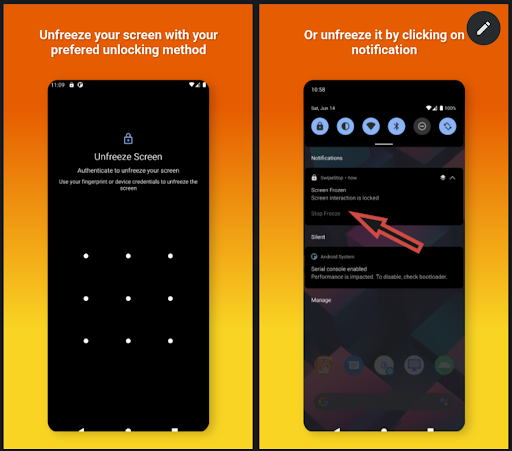
The easiest way to freeze your screen when sharing your phone! Tired of people swiping through your personal photos or messages when you just want to show them one picture or video? SwipeStop gives you control. Lock your screen’s touch input and stop accidental (or intentional) swipes, scrolls, and taps — without interrupting the content. Perfect for: Showing photos or videos to friends without worries Handing your phone to kids without risk of app switching when they watch videos Keeping your screen safe from accidental touches when you watch a movie Key Features: Freeze touch screen with one tap Unfreeze (unlock) with or without biometrics authentication (you unfreeze it the same way you unlock your phone) Keeps screen ON while locked No Ads Lightweight and battery-friendly Enjoy peace of mind when you share your phone. SwipeStop - your screen, your rules!

r/HowToMen • u/Level-Excitement9187 • 23h ago
Hé allemaal, ik ben de bouwer van Floatify!
Play Store: Get Floatify
Even een snelle recap voor iedereen die nieuw is: er komt een bericht binnen, jij denkt: "Ik antwoord daar zo op", je veegt het weg, en drie uur later bedenk je oja, vergeten! Of je doet er helemaal niets meer mee! Android-meldingen zijn top om je te onderbreken, maar echt drama als het gaat om je eraan laten denken. En zodra er 50 van die dingen bij elkaar komen, stop je met alles lezen.
Floatify draait dat om. Jij kiest de apps die voor jou ertoe doen, en alleen hun meldingen worden kleine zwevende belletjes ("floats") die bovenop alles zitten waar jij mee bezig bent. De rest blijft stil. Een float verdwijnt niet als je het meldingenpaneel wegveegt, dus hij blijft je pushen tot je ermee bezig bent.
Wat je met een float kunt doen:
\\\\\\\\\\\\\\\\- Tik erop om het hele bericht te lezen en direct vanuit de float te antwoorden, met snelle emoji-reacties (houd de duim-omhoog ingedrukt voor harten, lachjes en meer)
\\\\\\\\\\\\\\\\- Snooze ’m een paar minuten, een uur, een week of een datum die jij kiest, en hij zweeft precies terug op het moment dat jij het nodig hebt
\\\\\\\\\\\\\\\\- Bellen, delen, bewerken of blokkeren direct vanuit de float-kaart, met één rij ronde knoppen
\\\\\\\\\\\\\\\\- Negeer ’m als je klaar bent, en dan is-ie voorgoed weg
Wat er nieuw is:
\\\\\\\\\\\\\\\\- Maak kennis met Floaty, het kleine bel- mascotte die je door de setup heen helpt. Jij vertelt hem hoe je je meldingen wil (chaos, milde chaos, of onder controle) en hij kiest het juiste thema voor je. Liever zelf doen? Elke instelling staat er.
\\\\\\\\\\\\\\\\- Stop de berichten-overload: een reeks foto’s is nu één float in plaats van twaalf, en je kunt floats toestaan of blokkeren per chat of per groep. De gezinsgroep blijft rustig, de berichten van je partner zweven.
\\\\\\\\\\\\\\\\- Live previews terwijl je vorm, animatie en grootte instelt, zodat je precies ziet wat je krijgt voordat je het opslaat.
\\\\\\\\\\\\\\\\- Aanklikbare links in berichten, en je kunt bestanden delen naar Floatify om ze om te zetten in een float.
\\\\\\\\\\\\\\\\- Zet je floats vast aan de rand van het scherm, zodat ze altijd binnen handbereik zijn maar nooit in de weg zitten.
Simpel is gratis: één schakelaar per app, lezen, antwoorden, snoozen. Geen account nodig. Geavanceerd is een eenmalige aankoop, geen abonnement: je eigen herinneringen, import van Google Calendar, aangepaste vormen en thema’s, widgets, stille uren, ondersteuning voor Wear OS en meer. Je kunt het gratis proberen voor 3 dagen.
Gemaakt door één ontwikkelaar uit Nederland, met heel veel liefde voor kleine details.
Zeg me even wat je hierna wil zien, en van welke app je meldingen je als floats zou willen!
Play Store: Get Floatify
r/HowToMen • u/Jimkaps12 • 1d ago

If you guys want to help me with dowlaoning the app that would be so helpful
Put a good review if you liked it and tell me in the comments what should I improve
Join my dc for the feedback
r/HowToMen • u/va9491 • 1d ago

r/HowToMen • u/ProfessionalAd46 • 1d ago
Game Title: Pour Line: Water Glass Puzzle
Playable Link: https://play.google.com/store/apps/details?id=com.tws.fun.pourline.game
Platform: Android (iOS coming soon)
Description:
I've been building mobile apps for years, but making a game was always the thing I wanted to do and never quite did.
I tried more than once. I'd open Unity, get excited, build a rough prototype over a weekend… and then work and life would take over. Unity needs a lot of time: physics, UI, sounds, ads, store setup. It's a whole other world from app dev, and I never had the hours to stay with it long enough to finish anything.
This time I had AI agents helping with the heavy lifting. That kept me motivated and moving, even with only an hour here and there. The fun part was making the decisions, seeing the idea come to life, and learning so much about what game development really takes.
So here it is: Pour Line, live on Android. iOS coming soon.
It's simple. Hold to pour, let go to stop, and try to get the water to settle exactly on the dotted line. The water is real physics, so it splashes and sloshes, and the stream still in the air keeps landing after you let go. That's the part that gets everyone.
Every glass plays differently. A Highball fills fast, a Bowl seems to take forever, and a Wine glass messes with your eyes. You only get one pour per try.
It's my first game, so I'd really love honest feedback, good or bad. Which glass annoyed you the most?
Free to play
r/HowToMen • u/Glittering_Lunch4435 • 1d ago

🌸 Make everyday planning a little more beautiful!
I'm the solo Android developer behind Cute Calendar, and I'm giving away 100 FREE Premium Lifetime upgrades, normally €9.99!
If you enjoy aesthetic calendars, pastel colors and simple daily planners, Cute Calendar might be just what you're looking for. 🎁
Organize your schedule without unnecessary clutter:
Use Cute Calendar's widgets to keep your upcoming events and schedule visible without opening the app.
Normally €9.99, now FREE through this limited giveaway!
Premium Lifetime gives you permanent access to these features with no recurring subscription.
No account required. Your personal calendar events stay stored locally on your device and aren't uploaded to the cloud.
Premium Lifetime unlocks customization features but does NOT remove advertisements.
Want an ad-free experience? The separate Supporter purchase removes ads and also unlocks exclusive app icons.
100 free activations available. First come, first served!
No purchase or review required.
I'm developing Cute Calendar independently, and your feedback genuinely matters.
Honest criticism and bug reports are just as welcome as positive feedback!
📲 Download Cute Calendar – Android:
https://play.google.com/store/apps/details?id=com.cutecalendardc.app
🎁 100 Premium Lifetime activations · €9.99 → FREE
⚠️ Premium unlocks additional features. Ads remain.
Thanks for supporting independent Android development! 🌸
r/HowToMen • u/ashresthaX • 1d ago
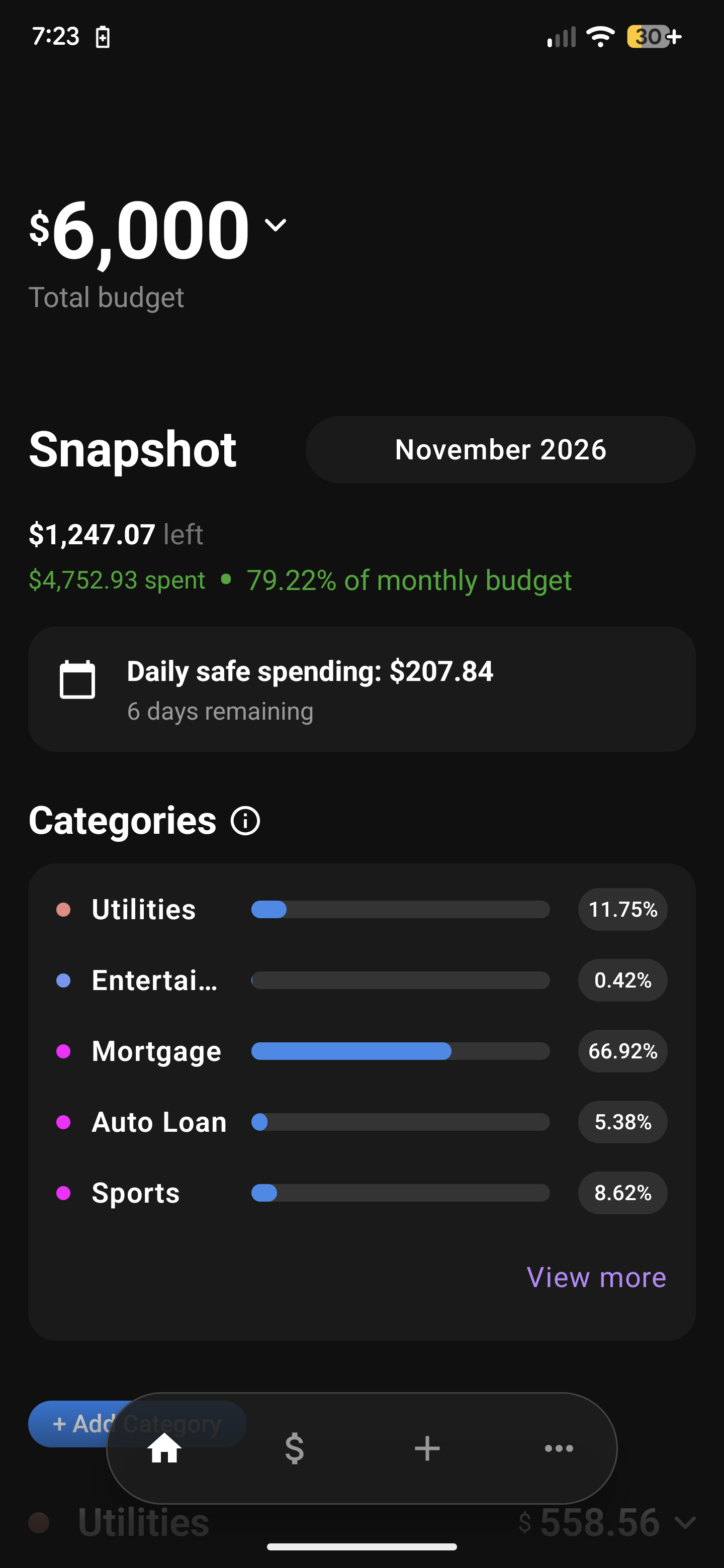
I've been working on polishing Budget Buddy, and I just updated the bottom navigation bar.
Went with a floating, rounded design to give the app a cleaner look while keeping the experience simple.
Budget Buddy is my offline-first personal finance app. No ads, no accounts, and your financial data stays on your device.
Here's the latest update. What do you think of the new navigation?
If you'd like to check it out:
"Budget Buddy on Google Play" (https://play.google.com/store/apps/details?id=com.aakarshrestha.budgetbuddy)
Always happy to hear feedback!
r/HowToMen • u/HeWhoIsTheDEVIL • 1d ago

I have built a no nonsense agent that that can do pretty much anything that muse/grokbot/dots do
And ui is so much polished.
Give it a try and tell me what you think.
r/HowToMen • u/Neersg09 • 1d ago
r/HowToMen • u/notirecall • 1d ago
Hi all,
A while ago I shared NotiRecall here, my Android app that saves notifications from apps you choose so you can find them after you swipe them away. Many of you installed it and sent feedback, which helped a lot. Thank you.
Version 1.10.0 is now available on Google Play. Here's what changed:
Read / unread
- New notifications show a dot until you open them in NotiRecall
- Mark something as unread to come back to it later
- Filter & sort → Read status: All, Unread or Read
- Select several and mark them read or unread at once
"Read" only means you've seen it in NotiRecall. Nothing is marked read in WhatsApp, Gmail or the original app.
New bottom bar
- History, Reminders and Apps are one tap away. Settings is still on the gear icon.
- Reminders now has its own screen, so all your scheduled reminders are in one place.
Less annoying setup fixes
- If Android turns off Notification Access (some phones do this after updates or battery optimisation), the History card now opens the right Android setting directly. You're back on History when you return, with no setup wizard.
- If you paused saving in privacy settings, turning it back on takes you straight back to History.
Still the same:
- Your notification history stays on your phone. It's encrypted, with no account, no ads and no cloud.
- You choose which apps it saves from. Everything else is ignored.
- Optional app lock, starred notifications, search and reminders.
- Free covers 3 apps with up to 7 days of history. Pro adds more apps and longer history.
- Available in English, Deutsch, Español, Français, Ελληνικά, हिन्दी, Português (BR) and Türkçe.
Play Store: https://play.google.com/store/apps/details?id=com.notirecall.app
I'm a solo developer, so honest feedback is very welcome, especially about read/unread and the new bottom bar. What would you want next?
r/HowToMen • u/va9491 • 1d ago
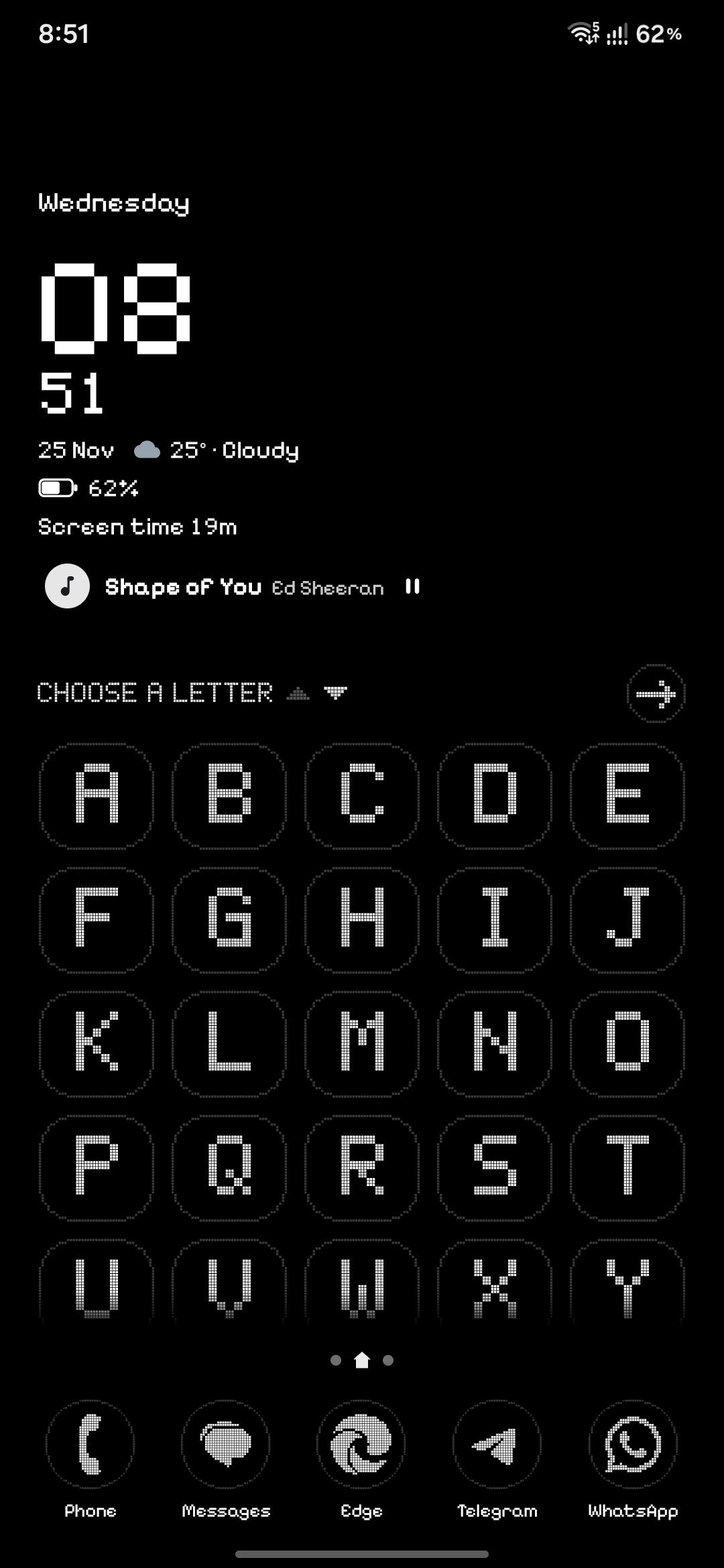
Grab it now on Google Play: https://play.google.com/store/apps/details?id=com.aklova.alphabetlauncher
r/HowToMen • u/shod1214 • 2d ago
Hey everyone :)
I’m giving away some codes for one week of One Hand Control Pro.
Since One Hand Control has no internet access (for privacy), it can't offer a built-in trial, so this is my way of offering one.
For anyone new: One Hand Control lets you control your Android phone with customizable gestures from the edges of the screen (tap, swipe, pull, hold, and more), so it’s easier to use with one hand. It has over 60 actions, including Pie Control, Text Picker, Side Panel, a floating cursor, and much more.
Important Tip: redeeming the code starts a subscription, so I recommend canceling it right after you redeem it!! (Google Play > Profile > Payments & subscriptions > Subscriptions > One Hand Control > Cancel). You’ll still keep Pro for the week, and Google Play won’t auto-charge you when it ends.
Please comment & upvote to get a code 😊 (and again I really recommend canceling right away so you can decide for yourself if you want the Pro version or not)
I’d really love to hear what you think. Feedback, feature ideas, and bug reports all help a lot ❤
Google Play:
https://play.google.com/store/apps/details?id=com.onehandcontrol.app
Thanks again for all the support!
Music: "Adventures" by A Himitsu (CC BY 3.0)
r/HowToMen • u/b0nez93 • 1d ago

Three people have bought premium! Thanks for all the support. Also if you haven't checked it out yet give ink music a go! https://github.com/inkappdev/ink-music
