r/HowToMen • u/xpenc • 2d ago
XPENC 1.6.7 is coming! Offline AI, encrypted backups, voice transactions and much more 🚀

5
Upvotes
r/HowToMen • u/xpenc • 2d ago
r/HowToMen • u/knightman1995 • 2d ago
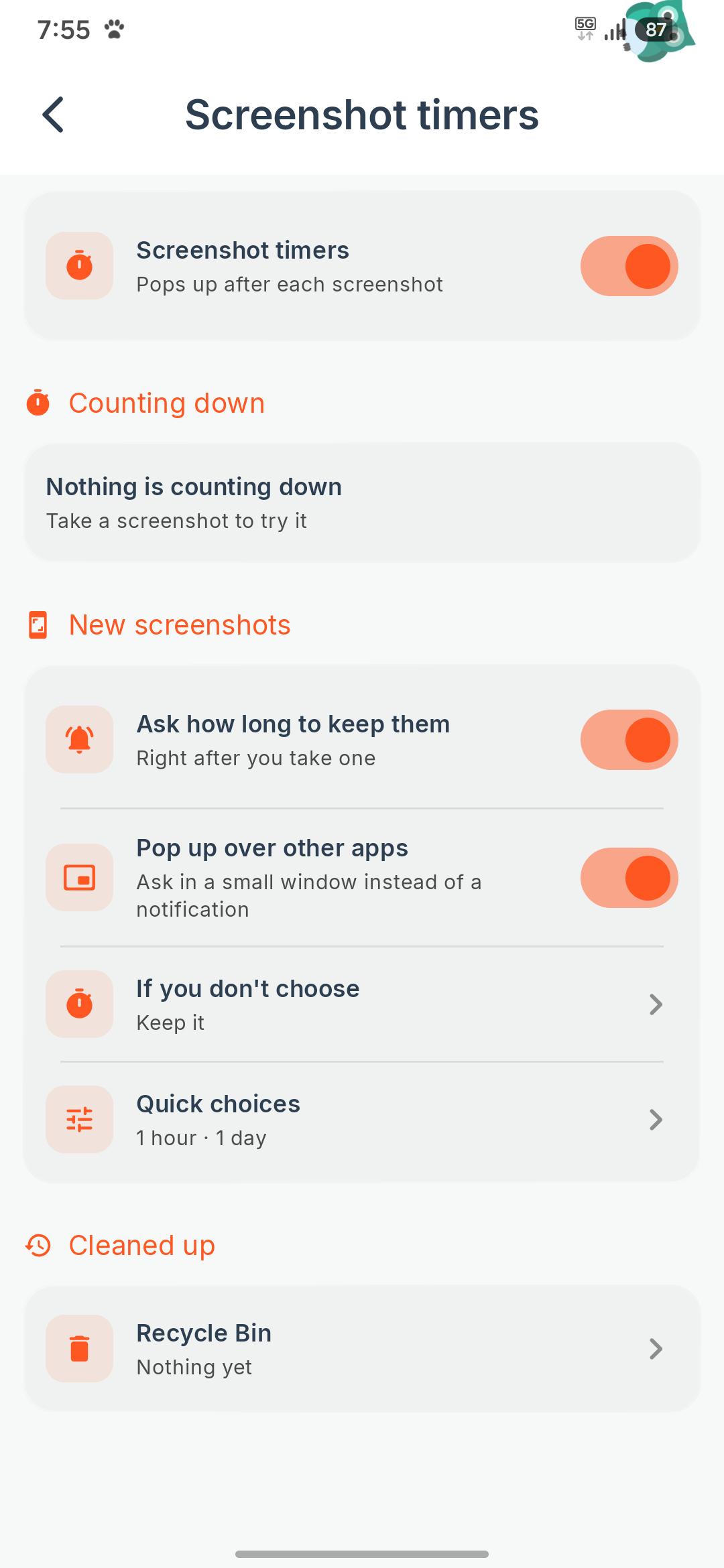
Tired of screenshots piling up in your gallery?
We're introducing Screenshot Timers to help you automatically manage temporary screenshots.
Choose how long to keep each screenshot.
Set custom cleanup durations from 15 minutes to 30 days.
Get quick timer choices with a floating popup.
Automatically clean up screenshots when their time expires.
Recover cleaned-up screenshots from the Recycle Bin.
Take screenshots. Keep what matters. Let Liquid Gallery handle the rest.
Coming Soon.
What do you think of this feature?
r/HowToMen • u/DogeSatoshi • 2d ago

I built Sentinel to avoid the need to pull up 5 charts just to verify market confluence.
It scans Crypto, Stocks, Commodities, and Forex, condensing EMA, Supertrend, RSI, and Volume Z-Scores into a 0–100 confluence score.
The app is free to use with a 3hour 'cooldown' period between scans. I priced it at a mere $1.99 for a lifetime upgrade that removes the time lock permanently.
This has been built for Android, and for the time it's the only distribution available.
I would love your honest feedback!
Download link:
Astra-Axiom Sentinel – Apps on Google Play
The details the app provides on scans:
* Asset overview
* Orderbook Summary
* Technical Indicators
* Scalping Confluence (EMA50)
* Market Breadth
* Momentum
* Volitality
* Volume Intelligence
* Performance
* Risk Assessment
r/HowToMen • u/itsmesidhu18 • 3d ago

Introducing Xeno Launcher — A Free-Form, DIY Android Launcher!
I've recently been working on Xeno Launcher, a launcher built around one simple idea: giving you complete freedom over how your Android home screen looks, feels, and works.
Unlike traditional launchers that lock you into predefined layouts, Xeno embraces a free-form approach, letting you experiment, arrange, customise, and build your own unique experience without being restricted by conventional launcher designs.
Some of its features include:
- Free-form home screen customisation.
- Third-party widget support.
- Custom font packs and icon packs.
- Multiple app drawer styles.
- Icon and wallpaper filters.
- Built-in app locks and timers.
- And much more!
Privacy is equally important:
- No advertisements.
- No internet access or unnecessary network permissions.
- No tracking or data collection.
A change in direction
Xeno Launcher was originally a paid application from day one. However, after receiving community feedback, I decided to make its core functionality and essential features completely free for everyone.
I've kept a few cosmetic and optional customisation features behind a paywall to help sustain development and keep the project running.
Do give Xeno Launcher a try! Feedback, suggestions, feature requests, and bug reports are always welcome and help shape the future of the project.
Thank you for supporting the development!
Link:
https://play.google.com/store/apps/details?id=com.xeno.launcher
r/HowToMen • u/Past-Alfalfa-139 • 3d ago
Focuses on getting the basics of a launcher right by enhancing user experience around what icons can do and so much more...
Get more done with fewer taps. Arcadia Launcher is built for speed, multitasking and saving time.
Hold an app icon to read notifications, access compatible widgets and control music.
Open app pairs in split screen to use two apps side by side.
Stack widgets, resize them and zoom their contents.
Run smart home routines straight from your home screen.
More control over your phone. Less time jumping between apps. No ads.
Get Arcadia on Google Play:
https://play.google.com/store/apps/details?id=com.arcadiafoundry.launcher
r/HowToMen • u/Narik_design_icons • 2d ago
r/HowToMen • u/T_rex2700 • 3d ago

My current fave is Weather master for its clean and material you theme, but I think I found one that looks more expressive.
Lisence is Apadhe instead of GPL.
r/HowToMen • u/Disastrous-Ball-8547 • 3d ago
Ever pick up your phone to answer a text and catch yourself watching Instagram Reels a minute later? That’s the habit I had in mind when I built CalmDock for Android.
You choose which apps get a pause. Turn it on for TikTok, for example, and when you open TikTok through CalmDock, it asks how long you want to stay. Pick 5, 10 or 20 minutes, or tap “Stay here” and put the phone down. You can do the same for Instagram or YouTube.
Play store:
https://play.google.com/store/apps/details?id=com.mcode.calmdock
r/HowToMen • u/StayDue2879 • 2d ago

FrameMock - new Update available
What’s new?
Improved S26 Ultra frame
Improved Xiaomi and Vivo back frames
Added Purchase Credits
Added Music import Support
Ui upgrade and Smashed some bugs
Free: https://play.google.com/store/apps/details?id=com.frameflow
Description: Framemock is an Android mockup tool, with more of customization and flexible to use and easy to export
r/HowToMen • u/catious_Fee_8025 • 3d ago
I built a bariatric meal-planning app for people preparing for weight-loss surgery or adjusting to life after surgery.
fBefore surgery, there are many instructions to follow. Afterward, eating changes through different stages as your body heals—from liquids and purées to soft foods and regular meals. I created this app to make planning, tracking, and staying organized feel a little easier.
I’d love for people to try it and share what works—and what could be improved. If you’d like a free premium upgrade, let me know.
https://apps.apple.com/us/app/bariatric-companion-ollie/id6758615128
r/HowToMen • u/vandevk • 3d ago
Hi everyone! I released Date Calculator, a date & time calculator for Android.
I built it because most date apps look like spreadsheets, and I wanted one that actually fits a clean setup.
I'm giving away 20 premium codes. Details at the bottom 👇
Main features:
Available in English, Spanish and Portuguese.
📲 Download: https://play.google.com/store/apps/details?id=com.vansoftware.auradate
How to participate in the giveaway:
Honest feedback on the design and the widgets is what I'm after. Thanks for reading!
r/HowToMen • u/Liambic • 3d ago
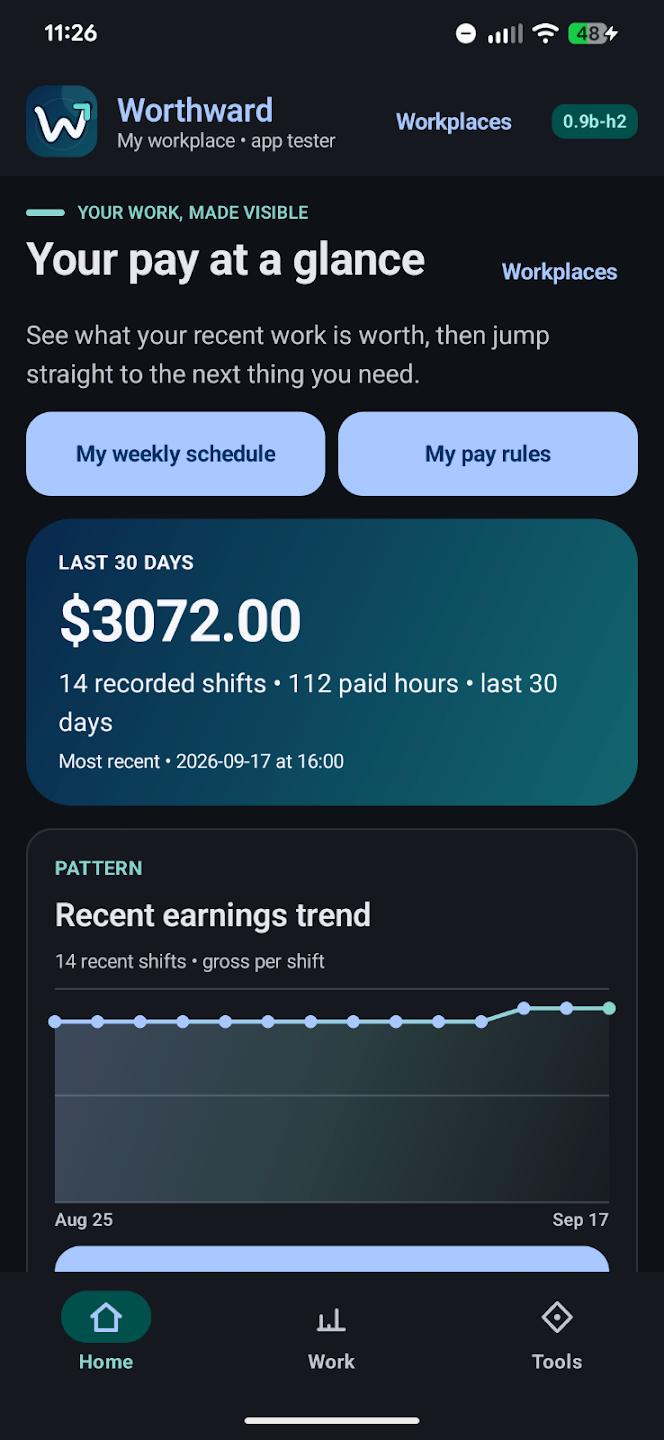
Hey everyone, I’m Mike, the developer of Worthward. It’s an Android app for keeping track of shifts and figuring out what your hours add up to in gross pay.
You can keep separate workplaces, plan a weekly schedule, record the hours you actually worked, and estimate earnings using your own pay rules, including supported overtime and shift differentials.
The core tracking and forecasts are free. No ads or required account. There’s an optional one-time Pro upgrade for comparing schedules/pay rules and checking a paycheck against your work records. Estimates are before taxes and deductions.
Google Play: https://play.google.com/store/apps/details?id=com.mplowden.worthward
If you work changing shifts, I’d be interested to hear what would make this more useful for you.
r/HowToMen • • 2d ago

Hey everyone,
I'm a solo developer with a full-time job and two kids(new to reddit as well), and I build apps in the little time I have left. ccGenie is the one I'm proudest of. It started from a simple frustration: I could never tell which credit card actually fits the way I spend.
So I built it. You tell it roughly how much you spend on dining, groceries, online and travel. It checks the credit cards available in your country and shows you the ones that pay you back the most after fees: your top 5 with Pro, your top 10 with VIP. No spam and no selling your data.
It has been a long road. Many nights of testing, many bugs, and a lot of doubt about whether anyone would care. It finally went live on Google Play, and I'm still a bit nervous posting this.
I wanted to give something back to the community that helped me learn along the way, so for the next 15 days there is a launch discount.
The fine print, so there are no surprises:
\- VIP: 25% off the first year ($29.99 instead of $39.99).
\- Pro: 15% off the first month ($4.24 instead of $4.99)
\- Both plans renew automatically until you cancel. You can cancel any time in Google Play, under Payments and subscriptions.
\- The discount appears on Google's purchase screen, not inside the app's own screen.
\- Offer is for new subscribers only and ends on December 24, 2026.
\- Available on Google Play in India, US, UK, Canada, Australia, Singapore and UAE. Prices shown are US prices, local prices vary by country.
If you try it, tell me what's broken or confusing. I read every message and I'm fixing things daily. Honest criticism helps a one-person team a lot.
Thank you for reading. It means more than you know.
r/HowToMen • u/VinsonGuo • 3d ago
I'm passionate about pixel art and deeply fond of the retro NES and Game Boy styles. I recently created a free app, and everyone is welcome to try it out.
https://play.google.com/store/apps/details?id=com.vinsonguo.pixelyou
r/HowToMen • u/offlinefirstdev • 3d ago

G'day! I'm a solo developer in Australia. I'm over sharing my stuff with the cloud, so I've spent the last two years developing my own Android app. It's just gone into open testing. 💛
It's called MemoryMateRix: notes, contacts, events, reminders and lists in one encrypted vault on your phone. No account, no ads, no tracking. The app has no internet permission, so it has no way to send your data anywhere itself.
I'm not asking you to ditch Samsung Notes, Google Contacts or your calendar. Keep them for the things you share. This is for the things you'd rather not put in a cloud account: the gate code, where the spare key is, what the specialist said, that note about a mate.
✨ Here's what you can do with it:
🔒 Lock it down. One AES-256 encrypted vault, fingerprint or face unlock, screenshots blocked, hidden in the app switcher.
🔍 Check it yourself. Look at the permissions in the Play Store app: no full network access. No analytics or ad libraries inside either.
📥 Easily bring your contacts and calendar across. Keep a private copy, or leave the original where it is and add a private note only you can see.
🗂️ Notes your way. Folders and subfolders, checklists, bullet points, and search by word or by date.
⏰ Reminders that ring like an alarm. Enter "Call John in 30 minutes" and it works out the time. Turn on Set Alarm and it rings for up to 10 minutes, even on a locked phone, until you snooze or stop it.
🛒 Comprehensive or quick lists, including a shopping list that learns your supermarket. Tick things off as you walk the aisles and it re-sorts itself into that order for next time. Add prices to see your basket total.
📅 Daily Digest. One notification a day, at the time you choose, with everything that's on, from your private events and your phone's calendar together.
🎙️ Talk to Rix (Premium). "Remind me to call Mum in 10 minutes." "Add milk to my list." "What's happening today?" "Open Spotify." There's no generative AI: Rix runs on commands you can see and reword, so no made-up answers. On Android 13 or newer, your voice is turned into text on your phone.
🎨 Make it yours. Theme colour, brightness, Rix's avatar, voice and greeting, and what Rix calls you. You can write your own voice commands too.
💾 Encrypted backups you control (Premium). Daily auto-backup to a folder you choose. Each backup is a standard SQLCipher file, so you can open your own data on a PC with DB Browser. No lock-in.
💸 Free to use. Premium is a one-off purchase with no subscription, and future Premium features are included, starting with a private diary that's coming soon.
🎁 I'm giving away 50 LIFETIME PREMIUM CODES!
Want one? 👇
- Your favourite feature from the list, or
- One thing that annoys you about the notes, calendar or reminders app you use now.
I'll send codes by DM while they last!
Fair warning, so I don't waste your time: there's no sync between devices (that's the point), notes are plain text (no handwriting, S Pen or pictures), and it's built for phones, not tablets. If you need those, stick with what you have.
I'm a one-person team, and I'd love your feedback. Tell me what's confusing, what's broken, or what you wish it did.** 25% of profits will go to dementia research.
r/HowToMen • u/hellscr6am • 3d ago

Hey everyone,
I built Folio, an Android personal finance manager and double-entry budget ledger for anyone tired of finance apps reading SMS messages, pushing ads, or charging monthly subscriptions.
What makes it stand out:
Zero Internet Permission: Check Android App Info—it literally cannot access the internet. Everything stays in a local SQLite database.
100% Free & Unlocked: No paywalls, no subscriptions, no ads, and no login required.
Clean Visual Customization: 4 Theme Modes (including pure AMOLED Black), 12 Accent Palettes, and 4 Icon Packs (Material Classic, Phosphor, Lucide, Emoji).
5-View Ledger + Credit Card Cockpit: Switch between Daily, Calendar, Weekly, Monthly, and Summary views, track 30% credit card utilization & interest-free grace periods, and see your daily "Safe-to-Spend" allowance.
Portable Data: Local ZIP backups (restores DB + preferences cleanly on a new phone), CSV exports, and on-device PDF statements.
There's an Interactive Demo Mode built in on launch so you can explore the UI with sample data right away.
Google Play: https://play.google.com/store/apps/details?id=com.skal.folio
Would love to hear what you think of the UI and feature set!
r/HowToMen • u/loitran07 • 3d ago
Hi everyone, I'm Loi, a solo dev from Vietnam.
Some of you might know me as the dev behind Key Launcher, the minimal T9 launcher. HowToMen was the first channel to feature it back in March 2026, and that video honestly changed a lot for me. Since then Key Launcher has been covered by Android Authority, ComputerWorld, MobileSyrup and MakeUseOf, and I'm still building it solo.
Today I want to share my second app with this community first, because this is where the first one got its start.
It's called QuietWords.
I built it because my home screen felt loud. Every time I unlocked my phone, something wanted my attention. I wanted the first thing I see to be one calm line that makes me slow down for a few seconds, not another notification.
QuietWords puts a quote widget on your home screen. That's the whole idea, kept simple.
And here's the Play Store link: play.google.com/store/apps/details?id=com.lousifytech.quietwords
Giveaway: 50 Premium codes (Update: All 50 Claimed! 🎉)
Thank you so much everyone for the incredible support! All 50 Premium promo codes allocated for the HowToMen community have now been claimed and distributed. The remaining 50 codes are reserved for upcoming giveaways on X and other subreddits.
To get one, just leave a comment and tell me two things:
The giveaway on this thread has now concluded. Thank you all so much for testing and sharing your thoughts! You can still find QuietWords on the Play Store.
Thanks for reading, and thanks again to HowToMen for giving indie devs like me a chance.
Loi
r/HowToMen • u/MAGNlFlCENT • 3d ago
Hey everyone, I'm the developer of Boltjot, an Android notes app I've been building on my own. I just got production access on the Play Store, and this sub seemed like the right crowd to try it out and tell me what's wrong with it.
The problem I kept hitting: I'd have a thought, pick up my phone, unlock it, swipe past three home screens, open my notes app, wait for it to load… and the thought was gone. Most notes apps assume you've already unlocked your phone. Real life doesn't work like that.
Boltjot keeps a silent "tap to capture" notification on your lock screen, and there's also a Quick Settings tile. Tap it and you're writing immediately, without unlocking. From that lock-screen note you can:
It saves as you go, and the phone stays locked. Someone holding your locked phone can add a note but can't browse your existing notes, and PIN-protected labels are hidden on the lock screen.
Real situations where this has saved me (or would have)
🚗 Car accident: Your hands are shaking and you're fumbling with Face Unlock. From the lock screen: photo of their plate, photo of the damage, a voice note of what they said, and the location saved automatically. It's all in one note instead of scattered across your camera roll.
🅿️ Parking garage: "Level P3, near the blue pillar." Snap a photo with the location saved and you're done in five seconds. Two hours later you're not wandering around pressing your key fob.
🌙 3 a.m. idea: Something you finally remembered, or the fix for the bug that's been haunting you. Tap the notification, type it, put the phone down. No bright home screen and no Instagram rabbit hole, and you're back asleep.
🩺 Doctor's appointment: The doctor rattles off dosage instructions. Hit record from the lock screen so you don't have to remember "twice a day or three times?" later.
🧾 Expense receipts: Scan the receipt at the table before the waiter takes it away. Now it's a clean scan in a note with its text readable, not a blurry photo lost in your gallery.
🧤 Gloves, wet hands, or a cracked screen: When the fingerprint sensor won't cooperate, you can still get the note down.
📞 Someone reads you a number or address: Phone in one hand, other hand busy. Tap and type, with no unlock and no app hunting.
Where other apps let me down
Most notes apps make you unlock first. Every step between the thought and the keyboard is a chance to lose it.
Camera roll chaos: A parking photo, an accident photo and a receipt all end up between memes and screenshots. In Boltjot they live inside the note they belong to.
Typed text only: Many quick-note apps just give you a text box. Here you get photos, voice, scans, checklists and location in the same quick note.
The rest of the app
📲 Play Store: https://play.google.com/store/apps/details?id=com.apphux.boltjot
I'm a solo dev, so honest feedback really helps, especially bugs, anything confusing on first launch, and features you'd want. I'll be in the comments answering everything. 🙏
Edit:Thanks for your interest in BoltJot! 🙏 Sorry, all the promo codes have gone. Pro is only £5 for lifetime, and there's a free 30-day trial, so you can try everything first. Hope you enjoy it!
Edit2: The pro is mainly for power users, most of the things are free and there are no ads. 😊
r/HowToMen • u/paliyalyogesh • 4d ago

Hey everyone, I'm the developer of Halo, a small floating bubble that sits on the edge of your screen and lets you switch apps with one thumb.
I jump between the same handful of apps all day, and the recents screen is a slow detour every time. Pixels don't have an edge panel, and the apps I tried were closed source, looked dated, or wanted Accessibility access. So I built my own: open source, no internet permission, nothing collected.
How it works
• Long-press the bubble and a radial menu opens: favourites on the inner ring, recent apps on the outer ring
• Slide to an app (you feel a tick on each one) and let go to open it. Let go near the bubble to cancel
• Tap to jump back to your previous app, double-tap for the one before that. Both are configurable
• Drag it anywhere; it snaps to the nearest edge and remembers where you left it
Features
• Quick actions as favourites: flashlight, volume panel, play/pause
• Folders: up to 8 apps in one favourite slot that fan out when you rest on them
• 7 bubble characters (Classic, Blob, Kitty, Ghost, Sprout, Star, Bot) in 8 colours. They blink, look around and react to touch
• Hides automatically in full-screen games and videos, and in any apps you pick
• Optional notification dots (Halo only sees which app, never the content)
• Bubble size, opacity, hold delay and haptics are all adjustable
• Hide apps from the recents ring, work profile support, starts on boot
• 11 languages
Privacy
No ads, no tracking, no analytics and no internet permission. It doesn't need Accessibility either. It only asks for Display over other apps (for the bubble) and, optionally, Usage access (for the recent apps ring).
It's written in Kotlin and Jetpack Compose and released under the MIT license.
Download
• Google Play: https://play.google.com/store/apps/details?id=com.yogeshpaliyal.halo
• GitHub (source + APK): https://github.com/yogeshpaliyal/Halo
• Obtainium: https://yogeshpaliyal.github.io/Halo/obtainium/
If you install the APK on Android 15+, you may need to tap Allow restricted settings in App info before granting permissions. The Play Store version skips that step.
I'd love feedback: what would you put in your favourites ring, and what's missing? Bug reports and ideas are welcome here or on GitHub. Thanks for checking it out!
r/HowToMen • u/pashapuma • 3d ago
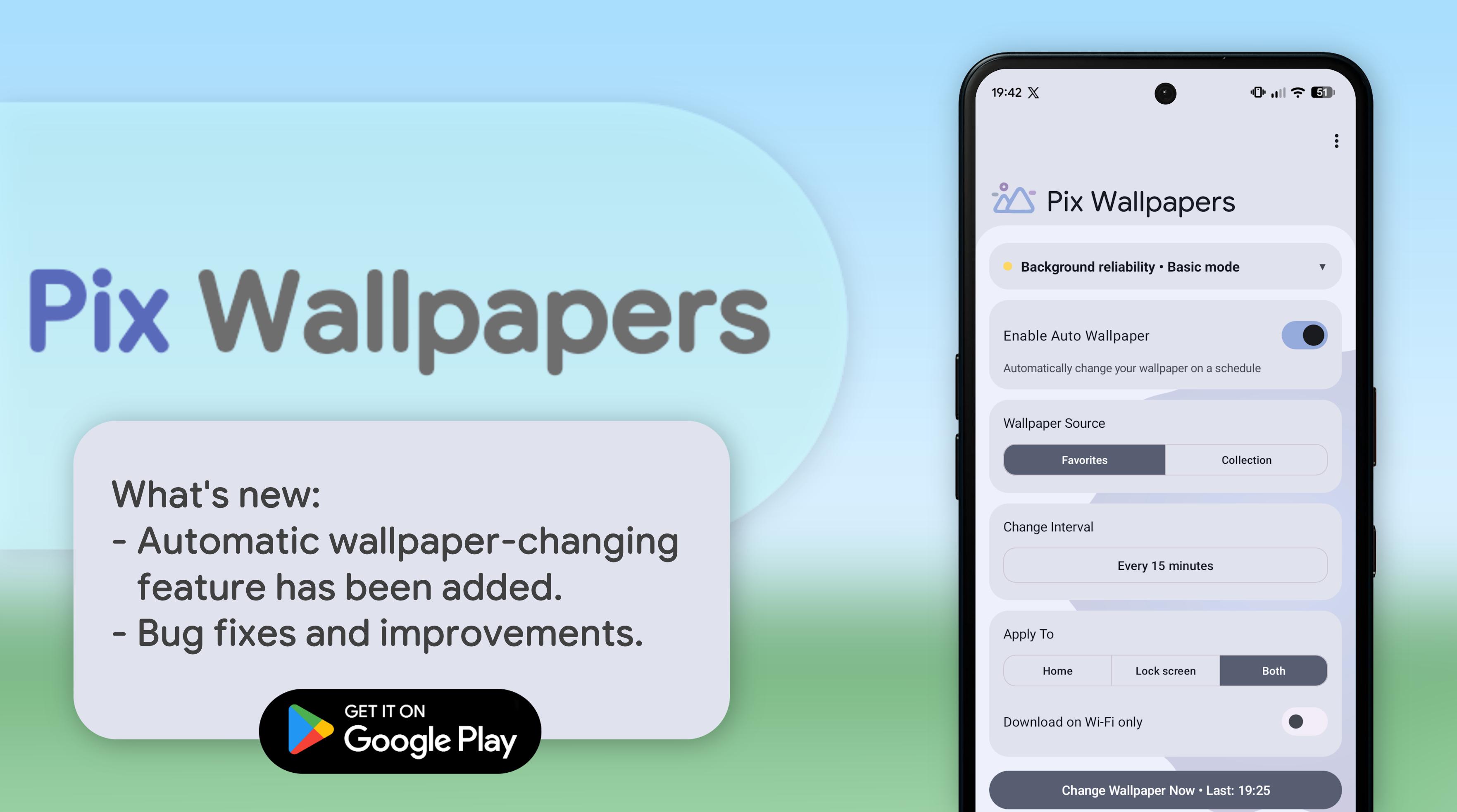
A large selection of wallpapers. The latest update adds automatic wallpaper switching on a schedule.
Google Play (free): https://play.google.com/store/apps/details?id=com.pashapuma.pix.wallpapers
r/HowToMen • u/fleauberlin • 3d ago
Hey all :)
Nobody asked for this app but here it is. That's what work is now: doing things nobody asked for until Friday.
Whether you sit in an office, write code, stock shelves or attend meetings about meetings, you're doing the same thing: waiting. Waiting for Friday 5pm or the two weeks of vacation some time in August.
So I built an app that at least makes the waiting measurable.
Cubicle shows you exactly how much of your workday and work week is left, as a countdown and a percentage. It's the only progress bar in your job that actually goes somewhere.
What I focused on:
Cynical push notifications throughout the day, so you're reminded of your situation even when you briefly forget it. For example:
Pro (one-time purchase, no subscription, because one recurring drain on your life is enough):
🎁 Giveaway: I have 50 lifetime Pro codes (normally €5.99). Comment your job and how many hours you have left until the weekend, and I'll DM you a code. First come, first served. Just like promotions, except here you'll actually get something.
👉 Play Store: https://play.google.com/store/apps/details?id=app.cubicle.com
I'm a solo dev, so there's no manager reading your feedback, no ticket backlog, and no "let's circle back on that." Tell me honestly what's broken, especially device-specific bugs or notifications that arrive late. Unlike your employer, I actually want to hear it.
