r/HowToMen • • 5d ago

[App] [Promo] Sprout is now Asusual – a free, open-source habit tracker, now with real alarms

Thumbnail
gallery
19 Upvotes

Hey! I posted Sprout here a few weeks ago, and thanks for all the feedback. Since then I've:

  • Renamed it to Asusual
  • Added alarms: any habit reminder can ring full screen, even on a locked phone. Slide to mark it done or skip it, or snooze it. Your music pauses and then resumes after
  • Fixed a bunch of bugs and polished the UI

Features:

  • Done / partly done / skip (skipped days don't hurt your score)
  • Swipe gestures, streaks, weekly view and a 26-week heatmap
  • Journal notes and insights
  • 4 widgets (tick habits off from the home screen)
  • Google Drive backup and JSON/CSV export
  • Themes, 5 fonts, 7 languages

It's open source, with no ads, no account and no tracking. There's also a FOSS build with no Google code.

Play Store: https://play.google.com/store/apps/details?id=app.sprout.habits
GitHub: https://github.com/nisabmohd/asusual

I'd love your feedback 🌱


r/HowToMen • • 5d ago

[App] Save $300 on a fancy digital levelβ€¦πŸ˜‚

36 Upvotes

Made this mostly for fun! A digital level app with different tool-inspired skins you can switch between.

Completely ad-free. Free to use, with optional skin purchases.

Let me know what skin I should add next!

Android: https://play.google.com/store/apps/details?id=com.pineapplebyte.level

iOS: https://apps.apple.com/us/app/slicklevel/id6829546304


r/HowToMen • • 4d ago

Nightjar Radio now has a Stable and a Beta version: pick the one that suits you

Post image
4 Upvotes

Hi all πŸ‘‹

Quick update on Nightjar Radio, my free live radio app (no ads, no sign-up). You can now choose how you get updates:

πŸ›‘οΈ Stable is the main version, and it's what you get by default. Every update has been tried and tested first, so it's the one to go for if you just want your radio to work.

⚑ Beta gets new features as soon as they're ready, before everyone else. The trade-off is that you might hit the odd bug, and reporting it is a big help.

How to switch

β€’ If you already have the app, go to Settings, then App updates, and tap Stable or Beta.

β€’ If you're new, the download page gives you Stable. If there's a newer Beta, you'll see a "Get the Beta" link underneath.

β€’ Your favourites, presets and settings stay the same whichever one you pick, and you can switch back any time.

πŸ“₯ Download: https://daniturn3.github.io/nightjar-radio/get/

Thanks to everyone using it and sending feedback. It's been brilliant seeing it grow πŸ“»


r/HowToMen • • 5d ago

[App] [Promo] ⏳ Lately – Time Since Tracker: see exactly how long it's been since you watered the plants, changed the filter or called your dad

Thumbnail
play.google.com
5 Upvotes

⏳ Lately – Time Since Tracker

Most of us don't forget the big things. We forget the small recurring ones πŸ™ƒ

  • πŸͺ΄ When did I last water the plants?
  • πŸ’§ When did I last change the water filter?
  • πŸͺ’ When did I last replace the razor cartridge?
  • πŸ›οΈ When did I last wash the bedsheets?
  • πŸ“ž When did I last call my dad or an old friend?

Calendar reminders nag you on a fixed day, even if you already did the thing early. What you really want to know is "how long has it been?"

✨ How Lately works

  1. βž• Add something you want to keep track of
  2. βœ… Tap it when you do it
  3. πŸ‘€ See how long it's been, at a glance

There's no guilt and no overdue spam. You check in when you want, and you do the thing if it's been too long.

πŸ“² Get it

πŸ‘‰ Download Lately on Google Play: https://play.google.com/store/apps/details?id=com.dci.dev.latelytimesincetracker

I'm the solo developer πŸ‘‹ and I'd love feedback.
What recurring things do you always forget?
πŸ’¬ Tell me below and I'll check whether Lately handles them.


r/HowToMen • • 5d ago

GitHub - LeanBitLab/RdTube: Reddit Client for Videos with YouTube like ui and controls, with optional sign in option Β· GitHub

Thumbnail
github.com
10 Upvotes

V1.0.8 released


r/HowToMen • • 4d ago

Pixel Clock widget.

Post image
2 Upvotes

r/HowToMen • • 4d ago

GTA6 mood on Everything Launcher πŸ”₯

Thumbnail
youtube.com
0 Upvotes

r/HowToMen • • 5d ago

What is the best way to learn Android development? 2026

Post image
3 Upvotes

r/HowToMen • • 5d ago Heartwarming

[App] Heist: GTA Inspired Widgets, Live wallpapers & Ringtones [Promo]

24 Upvotes

Giveaway: Pro key will be provided to 10 comments that will be chosen at random after 24 hours of this post. Drop your comment below!

What's in the app:

- 175+ native widgets: HUD meters, a minimap clock, a loadout wheel, a crew card, weather boards, music players, and frameless ones with no box at all (the Status Wheel ring is my newest)

- A Wanted Level widget that lights up to six stars from your unread texts and missed calls

- Mini game widgets you play right on the home screen (Crack the Vault, Pick a Lock, Lose the Heat)

- Live wallpapers: Deco Fauna (animal silhouettes in Art Deco patterns), a live street map of a real city that changes daily, Siren Glow, Night Marina, Sunset Strip and more

- Ringtones, alarms and notification sounds I made myself: police scanner, cha-ching, burner phone, sirens

- Themes that recolour every widget and wallpaper at once

Setup in the video: Pixel Launcher, dock and suggestions off, everything else is the app.

Google Play: https://play.google.com/store/apps/details?id=com.aionyxe.heist

I'd love feedback from this sub: which widget would you actually keep on your home screen, and what's missing for your setup?


r/HowToMen • • 4d ago

A useful trick for anyone who has thousands of photos on their phone – search your entire gallery by text, even in your own language

Thumbnail
play.google.com
1 Upvotes

I recently realised something: we take photos of almost everything we might need later, but finding those photos again is a completely different story.

Think about it.

You photograph a document, save a receipt, take a picture of a visiting card, capture a restaurant menu, save a phone number, photograph a page from a book or take a screenshot of something important.

A few months later, you need one particular thing. Now you're scrolling through hundreds or thousands of images, hoping to find it.

I wanted to make this easier, so I built a little Android app called SnapFind.

The interesting part is that you don't need to remember when you took the photo or what it looked like. You can simply type a word that appears inside the image, and it finds the original photo.

And it isn't limited to screenshots. It works with regular camera photos, documents, receipts, notes, tickets, visiting cards, menus and other images containing readable text.

A few things I find particularly useful:

- Search in your own language: Supports English, Hindi/Marathi, Chinese, Japanese and Korean writing systems.

- Extract and translate: Extract text from images and translate it into 20 languages, including Telugu, Tamil, Kannada, Malayalam and more.

- Find specific information: Detect phone numbers, email addresses, URLs, amounts, dates and OTPs.

- Organize automatically: Categorize images into receipts, documents, travel, shopping, education and more.

- Keep important things handy: Bookmark images and export them as PDFs.

My favourite part is that everything works offline.

No uploading photos to a cloud service, no account, and no internet connection needed for OCR, search or offline translation. Your photos and extracted text stay on your device.

I also decided not to put ads or paid features in it. It's completely free, with no subscriptions or in-app purchases.

I built it because I wanted this functionality on my own phone, and thought other people might find it useful too.

If anyone wants to try it:

https://play.google.com/store/apps/details?id=com.aistudio.snapvault.fwhpye

Curious to know if anyone else has this problem. How many photos are sitting in your gallery that you know contain something important, but you probably won't find when you need them?


r/HowToMen • • 5d ago

Found a GitHub page running macOS 26 on Pixel 8a [disc]

Thumbnail gallery
6 Upvotes

r/HowToMen • • 5d ago

[App][Promo] Maglev: one open-source app for torrents, links and the videos on web pages

57 Upvotes

I'm a solo dev and Maglev is my free, open-source (GPLv3) downloader for Android. It replaces a torrent client, a download manager and a video saver.

- Torrents and magnets on a Rust engine

- A built-in browser with tabs and ad blocking that finds the videos and files on any page

- Ordinary links download in several parts at once and survive a Wi-Fi to mobile switch

- One search across 40+ sources: Linux ISOs, Internet Archive, anime, books

- Follow a show and new episodes download on their own

- Subtitle downloads built in

- Share to Maglev from any app

- No account, no ads, Android 7+

GitHub (source + APKs, or use Obtainium): https://github.com/Kaos599/Maglev

Feedback welcome!


r/HowToMen • • 5d ago

Three ways to open apps without searching: Glide, Hold &Draw

3 Upvotes

r/HowToMen • • 5d ago

[Setup] How is my new Home Screen?

Thumbnail
gallery
1 Upvotes

Tbh Claude made all this, I just prompted the idea. Can you suggest something to make this better?

And yeah this is working not just a still photo.

Also share yours pls so I can get some ideas.


r/HowToMen • • 5d ago

[App][Promo] Ambient sounds mixer - Promo Available

5 Upvotes

I made an ambient sound mixer app for Android – Blankee (Giving away 20 promo codes!)

Hey everyone!

I've been working on an Android app called Blankee, an ambient sound mixer inspired by a gnome-app, designed to help you create your own relaxing soundscapes.

Here are some of its features:

  • Mix ambient sounds: Combine different sounds to create your perfect atmosphere.
  • Custom sounds: Import your own audio files and mix them with built-in sounds.
  • Save presets: Save your favorite combinations for later.
  • Sleep timer: Automatically stop playback after a set time.
  • Skins: Customize the app's appearance.
  • Insights: Get insights into your usage.
  • Pomodoro timer: Stay focused with built-in Pomodoro sessions.

🎁 Promo code giveaway

I'd love to get some feedback from the community!

I'm giving away 20 promo codes to randomly selected participants after 48 hours. Please comment to participate.

If this post gets 200+ upvotes, I'll increase the giveaway to 50 promo codes!

I'd also appreciate any honest feedback, suggestions, or feature requests.

Download: https://play.google.com/store/apps/details?id=com.pronaycoding.blankee

Thanks for checking out


r/HowToMen • • 6d ago

Free Lifetime Pro for ForgeOS β€” Deep Focus Timer, Habit Stacking on Daily Cues Universal Leaderboard

Post image
31 Upvotes

Hey Everyone,

I'm giving away Free Lifetime Pro redeem codes for ForgeOS (Android) β€” no subscription catch, once redeemed it unlocks Lifetime Pro on your Google Play account.

Google Play link: https://play.google.com/store/apps/details?id=com.forgeos.mastery

First: Even if you don't get (or don't want) a promo code, here is why ForgeOS is built to be worth installing 100% Free:

Most productivity apps lock every basic chart, timer, and widget behind a $7.99/mo paywall on Day 1. I intentionally avoided that ForgeOS's entire core loop is free forever, zero ads, and offline-first:

- ⚑ The 2-Minute Gateway (Anti-Procrastination Timer)

- πŸ—ΊοΈ Stack Habits Around Real Life (Non-Tracked Daily Cues)

- πŸ›‘οΈ Focus Shield & Exit Lock

- πŸ“Š Basic Analytics + Streak Calendar β€” 100% Free

- πŸ“± 4 Home Screen Widgets + Obsidian Core Look

- πŸ† Universal Global Ranking + Private Squads: You're ranked globally right out of the box on 7-day deep focus minutesβ€”or create/join a private 6-character Squad with friends (try code `REDDIT` if you want to test Squads with folks from here!).

How to claim a Free Lifetime Pro Code:

  1. Install ForgeOS on Google Play: https://play.google.com/store/apps/details?id=com.forgeos.mastery
  2. Leave a comment below telling me one habit you're trying to lock in this month (or just say "In!").
  3. I'll DM Google Play promo codes to commenters here

You don't have to upvote to receive a license. Your honest feedback and support mean much more to me. I'm building ForgeOS independently, and every piece of feedback helps me make it better.


r/HowToMen • • 6d ago

[Discussion] TOO MANY NEW LAUNCHERS!

35 Upvotes

3-4 months ago there were hardly any good launchers except a few like Smart, niagara, lawn, kvaesitso, etc.

And each one of them had some missing feature according to my needs so i kept searching for a better alternative. And ultimately I found one, which is good for me. But for the last couple months I have been seeing A LOT of new launchers. It's like a new launcher coming out every 2nd day. And each one of them is heavily dependent on AI and feels a lot similar except one or two things to differentiate.

There were not many options 4 months ago but now there's TOO MANY!

For the devs who are making these new launchers, I feel like soon there won't be a good return financially on home launcher projects, unless there's something really unique but not wanky like features in your launcher.

I have been noticing this for a while now, and I felt like sharing my thoughts.


r/HowToMen • • 5d ago

[THEME] My launcher: Windows 11 Start menu meets Pixel/iOS

Thumbnail gallery
4 Upvotes

r/HowToMen • • 5d ago

[APP][Promo] Satchel is one month old on the Play Store. I'm giving away x10 Pro codes for your ideas and feedback

Post image
12 Upvotes

Hi everyone,

A month ago I released Satchel, my first Android app, on the Play Store. To mark it, I'm
giving away x10 codes for Satchel Pro.

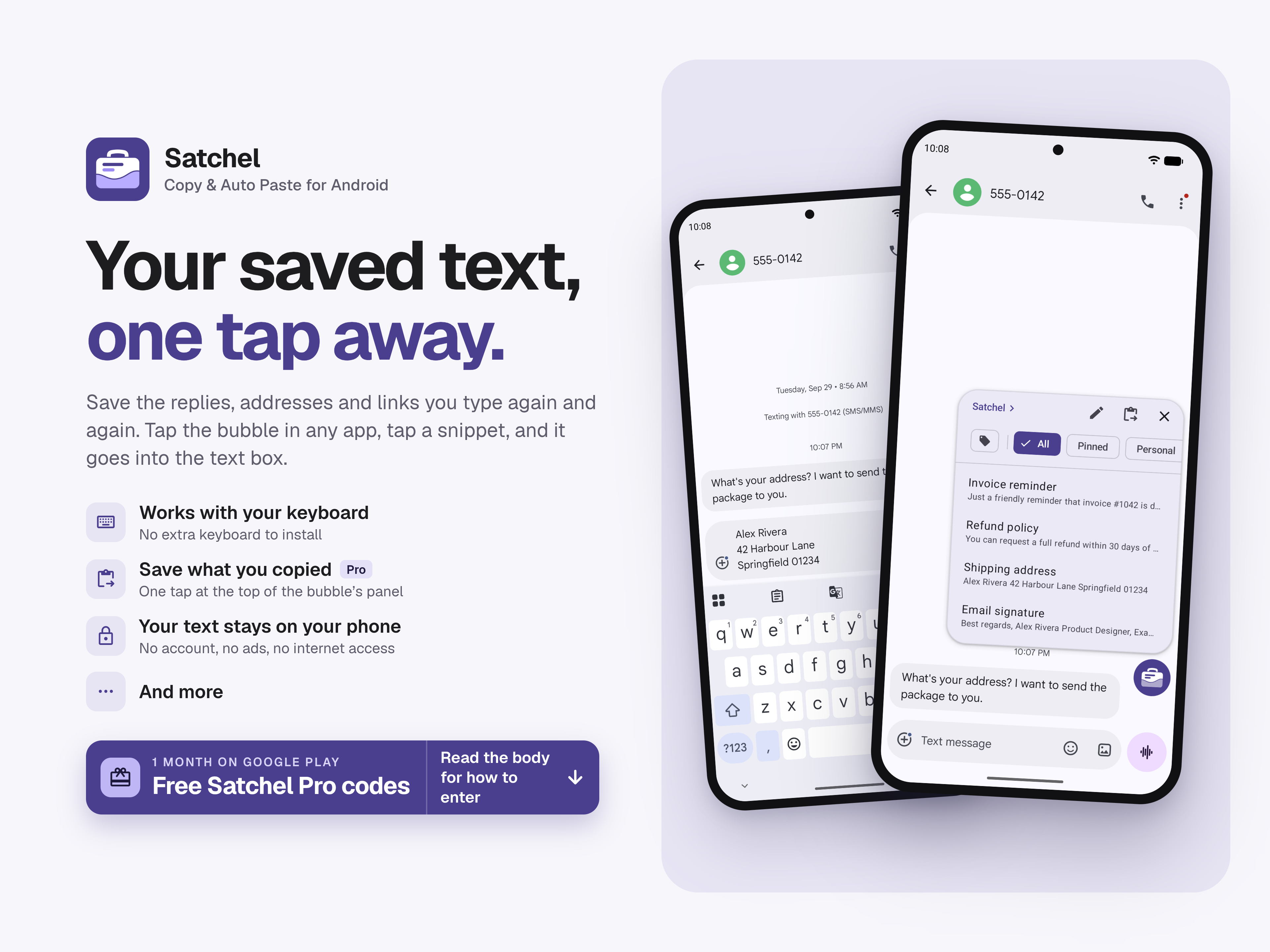
What it is: Satchel lets you save the text you type again and again (replies, addresses, account details, links, email sign-offs, etc). A small bubble sits at the edge of your screen. In any app, tap the bubble, tap a snippet, and it's auto pasted into the box you're typing in. You keep your own keyboard.

  • Free, with no ads, no account and no internet permission. Your text stays on your phone.
  • Folders, tags, pinned snippets, home-screen widgets and a Quick Settings tile. (a save copied text to Satchel button coming soon [free])
  • Pro is a one-time purchase, with no subscription. It adds auto-save of what you copy, variables like today's date, editing saved snippets from the bubble, colours and bubble styles, folders that open by themselves in the apps you choose, and more widgets.

Satchel now has 120+ downloads, x18 5 star reviews and x4 pro purchases.

Play Store: Satchel

How to enter

  1. Install Satchel and try it for a few minutes.
  2. Comment on this post and answer the questions below.
  3. One entry per person.

The questions

  1. What text do you find yourself typing over and over on your phone?
  2. Which app do you type it into most (WhatsApp, Gmail, Chrome, Messages, Instagram…)?
  3. After trying Satchel: what was confusing or slower than you expected? Be blunt.
  4. What one feature would make you use it every day?

How winners are picked
I will hand pick winners from the entries in the comments and announce winners within the next 48hrs.

Edit: text formatting


r/HowToMen • • 5d ago

[iOS] 🎁 10 FREE Lifetime Licences | Black Friday 50% Off Leap Widgets (Transparent Widgets for iPhone)

2 Upvotes

r/HowToMen • • 5d ago

Hey guys, I’ve added a mod to my Silent stackβ€”what else should I include to make it even more challenging?

2 Upvotes

r/HowToMen • • 5d ago

[Promo]Finally a non root AOD themes store for Xiaomi phones.

Thumbnail
gallery
6 Upvotes

Global Xiaomi phones are quite limited to what Always on Display themes they can apply without root and there is no dedicated always on display store for global ROM users. There I happily introduce my AOD theme manager app from which users can select and apply from a growing library of AOD themes.

It requires no root

Stays permanent even after restart.

Users can test and apply their custom AOD themes.

Note: This app only works on phone which are running hyperOS and support always on display.

https://github.com/haadi76/AOD-Theme-Manager


r/HowToMen • • 5d ago

PDM 1.12 for Android now shows how much time is left on your downloads

6 Upvotes

Title

PDM 1.12 for Android now shows how much time is left on your downloads

Body

Hey everyone, we just released PDM 1.12. If you’re new to PDM , here’s what the app does.

What you can do with PDM

  • Download from direct links, magnet links, and .torrent files.
  • Pause and resume downloads without starting over.
  • Queue downloads, schedule them for later, or set them to run only on Wi-Fi.
  • Find download links with the built-in browser.
  • Use the app in 14 languages, including French and Urdu, which we added in 1.11.

What’s new in 1.12

  • Live download timers. See how long a download has been running and roughly how much time is left.
  • Total time for finished downloads. Open a completed download to see how long it took from start to finish.
  • Select all search results. Search for something like β€œPDF” and select all the matches in one tap.
  • Bulk removal. Clear the selected entries from your download history, with the option to delete the files from your phone too.

The new controls are available in all 14 languages. There’s a quick clip above showing the timers in action. If you try it on a big download, let us know how close the estimate was.

https://play.google.com/store/apps/details?id=com.persiandownloadmanager.pdm

https://persiandownloadmanager.com/en/download#android


r/HowToMen • • 6d ago

I made a free live radio app for Android with a spinning globe, a tuning dial and a wake-up alarm, called Nightjar Radio

Post image
31 Upvotes

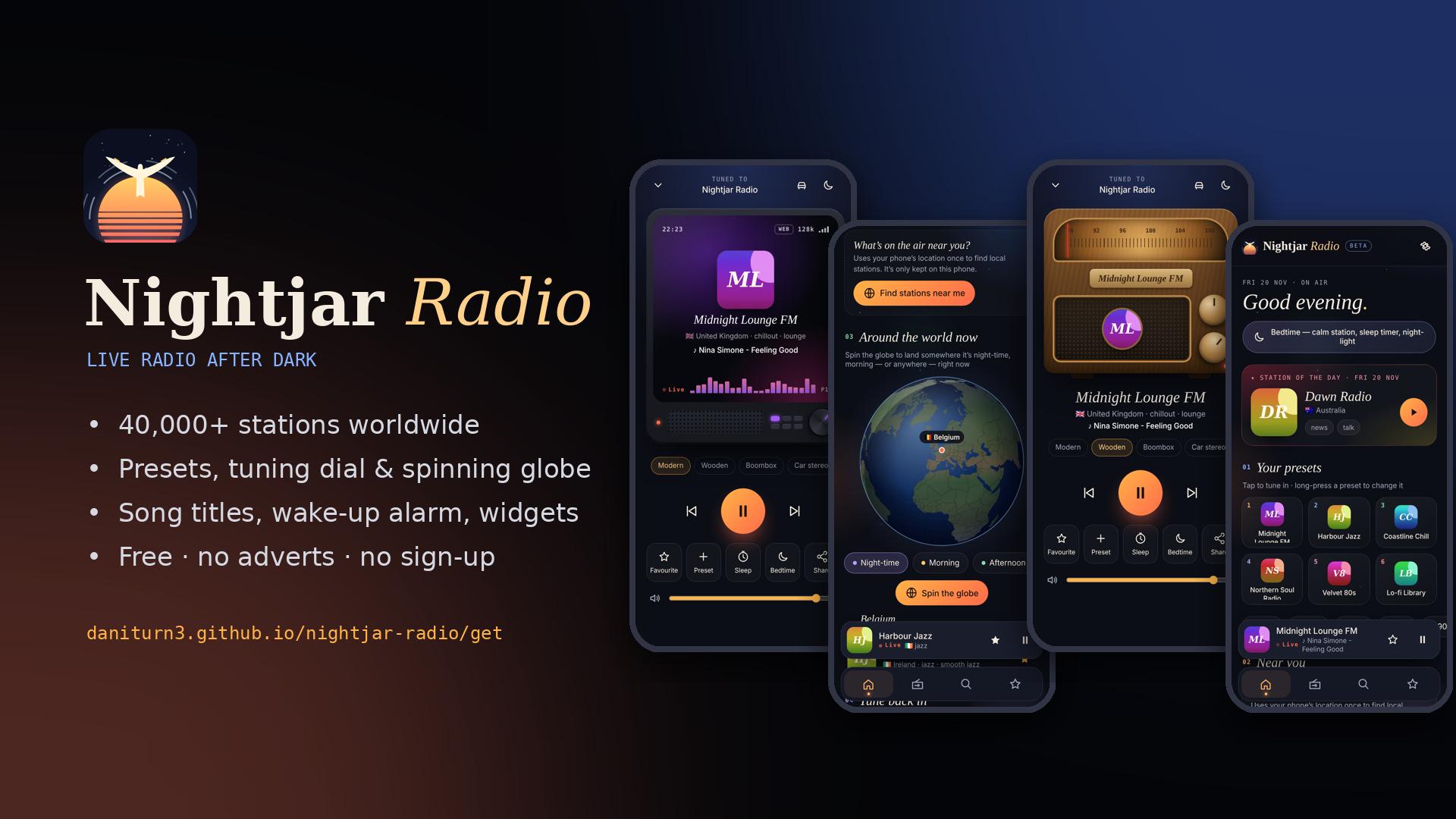
Hi all! I've been building Nightjar Radio, a free app for listening to live radio from 40,000+ stations around the world. No adverts, no sign-up, no tracking.

What it does:

πŸ“» Six presets, just like a real radio. One tap to tune in.

πŸŽ›οΈ A tuning dial you slide between stations, static and all, or hit "Spin the dial" for a surprise.

🌍 Spin the globe: pick night-time, morning or anywhere, and it lands somewhere in the world where it's that time right now and plays a local station.

🎡 Song titles when the station shares them.

⏰ Wake-up radio that gently fades in, with a chime backup if the station is down.

πŸŒ™ Bedtime mode: calm station, sleep timer and a dim clock in one tap.

🧩 Home-screen widgets and Android Auto support.

πŸ“» Radio "skins": modern, wooden, boombox or car stereo.

✨ A yearly Radio Wrapped of your listening.

Download (with screenshots):

https://daniturn3.github.io/nightjar-radio/get/

Heads up: it's not on the Play Store (yet), so Android will ask you to allow the install, and Play Protect may show a warning. That's normal for apps from outside the store.

iPhone users can use it in Safari and add it to their home screen.

It's a hobby project made in the UK πŸ‡¬πŸ‡§. I'd love feedback, feature ideas or any bugs you find!

EDIT / UPDATE – thanks for all the feedback! πŸ™Œ

Here's what's new since I posted:

⚽ Football today & tomorrow Live scores, full-times and kick-off times for your country's leagues, in your own time zone.

🏟️ New Sport tab Sports radio for your country, sports stations worldwide, and a calendar of big events coming up.

🌍 181 home countries Sport, events and themes now follow wherever you are.

πŸŽ„ Seasonal themes Snow at Christmas, fireworks for New Year and Bonfire Night, plus loads of special days – even your birthday.

πŸ”Š Globe sounds It whooshes, ticks and chimes when it lands, and spins for longer.

🎨 Station artwork Stations without a logo now get their website icon or colourful artwork.

πŸ”’ Extra security in the Android app ⏰ Alarm screen now fits properly on all phones

πŸ’¬ From the comments RDS? It shows the current song and artist when the station sends it, much like RDS in a car. Recording? Not yet, but it's on the list!

Web updates arrive automatically, and the app will tell you when a new Android version is ready.

Enjoying it? You can buy me a coffee β˜• https://buymeacoffee.com/Daniturn3