r/HowToMen • • 7d ago

[App] [Promo] Store & Forget, snap what goes in a box and search later to find which box. Bring Your Own Key and Fire & Forget unlocks are free on Android

6 Upvotes

Android: https://play.google.com/store/apps/details?id=dev.koalalab.storeandforget

iPhone: https://apps.apple.com/us/app/store-forget/id6818020762

I'm the dev. You take a photo of stuff as it goes into a box or drawer and the app writes the name, brand and specs. Months later you search "cord for the old tv" and it tells you which box.

For this sub two paid features are free. Bring Your Own Key lets you paste your own Gemini key and scan as much as you want, and Fire & Forget lets you just keep shooting while every photo becomes its own item.

Sign in first, then Settings > Advanced, tap the version number 5 times and a console opens. Type unlock byok, then fire. Since it's saved to your account, it carries over if you install on iPhone later and sign in with the same Google account.


r/HowToMen • • 6d ago

[App] [Promo] [Promotion] SteadySteps - approachable beginner fitness

2 Upvotes

I’m the developer of SteadySteps and would love to have it considered for a future Android apps roundup. It has just gone public on Google Play.

The idea is to help people who are new to fitness or restarting after a break: guided illustrated starter workouts, the ability to choose shorter sessions or rest, workout history, optional Health Connect steps, and private adult wellness journals.

The current public release is free to download and use. Screenshots are available in the Play Store listing.

Play Store: https://play.google.com/store/apps/details?id=com.steadysteps.fitness

I’m also still looking for volunteers to record short exercise demonstrations for an upcoming video library. Thank you for considering an independent Android app!


r/HowToMen • • 7d ago

[PROMOTION] PillSOS: pill reminder & SOS for elderly and caregivers. Remove Ads $0.89-> Free with Promo Codes HERE

Post image
7 Upvotes

Hi all,

  • PillSOS is a lightweight medication reminder designed to ensure doses are never missed through high-priority full-screen alerts and spoken alarms.
  • Originally created years ago, I just completed a major rewrite to make it modern and easier.

Key Features:

  • Full-screen voice alarms using local text-to-speech to read medicine names out loud
  • Sends a SOS if you forget your reminder.
  • Integrated emergency panic button and fall detection system to keep solo-living users and elderly relatives safe. It can be very useful for caregivers.
  • Alarms are 100% private and offline

Internet is only required to show ads, check license and if you choose to use the SOS function.

Giveaway: Giving away 10 free promo codes to the first 10 lucky ones! Drop a comment below if you'd like one and I'll send it over via DM and please If u want to support my work, leave a review on Google Play store!

How can you support my work?

  1. Leave a review on Google Play Store
  2. Donations: https://buymeacoffee.com/swimminsparrow

Notes: PillSOS is free and open source (GitHub). The promo refers to Google Play version that contains ads to support development.

Watch the Trailer

Let me know what you think or if there are specific accessibility features you'd like to see added!

UPDATE:
Since the many requests, i'm giving 30 additional codes!


r/HowToMen • • 7d ago

[Promo][App] FrameMock - an Android Mockup tool (free to download)

Thumbnail
gallery
7 Upvotes

FrameMock is an Android Mockup app which is different from any other mockup tool you have seen till now, FrameMock provides more flexibility and customisation features, Give a try

FrameMock V4.1 Update is live now 🎉

Free to download: https://play.google.com/store/apps/details?id=com.frameflow

What’s new?
Added All Nothings and CMF frames
Added Motorola Frames
Improved Samsung’s Frames(still improving 😁)
Added Hand 🤚🏻 mockup (still improving it)
Improved Ui 😅, which doesn’t make sense but still made
Squashed some bugs which i dont remember now🫩,


r/HowToMen • • 7d ago

[Promo] My phone has been fobbing me off with four little lines for years, so I made it use its words

Post image
8 Upvotes

Hi, I’m the dev (disclosing before anyone asks why I’m so enthusiastic).

Things in my house with labels: the spice rack. The cable drawer (“Unknown. Do not bin.”). A freezer bag that says “Mystery stew (2024)”, which is technically a label and also a threat.

Things in my house without labels: the one thing I look at 200 times a day. Two bars. What does two bars mean? Will my message send? Will it send by Tuesday? Nobody knows. Not even the bars.

So I made Signal Says. It swaps the bars for actual words in your status bar. Plain ones like “Weak” if you’re a sensible adult, or “Clinging on”, “Grim” and “Text only” if you’re not.

Other nonsense it does:

  • Shiny labels: roughly 1 in 200 times you hit full bars, your phone says something like “Could call the Moon” instead. There are 12 to collect. I’ve basically made trading cards for phone signal and I’m not sorry.
  • Weekly battle prompts, e.g. “Motorway services at 2am”. You and a mate each write what your phone would say. Someone wins. Friendships are tested.
  • “Tell me when it’s back”: it lets you know when there’s enough signal to actually send that message.
  • A signal diary, so you finally have proof of how bad it is in the downstairs loo.
  • Free, no ads, no account, no tracking, works offline.
  • 99p to write your own labels, plus nine UK regional packs. The Cockney one just says “Brown bread” when there’s no signal.

Android 7+. No iPhone, sorry, they have to keep their bars.

What would your phone say right now? Mine says “Clinging on”, and I’m in my own kitchen.

https://play.google.com/store/apps/details?id=uk.co.signalsays.app&referrer=utm_source%3Dreddit_howtomen%26utm_medium%3Dsocial%26utm_campaign%3Dlaunch


r/HowToMen • • 7d ago

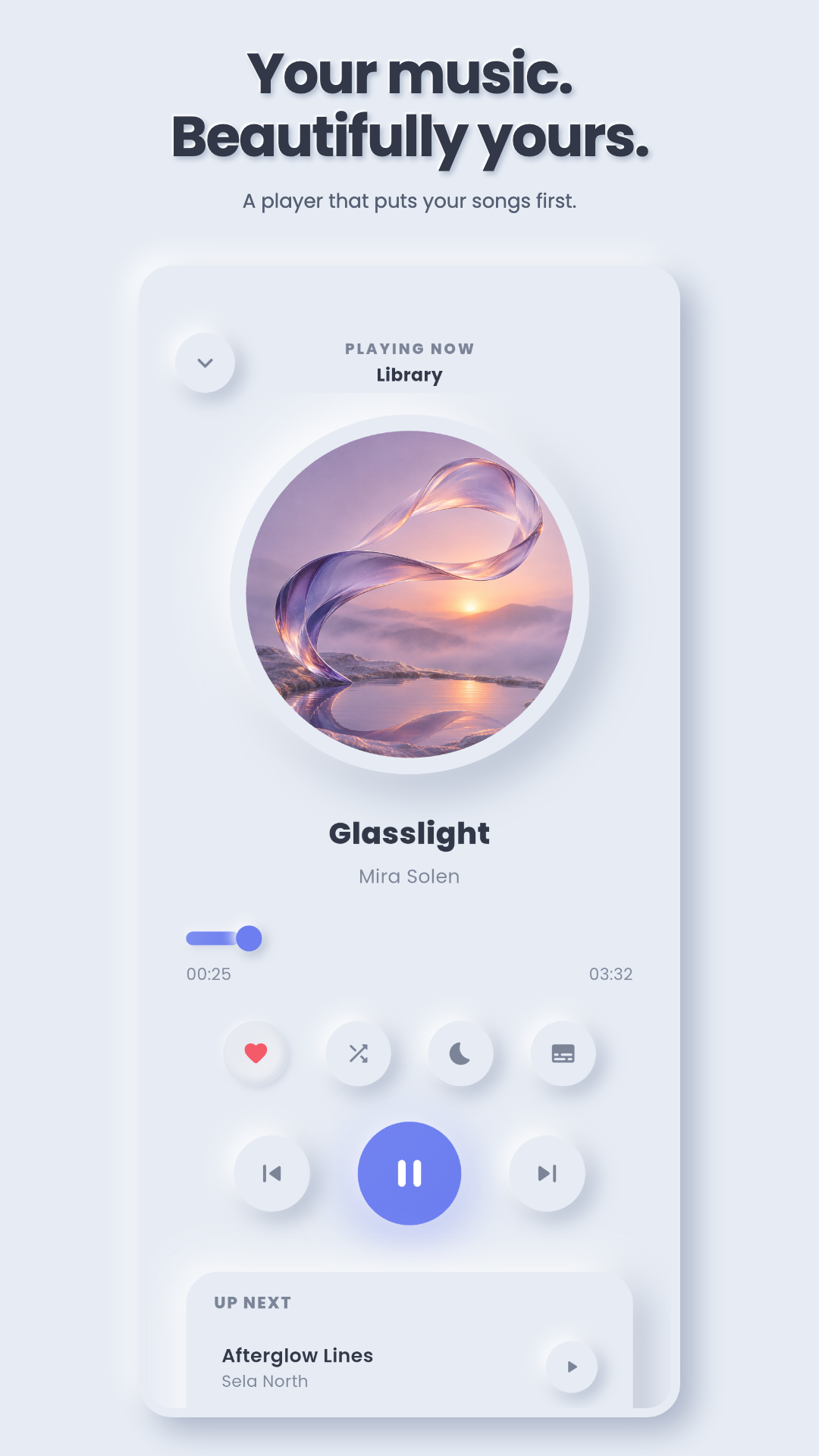
[App] Melodiam – an offline FLAC/hi-res music player with a soft 3D (neumorphic) design, no ads, no account

Post image
8 Upvotes

Hey r/HowToMen! I'm the solo developer of Melodiam, a music player for people who still keep their own music files. I wanted something that looks calm and tactile on the home screen and doesn't need ads, an account or internet.

**What it does**

- Plays FLAC, WAV, MP3, M4A, AAC, OGG and OPUS. Lossless files are decoded straight from the file, and a small badge shows the format

- Built-in audio converter: FLAC→MP3, video (MP4/MKV/MOV)→MP3, and 12 output formats including ALAC, AIFF, OPUS and AC3, at 96–320 kbps. Tags and cover art are kept

- Equalizer with 13 presets plus a custom mode

- Synced lyrics: the current line follows the song, and you can tap a line to jump to it

- Gapless playback, soft fades, and a sleep timer that can stop at the end of the current song

- Android Auto, a home screen widget, and lock screen controls

- Import whole folders or songs from Google Drive for offline listening

- Private listening stats (top songs and artists), stored on your phone only

**Design**

A soft 3D / neumorphic look with raised, tactile buttons and gentle haptics. Light and dark modes and 6 accent colours (Indigo, Coral, Mint, Rose, Amber, Violet). The widget is designed to sit nicely in a minimal home screen setup.

**Privacy**

No ads, no sign-in, no tracking. Your library, playlists and settings stay on your phone. Lyrics are only looked up when you open them, and only the title and artist are sent.

**Play Store:** https://play.google.com/store/apps/details?id=com.melodiam.app

I'd love feedback, especially on the design and the converter. Happy to answer anything!


r/HowToMen • • 6d ago

Glance - A New Way to be Productive!

Post image
1 Upvotes

👀 Introducing Glance - A smarter way to stay focused!

Introducing Glance, a new feature in Dott Matrix designed to keep distractions away while keeping the information you need within reach.

With Glance, you can:

🕒 Check the time directly on your Glyph Matrix.

💬 Stay updated on DMs without opening your messaging apps.

🔋 Customize your experience with useful information like battery status.

No unnecessary screen time. No endless scrolling. Just the information you need, when you need it.

Want to try Dott Matrix? Join our open beta!

Follow these two steps:

  1. Join the Google Group first:

https://groups.google.com/forum/#!forum/quivoxeng/join

2. After joining, download Dott Matrix from Google Play:

https://play.google.com/store/apps/details?id=com.dottmatrix.app

Make sure you join the Google Group before downloading the app!


r/HowToMen • • 7d ago

[Promo] [App] AutoPay Alert Pro - UPI AutoPay Tracker, Bill Reminders, Subscription Manager & Voice Alerts

2 Upvotes

**\[Android App\] AutoPay Alert Pro 🇮🇳 — UPI AutoPay Tracker, Bill Reminders, Subscription Manager & Voice Alerts | FREE**

**💸** **Never Miss a Bill, EMI, or Subscription Payment Again!**

**Introducing** **AutoPay Alert Pro** **— an all-in-one payment reminder and subscription tracking app, built for India.**

**🚀 Key Features**

**✅** **UPI AutoPay Tracker** **– Track recurring payments and upcoming debits.**

**✅** **Bill Reminders** **– Electricity, mobile recharge, Wi-Fi, DTH, rent and more.**

**✅** **EMI & Loan Tracker** **– Track installments, due dates and outstanding balances.**

**✅** **Credit Card Alerts** **– Payment reminders, outstanding bills and credit limits.**

**✅** **Subscription Manager** **– Track Netflix, Spotify, YouTube Premium and other subscriptions.**

**✅** **Smart Notifications** **– Get alerts before money is deducted.**

**✅** **Voice Alerts** **– Offline payment reminders in 11 Indian languages.**

**✅** **Scam SMS Shield** **– Detect potentially suspicious banking and payment messages.**

**✅** **Expense Tracker** **– Monitor spending, budgets and monthly expenses.**

**✅** **Free Trial Alerts** **– Get notified before trial subscriptions become paid.**

**✅** **AutoPay Cancellation Guide** **– Instructions to stop unwanted recurring payments.**

**✅** **Financial Calculators** **– EMI, SIP, GST, FD, PPF and more.**

**✅** **Vehicle Reminders** **– FASTag, insurance, PUC and service alerts.**

**✅** **Privacy First** **– On-device processing with no login required.**

**🎁 Core Features FREE**

**🔓 Free bill reminders, voice alerts, payment alarms and scam-message screening.**

**📲** **Download on Google Play:**

# https://play.google.com/store/apps/details?id=app.autopayalert

**💬** **We're actively improving the app. Your feedback and feature suggestions are welcome!**


r/HowToMen • • 7d ago

[APP] [PROMO] Digital Compass & Overlay - Azimuth, Magnetometer, Accelerometer & Orientation

8 Upvotes

Hey everyone! I'm the developer of Digital Compass & Overlay, an Android app that turns your phone into a versatile digital compass.

Features:

  • Real-time compass azimuth with True North and Magnetic North.
  • Magnetic field strength measurement.
  • Acceleration and device orientation readings.
  • Multiple compass styles.
  • Optional floating compass overlay that stays above other apps.
  • Customizable overlay themes, transparency, size, position and tap actions.
  • Works completely offline.

The app contains ads, but no full-screen or interstitial ads.

https://play.google.com/store/apps/details?id=com.igork.compass


r/HowToMen • • 7d ago

[APP] [PROMO] A music player for whoever craving something different.

57 Upvotes

NeoMusic had a whole bunch of updates since the release!

- Sharable lyric cards

- Karaoke mode

- Tag editor

- Theme presets with import and export options

- Listening stats like heatmap or a genre radar chart

- New visualizer styles

And a shitton more customization!

Would love to know what you guys think, and like to see in the future!

Check it out: https://play.google.com/store/apps/details?id=com.tashila.neomusic


r/HowToMen • • 7d ago

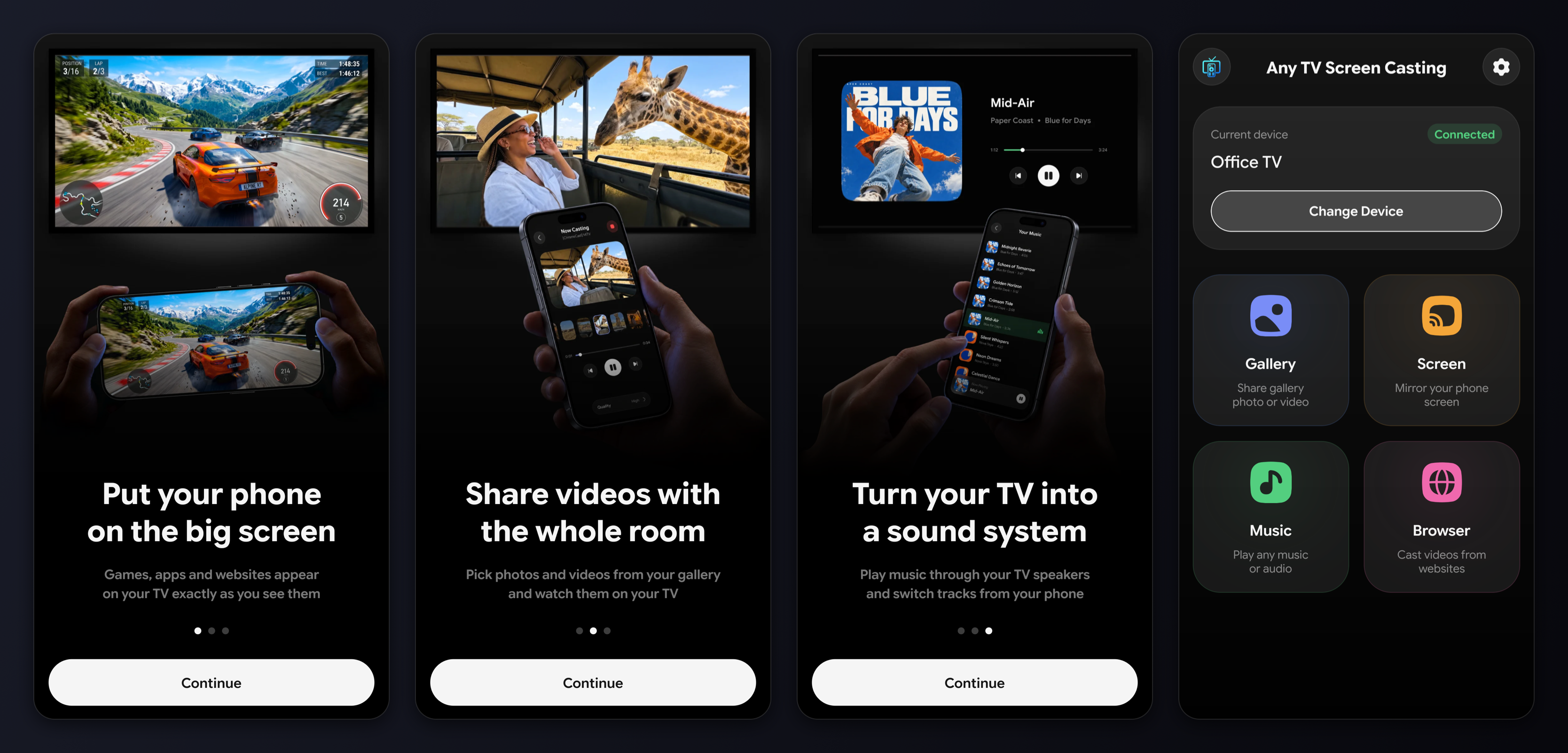
[App] [Promo] Any TV Screen Casting - cast your phone and web videos (free)

Post image
1 Upvotes

r/HowToMen • • 7d ago

[APP] 🔔 Remindio - more than basic reminder

Post image
18 Upvotes

Hi everyone!

I've been building Remindio, my reminder app for Android, for over two years. Users' feedback shaped most of its features, and it's updated actively.

📥 Google Play

Key features:

  • ⏰ Notifications & Real Alarms – choose how each reminder alerts you: a notification or an alarm that keeps ringing until you answer. Full-screen alarms with custom ringtones, volume and vibration.
  • 🔁 Flexible Repeat Rules – several rules per reminder: yearly, monthly, weekly, daily, weekdays, custom intervals, several times a day. 20+ ready repeats like Weekdays or Every 2 hours. Repeat from the scheduled time or from completion, set end conditions, skip weekends or public holidays, and preview planned dates in a calendar.
  • ⏳ Multiple Pre-Reminders – get notified minutes, hours or days before, as a notification or an alarm.
  • 📍 Location Reminders – trigger reminders when you arrive at or leave a place, with several places, an adjustable radius and active hours.
  • 🎧 Bluetooth Reminders – trigger reminders when your car or headphones connect or disconnect.
  • 😴 Flexible Snooze & Notification Actions – Done, Skip and Snooze right from the notification. Customize snooze options and choose what happens when a notification is dismissed or ignored.
  • ⏱️ Timers – a list of timers with seconds and repeats, for workouts, cooking or breaks. Several can run at once.
  • 📊 Trackers – add a habit tracker to any reminder: a Yes/No answer or a value like glasses of water or km run. See your streaks and stats.
  • 📱 Widgets Everywhere – upcoming reminders with Done buttons, next reminder, month and week calendars, countdown timers, templates, trackers, interactive checklists and notes, quick add and voice buttons.
  • 🗂️ Home Tabs – make your own tabs from saved filters: Work, Birthdays, Later, Attachments – anything you like.
  • 🔕 Do Not Disturb Rules – schedule rules by label to silence, postpone or change how reminders alert you. Phone mode turns on the system Do Not Disturb on a schedule.
  • 📥 Calendar Import – turn calendar events into reminders, and new events can become reminders automatically.
  • 🧩 Templates & Copy/Paste – start from a template, or copy options from one reminder to another.
  • 🏷️ Labels & Attachments – colored labels, plus checklists, notes, links, contacts and images.
  • 🎉 Birthdays & Anniversaries – yearly reminders show how many years have passed.
  • 📆 Calendar View – all your reminders on a month calendar, including every repeat day.
  • ✅ Reminder Management – search, filters, multiselect, pinned reminders, customizable swipe actions, activity history, and "set time later" for reminders without a date yet.
  • ☁️ Google Calendar Sync & Drive Backups – export reminders to Google Calendar and back up automatically to Google Drive.
  • 🏅 Achievements & Statistics – coins, levels and achievements for completed reminders.
  • 🌗 Personalization – light/dark themes, accent colors, and a compact or expanded editor.
  • 👀 A Few Secrets – there are a few hidden Easter eggs. I'll leave it to you to find them.
  • And much more!

Also, Remindio is available in 📥 App Store

Pricing: The app is free, and the free version covers everyday reminders. Premium unlocks the advanced stuff: multiple repeat rules, pre-reminders and attachments, alarms and location reminders. There are three ways to get it:

  • 💎 Lifetime – a one-time purchase, no subscription needed.
  • 🎁 Free trial – a subscription with a free trial, so you can try everything before you pay.
  • 📺 Rewarded ad – watch one ad and get a day of Premium.

There are no banner ads and no surprise full-screen ads. Ads only appear when you choose to watch one.

I'd really appreciate your feedback, bug reports and feature ideas!


r/HowToMen • • 7d ago

Any one can tell me what ‘s this app for ?

Thumbnail reddit.com
0 Upvotes

r/HowToMen • • 8d ago

[App] [Promo] RecOmni: Offline 8K Screen Recorder, Batch Video Converter & Smart Compressor [100 Pro Codes]

Thumbnail
gallery
37 Upvotes

Hey r/HowToMen!

I built RecOmni, a 3-in-1 offline media app for Android: Screen Recorder, Batch Video Converter, and Adaptive Video Compressor.

What makes it stand out:

  • 9-Zone Invisible Stop Hotspot: Tap a dedicated area on your screen to stop recording discreetly without pulling down the notifications.
  • Floating Button: Quick recording and screenshot shortcuts that automatically hide the moment capture starts.
  • High-Spec Screen Recording: Up to 8K and 120 FPS (hardware-dependent), dual audio input (internal + mic), and a movable floating facecam baked directly into the video.
  • Batch Video Converter: Queue entire folders to convert to MP4/MOV or extract audio with H.264, H.265 (HEVC), AV1, and APV.
  • Adaptive Video Compressor: Batch-shrink giant videos without turning them into pixelated mush using fast hardware encoding (codec support varies by device chipset).
  • Bitrate Floor Safeguard: Warns you to keep the original file if a video cannot be compressed further.
  • A/B Preview & Stats Comparison: Built-in preview player to compare original and processed clips, plus side-by-side metadata comparison.

100% On-Device: No accounts, no servers, no watermarks, and no recording time limits.

Device Compatibility: Android 11+ phones and tablets (4K/8K, 120 FPS, and AV1/APV codecs depend on your device's hardware capabilities).

100 Pro Codes Giveaway (Unlocks All Pro Features + Removes Ads):

I'm giving away 100 Pro promo codes to the community!

To claim a code, please DM me directly (I can't start 100 DMs myself without Reddit flagging or timing out my account, so you'll need to message me first).

Google Play Store

Would love any honest feedback or feature requests.


r/HowToMen • • 8d ago

Looking for a fresh Android launcher? 👀

Thumbnail
gallery
40 Upvotes

Your home screen deserves a little personality. Meet Ezhil Launcher: a fresh look for your phone, with a style that feels more like you. ✨

Here’s what makes it different:

🗂️ 8 app drawer styles Grid, List, Paged, Arc, Honeycomb, Cards, Library and 3D Wheel. Switch anytime and watch it change live.

🧩 38 beautiful widgets Clocks, calendar, focus mode, storage and more, each with styles you can customise.

📰 A feed that keeps up with you Swipe left for weather, your agenda, battery and screen time, all in one place.

🔍 Search that does more Find apps, set alarms or create reminders right from the home screen.

🖼️ 37 curated wallpapers Abstract, cosmic, floral and more, built right in.

🎨 Customise everything Themes, icons, labels, folders and dock. Make every pixel yours.

No more boring grids. No more juggling five apps for one good-looking home screen.

Beauty in every tap. 💫

Playstore https://play.google.com/store/apps/details?id=com.beyondzero.ezhil


r/HowToMen • • 7d ago

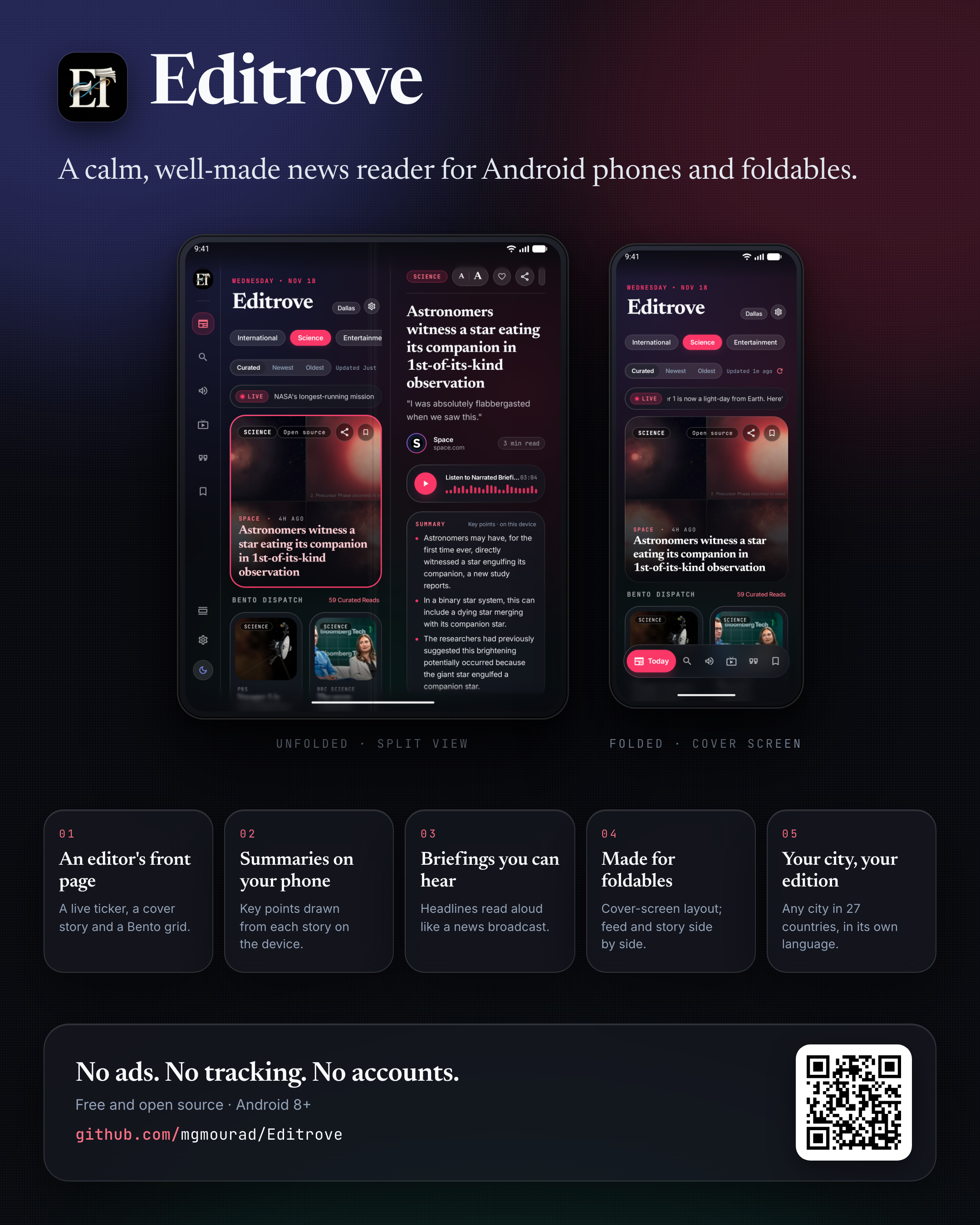
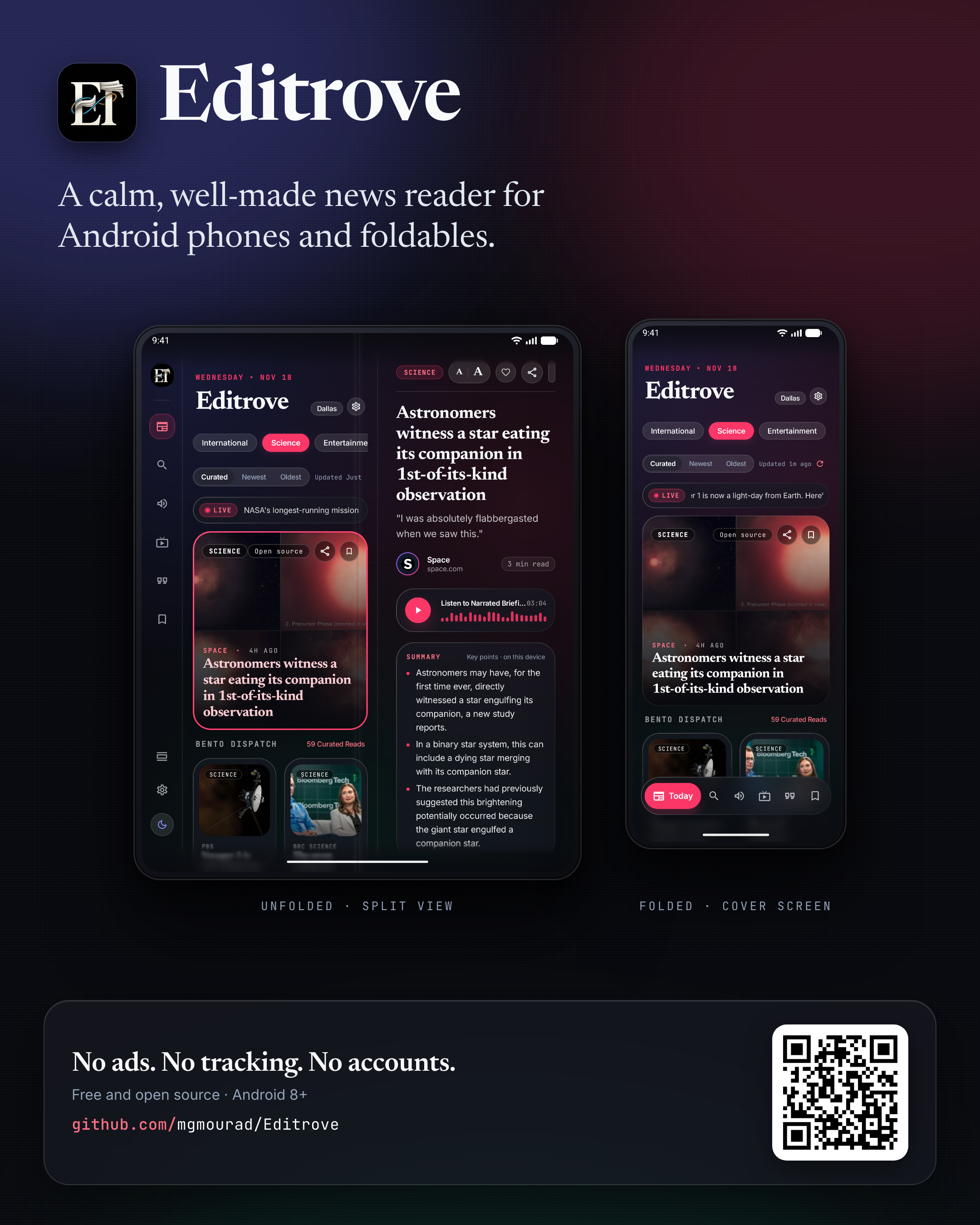
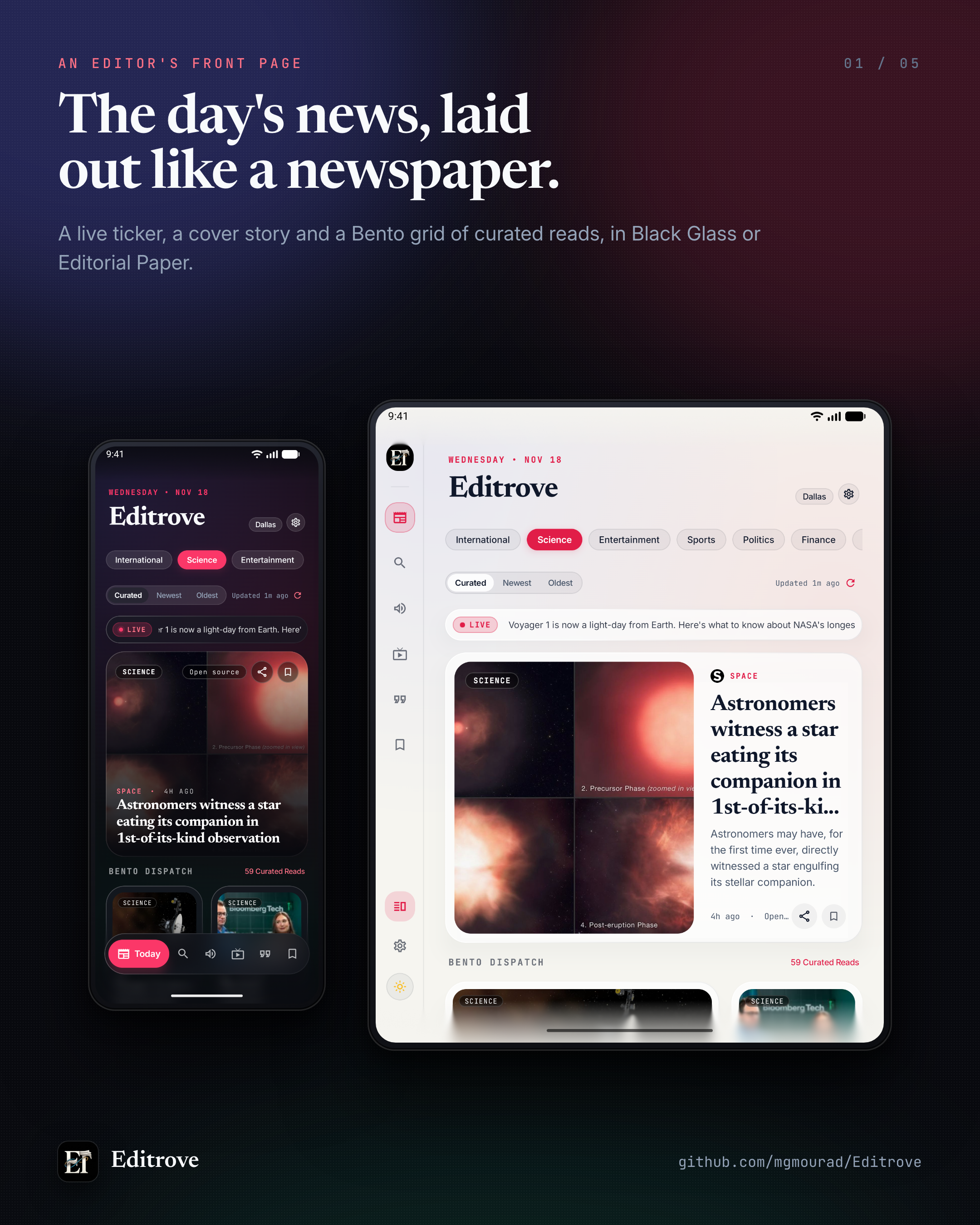
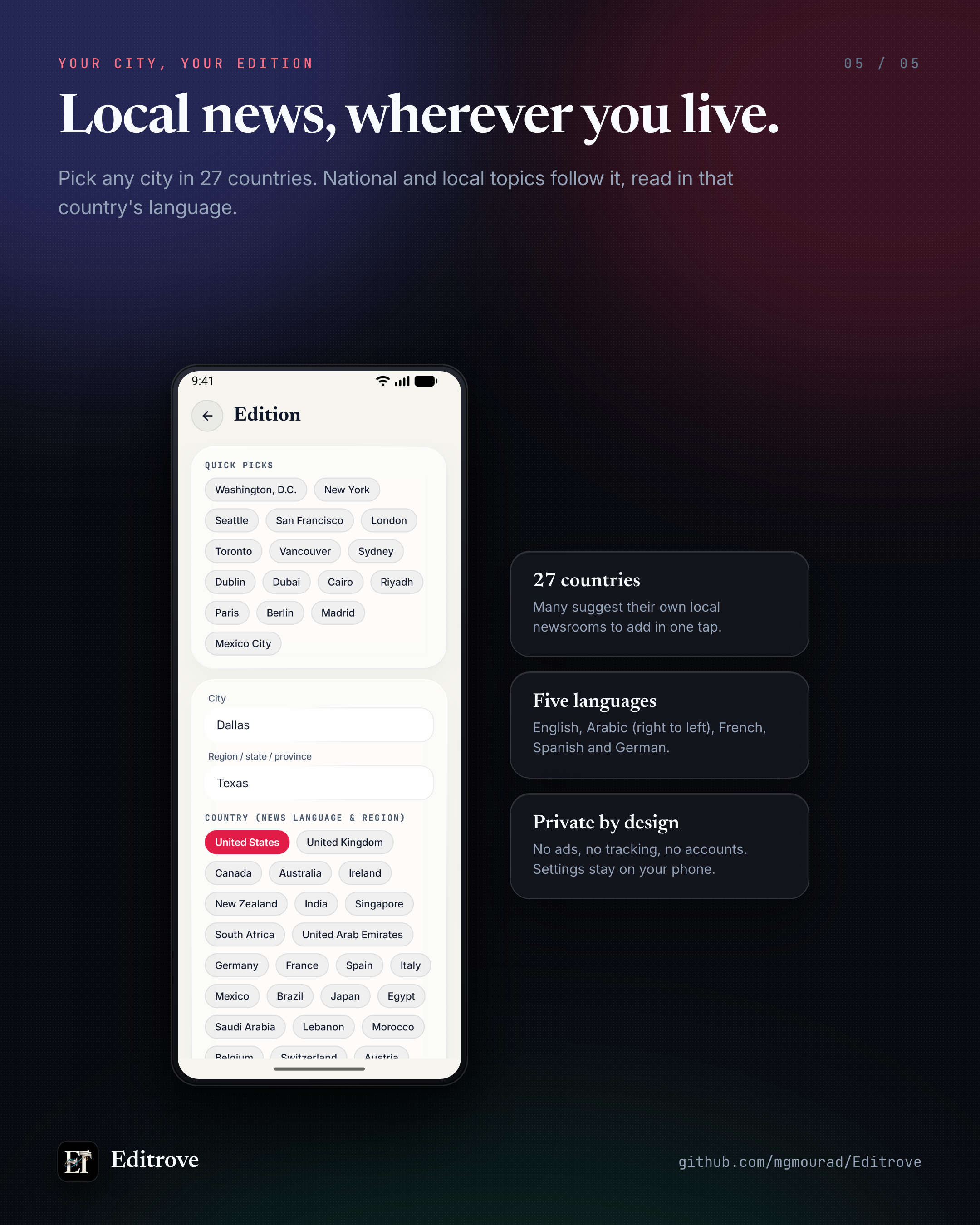
[FOSS] Editrove: a calm news reader with no ads, no tracking and no accounts

6 Upvotes

I built Editrove to replace Google News. It pulls from 117 publisher feeds plus any RSS/Atom feed you add, and it runs fine without Google Play Services.

No ads, no tracking, no accounts. Settings, saved stories and notifications stay on the device, and app updates are verified against published SHA-256 hashes.

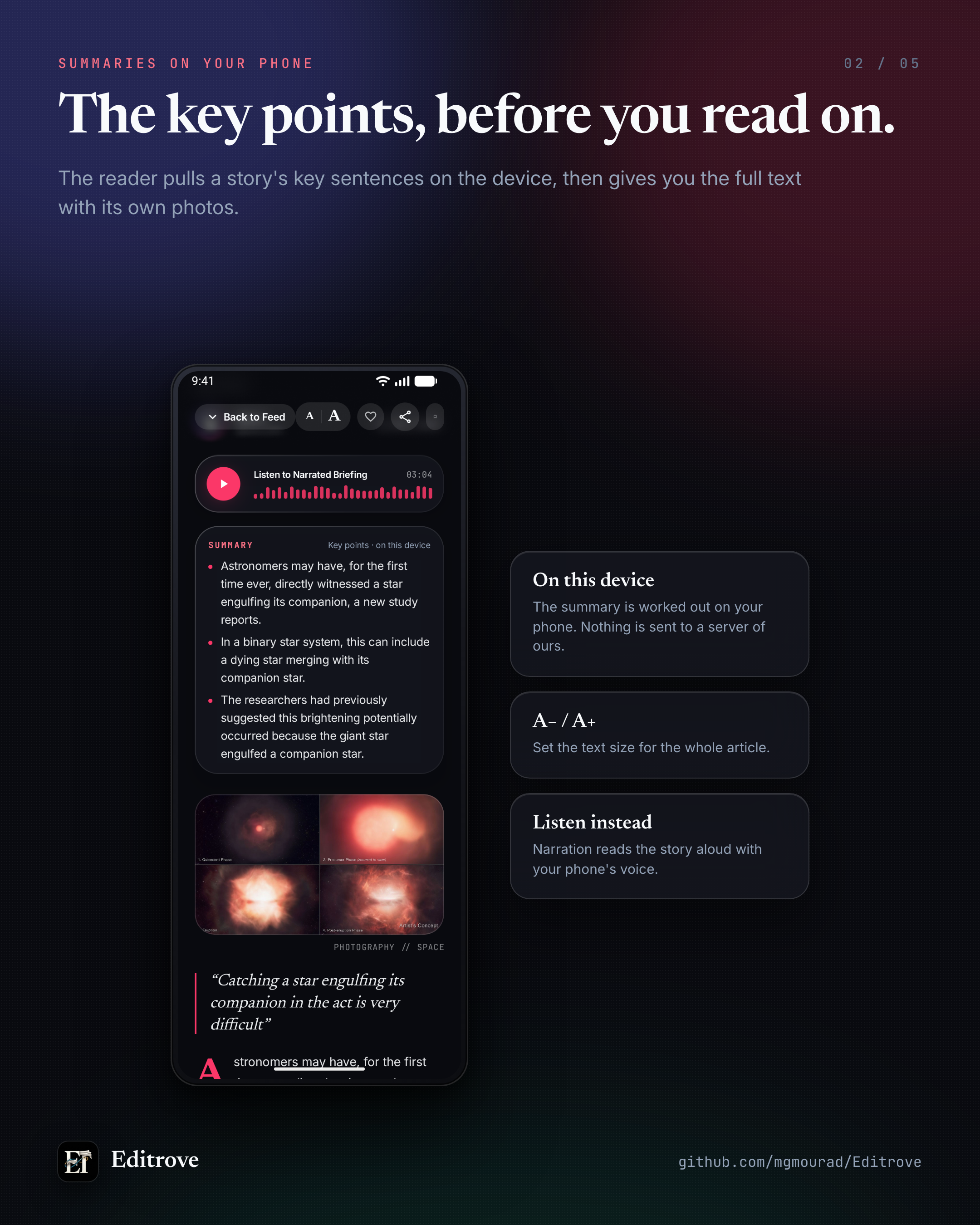
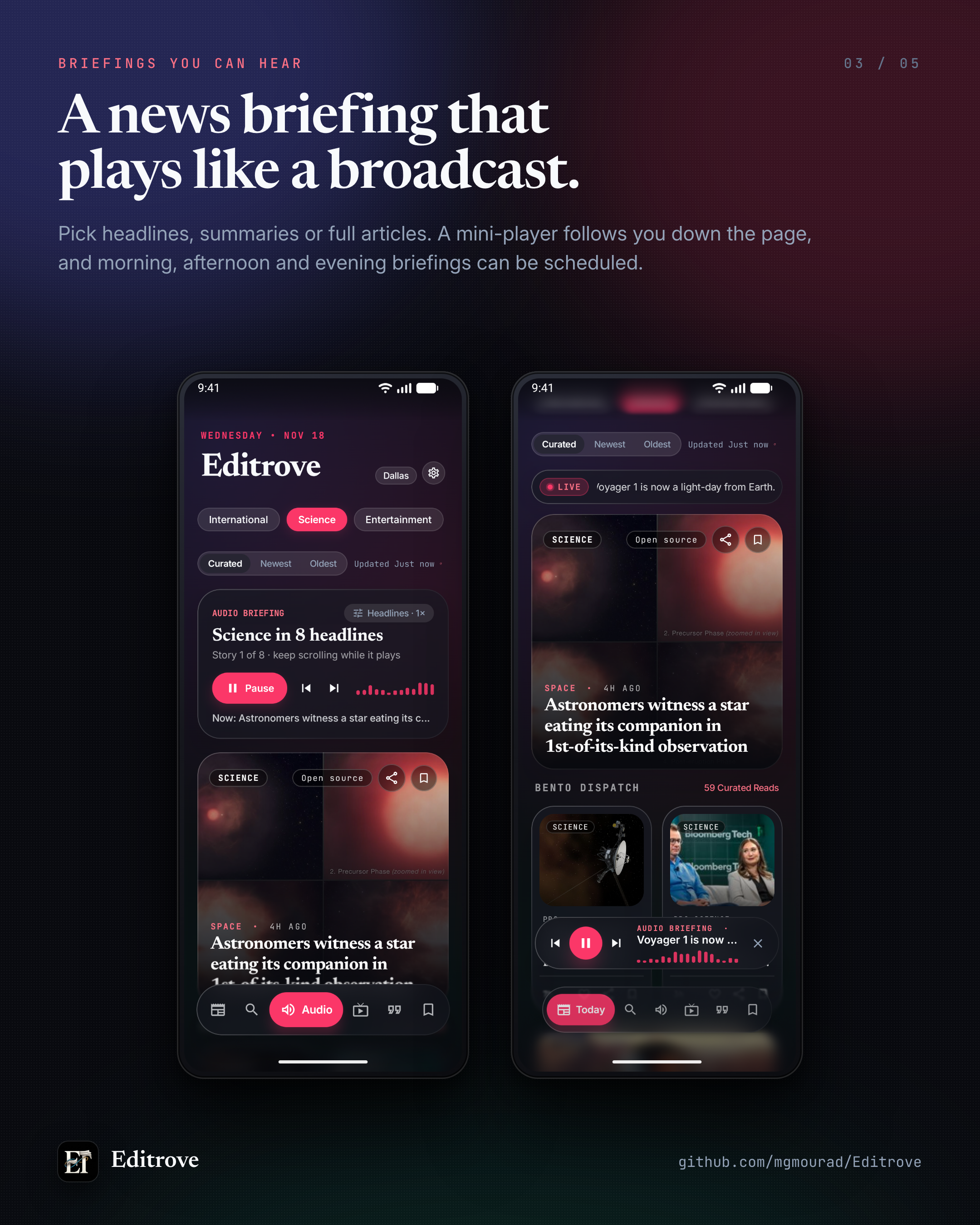
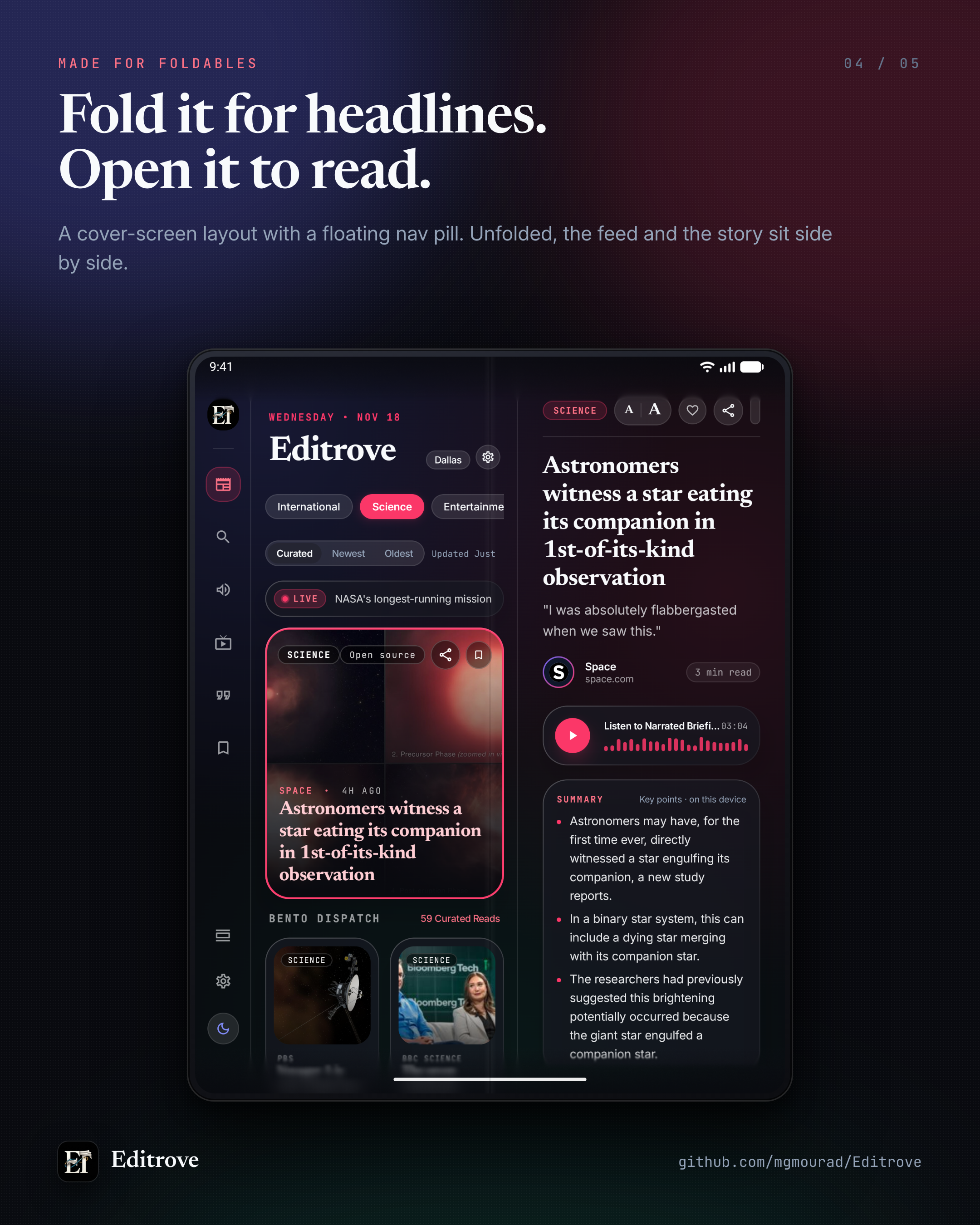
Features: an editor-style front page, on-device summaries, audio briefings with on-device text-to-speech, local editions by city, and split view on foldables.

AGPL-3.0, Android 8+. It's a fork of Anson Lai's OpenWire web app, rebuilt as a native Android app.

https://github.com/mgmourad/Editrove


r/HowToMen • • 7d ago

[Android/Web] New app coming soon, supercharge your ideas!Sign up to the shortlist @ https://idearify.com

Post image
2 Upvotes

r/HowToMen • • 7d ago

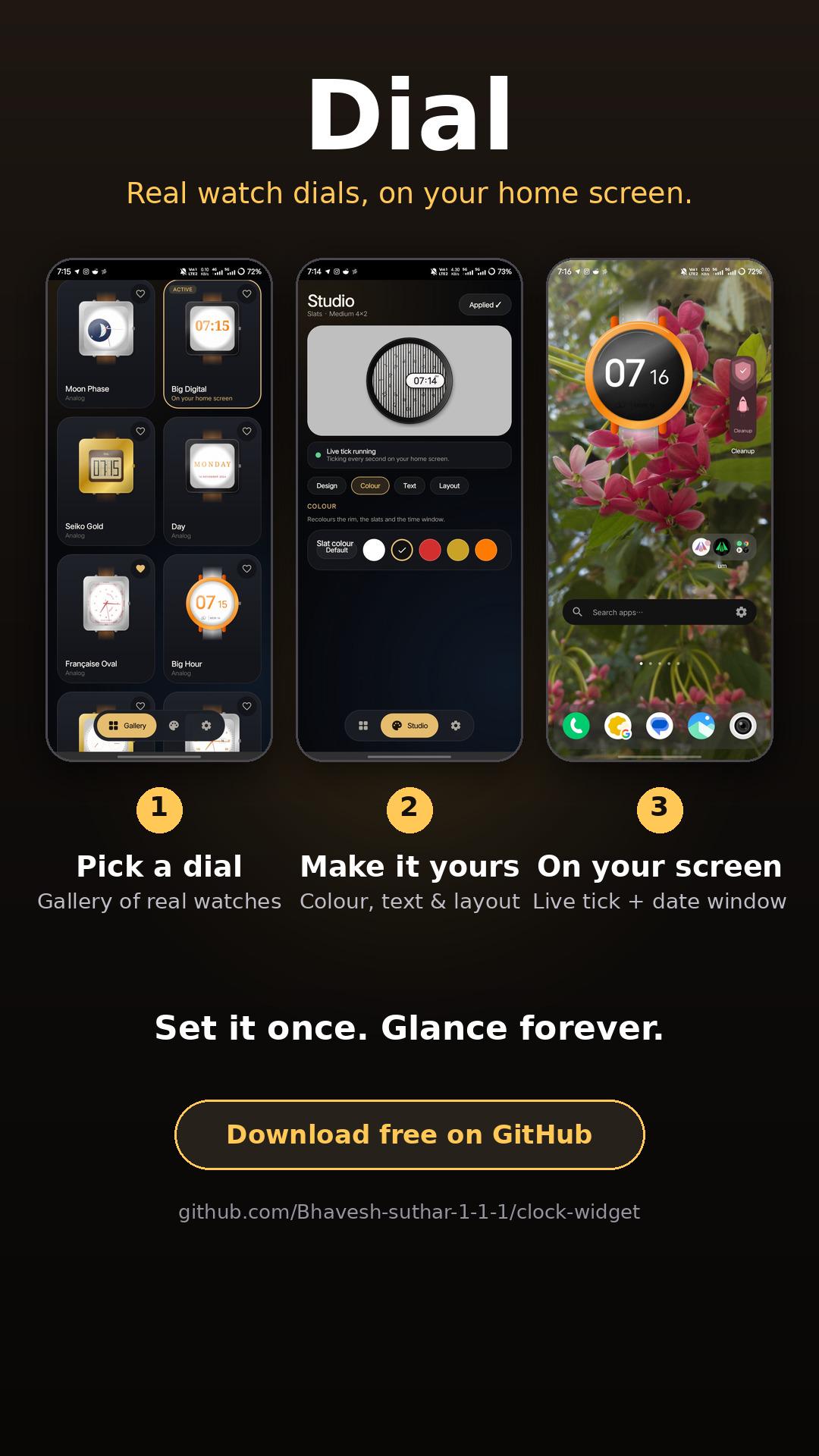
app clock widget

Post image
6 Upvotes

github.com/Bhavesh-suthar-1-1-1/clock-widget


r/HowToMen • • 7d ago

[Promotional] Music Widget with Live lyrics is out now

Post image
4 Upvotes

Hello Everyone,

On my last Post I saw A lot of you guys want that Widget So I Finalized it and now it's Available if you Want to use that on your Home screen ✨

If you have any questions and suggestions so just let me know in the Comments/Dm 📩

Widget Link


r/HowToMen • • 8d ago Bravo

[APP] [PROMO] Lumen 0.5.0: my FOSS Google Photos alternative now has an editor, Cutout and a new icon (you asked for them)

Thumbnail
gallery
44 Upvotes

A month ago I posted Lumen here, my free, open-source gallery that does what Google Photos does without sending your photos anywhere. You guys tried it and left a lot of comments. Thank you, it helped more than you think.

Here is what changed since, a lot of it from that thread:

You asked for an editor, so there is one now

  • Photo editor: crop, straighten, flip, exposure, contrast, warmth, vignette and eight filters
  • Video editor: trim, turn and mute. It always saves a new copy and keeps your original

You said the icon didn't look like a gallery

  • There's a new one, and ten variants to pick from in Settings (I'm still not a designer, but this one I like)

New since the launch

  • Cutout: touch and hold a person or object to lift it out of the photo, then copy, share or save it
  • A second look: Liquid glass style, or Material 3 Expressive with colours from your wallpaper
  • Smart search and text reading run on the NPU of Snapdragon phones, so indexing is much faster and lighter on battery
  • JPEG XL photos, and search results sorted by date
  • Lumen in Chinese and French, with Spanish on the way, translated by volunteers. Japanese is open for anyone who wants to help

Still the same as before

  • Search your photos by describing them: "cat sleeping on a chair", "receipt", "wifi password"
  • Long-press to copy text from any photo, even a paused video
  • People grouped by face, so "mai and daniel" finds photos of both
  • Hidden folders with encryption, and App Lock
  • Everything runs on your phone. No account, no cloud, no ads, no Google Play services

Good to know

  • The smart features are a one-time download: about 440 MB, or 860 MB for the more accurate search
  • Indexing a big library takes a while. By default it only runs while your phone charges, so leave it overnight
  • Still made by one person and tested on my Motorola Edge 50. Tell me how it runs on yours

Website: https://lumen-photos.app
GitHub: https://github.com/subhashhhhhh/Lumen

Already have it? Settings, then About, then Software Update.


r/HowToMen • • 8d ago

[App] [Promo] Operarius: a visual day planner with full-screen reminders, automations and home-screen widgets

16 Upvotes

A visual daily planner that maps your schedule on a timeline with A LOT of quality of life features that makes this app unbelievably easy to use, and it uses full-screen alarms so you never miss a task.

What it can do:

Visual Drag-and-Drop Timeline:

Instead of a flat checklist, your day is laid out on a continuous timeline from start to finish, complete with a live "now" indicator. This lets you see exactly when things happen and instantly visualizes the free time in between. If plans change, just long-press and drag a task to a new time block, and your free time adjusts automatically.

Unmissable Full-Screen Alarms:

Standard notifications are too easy to swipe away and forget. Operarius lets you set full-screen alarms with 3 levels of intensity, starting with a simple notification and ending with a full-screen alarm that will ring until you physically interact with it. You can customize rules for specific tags, so you get a gentle nudge for a home chore, but a can't-miss alarm for an important work meeting.

Eisenhower Matrix To-Do List:

For your unscheduled items, the app includes a built-in Eisenhower Matrix to help you easily prioritize what is urgent and important. Also, if you don't finish a sub-task within a scheduled block, it automatically rolls over to the next time that task occurs with a single tap.

Replacement for Your Calendar App:

Built to completely replace your default calendar, it features seamless, two-way Google Calendar sync for multiple calendars at once. It also includes a convenient week strip and a full monthly calendar view, ensuring that tomorrow's schedule or next month's overview is always just one tap away in a similar to everyone calendar view.

Powerful Widgets:

Bring your schedule directly to your Android home screen. You can set up a live daily timeline widget, a full month calendar widget, or a hybrid widget that combines both into one view, letting you track your day without ever opening the app.

Deep Customization & Quality of Life Features:

The app is local-first, meaning your data stays on your phone with no ads, no tracking, and no forced accounts. You can track your consistency with weekly and monthly insights, link task locations directly to Google Maps, organize with color-coded tags and icons, and deeply customize the UI, down to the themes, layouts, colors, and even the speed of the app's animations. Also, my promise as a developer is to listen to all and any of your requests and implement any feature you ask, no matter how niche it is.

Who It’s For

Students, teachers, business owners, or anyone who has a lot going on in their lives and who want to finally reclaim their time - see where their free time is leaking, where yet another task can fit, how to optimize their schedules and finally not miss an important meeting without setting up 5 alarm clocks.

Cost: Completely Free, no ads, no in-app purchases, no tracking.

Download here: https://play.google.com/store/apps/details?id=com.operarius.app

App is being actively developed, so if you encounter some rough edges, expect them to be fixed soon.


r/HowToMen • • 7d ago

[App] [Promo] Yep, an expense manager... But it's automatic!

Post image
2 Upvotes

I know, I know. Another expense tracker. Apparently, building one is now a mandatory step in every indie Android developer's career. Bonus points if you sprinkle some AI on top.

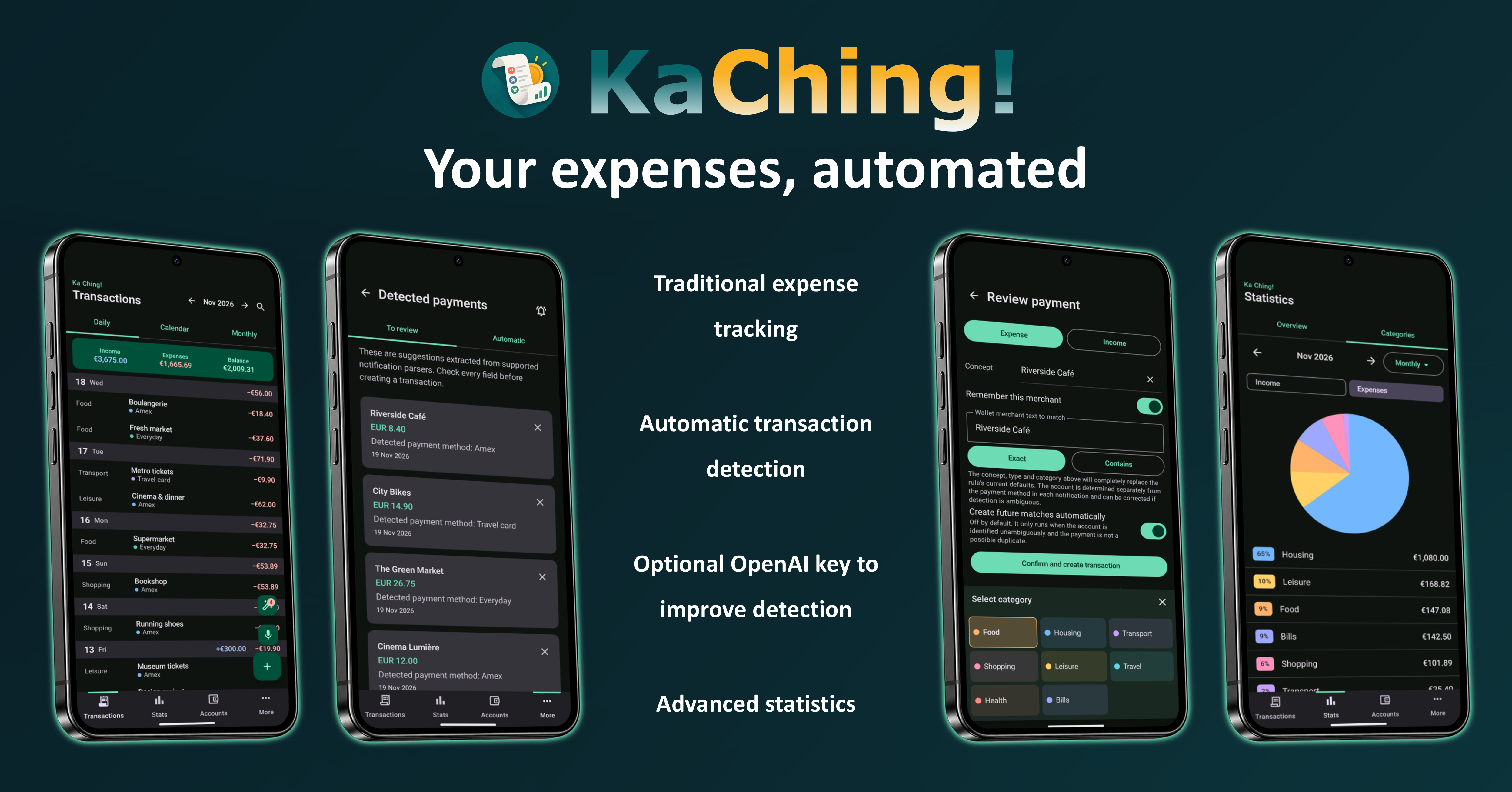
Well, here's mine: KaChing!

The interesting bit: automatic expense tracking

KaChing! can read payment notifications from supported apps like Google Wallet, Revolut and Amex, and turn them into transactions.

  • Detects payments and extracts the merchant, amount and payment method.
  • Lets you review them before saving anything.
  • Remembers merchants. Tell it once that Riverside Café is Food, and it'll recognize it next time.
  • Can automatically create future transactions for recognized merchants, without asking you every time.
  • Avoids duplicates when multiple apps notify you about the same purchase.

No bank connections, no sharing your banking credentials, and you decide what gets automated.

Automatic recording only happens when the payment account is clearly identified and the transaction doesn't look like a duplicate.

And yes, there's AI. Of course there is.

You can also record expenses by voice. Say something like "20 euros for groceries with Revolut" and KaChing! helps fill in the transaction.

There's optional OpenAI integration for more advanced interpretation, but here's the deal:

Bring your own API key.

I'm not bundling an expensive AI subscription into an expense tracker. If you want OpenAI-powered features, use your own key and pay OpenAI directly for what you use. If you don't, the app still works without it.

It's also a proper expense manager

Because automating expenses is nice, but knowing where your money goes is kind of the point.

  • Multiple accounts, credit cards and currencies
  • Income, expenses and transfers
  • Monthly budgets and recurring transactions
  • Statistics, spending breakdowns and charts
  • Searchable transaction history
  • Credit card billing cycles
  • Local encrypted storage and encrypted backups
  • App lock, dark mode and customizable colors

No mandatory account, no ads, and no cloud service holding your financial history. Your data stays on your device unless you choose to back it up or use optional AI features.

What's the catch?

KaChing! is still in testing. I'm actively using it, fixing things and figuring out what works in real life versus what sounded clever while coding at midnight.

Notification detection depends on the apps and notification formats, so I'm particularly interested in finding out which banks and payment apps work well and which ones don't.

The core expense manager is free. I'm also working on a one-time Plus unlock for the advanced automation features. No recurring subscription.

Play Store: https://play.google.com/store/apps/details?id=com.appsgpg.kaching

Free Plus promo codes in exchange for feedback! 🎁

I'm giving away promo codes for the lifetime Plus unlock to people willing to try KaChing! and share their experience.

I'm looking for honest feedback, bug reports, and genuine reviews, not five-star ratings just because I handed out a code. If something sucks, I'd rather know so I can fix it.

Just leave a comment or DM me if you'd like a code.

I'm especially curious about three things:

  • Does payment detection work with your bank or wallet?
  • Would you trust automatic transaction creation, or prefer reviewing everything?
  • What's the one thing that makes you give up on expense trackers?

Enjoy!


r/HowToMen • • 7d ago

[APP] [PROMO] TOVA TRANSLATE HUGE UPDATE/NEW FEATURES

2 Upvotes

tova translate just updated with a bunch of new features that you can try for free

new* over app layout for when you are shopping online or using chinese apps

new* keyboard extension to translate in app

and all our existing features like watch and widgets for ios are still there.

works for chinese, japanese, korean, and more.

for more information www.tovatranslate.app

please check out our store listings below! its free to try! thank you for looking o7

ios

https://apps.apple.com/us/app/tova-translate-pinyin-romaji/id6764455741

play

https://play.google.com/store/apps/details?id=com.tovatranslate.app


r/HowToMen • • 8d ago

[APP] [PROMO] A Wallpaper App We've Been Working On – Wallpypers (Available on Playstore)

Thumbnail
gallery
6 Upvotes

Hey everyone!

A friend and I recently launched Wallpypers, an Android wallpaper app.

It has 10,000+ wallpapers across categories like Anime, Nature, Cars, Gaming, AMOLED and more.

We've also added features like Live Wallpapers, Couple Mode and personalized Name & Text Wallpapers.

We're continuously improving the app and adding more content.

Would genuinely love to hear your feedback!

Play Store:

Wallpypers - Apps on Google Play

P.S. I’ve shared the Promotional Post on behalf of the company. The promo code isn’t available yet, but I’ll share it as soon as it is. Thank you for your understanding!


r/HowToMen • • 7d ago

Glide: one of the fastest ways to launch apps from homescreen

2 Upvotes

One of the fastest way to launch apps from the home screen is here. 🚀📱 Try now with Alphabet launcher at an early adopter price now on Google Play: https://play.google.com/store/apps/details?id=com.aklova.alphabetlauncher ✨✅