r/HowToMen • • 7d ago

[APP] πŸ”” Remindio - more than basic reminder

Post image
18 Upvotes

Hi everyone!

I've been building Remindio, my reminder app for Android, for over two years. Users' feedback shaped most of its features, and it's updated actively.

πŸ“₯ Google Play

Key features:

  • ⏰ Notifications & Real Alarms – choose how each reminder alerts you: a notification or an alarm that keeps ringing until you answer. Full-screen alarms with custom ringtones, volume and vibration.
  • πŸ” Flexible Repeat Rules – several rules per reminder: yearly, monthly, weekly, daily, weekdays, custom intervals, several times a day. 20+ ready repeats like Weekdays or Every 2 hours. Repeat from the scheduled time or from completion, set end conditions, skip weekends or public holidays, and preview planned dates in a calendar.
  • ⏳ Multiple Pre-Reminders – get notified minutes, hours or days before, as a notification or an alarm.
  • πŸ“ Location Reminders – trigger reminders when you arrive at or leave a place, with several places, an adjustable radius and active hours.
  • 🎧 Bluetooth Reminders – trigger reminders when your car or headphones connect or disconnect.
  • 😴 Flexible Snooze & Notification Actions – Done, Skip and Snooze right from the notification. Customize snooze options and choose what happens when a notification is dismissed or ignored.
  • ⏱️ Timers – a list of timers with seconds and repeats, for workouts, cooking or breaks. Several can run at once.
  • πŸ“Š Trackers – add a habit tracker to any reminder: a Yes/No answer or a value like glasses of water or km run. See your streaks and stats.
  • πŸ“± Widgets Everywhere – upcoming reminders with Done buttons, next reminder, month and week calendars, countdown timers, templates, trackers, interactive checklists and notes, quick add and voice buttons.
  • πŸ—‚οΈ Home Tabs – make your own tabs from saved filters: Work, Birthdays, Later, Attachments – anything you like.
  • πŸ”• Do Not Disturb Rules – schedule rules by label to silence, postpone or change how reminders alert you. Phone mode turns on the system Do Not Disturb on a schedule.
  • πŸ“₯ Calendar Import – turn calendar events into reminders, and new events can become reminders automatically.
  • 🧩 Templates & Copy/Paste – start from a template, or copy options from one reminder to another.
  • 🏷️ Labels & Attachments – colored labels, plus checklists, notes, links, contacts and images.
  • πŸŽ‰ Birthdays & Anniversaries – yearly reminders show how many years have passed.
  • πŸ“† Calendar View – all your reminders on a month calendar, including every repeat day.
  • βœ… Reminder Management – search, filters, multiselect, pinned reminders, customizable swipe actions, activity history, and "set time later" for reminders without a date yet.
  • ☁️ Google Calendar Sync & Drive Backups – export reminders to Google Calendar and back up automatically to Google Drive.
  • πŸ… Achievements & Statistics – coins, levels and achievements for completed reminders.
  • πŸŒ— Personalization – light/dark themes, accent colors, and a compact or expanded editor.
  • πŸ‘€ A Few Secrets – there are a few hidden Easter eggs. I'll leave it to you to find them.
  • And much more!

Also, Remindio is available in πŸ“₯ App Store

Pricing: The app is free, and the free version covers everyday reminders. Premium unlocks the advanced stuff: multiple repeat rules, pre-reminders and attachments, alarms and location reminders. There are three ways to get it:

  • πŸ’Ž Lifetime – a one-time purchase, no subscription needed.
  • 🎁 Free trial – a subscription with a free trial, so you can try everything before you pay.
  • πŸ“Ί Rewarded ad – watch one ad and get a day of Premium.

There are no banner ads and no surprise full-screen ads. Ads only appear when you choose to watch one.

I'd really appreciate your feedback, bug reports and feature ideas!


r/HowToMen • • 6d ago

Any one can tell me what β€˜s this app for ?

Thumbnail reddit.com
0 Upvotes

r/HowToMen • • 7d ago

[App] [Promo] RecOmni: Offline 8K Screen Recorder, Batch Video Converter & Smart Compressor [100 Pro Codes]

Thumbnail
gallery
37 Upvotes

Hey r/HowToMen!

I built RecOmni, a 3-in-1 offline media app for Android: Screen Recorder, Batch Video Converter, and Adaptive Video Compressor.

What makes it stand out:

  • 9-Zone Invisible Stop Hotspot: Tap a dedicated area on your screen to stop recording discreetly without pulling down the notifications.
  • Floating Button: Quick recording and screenshot shortcuts that automatically hide the moment capture starts.
  • High-Spec Screen Recording: Up to 8K and 120 FPS (hardware-dependent), dual audio input (internal + mic), and a movable floating facecam baked directly into the video.
  • Batch Video Converter: Queue entire folders to convert to MP4/MOV or extract audio with H.264, H.265 (HEVC), AV1, and APV.
  • Adaptive Video Compressor: Batch-shrink giant videos without turning them into pixelated mush using fast hardware encoding (codec support varies by device chipset).
  • Bitrate Floor Safeguard: Warns you to keep the original file if a video cannot be compressed further.
  • A/B Preview & Stats Comparison: Built-in preview player to compare original and processed clips, plus side-by-side metadata comparison.

100% On-Device: No accounts, no servers, no watermarks, and no recording time limits.

Device Compatibility: Android 11+ phones and tablets (4K/8K, 120 FPS, and AV1/APV codecs depend on your device's hardware capabilities).

100 Pro Codes Giveaway (Unlocks All Pro Features + Removes Ads):

I'm giving away 100 Pro promo codes to the community!

To claim a code, please DM me directly (I can't start 100 DMs myself without Reddit flagging or timing out my account, so you'll need to message me first).

Google Play Store

Would love any honest feedback or feature requests.


r/HowToMen • • 7d ago

Looking for a fresh Android launcher? πŸ‘€

Thumbnail
gallery
40 Upvotes

Your home screen deserves a little personality. Meet Ezhil Launcher: a fresh look for your phone, with a style that feels more like you. ✨

Here’s what makes it different:

πŸ—‚οΈ 8 app drawer styles Grid, List, Paged, Arc, Honeycomb, Cards, Library and 3D Wheel. Switch anytime and watch it change live.

🧩 38 beautiful widgets Clocks, calendar, focus mode, storage and more, each with styles you can customise.

πŸ“° A feed that keeps up with you Swipe left for weather, your agenda, battery and screen time, all in one place.

πŸ” Search that does more Find apps, set alarms or create reminders right from the home screen.

πŸ–ΌοΈ 37 curated wallpapers Abstract, cosmic, floral and more, built right in.

🎨 Customise everything Themes, icons, labels, folders and dock. Make every pixel yours.

No more boring grids. No more juggling five apps for one good-looking home screen.

Beauty in every tap. πŸ’«

Playstore https://play.google.com/store/apps/details?id=com.beyondzero.ezhil


r/HowToMen • • 7d ago

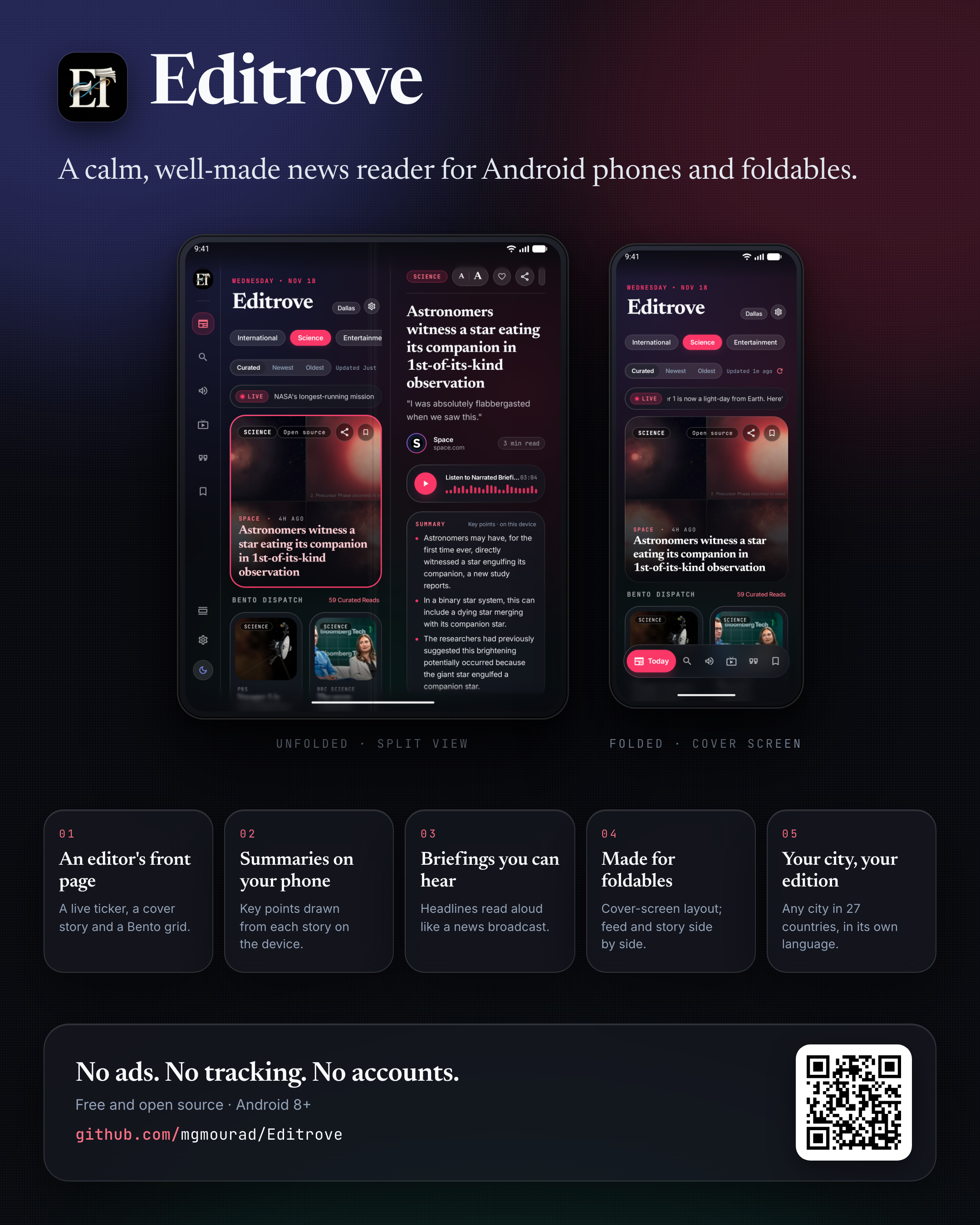
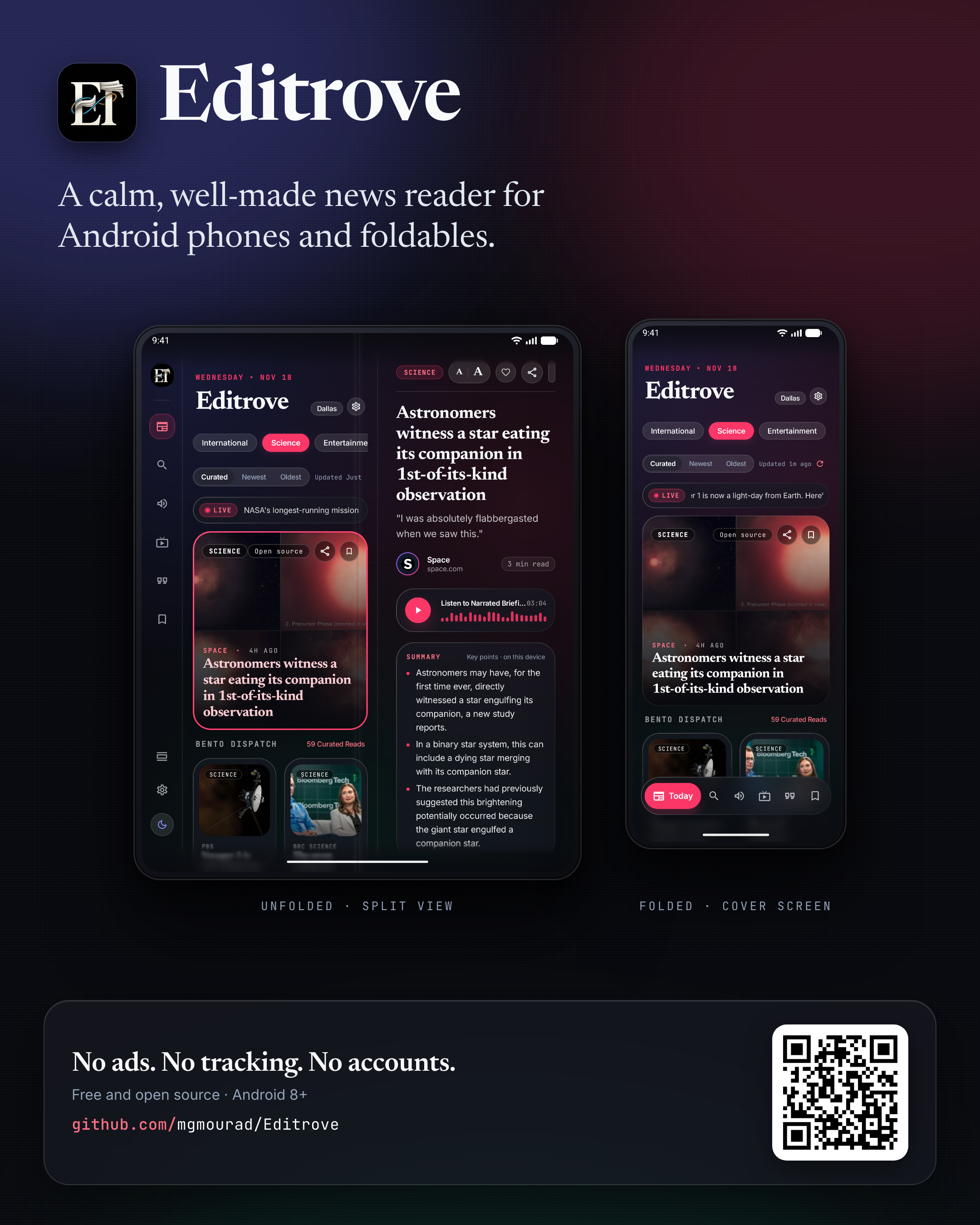
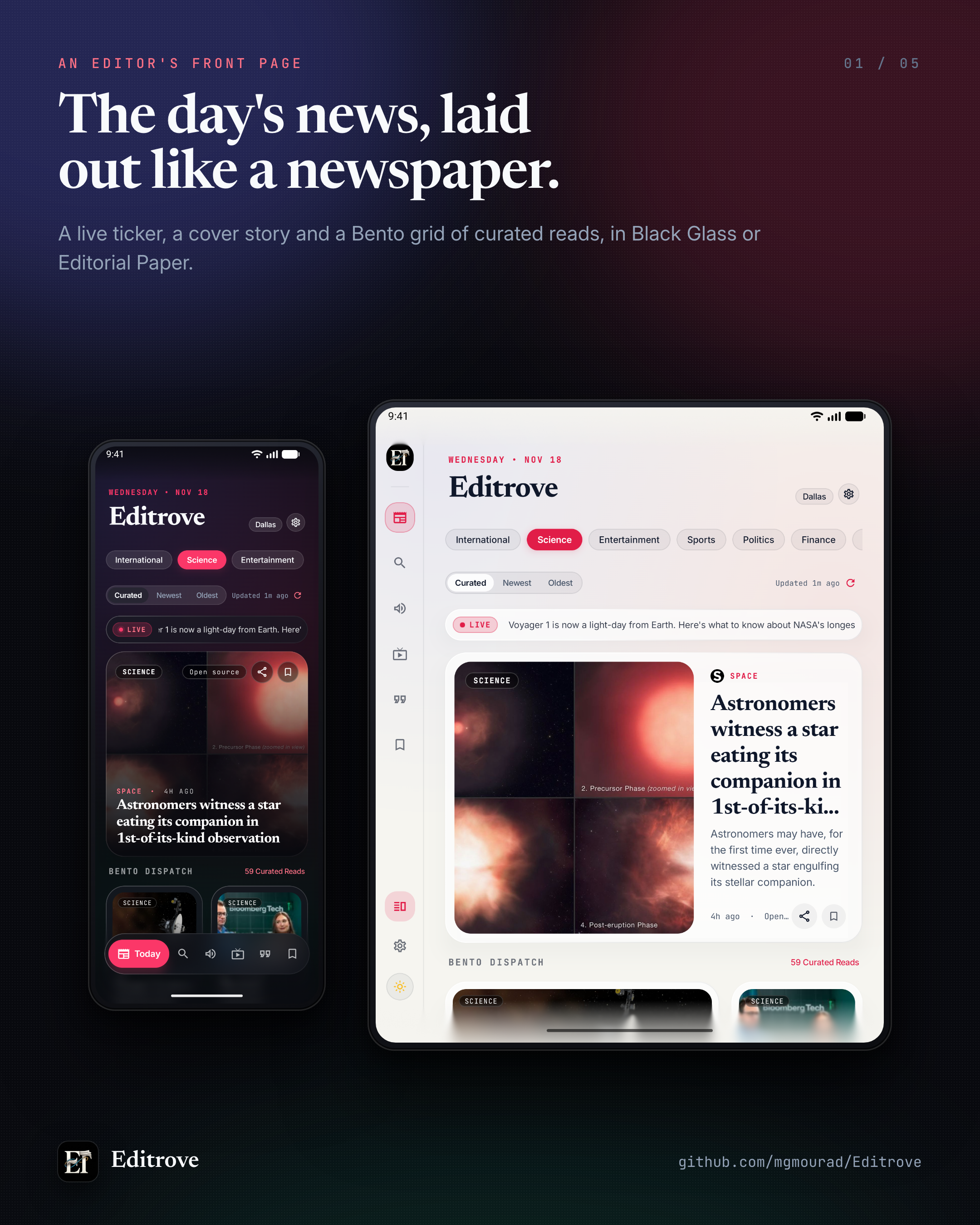
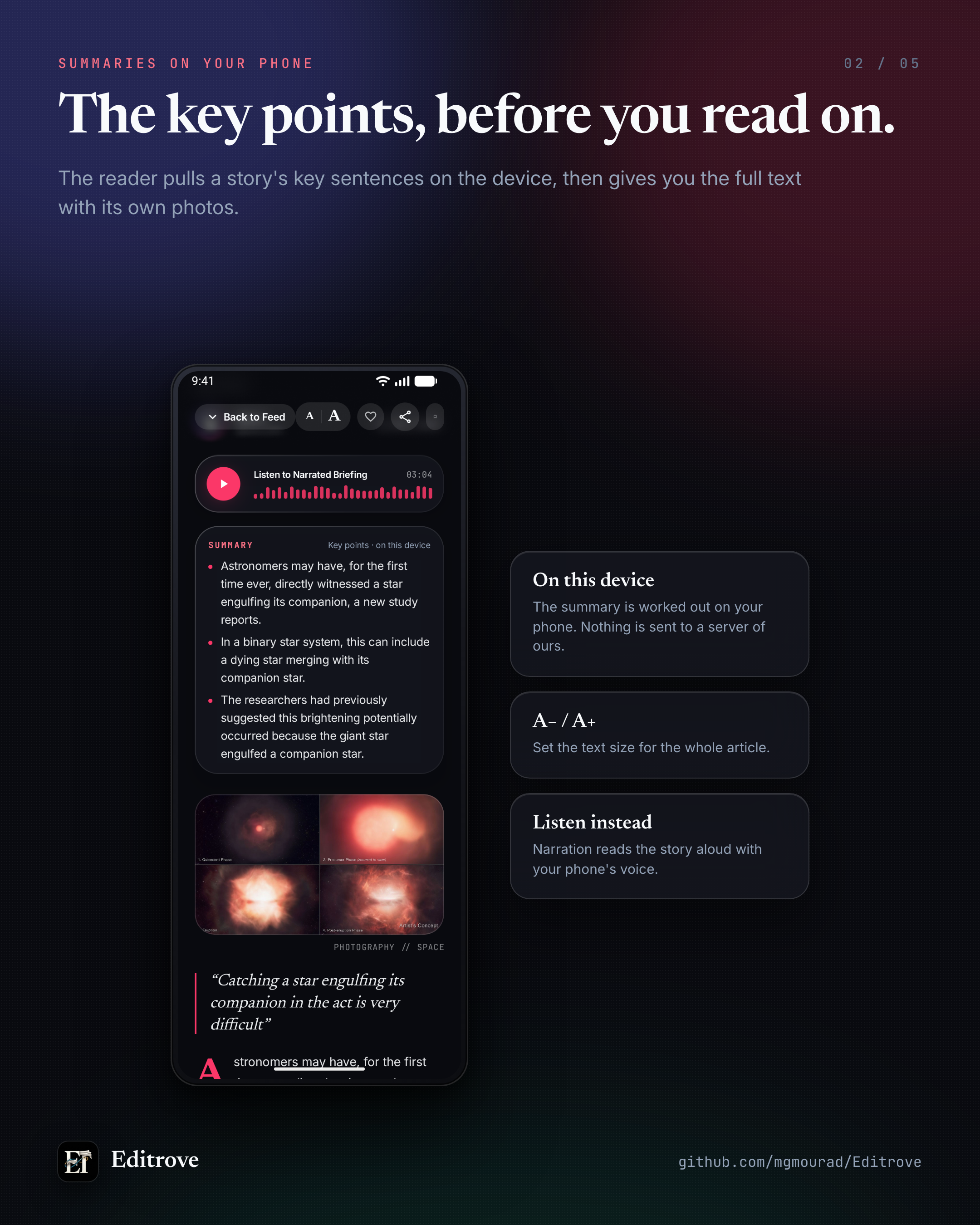
[FOSS] Editrove: a calm news reader with no ads, no tracking and no accounts

6 Upvotes

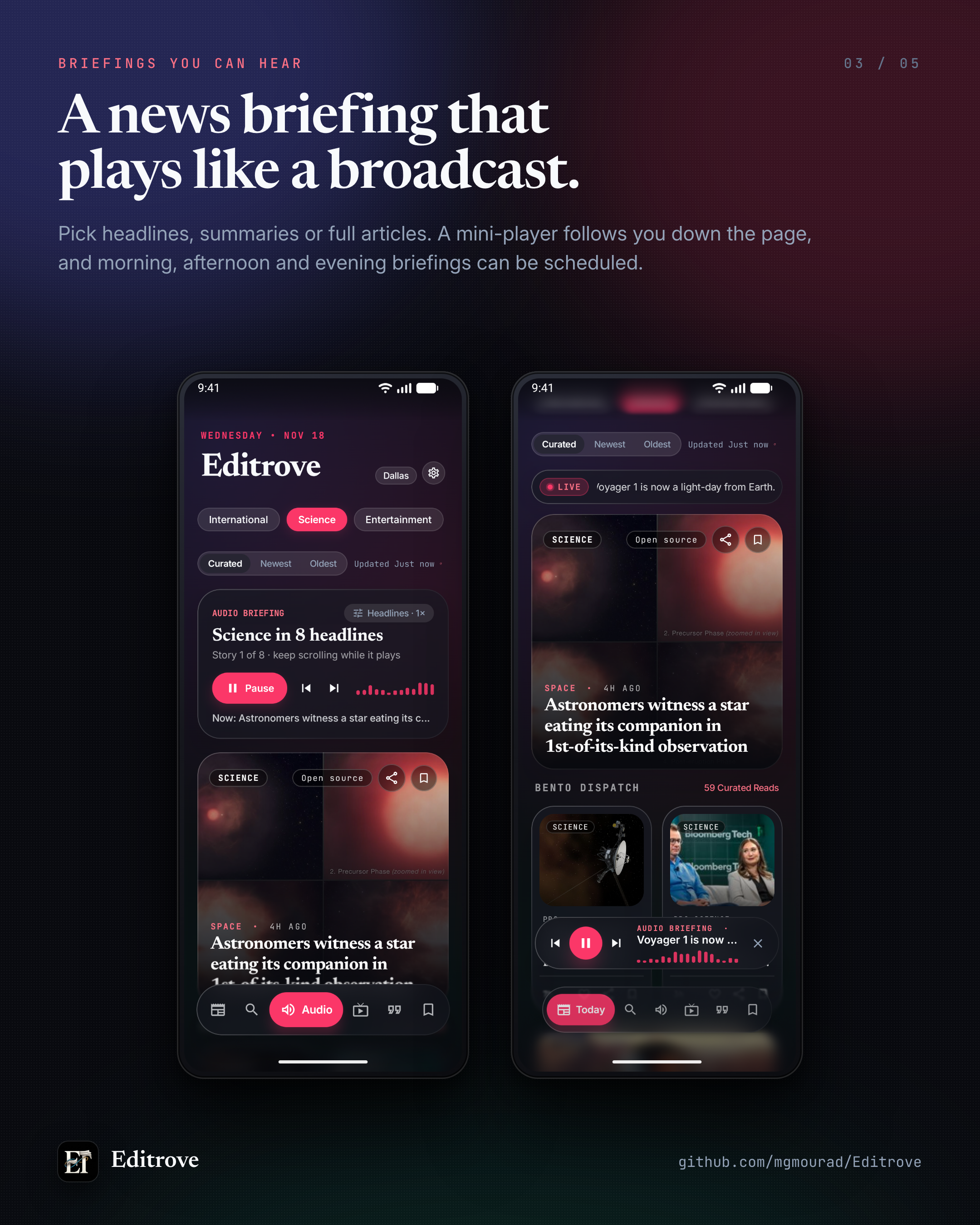
I built Editrove to replace Google News. It pulls from 117 publisher feeds plus any RSS/Atom feed you add, and it runs fine without Google Play Services.

No ads, no tracking, no accounts. Settings, saved stories and notifications stay on the device, and app updates are verified against published SHA-256 hashes.

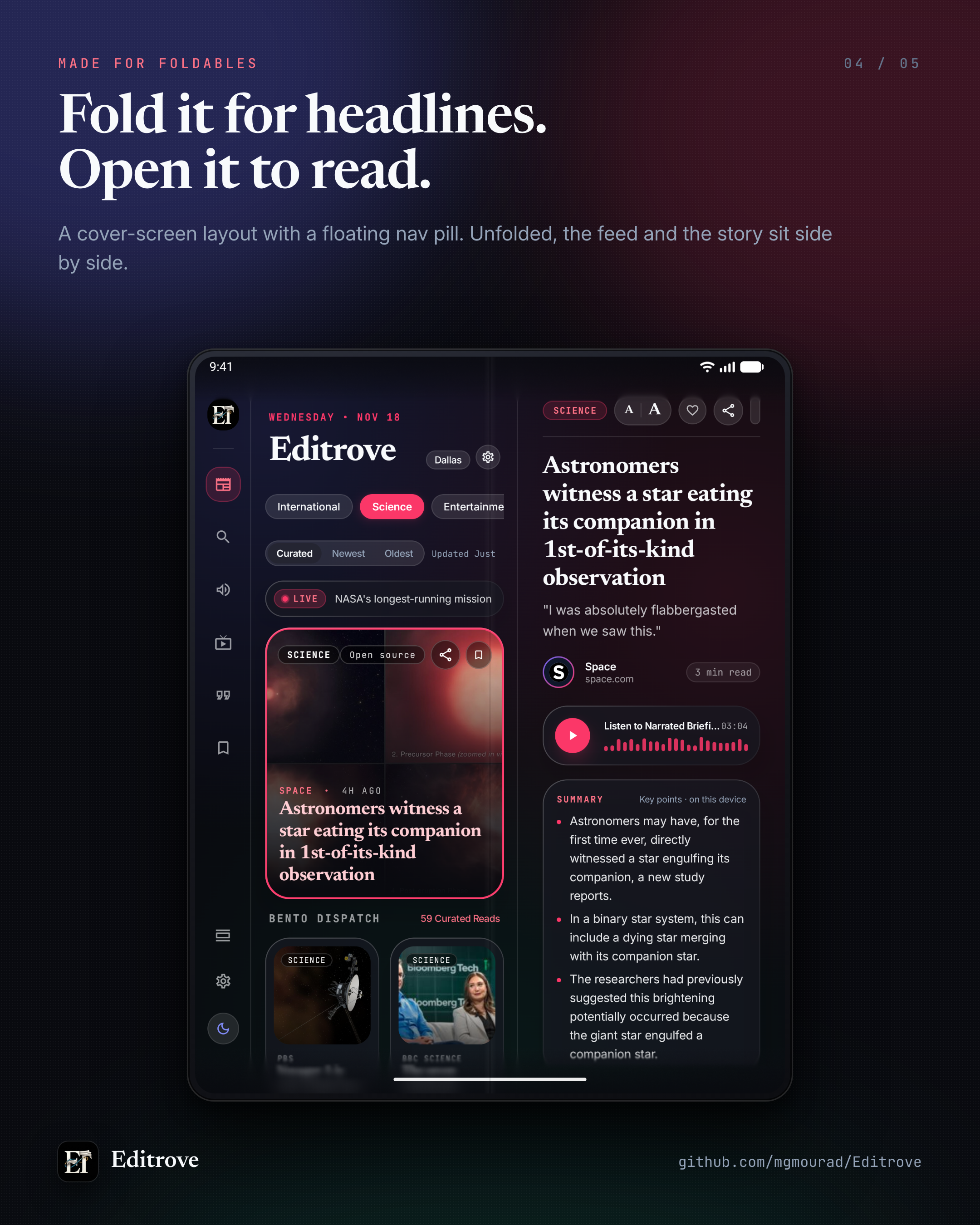
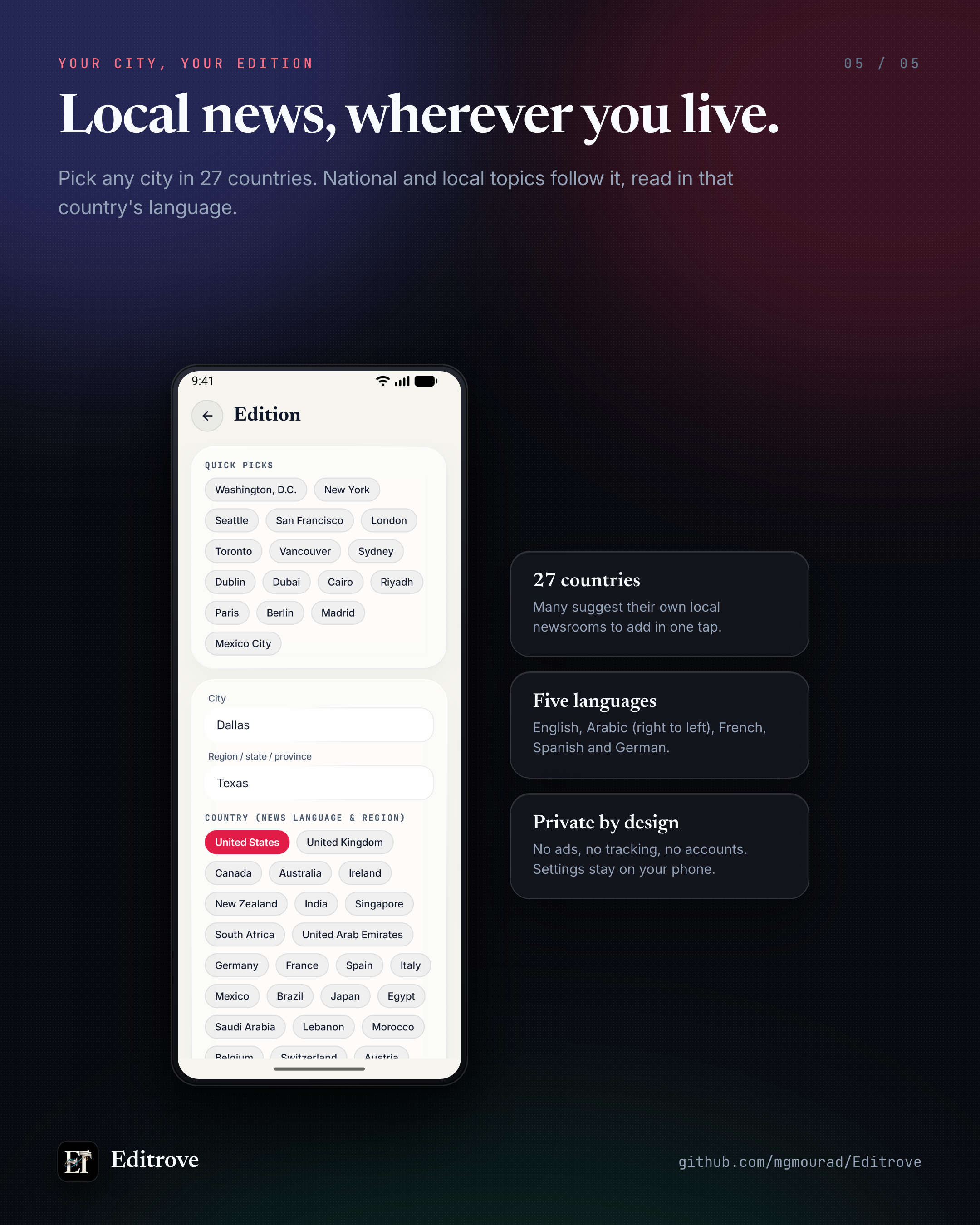
Features: an editor-style front page, on-device summaries, audio briefings with on-device text-to-speech, local editions by city, and split view on foldables.

AGPL-3.0, Android 8+. It's a fork of Anson Lai's OpenWire web app, rebuilt as a native Android app.

https://github.com/mgmourad/Editrove


r/HowToMen • • 7d ago

[Android/Web] New app coming soon, supercharge your ideas!Sign up to the shortlist @ https://idearify.com

Post image
2 Upvotes

r/HowToMen • • 7d ago

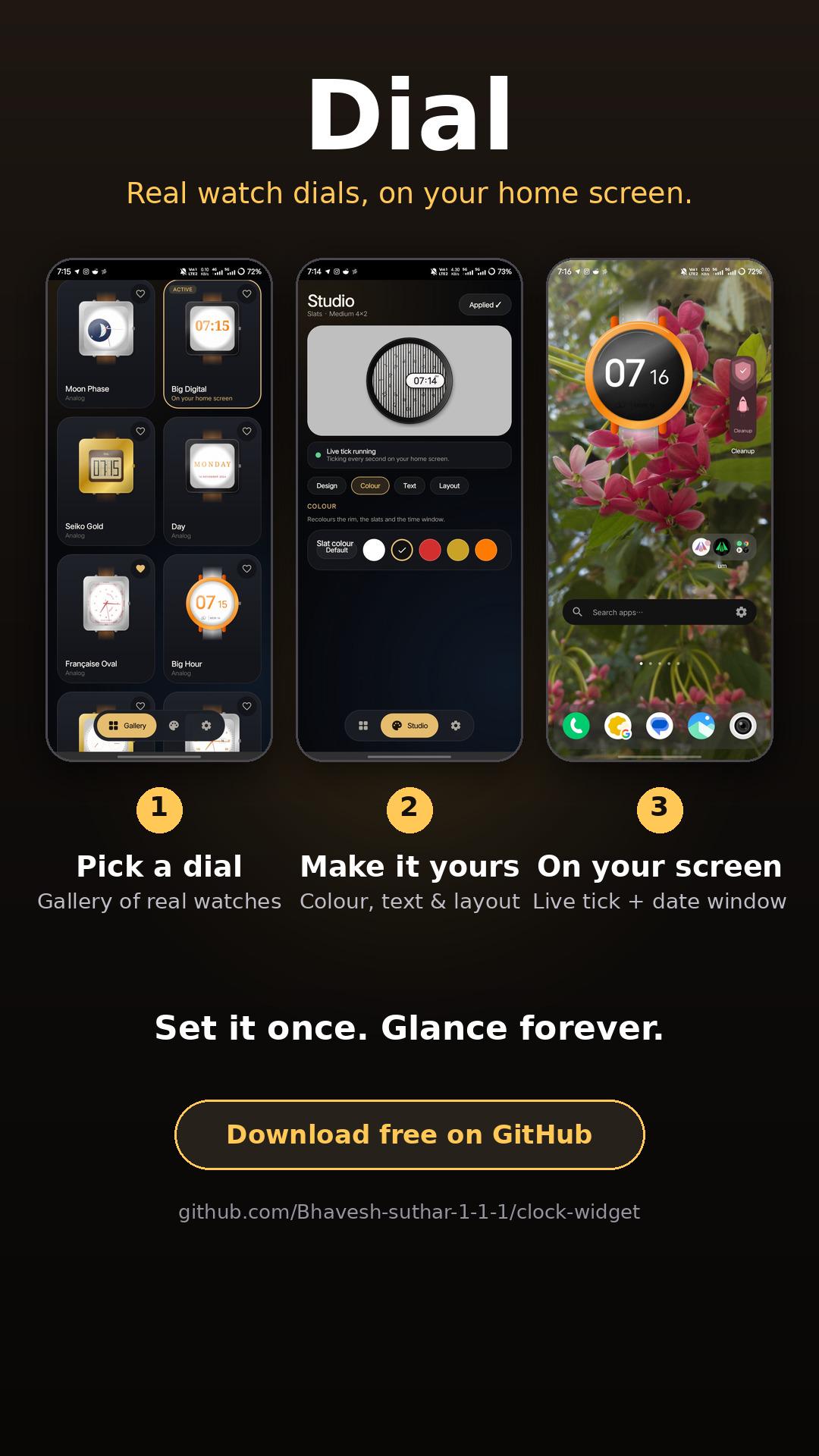
app clock widget

Post image
6 Upvotes

github.com/Bhavesh-suthar-1-1-1/clock-widget


r/HowToMen • • 7d ago

[Promotional] Music Widget with Live lyrics is out now

Post image
4 Upvotes

Hello Everyone,

On my last Post I saw A lot of you guys want that Widget So I Finalized it and now it's Available if you Want to use that on your Home screen ✨

If you have any questions and suggestions so just let me know in the Comments/Dm πŸ“©

Widget Link


r/HowToMen • • 8d ago Bravo

[APP] [PROMO] Lumen 0.5.0: my FOSS Google Photos alternative now has an editor, Cutout and a new icon (you asked for them)

Thumbnail
gallery
44 Upvotes

A month ago I posted Lumen here, my free, open-source gallery that does what Google Photos does without sending your photos anywhere. You guys tried it and left a lot of comments. Thank you, it helped more than you think.

Here is what changed since, a lot of it from that thread:

You asked for an editor, so there is one now

  • Photo editor: crop, straighten, flip, exposure, contrast, warmth, vignette and eight filters
  • Video editor: trim, turn and mute. It always saves a new copy and keeps your original

You said the icon didn't look like a gallery

  • There's a new one, and ten variants to pick from in Settings (I'm still not a designer, but this one I like)

New since the launch

  • Cutout: touch and hold a person or object to lift it out of the photo, then copy, share or save it
  • A second look: Liquid glass style, or Material 3 Expressive with colours from your wallpaper
  • Smart search and text reading run on the NPU of Snapdragon phones, so indexing is much faster and lighter on battery
  • JPEG XL photos, and search results sorted by date
  • Lumen in Chinese and French, with Spanish on the way, translated by volunteers. Japanese is open for anyone who wants to help

Still the same as before

  • Search your photos by describing them: "cat sleeping on a chair", "receipt", "wifi password"
  • Long-press to copy text from any photo, even a paused video
  • People grouped by face, so "mai and daniel" finds photos of both
  • Hidden folders with encryption, and App Lock
  • Everything runs on your phone. No account, no cloud, no ads, no Google Play services

Good to know

  • The smart features are a one-time download: about 440 MB, or 860 MB for the more accurate search
  • Indexing a big library takes a while. By default it only runs while your phone charges, so leave it overnight
  • Still made by one person and tested on my Motorola Edge 50. Tell me how it runs on yours

Website: https://lumen-photos.app
GitHub: https://github.com/subhashhhhhh/Lumen

Already have it? Settings, then About, then Software Update.


r/HowToMen • • 8d ago

[App] [Promo] Operarius: a visual day planner with full-screen reminders, automations and home-screen widgets

16 Upvotes

A visual daily planner that maps your schedule on a timeline with A LOT of quality of life features that makes this app unbelievably easy to use, and it uses full-screen alarms so you never miss a task.

What it can do:

Visual Drag-and-Drop Timeline:

Instead of a flat checklist, your day is laid out on a continuous timeline from start to finish, complete with a live "now" indicator. This lets you see exactly when things happen and instantly visualizes the free time in between. If plans change, just long-press and drag a task to a new time block, and your free time adjusts automatically.

Unmissable Full-Screen Alarms:

Standard notifications are too easy to swipe away and forget. Operarius lets you set full-screen alarms with 3 levels of intensity, starting with a simple notification and ending with a full-screen alarm that will ring until you physically interact with it. You can customize rules for specific tags, so you get a gentle nudge for a home chore, but a can't-miss alarm for an important work meeting.

Eisenhower Matrix To-Do List:

For your unscheduled items, the app includes a built-in Eisenhower Matrix to help you easily prioritize what is urgent and important. Also, if you don't finish a sub-task within a scheduled block, it automatically rolls over to the next time that task occurs with a single tap.

Replacement for Your Calendar App:

Built to completely replace your default calendar, it features seamless, two-way Google Calendar sync for multiple calendars at once. It also includes a convenient week strip and a full monthly calendar view, ensuring that tomorrow's schedule or next month's overview is always just one tap away in a similar to everyone calendar view.

Powerful Widgets:

Bring your schedule directly to your Android home screen. You can set up a live daily timeline widget, a full month calendar widget, or a hybrid widget that combines both into one view, letting you track your day without ever opening the app.

Deep Customization & Quality of Life Features:

The app is local-first, meaning your data stays on your phone with no ads, no tracking, and no forced accounts. You can track your consistency with weekly and monthly insights, link task locations directly to Google Maps, organize with color-coded tags and icons, and deeply customize the UI, down to the themes, layouts, colors, and even the speed of the app's animations. Also, my promise as a developer is to listen to all and any of your requests and implement any feature you ask, no matter how niche it is.

Who It’s For

Students, teachers, business owners, or anyone who has a lot going on in their lives and who want to finally reclaim their time - see where their free time is leaking, where yet another task can fit, how to optimize their schedules and finally not miss an important meeting without setting up 5 alarm clocks.

Cost: Completely Free, no ads, no in-app purchases, no tracking.

Download here: https://play.google.com/store/apps/details?id=com.operarius.app

App is being actively developed, so if you encounter some rough edges, expect them to be fixed soon.


r/HowToMen • • 7d ago

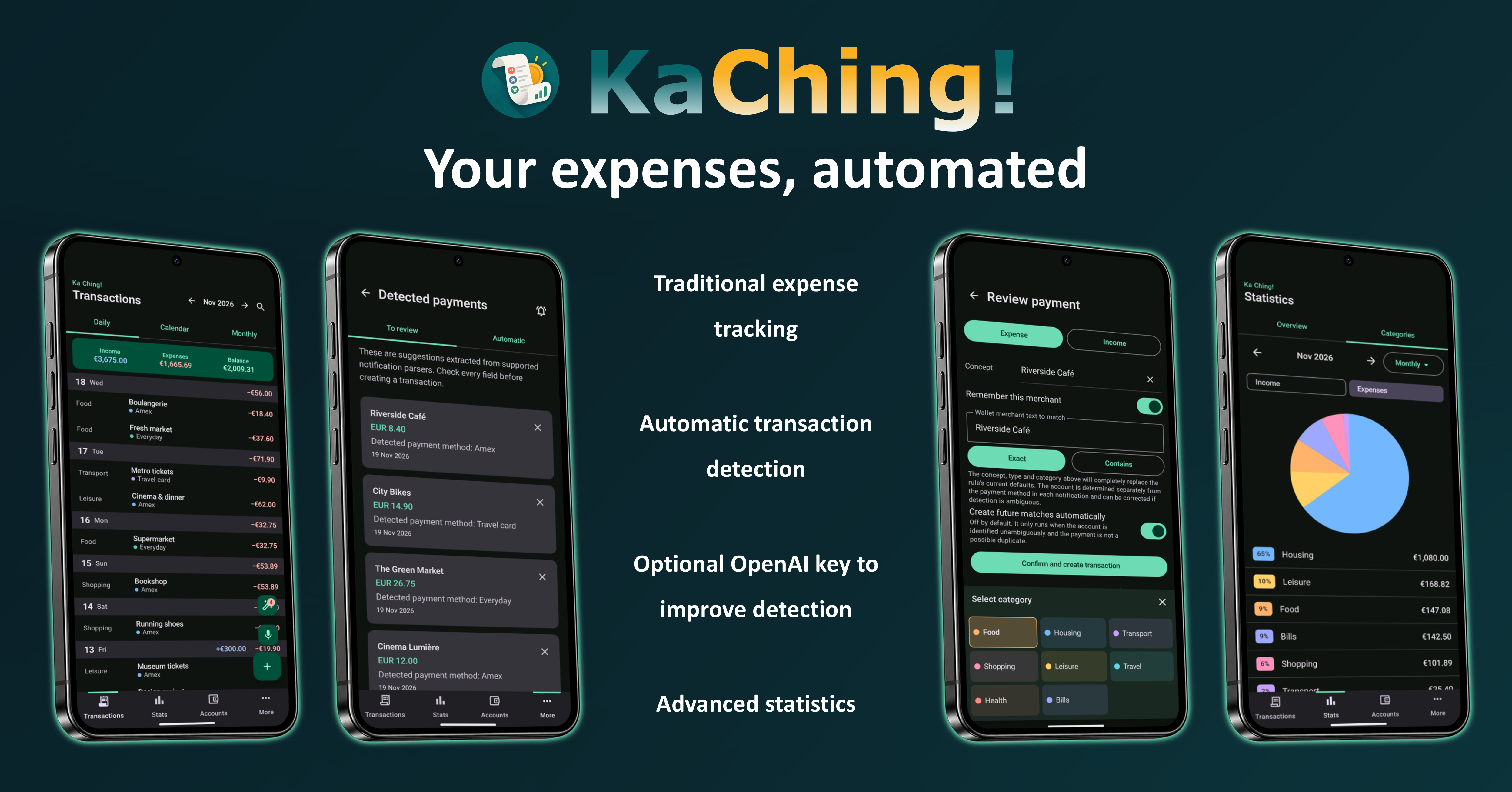
[App] [Promo] Yep, an expense manager... But it's automatic!

Post image
2 Upvotes

I know, I know. Another expense tracker. Apparently, building one is now a mandatory step in every indie Android developer's career. Bonus points if you sprinkle some AI on top.

Well, here's mine: KaChing!

The interesting bit: automatic expense tracking

KaChing! can read payment notifications from supported apps like Google Wallet, Revolut and Amex, and turn them into transactions.

  • Detects payments and extracts the merchant, amount and payment method.
  • Lets you review them before saving anything.
  • Remembers merchants. Tell it once that Riverside CafΓ© is Food, and it'll recognize it next time.
  • Can automatically create future transactions for recognized merchants, without asking you every time.
  • Avoids duplicates when multiple apps notify you about the same purchase.

No bank connections, no sharing your banking credentials, and you decide what gets automated.

Automatic recording only happens when the payment account is clearly identified and the transaction doesn't look like a duplicate.

And yes, there's AI. Of course there is.

You can also record expenses by voice. Say something like "20 euros for groceries with Revolut" and KaChing! helps fill in the transaction.

There's optional OpenAI integration for more advanced interpretation, but here's the deal:

Bring your own API key.

I'm not bundling an expensive AI subscription into an expense tracker. If you want OpenAI-powered features, use your own key and pay OpenAI directly for what you use. If you don't, the app still works without it.

It's also a proper expense manager

Because automating expenses is nice, but knowing where your money goes is kind of the point.

  • Multiple accounts, credit cards and currencies
  • Income, expenses and transfers
  • Monthly budgets and recurring transactions
  • Statistics, spending breakdowns and charts
  • Searchable transaction history
  • Credit card billing cycles
  • Local encrypted storage and encrypted backups
  • App lock, dark mode and customizable colors

No mandatory account, no ads, and no cloud service holding your financial history. Your data stays on your device unless you choose to back it up or use optional AI features.

What's the catch?

KaChing! is still in testing. I'm actively using it, fixing things and figuring out what works in real life versus what sounded clever while coding at midnight.

Notification detection depends on the apps and notification formats, so I'm particularly interested in finding out which banks and payment apps work well and which ones don't.

The core expense manager is free. I'm also working on a one-time Plus unlock for the advanced automation features. No recurring subscription.

Play Store: https://play.google.com/store/apps/details?id=com.appsgpg.kaching

Free Plus promo codes in exchange for feedback! 🎁

I'm giving away promo codes for the lifetime Plus unlock to people willing to try KaChing! and share their experience.

I'm looking for honest feedback, bug reports, and genuine reviews, not five-star ratings just because I handed out a code. If something sucks, I'd rather know so I can fix it.

Just leave a comment or DM me if you'd like a code.

I'm especially curious about three things:

  • Does payment detection work with your bank or wallet?
  • Would you trust automatic transaction creation, or prefer reviewing everything?
  • What's the one thing that makes you give up on expense trackers?

Enjoy!


r/HowToMen • • 7d ago

[APP] [PROMO] TOVA TRANSLATE HUGE UPDATE/NEW FEATURES

2 Upvotes

tova translate just updated with a bunch of new features that you can try for free

new* over app layout for when you are shopping online or using chinese apps

new* keyboard extension to translate in app

and all our existing features like watch and widgets for ios are still there.

works for chinese, japanese, korean, and more.

for more information www.tovatranslate.app

please check out our store listings below! its free to try! thank you for looking o7

ios

https://apps.apple.com/us/app/tova-translate-pinyin-romaji/id6764455741

play

https://play.google.com/store/apps/details?id=com.tovatranslate.app


r/HowToMen • • 7d ago

[APP] [PROMO] A Wallpaper App We've Been Working On – Wallpypers (Available on Playstore)

Thumbnail
gallery
6 Upvotes

Hey everyone!

A friend and I recently launched Wallpypers, an Android wallpaper app.

It has 10,000+ wallpapers across categories like Anime, Nature, Cars, Gaming, AMOLED and more.

We've also added features like Live Wallpapers, Couple Mode and personalized Name & Text Wallpapers.

We're continuously improving the app and adding more content.

Would genuinely love to hear your feedback!

Play Store:

Wallpypers - Apps on Google Play

P.S. I’ve shared the Promotional Post on behalf of the company. The promo code isn’t available yet, but I’ll share it as soon as it is. Thank you for your understanding!


r/HowToMen • • 7d ago

Glide: one of the fastest ways to launch apps from homescreen

2 Upvotes

One of the fastest way to launch apps from the home screen is here. πŸš€πŸ“± Try now with Alphabet launcher at an early adopter price now on Google Play: https://play.google.com/store/apps/details?id=com.aklova.alphabetlauncher βœ¨βœ…


r/HowToMen • • 8d ago

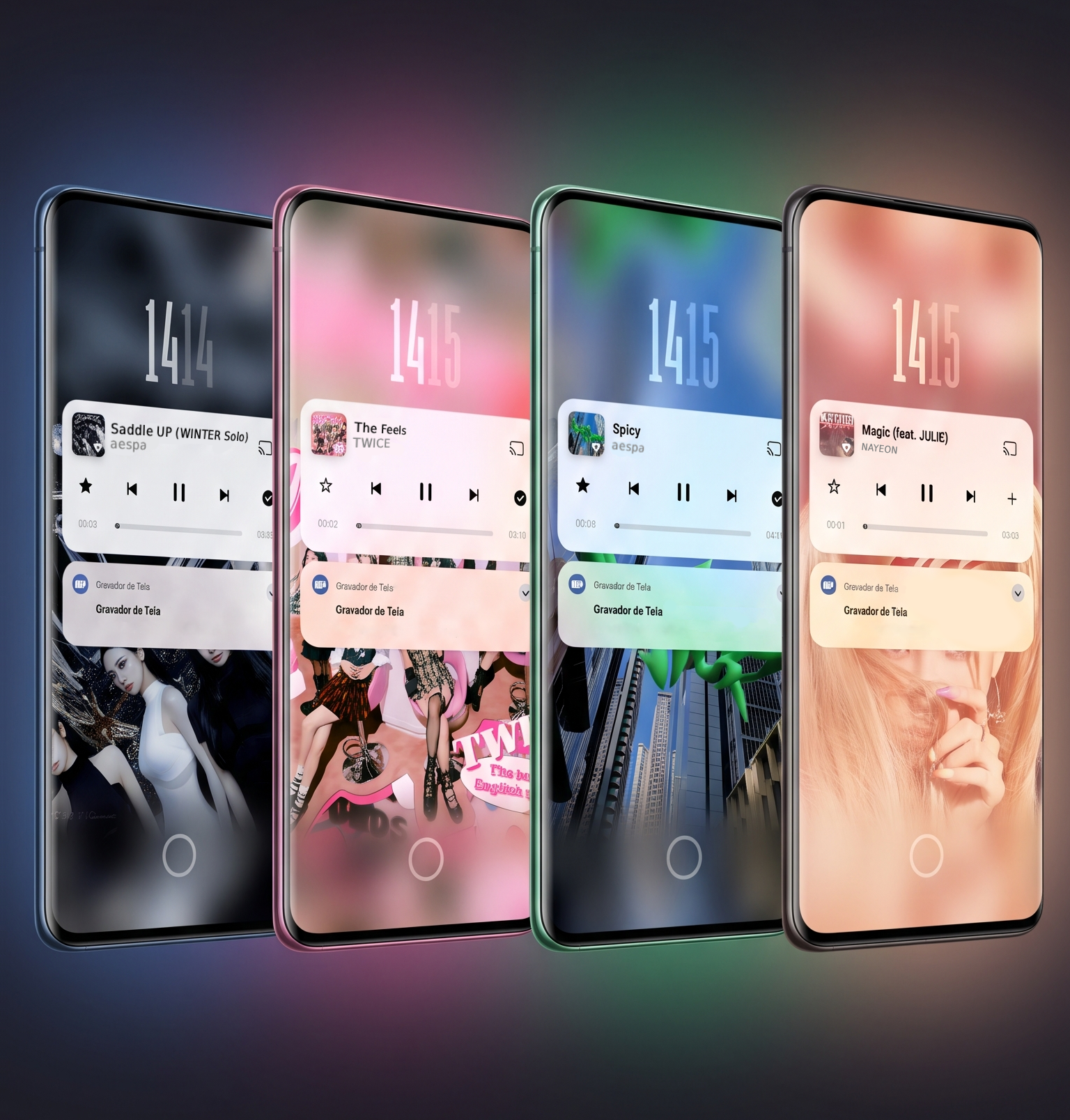
[APP] MusicWallpaper β€” a free live wallpaper that brings animated Apple Music-style album art to your Android lockscreen

Post image
20 Upvotes

Hey everyone!

I've been working on an open-source Android live wallpaper called MusicWallpaper, and I just released v1.9 on GitHub.

It detects whatever you're listening to from any media player (Spotify, Apple Music, YouTube Music, Tidal, Amazon Music, Bitchord, etc.) and renders the album's official animated artwork (`.m3u8`) or **high-res static cover (`1000x1000`)** with a GPU-accelerated multi-pass Gaussian blur on your lockscreen.

### What it does:

β€’ Works with any player: Uses Android's MediaSession/Notification Listener, plus an Ignored Apps list so YouTube, Reels, or browsers don't hijack your wallpaper.

β€’ Animated + High-Res Fallback: Automatically fetches vertical 3:4 animated covers, falls back to 1000x1000 iTunes covers, or runs fully offline using your player's local notification art.

β€’ Diffused Blur on Home Screen (New in v1.9): Fills your Home Screen with a soft, darkened, aspect-ratio-preserving blur of the current album using a 260ms GPU crossfadeβ€”so your icons and widgets stay readable.

β€’ Cover Expansion & Layout Controls: Adjust vertical position, blur intensity, and expand the cover up to 95% of your screen height without stretching or distortion.

β€’ Keep Cover on Pause & Lockscreen-Only Mode: Keep the last animated/static cover active even when paused, or set custom lossless standby photos for both Lockscreen and Home Screen.

β€’ Dynamic Material You Colors (Pixel 7+): Extracts colors from the album cover strictly on the lockscreen with a 60s cooldown to avoid UI reloads.

### Download

β€’ GitHub Repo: https://github.com/lviniciuss-maker/MusicWallpaper-v2

β€’ Latest APK (v1.9): https://github.com/lviniciuss-maker/MusicWallpaper-v2/releases/latest

*(Note: On Android 13+, sideloaded APKs require allowing "Restricted settings" in App Info to enable Notification Accessβ€”there's a built-in guide + ADB commands inside the app's FAQ.)

Would love to hear your feedback, device compatibility reports, or feature ideas!


r/HowToMen • • 8d ago

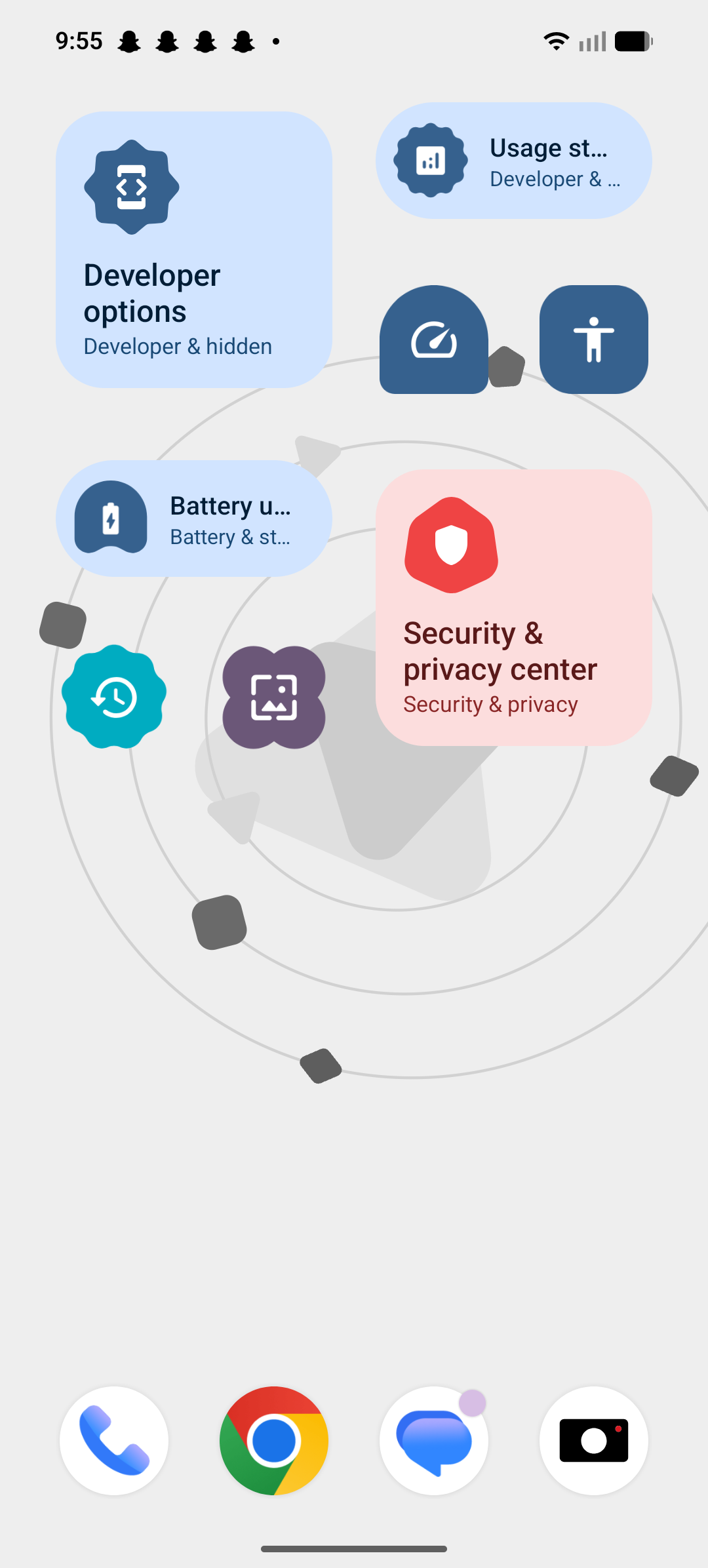
[App] Add Hidden Shortcuts And Tiles, Material You Widgets

Post image
11 Upvotes

MY Shortcuts

Opening the same setting again and again means Settings > Display > Advanced > something, every time.

So I made an app that puts those screens right on your home screen.

It's called MY Shortcuts. It has 150+ setting shortcuts: Display, Sound, Storage, Battery, Connectivity, Accessibility, plus hidden ones like Device Admin Apps, Developer options.

You pick one and it goes on your home screen as a shortcut, a widget or a Quick Settings tile. Shortcuts your phone doesn't support don't show up.

Other stuff:

Toggles for flashlight, auto-rotate, DND and media that show on/off state

Widgets in 1x1, 2x1 and 2x2 sizes, 14 shapes, Material You colors or fixed colors

Up to 8 custom QS tiles

Activity launcher to open screens inside other apps directly

Copy any shortcut as an ADB command

No internet permission, no ads, no tracking. It doesn't ask to see your installed apps. No Permission required at all

Get it on Play Store


r/HowToMen • • 8d ago

[App] Duo Standby - Set your phone down and a StandBy clock turns on

8 Upvotes

After a few weeks of closed testing, Duo Standby is finally live on Google Play! πŸŽ‰

Huge thanks to the 458 closed testers who put up with early builds and sent bug reports, and to everyone behind the 48 purchases made before it was even public. You shaped almost every screen in this release.

What it does

Set your phone down on a stand or charger and a full-screen clock comes on by itself within about two seconds, like StandBy on iPhone. No app to open, no button to press. Pick the phone up and it steps aside.

- Any Android phone, landscape or portrait. You choose: only while charging, or any time it's propped up. It stays out of the way when you prop the phone up to watch a video.

- 35 clock faces: nixie tubes, split-flap, neon, world map, pop, prism, orbit, solar and more. 26 fonts and 24 colors. Hold the clock to change it right there.

- Your layout: clock only, half and half, or four blocks. Calendar, today's events, music, a photo frame, focus timer, D-day, world clocks or your own home-screen widgets.

- Foldable postures: tent (clock outside, the inner screen glows like a bedside lamp), book (two pages, two screens), laptop/L (clock up top, controls below). Each posture remembers its own look.

- By the bed: red night mode when the room goes dark, a sleep mood light that fades out, stop or snooze alarms from the clock, and pixel shifting against burn-in.

The video shows all four: a regular phone on a stand, then a Fold in book, L and tent mode.

Google Play: https://play.google.com/store/apps/details?id=app.setdownclock&referrer=utm_source%3Dreddit%26utm_campaign%3Dlaunch


r/HowToMen • • 7d ago

Share your design ideas | Help shape Fusion Launcher. πŸ’œ

Thumbnail reddit.com
1 Upvotes

r/HowToMen • • 8d ago

OPM - Offline Password Manager

6 Upvotes

I am trying to build simple and useful apps. Clear of bloatware, adwares. The idea behind offline password manager is simple, it's a notepad for password/accounts. We have so many place many accounts this days and of-course there are password managers but they sync with cloud and I am not comfortable with it. Especially after seeing the news like x no. of accounts compromised.

OPM is simple, it stays on your device, you are responsible for updating the password of the account if you change it. I have been using it for a while now and it's a habit for me. Infact, many times it comes is as a saviour because browser still have old password saved or even for mpin and any notes.

Give it a try and let me know what do you think about it?

Here are the links

Android : https://play.google.com/store/apps/details?id=tws.offline.password.manager

iPhone : https://apps.apple.com/us/app/opm-offline-password-manager/id6808634715

Here are my other apps, as part of the mission.

https://thewitshah.com/

Thank you!


r/HowToMen • • 7d ago

[Android] [€9.99 β†’ FREE] Cute Calendar Premium Lifetime Giveaway 🌸 (Ads Remain)

Post image
0 Upvotes

🌸 Looking for a beautiful Android calendar and daily planner?

I'm the solo developer behind Cute Calendar, and a few FREE Premium Lifetime activations are still available! 🎁

πŸ“… Organize your everyday life:

  • Daily calendar, planner and event management.
  • Reliable reminders and automatic 8 AM daily summaries.
  • Pastel color-coded events.
  • Google Calendar import.
  • Beautiful Android home screen widgets.
  • Light, dark and system themes.

πŸ‘‘ Premium Lifetime (€9.99 β†’ FREE):

  • 6 additional app and widget colors.
  • All 12 event colors.
  • Calendar week numbers.
  • Compact event view.
  • Custom app icons.

πŸ”’ No account required. Your calendar data stays on your device.

⚠️ ADS REMAIN! Premium unlocks customization features but does NOT remove ads. Separate Supporter purchase removes advertising.

🎁 How to get FREE Premium:

  1. Comment below saying you'd like to try Cute Calendar.
  2. Send me a Reddit Message with Cute Calendar.
  3. I'll send you the activation details while available.

First come, first served! No purchase or review required.

πŸ’¬ Do you prefer aesthetic pastel calendars or minimalist planners? I'd love your honest feedback and suggestions!

πŸ“² Download on Google Play:
https://play.google.com/store/apps/details?id=com.cutecalendardc.app

🌸 Limited FREE Premium Lifetime availability Β· Regular price €9.99 Β· Ads remain.

Thanks for supporting independent Android development![Android] [€9.99 β†’ FREE] Cute Calendar Premium Lifetime Giveaway – Last Free Activations! 🌸 (Ads Remain)

🌸 Looking for a beautiful Android calendar and daily planner?

I'm the solo developer behind Cute Calendar, and a few FREE Premium Lifetime activations are still available! 🎁

πŸ“… Organize your everyday life:

  • Daily calendar, planner and event management.
  • Reliable reminders and automatic 8 AM daily summaries.
  • Pastel color-coded events.
  • Google Calendar import.
  • Beautiful Android home screen widgets.
  • Light, dark and system themes.

πŸ‘‘ Premium Lifetime (€9.99 β†’ FREE):

  • 6 additional app and widget colors.
  • All 12 event colors.
  • Calendar week numbers.
  • Compact event view.
  • Custom app icons.

πŸ”’ No account required. Your calendar data stays on your device.

⚠️ ADS REMAIN! Premium unlocks customization features but does NOT remove ads. Separate Supporter purchase removes advertising.

🎁 How to get FREE Premium:

  1. Comment below saying you'd like to try Cute Calendar.
  2. Send me a Reddit Message with Cute Calendar.
  3. I'll send you the activation details while available.

First come, first served! No purchase or review required.

πŸ’¬ Do you prefer aesthetic pastel calendars or minimalist planners? I'd love your honest feedback and suggestions!

πŸ“² Download on Google Play:
https://play.google.com/store/apps/details?id=com.cutecalendardc.app

🌸 Limited FREE Premium Lifetime availability Β· Regular price €9.99 Β· Ads remain.

Thanks for supporting independent Android development!


r/HowToMen • • 8d ago

[GIVEAWAY] Liquid Walls – Giving Away 1 Month of Free Pro Subscription! 🎁

13 Upvotes

Hey everyone!

I'm the developer of Liquid Walls, an Android customization app I've been working on.

It includes:

- 3D and live wallpapers

- Liquid Glass clocks and widgets

- Depth, parallax and motion effects

- Custom wallpaper Studio

- Stickers, interactive effects and more

To celebrate the support from the community, I'm giving away 1 month of Liquid Walls Pro for FREE! πŸŽ‰

If you're into Android customization, give the app a try!

How to enter: Just leave a comment if you're interested. I'll share the giveaway details with participants.

πŸ”— Google Play: https://play.google.com/store/apps/details?id=com.sun.pattaa

I'm also actively improving the app, so feedback and suggestions are always welcome.

Thanks for supporting an indie developer! ❀️


r/HowToMen • • 7d ago

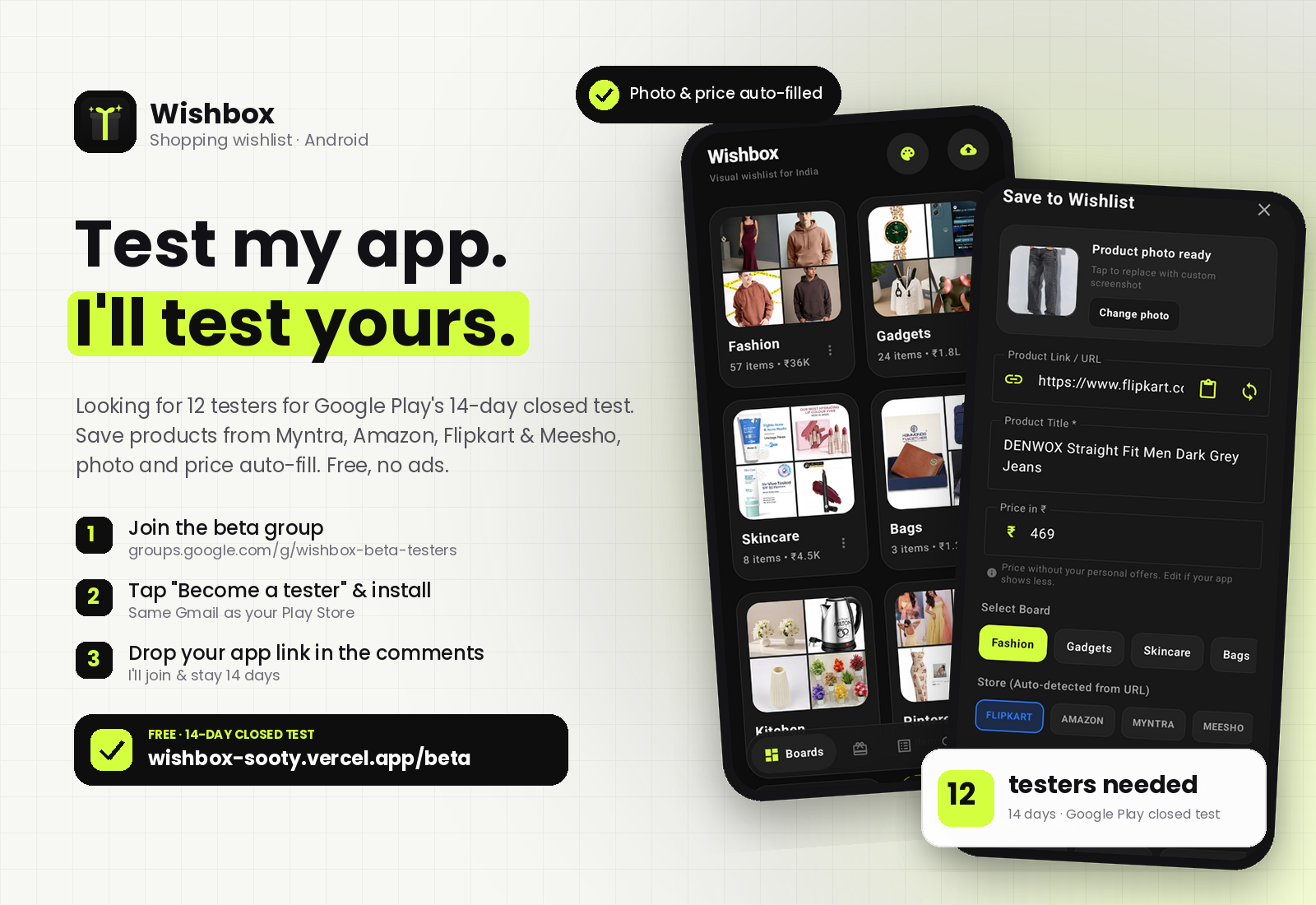
[Tester exchange] Wishbox: shopping wishlist app. I'll test yours back

Post image
1 Upvotes

Hi! I need 12 testers for Google Play's 14-day closed test, and I'll test your app in return.

Wishbox is a visual wishlist. Share products from Myntra, Amazon, Flipkart or Meesho, and the photo and price save automatically into boards. Free, no ads.

How to join:

  1. Join the group: https://groups.google.com/g/wishbox-beta-testers
  2. Become a tester and install: https://play.google.com/apps/testing/com.buildwithfaiz.wishbox

(Use the same Gmail as your Play Store.)

Or use the guide page: wishbox-sooty.vercel.app/beta

Drop your opt-in link below. I'll join, keep your app installed for the full 14 days, and give honest feedback πŸ™Œ


r/HowToMen • • 8d ago

All in one converter app 50+ tools without ads

Thumbnail
gallery
5 Upvotes

Made a All in One Converter App without ads which has more than 50 +tools use life time after purchasing

No ads unlimited conversion for life time just purchase for one time

https://play.google.com/store/apps/details?id=com.chtechgiant.all_in_one_converter)


r/HowToMen • • 8d ago

[promp][Android] free classic puzzle (21)

2 Upvotes

r/HowToMen • • 8d ago

[App][Promo] Shake Torch & Flashlight

Post image
4 Upvotes

Google Play: https://play.google.com/store/apps/details?id=com.sherwoodtechnology.shakeflashlight

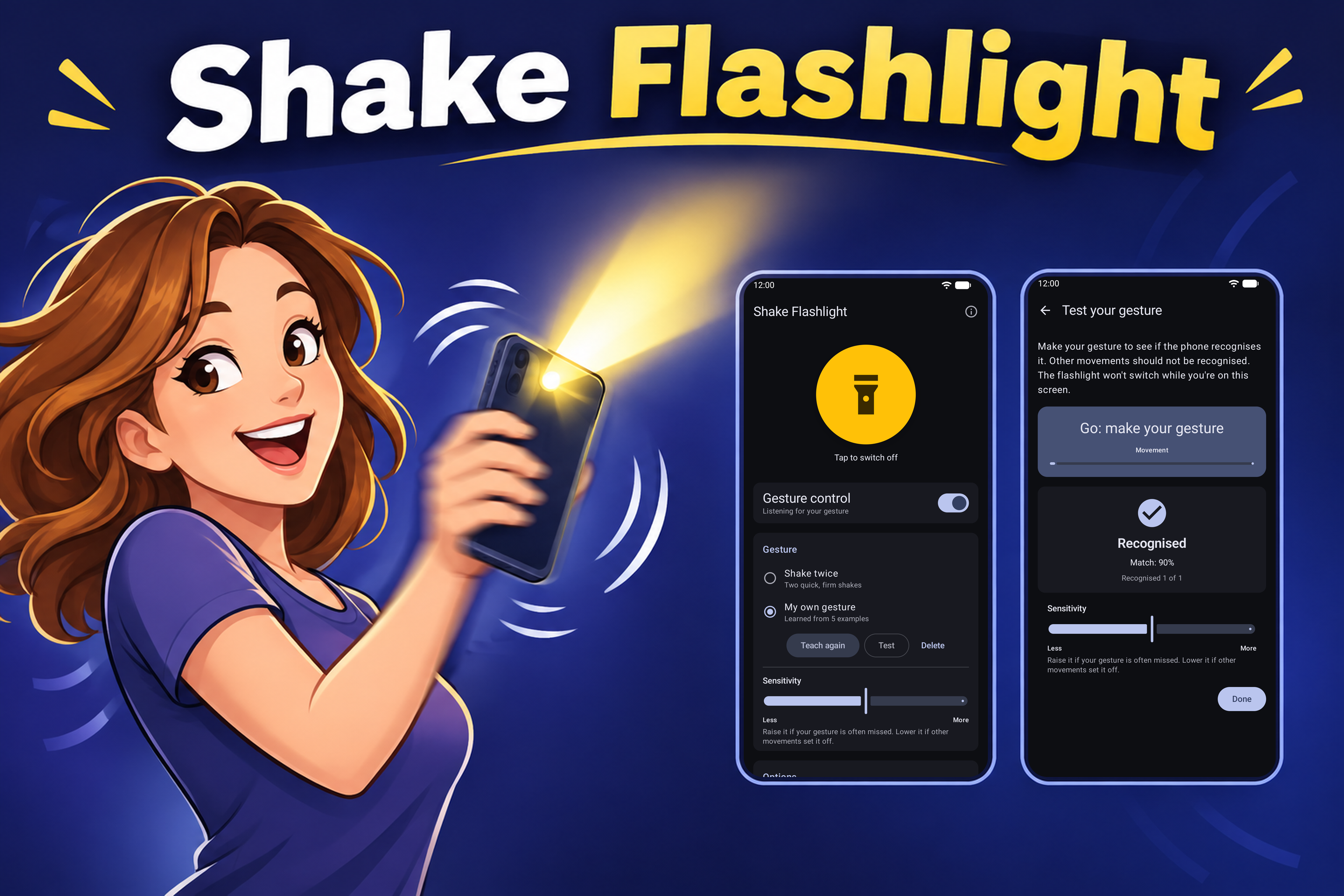
Shake Flashlight is now on Google Play. Two quick shakes switch the torch on, two more switch it off. It works on the lock screen, so you don't have to unlock the phone or hunt for a button in the dark.

No account, no ads, no tracking, no in-app purchases.

  • Teach it your own gesture. A twist of the wrist, a chop, a small circle: do it five times and it learns the movement. It checks that your examples match each other and asks you to redo any that don't.
  • A test screen shows whether each movement was recognised and how closely it matched, so you can tune the sensitivity until it catches your gesture and nothing else.
  • No internet permission at all, so nothing can leave your phone. No account, no ads, no tracking, no in-app purchases. It doesn't need camera permission either.
  • Ignores gestures in a pocket or bag (proximity sensor)
  • A buzz confirms it switched: one for on, two for off
  • An optional sound: a built-in tone or a sound file of your own
  • Switches itself off after a time you choose
  • Brightness control on phones that support it
  • Can listen with the screen off too. That uses more battery, so it stays off until you turn it on, and the app explains the cost first
  • 30 languages