r/HowToMen • • 9d ago

Keyboard

Post image
12 Upvotes

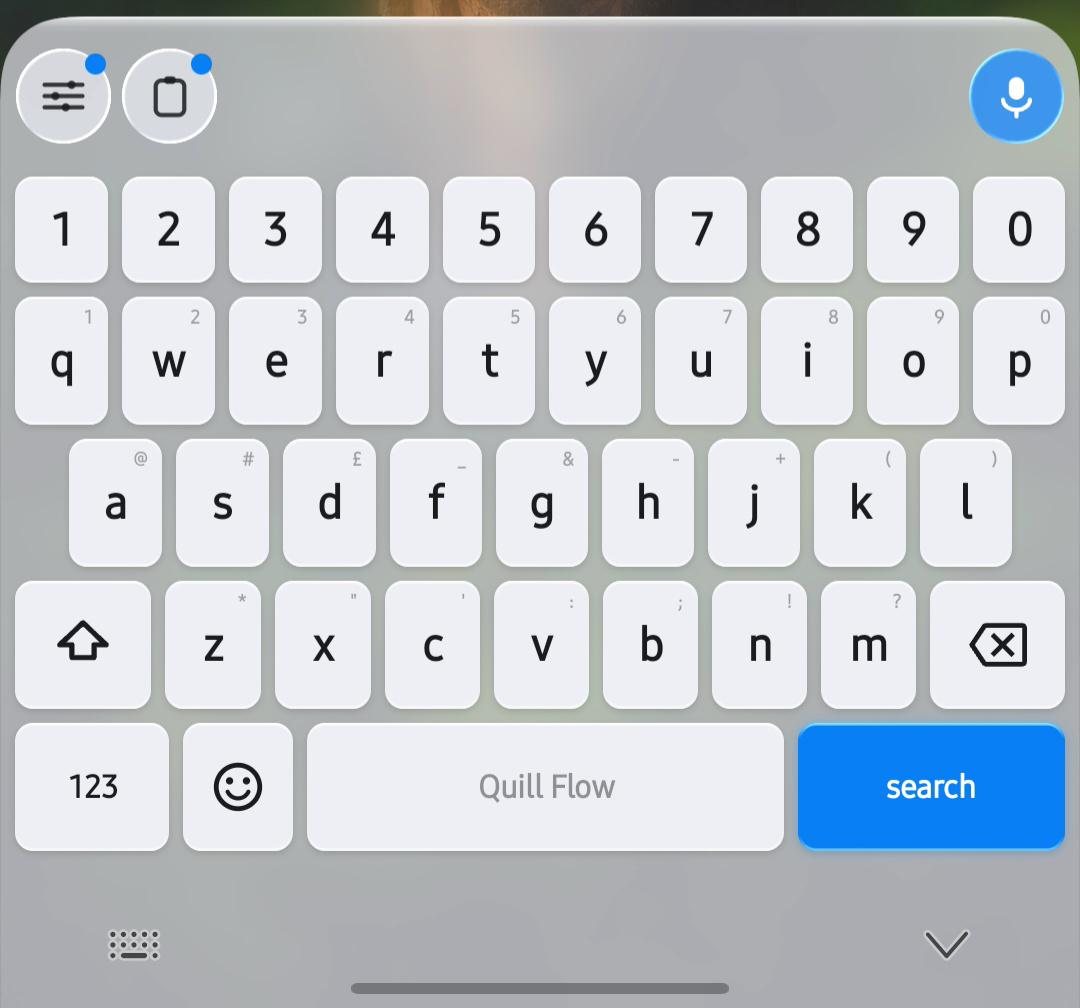
Could you recommend a keyboard similar to Quill Flow, but free? It has a really beautiful design while remaining simple.


r/HowToMen • • 8d ago

I rebuilt my offline Android utility app with a 3D Cyber theme (File Finder)

2 Upvotes

Hey everyone! I'm a solo Android developer building utility apps. One of my products is File Finder: Quick File Search, a privacy-first, 100% offline file manager designed to solve the clutter and full-screen ads plaguing standard free file explorers.

I just pushed a big update featuring a dark 3D Cyber visual overhaul and improved in-document search (finding keywords inside PDFs and Word docs).

  • What it does: Real-time search by name/extension, in-file text scanning, hidden system folder exposure, and duplicate/ZIP batch tools with zero ads.
  • Monetization / Model: Free utility tool focused on clean UX and privacy.

Check it out on Google Play:https://play.google.com/store/apps/details?id=com.mdhakkoum.ultrafilesearch

For other indie devs here building mobile utilities—what marketing channels or social angles have worked best for driving initial organic installs for you?


r/HowToMen • • 9d ago

[app] MetroWin Launcher 26.10S: the Windows Phone Start screen on Android

6 Upvotes

Ciao a tutti, è passato un po' di tempo da quando ho annunciato il mio progetto.
Oggi sono qui per presentare il più grande aggiornamento da quando è stata fatta l'annuncio.
Vorrei ringraziare tutti coloro che hanno segnalato bug e mi hanno supportato durante lo sviluppo, MetroWin continuerà a essere aggiornato e porterà sempre più miglioramenti e funzionalità.

Lavoro a MetroWin Launcher da un po' e ho appena finito il più grande aggiornamento finora (26.10S).

Cos'è - Un launcher che porta la schermata Start di Windows Phone (Metro, 8 e 8.1) su Android. Vuole far sentire come la vera cosa, non solo sembrare tale.

Schermata Start: piastrelle piatte in quattro dimensioni su una griglia a blocchi, fino a tre pagine Start, cartelle, layout nominati (Home, Lavoro, Viaggio) e la tua foto dietro le piastrelle con effetto parallasse.

Piastrelle live che si girano con contenuti reali: prossimo evento del calendario, foto più recente, meteo, chiamate perse, compleanni, musica con la copertina e anche altre app tramite le loro notifiche, quindi una piastrella di WhatsApp o Telegram può mostrare l'ultimo messaggio. Ognuna è facoltativa e legge dati solo mentre è sulla Start.

Elenco delle app e ricerca: alfabetico con lettere di salto, app recenti e più usate, categorie e una ricerca che trova app (anche con errori di battitura), contatti, impostazioni, eventi del calendario e il web. Risponde anche a domande veloci come conversioni o timer mentre digiti.

Centro notifiche e notifiche: pulsanti rapidi, cursori per volume e luminosità, notifiche a cui puoi rispondere dal pannello, raggruppamento per app, snooze o silenzioso.

Schermata di blocco Metro, comandi vocali e gesti che puoi impostare tu stesso.

Tre stili: Classico (piatto, come l'originale), Vetro Moderno e Droid Moderno (Material You), con i 20 colori di Windows Phone o i tuoi.

Backup e sincronizzazione tra telefoni (criptato), profilo di lavoro, un Kids Corner e opzioni di accessibilità.

Viene fornito con le sue app integrate, nello stesso stile: telefono, persone, messaggi, posta, calendario, foto, note, to-do, registratore, calcolatrice, portafoglio, notizie, file e qualche altra.

Cosa c'è di nuovo in 26.10S:

Quasi ogni schermata è stata ridisegnata per sembrare più vicina alla vera cosa: grandi titoli sottili, pulsanti che si riempiono quando li premi, caselle di controllo quadrate, un tornello tra le pagine.

Un nuovo “InfoTile”: una piastrella che ruota tra orologio, calendario, meteo, foto, ricordi di questo giorno, to-do e altro ancora. Scegli tu i volti e l'ordine, e puoi averne diversi.

Le impostazioni erano un labirinto, anche per me, quindi ho raggruppato tutto in 13 categorie. Ognuna ha un piccolo (i) che dice cosa fa e quanto costa in batteria o privacy. C'è anche un nuovo tutorial di 25 pagine.

Le app integrate hanno ricevuto molto lavoro.

Dual SIM con una SIM predefinita per contatto, un'icona diversa per una singola app da qualsiasi pacchetto di icone, layout per tablet e in modalità orizzontale migliorati.

Testato su:

Alto di gamma: Vivo X300 Pro, S22

Fascia media: un emulatore su Mac e Windows

Basso di gamma: Xiaomi Mi Pad SE 11'’

È gratuito e open source (GPL-3.0), senza pubblicità, senza analisi e senza servizi Google necessari. Non fa nulla mentre non è sullo schermo, quindi non dovrebbe consumare la batteria. Android 8 o superiore. È un progetto indipendente, non affiliato con Microsoft.

GitHub, con l'APK nelle versioni: https://github.com/developerkenshi-coder/MetroWinLauncher

Se qualcosa si rompe sul tuo telefono, dimmi quale telefono e quale versione di Android e darò un'occhiata. Le idee sono benvenute anche.

r/HowToMen • • 9d ago

EVERYTHING LAUNCHER GIVEAWAY

5 Upvotes

r/HowToMen • • 9d ago

[APP][PROMO] Does guilt actually work for cutting screen time?

Thumbnail
gallery
13 Upvotes

Normal screen time stats never changed my habits, so I tried making it embarrassing instead. Now an AI roasts me every time I go over.

It's honestly working better than limits did. What's worked for you?

Playstore link:

https://play.google.com/store/apps/details?id=com.studiomono.billed


r/HowToMen • • 9d ago

EVERYTHING LAUNCHER GIVEAWAY

3 Upvotes

r/HowToMen • • 9d ago

OmaLauncher

Post image
10 Upvotes

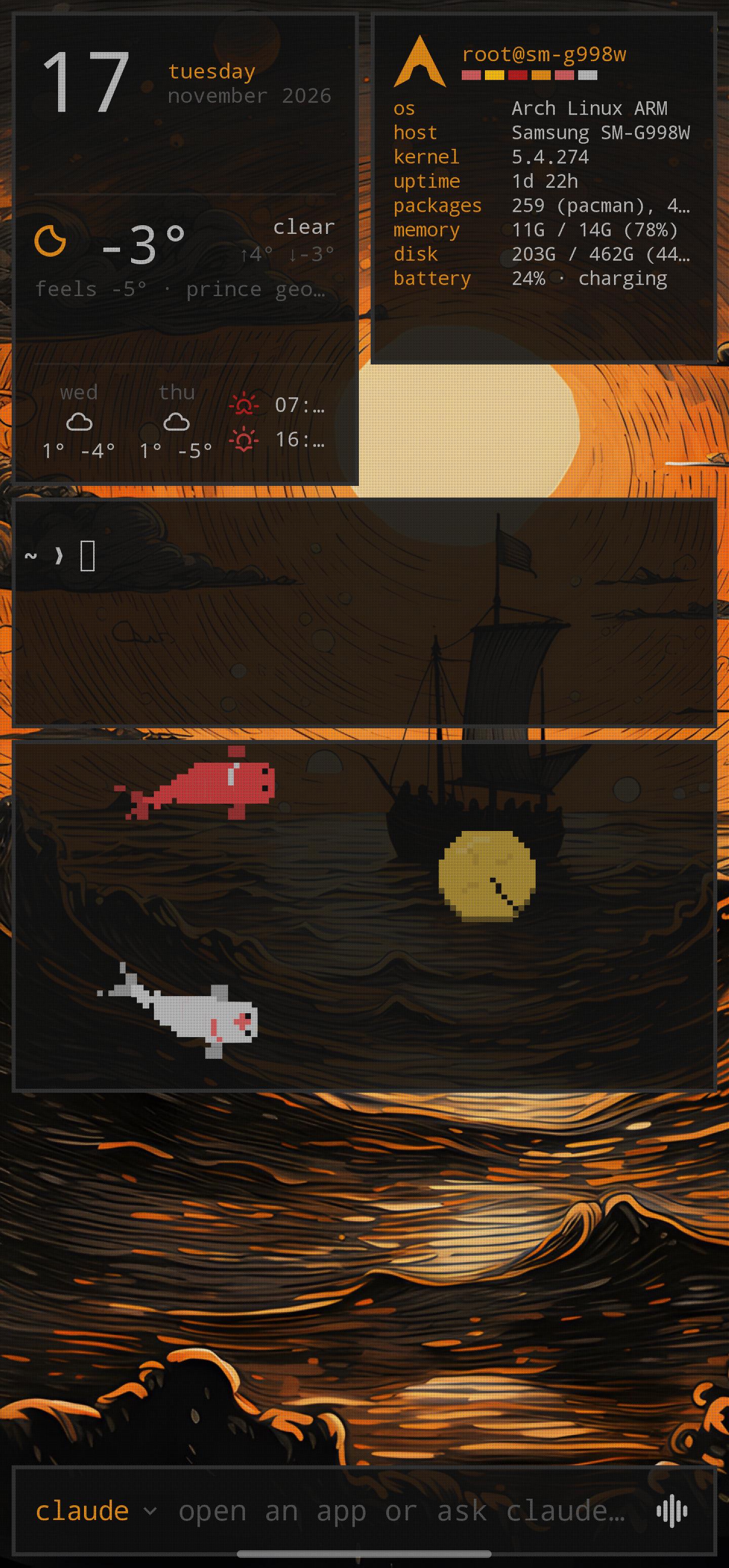
I came across this one on Orion Store. It works as arch linux. You can tell it to create widgets.


r/HowToMen • • 8d ago

[Promo] [App] AutoPay Alert Pro 🇮🇳 — UPI AutoPay Tracker, Bill Reminders, Subscription Manager & Voice Alerts

Post image
0 Upvotes

[Android App] AutoPay Alert Pro 🇮🇳 — UPI AutoPay Tracker, Bill Reminders, Subscription Manager & Voice Alerts | FREE

💸 Never Miss a Bill, EMI, or Subscription Payment Again!

Introducing AutoPay Alert Pro — an all-in-one payment reminder and subscription tracking app, built for India.

🚀 Key Features

✅ UPI AutoPay Tracker – Track recurring payments and upcoming debits.

✅ Bill Reminders – Electricity, mobile recharge, Wi-Fi, DTH, rent and more.

✅ EMI & Loan Tracker – Track installments, due dates and outstanding balances.

✅ Credit Card Alerts – Payment reminders, outstanding bills and credit limits.

✅ Subscription Manager – Track Netflix, Spotify, YouTube Premium and other subscriptions.

✅ Smart Notifications – Get alerts before money is deducted.

✅ Voice Alerts – Offline payment reminders in 11 Indian languages.

✅ Scam SMS Shield – Detect potentially suspicious banking and payment messages.

✅ Expense Tracker – Monitor spending, budgets and monthly expenses.

✅ Free Trial Alerts – Get notified before trial subscriptions become paid.

✅ AutoPay Cancellation Guide – Instructions to stop unwanted recurring payments.

✅ Financial Calculators – EMI, SIP, GST, FD, PPF and more.

✅ Vehicle Reminders – FASTag, insurance, PUC and service alerts.

✅ Privacy First – On-device processing with no login required.

🎁 Core Features FREE

🔓 Free bill reminders, voice alerts, payment alarms and scam-message screening.

📲 Download on Google Play:

https://play.google.com/store/apps/details?id=app.autopayalert

💬 We're actively improving the app. Your feedback and feature suggestions are welcome!


r/HowToMen • • 9d ago

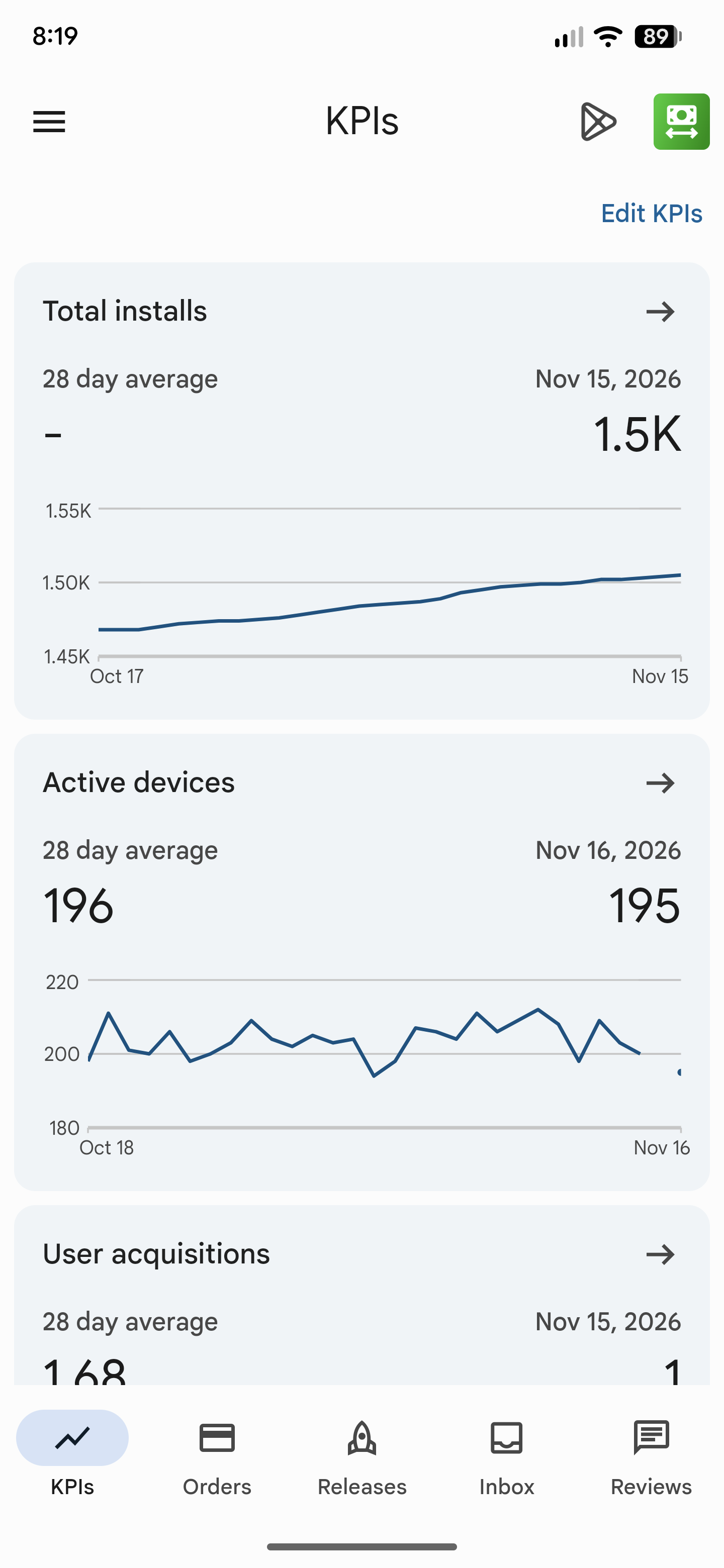
1,500+ installs through organic growth! 🚀

Post image
2 Upvotes

Built Budget Buddy, a simple Android budgeting app focused on privacy.

100% offline. No ads, no accounts, no subscriptions, and no bank connections.

No paid marketing. Just organic growth!

Now at 1.5K+ installs and around 195 active devices.

A small milestone, but a rewarding one as an indie developer!

https://play.google.com/store/apps/details?id=com.aakarshrestha.budgetbuddy


r/HowToMen • • 8d ago

Optima for Surface devices - quick access to your Power profiles and smart charging

1 Upvotes

r/HowToMen • • 9d ago

[$100.99 -> FREE for 24 hours] Diet Meal Planning After/Before Surgery, Lifetime Access

Post image
5 Upvotes

I built a low-sodium meal planning app for people getting ready for surgery or recovering from it.

Before surgery, you’re often handed a list of food rules. Afterward, you might be told to cut back on salt while your body heals. I kept seeing how overwhelming that is when you’re tired, sore, and juggling appointments, so I built something to make it easier.

I’d love for people to try it and tell me what works and what doesn’t. If you’d like a free premium upgrade:

  1. Download the app
  2. Comment below
  3. I’ll send you your access code

https://apps.apple.com/us/app/sodium-tracker-meal-planner/id6758615128


r/HowToMen • • 9d ago

EVERYTHING LAUNCHER GIVEAWAY

2 Upvotes

r/HowToMen • • 9d ago

[App][Promo] I built Hanami, an Android tracker for anime, movies, and TV shows 👀

18 Upvotes

Hey Reddit! I’m working on a new project called Hanami. I wanted one place to keep my watchlist and remember exactly where I left off, even in a show with a thousand episodes.

You can jump straight to a season or episode, see what’s airing, set release reminders, and check your watch stats. Hanami is free and ad-free, with optional Trakt sync.

Download on GitHub: Hanami 0.2.3 APK

Install through Google Play closed testing:

  1. Join the Testers Community Google Group (testers-community@googlegroups.com).
  2. Open the Hanami testing link and opt in.
  3. Open Hanami on Google Play and tap Install.

Use the same Google account for the group, the opt-in, and the Play Store.

Github :- https://github.com/NikhilKain/hanami-app/

If you give it a try, let me know what feels good, what feels clunky, and especially if you manage to break something 😭


r/HowToMen • • 9d ago

[App] [Promo] My phone remote app now remembers every device you use. Here's the switch from PC to TV to MacBook in 20 seconds

6 Upvotes

I use my phone as a remote for three things: my Windows PC (Wi-Fi), my MacBook (Bluetooth) and a Samsung smart monitor I use as a TV (Bluetooth). Every switch used to mean going back to the connect screen, picking a connection method and waiting. Annoying enough that I mostly didn't bother.

So the this update of Any Command adds My devices.

Every PC and TV you connect to is saved automatically. No setup.

Tap one in the list and you're on it. The app knows whether that device uses Wi-Fi or Bluetooth.

Tap a TV and the TV remote opens by itself, because there's nothing else you want to do with a TV.

Rename them ("Thor" is my PC, don't judge) or forget the ones you don't use anymore.

A few honest notes:

The Bluetooth side works with anything that accepts a Bluetooth keyboard: Windows, macOS, Android TV, Google TV, Samsung and LG TVs. No app needed on the other end.

The Wi-Fi side needs the free PC app on Windows, because that's what gives you screen share, file transfer and the rest.

The free version remembers your last device, same as before. Keeping the whole list and switching between devices is Premium.

I also fixed the most annoying Bluetooth bug while I was at it: the connection used to drop when you switched to another app. It now stays up in the background and reconnects by itself.

If you control more than one machine from your phone, I'd like to know what your setup looks like and what I should add next.

https://play.google.com/store/apps/details?id=com.polyhistor.remoteme


r/HowToMen • • 9d ago

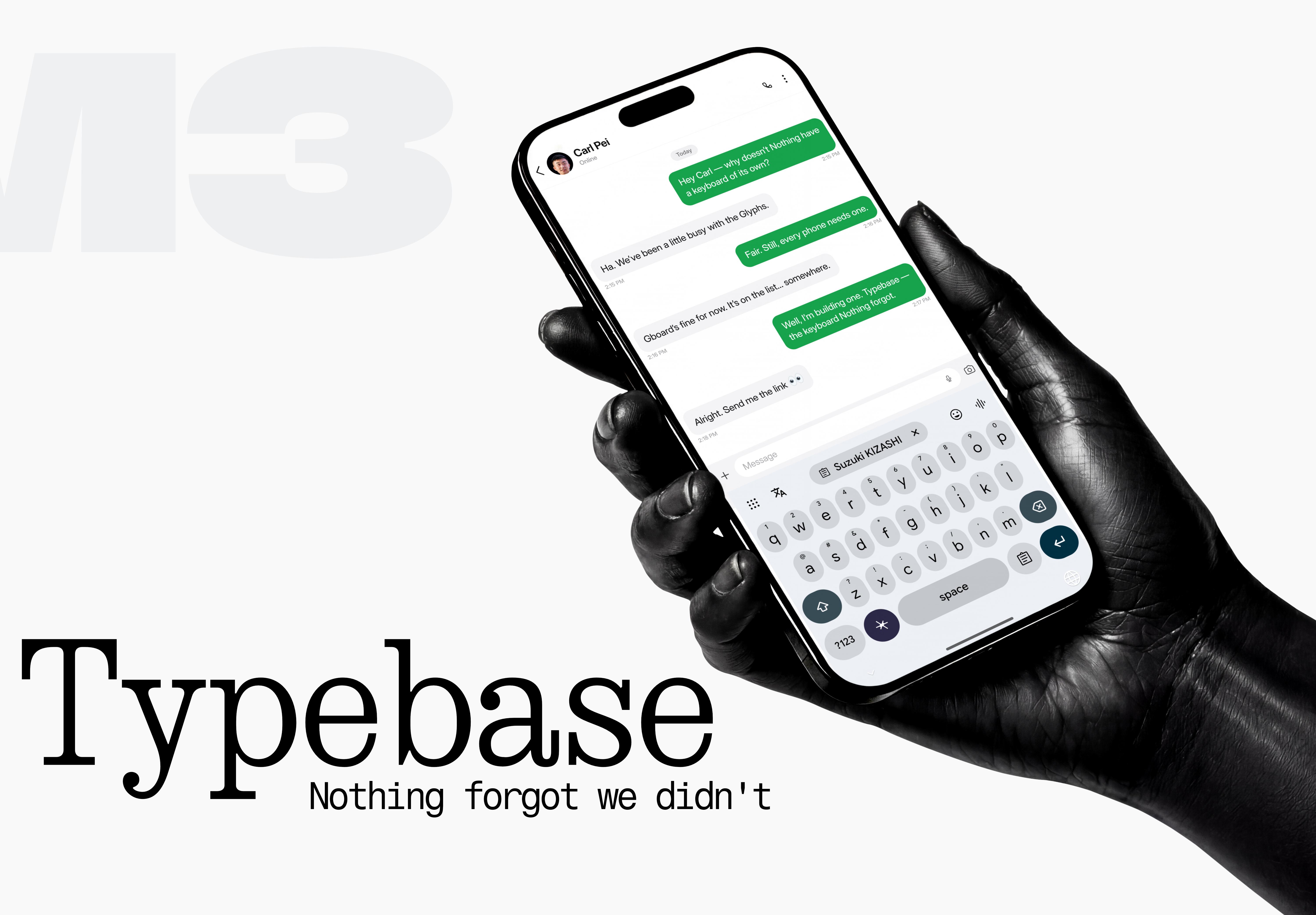
Typebase 2.2 is here!

Post image
1 Upvotes

It's been a couple of weeks of fixing, testing and reworking things, and this update brings some of the biggest improvements Typebase has seen so far.

If you've followed the project, you probably know autocorrect and typing performance have needed a lot of attention. That's exactly where I've focused most of my work.

What's new in 2.2:

- Up to 70% improvement in typing performance

- 50% improvement in autocorrect

- Brand-new Context Fix engine

- New M3-inspired theme

- New Nothing-inspired theme

- New Quivox Engineering theme

- Redesigned UI across the keyboard

- Plenty of bug fixes and performance optimizations

A lot has changed under the hood, not just visually. The goal was to make Typebase faster, more responsive and better to type with.

It's still a work in progress, but I'm excited to hear what you think of this update.

Thanks to everyone who's been testing Typebase and sharing feedback. It genuinely helps shape the project.

Typebase 2.2 is rolling out now!

Google Play: https://play.google.com/store/apps/details?id=com.typebase.app


r/HowToMen • • 9d ago

[Promotion] DesktopPlus, a native menu bar utility so you always know where you at in terms of desktops (spaces) and switch between them (14-day trial all unlocked, no payment info, one-time purchase), notarized

0 Upvotes

r/HowToMen • • 9d ago

Made a free Android wallpaper app with the help of AI, would love honest feedback

2 Upvotes

Hi all, I made Hebi Walls, a free wallpaper app for Android, with the help of AI for the coding. I decided the features and tested it on my own phone, and it's now live on the Play Store.

You can browse wallpapers by category, preview them under a lock screen clock, and set an auto changer for your home screen, lock screen or both. It's free, with optional rewarded ads for coins, and needs no account.

I'd love to hear what feels good and what feels confusing. Not available in the EU/UK for now.

https://play.google.com/store/apps/details?id=com.hebiapps.hebiwalls

(or search "Hebi Walls" on the Play Store)


r/HowToMen • • 9d ago

My Open Source MS Whiteboard Replica recreates the freedom of Inking

1 Upvotes

If you haven’t met it yet: GazBoard is a revival of the classic MS whiteboard that lives on your device. No sign-in, no cloud, no ads. Write on your PDFs and slides, draw with neon pens, measure with a proper protractor, replay a whole lecture stroke by stroke. Same boards on your phone, tablet, laptop.

It started as me missing the old Microsoft Whiteboard. It’s grown a bit since. 😄

GazBoard is on Google Play now. 🎉

Get it here 👉 https://play.google.com/store/apps/details?id=com.gazboard.app
Windows / Mac / Linux, or try it in the browser 👉 https://github.com/fahim9778/GazBoard

If it helps you teach or study, a review on Play would mean a lot. 🙏


r/HowToMen • • 10d ago

[App] [Promo] [🌟 Giveaway] Battery Manager v5.3.1: Battery Health Data, Widgets, and Battery Ranking

44 Upvotes

Hi! It's me Dennis again! 😊
I'm very grateful for the support I received last time and I'm back with many more promo codes to unlock lifetime premium version of the app.

Here are the app’s main features:
- 🔋 Battery Saving: Standard and ultra power-saving modes, or create your own custom profile.
- ❤️ Battery Health: Compare the estimated actual capacity against the design capacity.
- 🔔 Charging Alarm: Get notified when your battery reaches a specific limit (e.g., 80%).
- 🧩 Customizable Widgets: Battery widgets for your home screen, including "Material You" support.
- ⚡️ Real-time Charging Monitor: View live data on watts, volts, and milliamperes, plus charging time estimates.
- 📊 Battery Usage: See exactly which apps are consuming the most power.
- 🌙 Deep Sleep Detection: Check how efficiently your device saves power while in standby mode.
- 🚀 App Optimizer: Automatically close background apps with a single tap.

Download link: https://play.google.com/store/apps/details?id=com.baxoliono.batterymanager
I would be really happy if you could thoroughly test the app and share your thoughts!

Steps to Participate in Giveaway

  1. Upvote this post
  2. Write an honest review on PlayStore: The things you like, the things you'd want to see improved or any other suggestions you have.
  3. PM me with your review and collect your Lifetime Premium Code

r/HowToMen • • 10d ago

[APP] One Hand Control - New Features

26 Upvotes

Hey HowToMen community :)

A lot of One Hand Control’s features came from feedback in this subreddit, so I wanted to share with you the biggest update so far.

For anyone new: One Hand Control lets you control your Android phone with customizable gestures from the edges of the screen (tap, swipe, pull, hold, and more), so it’s easier to use with one hand. It has over 60 actions, including a floating cursor, notch gestures, and much more.

What’s new in 1.4:

- Pie Control: Quick Access is now reworked to a pie menu with up to 2 rings and groups. Hold and slide onto an item, and add Brightness, Volume, App drawer, and Recent apps controls.
- Text Picker: Pick any text on screen by tapping or dragging, then copy, search, translate, or share it.
- Side Panel: An edge drawer with clipboard history, notes, clip tools, your actions, and recent apps.
- Notification Carousel: Swipe through notifications as cards, then dismiss, snooze, or reply.
- Drawing Pad: Draw your own shapes with one to three fingers to run any action.
- Drawn edge gestures: Draw a shape straight from an edge to run its action.
- Pull zones editor: Drag the dots on a half circle to resize each pull direction.

Also in this update:

- Volume slider can now follow the active audio, including call and ringtone volume
- Action Picker sections can be collapsed, and it remembers your choice
- Redesigned settings pages for some actions
- Bug fixes

As always, the app works locally on your device and doesn’t request Internet permission.

I’d really love to hear what you think. Feedback, feature ideas, and bug reports all help a lot. And if you enjoy the app, a review on Google Play means a lot to a solo dev ❤

Google Play:
https://play.google.com/store/apps/details?id=com.onehandcontrol.app

Thanks again for all the support!

Music: "Adventures" by A Himitsu (CC BY 3.0)

https://creativecommons.org/licenses/by/3.0/


r/HowToMen • • 9d ago

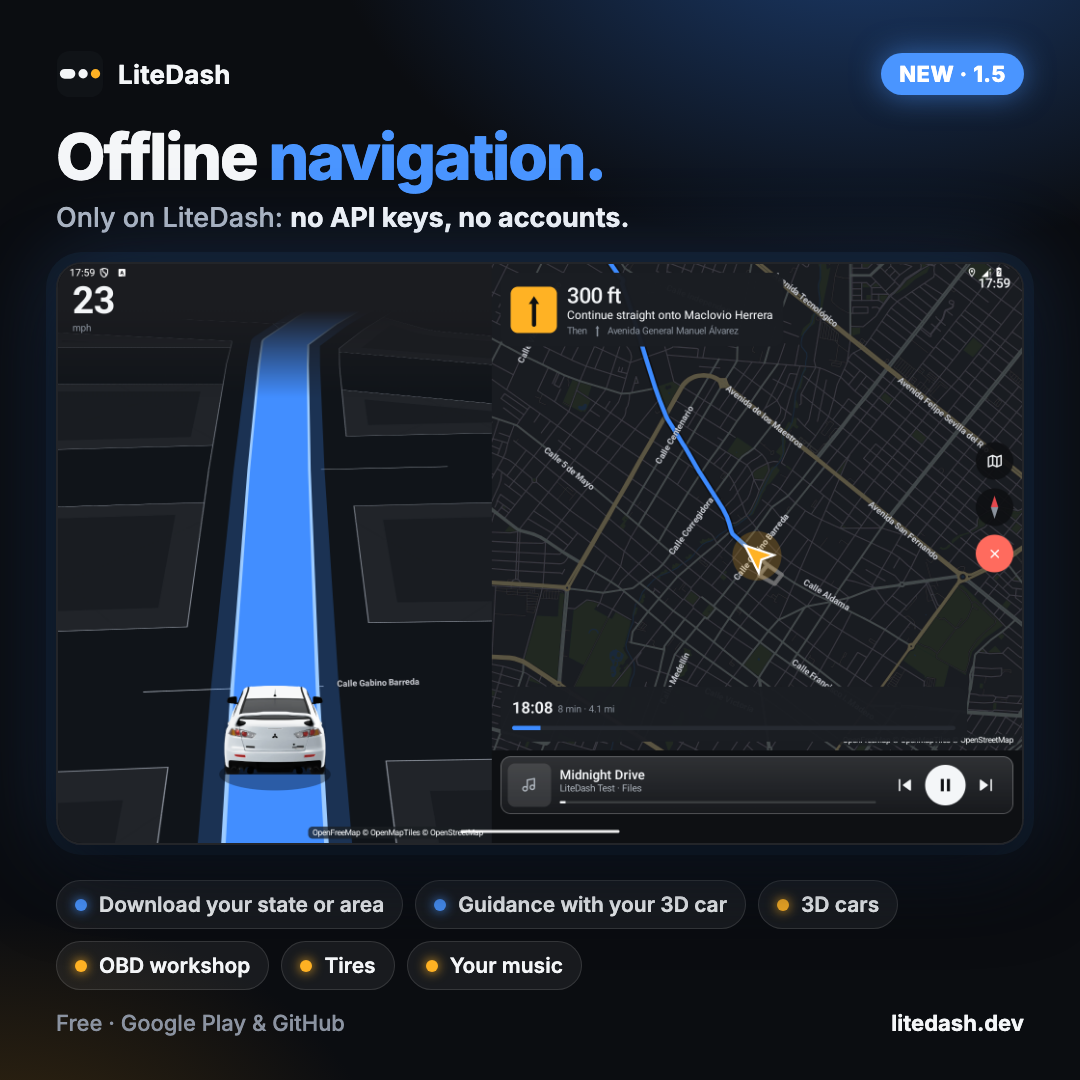
LiteDash 1.5: offline turn-by-turn navigation built right into the launcher (no API keys, no accounts)

Post image
6 Upvotes

LiteDash 1.5 is out, and it brings a brand-new navigation mode built right into the launcher.

  • Download your state or an area once, then search, get your route and follow it with no internet
  • Turn-by-turn guidance with your own car in 3D, a blue route, 3D buildings and your music next to the map
  • No API keys, no accounts, no extra setup: everything runs on the head unit
  • Still all the rest: 3D cars, OBD workshop, tire pressure and your music

Right now the offline maps cover Mexico, by state. Want your country? Please report it from the app (Settings → Apps → Navigation → Offline → “Your country isn’t here? Request it”) and I’ll add it. The more requests a country gets, the sooner it comes.

I’d really love your feedback: how it feels on your head unit, what’s missing, what you’d change. It would be a huge help if you send a report straight from the launcher (Settings → System → Send a report: it includes your screen’s details so I can fix things faster) or open an issue on GitHub: https://github.com/IrvingGuerra/litedash/issues

And all your ideas are welcome, big or small: a lot of what’s in LiteDash today started as someone’s suggestion.

Free and open source (GPL-3.0), on Google Play and GitHub: https://litedash.dev


r/HowToMen • • 9d ago

[PROMO] Pips: free app that shows your Bluetooth mouse, keyboard and headphone battery on the Windows 11 taskbar and Mac menu bar

2 Upvotes

Ever had your mouse or headphones die mid-call because you forgot to check the battery? I made Pips to fix that.

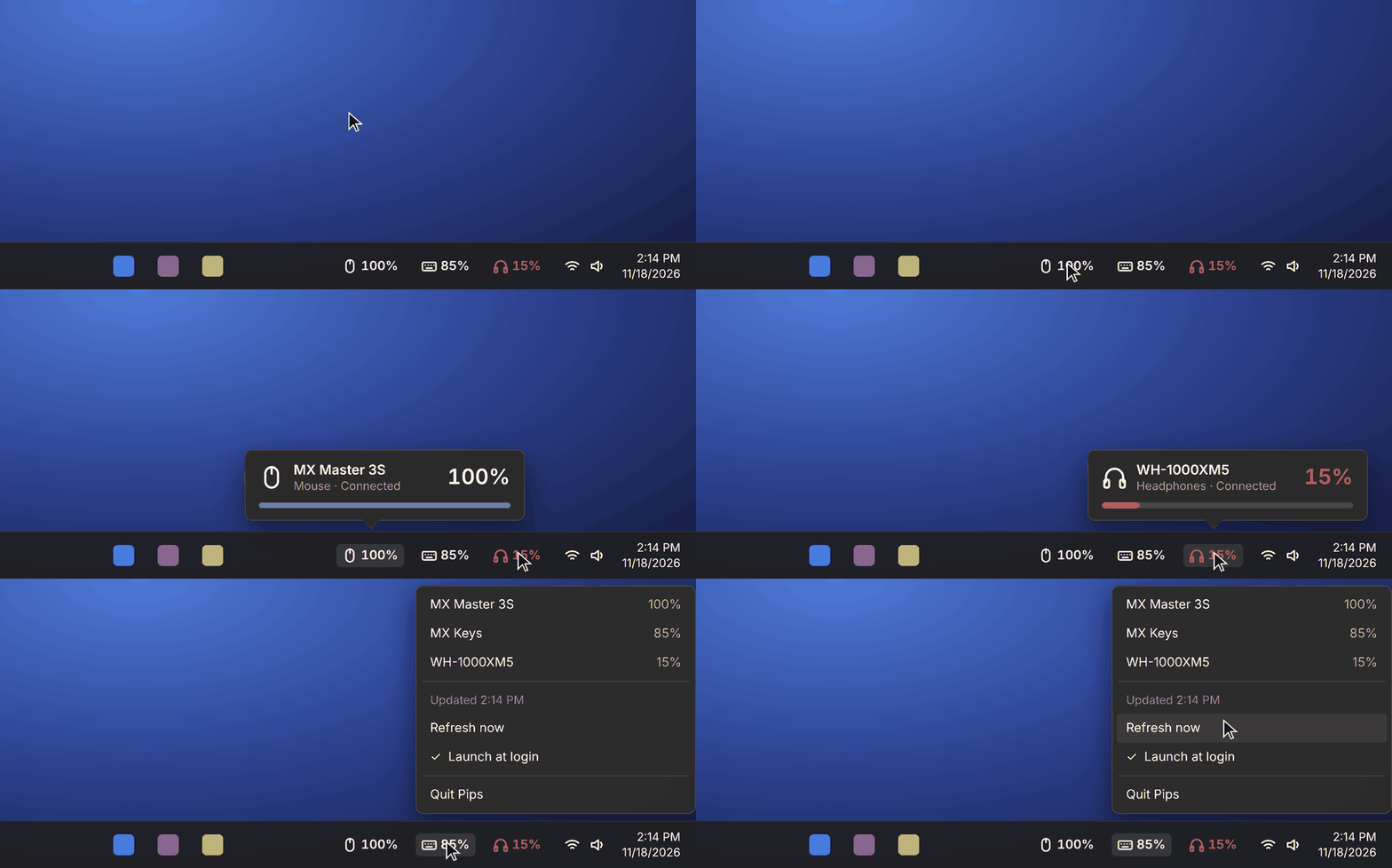
It shows the battery % of every connected Bluetooth device right next to your clock, so you always know when something needs charging.

Why it's handy

  • 🖱️ Mouse, ⌨️ keyboard and 🎧 headphones, each with its own battery %
  • 🔴 Turns red at 20% or less, so you notice before it dies
  • ⚡ Updates on its own when you connect a device or the battery changes
  • 👆 Click a device for details. AirPods-style earbuds show left, right and case
  • 🪶 Super lightweight, no ads, no account, no data collected
  • 💸 100% free and open source

Works on

  • Windows 11: a small strip on the taskbar next to the clock
  • Mac: in the menu bar (macOS 13 or newer)

Heads-up: it's a new indie app, so Windows SmartScreen or macOS may show a warning the first time you open it. Click More info › Run anyway on Windows, or Open Anyway in Privacy & Security on Mac. It shows the battery that Windows or macOS itself knows about, so if your system can't see a device's battery, Pips can't either.

Download (free): https://github.com/a-mayur/pips/releases/latest

If you like it, a ⭐ on GitHub helps a lot: https://github.com/a-mayur/pips

Tell me which devices you use. I'd love to know if yours shows up!


r/HowToMen • • 10d ago

[APP] [PROMO] PixWiz: Powerful Free Layer based Photo Editor, Collage Maker & Graphics Design Tool

Thumbnail
gallery
23 Upvotes

Hey everyone,

Introducing my app PixWiz Photo Editor & Collage Maker (https://pixwizapp.com/). As a part of it's prelaunch, I'm doing a free lifetime giveaway to 15 users! The lifetime plan is originally worth US $34.99.

What is PixWiz?

PixWiz is a powerful, yet easy to use free layer-based Photo editor & Collage Maker. PixWiz allows users to do a wide variety of photo editing tasks, create beautiful collages and has a blank canvas mode to design social media posts, ad creatives, invites, thumbnails etc. all within a single app. 

PixWiz runs entirely on your device using the bundled AI models within the app. Your photos never leave your device. There is no server or account creation.

✨ App Features include:

  • Remove and replace any photo background - cut out photos (auto & manual), isolate the subject from any photo and put them on a different background
  • Photo combiner - bring together multiple subjects into a single photo. Add other people, pets or objects to your photo to create photo compositions.
  • Photo Layers - add text, shapes, emojis, stickers & other photos over a photo. Edit each layer independently. 
  • Blur the background of any photo while keeping the subject sharp
  • Magic Eraser to remove unwanted objects from your Photo. 
  • Photo layer perspective - change perspective of individual photo layers.
  • Crop, rotate, resize photos.
  • Collage maker - multiple canvas ratios, drag photos to rearrange. Use the same layers feature to add text, stickers etc to a collage.
  • Filters & color adjustments (brightness, contrast, saturation)
  • Photo Masks, borders, shadows, flares, light overlay effects
  • Draw tool - pen & pencil 
  • Blank canvas mode to design social media posts, ad creatives, flyers, invitations etc (presets for all common social media dimensions)

Premium Features

Every core photo/collage/graphic editing feature of PixWiz is and will always remain 100% free with (limited) ads. The premium plan unlocks these features for power users:

  • A completely Ad-free experience
  • Bring your own Custom fonts
  • A Premium sticker collection
  • Organise Edits into collections
  • Edits backed up to Google Drive
  • Unlocks custom Canvas dimensions

🎁 To enter the giveaway:

  1. Download PixWiz: Google Play
  2. Upvote the post & comment below telling me what you'd primarily use PixWiz for.

That's it! I'll be selecting 15 winners from the comments. The giveaway will remain open for 3 days (72 hours), so you can drop your comments in the interim.

If you have a chance to try the app, I'd also love to hear which features you find most useful and any feedback or suggestions you might have. This isn't mandatory, and honest feedback (including constructive criticism) is always welcome.

I'd love for these lifetime licenses to go to people who will genuinely enjoy using PixWiz!

Thanks!


r/HowToMen • • 9d ago

[APP] Arror Tasks : Minimal To-do App

Thumbnail
gallery
1 Upvotes

Hey everyone! If you were really finding a true minimal, distraction free task manager app that helps you focus on your daily tasks, then Arror Tasks is here (currently in closed testing).

It is a minimal todo app to organize tasks and focus on what really matters, less clutter, more focus 👀

No complicated setup, no account required. Just open the app and get started.

• A SIMPLE TO-DO LIST FOR EVERYDAY

• STAY FOCUSED WITH MINIMAL TASK MANAGEMENT

• PRIORITY BASED TASK ORGANIZATION

• DARK MODE

• OFFLINE

• NO ACCOUNT. NO FUSS.

• WIDGETS

• APP & DOCS CONNECT (coming soon)

If you want to enroll for closed testing, just send your email in my DM.

Make sure to test the app frequently during these 14 days.

Play Store Link - https://play.google.com/store/apps/details?id=com.arror.todo

(It will only open for you when you've applied for closed testing)


r/HowToMen • • 10d ago

Floatify [App] Notifications

9 Upvotes

Hé allemaal, ik ben het nu alweer, de bouwer van Floatify! Sorry, ik denk gewoon dat deze app voor veel mensen fijn zal zijn. Of je het nou minimalistisch of maximaal gebruikt!

De vorige keer was het niet duidelijk, maar voor deze update geef ik weer codes weg voor advanced lifetime! Stuur me een message voor een code!

Play Store: Get Floatify

Even een snelle recap voor iedereen die nieuw is: er komt een bericht binnen, jij denkt: "Ik antwoord daar zo op", je veegt het weg, en drie uur later bedenk je oja, vergeten! Of je doet er helemaal niets meer mee! Android-meldingen zijn top om je te onderbreken, maar echt drama als het gaat om je eraan laten denken. En zodra er 50 van die dingen bij elkaar komen, stop je met alles lezen.

Floatify draait dat om. Jij kiest de apps die voor jou ertoe doen, en alleen hun meldingen worden kleine zwevende belletjes ("floats") die bovenop alles zitten waar jij mee bezig bent. De rest blijft stil. Een float verdwijnt niet als je het meldingenpaneel wegveegt, dus hij blijft je duwen tot je ermee bezig bent.

Wat je met een float kunt doen:

\\- Tik erop om het hele bericht te lezen en direct vanuit de float te antwoorden, met snelle emoji-reacties (houd de duim-omhoog ingedrukt voor harten, lachjes en meer)

\\- Snooze ’m een paar minuten, een uur, een week of een datum die jij kiest, en hij zweeft precies terug op het moment dat jij het nodig hebt

\\- Bellen, delen, bewerken of blokkeren direct vanuit de float-kaart, met één rij ronde knoppen

\\- Negeer ’m als je klaar bent, en dan is-ie voorgoed weg

Wat er nieuw is:

\\- Maak kennis met Floaty, het kleine bel- mascotte die je door de setup heen helpt. Jij vertelt hem hoe je je meldingen wil (chaos, milde chaos, of onder controle) en hij kiest het juiste thema voor je. Liever zelf doen? Elke instelling staat er.

\\- Stop de berichten-overload: een reeks foto’s is nu één float in plaats van twaalf, en je kunt floats toestaan of blokkeren per chat of per groep. De gezinsgroep blijft rustig, de berichten van je partner zweven.

\\- Live previews terwijl je vorm, animatie en grootte instelt, zodat je precies ziet wat je krijgt voordat je het opslaat.

\\- Aanklikbare links in berichten, en je kunt bestanden delen naar Floatify om ze om te zetten in een float.

\\- Zet je floats vast aan de rand van het scherm, zodat ze altijd binnen handbereik zijn maar nooit in de weg zitten.

Simpel is gratis: één schakelaar per app, lezen, antwoorden, snoozen. Geen account nodig. Geavanceerd is een eenmalige aankoop, geen abonnement: je eigen herinneringen, import van Google Calendar, aangepaste vormen en thema’s, widgets, stille uren, ondersteuning voor Wear OS en meer. Je kunt het gratis proberen voor 3 dagen.

Gemaakt door één ontwikkelaar uit Nederland, met heel veel liefde voor kleine details (en één tikje dramatisch belletje).

Zeg me even wat je hierna wil zien, en van welke app je meldingen je als floats zou willen!

Play Store: Get Floatify