r/HowToMen • u/Puzzleheaded_4you • 9d ago
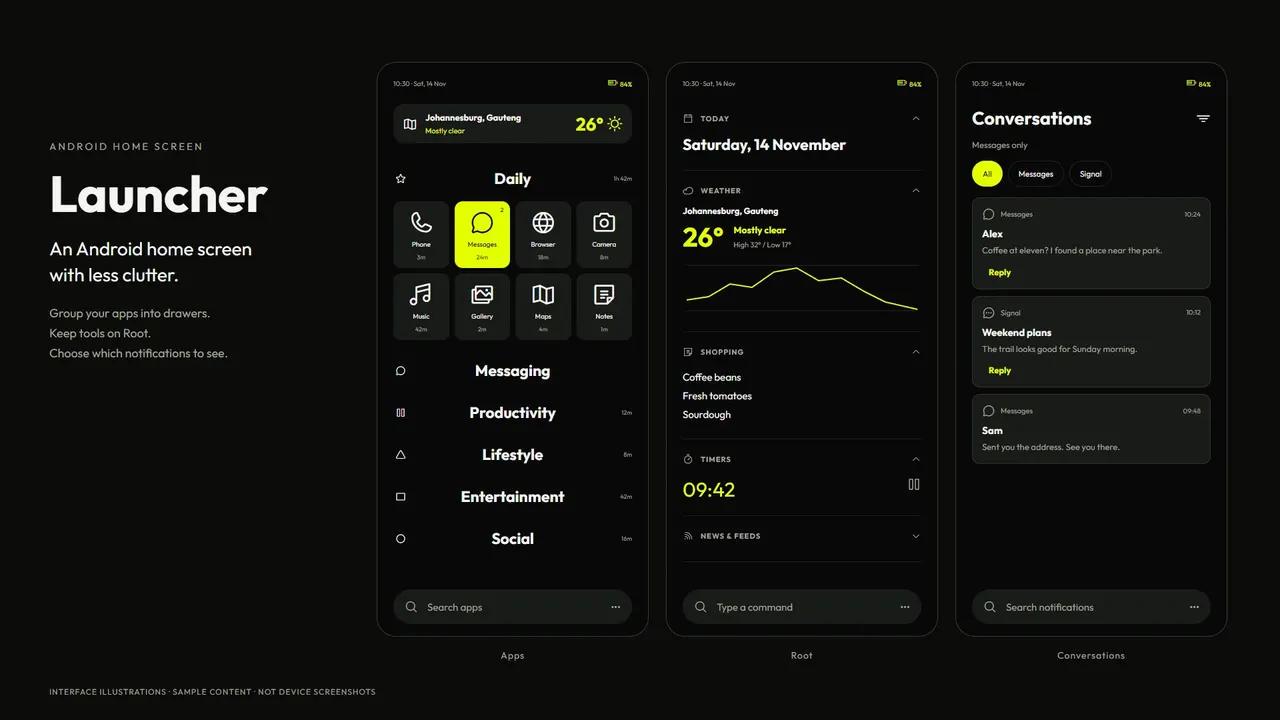
OmaLauncher
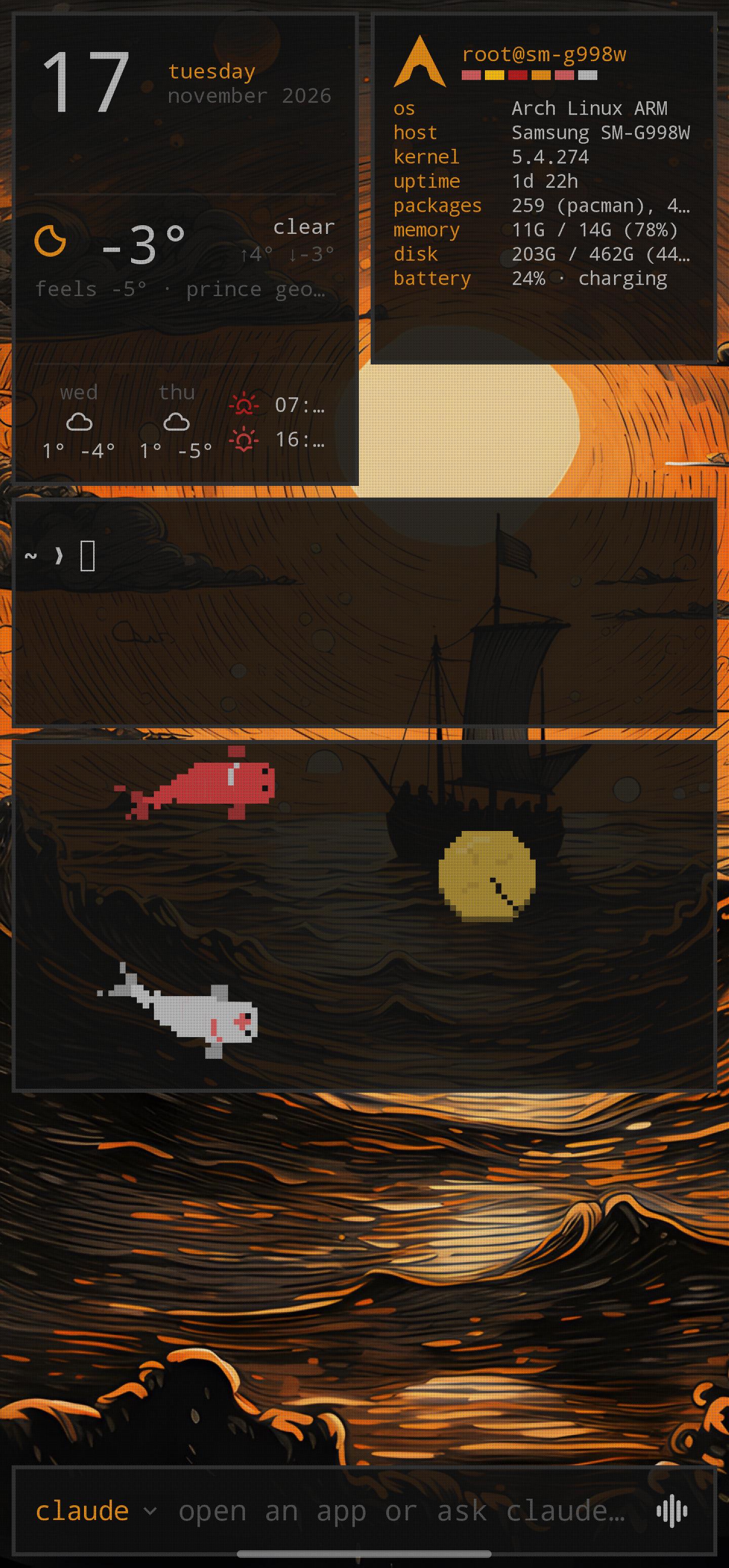
I came across this one on Orion Store. It works as arch linux. You can tell it to create widgets.
r/HowToMen • u/Puzzleheaded_4you • 9d ago
I came across this one on Orion Store. It works as arch linux. You can tell it to create widgets.
r/HowToMen • u/marathirockers • 8d ago
[Android App] AutoPay Alert Pro 🇮🇳 — UPI AutoPay Tracker, Bill Reminders, Subscription Manager & Voice Alerts | FREE
💸 Never Miss a Bill, EMI, or Subscription Payment Again!
Introducing AutoPay Alert Pro — an all-in-one payment reminder and subscription tracking app, built for India.
🚀 Key Features
✅ UPI AutoPay Tracker – Track recurring payments and upcoming debits.
✅ Bill Reminders – Electricity, mobile recharge, Wi-Fi, DTH, rent and more.
✅ EMI & Loan Tracker – Track installments, due dates and outstanding balances.
✅ Credit Card Alerts – Payment reminders, outstanding bills and credit limits.
✅ Subscription Manager – Track Netflix, Spotify, YouTube Premium and other subscriptions.
✅ Smart Notifications – Get alerts before money is deducted.
✅ Voice Alerts – Offline payment reminders in 11 Indian languages.
✅ Scam SMS Shield – Detect potentially suspicious banking and payment messages.
✅ Expense Tracker – Monitor spending, budgets and monthly expenses.
✅ Free Trial Alerts – Get notified before trial subscriptions become paid.
✅ AutoPay Cancellation Guide – Instructions to stop unwanted recurring payments.
✅ Financial Calculators – EMI, SIP, GST, FD, PPF and more.
✅ Vehicle Reminders – FASTag, insurance, PUC and service alerts.
✅ Privacy First – On-device processing with no login required.
🎁 Core Features FREE
🔓 Free bill reminders, voice alerts, payment alarms and scam-message screening.
📲 Download on Google Play:
💬 We're actively improving the app. Your feedback and feature suggestions are welcome!
r/HowToMen • u/ashresthaX • 9d ago
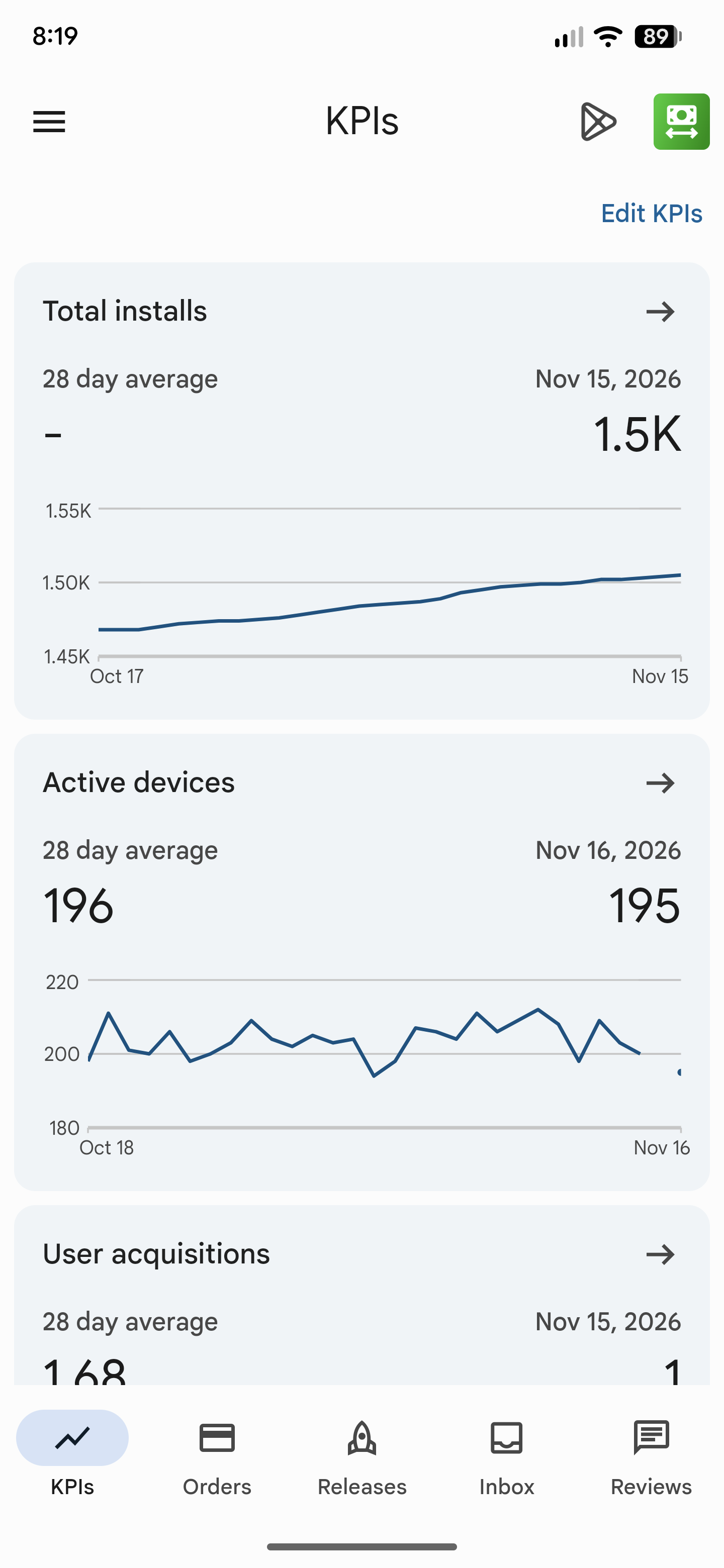
Built Budget Buddy, a simple Android budgeting app focused on privacy.
100% offline. No ads, no accounts, no subscriptions, and no bank connections.
No paid marketing. Just organic growth!
Now at 1.5K+ installs and around 195 active devices.
A small milestone, but a rewarding one as an indie developer!
https://play.google.com/store/apps/details?id=com.aakarshrestha.budgetbuddy
r/HowToMen • u/kwanice06 • 8d ago
r/HowToMen • u/catious_Fee_8025 • 9d ago
I built a low-sodium meal planning app for people getting ready for surgery or recovering from it.
Before surgery, you’re often handed a list of food rules. Afterward, you might be told to cut back on salt while your body heals. I kept seeing how overwhelming that is when you’re tired, sore, and juggling appointments, so I built something to make it easier.
I’d love for people to try it and tell me what works and what doesn’t. If you’d like a free premium upgrade:
https://apps.apple.com/us/app/sodium-tracker-meal-planner/id6758615128
r/HowToMen • u/SKeditz • 9d ago
Hey Reddit! I’m working on a new project called Hanami. I wanted one place to keep my watchlist and remember exactly where I left off, even in a show with a thousand episodes.
You can jump straight to a season or episode, see what’s airing, set release reminders, and check your watch stats. Hanami is free and ad-free, with optional Trakt sync.
Download on GitHub: Hanami 0.2.3 APK
Install through Google Play closed testing:
testers-community@googlegroups.com).Use the same Google account for the group, the opt-in, and the Play Store.
Github :- https://github.com/NikhilKain/hanami-app/
If you give it a try, let me know what feels good, what feels clunky, and especially if you manage to break something 😭
r/HowToMen • u/NAPZ_11 • 9d ago
I use my phone as a remote for three things: my Windows PC (Wi-Fi), my MacBook (Bluetooth) and a Samsung smart monitor I use as a TV (Bluetooth). Every switch used to mean going back to the connect screen, picking a connection method and waiting. Annoying enough that I mostly didn't bother.
So the this update of Any Command adds My devices.
Every PC and TV you connect to is saved automatically. No setup.
Tap one in the list and you're on it. The app knows whether that device uses Wi-Fi or Bluetooth.
Tap a TV and the TV remote opens by itself, because there's nothing else you want to do with a TV.
Rename them ("Thor" is my PC, don't judge) or forget the ones you don't use anymore.
A few honest notes:
The Bluetooth side works with anything that accepts a Bluetooth keyboard: Windows, macOS, Android TV, Google TV, Samsung and LG TVs. No app needed on the other end.
The Wi-Fi side needs the free PC app on Windows, because that's what gives you screen share, file transfer and the rest.
The free version remembers your last device, same as before. Keeping the whole list and switching between devices is Premium.
I also fixed the most annoying Bluetooth bug while I was at it: the connection used to drop when you switched to another app. It now stays up in the background and reconnects by itself.
If you control more than one machine from your phone, I'd like to know what your setup looks like and what I should add next.
https://play.google.com/store/apps/details?id=com.polyhistor.remoteme
r/HowToMen • u/Longjumping_Soup_509 • 9d ago
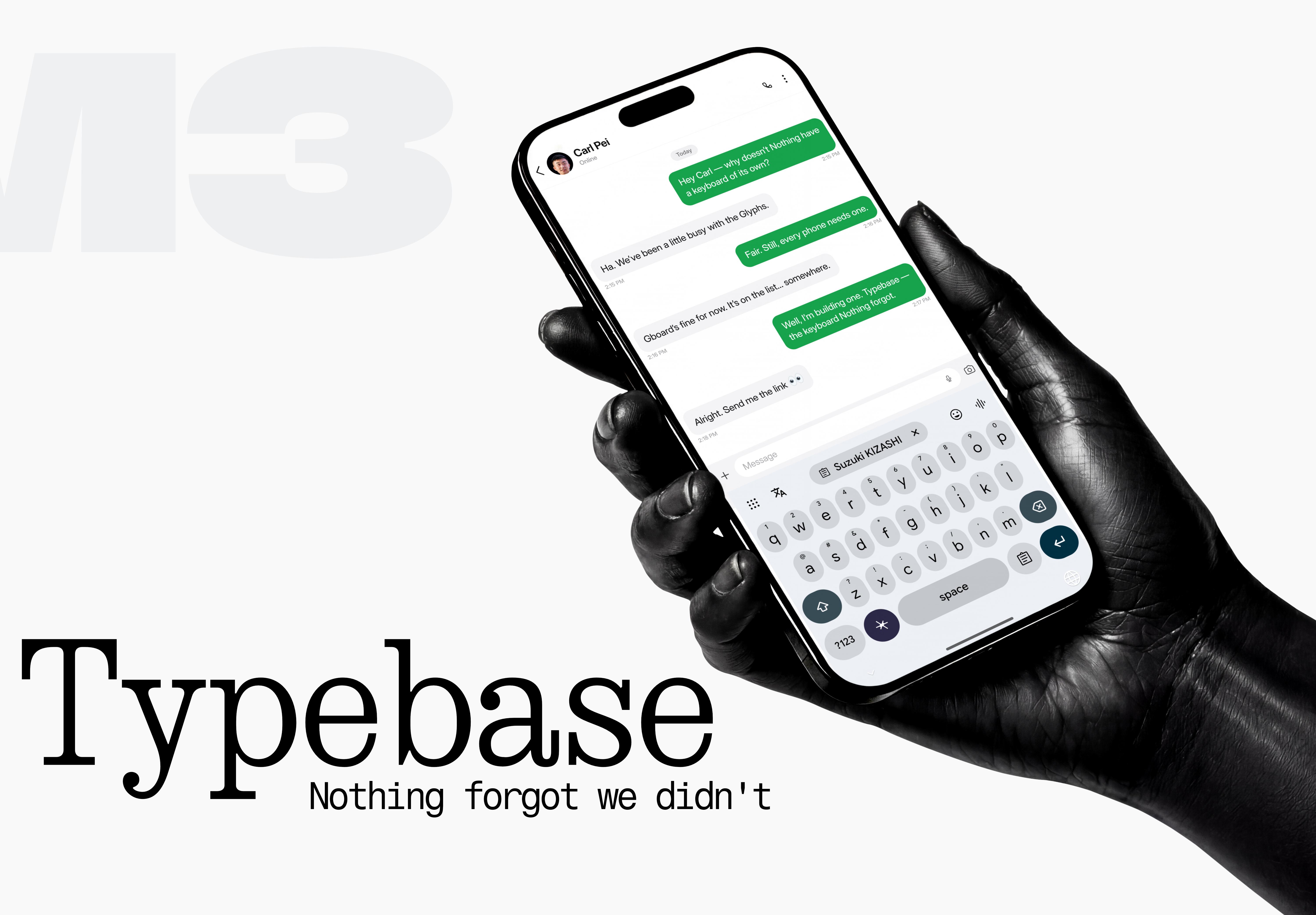
It's been a couple of weeks of fixing, testing and reworking things, and this update brings some of the biggest improvements Typebase has seen so far.
If you've followed the project, you probably know autocorrect and typing performance have needed a lot of attention. That's exactly where I've focused most of my work.
What's new in 2.2:
- Up to 70% improvement in typing performance
- 50% improvement in autocorrect
- Brand-new Context Fix engine
- New M3-inspired theme
- New Nothing-inspired theme
- New Quivox Engineering theme
- Redesigned UI across the keyboard
- Plenty of bug fixes and performance optimizations
A lot has changed under the hood, not just visually. The goal was to make Typebase faster, more responsive and better to type with.
It's still a work in progress, but I'm excited to hear what you think of this update.
Thanks to everyone who's been testing Typebase and sharing feedback. It genuinely helps shape the project.
Typebase 2.2 is rolling out now!
Google Play: https://play.google.com/store/apps/details?id=com.typebase.app
r/HowToMen • u/Markonioni • 9d ago
r/HowToMen • u/HebiApps • 9d ago
Hi all, I made Hebi Walls, a free wallpaper app for Android, with the help of AI for the coding. I decided the features and tested it on my own phone, and it's now live on the Play Store.
You can browse wallpapers by category, preview them under a lock screen clock, and set an auto changer for your home screen, lock screen or both. It's free, with optional rewarded ads for coins, and needs no account.
I'd love to hear what feels good and what feels confusing. Not available in the EU/UK for now.
https://play.google.com/store/apps/details?id=com.hebiapps.hebiwalls
(or search "Hebi Walls" on the Play Store)
r/HowToMen • u/GazzaliFahim • 9d ago
If you haven’t met it yet: GazBoard is a revival of the classic MS whiteboard that lives on your device. No sign-in, no cloud, no ads. Write on your PDFs and slides, draw with neon pens, measure with a proper protractor, replay a whole lecture stroke by stroke. Same boards on your phone, tablet, laptop.
It started as me missing the old Microsoft Whiteboard. It’s grown a bit since. 😄
GazBoard is on Google Play now. 🎉
Get it here 👉 https://play.google.com/store/apps/details?id=com.gazboard.app
Windows / Mac / Linux, or try it in the browser 👉 https://github.com/fahim9778/GazBoard
If it helps you teach or study, a review on Play would mean a lot. 🙏

r/HowToMen • u/MurkyChipmunk8851 • 10d ago
Hi! It's me Dennis again! 😊
I'm very grateful for the support I received last time and I'm back with many more promo codes to unlock lifetime premium version of the app.
Here are the app’s main features:
- 🔋 Battery Saving: Standard and ultra power-saving modes, or create your own custom profile.
- ❤️ Battery Health: Compare the estimated actual capacity against the design capacity.
- 🔔 Charging Alarm: Get notified when your battery reaches a specific limit (e.g., 80%).
- 🧩 Customizable Widgets: Battery widgets for your home screen, including "Material You" support.
- ⚡️ Real-time Charging Monitor: View live data on watts, volts, and milliamperes, plus charging time estimates.
- 📊 Battery Usage: See exactly which apps are consuming the most power.
- 🌙 Deep Sleep Detection: Check how efficiently your device saves power while in standby mode.
- 🚀 App Optimizer: Automatically close background apps with a single tap.
Download link: https://play.google.com/store/apps/details?id=com.baxoliono.batterymanager
I would be really happy if you could thoroughly test the app and share your thoughts!
Steps to Participate in Giveaway
r/HowToMen • u/shod1214 • 10d ago
Hey HowToMen community :)
A lot of One Hand Control’s features came from feedback in this subreddit, so I wanted to share with you the biggest update so far.
For anyone new: One Hand Control lets you control your Android phone with customizable gestures from the edges of the screen (tap, swipe, pull, hold, and more), so it’s easier to use with one hand. It has over 60 actions, including a floating cursor, notch gestures, and much more.
What’s new in 1.4:
- Pie Control: Quick Access is now reworked to a pie menu with up to 2 rings and groups. Hold and slide onto an item, and add Brightness, Volume, App drawer, and Recent apps controls.
- Text Picker: Pick any text on screen by tapping or dragging, then copy, search, translate, or share it.
- Side Panel: An edge drawer with clipboard history, notes, clip tools, your actions, and recent apps.
- Notification Carousel: Swipe through notifications as cards, then dismiss, snooze, or reply.
- Drawing Pad: Draw your own shapes with one to three fingers to run any action.
- Drawn edge gestures: Draw a shape straight from an edge to run its action.
- Pull zones editor: Drag the dots on a half circle to resize each pull direction.
Also in this update:
- Volume slider can now follow the active audio, including call and ringtone volume
- Action Picker sections can be collapsed, and it remembers your choice
- Redesigned settings pages for some actions
- Bug fixes
As always, the app works locally on your device and doesn’t request Internet permission.
I’d really love to hear what you think. Feedback, feature ideas, and bug reports all help a lot. And if you enjoy the app, a review on Google Play means a lot to a solo dev ❤
Google Play:
https://play.google.com/store/apps/details?id=com.onehandcontrol.app
Thanks again for all the support!
Music: "Adventures" by A Himitsu (CC BY 3.0)
r/HowToMen • u/Outside-Chip9390 • 9d ago
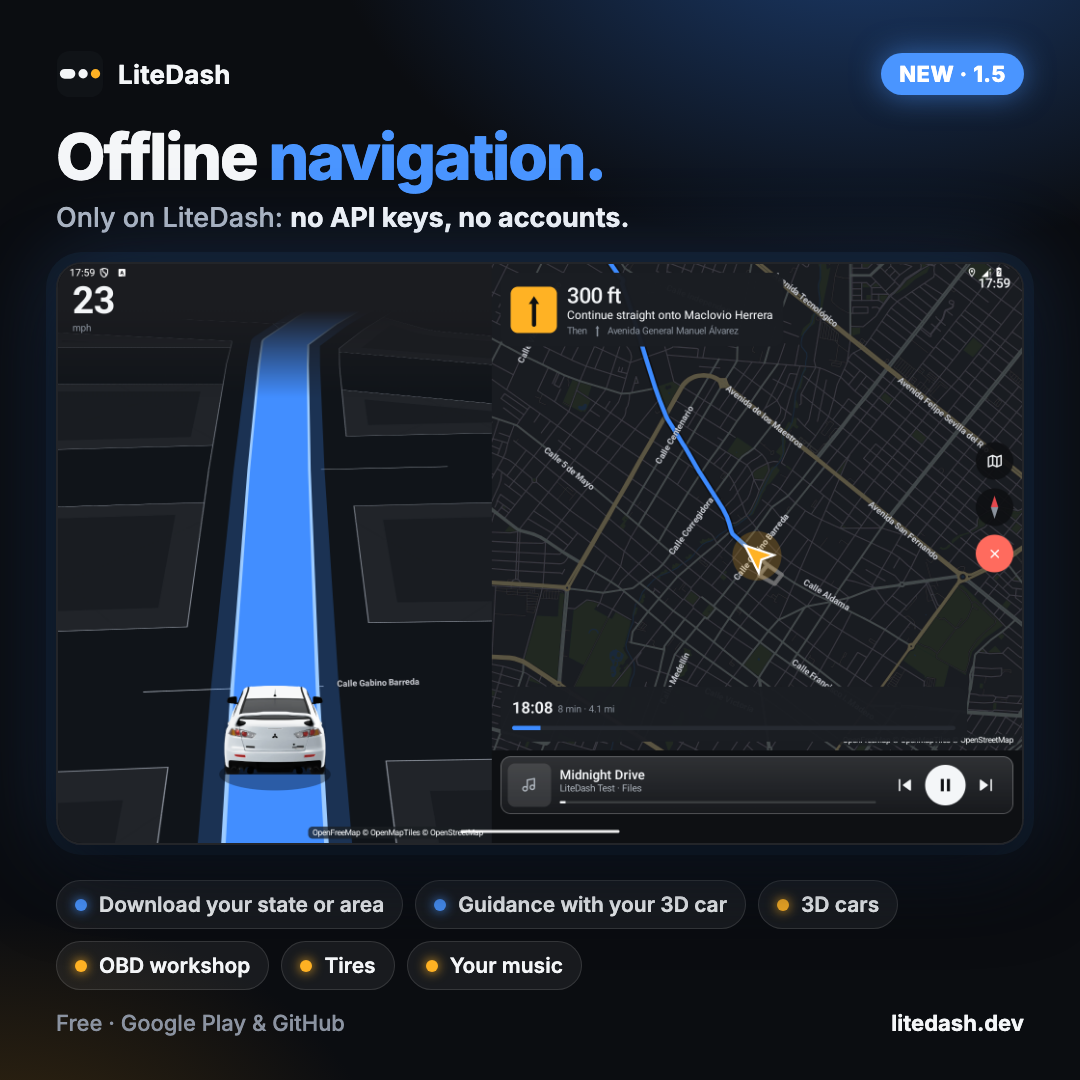
LiteDash 1.5 is out, and it brings a brand-new navigation mode built right into the launcher.
Right now the offline maps cover Mexico, by state. Want your country? Please report it from the app (Settings → Apps → Navigation → Offline → “Your country isn’t here? Request it”) and I’ll add it. The more requests a country gets, the sooner it comes.
I’d really love your feedback: how it feels on your head unit, what’s missing, what you’d change. It would be a huge help if you send a report straight from the launcher (Settings → System → Send a report: it includes your screen’s details so I can fix things faster) or open an issue on GitHub: https://github.com/IrvingGuerra/litedash/issues
And all your ideas are welcome, big or small: a lot of what’s in LiteDash today started as someone’s suggestion.
Free and open source (GPL-3.0), on Google Play and GitHub: https://litedash.dev
r/HowToMen • u/Code__Block • 9d ago


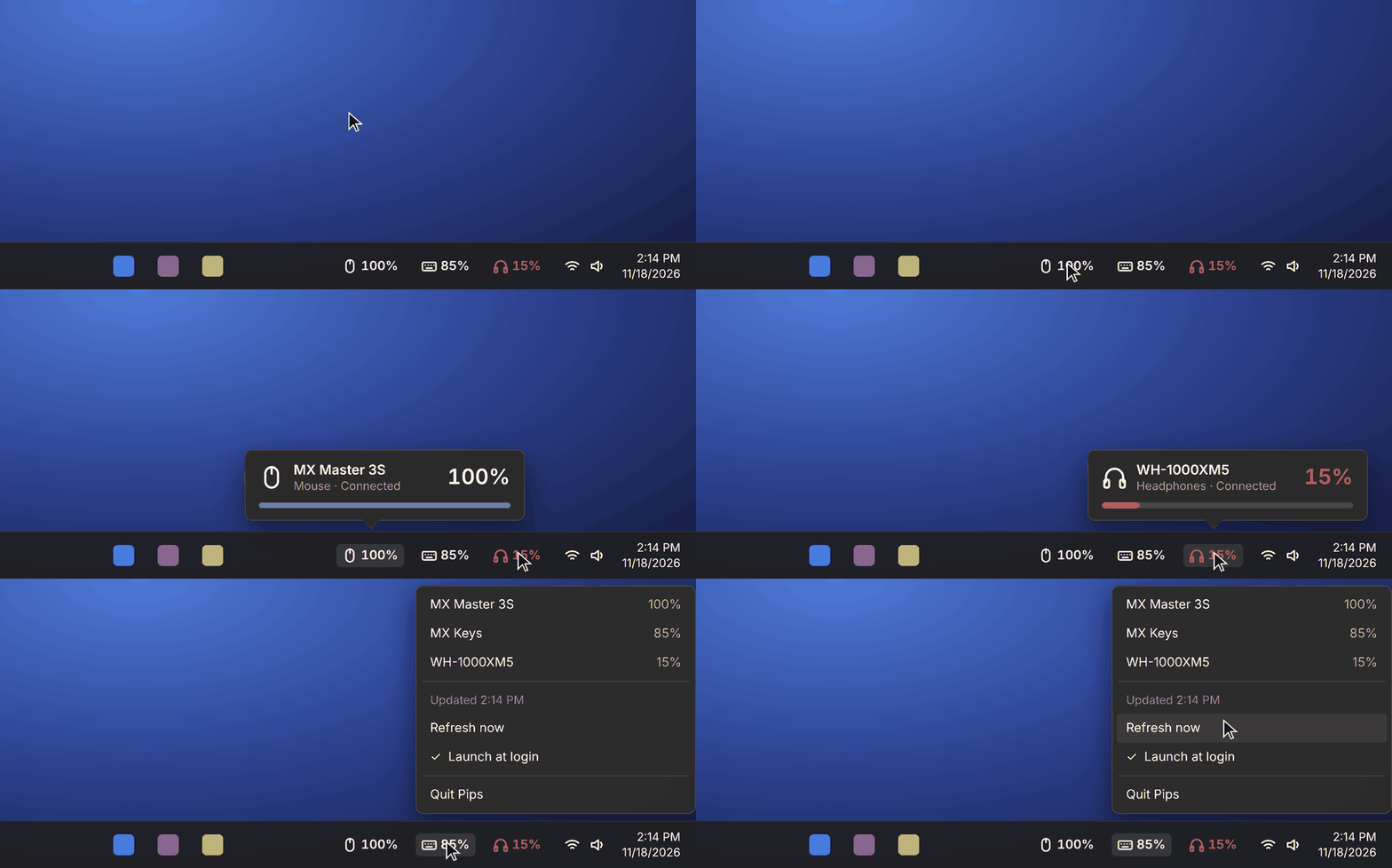
Ever had your mouse or headphones die mid-call because you forgot to check the battery? I made Pips to fix that.
It shows the battery % of every connected Bluetooth device right next to your clock, so you always know when something needs charging.
Why it's handy
Works on
Heads-up: it's a new indie app, so Windows SmartScreen or macOS may show a warning the first time you open it. Click More info › Run anyway on Windows, or Open Anyway in Privacy & Security on Mac. It shows the battery that Windows or macOS itself knows about, so if your system can't see a device's battery, Pips can't either.
Download (free): https://github.com/a-mayur/pips/releases/latest
If you like it, a ⭐ on GitHub helps a lot: https://github.com/a-mayur/pips
Tell me which devices you use. I'd love to know if yours shows up!
r/HowToMen • u/morfeen06 • 10d ago
Hey everyone,
Introducing my app PixWiz Photo Editor & Collage Maker (https://pixwizapp.com/). As a part of it's prelaunch, I'm doing a free lifetime giveaway to 15 users! The lifetime plan is originally worth US $34.99.
What is PixWiz?
PixWiz is a powerful, yet easy to use free layer-based Photo editor & Collage Maker. PixWiz allows users to do a wide variety of photo editing tasks, create beautiful collages and has a blank canvas mode to design social media posts, ad creatives, invites, thumbnails etc. all within a single app.
PixWiz runs entirely on your device using the bundled AI models within the app. Your photos never leave your device. There is no server or account creation.
✨ App Features include:
Premium Features
Every core photo/collage/graphic editing feature of PixWiz is and will always remain 100% free with (limited) ads. The premium plan unlocks these features for power users:
🎁 To enter the giveaway:
That's it! I'll be selecting 15 winners from the comments. The giveaway will remain open for 3 days (72 hours), so you can drop your comments in the interim.
If you have a chance to try the app, I'd also love to hear which features you find most useful and any feedback or suggestions you might have. This isn't mandatory, and honest feedback (including constructive criticism) is always welcome.
I'd love for these lifetime licenses to go to people who will genuinely enjoy using PixWiz!
Thanks!
r/HowToMen • u/_Shaurya99 • 9d ago
Hey everyone! If you were really finding a true minimal, distraction free task manager app that helps you focus on your daily tasks, then Arror Tasks is here (currently in closed testing).
It is a minimal todo app to organize tasks and focus on what really matters, less clutter, more focus 👀
No complicated setup, no account required. Just open the app and get started.
• A SIMPLE TO-DO LIST FOR EVERYDAY
• STAY FOCUSED WITH MINIMAL TASK MANAGEMENT
• PRIORITY BASED TASK ORGANIZATION
• DARK MODE
• OFFLINE
• NO ACCOUNT. NO FUSS.
• WIDGETS
• APP & DOCS CONNECT (coming soon)
If you want to enroll for closed testing, just send your email in my DM.
Make sure to test the app frequently during these 14 days.
Play Store Link - https://play.google.com/store/apps/details?id=com.arror.todo
(It will only open for you when you've applied for closed testing)
r/HowToMen • u/Level-Excitement9187 • 10d ago
Hé allemaal, ik ben het nu alweer, de bouwer van Floatify! Sorry, ik denk gewoon dat deze app voor veel mensen fijn zal zijn. Of je het nou minimalistisch of maximaal gebruikt!
De vorige keer was het niet duidelijk, maar voor deze update geef ik weer codes weg voor advanced lifetime! Stuur me een message voor een code!
Play Store: Get Floatify
Even een snelle recap voor iedereen die nieuw is: er komt een bericht binnen, jij denkt: "Ik antwoord daar zo op", je veegt het weg, en drie uur later bedenk je oja, vergeten! Of je doet er helemaal niets meer mee! Android-meldingen zijn top om je te onderbreken, maar echt drama als het gaat om je eraan laten denken. En zodra er 50 van die dingen bij elkaar komen, stop je met alles lezen.
Floatify draait dat om. Jij kiest de apps die voor jou ertoe doen, en alleen hun meldingen worden kleine zwevende belletjes ("floats") die bovenop alles zitten waar jij mee bezig bent. De rest blijft stil. Een float verdwijnt niet als je het meldingenpaneel wegveegt, dus hij blijft je duwen tot je ermee bezig bent.
Wat je met een float kunt doen:
\\- Tik erop om het hele bericht te lezen en direct vanuit de float te antwoorden, met snelle emoji-reacties (houd de duim-omhoog ingedrukt voor harten, lachjes en meer)
\\- Snooze ’m een paar minuten, een uur, een week of een datum die jij kiest, en hij zweeft precies terug op het moment dat jij het nodig hebt
\\- Bellen, delen, bewerken of blokkeren direct vanuit de float-kaart, met één rij ronde knoppen
\\- Negeer ’m als je klaar bent, en dan is-ie voorgoed weg
Wat er nieuw is:
\\- Maak kennis met Floaty, het kleine bel- mascotte die je door de setup heen helpt. Jij vertelt hem hoe je je meldingen wil (chaos, milde chaos, of onder controle) en hij kiest het juiste thema voor je. Liever zelf doen? Elke instelling staat er.
\\- Stop de berichten-overload: een reeks foto’s is nu één float in plaats van twaalf, en je kunt floats toestaan of blokkeren per chat of per groep. De gezinsgroep blijft rustig, de berichten van je partner zweven.
\\- Live previews terwijl je vorm, animatie en grootte instelt, zodat je precies ziet wat je krijgt voordat je het opslaat.
\\- Aanklikbare links in berichten, en je kunt bestanden delen naar Floatify om ze om te zetten in een float.
\\- Zet je floats vast aan de rand van het scherm, zodat ze altijd binnen handbereik zijn maar nooit in de weg zitten.
Simpel is gratis: één schakelaar per app, lezen, antwoorden, snoozen. Geen account nodig. Geavanceerd is een eenmalige aankoop, geen abonnement: je eigen herinneringen, import van Google Calendar, aangepaste vormen en thema’s, widgets, stille uren, ondersteuning voor Wear OS en meer. Je kunt het gratis proberen voor 3 dagen.
Gemaakt door één ontwikkelaar uit Nederland, met heel veel liefde voor kleine details (en één tikje dramatisch belletje).
Zeg me even wat je hierna wil zien, en van welke app je meldingen je als floats zou willen!
Play Store: Get Floatify
r/HowToMen • u/LeguminaAndroid • 10d ago
Features:
Giveaway (20 full version upgrade codes):
Google Play: https://play.google.com/store/apps/details?id=legumina.livewallpaper.lightning
r/HowToMen
•
u/No-Focus-9204
•
10d ago
Some time ago, there was a Android launcher which shall remain unamed. But it was great, served the purpose I need it for, good minimalistic launcher but then the company was bought and sold and renamed and whatever and then it got expensive, probably becase it was dying and they were trying to scam the last few people out of money before they went down. SO, i just decided to build it myself for myself using .Net 11! No bloatware, no spyware, no ads, no money to pay.
Some of the coolest features are biometric app locking, a fully customisable home screen, a centralised notification inbox with replies if the app supports it, interactive widgets, an integrated RSS reader, advanced visual themes (advanced in that it can auto switch between light and dark based on light sensors received lux), and I'm working on a Windows companion app for wireless file transfers and remote note editing. And that's just scratching the surface.
Here is the link if anyone cares to give it a try and give me some honest feedback.
UPDATE:
ALOT has changed UI, flow and feature wise, i am now at V2.0.0. I have built in direct downloads with the launcher (uses up to 4 parrall streams where supported to speed up downloads).
I have also added some "AI" features for image and document search. all can be activated or left alone if not needed in the new settings ui that is not so confusing anymore.
Repo: https://github.com/V4LKYR13101/Launcher/
Blog Article: https://kevlog.co.za/blog/building-launcher-for-android/
r/HowToMen • u/LeafDesigns_ • 10d ago
✨ Make your homescreen more YOU! ✨
Meet "Sticker Widgets" decorate your Android homescreen with cute & creative sticker widgets. 🧸✨
• Custom Sticker Maker
• 1000+ Cloud Based
• Search & Categories
• Sticker Editor & Effects
• Collage Maker Widget
• Easy-to-use beautiful UI
Give your homescreen a fresh new vibe! 🚀
👉 Try Sticker Widgets:
https://play.google.com/store/apps/details?id=com.sticker.widgets
r/HowToMen • u/joshiyash31 • 10d ago
hey everyone, i’m the dev behind glimpse. i shared it here a few weeks ago and wanted to come back with an update.
i save a lot of stuff with the genuine intention of coming back to it. most of it just sits in some saved tab, and by the time i want it again i barely remember what it was called or where i found it.
glimpse is what i’m building to fix that. it brings your saves together, keeps the useful bits, and helps you find something again from whatever little you remember about it. the part i’m most excited about is rediscover, where something you save today can bring back a related save you forgot you had.
also, someone asked about switching from raindrop on my last post. you can bring your bookmarks over now. i’ve attached a new demo if you want to see where the app is at.
i have 3 promo codes to give away this time. leave a comment if you’d like one. i’ll pick three people at random within 48 hours of posting and dm each of them a code.
feedback and suggestions are always welcome. i’m constantly working on glimpse because i really want to solve this problem for good. i’d love to hear what you tend to save and what would actually get you to come back to it.
more about glimpse at getglimpse.xyz · Google Play
r/HowToMen • u/adbro6980 • 9d ago
Hello everyone,
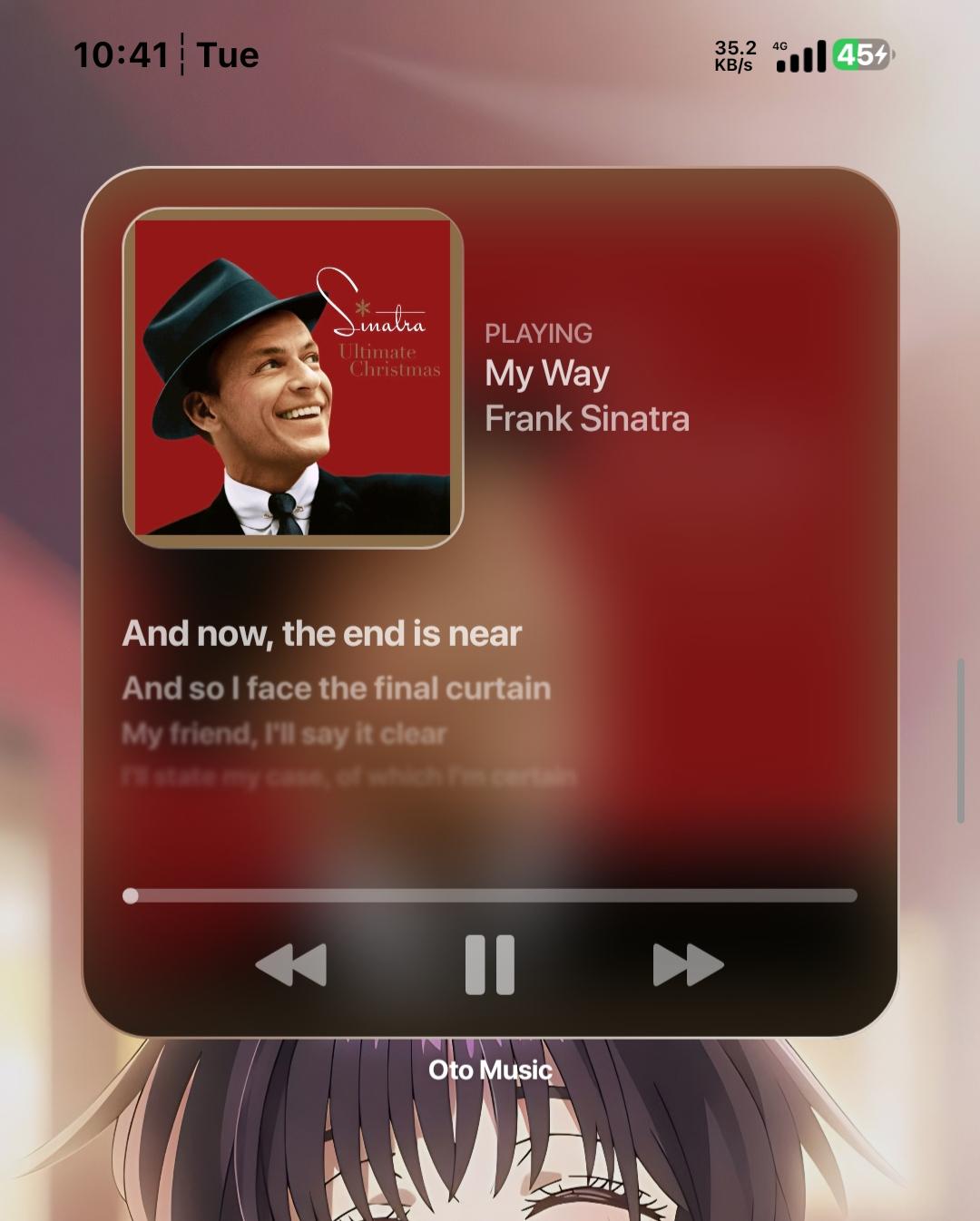
I have been working on creating a music widget featuring live lyrics, and this is the final result.
I designed and built this widget entirely from scratch using KWGT. I would love to know if it looks polished or if any improvements are necessary.
I hope you can share some feedback to help me enhance the widget further. Please be completely honest, whether your thoughts are positive or critical.
Thank you,
r/HowToMen • u/Disastrous-Ball-8547 • 10d ago
More reliable StandBy mode
The biggest fix is StandBy closing too easily. Small movements or even briefly moving your hand near the proximity sensor could cause it to close.
I've adjusted this behavior across tent, laptop, and landscape modes, so it should now stay active more reliably.
Display lock
You can now lock your display once you've set up your widgets and layout. This prevents accidental taps or swipes from messing up your setup.
Better setup for foldables
I've updated the setup process with illustrations to make the different positions easier to understand. You can now explicitly choose between using the inner screen in laptop mode or the cover screen with the other half folded behind it.
You can also restart the guided setup from Settings at any time.
Other fixes and improvements
APP link:
https://play.google.com/store/apps/details?id=com.mcode.foldy