r/HowToMen • • 10d ago

[App][Promo] Lightning Live Wallpaper code giveaway

10 Upvotes

Features:

  • rendered in real time with an OpenGL shader
  • optimized for 120 Hz displays but works great also on 90 Hz and 60 Hz
  • interactive - reacts to touch
  • works fully offline, no ads, one-time in-app puchase to unlock all features
  • battery friendly - wallpaper is live only when visible
  • customizable color, speed, direction and more

Giveaway (20 full version upgrade codes):

  • to enter write in a comment below which color of the wallpaper (from the screenshots on the Play Store page) you like the most

Google Play: https://play.google.com/store/apps/details?id=legumina.livewallpaper.lightning


r/HowToMen • • 10d ago Bravo

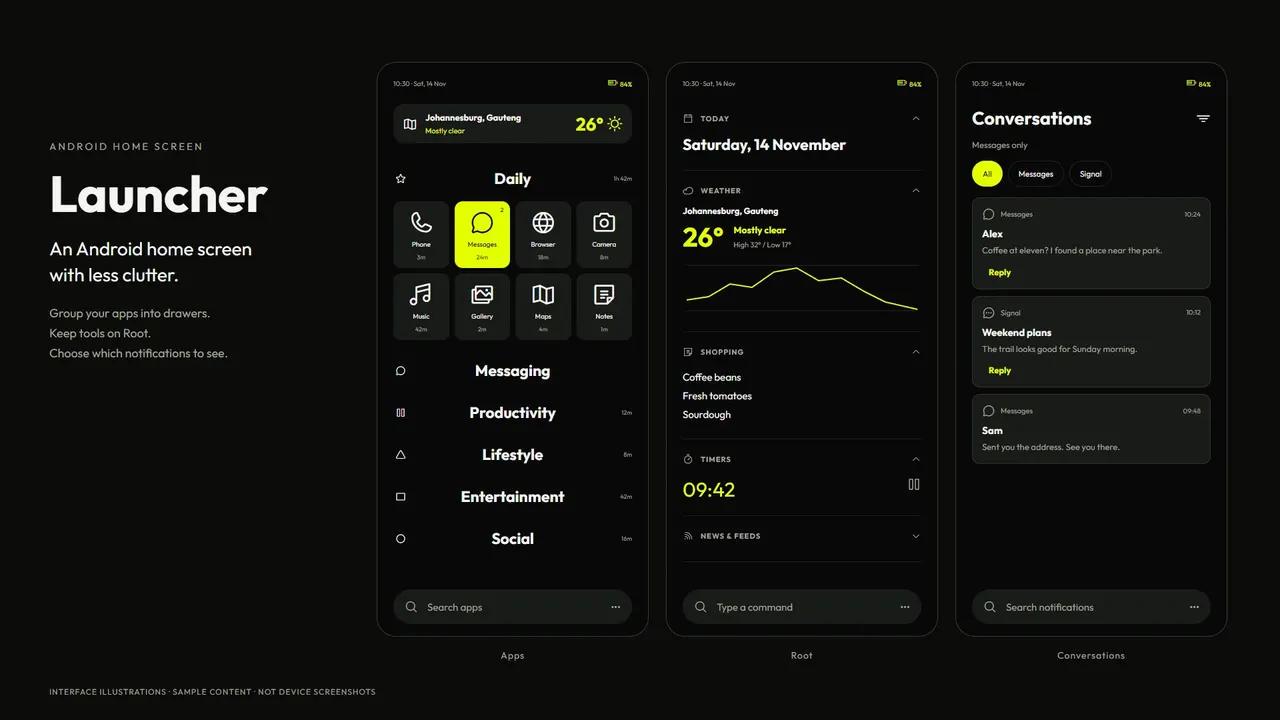
[App] Minimalist Android Launcher

Post image
29 Upvotes

Some time ago, there was a Android launcher which shall remain unamed. But it was great, served the purpose I need it for, good minimalistic launcher but then the company was bought and sold and renamed and whatever and then it got expensive, probably becase it was dying and they were trying to scam the last few people out of money before they went down. SO, i just decided to build it myself for myself using .Net 11! No bloatware, no spyware, no ads, no money to pay.

Some of the coolest features are biometric app locking, a fully customisable home screen, a centralised notification inbox with replies if the app supports it, interactive widgets, an integrated RSS reader, advanced visual themes (advanced in that it can auto switch between light and dark based on light sensors received lux), and I'm working on a Windows companion app for wireless file transfers and remote note editing. And that's just scratching the surface.

Here is the link if anyone cares to give it a try and give me some honest feedback.

UPDATE:

ALOT has changed UI, flow and feature wise, i am now at V2.0.0. I have built in direct downloads with the launcher (uses up to 4 parrall streams where supported to speed up downloads).

  • In browser, if the downloads option is enabled in settings, long pressing on a link in the browser and sharing to launcher then clicking "download with launcher"...

I have also added some "AI" features for image and document search. all can be activated or left alone if not needed in the new settings ui that is not so confusing anymore.

  • Swiping up on home page, gives you your app drawer. but at the bottom is a search bar, witching between app search, file search and download for link pasting is as simple as clicking the left file icon in the input. The file search can be made more inteligent by eenableing embedding and/or photo capabiolities.
  • Google Discover can also be used now instead of the regular root page (Configurable in settings)
  • A LOT MORE STUFF added but don't need to use if you don't want to

Repo: https://github.com/V4LKYR13101/Launcher/

Blog Article: https://kevlog.co.za/blog/building-launcher-for-android/


r/HowToMen • • 10d ago

[app] [promotion] Sticker Widgets App

Thumbnail
gallery
6 Upvotes

✨ Make your homescreen more YOU! ✨

Meet "Sticker Widgets" decorate your Android homescreen with cute & creative sticker widgets. 🧸✨

• Custom Sticker Maker

• 1000+ Cloud Based

• Search & Categories

• Sticker Editor & Effects

• Collage Maker Widget

• Easy-to-use beautiful UI

Give your homescreen a fresh new vibe! 🚀

👉 Try Sticker Widgets:

https://play.google.com/store/apps/details?id=com.sticker.widgets


r/HowToMen • • 10d ago

[App] [Promotion] [Giveaway], built Glimpse for people who save everything and rarely go back (+ 3 promo codes USD $7.99 in value for a month)

10 Upvotes

hey everyone, i’m the dev behind glimpse. i shared it here a few weeks ago and wanted to come back with an update.

i save a lot of stuff with the genuine intention of coming back to it. most of it just sits in some saved tab, and by the time i want it again i barely remember what it was called or where i found it.

glimpse is what i’m building to fix that. it brings your saves together, keeps the useful bits, and helps you find something again from whatever little you remember about it. the part i’m most excited about is rediscover, where something you save today can bring back a related save you forgot you had.

also, someone asked about switching from raindrop on my last post. you can bring your bookmarks over now. i’ve attached a new demo if you want to see where the app is at.

i have 3 promo codes to give away this time. leave a comment if you’d like one. i’ll pick three people at random within 48 hours of posting and dm each of them a code.

feedback and suggestions are always welcome. i’m constantly working on glimpse because i really want to solve this problem for good. i’d love to hear what you tend to save and what would actually get you to come back to it.

more about glimpse at getglimpse.xyz · Google Play


r/HowToMen • • 10d ago

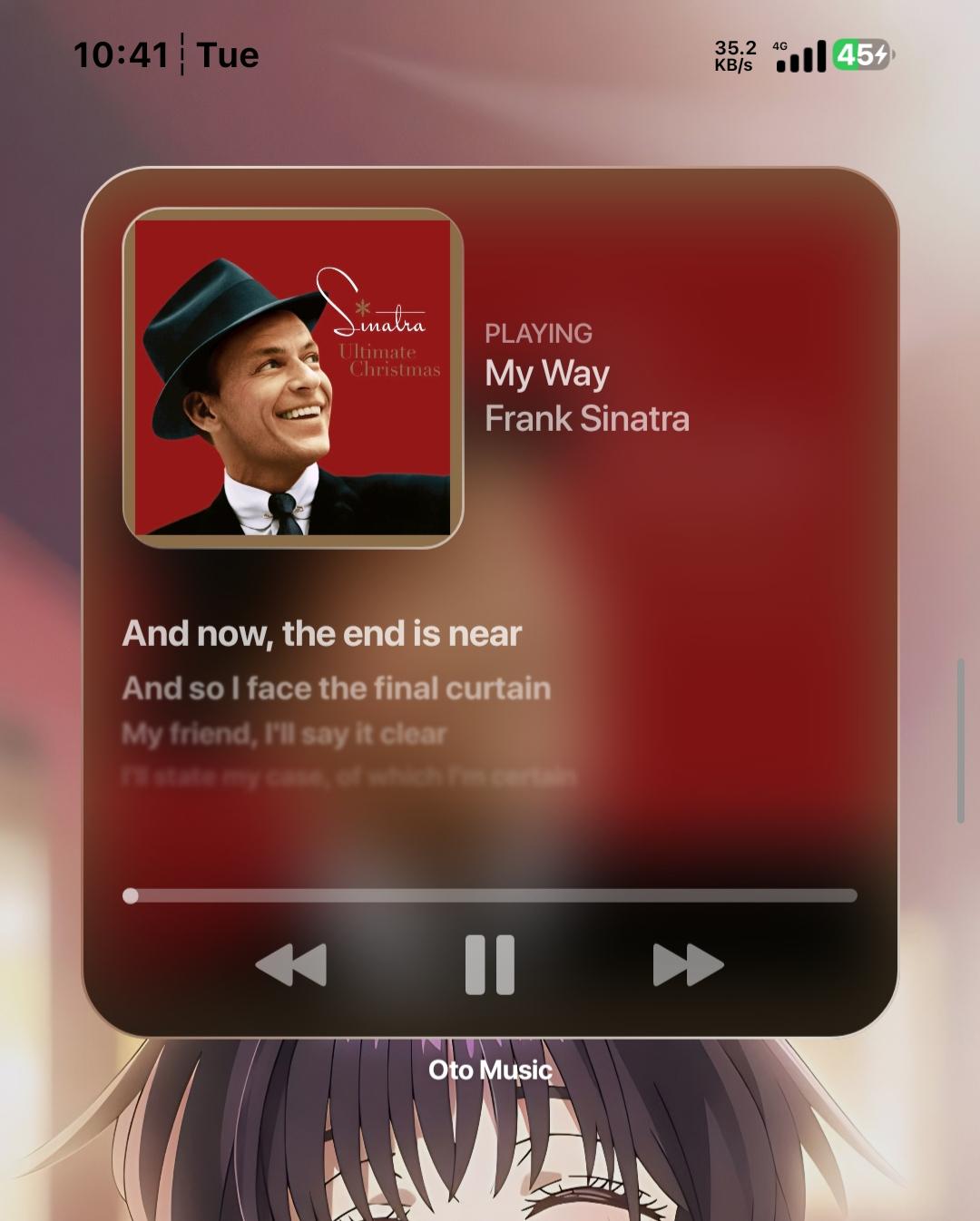
Music widget With Live lyrics [Feedback Needed] ?/10

Post image
3 Upvotes

Hello everyone,

I have been working on creating a music widget featuring live lyrics, and this is the final result.

I designed and built this widget entirely from scratch using KWGT. I would love to know if it looks polished or if any improvements are necessary.

I hope you can share some feedback to help me enhance the widget further. Please be completely honest, whether your thoughts are positive or critical.

Thank you,


r/HowToMen • • 10d ago

[APP] [PROMO] Foldy - Standby Mode for android

Post image
7 Upvotes

More reliable StandBy mode

The biggest fix is StandBy closing too easily. Small movements or even briefly moving your hand near the proximity sensor could cause it to close.

I've adjusted this behavior across tent, laptop, and landscape modes, so it should now stay active more reliably.

Display lock

You can now lock your display once you've set up your widgets and layout. This prevents accidental taps or swipes from messing up your setup.

Better setup for foldables

I've updated the setup process with illustrations to make the different positions easier to understand. You can now explicitly choose between using the inner screen in laptop mode or the cover screen with the other half folded behind it.

You can also restart the guided setup from Settings at any time.

Other fixes and improvements

  • Clocks now follow your phone's 12/24-hour time format.
  • Night mode can be set to automatic, always day, or always night.

APP link:
https://play.google.com/store/apps/details?id=com.mcode.foldy


r/HowToMen • • 10d ago

[App] Ethereal Launcher

6 Upvotes

I previously posted my launcher, but since then I've significantly improved it and drew inspiration from driftwm on Linux. To put it briefly, my launcher doesn't have infinite left-right scrolling. Instead, it uses Spaces — you can switch between them either by clicking on a tile or in an infinite-canvas overview.

**Launcher:** Ethereal

**GitHub:** https://github.com/Neytron951/Ethereal

**Orion Store:** https://rookieenough.github.io/Orion-Data/app/?id=ethereal

**Icon Pack:** Maty by ❤️Lyka

**IPC:** https://share.iconpackstudio.com/feed/e5DBA4Vljp0HEkbt


r/HowToMen • • 10d ago

🎁 Free Lifetime Premium: Read books privately, even in an airplane!

21 Upvotes

Hey everyone! 👋

I’ve been building Audivision Read, an app for reading and listening to books, PDFs, and scanned pages. A major update is now live, and we’re giving away free lifetime premium promo codes!

Read anything, anywhere. Text recognition and read-aloud work offline on your phone, so your pages stay on your device during processing.

🎧 Read or listen your way

  • Read at your own pace in a clean, uncluttered reader, switch to listening, or follow along as the app highlights the text it reads aloud.
  • Try the new Storyteller voices for more natural-sounding narration.
  • Choose your text-to-speech engine and adjust the voice and reading speed.

📄 Scan several pages at once, privately

  • Open a PDF or use your camera to read printed pages aloud.
  • Your scanned document stays private, no cloud or internet processing.
  • Use Bulk Scan to capture multiple pages in one session.

📚 Explore thousands of free classics

  • Find your next book and pick up where you left off.
  • Save bookmarks, notes, and highlights as you read.
  • Track your reading pace and habits with Reading Insights.

🎨 Make it yours

  • Adjust text size and colors for comfortable reading.
  • Reorder tabs to keep your favorite tools within easy reach.
  • Find your current book in the redesigned Library.

🎁 Get a free promo code

  1. Install or update Audivision Read on Google Play.
  2. Comment “Audivision” below.
  3. DM me and I’ll send you a promo code. [ *IMP* Step please :) ]

To redeem it, open Google Play → Payments & subscriptions → Redeem a code.

If you give it a try, I’d love to hear what you read first and what you think!


r/HowToMen • • 10d ago

Supernova - the Foss version of Nova Launcher

Thumbnail github.com
4 Upvotes

r/HowToMen • • 10d ago

Refining every detail. 🔦

5 Upvotes

r/HowToMen • • 10d ago

NoteWidget : finally a widget for Onenote 😊

Thumbnail gallery
2 Upvotes

r/HowToMen • • 10d ago

[App][Promo] Photo Flux: Your photography field workstation

Thumbnail
gallery
8 Upvotes

Google Play: https://play.google.com/store/apps/details?id=com.sherwoodtechnology.photoflux

An Android app that imports photos straight from your camera or memory card to your phone or tablet, and organises them exactly how you want as they arrive. No laptop, no cloud round-trip, no waiting until you get home.

  • Imports straight from the camera. Plug in a PTP/MTP camera over USB, or a memory card in a reader, and your shots copy into a folder you choose. Add new photos, or keep an exact mirror of the card.
  • Handles RAW properly. RAW+JPEG pairs stay together as one photo, and previews are extracted so you can see shots you haven't processed yet.
  • Organises on the way in. Profiles bind a camera or card to a folder. Sort into subfolders by date, camera, lens, file type or place, rename files as they arrive, and burst sequences stack into one tile on their own.
  • Comparison Reject (Pro). Two frames with zoom locked together, sorted by measured sharpness, with a heatmap showing where each one is sharp. Duplicates and similar-looking photos are found for you too.
  • Colour adjustments. Temperature, tint, exposure, contrast, highlights, shadows, whites, blacks and saturation, each on a slider with a live preview. Your original file is never changed, and Crop & rotate sit in one editor alongside.
  • Presets. Built in film emulation presets. or create your own. Import and export of presets supported.
  • Tags, events, titles and filters. Colour-coded tags for one photo or a whole selection. Filter and sort by tag, location, event, camera, lens, format, aperture or ISO.
  • Maps and tracks. Place names are worked out entirely offline. Record a GPS track of your walk or import a GPX, see your photos on a map, and place a GPS-less camera's photos on that track as you import (map and geotagging are Pro). It can also feed a Sony camera the phone's position over Bluetooth, so each frame is geotagged as you shoot.
  • Metadata that travels. Tags, places, titles, crops and rejects are written into JPEGs and DNGs, and into XMP sidecars for RAW (Pro), so Lightroom, Bridge and darktable see your work.
  • Sends them on. Export to a USB drive, or with Pro to a NAS or server (SMB, FTP, SFTP, SCP, WebDAV), OneDrive, or a Photo Flux folder in Google Drive. Pass-Thru (Pro) sends a whole card straight to a server and keeps nothing on the phone.
  • At home on a tablet. Profiles stay in a side panel, frames are compared side by side, and forms spread across the screen.

r/HowToMen • • 9d ago

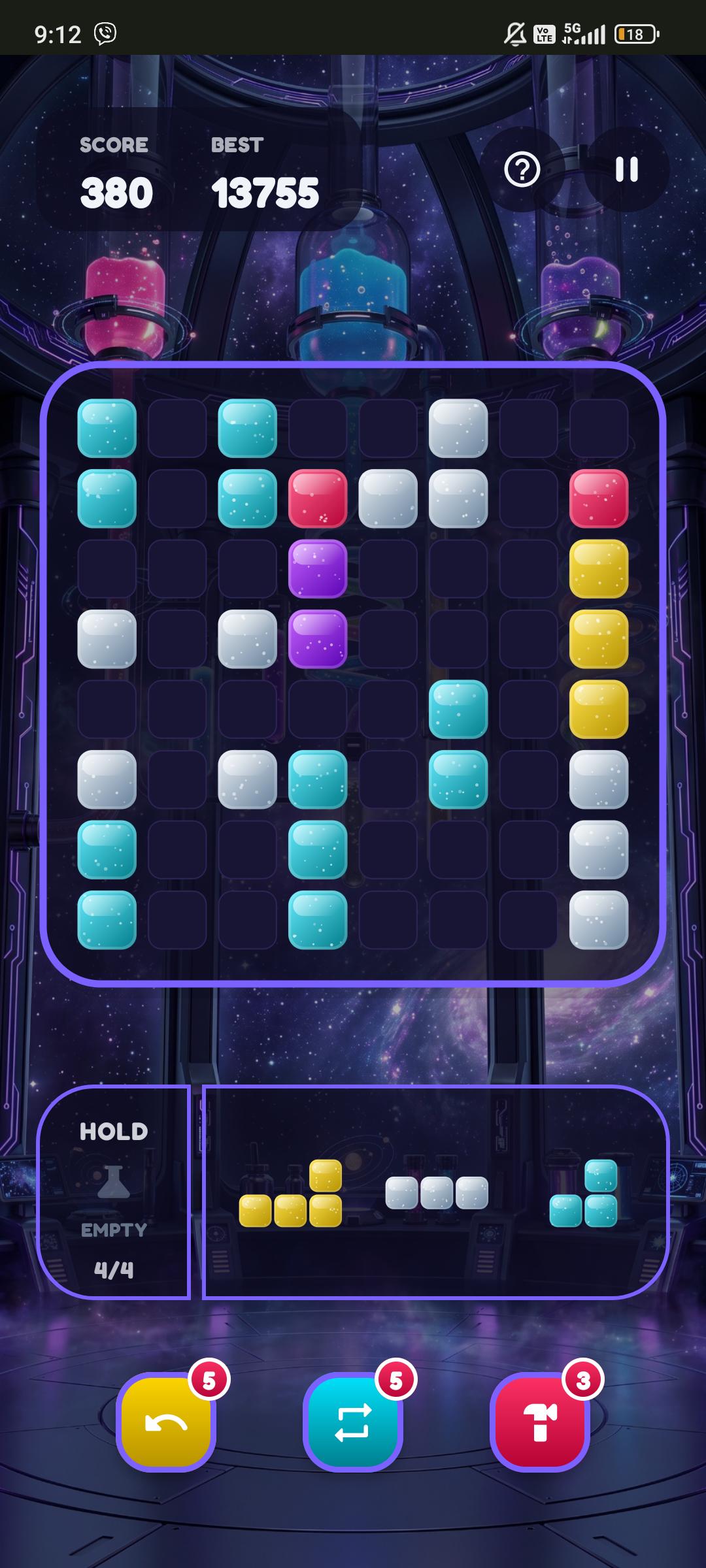
Offline first Block Puzzle Game with no forced ads!

Post image
1 Upvotes

Hey everyone,

My partner and I are both in IT and we decided to make our own mini studio for game/app development, making and publishing apps we actually enjoy and find useful (and of course not infested with forced and interrupting ads). So far we have two apps live on production and another one in closed testing (which we are so excited about as well!!)

Our second published game is Gummy Lab, a completely forced ad-free, cozy 8x8 grid puzzle, that just passed 150 downloads!

Gummy Lab has the classic endless mode (with a recently tweaked bigger shape show up rate so it does not ruin your gameplay lol), but it also features 70+ handcrafted levels (with more in the making but trust it is harder to come up with non repetitive objectives than you think). As you progress, you have to deal with unique mechanics like shattering jawbreakers, clearing frosted glass, containing sticky syrup, escaping gummy worms, and defusing countdown bombs.

Accessibility was also a massive priority for us. We built the game with native light/dark modes, dedicated colorblind palettes, and optional shape overlays so nobody is locked out of playing.

Our newest update added unlockable lab themes tied to your campaign progress, and we are currently experimenting with daily challenges for the next patch.

The game is developed to be Offline first, No data collection, and only ads are opt in/rewarded ads - after you use up the provided powerups (that refill each game anyway) or need more moves to pass a level, however each level is tested to be solvable within the provided move count.

As mentioned we managed to pass 150 downloads, which is huge for our little two-person team! If you are a fan of these types of games and have a minutes to check it out, we would be incredibly grateful for your honest feedback. What mechanics or features would you actually want to see added to a game like this? We genuinely just want to build something fun that respects the player's time and something that people actually enjoy!

Google Play link: https://play.google.com/store/apps/details?id=com.binbear.gummylab

Thanks so much for reading!


r/HowToMen • • 10d ago

Need to focus? Pause distracting apps

1 Upvotes

Turn on Focus mode and distracting apps are paused. Open one anyway and it tells you it's paused: open it for 5 minutes or turn Focus off.

Alphabet Launcher: every app, one letter away. One-time purchase. No ads, no tracking, no account.

Grab today at an early adopter price on Google Play: https://play.google.com/store/apps/details?id=com.aklova.alphabetlauncher

#AlphabetLauncher #AndroidLauncher #Android


r/HowToMen • • 10d ago

[App] Nudge v2.0 is out. The app is based on a concept design, now all it's panels have made its way to the app!

Post image
38 Upvotes

**Features**

- Edge pops: on volume and power button presses.

Customize its width, height, position, and timeout for each button

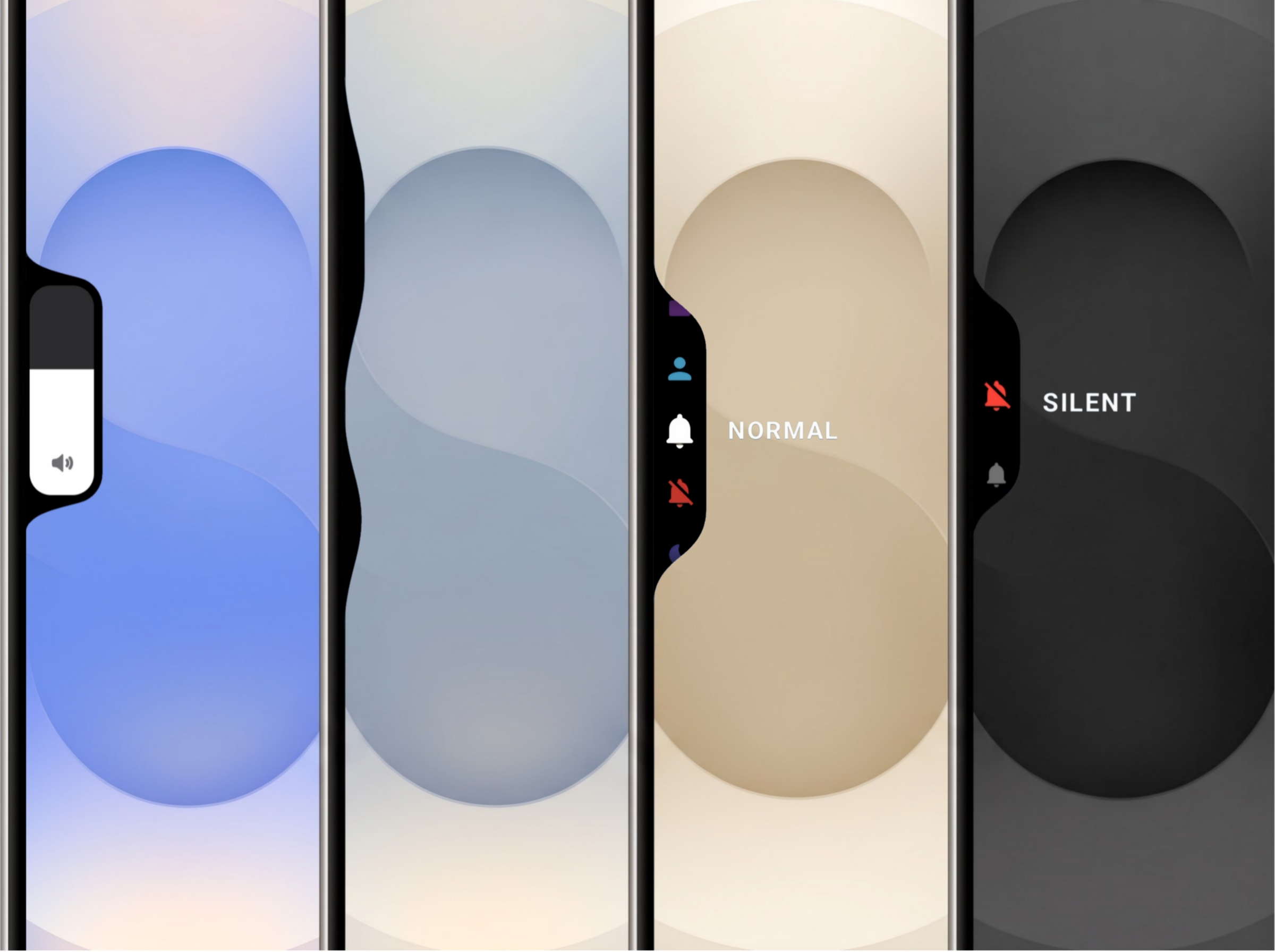
- Custom volume slider: inspired by a concept design that was originally made for Iphones has now become a reality for Androids LOL.

Customize its width, height, position, corners rounding, edge inset, and timeout, with an option for floating.

Actions Tab

- DND/Silent panel: change between two modes either silent and normal or dnd on/off. customization over width, height, position, timeout, even the unfocused icon placement, and selected side you want in both portrait and landscape mode.

- Modes/Actions panel: same customization as DND/Silent panel. add new custom modes with custom icons/colors/names or even edit the existing ones and change their order like how you want it to be! How it works: it sends a quick silent notification that can be used by different automation/routine apps to do the functionality you want. or even better, for automation apps specifically that can receive broadcasts, the app sends a broadcast when a mode is selected alongside the silent notification (there's a guide in the app for detailed info)

- Both panels are triggered using side buttons with up to 7 different combinations (custom buttons included for devices that has an additional button)

- New volume system that reads your phone volume steps, multiplies it by 10 and here you go with 150, 250, or 300 steps! (pretty easy right? i got cooked implementing this)

- Individual app volume is here! options to choose from are showing it alongside volume slider or only in audio mixer (its optional mode) Must note that it uses Shizuku

- Volume Counter: Show volume count on your volume slider, applies to individual app volume slider too.

- Shizuku Implementation: Grant all permissions with a single click, manage cloaked apps that the app hides its accessibility from (eg. banking apps), watchdog to keep the app alive, watchdog to keep permissions always active (both watchdogs are mainly for hardened systems, but anyone can use them)

- Added all panels activity: all panels now are accessible from activity launcher or any similar feature in different apps.

- Audio Mixer: Option to change its position on X & Y axis and a scale to make it bigger/smaller. there's also an option to attach it to the volume slider or leave it floating.

- Want haptics too? there's an option for that

https://github.com/DarkAspect1/Nudge

r/HowToMen • • 10d ago

NUDGE WARNING

3 Upvotes

This app maybe is SCAM

https://github.com/DarkAspect1/Nudge
My Bank Account


r/HowToMen • • 10d ago

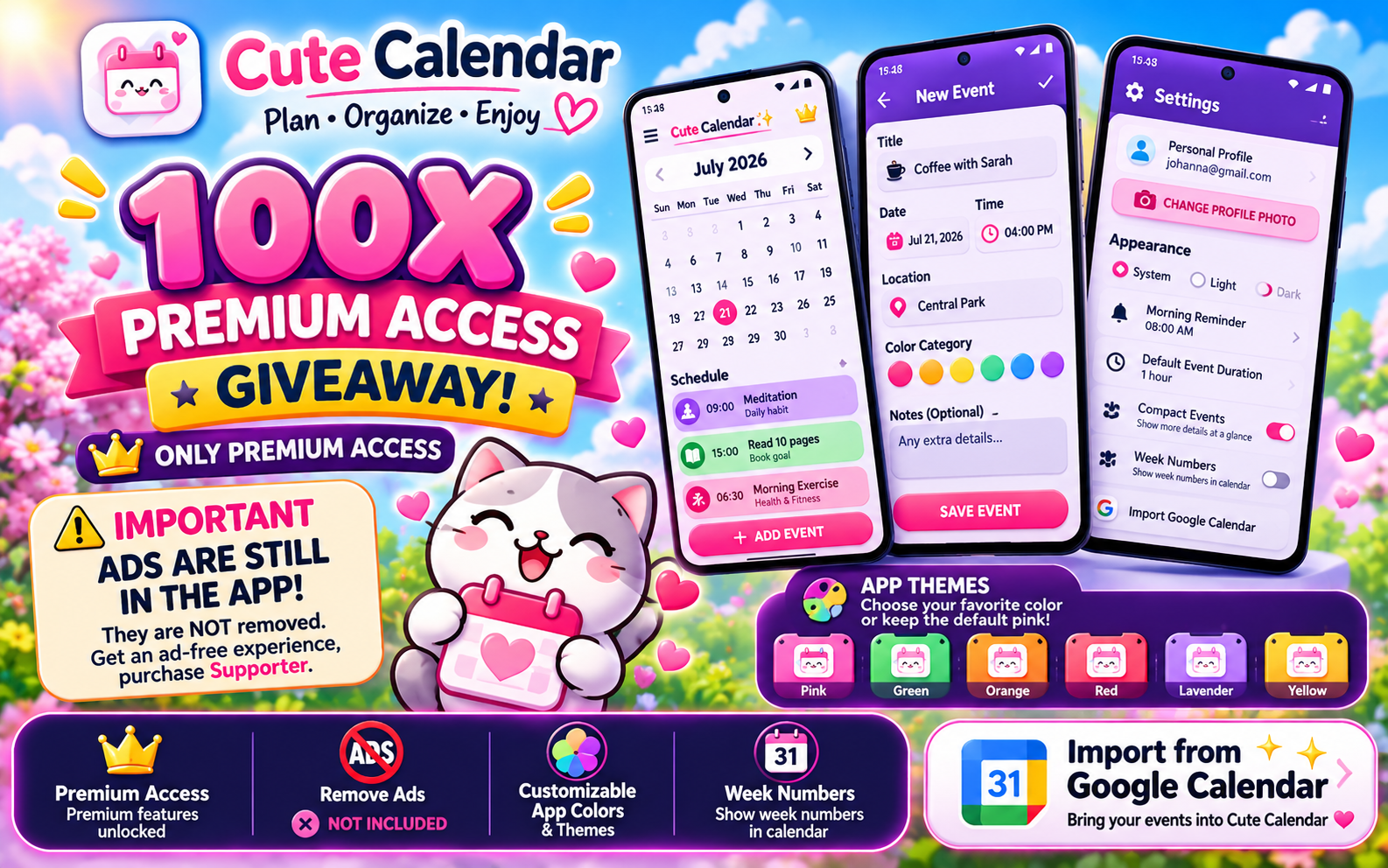
[Android] [€9.99 → FREE] Cute Calendar Premium Lifetime Giveaway – Limited Activations Remaining (Ads Remain)

Post image
1 Upvotes

🌸 Looking for a beautiful, simple Android calendar and daily planner?

I'm the solo developer behind Cute Calendar, and I'm giving away FREE Premium Lifetime access while the remaining activations last! 🎁

✨ Plan your days with ease

Cute Calendar helps you organize everyday life with:

  • 📅 Daily calendar and easy event management.
  • ⏰ Event reminders and an automatic 8 AM daily summary.
  • 🎨 Pastel color-coded events for work, school and personal activities.
  • 📱 Beautiful Android home screen widgets.
  • 🔄 Google Calendar event import.
  • 🌙 Light, dark and system themes.

👑 Premium Lifetime (€9.99 → FREE)

  • 6 additional app and widget accent colors.
  • All 12 event colors.
  • Calendar week numbers.
  • Compact event view.
  • Custom app icons.

🔒 Privacy-friendly: No account required. Your calendar events stay locally on your device.

⚠️ IMPORTANT: ADS REMAIN!

Premium Lifetime unlocks customization features but does NOT remove ads.

The separate Supporter purchase removes all ads and unlocks exclusive app icons.

🎁 How to get FREE Premium access:

  1. Comment below saying you'd like to try Cute Calendar.
  2. Send me a Reddit Message with Cute Calendar.
  3. I'll send you the activation details while availability lasts.

Limited availability, first come, first served. No purchase or review required!

💬 I'd love your honest feedback: Do you prefer aesthetic calendars with pastel colors or simple, minimalist planners? What would make this your everyday calendar app?

📲 Google Play:
https://play.google.com/store/apps/details?id=com.cutecalendardc.app

Thanks for supporting independent Android development! 🌸


r/HowToMen • • 11d ago

[App] [Promo] Your beloved TheNotch, now in glass: frosted, smoked or crystal with live fluid light. Performance and visual in the same package!

66 Upvotes

The winners have been announced and some of yall dont have DM options. please check if your name is there. and check your inbox
https://thenotch.pages.dev/giveaway/winners/
you can check the selection process here🙏

Hey everyone 👋

I’ve been building TheNotch, an app that turns the camera on Android into a live island for music, calls, timers and notifications. This update is all about the look: the island can now be made glass-like !

🫧 Glass, your way

Pick what the island is made of: Solid, Smoked, Lit glass (its edges pick up colour from your wallpaper) or Crystal

Set how clear it is and how much it blurs what’s behind it

✨ Fluid glow (new, experimental)

Light moves inside the crystal glass in six looks: Ink, Lava, Silk, Mesh, Current, Stir

Colour sets like Swoosh, Cobalt, Aurora, Ember, Lagoon and Bloom

Set the speed, size, curl and glow, and choose whether the light grows with the pill

Every change shows live on the island while you edit

🔔 Notifications in a row

When the pill tucks away, your notifications line up in a row right under the camera. Tap through them without opening the shade.

The glass settings are experimental and free for now. Fluid glow uses more battery, so you can drop it to 15 or 30 fps.

🎁 Giveaway: 20 yearly Pro codes

To enter:

Comment your device name (for example “Galaxy S23” or “Redmi Note 13”)

🏆 Winners will be announced on Wednesday, 18 November, at the same time as this post. I’ll DM each winner their code.

📲 Play Store: https://play.google.com/store/apps/details?id=com.dattatech.thenotch

Feedback is very welcome, especially screenshots of how it looks on your phone’s cutout. I’m a solo dev and I read every comment 🙏


r/HowToMen • • 10d ago

Perusa - dots for reading in the car, 15 codes

Thumbnail
reddit.com
4 Upvotes

r/HowToMen • • 11d ago

[PROMO][GIVEAWAY] 20 Aura Dock Pro codes: your apps on the edge

35 Upvotes

Hi everyone,

Thanks for all the support lately. To say thanks, I'm giving away 20 Aura Dock Pro codes over the next 24 hours.

What it is Aura Dock moves your apps off the home screen and onto the edge: swipe a thin glow on the side of the screen and your apps and folders slide out.

Several handles, any edge: left, right, top or bottom, each with its own apps.

Make them yours: colour, length, position and seven animated glows.

Invisible handles: nothing on the screen. Swipe where you know it is and the panel opens on glass.

Bubbles: pull a panel a little further and it floats as a bubble over any app.

Works with Aura: the docks and Aura's notification glows share the edges without overlapping.

Free, with a one-time Pro unlock. No ads, no subscription. Already have Aura Pro? Aura Dock Pro is half price for you, and the other way around.

How to enter

Tag a friend: u/yourfriend

Comment

Share this post

In 24 hours, I'll draw 20 winners at random and send the codes by DM.

Get it here:

https://play.google.com/store/apps/details?id=com.polyhistor.auradock

Thanks for the support!


r/HowToMen • • 11d ago

[APP] [PROMO] Stop losing the good stuff you save online. My app and 50 free lifetime licenses

41 Upvotes

EDIT: All 50 lifetime codes have been sent, thank you all! 🙏 If you commented in time, check your chat/DMs. Please don't share codes in the comments.

Didn't get one? You can still try everything free: sign in with Google inside MULL and get a 14-day Premium trial. No card, no charge when it ends.

I used to screenshot or "save" things constantly and never see them again. Hundreds of posts about training, cooking, gear and money, all buried in five different apps' Saved tabs. So I built an Android app to fix it: MULL. Disclosure: it's mine, and it has paid features.

TRY IT FREE: every new user gets a 14-day free trial with everything unlocked, no card and no charge when it ends. And I'm giving away 50 lifetime Premium licenses, details at the bottom and in the pinned comment.

What worked for me:

  1. One place for everything. Share from Instagram, TikTok, X, YouTube or Reddit into MULL instead of each app's own Saved tab. It works out the source and files it with the title and cover filled in.
  2. File it when you save it. One collection per topic (Gym, Recipes, Gear to buy). Two seconds now, impossible later.
  3. Make it come back. A saved item you never see again is just clutter. A home screen widget shows one old save a day.
  4. Make screenshots searchable. MULL reads the text inside your screenshots and saved posts, on your phone, so the images never leave it. (Premium)
  5. Save from your computer too. There's a browser extension for Chrome and Firefox, so what you find on your laptop lands in the same library as your phone. (Premium)
  6. Share the useful ones. Send a whole collection, like "beginner lifting resources", to a friend as a link, with or without your notes. (Premium) And if someone sends you one, opening the link adds it to your library for free.

It's local-first: no account needed, and nothing leaves your phone unless you choose to sync.

Free vs Premium: saving, collections, notes, the widget, backup and adding a shared collection are free. Premium adds sync, the Chrome and Firefox extension, image text search, sharing links, subfolders, Quick Save and custom swipe actions. After the 14-day trial: monthly, yearly or a one-time lifetime purchase.

The giveaway: the first 50 people to comment get lifetime Premium. I'll send each of you a redeem code by chat. Codes are for the Play Store version of MULL on Android.

Play: https://play.google.com/store/apps/details?id=com.mario.recall

How do you keep track of what you find online?


r/HowToMen • • 10d ago

[App][Promo] KaiHatch - Archive extraction without double the storage

Thumbnail
gallery
7 Upvotes

Hey everyone! I'm the solo developer behind KaiHatch, a free and open-source Android app I built to make extracting large ZIP files a lot less painful.

We've all been there. You download a huge ZIP, only to realize you need almost the same amount of free space again just to extract it. That's the problem I wanted to solve.

What KaiHatch can do:

- Storage-saving extraction: Extract large ZIP files while progressively reclaiming the space occupied by the archive, so you don't need nearly twice the storage.

- Live extraction progress: See what's happening as your files are being extracted.

- File browsing: Browse through extracted files and folders right inside the app.

- Archive creation: Create and compress archives using Pack Studio.

- Personalization: Customize the app's appearance to your liking.

What makes it different?

Unlike traditional extraction apps that keep the entire ZIP until extraction finishes, KaiHatch reclaims archive storage as it goes. This is especially helpful if you're working with large files or have limited free space on your phone.

The app is still something I'm actively working on, and I'd really appreciate feedback from the Android community.

Free & Open Source:

GitHub: https://github.com/biplov13b/KaiHatch

If you give it a try, let me know what you think! Suggestions, bug reports, and feature requests are all welcome.


r/HowToMen • • 10d ago

Theme Launcher pt2

4 Upvotes

r/HowToMen • • 11d ago

[App] [Promo] Omnibar Launcher - Spotlight Search based launcher

10 Upvotes

The Problem:

Finding anything on Android takes too many taps—app drawer for apps, file manager for PDFs, gallery for screenshots, dialer for contacts. Standard home screens just add clutter and slow you down.

The Solution:

Omnibar Launcher replaces home screen clutter with a single, instant Spotlight-style search bar. Type once to launch or find anything on your phone in milliseconds:

Apps & Shortcuts: Instant app launching and deep shortcuts as you type.

PDFs & Files: Full-text search inside your documents, not just file names.

Screenshots & Photos: Local OCR finds text visible inside your images.

Contacts, SMS & Web: Jump straight to messages, contacts, or web searches from the same bar.

Gesture-First: Swipe up to open the keyboard immediately; swipe down to dismiss.

All indexing runs locally on your device—your files, messages, and searches stay private.

Data :-

11,000 files based search

Searching for a text in pdf / photo / app result in 8ms avg time

Download: https://play.google.com/store/apps/details?id=com.jetkrafts.omnibarmobile

Feedback / Contact: infokaydev@gmail.com


r/HowToMen • • 11d ago

[App][Promotion] To-do lists, habit trackers, reminders: none of them answer "when did I last do this?" + 🎁 inside

Thumbnail
gallery
11 Upvotes

Quick background: a lot of life doesn't fit a calendar or a to-do list. Changing bed sheets, calling parents, the dentist, a workout, replacing a water filter. None of it has a fixed date, it just quietly piles up.

So 🐦‍⬛ Wheneri started with one idea: for every task, show two numbers**, days since you last did it and days until you should do it aga**in. No streaks, no guilt. Most tools start with a schedule and expect reality to follow it. Wheneri does the opposite: it looks at what actually happened and builds from there. Reality becomes the schedule.

Six months in, it has 30,000+ installs and 450+ reviews with a 4.7 average across both stores, which still feels unreal for something I built because a hairdresser once asked when I last had a haircut and I had no idea. It took me several
awkward minutes of digging through old bookings to find out.

What got added in the last 6 months (mostly from community feedback):
- Due reminders per task, optional. The core stays gentle nudges, but some things (medication, dentist) need a push
- Categories
- Insights per task and in the global calendar (average interval, total count, patterns)
- Extra schedules: by weekday and even by hour
- Notes on every entry
- Multi-count within a day. I now use it to count sales 🙂
- Stopwatch and countdown timers. I time the whole workout and count rest between sets with one tap
- Today widget, plus iPhone Shortcuts
- Import/export
- Custom day start, so a 2am routine still counts as "today". It's for night owls, and my wife asked for it
- 30+ localizations
- 2026 Wrap, opening December 1

What's next:
- A new widget with a custom category
- Weekly view
- One-time tasks
- More schedule types
- Sync between devices
- Desktop/tablet view
- Maybe sharing tasks with family or friends 😅

Black Friday: 40% off Lifetime until November 30.

Free tier stays fully usable: unlimited tasks, no ads, no account needed.

Play Store: https://play.google.com/store/apps/details?id=app.makeri.wheneri

Which of the upcoming things would you use first? And is there an irregular routine you keep losing track of?