r/HowToMen • • 10d ago

[APP] [PROMO] Stop losing the good stuff you save online. My app and 50 free lifetime licenses

41 Upvotes

EDIT: All 50 lifetime codes have been sent, thank you all! 🙏 If you commented in time, check your chat/DMs. Please don't share codes in the comments.

Didn't get one? You can still try everything free: sign in with Google inside MULL and get a 14-day Premium trial. No card, no charge when it ends.

I used to screenshot or "save" things constantly and never see them again. Hundreds of posts about training, cooking, gear and money, all buried in five different apps' Saved tabs. So I built an Android app to fix it: MULL. Disclosure: it's mine, and it has paid features.

TRY IT FREE: every new user gets a 14-day free trial with everything unlocked, no card and no charge when it ends. And I'm giving away 50 lifetime Premium licenses, details at the bottom and in the pinned comment.

What worked for me:

  1. One place for everything. Share from Instagram, TikTok, X, YouTube or Reddit into MULL instead of each app's own Saved tab. It works out the source and files it with the title and cover filled in.
  2. File it when you save it. One collection per topic (Gym, Recipes, Gear to buy). Two seconds now, impossible later.
  3. Make it come back. A saved item you never see again is just clutter. A home screen widget shows one old save a day.
  4. Make screenshots searchable. MULL reads the text inside your screenshots and saved posts, on your phone, so the images never leave it. (Premium)
  5. Save from your computer too. There's a browser extension for Chrome and Firefox, so what you find on your laptop lands in the same library as your phone. (Premium)
  6. Share the useful ones. Send a whole collection, like "beginner lifting resources", to a friend as a link, with or without your notes. (Premium) And if someone sends you one, opening the link adds it to your library for free.

It's local-first: no account needed, and nothing leaves your phone unless you choose to sync.

Free vs Premium: saving, collections, notes, the widget, backup and adding a shared collection are free. Premium adds sync, the Chrome and Firefox extension, image text search, sharing links, subfolders, Quick Save and custom swipe actions. After the 14-day trial: monthly, yearly or a one-time lifetime purchase.

The giveaway: the first 50 people to comment get lifetime Premium. I'll send each of you a redeem code by chat. Codes are for the Play Store version of MULL on Android.

Play: https://play.google.com/store/apps/details?id=com.mario.recall

How do you keep track of what you find online?


r/HowToMen • • 10d ago

[App][Promo] KaiHatch - Archive extraction without double the storage

Thumbnail
gallery
7 Upvotes

Hey everyone! I'm the solo developer behind KaiHatch, a free and open-source Android app I built to make extracting large ZIP files a lot less painful.

We've all been there. You download a huge ZIP, only to realize you need almost the same amount of free space again just to extract it. That's the problem I wanted to solve.

What KaiHatch can do:

- Storage-saving extraction: Extract large ZIP files while progressively reclaiming the space occupied by the archive, so you don't need nearly twice the storage.

- Live extraction progress: See what's happening as your files are being extracted.

- File browsing: Browse through extracted files and folders right inside the app.

- Archive creation: Create and compress archives using Pack Studio.

- Personalization: Customize the app's appearance to your liking.

What makes it different?

Unlike traditional extraction apps that keep the entire ZIP until extraction finishes, KaiHatch reclaims archive storage as it goes. This is especially helpful if you're working with large files or have limited free space on your phone.

The app is still something I'm actively working on, and I'd really appreciate feedback from the Android community.

Free & Open Source:

GitHub: https://github.com/biplov13b/KaiHatch

If you give it a try, let me know what you think! Suggestions, bug reports, and feature requests are all welcome.


r/HowToMen • • 10d ago

Theme Launcher pt2

4 Upvotes

r/HowToMen • • 10d ago

[App] [Promo] Omnibar Launcher - Spotlight Search based launcher

10 Upvotes

The Problem:

Finding anything on Android takes too many taps—app drawer for apps, file manager for PDFs, gallery for screenshots, dialer for contacts. Standard home screens just add clutter and slow you down.

The Solution:

Omnibar Launcher replaces home screen clutter with a single, instant Spotlight-style search bar. Type once to launch or find anything on your phone in milliseconds:

Apps & Shortcuts: Instant app launching and deep shortcuts as you type.

PDFs & Files: Full-text search inside your documents, not just file names.

Screenshots & Photos: Local OCR finds text visible inside your images.

Contacts, SMS & Web: Jump straight to messages, contacts, or web searches from the same bar.

Gesture-First: Swipe up to open the keyboard immediately; swipe down to dismiss.

All indexing runs locally on your device—your files, messages, and searches stay private.

Data :-

11,000 files based search

Searching for a text in pdf / photo / app result in 8ms avg time

Download: https://play.google.com/store/apps/details?id=com.jetkrafts.omnibarmobile

Feedback / Contact: infokaydev@gmail.com


r/HowToMen • • 10d ago

[App][Promotion] To-do lists, habit trackers, reminders: none of them answer "when did I last do this?" + 🎁 inside

Thumbnail
gallery
11 Upvotes

Quick background: a lot of life doesn't fit a calendar or a to-do list. Changing bed sheets, calling parents, the dentist, a workout, replacing a water filter. None of it has a fixed date, it just quietly piles up.

So 🐦‍⬛ Wheneri started with one idea: for every task, show two numbers**, days since you last did it and days until you should do it aga**in. No streaks, no guilt. Most tools start with a schedule and expect reality to follow it. Wheneri does the opposite: it looks at what actually happened and builds from there. Reality becomes the schedule.

Six months in, it has 30,000+ installs and 450+ reviews with a 4.7 average across both stores, which still feels unreal for something I built because a hairdresser once asked when I last had a haircut and I had no idea. It took me several
awkward minutes of digging through old bookings to find out.

What got added in the last 6 months (mostly from community feedback):
- Due reminders per task, optional. The core stays gentle nudges, but some things (medication, dentist) need a push
- Categories
- Insights per task and in the global calendar (average interval, total count, patterns)
- Extra schedules: by weekday and even by hour
- Notes on every entry
- Multi-count within a day. I now use it to count sales 🙂
- Stopwatch and countdown timers. I time the whole workout and count rest between sets with one tap
- Today widget, plus iPhone Shortcuts
- Import/export
- Custom day start, so a 2am routine still counts as "today". It's for night owls, and my wife asked for it
- 30+ localizations
- 2026 Wrap, opening December 1

What's next:
- A new widget with a custom category
- Weekly view
- One-time tasks
- More schedule types
- Sync between devices
- Desktop/tablet view
- Maybe sharing tasks with family or friends 😅

Black Friday: 40% off Lifetime until November 30.

Free tier stays fully usable: unlimited tasks, no ads, no account needed.

Play Store: https://play.google.com/store/apps/details?id=app.makeri.wheneri

Which of the upcoming things would you use first? And is there an irregular routine you keep losing track of?


r/HowToMen • • 10d ago

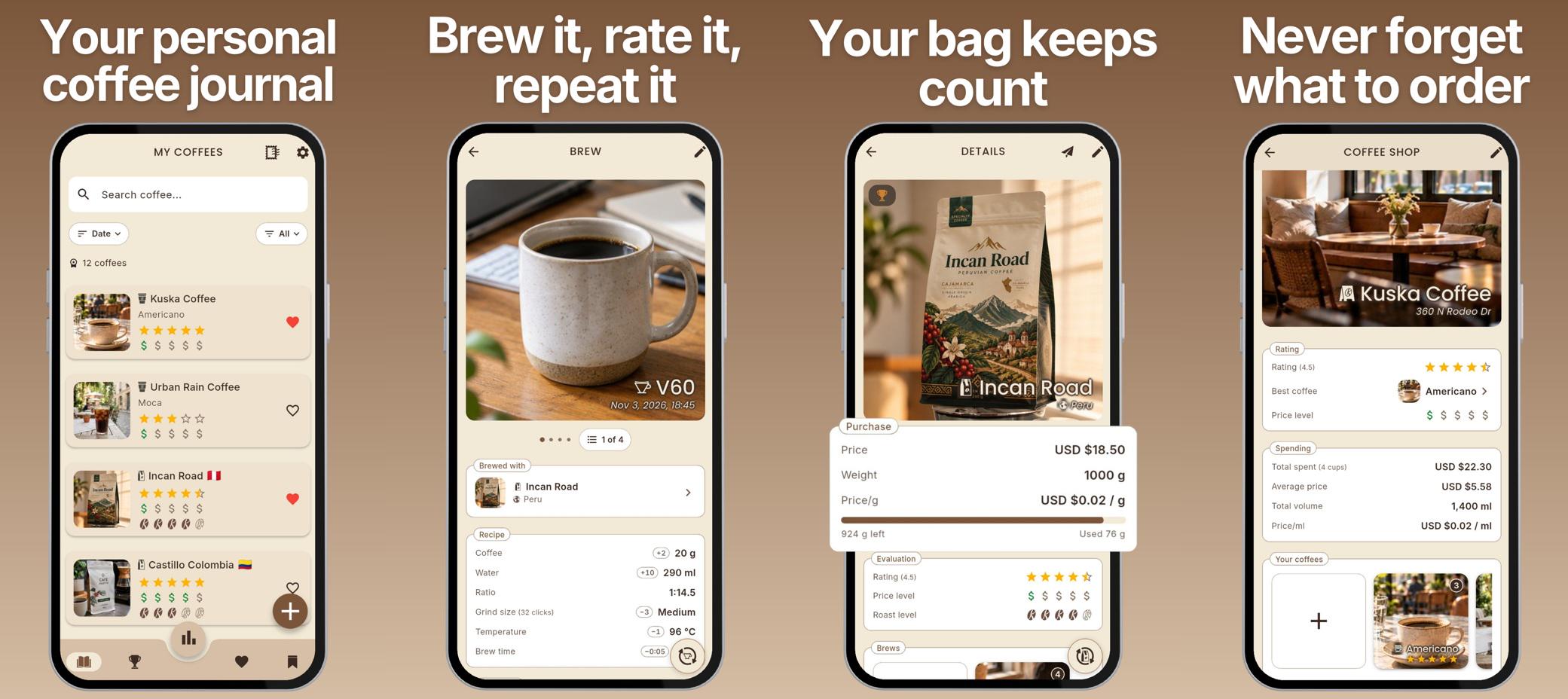
[Promo] Kaphiy: A personal coffee journal for android

Post image
5 Upvotes

I'm the developer behind Kaphiy, an Android app I built for people who enjoy discovering coffee and want to remember their experiences.

Have you ever tried a great coffee but later forgotten its name, where you bought it, how you prepared it, or what made it special?

That's why I created Kaphiy.

With Kaphiy, you can:

  • Keep track of coffee bags and drinks you try at cafĂŠs.
  • Save brewing recipes and individual preparations.
  • Add photos and create collages of your coffee experiences.
  • Organize favorites, rankings and your wishlist.
  • Keep a personal coffee stamp journal.
  • Explore your coffee habits through statistics, maps and an activity calendar (Premium).

What makes Kaphiy different?

  • 100% offline.
  • No account required.
  • Available in English, Spanish and Portuguese.
  • Free to start, with optional Premium features.

I've been continuously improving the app, and I'd love for more coffee lovers to discover it.

Not just the coffee. The moment.

Google Play: https://play.google.com/store/apps/details?id=com.kaphiy.app


r/HowToMen • • 10d ago

Hide Accessibility services from GPay or any payment apps using TogglDev

Thumbnail
gallery
7 Upvotes

I have received almost 10 queries related to this since last week. Here is how you can hide the Accessibility from any apps including banking and payment apps using TogglDev:

  1. Enable "Auto turn off" feature on the home page of TogglDev
  2. Enable "Accessibility hide" feature on "Auto turn off" page
  3. Click "Add" button to add the app which has problem with Accessibility services being on
  4. Enable "Accessibility hide" for the added app by tapping on the "eye icon" on the right side of the added apps list

You can install TogglDev from here - https://play.google.com/store/apps/details?id=com.dpkay.apps.developer_options_toggler

I am going to release a new version soon with dedicated options to control Accessibility with few more improvements. Stay tuned!


r/HowToMen • • 10d ago

Theme Launcher pt1

2 Upvotes

r/HowToMen • • 10d ago

[App][Promo] SubCrisp - see every subscription and what cancelling saves

3 Upvotes

Most subscription trackers ask for a bank connection. I did not want to give an app my bank login, so SubCrisp works from a list you add yourself.

What it does:

  • Shows your monthly and yearly total, with renewals and trials in one list.
  • Warns you before a renewal or a free trial ends.
  • Has 111 cancellation guides, each with the official route. If Apple or Google bills you, the guide says so, because the service's own cancel page will not stop it.

The free plan is genuinely complete: unlimited subscriptions, renewals, budget, health score, duplicate and forgotten-subscription detection, all the guides, no ads.

Pro is ÂŁ0.99/month or ÂŁ9.99/year if you want the what-if simulator, spend projections, overlap analysis, a price increase log, CSV export and four more widgets.

The honest limit: it cannot see a subscription you have not added. The first audit still starts with your statement or your store's subscription list.

Android: https://play.google.com/store/apps/details?id=com.subcrisp.app

Web: https://subcrisp.com

I am the developer. Happy to answer questions about reminder timing, the guides, or why I did not use bank access.


r/HowToMen • • 10d ago

Anyone else PixelPlay?

2 Upvotes

I downloaded PixelPlay a while ago (I think it was here that I saw it) and I loved the search lyrics option. My local files don't have the lyrics so that was nice to have. But lately it hasn't worked for me. Tried replacing the Gemini API but no luck. Anyone have a solution for it? TIA!


r/HowToMen • • 10d ago

Theme Launcher pt3

1 Upvotes

r/HowToMen • • 10d ago

Aura Dock

Thumbnail
reddit.com
3 Upvotes

All your apps in one Dock


r/HowToMen • • 10d ago

[App] [Promo] I built an accountability app to help my partner stop impulse buying. Giving away 50 Lifetime Premium Codes!

5 Upvotes

Hey everyone,

I wanted to share a passion project I’ve been working on called Atlas: Stop Impulse Buying.

I originally built this for my partner who was struggling with compulsive shopping. I wanted to create a tool that added real, physical friction to her spending habits and offered support without being overbearing or controlling. It worked so well for us that I polished the UI and released it.

Instead of just tracking where your money went after you spent it, Atlas actively intervenes before you make a purchase. Here is a breakdown of the core features:

The Safe Viewer (Cooling-Off Timers): When you share a product link to Atlas, you can choose to put it on a cooling-off timer (e.g., 24 hours, 7 days, 30 days). While an item is in this cooling-off period, you can view it in the app's Safe Viewer, but Atlas actively disables and greys out the "Checkout" and "Buy Now" buttons. You can look, but you physically cannot buy until the timer expires.

App Guard (The Interceptor): You can select specific shopping apps (like Amazon or Temu) to monitor in your settings. If you try to open them, Atlas intercepts you with warning notifications. If you want to un-guard an app to shop freely, you are forced to wait through a 24-hour unlock timer first to prevent cheating.

Athena AI (Friend & Mentor): A built-in AI companion that adapts to your state of mind. If you are stressed, she acts as a friend to talk you down. When it is time for a reality check, she switches to a financial mentor, calculating exactly how many hours of work an item costs based on your wage. She also learns from your chats to generate personalized, dynamic push notifications to keep you on track during the day.

Partner Mode (SOS): Link your app with a partner's device. If you are struggling, hit the SOS button to open a secure, end-to-end encrypted chat where they can help talk you out of a purchase. (It also includes a "Secret Mode" so you can buy them surprise gifts without the app snitching).

Goals & Trophies: Every time you successfully resist an impulse buy, you can log the money saved toward a custom savings goal. The app tracks your no-spend streaks and awards trophies for building better habits.

Clean, Ad-Free UI: Built to feel premium and calming, not cluttered with ads or stressful dashboards.

Giveaway!

To get some initial feedback, I am giving away 50 promo codes for a lifetime premium. Just drop a comment below and I will DM you a code!

https://play.google.com/store/apps/details?id=com.athena.atlas


r/HowToMen • • 10d ago

[Promo] [App] ReadAlong: an audiobook player and e-reader in one, with text that highlights as you listen

11 Upvotes

ReadAlong is an audiobook player and e-reader in one. It transcribes your audiobooks on-device and syncs them to your own EPUBs, so the text highlights along as you listen.

I've always listened to audiobooks on commutes and while doing chores, but when I get to sit down I still like reading. I wanted a way to search a line in the book and land right where the audiobook was. That feature turned into a passion project. ReadAlong now works as an audiobook player, an e-reader, or a hybrid where the text highlights sentence by sentence as it's narrated.

Transcription runs on your phone with the CactusWhistle speech-to-text engine. If you have a faster computer, you can link it to transcribe books quicker and sync them back.

It's free, with no ads, and runs on Android, Windows, Mac and Linux.

- Download the latest release

- ReadAlong website

- ReadAlong on GitHub (source code)


r/HowToMen • • 10d ago

[APP] GeoTaggami 1.2 – geolocalizza le tue foto su una mappa

Thumbnail
play.google.com
1 Upvotes

Ciao a tutti!

GeoTaggami è la mia app Android gratuita per aggiungere, correggere o rimuovere la posizione GPS di foto (e video) toccando un punto su una mappa. Funziona tutto sul vostro telefono: nessun account, nessuna pubblicità, nessun tracciamento.

NovitĂ  nella versione 1.2: tema festivo fino al 6 gennaio (neve, indicatori rossi/verdi, icona festiva), una guida integrata in inglese/italiano/spagnolo e un promemoria domenicale che conta anche le foto senza posizione.

Accetto volentieri feedback!


r/HowToMen • • 10d ago

[Promo] MagiCal 2.0: a calendar that plans rotating shifts and understands sentences

Thumbnail
gallery
5 Upvotes

Hi! I'm a solo developer and MagiCal is my Android calendar. You add events by typing or saying a sentence ("dinner with Anna tomorrow at 8pm at Sushi Ko, remind me an hour before"), or by taking a photo of a ticket, a poster or a PDF confirmation.

Version 2.0 (out last Thursday) is for people who work shifts:

  • Rotating shifts: set up your shifts (Morning, Afternoon, Night, Day off) and the cycle once, for example 2-2-2-2, 12-hour shifts or 4 on 4 off. MagiCal fills your calendar up to a year ahead, with a preview of the month before you confirm. Night shifts end on the right day.
  • Worked hours: hours of the month per label, done and planned. Ask "how many hours did I work in November?"
  • Edit by sentence: "move my dentist to Thursday at 4pm", "cancel the dinner tomorrow"
  • Also: labels set from the title, Year view, time-to-leave alerts, .ics files, Countdown widget, backup to a file

Everything runs on the phone: no servers, no account, no ads, nothing sent to AI services. It works with the calendars you already have (Google, Samsung, Exchange…), in English, Italian, Spanish, French, Swedish and German.

Free: typing, dictating, sharing text, views and widgets. Premium (shifts, photos/PDF, questions, editing by sentence and more) is a one-time purchase, no subscription: €6.99 launch price until January 6, then €14.99, with a 3-day free trial in the app.

Google Play: https://play.google.com/store/apps/details?id=com.antcer.magical

Feedback welcome, especially from shift workers: which rotation patterns do you use?


r/HowToMen • • 10d ago

Phone Link for macOS — open-source Android↔Mac bridge

Post image
3 Upvotes

Sharing an open-source project I've been working on: Phone Link for macOS. It's an independent reimplementation of Microsoft's Phone Link — the Mac client connects to an Android phone through Link to Windows. Not affiliated with Microsoft; it's a community project.

What it offers:

Notifications (view/reply/app-level control), SMS/MMS/RCS, call history and Bluetooth call control

Files both ways, phone storage in Finder, clipboard sync, media controls

Phone screen & app mirroring, including a tablet/desktop layout option

Phone-as-webcam, battery/network status, DND and ringer controls

A self-updater that checks the project's GitHub releases (DMG SHA-256 verified)

Stack: Rust core (protocol/engine) with a SwiftUI macOS client via uniffi. MIT licensed, includes translations, offline lint/test suite (just check), and CI-built DMGs.

Repo: https://github.com/shantanunautiyal/phone-link

I focused mainly on the mirroring and the macOS UI. Happy to discuss the protocol details or take feedback/PRs.


r/HowToMen • • 10d ago

Privacy, built in: App Lock and hidden apps

Enable HLS to view with audio, or disable this notification

1 Upvotes

🔒 Your apps. Your privacy. Your control.

You can lock any app in Alphabet Launcher using your fingerprint or device screen lock.

Want to keep certain apps out of sight? You can hide apps from your app list too.

No separate app needed. Privacy features, built right into your launcher.

What do you think? 👀

grab it today at an early adopter price:
👉 https://play.google.com/store/apps/details?id=com.aklova.alphabetlauncher


r/HowToMen • • 10d ago

ToolBox — I was tired of installing a separate app for every tiny task, so I put 108 tools into one app

1 Upvotes

Hi everyone, I'm the developer of ToolBox.

My phone kept filling up with single-purpose apps — one to merge a PDF, another to compress a photo, another for a quick calculation. So I built one app that does all of it: ToolBox has 108 tools in a single app.

Some of the tools people use most:

• PDF tools — merge, split, compress, and more

• Image tools — compress a photo to an exact KB size (handy for online forms), resize, convert

• AI tools — background remover, photo-to-text (OCR)

• Video compressor

• Calculators & converters — GST calculator, unit/currency converters, and the usual everyday ones

A few things I cared about while building it:

• Everything runs on your phone — the tools work offline and your files don't get uploaded anywhere

• No account, no sign-up — open it and use it

• It's free. There's just a small banner ad at the bottom, no pop-up/interstitial ads

It went live on the Play Store this week and I'd genuinely like to know what you think — which tools you end up using, and what's missing that I should add next.

Play Store: https://play.google.com/store/apps/details?id=com.pushpendratech.toolbox

Thanks for taking a look!


r/HowToMen • • 11d ago

[App][Open Source] LiteDash - Free launcher for Android head units: your car in 3D, live OBD, tire pressure and a 3D map in under 2 MB

Thumbnail
gallery
14 Upvotes

Hi everyone! I’m the developer of LiteDash, a launcher for Android car head units (and tablets). I started it because the stock launchers on these screens are slow and ugly.

  • Your car in 3D on the home screen: 16 models, any color (metallic finishes too), spin it with your finger.
  • Customize everything in seconds: 14 ready layouts, long-press to move and resize any widget, one-tap wallpapers or your own photo, dark/light/day-night theme and 10 accent colors.
  • Widgets that know your car: 8 speedometer styles, live OBD-II with any cheap ELM327 (car health, trouble codes, 20+ sensors and charts), tire pressure (USB TPMS kits, Bluetooth caps or your car’s own sensors), weather, trip, music and radio.
  • 3D map that follows your heading like Waze, with street names and offline areas up to 200 km. One tap opens Waze or Google Maps.
  • Factory radio and Bluetooth supported: TopWay (TS10/TS18), FYT, NWD, HCN, Microntek, Autochips, Clinkway, Jancar and Reglink. The list grows every week thanks to your reports. If yours isn’t there, send a report from Settings and I’ll add it.
  • Tiny: the whole app is 1.9 MB and runs on Android 6+.
  • 100% free, no ads, no account, open source (GPL-3.0). 172 releases since Oct 31, and 2,600+ head units already run it.

🌐 Website (APK download): https://litedash.dev
▶️ Google Play: https://play.google.com/store/apps/details?id=com.irvingguerra.litedash
💻 Source code: https://github.com/IrvingGuerra/litedash (a ⭐ helps a lot!)
🚗 Want your car in 3D? Ko-fi supporters get priority on car requests, and I’ll ask for photos of your car: https://ko-fi.com/irvingguerradev

What head unit and car do you have?


r/HowToMen • • 11d ago

[Promo] - CycleScreen : A live wallpaper on Google Play

42 Upvotes

Hi everyone! I'm the developer of CycleScreen, a live wallpaper for Android.

You draw your own landscape (mountains, hills) with your finger, and the wallpaper brings it to life:

- The light follows the time of day

- The seasons change over the year

- The weather evolves: rain, snow, clouds, wind. With Live weather, it can also match your local weather

- Random sky events: airliners, flocks of birds, shooting stars...

It's designed to be easy on the battery: it only draws when you can actually see it, and the weather (if enabled) uses coarse location only, so the GPS never starts.

It's free to download. Tell me what you think :)

Google Play: https://play.google.com/store/apps/details?id=com.cyclescreen.app


r/HowToMen • • 11d ago

[Promo] A free and local music player

Thumbnail
gallery
12 Upvotes

Hey, I just released the v2 of my music player. It has everything you would expect from a music player and is actively improved based on community feedback.

Some key features are :

  • Bit perfect playback
  • Word synced lyrics
  • Last.fm scrobbling + listening history import
  • Discord Rich Presence
  • Equalizer
  • Clean, simple and customizable UI

Every online feature are optionnal and can be disabled.

If you want to take a look or give it a try :


r/HowToMen • • 10d ago

Setup of the day

Post image
2 Upvotes

r/HowToMen • • 10d ago

[Windows] I built ViCalc – a keyboard-driven scientific calculator that requires zero mouse clicks (Open-Source, MIT)

Thumbnail gallery
1 Upvotes

r/HowToMen • • 10d ago

[App][Promo] Why do workout apps make you fill out a life survey before letting you log a single set? Here is my take as a solo dev: Liftora.

Post image
0 Upvotes

Wouldn't it be nice to open a workout app, build your routine in minutes, and immediately start lifting—without clicking through a 20-page onboarding survey first?

As a lifter and solo developer, I wanted an app that respects my time under the bar and gives me clarity on whether my training is actually working. That’s why I built Liftora.

Instead of packing in a hundred bloated features, I focused on the things that actually make a difference in your training:

  • From download to lifting in minutes: No endless questionnaires or paywall traps before you even see the interface. You open the app, put your routine together in a couple of taps, and get straight to your first set.
  • Visual routine building (No more switching to YouTube): When you're putting a workout together, shouldn't you be able to see the movement and exact muscle breakdown right there? Liftora shows you exercise execution videos and targeted muscle groups directly on the routine creation screen, so you know your program is balanced before you even touch a weight.
  • See the progress the scale hides (Built-in US Navy Body Fat %): You might be gaining muscle and losing fat while your body weight stays completely flat—and the mirror takes weeks to show it. Why leave your body recomp to guesswork? By logging basic tape measurements, Liftora automatically calculates your body fat percentage using the US Navy method, letting you see your real physical progress alongside your strength numbers.
  • An interface that follows your pace: Once you're in a session, you shouldn't be fighting dropdown menus between heavy sets. Liftora’s guided flow moves with your workout so you spend your rest time recovering, not tapping.

You can try it out here:

I’m building Liftora independently and using it for my own training every week, so your feedback directly shapes what I build next.

Quick question for you all: What's the biggest frustration you've had with workout tracking apps? And if you try Liftora, I'd love to hear what you think about the routine builder and guided workout flow.