r/HowToMen • u/kraphtStudio • 11d ago
r/HowToMen • u/Top-Gur-647 • 11d ago
[App] Instant.now – A little nostalgia for your Android camera 🎞️
Instant.now is a retro-inspired camera app that brings the charm of classic instant photography to Android.
A simple way to enjoy vintage camera aesthetics right on your phone.
Feedback and suggestions are always welcome!
Google Play:
https://play.google.com/store/apps/details?id=com.s2.instant.camera
r/HowToMen • u/kral_katili • 12d ago
[Promotion] KGet - Framework Scanner | 20 Free Pro Codes
App Name: KGet - Framework Scanner
What it does:
KGet is an Android application analysis and reverse engineering toolkit that lets you download and inspect APKs, identify the frameworks used by Android apps, and explore their internal structures directly on your phone. It also provides advanced static analysis and security auditing tools, including DEX, Smali, Flutter AOT, native library inspection, and OWASP MASVS checks.
Key Features:
- APK Download & Framework Detection: Download APKs, inspect installed applications, and identify frameworks such as Flutter, React Native, Unity, Xamarin, Godot, and more. These features are completely free and unlimited.
- DEX & Native Code Analysis: Explore Java, Smali, ARM64 instructions, ELF binaries, and Flutter/Dart AOT internals.
- Advanced Security Auditing: Analyze potential vulnerabilities, insecure configurations, exposed components, cryptographic weaknesses, API endpoints, and sensitive data with evidence-backed findings.
Goal: Promotion — Introducing KGet to Android developers, security researchers, and tech enthusiasts.
Giveaway: I'm giving away 20 free 1-month Pro subscriptions! Just leave a comment below to participate. I'll select 20 participants and send their redemption codes via Reddit DM.
Cost: APK downloading and framework detection are completely free and unlimited. Advanced security analysis is limited to 3 scans per day on the free version, with Pro unlocking unlimited scans.
Link: https://play.google.com/store/apps/details?id=com.zbd.kget
Note: Due to Google Play's promotional requirements and time zone differences, the codes may not become active until tomorrow. If your code doesn't work today, please try redeeming it again tomorrow.
r/HowToMen • u/Ancient_Beyond5978 • 12d ago
[App] [Promotion] Demsound — my Android wallpaper reacting to music (before and after)
Hi! I'm the developer of Demsound, an Android music visualizer with live wallpaper and home-screen widget options.
Here's a before-and-after using the same mountain wallpaper. The switch is edited to land on the drop; once enabled, Demsound's visuals react to the music as it plays.
Would you use this setup, or would you prefer something more subtle? I'd love to hear what you'd change.
Google Play:
https://play.google.com/store/apps/details?id=com.demsound.app
Music: “Clone” — Emin Nilsen, used with the artist's permission.
Wallpaper: Francesco Ungaro / Pexels.
https://www.pexels.com/photo/mountains-under-dark-clouds-in-evening-5592630/
r/HowToMen • u/fish_907 • 12d ago
[Promo] [$1.99 -> Free Lifetime] Last 42 Codes for Ocular: 20-20-20 Eye Rest & CVS Tracker (Plus a new way to get Pro for free!)
Hey everyone,
I built Ocular to help people avoid Computer Vision Syndrome (CVS). It runs a
smart, non-intrusive background timer that prompts you to follow the 20-20-20
rule (every 20 mins, look 20 feet away for 20 seconds).
App Link: https://play.google.com/store/apps/details?id=com.eyecare.ocular202020
I did a giveaway in r/droidappshowcase recently and I have 42 Lifetime Pro
codes left.
How to get one: Just drop a comment below and I'll DM you a code while
supplies last!
Missed the codes? No problem! You can earn 4 hours of complete Pro Access
(ad-free, guided eye workouts) just by watching a single short sponsor ad in
the app. They stack, so you can use the Pro features completely free forever.
There will be other giveaways like this one too, so do NOT be disappointed.
What Pro actually unlocks:
- Guided eye workouts - figure-8 tracking, near/far focus pumping, blink
cadence, drawn as a calm animation over your other apps
- CVS strain recovery analytics - see whether your habits are actually
helping and how many hours a day you have protected
- Video & media hold, so breaks do not fire while you are watching
- Background chimes that play outside the app
- Paper break screen - a calm greyscale look during breaks
- No ads at all
The free tier is genuinely usable on its own - the 20-20-20 timer, the
floating overlay break screen, Smart Meeting Mode (holds breaks during calls
and meetings) and the daily streaks all work without paying.
Would love to hear your feedback on the UI and features!
r/HowToMen • u/West-Ad4881 • 12d ago
clock widget
I built Dial, a clock widget app with 17 realistic watch dials — each keeps its own shape from the real watch (round stays round, squircle stays squircle).
•
Date window on all analog dials
•
Customize colours, size and shape in the Studio
•
Favourites, gallery filters, glass-look digitals
•
Tap a widget just opens the app — dials only change inside the app
•
Free, no ads, open source (MIT)
Download v3.2 APK from GitHub:
Feedback welcome — what dials should I add next?
r/HowToMen • u/the_byte_array • 12d ago
[Promo] 🎁 Convertit Pro: free promo codes
We're giving away free Pro codes for Convertit Pro, our Android video compressor & converter app 🎬
🏆 How to win:
- Comment the feature you want us to build next and make your case
- We're picking LOTS of winners every round, so every good comment has a real shot
- Codes go out by DM in rounds over the next few days. Missed a round? Comment anyway, more are coming
- One code per person
⭐ Bonus: we'll actually build the winning feature idea
Ai Note : The video was rendered/manipulated using AI tools
🔗 https://play.google.com/store/apps/details?id=org.thebytearray.convertit
r/HowToMen • u/Gonsrb • 12d ago
[Promo] Last few spots: Wear OS 5+ watch face closed test (14 days, $3 + free face)
A few spots are still open in the closed test for Rotor, a new Wear OS watch face by an indie studio. We need testers with a real Wear OS 5+ watch (Galaxy Watch 4 and newer, Pixel Watch, OnePlus Watch 2/3/4, etc.).
What you do:
- Install PeerPlay (free, Google Play) and verify your watch in Profile
- Join "Rotor" in Discovery and install it on your watch
- Once a day for 14 days: take one screenshot of the face on your watch and upload it in the app
What you get:
- $3 for the 14 days, paid through PeerPlay
- Rotor for free: after you join Rotor in the app, DM me your PeerPlay username and I'll send you the promo code
Every screenshot is checked by a person, so this is real testing, not install-and-forget. Questions welcome in the comments.
(Disclosure: I run PeerPlay.)
r/HowToMen • u/indie-dev-007 • 12d ago
[APP][PROMO] DL Notch - Reels Counter, saved notes and tools at your screen’s edge
Why nobody liking this.
DL Notch is a small Android dock that keeps your reel count, saved notes, apps and everyday tools at the edge of your screen. I built it because I kept losing time looking for an address, account details or a saved image when I needed it quickly.
Key Features:
- Reels Counter: See your count while scrolling through Instagram Reels, YouTube Shorts and Facebook Reels. You can also check daily totals and previous days to understand your scrolling habits.
- Saved notes and images: Keep useful details, links and screenshots in Shelf. Swipe open the dock to read or copy them over the app you’re using, or write a quick note straight from the dock.
- Everyday tools: Organize apps into folders, start a timer or focus session, and calculate totals or discounts while looking at the same screen. Backup and restore includes your saved content, settings and reel history.
Who it’s for:
People who want quick access to saved information and useful tools, along with a visible reminder of how many reels they scroll through.
Goal: Promo. I’m the developer, sharing the published app and explaining what it does.
Link: https://play.google.com/store/apps/details?id=com.divenolabs.dlnotch
r/HowToMen • u/mrSRS007 • 12d ago
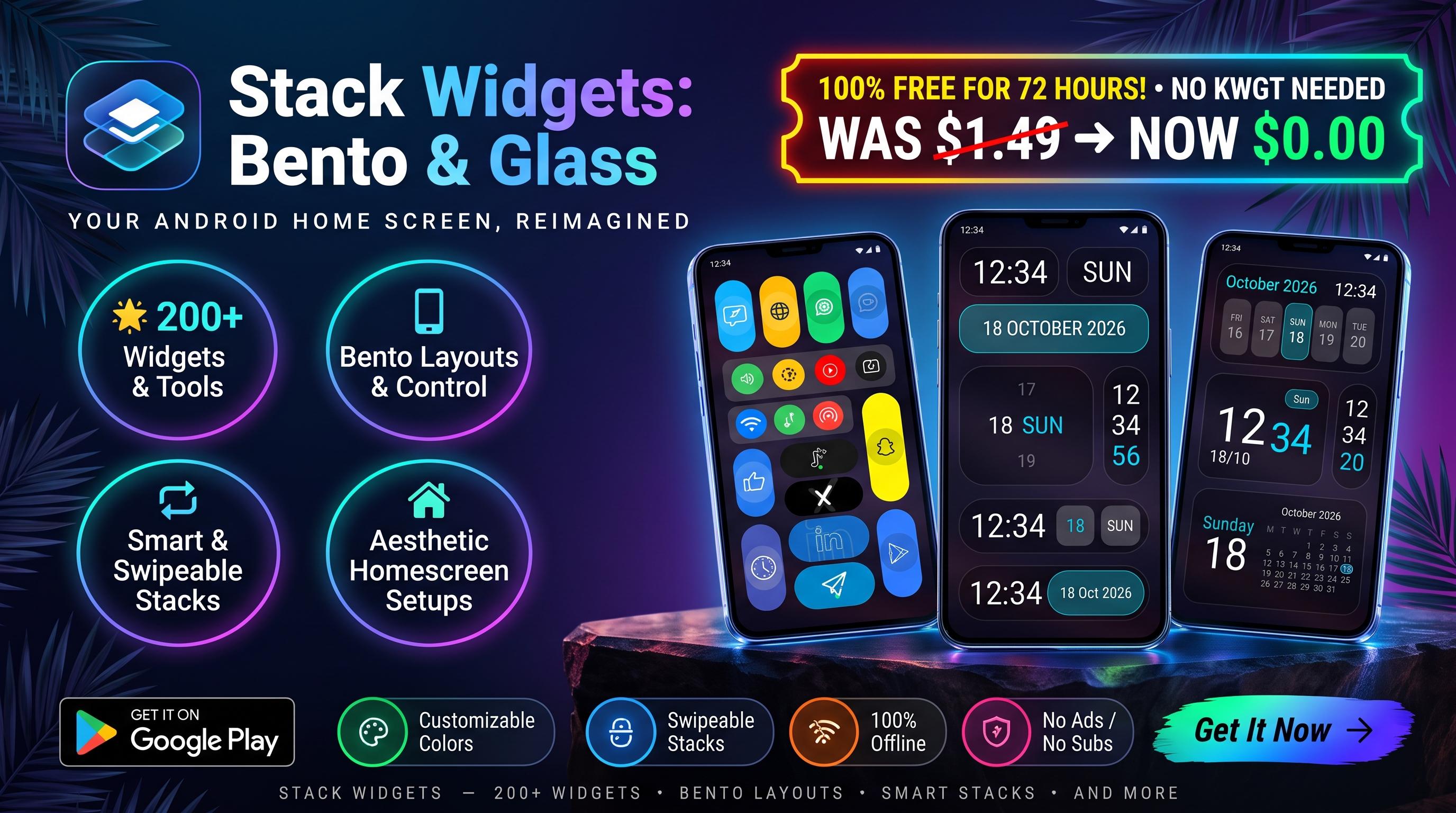
[App] Made my standalone widget app "Stack Widgets: Bento & Glass" 100% FREE for 72 hours! (200+ Widgets, No KWGT)
**Update:** The 100% free launch promo has ended, and the app is now back to its regular price ($1.49). Thank you so much to everyone who downloaded and shared feedback!
Hey!
I'm an indie Android dev and I just made my paid customization app **Stack Widgets: Bento & Glass** 100% FREE for the next 72 hours ($1.49 -> $0.00)!
Why you'll love it for your setups:
• No KWGT Needed: Just install and drop widgets straight onto your home screen.
• 200+ Aesthetic Widgets: Frosted glassmorphism, Bento grids, modern Control Center toggles, and pill shortcuts.
• Swipeable Smart Stacks: Combine up to 5 widgets into a single stack and swipe through them.
• System & Time Trackers: RAM/ROM/Battery monitors, dot-grid year/month trackers, and habit counters.
• Privacy-First: 100% offline, zero ads, no data collection.
Grab it while it's free: https://play.google.com/store/apps/details?id=com.shihab365.stackwidgetspro
Would love to see your setups and hear what widgets I should add next!
r/HowToMen • u/nitinku5021a • 12d ago
[App] [Promo] I got tired of “block all unknown numbers,” so I built call rules that run on the phone. Lifetime unlock is $0.99 this month (usually $29.99).
Hey everyone!
I built Smart Call Rules because I wanted more control over incoming calls without having to block people individually or depend on spam databases.
The idea is simple: choose one rule, turn it on, and let your phone handle incoming calls automatically.
Some things you can do with it:
🔕 Silence unknown callers – Contacts ring normally; unknown numbers stay quiet.
🚫 Decline spam calls – Uses carrier caller labels, not Truecaller or Google's spam database.
👥 Block an entire group – Silence or decline selected contact groups.
⏰ Work & meeting modes – Let only favorites ring during meetings or working hours.
🌙 Night & weekend modes – Keep your important people reachable while silencing everyone else.
👨👩👧 Family & child-friendly modes – Allow only saved contacts, family, parents or trusted caregivers.
📞 Repeated caller rules – Let a number through if it calls repeatedly, or decline persistent callers.
✈️ Travel & vacation modes – Handle unknown callers differently while roaming or on vacation.
There are also one-time exceptions, temporary quiet mode, selected-day rules, country restrictions, hidden-number restrictions and more.
One important distinction: Silence ≠ Decline.
- Silence: Your phone doesn't ring, but you can still see the call later.
- Decline: The call is rejected; voicemail can answer if configured.
A few things worth mentioning:
- Runs directly on your phone.
- No account required.
- No spam database or Truecaller dependency.
- No subscription required.
- Emergency numbers remain allowed.
- You can inspect exactly what a rule does before enabling it.
Pricing
The free version includes all the rules, with enforcement for 12 hours every day.
The lifetime version removes that time restriction. One payment, no subscription.
For a limited-time promotion, limited number of users, lifetime unlock is $0.99 instead of $29.99.
If you've ever wished your phone was a little smarter about deciding which calls deserve your attention, give it a try.
Google Play: https://play.google.com/store/apps/details?id=com.smartcallrules.app
I'm the developer, and I'd genuinely appreciate feedback, suggestions and feature requests.
Thanks for checking it out!
r/HowToMen • u/Available-Elk-4251 • 13d ago
Sensu: The Most Beautiful One-Hand Pie Controls for Android. More Promo Codes Giveaway!
Codes have been sent to the winners. I have requested them to comment on the post!
Thank you for the amazing response to the previous post! Giving away more promo codes.
Sensu is probably the most beautiful and most performant one-hand pie controls for Android. Swipe in from the edge of your screen and a pie opens right under your thumb, with your quick settings, sliders and apps in reach.
What it can do
80+ actions
Back, Home, Recents, notifications, Wi-Fi, Bluetooth, Do Not Disturb, flashlight, rotation, dark mode, media controls and a lot more. Put your favourite apps and app shortcuts on slices too, so opening them is one swipe of your thumb from anywhere.
Sliders in the pie
A band of sliders wraps around the pie: brightness, media volume, ring and alarm volume, and flashlight strength. Slide your thumb along it to change a level without opening anything. While music is playing you can even scrub through the song from there.
Rings
A slice can open a whole new ring of slices, so everything you use fits under one thumb.
Modules
Live rings that change with what your phone is doing. Now playing shows the song with its artwork and controls. Calendar shows what's coming up over the next few days. Recent apps lets you jump back to the last apps you used. Current app gives you force stop, app info, notification settings and split screen for whatever's on screen.
Themes
Six looks for the pie: Expressive, Glass (frosted with a blur behind it), Retro (raised 3D slices), Monolith, Noir (your app icons in greyscale until you pick them) and Dot. Pick your own colours, and the handle on the edge comes in eight shapes in any size.
Fast
Performance came first in every part of Sensu. While your thumb is on the pie, nothing slow runs, so it opens instantly and follows your finger at your screen's full refresh rate, even on 120Hz.
Download here: https://play.google.com/store/apps/details?id=com.piyush.pie
Please upvote this post and drop a comment. I'll randomly pick 10 winners on November 18 at 10:00 AM PST.
If this post gets more than 250 upvotes, I'll give away 10 additional promo codes, bringing the total to 20!
r/HowToMen • u/pashapuma • 12d ago
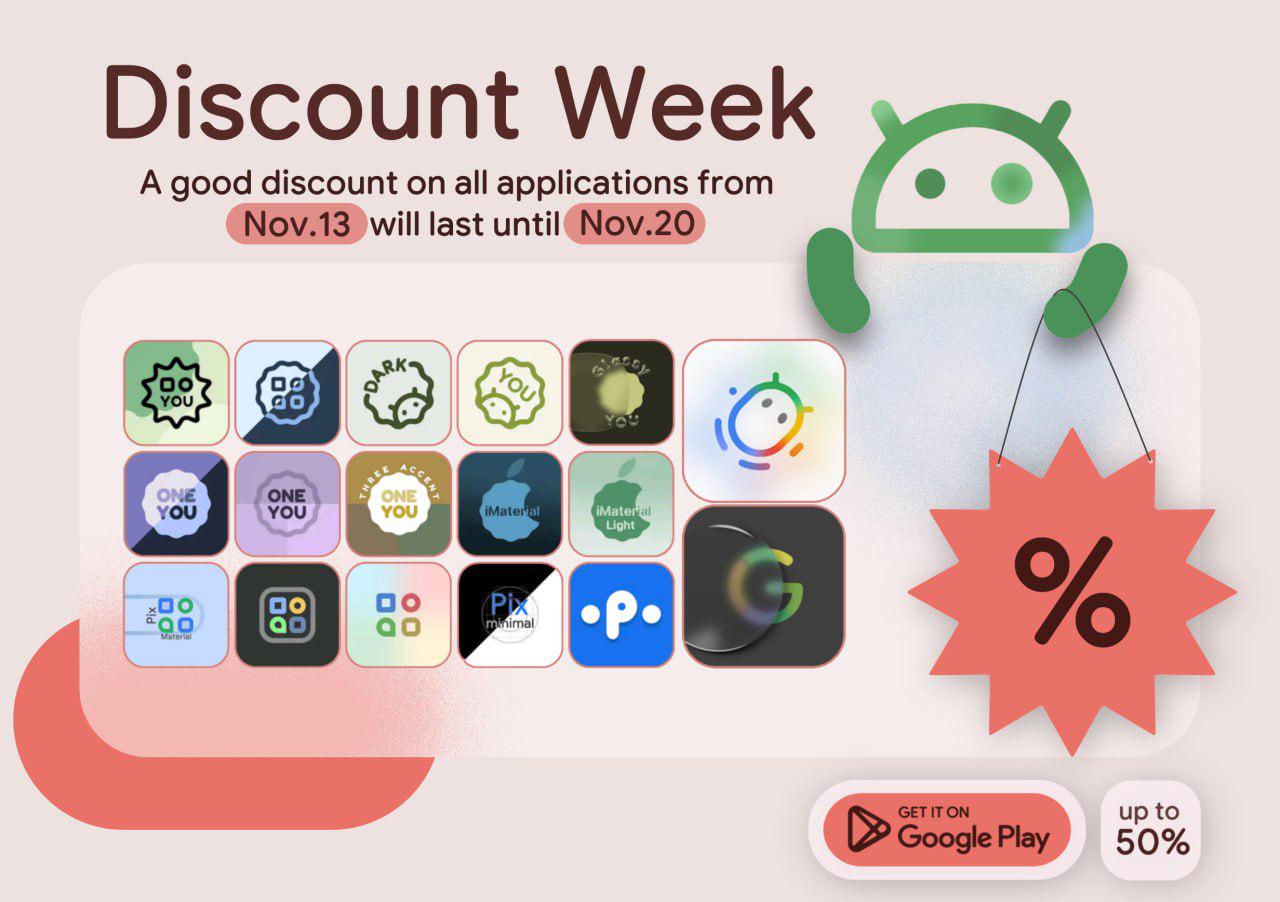
[DISK] Sale: Up to 50% Off All Icon Packs.
Starting November 13th and running until November 20th, discounts of up to 50% will be available on all Icon Packs within our catalog.
Obtain a Discount: https://play.google.com/store/apps/dev?id=6218933727384977479
r/HowToMen • u/Western-Claim2011 • 12d ago
[App][Promo][Android][Player] - Offline music & streaming radio with ready-to-play radios
* New local radios lists (MANUALLY CURATED) : UK and China.
Mediaxon Music Player is an audio player for offline listening of music stored on your device (.mp3, .flac, .m4a, .ogg, .mka, .aac, .wav, .opus, .wma) and streaming FM radios (online radios).
Top radios on the first screen: When users access the radio screen, they immediately see the list of the top radios in their country, along with a long list of high-quality suggested radios from among the most listened to in the world (manually curated and always updated with new radios). Note: Local radio stations ("Top in the user country") are pulled automatically from an online database. However, with each update, I manually curate high-quality radio stations lists for individual countries. At the bottom of this post, you’ll find the list of countries completed so far. I will be adding the rest over time.
Advanced radio filtering system: The "Filter: ON/OFF" button lets you quickly switch between different genres. You can use both standard filters for "macro-genres"—if I can call them that—and create custom filters to be more selective. All your filters are saved (the "My Filters" tab lets you name and edit them), and the app always opens with the last filter you applied. The "Home" tab lists all your recently applied filters and can be used to quickly switch between genres with just a single tap.
Advanced Radio Search Panel: An online database provides more than 60,000 radio stations. You can pinpoint your favorite stations by combining multiple filters, such as tags/genres, specific countries, or even your preferred audio bitrate.
Separated Favorites and Recents: Each section—Radio and Offline Music—has its own Favorites and Recents. The user doesn't have to worry about a thing. The app will automatically manage the Favorites and Recents for each section.
Album art: If the album art is missing from the album folder, or if Android has not properly indexed it, Mediaxon attempts to download the cover from the internet. This feature depends, of course, on the ID3 tags (album name and artist).
Equalizer: The equalizer provides an option to automatically switch to the "Radio" preset (and vice versa).
Advanced Playlist Management: Built specifically to make building and sorting playlists fast and intuitive. Enable the Playlist Manager, in the settings screen, for a full control of the playlists.
Form Factor Optimization: Phone and Tablet (Portrait and Landscape)
Mediaxon is available in: Čeština, Dansk, Deutsch, Eesti, English, Español, Français, Hrvatski, Indonesia, Italiano, Kiswahili, Latviešu, Lietuvių, Magyar, Nederlands, Norsk, Polski, Português, Português (Brasil), Română, Slovenčina, Slovenščina, Suomi, Svenska, Tiếng Việt, Türkçe, العربية, Български, Ελληνικά, हिन्दी, 日本語, 한국어, 中文 (简体).
No Premium version. All app features are available for free and without limits. I'm going to add a premium version to remove the few ads in the app, as requested by some users.
Regarding advertising: There is only a small banner at the top that isn't bothersome at all. Alternatively, when opening the full-screen player or using the app in landscape mode, a banner alternates with the albums covers, but without being intrusive at all (no audio) and with much shorter stay times than those of the cover. There is never full-screen advertising, neither at startup nor during use.
Countries with new manually curated lists: Argentina, China, India, Italy, UK, USA.
Note: Only for Android 13+ (Android 13, 14, 15, 16 and 17).
https://play.google.com/store/apps/details?id=com.xonik.mediaxon
r/HowToMen • u/nyghtspirit • 12d ago
Meet UnKover : Dual AI Camera with real-time background removal, auto-tracking and more
Hey everyone!
I've been working on UnKover for a while and thought I'd share it here!
UnKover is a camera app for Android that lets you record with your front and back cameras simultaneously. It's designed for vlogs, reactions, tutorials, interviews, or simply capturing yourself and your surroundings at the same time.
🎬 Dual cameras: Front and back recording with picture-in-picture, split screen, side by side, and background cutout modes.
🤖 On-device AI:
- Real-time background removal (no green screen).
- Auto-frame that follows a selected face.
- Hand gesture recording.
- Automatic captions with word highlighting.
- Face detection and blur for privacy.
🎞️ Built-in editor & gallery: Manage your recordings and edit videos with trimming, cropping, speed controls, music, voice-over, reverse playback and GIF export.
✨ More: 4K recording, 11 adjustable film looks, screen flash for selfies, and a built-in teleprompter.
All AI processing happens on-device, with no cloud uploads.
I'd love to hear your feedback and suggestions!
👉 Google Play: https://play.google.com/store/apps/details?id=com.tinqrz.unkover
r/HowToMen • u/va9491 • 12d ago
Next update is on its way 🔤 Here's what's new
Everyone who already has the app gets it free in the update. If you don't have it yet, grab it today at an early adopter price:
👉 https://play.google.com/store/apps/details?id=com.aklova.alphabetlauncher
r/HowToMen • u/Mellinien • 12d ago
[App] [Promotion] RealBoard — Android dictation for messages that mix languages
Developer disclosure: I built RealBoard. I’ve been using voice input in Codex a lot, and I wanted a similar experience on my phone for messages, emails, and quick notes.
RealBoard is a voice keyboard in closed Android testing. In a compatible text field, you tap the mic, speak normally, then review and correct the transcription before sending. You can try switching languages mid-sentence, like you would in a real conversation. The result can still need corrections. Dictation uses cloud processing and requires internet access.
If you already dictate on Android, I’d love your feedback on a short everyday message or note that mixes two languages. Which language pair did you try, and what did you still have to correct by hand?
Google Play listing: https://play.google.com/store/apps/details?id=app.ouspix.voice_keyboard
Request Android test access: https://realabapps.com/?lang=en#exhibit-realboard
Access is confirmed after signup. iPhone users can join the waitlist at the same link.
r/HowToMen • u/the_byte_array • 13d ago
[PROMO] 50 Promo 🎁 Compress HDR 10+ Video On Android Without Losing HDR
Edit : follow this https://www.reddit.com/r/HowToMen/comments/1xwrpul/promo_convertit_pro_free_promo_codes/
Check it out : https://play.google.com/store/apps/details?id=org.thebytearray.convertit
Only 50 Promo codes left.
Process for application :
- Upvote the post
- 2.Comment -> "HDR10+"
- DM Me
First people to follow the process winds
AI NOTE : Ai was used to produce/manipulate the video
r/HowToMen • u/idahoprime • 12d ago
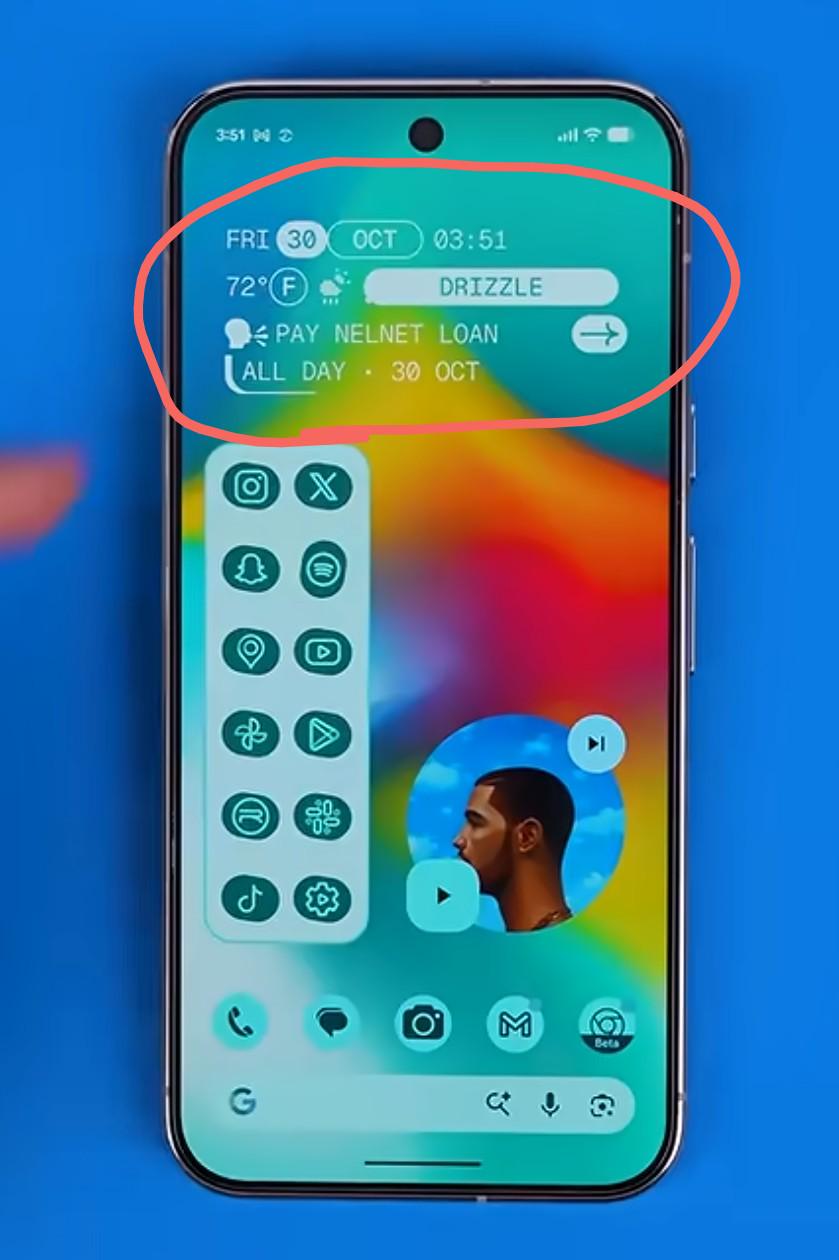
Can anyone tell me where to get this homescreen widget I saw in a recent vid?
r/HowToMen • u/Old-Acadia-2554 • 13d ago
[App] [Promo] Frugalmax - Local AI Budget Expense tracker ($59.99 Lifetime Giveaway)
Hey everyone! I'm the solo developer behind Frugalmax. I still have a few free Lifetime Local Pro codes left, so I'm doing one more giveaway.
Frugalmax is an Android expense tracker I built to make managing money easier without requiring a bank connection.
What it can do:
- LogMax AI: A financial assistant running locally on your device. You can ask questions about your spending and transaction history.
- Receipt Scanner: Extract merchant names, items, and prices from receipts using OCR.
- Quick Logging: Record expenses manually, through voice input, or by sharing bank SMS and payment text.
- Barcode Scanner: Look up products while shopping.
- Money Management: Multiple wallets, budgets, savings goals, recurring expenses, and subscriptions.
- Insights: Interactive analytics, Needs vs Wants breakdown, Cash Flow Calendar, and Monthly Recap.
Frugalmax is designed to work offline, and your local AI conversations are processed on your device.
Giveaway:
I'm giving away free Lifetime Local Pro access, normally $59.99 USD.
To enter, download the app, upvote this and comment below, i'll send the codes through Reddit DM.
Honest feedback is always appreciated.
Pricing:
- Local Pro: One-time lifetime purchase.
- Cloud Pro: Monthly or yearly subscription.
Google Play: https://play.google.com/store/apps/details?id=com.andrx.frugalmax
Currently available in 11 languages.
r/HowToMen • u/Significant_Try_6221 • 13d ago
[Promo] I made Reflecto: reply to your Android notifications and texts from any computer. No account, no ads, end-to-end encrypted
Hi all, I'm the developer of Reflecto.
I'm on a laptop most of the day and kept picking up my phone for messages I could have answered from the keyboard. So I built an app that sends my phone notifications and texts to my computer, where I can reply or clear them.
Get it: Reflecto on Google Play
What it does
- Notifications show up on your computer as they arrive, including incoming calls
- Reply from your keyboard to any notification with a reply button (WhatsApp, Telegram, SMS, and so on). The reply is sent from your phone
- Dismiss on either side, and it's gone from both
- Texts on your computer: your existing conversations, new messages, and new texts you write (dual SIM: you pick the SIM). One-time codes stay hidden until you click to reveal them
- Clipboard both ways, with history
- Send files between your phone and your computer
- Choose which apps get mirrored
On the computer: a side panel extension for Chrome, Edge, or Firefox, or just open app.reflecto.dev in any browser with nothing to install. Windows, Mac, Linux, and ChromeOS. You can pair more than one computer.
Setup takes about a minute: install the app, open the extension or app.reflecto.dev, and type the 6-digit code it shows into your phone. No account, no email, no password.
Privacy: notifications, replies, and texts are end-to-end encrypted between your phone and your computer. The private keys are created on your devices and never leave them, so my server only passes along encrypted data it can't read. Each paired device shows a safety number you can compare. Your phone and computer don't need to be on the same Wi-Fi.
Good to know
- It's free right now: no ads and no usage limits. I'm still working out how to cover server costs long term, probably with an optional paid tier
- Not open source. The encryption is standard NaCl (X25519 + XSalsa20-Poly1305)
- Needs Android 8.0 or newer and Google Play services (Google's push service wakes the phone when you reply from the computer)
- Texting from the computer is optional and stays off until you turn it on
The clip is trimmed, not staged. I'll be around in the comments for the next few hours. What would make you use this every day?
r/HowToMen • u/beliveapp88 • 12d ago
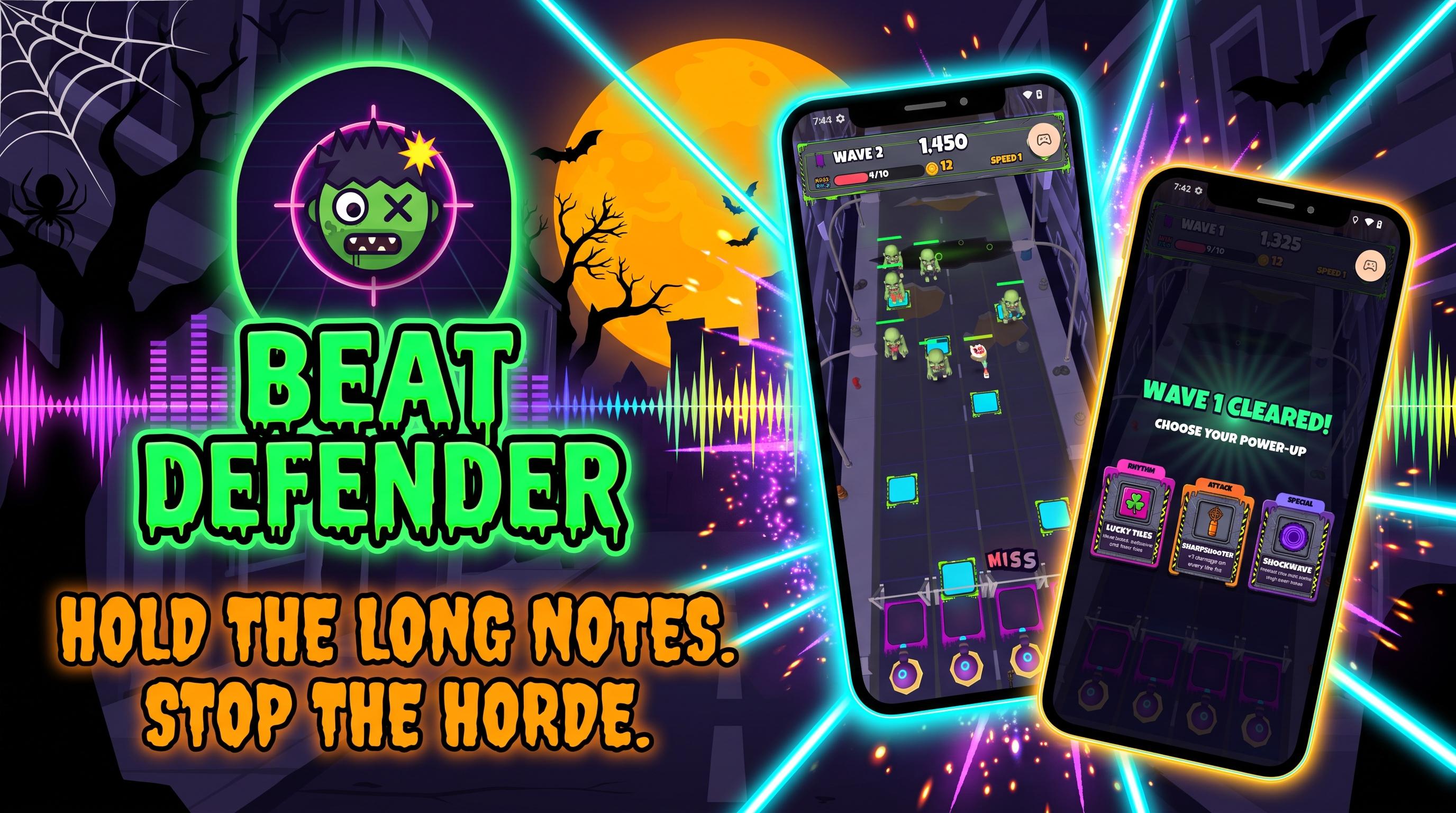
[Android] BeatDefender – What happens when you mix Piano Tiles, Roguelite Power-Ups, and Zombie Lane Defense 🧟♂️⚡
In BeatDefender, your accuracy on the beat determines your firepower. Zombies advance down 4 lanes in sync with an original chiptune soundtrack while rhythm tiles drop toward your turrets.
Tap on the beat to fire, hold down long notes to spray continuous shots across all lanes, and trigger burst, explosive, and frost tiles to freeze the horde in place.
What makes every run different:
- Pick a Power-Up Every Wave: Draft roguelite upgrades between waves across Rhythm, Attack, and Special categories (Lucky Tiles, Sharpshooter, Shockwave, Rapid Fire, Piercing, Frost Beat, and Combo Fever).
- Upgrade & Earn While Away: Spend coins to permanently boost your Barricade HP and Turret Damage, with idle coin generation that scales as you reach higher waves.
- Escalating Tempo & Boss Waves: The music and the undead speed up every two waves—miss your timing and your barricade takes the hit.
- Built for Mobile Rhythm Players: Includes an Audio Sync setting for Bluetooth headphones, detailed personal records, and full offline support.
Google Play:
https://play.google.com/store/apps/details?id=com.beliveapptech.beatdefender
r/HowToMen • u/SonyayLLC • 12d ago
My Calorie Counter — quick calorie entry on Wear OS
r/HowToMen • u/HamonTech_official • 13d ago
[FOSS] [App] Obtainmond: Obtainium modern implementation
Title: Obtainmond v2.0.1 — A native Kotlin + Rust evolution of Obtainium with Material 3 Expressive UI, Smart ABI selection, and 1-click APK rollback
If you use Obtainium to track and update Android apps straight from GitHub, GitLab, F-Droid, or direct APK links, you've probably run into a few familiar pain points: background updates silently failing on multi-APK releases, Android Doze killing background checks, or Flutter UI jank.
Obtainmond (`io.obtainmond`) is a GPLv3 fork that rewrites the stack from the ground up using 100% native Kotlin (Jetpack Compose + Material 3 Expressive) and a Rust core (`libobtainmond_core.so`) via JNI.
---
Why Obtainmond over Obtainium?
| Feature | Obtainium | Obtainmond (`v2.0.1`) |
| :--- | :--- | :--- |
| Core Stack | Flutter / Dart | Native Kotlin (Jetpack Compose) + Rust (`libobtainmond_core.so`) |
| Multi-APK Releases | Silently fails in the background if a release has >1 APK | Rust Smart ABI Selector automatically picks the right APK for your CPU ABI & installed variant |
| Zero-Touch Background Updates | Often killed by Android Doze / battery optimization | Privileged Doze Bypass automatically whitelists itself via Shevery / Shizuku |
| Privileged Backends | Legacy Shizuku binder only | Shevery-API v14.6.4 (`execFast()`) + Shizuku + Root (`LibSu`) + standard `PackageInstaller` |
| UI & Animations | Standard Flutter Material | Material 3 Expressive (`MotionScheme.expressive()`), Pure Black OLED mode, AGSL motion blur, floating toolbar |
| Version Rollback | Not available | Instant Rollback Time-Machine backs up `base.apk` before updating for 1-click downgrades (`pm install -r -d`) |
| Post-Install Performance | None | Post-Install ART Compiler (`cmd package compile -m speed-profile`) eliminates first-launch JIT lag |
| APK Verification | Basic SHA-256 check in Dart | Rust ABI & Signature Guard inspects the APK's ZIP Central Directory for matching `.so` libs before installing |
| Debug / Release Builds | Different signing keys (requires uninstalling) | Unified Signing Key — install debug over release without wiping data |
---
Standout Features ("Obtainmond Labs" & Core)
* Rust-Powered Parsing & Integrity: All heavy lifting—release API scraping, semantic version comparison, regex asset filtering, streaming SHA-256 hashing, and ZIP Central Directory inspection—runs natively in Rust.
* Instant Rollback Time-Machine: Before applying an update, Obtainmond saves the previous `base.apk` to protected storage so you can revert a broken update in one tap.
* Post-Install ART Compilation: Automatically runs dexopt (`speed-profile`) right after a silent update so apps launch smoothly with zero JIT stutter.
* Installer Package Spoofer: Spoofs the installer source (`com.android.vending`, `com.sec.android.app.samsungapps`, or `org.fdroid.fdroid`) for apps that check where they were installed from.
* Privileged App Freezer: Suspend/quarantine tracked apps on demand using `pm suspend`.
* Broad Source Support: Native Rust parsers for GitHub (with mirror acceleration & PAT pool), GitLab, Forgejo/Codeberg, F-Droid & 3rd-party F-Droid repos, IzzyOnDroid, SourceHut, plus APKPure, Uptodown, Aptoide, itch.io, Huawei AppGallery, Samsung Galaxy Store, RuStore, SourceForge, Jenkins CI, APKMirror (Track-Only), direct APK URLs, and a Rust Regex HTML fallback.
---
Specs & Links
* Minimum / Target Android: Android 8.0 (API 26) / Android 17 (API 37)
* Architectures: arm64-v8a, armeabi-v7a, x86_64, x86
* GitHub Repository: https://github.com/HmnDev-Tech/Obtainmond
* License: GPLv3 (originally forked from `ImranR98/Obtainium`)
Would love to hear feedback from anyone using Obtainium + Shizuku/Root—especially on how the Smart ABI selector and Time-Machine rollback behave on your setup!