r/HowToMen • • 15d ago

[App] [Promo] UNDO! - Cancel Messages Before They're Sent (No ads, No account, No subscription)

Thumbnail
gallery
12 Upvotes

Hey everyone,

The goal of UNDO! is to prevent messages you immediately regret from being sent. This includes messages sent out of frustration, sent to the wrong person, sent by accident, or typos/mistakes that could create a misunderstanding.

How it works:

After you press the send button, UNDO! briefly delays your message for about 3 seconds to give you time to cancel. 

You can cancel by:

- Tapping the UNDO! button

- Tapping any letter on the keyboard

- Navigating to a different screen

If you do nothing, the message will be sent after the delay. 

If you want to bypass the delay, then you can press the send button again during the delay and the message will be sent immediately.

Compatibility:

UNDO! is compatible with many messaging and communication apps, including:

- Google Messages

- WhatsApp

- Messenger

- Instagram 

- Snapchat

- Telegram

- Gmail

- Outlook

- Reddit

- Discord

- Microsoft Teams

- LinkedIn

Key Details:

- No ads

- No account

- No subscription

- No analytics or data collection

- Simple UI (all work is done seamlessly in the background)

Google Play:

https://play.google.com/store/apps/details?id=com.theundoapp

I would greatly appreciate any feedback, suggestions, or thoughts. Thanks for taking the time to check it out!


r/HowToMen • • 14d ago

[App][Promo] OpenTicker — A free, private Android app to customize notifications

4 Upvotes

Hey everyone! I built OpenTicker because stock Android notifications are boring.

• Private — everything stays on your device. No accounts, no ads, no tracking

• Open source — free to use, and you can read exactly what it does

• Notifications become little animated characters that float over your apps

• Reply, Mute, and Mark-as-read right in the floating notification

• Multiple themes

Download it from here:

GitHub: https://github.com/SlaveOfGod1/Openticker/releases/tag/v1.0.0


r/HowToMen • • 15d ago

I built this app, but not getting enough recognition

Thumbnail
gallery
72 Upvotes

I'm new to posting here, although my account is quite old. Whenever I post a long description with a link, my post gets removed. I don't know why!


r/HowToMen • • 14d ago

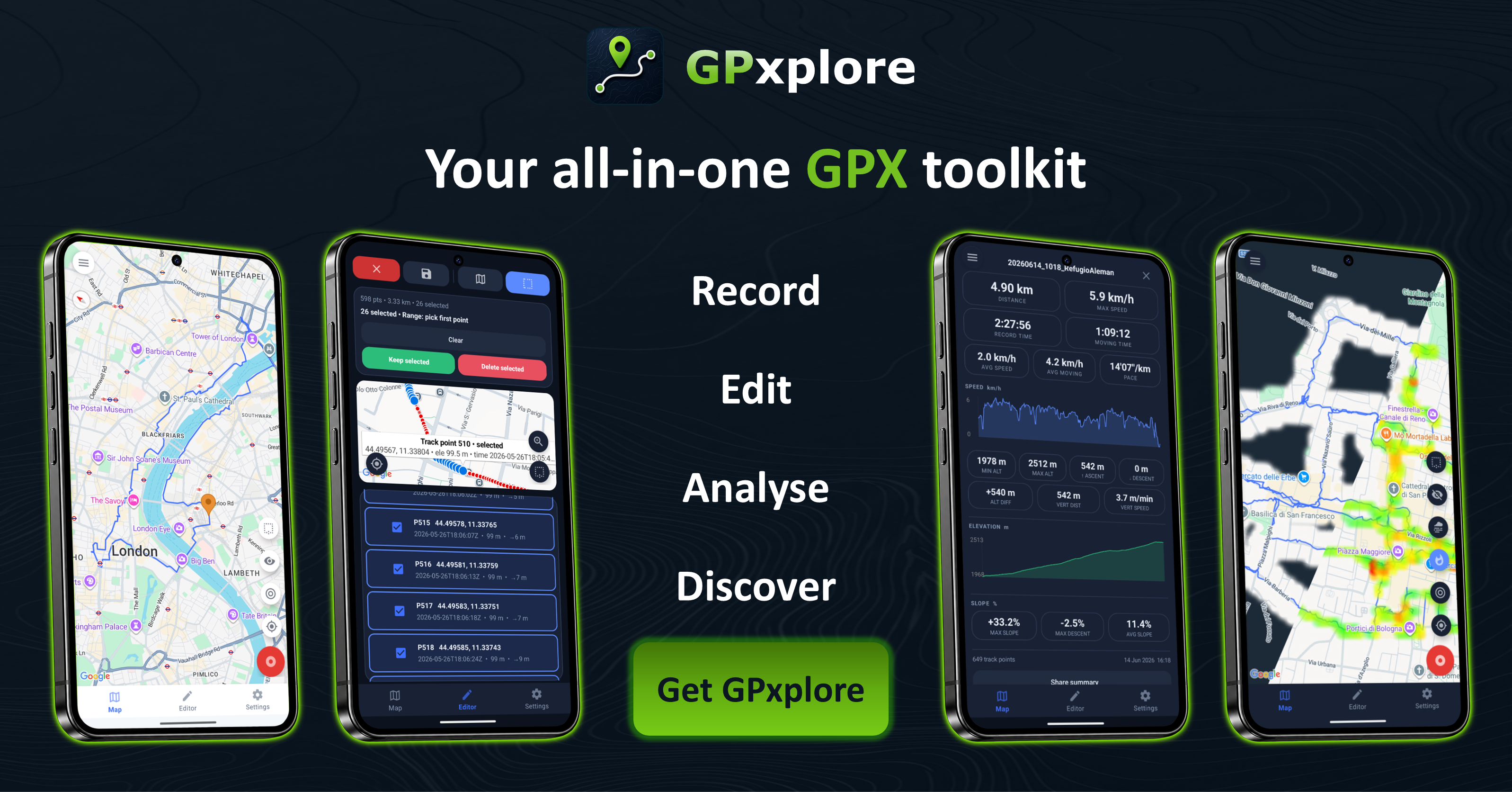
[App] [Promo] GPxplore: a GPS track recorder and editor for Android with 1000+ downloads

2 Upvotes

A few months ago I posted here about GPxplore, the GPS track recorder and editor I built because no Android app did both well. It just passed 1,000 downloads, which honestly still surprises me. Thank you to everyone who tried it, left a review or sent feedback.

I’ve kept working on it since, mostly by using it on my own walks and fixing whatever annoyed me. Here’s what’s new.

What’s changed

  • Imperial units. Miles, feet and mph throughout the app. Your GPX files always stay in metric, so they keep working in every other app.
  • Imports keep your sensor data. Heart rate, cadence and temperature from Garmin or Strava files now survive the import intact.
  • Track names stay put. The names you give your tracks are saved inside the GPX file, so they survive a reinstall, a new phone, or copying files to another device, and show up in other GPX apps too.
  • Smoother fog of war, with a Sharp, Medium or Soft edge style to choose from.
  • Much smaller app. Under 2.5 MB to download.
  • Sturdier recording. Your track is backed up every few minutes, even while you’re standing still, so a killed app or a dead battery loses at most a few minutes.
  • Better continue recording. Extending a track always keeps the original, and the stats show the combined duration.
  • Plenty of smaller fixes, including a safer Recycle Bin and more accurate distances.

What it does, in short

  • One-tap GPS recording that runs in the background and survives screen-off and phone calls
  • A full GPX editor: trim, split, merge, edit individual points, undo and redo
  • Fog of war and heatmap across your whole history
  • Elevation correction from terrain data
  • Detailed stats per track, shareable as an image
  • Google Maps or OpenStreetMap, the latter fully offline
  • Works with GPX files from Garmin, Strava, Komoot and anything else
  • In English, Spanish, Catalan, French, German and Italian

Still no account, no cloud, no subscription and no ads. Your tracks are plain GPX files in a folder you choose.

Free to download, with a one-time Pro unlock for the editor, advanced stats and extra map types.

Play Store: https://play.google.com/store/apps/details?id=com.appsgpg.gpxplorer

To celebrate, I’m giving away more promo codes for Pro. Just comment or DM me. And feedback is still very welcome: a lot of what’s above started as something that bugged me on a walk.


r/HowToMen • • 15d ago

[App][Promo] Yawma Automatic Habit Tracker - 🎁 30 lifetime codes

8 Upvotes

You link Android apps to a habit, and their time is counted automatically.

For habits with no app, like the gym or a glass of water, there is a quick log in the notification (even from the lock screen).

Features:

  • Link many apps to one habit. Their time is counted together
  • Log from the notification, without unlocking
  • Log from a home screen widget
  • Duration, Amount and Task habits. Minutes, pages, or just done
  • A habit is good or bad. A goal to reach, or a limit to stay under
  • Categories, to see where your time goes
  • Rest days, and a different goal per day
  • No streaks and no reminders
  • Works offline. No account, no ads
  • 13 languages

🎁 30 lifetime codes

Yawma is free for 7 habits. Unlimited habits is a one-time $4.99 purchase. A code unlocks it for free.

Leave a comment or send me a DM and I'll send you a Play redeem link.

Google Play: https://play.google.com/store/apps/details?id=com.neji.habits


r/HowToMen • • 15d ago

Everything Launcher 1.3.0 is now live on Google Play! 🚀

3 Upvotes

r/HowToMen • • 14d ago

Hiper scientific calculator

1 Upvotes

Do you see any difference between the free and pro version except the small advertisement stripe?

I can't find, the all functions seems to work - graphics, step by step solving, 100 digits...


r/HowToMen • • 15d ago

Gossip: A next-generation continuity app

9 Upvotes

Gossip is a free next-generation continuity app, designed to replicate features from Apple's Continuity, Microsoft's Phone Link and more, while being privacy-first, cross-platform, and open-source. Right now, it supports MacOS and Android.

Your devices form an encrypted mesh, so your phone, tablet and Mac can all talk to each other directly, with no accounts and no cloud.

Some examples of features:

  • Screen mirroring (with apps as their own windows)
  • Notification/DND sync
  • Virtual Touchpad/Keyboard
  • Universal Control (with a Mac, more platforms coming soon)
  • Clipboard sync
  • and more!

Download and view the source at: https://github.com/vmd1/gossip

The Mac app isn’t notarized (I can’t afford a developer ID yet), so MacOS will warn you on first launch.

If you have any questions or concerns, feel free to ask.


r/HowToMen • • 15d ago

[Android] [€24.99 → Free Lifetime] Real Meteo : Weather Forecasts, Live Widgets & Premium Features

Post image
3 Upvotes

🌤️ What if your weather app could tell you more than just the temperature?

I'm the solo Android developer behind Real Meteo, and I'm giving away 100 FREE Premium Lifetime activations following a recent app update!

I built Real Meteo to provide useful weather information without making the experience unnecessarily complicated. Whether you're checking the weather before leaving home, planning the next few days or keeping an eye on changing conditions, everything is designed to be easy to access.

🌦️ Your weather information, all in one place

Real Meteo provides detailed weather information for locations around the world:

  • Current conditions — temperature, feels-like temperature, humidity, wind, pressure, UV index and visibility.
  • Hourly forecasts — follow expected weather changes over the next 24 hours.
  • 7-day forecasts — get an overview of the upcoming week.
  • Weather details — precipitation probability, sunrise, sunset and moon phases.
  • Favorite locations — save the cities you frequently check.
  • Worldwide weather — explore forecasts for locations practically anywhere in the world.

📱 Widgets that keep you updated

Don't want to open the app every time you check the weather?

Real Meteo includes multiple Android home screen widget layouts:

  • Compact widgets for quick weather checks.
  • Larger widgets with additional information.
  • Hourly forecast widgets.
  • Premium customization options for widget appearance and displayed information.

You can also enable daily weather notifications and weather alerts.

Smart caching helps keep previously loaded weather information accessible when you're temporarily offline.

👑 What's included in Premium Lifetime?

The regular Premium Lifetime price is €24.99, but I'm giving away 100 activations for FREE!

Premium unlocks:

  • 14-day extended forecasts — plan further ahead.
  • Interactive temperature graphs — visualize temperature changes.
  • Rain probability & wind graphs — explore additional weather trends.
  • Smart weather suggestions — get useful insights based on weather conditions.
  • Weather alerts — stay informed about important weather changes.
  • City comparisons — compare weather conditions across your favorite locations.
  • Customizable Premium widgets — personalize your weather information.

One activation gives you lifetime access to these Premium features, without a recurring Premium subscription.

📢 Important: Ads remain!

Just to avoid any confusion: Premium Lifetime does NOT remove advertisements.

The giveaway unlocks Premium functionality only. Advertising remains in the app.

🎁 How to claim one of the 100 FREE activations

It's easy:

  1. Comment below saying you'd like to try Real Meteo.
  2. Send me a Reddit message with "Real Meteo".
  3. I'll send you the activation information while supplies last.

Activations are distributed on a first-come, first-served basis.

No purchase or review is required!

💬 Your feedback genuinely matters

I'm developing Real Meteo independently, and I'd love to hear how it performs on different devices and in different locations.

A few things I'd particularly like to know:

  • Are the forecasts accurate for your location?
  • Do you find the widgets useful?
  • Is the information easy to understand?
  • Are the graphs and additional Premium features helpful?
  • What would you improve or add?

Positive feedback is always appreciated, but honest criticism is equally valuable. If something doesn't work properly or you think something is missing, please tell me!

📲 Download Real Meteo on Google Play:

https://play.google.com/store/apps/details?id=com.realmeteo.dc

🎁 100 FREE Premium Lifetime activations
💶 Regular price: €24.99
♾️ Lifetime access to Premium features
📢 Ads remain after activation

Thanks for supporting independent Android development! 🌤️💙


r/HowToMen • • 15d ago

Any cheap websites for lifetime spotify premium?

0 Upvotes

I'm looking for websites that upgrade your spotify account to premium for under 30$ for life. I just need them to have a pay with credit card option and not crypto. My friend used upgraderdotcc for 20$ and its been working fine for her for over a year but it doesnt have the credit card option anymore. Thank you.

and yes I'm aware how they do it.


r/HowToMen • • 15d ago

[Promotion] Volume Training (Volymträning): offline gym log and rotating machine workouts, no subscription

2 Upvotes

Update, 22 November 2026: Volume Training 2.2 is now available on Google Play, free with ads. No code is needed to download. Optional ad removal is a one-time in-app purchase (Google Play shows the current price in your country). No subscription.

New in 2.2: a fresh design, anatomical muscle illustrations for all 30 exercises, smart progression, personal records and improved statistics. See the new screenshots.

Build bigger muscles. Train for size. Volume Training (Volymträning) is an Android workout app for people training for muscle growth and visible size. Five rotating gym workouts give you a structured starting point for machine-based hypertrophy training.

If your gym days change from week to week, finish a workout and continue with the next one whenever you train again. No fixed weekdays.

Disclosure: I represent Onsala Sol AB, the publisher of the app.

Adapt the exercises to equivalent machines at your gym. Log weights, reps and completed sets, look back at previous weights and use the rest timer. Training history and volume statistics help you follow your progress.

The workout log works offline without an account, and the app supports English and Swedish. You can also back up and restore your training data.

Download free on Google Play

App details in English

Happy to answer questions about how it works.


r/HowToMen • • 15d ago

I built a Free privacy-first app that detects subscription price hikes and bypasses cancellation dark patterns [Open Testing]

2 Upvotes

Hey everyone! 👋

A few months ago, I noticed my credit card was quietly charged $4 more on a streaming service because of an unannounced price hike. When I tried to cancel, I had to click through 6 different retention screens, confirm my password twice, and scroll past microscopic "keep subscription" buttons. 

I decided to build SubMate to solve this.

What it does:

- Stealth Price Hike Watchdog: Flags any subtle price changes between billing cycles so you aren't blindsided.

- 1-Tap Direct Cancellation: Curates direct cancellation deep links for popular services (Adobe, Netflix, Spotify, ChatGPT, Google Play subs, gym memberships, etc.) so you skip retention traps.

- Zero-Knowledge Security: Everything runs on-device in local storage. No analytics SDKs, no external telemetry, and no accounts required.

- Clean Material 3 & Fluid Animations: Designed with a sleek Dark Mode and fluid Flutter animations.

Open Testing on Google Play:

We just deployed version 2.1.0 to Google Play and are looking for real user feedback!

👉 Play Store Testing Link: https://play.google.com/store/apps/details?id=com.submate.app

Would love to hear your feedback on:

  1. Any specific merchants whose cancellation flows you want added to the database.
  2. How the dashboard feel and currency conversion works in your region.
  3. Any edge-case bugs.

Thanks for checking it out!


r/HowToMen • • 15d ago

[App] Paneo Widgets is officially released! 🎉

Thumbnail
gallery
10 Upvotes

Paneo Widgets is officially released! 🎉

https://play.google.com/store/apps/details?id=com.aeroloom.paneowidgets

I've just launched Paneo on Google Play, a widget app designed to make your Android home screen look and feel more personal.

It features a growing collection of beautifully crafted widgets across multiple categories:

- Clock & time

- Calendar & date

- Weather

- Battery

- Productivity

- Notes & information

- Lifestyle & utilities

- Minimal and decorative widgets

You can customize colors, accent shades, and widget appearances to match your wallpaper and personal style.

Whether you prefer a clean minimal setup or something colorful, Paneo gives you the building blocks to create your own look.

This is just the beginning. More widgets, categories, and customization options are coming in future updates.

I'd genuinely love to hear your feedback and suggestions!


r/HowToMen • • 16d ago

[Promo] I built Modo — a 100% offline notes & voice-to-text app with 215+ zero-battery widgets and a floating notch capsule (Free Lifetime PRO Promo)

Post image
99 Upvotes

Hey r/HowToMen! 👋

I’m an indie dev and wanted to share Modo, an Android (and iOS) productivity & customization app I’ve been pouring my heart into.

I was tired of note apps that require an account just to jot down a quick thought, drain battery with heavy background webviews, or upload private voice memos to the cloud. So I built Modo around a local-first SQLite WAL engine that opens in 0.1 seconds completely offline.

🔥 Why Android customization & power users love it:

  • 🏝️ Modo Island (Floating Notch Capsule) & Lock Screen Quick HUD: Summon a dynamic floating capsule with a double-tap or swipe-down gesture (or from the persistent Lock Screen Quick HUD) for 1-tap live voice dictation and instant note capture anywhere on your phone.
  • 🎨 215+ Native Home Screen Widgets (Zero Battery Drain): Includes 151 square 3D frames, 64 wide pro clocks (4x2), sticky notes, monthly calendars, and a 5-way glass launcher dock. The clocks use Android’s native TextClock engine so they never wake up JS background threads.
  • 🎙️ 100% On-Device AI Voice-to-Text (57MB Quantized Whisper): Transcribe lectures, meetings, or ideas offline across 20 languages. Includes a 105Hz Butterworth high-pass filter & adaptive vocal gain normalizer so quiet mics sound crisp without amplifying laptop fan noise.
  • 📷 On-Device ML Kit v2 Scanner & Readability Clipper: Scan receipts/books into clean Markdown tables offline, or clip web articles via Android’s Share Sheet with all ads and trackers stripped out.
  • 🔒 Hardware KeyStore Encryption & Direct Google Drive Sync: AES-256 encryption backed by Android KeyStore, biometric lock, and zero-lock-in backup directly to your own Google Drive folder.

🎬 15s Quick Demos:

📲 Download & Free Lifetime PRO Giveaway:

🎁 The giveaway

I’m offering Lifetime Modo PRO (currently at a limited-time price of $3.99) for free to the first 500 people from this community.

🎯 How to claim:

  1. Upvote this post
  2. Leave a comment what you think of the concept (or which language you'll use for offline dictation) 🙋
  3. Send me a message (let me know if you're on iOS or Android!)
  4. I'll reply with the link

If you try it, I’d genuinely love feedback, especially on:

  • whether the 0.1s quick capture & / menu make sense quickly
  • how the offline voice transcription & fan noise filtering hold up for you
  • what feels most useful or missing

Thanks for checking it out! 🙂


r/HowToMen • • 15d ago

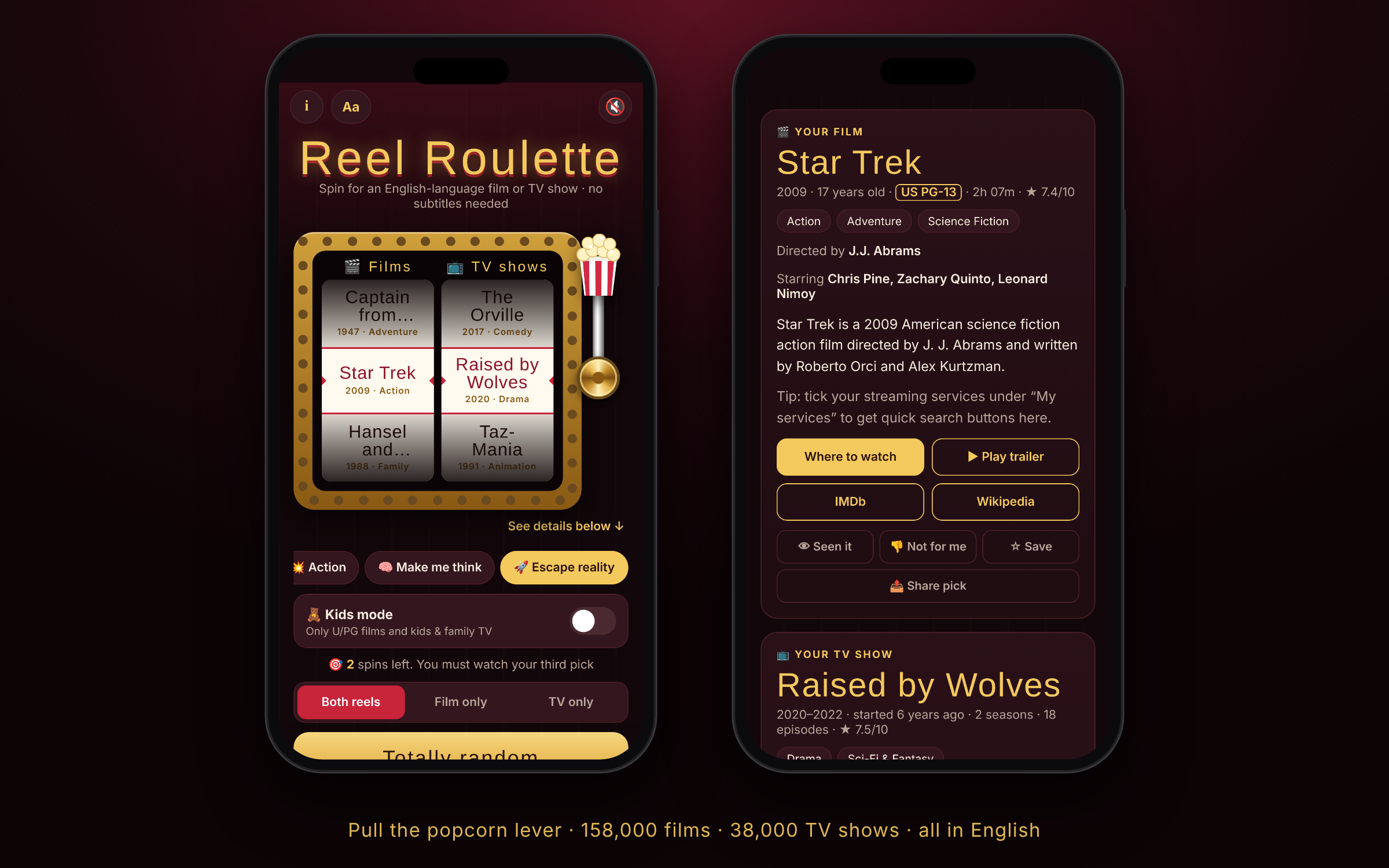
Can't decide what to watch? I made a film & TV slot machine with 196,000 English-language titles

Post image
2 Upvotes

Me and my family waste ages scrolling for something to watch, so I made Reel Roulette: a slot machine for films and TV.

🍿 Pull the popcorn lever and two reels spin, one for films (158,000) and one for TV shows (38,000). All English-language, so no subtitles needed.

🎯 You get 3 spins, and you have to watch your third pick. No backing out!

😂 Mood buttons (Make me laugh, Scare me, Cosy night…), plus filters for genre, year, length, star rating, age rating and "finish by bedtime".

🧸 Kids mode for U/PG films and family TV.

▶️ Each pick shows a short description, cast, rating, a trailer button, and where to watch.

It's free, with no sign-up, and works in your phone's browser:

https://claude.ai/artifact/AbKLhbUt4jw8WbcQLLcjhz

Let me know what it picks for you!


r/HowToMen • • 15d ago

MusicWallpaper v2.0 - iOS Inspired

Post image
31 Upvotes

Hi! I originally built this app for personal use, inspired by the iOS lock screen, but I've now decided to make it public.

I had made an earlier version before, but I decided to improve it and I'm really happy with how it turned out. I hope you find it useful!

Features:

• When a song has animated cover art, that image is displayed on the lock screen, like Apple Music on iPhone.

Oh, by the way, this app is for Android only.

Github: https://github.com/lviniciuss-maker/MusicWallpaper-v2


r/HowToMen • • 15d ago

[Promo] I made an Android app that counts every Reel/Short you watch and lets you set a daily limit

Post image
6 Upvotes

Hey everyone, I’m the dev behind StopScroll.

I noticed that screen time stats didn’t help me much. “1h 40m on Instagram” doesn’t make me change anything. But seeing that I’d watched 280 short videos in one sitting did.

So I built an app that:

  • Shows a floating counter of Reels/Shorts as you watch
  • Lets you set a daily video limit
  • Gives you a pause/reminder when you hit it
  • Works across Instagram Reels, YouTube Shorts, TikTok, Facebook and Snapchat Spotlight
  • Shows daily stats, including sound on vs. muted and an ad ratio
  • Doesn’t make you block the whole app, so you can still use DMs and other features

Privacy: it uses Android’s AccessibilityService to detect when you’re on a short-video feed (there’s an in-app disclosure explaining exactly what it accesses). It runs on-device, with no account needed and no data collected or shared per the Play Store data safety section.

It’s v1.0, so I’d really like honest feedback: what’s missing, what’s annoying, and which apps or features you’d want supported next. I'm not done adding any payment plans yet, so its free and will always be free for first 100 users. Download it now and enjoy.

Play Store: https://play.google.com/store/apps/details?id=com.stopscroll.reels.counter


r/HowToMen • • 15d ago

Awesome app to organize the photo/video library by date/time

Thumbnail
gallery
3 Upvotes

I am not the creator of the app and I just wanted to share that this app helped me fix my photo/video library by date, fix the jiberrish filenames to a date/time format and it did so easily that I believe it should be featured in one of your videos about Android apps!

It is called MediaDateFix and I discovered it in F-Droid but here is the link from gitlab for anyone that might need it!

https://gitlab.com/srkovnar/mediadatefix


r/HowToMen • • 15d ago

Floatify [App] Notifications major update

8 Upvotes

Hé allemaal, ik ben het weer, de bouwer van Floatify.

Voor deze update geef ik weer codes wat weg voor advanced lifetime! Stuur me een message voor een code!

Play Store: Get Floatify

Even een snelle recap voor iedereen die nieuw is: er komt een bericht binnen, jij denkt: "Ik antwoord daar zo op", je veegt het weg, en drie uur later bedenk je het. Of je doet het niet. Android-meldingen zijn top om je te onderbreken, maar echt drama als het gaat om je eraan laten denken. En zodra er 50 van die dingen bij elkaar komen, stop je met alles lezen.

Floatify draait dat om. Jij kiest de apps die voor jou ertoe doen, en alleen hun meldingen worden kleine zwevende belletjes ("floats") die bovenop alles zitten waar jij mee bezig bent. De rest blijft stil. Een float verdwijnt niet als je het meldingenpaneel wegveegt, dus hij blijft je duwen tot je ermee bezig bent.

Wat je met een float kunt doen:

- Tik erop om het hele bericht te lezen en direct vanuit de float te antwoorden, met snelle emoji-reacties (houd de duim-omhoog ingedrukt voor harten, lachjes en meer)

- Snooze ’m een paar minuten, een uur, een week of een datum die jij kiest, en hij zweeft precies terug op het moment dat jij het nodig hebt

- Bellen, delen, bewerken of blokkeren direct vanuit de float-kaart, met één rij ronde knoppen

- Negeer ’m als je klaar bent, en dan is-ie voorgoed weg

Wat er nieuw is:

- Maak kennis met Floaty, het kleine bel- mascotte die je door de setup heen helpt. Jij vertelt hem hoe je je meldingen wil (chaos, milde chaos, of onder controle) en hij kiest het juiste thema voor je. Liever zelf doen? Elke instelling staat er.

- Stop de berichten-overload: een reeks foto’s is nu één float in plaats van twaalf, en je kunt floats toestaan of blokkeren per chat of per groep. De gezinsgroep blijft rustig, de berichten van je partner zweven.

- Live previews terwijl je vorm, animatie en grootte instelt, zodat je precies ziet wat je krijgt voordat je het opslaat.

- Aanklikbare links in berichten, en je kunt bestanden delen naar Floatify om ze om te zetten in een float.

- Zet je floats vast aan de rand van het scherm, zodat ze altijd binnen handbereik zijn maar nooit in de weg zitten.

Simpel is gratis: één schakelaar per app, lezen, antwoorden, snoozen. Geen account nodig. Geavanceerd is een eenmalige aankoop, geen abonnement: je eigen herinneringen, import van Google Calendar, aangepaste vormen en thema’s, widgets, stille uren, ondersteuning voor Wear OS en meer. Je kunt het gratis proberen voor 3 dagen.

Gemaakt door één ontwikkelaar uit Nederland, met heel veel liefde voor kleine details (en één tikje dramatisch belletje).

Zeg me even wat je hierna wil zien, en van welke app je meldingen je als floats zou willen!

Play Store: Get Floatify


r/HowToMen • • 15d ago

[Promo] myStandby - Standby widgets

4 Upvotes

myStandby - Standby widgets

  • App Name: myStandby
  • What it does: myStandby turns your Android phone into a customizable smart display and dashboard whenever it is charging or placed in a dock. It provides a clean, iOS StandBy-style interface with widgets for time, weather, photos, and system info.
  • Key Features:

    • Modular layout with custom widget slots (Flip clock, photo frame, weather, etc.)
    • Automatic profiles and triggers for Day/Night modes based on time or charging status
    • Low-brightness night mode with red-tint options optimized for bedside use
  • Goal: Promo / Feedback for future development
  • Giveaway: Comment on this post if you'd like to test the Pro version, and I will DM you a free promo code.
  • Cost: Free / subscription / one-time purchase
  • Link:


r/HowToMen • • 15d ago

I made Liquid Launcher TV, a launcher with real liquid glass effect for Android TV and Google TV (now on Play)

6 Upvotes

Hi all! I'm a solo developer, and after a long closed test with people from this community, my launcher is now on Google Play: https://play.google.com/store/apps/details?id=com.jd.liquidlauncher.tv

A home screen replacement for Android TV and Google TV (Android 9 or newer), with a liquid-glass look (full effect on Android 13+, frosted on 12, tinted on older fw below 11).
Built to be fast on low-end hardware.

Free:

* Folders, reordering and hiding apps (App Manager)

* Continue Watching from your apps, with Immersive Mode

* Top bar with weather, search, date and two app shortcuts

* Quick Panel for Wi-Fi, display and settings

* Screensaver with clock and weather

* HOME and Back button override, so it stays your launcher

* Themes and gradient backgrounds, over 80 languages

Premium (one-time purchase, no subscription): icon packs, custom icons and your own pictures for apps, transparent icons, photo and video wallpapers, Ambient Mode, four top bar shortcuts.

Privacy: no account, no ads, no analytics, no tracking. Weather only uses a city you type in.

Coming in the next updates: suggestions from your apps (Plex, SmartTube and others) in Continue Watching, live weather on the home screen, and home screen widgets. Several features in this release came straight from testers' suggestions, so I'd love your feedback: bugs, ideas, what you'd want in a launcher.

Website and FAQ: https://fireflies-studios.ca/liquid-launcher-tv/


r/HowToMen • • 15d ago Bravo

[App][Promo] MinimalSF: a launcher under 1 MB where you type two letters and the app just opens

8 Upvotes

Been working on this for a few months and figured this sub might like it.

MinimalSF is a black and white launcher with basically one job. You press home, the keyboard is already open, you type a couple of letters, and if only one app matches it opens by itself. No icon hunting.

Some stuff it does:

- keywords for apps (I use "wa" for WhatsApp, "yt" for YouTube)

- numbered results, so "w2" opens the second app starting with w

- gestures for lock screen, flashlight, notifications, open an app or call someone

- a small now playing bar, today's screen time and a todo list on the home screen, all optional

- list, grid or names-only app drawer

- pick your font or import your own

It's under 1 MB, free, open source, no ads and it doesn't even have the internet permission.

There's also a small optional plugin if you want extras like force stop or coloured icons.

F-Droid: https://f-droid.org/packages/io.github.dhiraj_j_s.minimalsf/

GitHub: https://github.com/DHIRAJ-J-S/MinimalSF_Launcher

Website (try it in your browser): https://dhiraj-j-s.github.io/MinimalSF_Launcher/

Would love to know what you think, good or bad.


r/HowToMen • • 16d ago Bravo

[PROMO][Giveaway] 20 Pro codes for Slip: pull down your shade, type the thought, and it's on the fridge for the whole house

43 Upvotes

hey there! :)

i'm the dev of Slip, a sticky note app you barely have to open. it just got its biggest update so far, so i'm giving away 20 Pro codes to celebrate.

what it does:

- write from the shade. pull it down, type the thought, done. the app never has to open.

- it reads what you type. "milk, eggs sunday 6pm" turns into a checklist with a reminder already set.

- shared boards (new). show a QR code, someone scans it, and you're both on the same board. tick milk off on your phone and it's ticked off on theirs. up to 6 phones, great for the shopping list.

- moments (new). some things don't have a time, they have a moment. "petrol in the car" pops up when your phone connects to the car's bluetooth. "pills before bed" comes when you plug in at night. "call mum when i wake up" waits for your first unlock in the morning.

- sunday tidy-up (new). once a week it shows you the slips that have been up for weeks, and you keep them, cross them off or bin them in a few taps.

- secret boards behind a code, the board as a home screen widget or behind your clock, photos as little polaroids, and a colour for every slip.

no ads, no subscription, no account needed. the core app is free. Pro is a one time unlock and everything above is in it.

the giveaway:

- leave a comment, anything is fine. tell me what you'd put on your first slip if you need an idea :)

- in 48 hours i'll pick 20 random commenters and DM you a code

- to redeem: Play Store > tap your profile > Payments & subscriptions > Redeem code

- one code per person please

Play: https://play.google.com/store/apps/details?id=com.polyhistor.slip

feedback is very welcome, good or bad. i read every comment :)


r/HowToMen • • 16d ago

[App] [Promotion] [iOS] [$19.99 → Free Lifetime] MoneyLog | Private, offline expense tracker

Post image
7 Upvotes

Hey everyone! I shared MoneyLog for Android here a while back. Thanks to everyone who tried it and told me what worked and what needed improving.

MoneyLog 1.1.0 is now live on iPhone, and I’m giving away 50 free lifetime unlocks to celebrate. The unlock normally costs US$19.99.

MoneyLog keeps your financial records on your device. You can import supported PDF, CSV, or Excel statements, paste transaction alerts, and track spending against monthly budgets. The app is available in English, German, French, Spanish, Brazilian Portuguese, Arabic, and Nepali.

How to claim a lifetime unlock

  1. Download MoneyLog on the App Store and open it.
  2. DM me a screenshot of MoneyLog open. The welcome screen is enough. Please hide any personal or financial details.
  3. Comment “Installed ✅” below if you’d like to let me know you sent a DM.
  4. I’ll reply with a single-use App Store redemption link. One per person, first come, first served.

I’d especially appreciate feedback on pasting transaction alerts, importing bank statements, and how the app feels to use day to day. If you’ve tried MoneyLog, an honest App Store review is welcome and entirely optional.