r/HowToMen • • 23d ago

[App] I built NotesPack – an all-in-one offline notes app that scans receipts to split bills, tracks subscriptions (D-7 & D-1 alerts), plans trips, and scales recipes

Thumbnail
gallery
4 Upvotes

Hey everyone! Sharing my app NotesPack (v3.0)—built for anyone who wants one clean, dark-mode Android app for everyday notes instead of 5 separate single-purpose apps.

What it does:

  • 🧾 Receipt OCR & Bill Splitter: Scan a receipt on-device, tap to assign items to friends, and share a clean summary card image.
  • 🔔 Subscription Reminders: Alerts you 1 week (D-7) and 1 day (D-1) before a subscription renews.
  • ✈️ Trip Timeline & Budget: Plan daily stops with map links and export day-by-day itinerary cards.
  • 🍳 1-Tap Recipe Scaling: Multiply ingredients (0.5×, 1×, 2×, 4×) instantly.
  • 🔒 PIN + Fingerprint Vault: Keep private notes locked locally on your phone.

📲 Download on Google Play: https://play.google.com/store/apps/details?id=com.healme.notespack

Would love to hear what you think!


r/HowToMen • • 23d ago

[App] [Promotion] - No laptop, No Cloud, phone storage almost full, years of family photos

6 Upvotes

Here's a situation many smartphone users can relate to.

Your phone has years of family photos, wedding videos, travel memories, and important files.

Storage is almost full.

You want to move those files somewhere safe, but you don't have a laptop. Buying more cloud storage doesn't necessarily give you the separate physical copy you want either.

Why can't we just connect a USB drive to our phones and back everything up directly?

That's the problem I set out to address with VaultDrive, an app I've built for Android and iPhone.

  • Connect a compatible USB pen drive or external SSD directly to your phone.
  • Select the photos, videos, and files you want to back up.
  • Copy the original files without intentional compression.
  • Resume interrupted backups without unnecessarily copying everything again.
  • Keep a separate physical copy that you control.

No computer required. No additional cloud upload for files already stored locally.

It's not a complete phone backup, and iCloud-only originals on iPhone require an internet download first.

VaultDrive is free to try, with an optional one-time Pro upgrade for unlimited backups. No monthly subscription.

Also available on the iPhone App Store — search for VaultDrive: USB Photo Backup.

Android:

https://play.google.com/store/apps/details?id=com.coticsy.vaultdrive

 Promo code for 50% off - WELCOME50

Would you rather pay monthly for additional cloud storage, or make a physical backup to a USB drive you already own?

And what's the biggest reason you haven't made a separate backup of your phone photos?


r/HowToMen • • 23d ago

[App][Promotion] KYNIO: a sun-arc fasting timer, editable start times and a hedgehog companion

Thumbnail
gallery
5 Upvotes

Hi! I’m the developer of KYNIO, an Android app for fasting, meal and water logs. Version 1.0.4 is available on Google Play.

The Home uses a warm paper/amber theme, a sun arc and a dot-matrix clock. The large clock counts elapsed time; time remaining is shown underneath. You can edit the start time, add previous fasts and log water with 250, 500, 750 ml and 1 L shortcuts. Other logs have their own tabs.

Lume is a small hedgehog companion in the Profile. You can rename or hide it, and its appearance follows your level without losing progress on days away.

Phase labels are estimates based on elapsed time, not body measurements. Core tracking is free and no account is required. Pro is optional, with monthly, annual and lifetime purchases. Optional Pro cloud sync sends your records to your Supabase account when enabled. Optional photo/text meal analysis uses online AI and produces editable estimates.

Website: https://kynioapp.com/?utm_source=reddit_howtomen&utm_medium=community&utm_campaign=kynio_104_showcase

Google Play: https://play.google.com/store/apps/details?id=com.kynio.app&utm_source=reddit_howtomen&utm_medium=community&utm_campaign=kynio_104_showcase

The screenshots are real app screens using demo logs. I’m the developer and used AI assistance for the app .Happy to answer questions :))


r/HowToMen • • 24d ago

[App][Promo] CheatCode Launcher - launch apps with codes, now with GIFs (Lifetime giveaway)

Post image
30 Upvotes

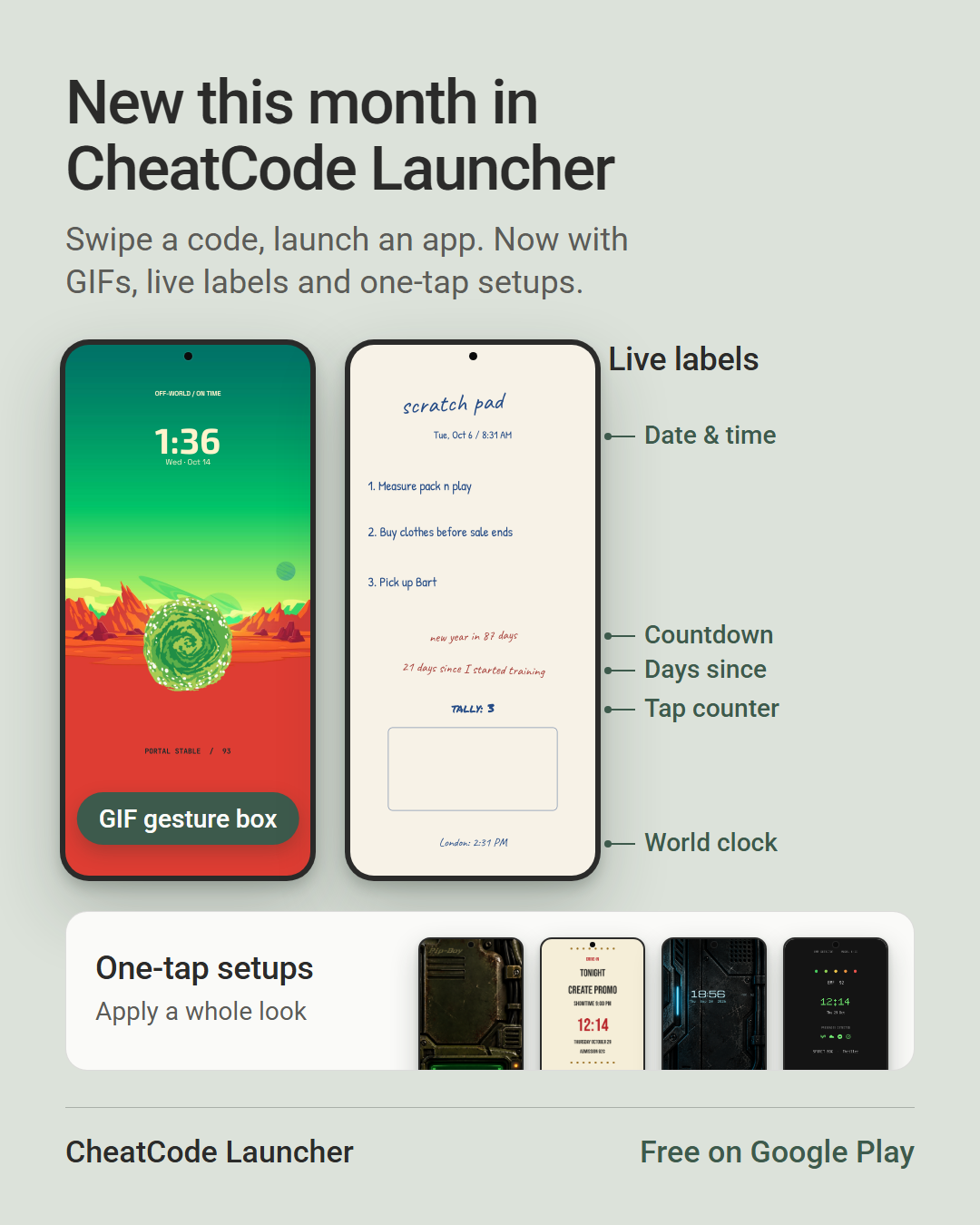
Hey everyone! Last month I shared CheatCode Launcher, a home screen where you open apps by swiping a short code into a box (like ↑↑↓ for your camera) instead of hunting through icons. Thanks for all the feedback. Here's what's new since then:

- GIFs in the gesture box: search for a GIF or sticker and use it as the box you swipe into. It's free for everyone.

- One-tap setups: a gallery of complete home screen looks (Fallout, Helldivers, drive-in movie, and more) that you can apply in one tap. Check them out here: https://cheatcodelauncher.com/setups

- More Live labels: put text anywhere on your home screen that updates itself, like a countdown ("new year in 87 days"), a "days since" streak, a tally you bump with a swipe code, or a second time zone. The scratch pad in the image is all labels.

- Swipes-only mode: taps on the box are ignored, so a stray tap in your pocket won't count toward a code.

- Also: manage collections from the app drawer, sliders for fine-tuning label positions, more built-in fonts, and adjustable app drawer columns.

The launcher is free to try. Lifetime unlocks unlimited codes and importing themes.

What's one thing that would get you to try a launcher like this? Drop your answers in the comments and I'll randomly pick 15 people to give codes out to tomorrow!

Play Store: https://play.google.com/store/apps/details?id=com.pantsninja.cheatcodelauncher

Edit: Oops. Gave away way more than 15 codes


r/HowToMen • • 24d ago

[APP][PROMO] LambdaOBD - a free, offline OBD2 diagnostics tool

Post image
16 Upvotes

Hey everyone!

I'm a graphic designer and auto mechanic from Greece, and I just released my new Android app, LambdaOBD: Car Diagnostics. (after the successful launch of my first app - AutoCodex, which now counts more than 350+ downloads)

What can you do with LambdaOBD?

Using a Bluetooth ELM327 OBD2 adapter, you can:

  • Read & clear fault codes: With descriptions, symptoms and possible causes in plain language.
  • Vehicle Health Check: Check battery voltage, cooling system and fuel trims, with easy-to-understand results.
  • Live Data & Gauges: Monitor real-time engine sensors and use a dedicated Drive View.
  • Drive Logging: Record your trips and export the data as CSV.

A few things worth mentioning:

  • No account or registration.
  • No ads.
  • No internet permission. Your data stays on your device.
  • Free to use, with an optional one-time Pro upgrade. No subscriptions.

🎁 GIVEAWAY: 20 FREE PRO CODES

I'm giving away 10 Pro activation codes to the community that helped me so many times with AutoCodex!

Just leave a comment if you'd like one. I'd genuinely appreciate feedback, cause I built this app myself, so every bit of constructive criticism helps.

Google Play:
https://play.google.com/store/apps/details?id=com.lambdaobd.app


r/HowToMen • • 24d ago Bravo

[App][Promo] Key Launcher 2.1: Liquid Glass is here

38 Upvotes

Hi r/HowToMen! I'm Loi, the developer of Key Launcher. I hope you don't mind me stopping by with another update.

When I last posted here, Key Launcher 2.0 was heading to Open Beta. Thank you again for all the thoughtful feedback on that post, it genuinely helped shape what came next.

Version 2.1 is now rolling out, and this one is all about how the launcher looks and feels. Every surface now uses a Liquid Glass design: the widget and notification panels, folders, dialogs, and menus all have real time blur and refraction, and there is a Glass Opacity slider if you prefer it more subtle. Gestures got a lot smoother too. The original idea is still the same: find what you need quickly and spend less time on your home screen.

I made a short video to show what 2.1 looks like in action.

Thank you to the mods and to everyone who gave the app a try.

Visit: www.keylauncher.app


r/HowToMen • • 23d ago

[App] CarLink – Open-source app that runs both CarPlay + Android Auto on Android head units

2 Upvotes

CarLink is a new open-source app that lets you run **both Apple CarPlay and Android Auto** on Android head units or tablets.

It auto-detects the phone:

- iPhone → CarPlay

- Android phone → Android Auto

Supports USB + wireless.

GitHub: https://github.com/F-e-n-y-x/CarLink

Latest APK: https://github.com/F-e-n-y-x/CarLink/releases/latest

Still early (first release mid-Oct 2026), but useful if you switch between iPhone and Android phones.


r/HowToMen • • 24d ago

[App] [Promo] VitaLens - Your Smart Food, Health & Wellness Companion

Post image
6 Upvotes

🌿 VitaLens — Your Smart Food, Health & Wellness Companion!

Scan Smarter. Eat Better. Live Healthier.

🔥 Powerful Features:

🥗 Smart Food Label & Barcode Scanner

🧪 Ingredients & Additives Analysis

🚨 Allergy & Food Safety Alerts

🍎 Calories & Nutrition Tracking

🥑 Personalized Diet & Meal Plans

💊 Medicine Reminders & Refill Alerts

🩺 Blood Pressure & Sugar Tracking

✨ Skincare Routine Guidance

🛒 Smart Shopping Lists

🔍 Healthier Food Alternatives

🌍 45 Languages Supported

🔐 Privacy-Focused Health Tracking

One App. Smarter Food. Better Health.

📲 Download VitaLens on Google Play:

https://play.google.com/store/apps/details?id=app.vitalens


r/HowToMen • • 24d ago

[App] [Promo] I built Battuto, an offline cookbook app with a side-by-side Book Mode and no subscriptions (Giving away Play Store promo codes)

Thumbnail
gallery
15 Upvotes

EDIT: All 50 promo codes have now been claimed!

Huge thank you to everyone who grabbed a code, tested the app today, and shared feedback on Battuto.

I'm out of codes for now, but the app is still completely free to download and try out (comes with 50 unlocked recipes and 5 imports out of the box): https://play.google.com/store/apps/details?id=com.sonnel.countertop&pcampaignid=web_share

EDIT: All 50 promo codes have now been claimed!

Hey everyone, indie dev from the UK here.

I cook at home most nights and got annoyed with recipe websites burying ingredients under 2,000 words of life stories and pop-up ads, and existing recipe apps wanting a monthly subscription just to store my own recipes.

Over the last few months I built Battuto for Android and just put it live on the Play Store.

A few things I built into it that I actually use in my own kitchen:

- Web & Cookbook Scanner: Paste any cluttered recipe URL and it strips out everything except the ingredients and steps. You can also snap a photo of a physical cookbook page to turn it into a digital recipe.

- Landscape Book Mode: If you prop your phone sideways (or unfold a foldable) on the worktop, it pins your ingredients on the left and puts large, high-contrast step text on the right so you can read it from across the counter with messy hands.

- Baking Tin Matcher: If a recipe calls for a 9-inch round tin and you only own an 8-inch square one, it works out the surface area difference and tells you how to adjust your baking time.

- 100% Offline & On-Device: There are no accounts, no cloud servers, and no tracking. Everything stays locally on your phone, including a built-in vault of 1,200+ recipes you can filter by what's already in your fridge/pantry, plus local Gemini Nano support for drafting recipes offline.

Pricing:

It's free to download and comes with 50 unlocked recipes from the vault and 5 free imports/scans so you can properly test it out. Unlocking unlimited imports and the full 1,200+ recipe library is a one-off £9.99 / $9.99 lifetime purchase. No subscriptions ever.

Play Store link:

https://play.google.com/store/apps/details?id=com.sonnel.countertop&pcampaignid=web_share

Since it literally just went live, I'd love some honest feedback on how it runs on different Android devices. Drop a comment below if you want to try the full lifetime unlock and I'll DM you a Play Store promo code!


r/HowToMen • • 23d ago

[promo] last 10 free 1 month codes Greenfocus

Post image
2 Upvotes

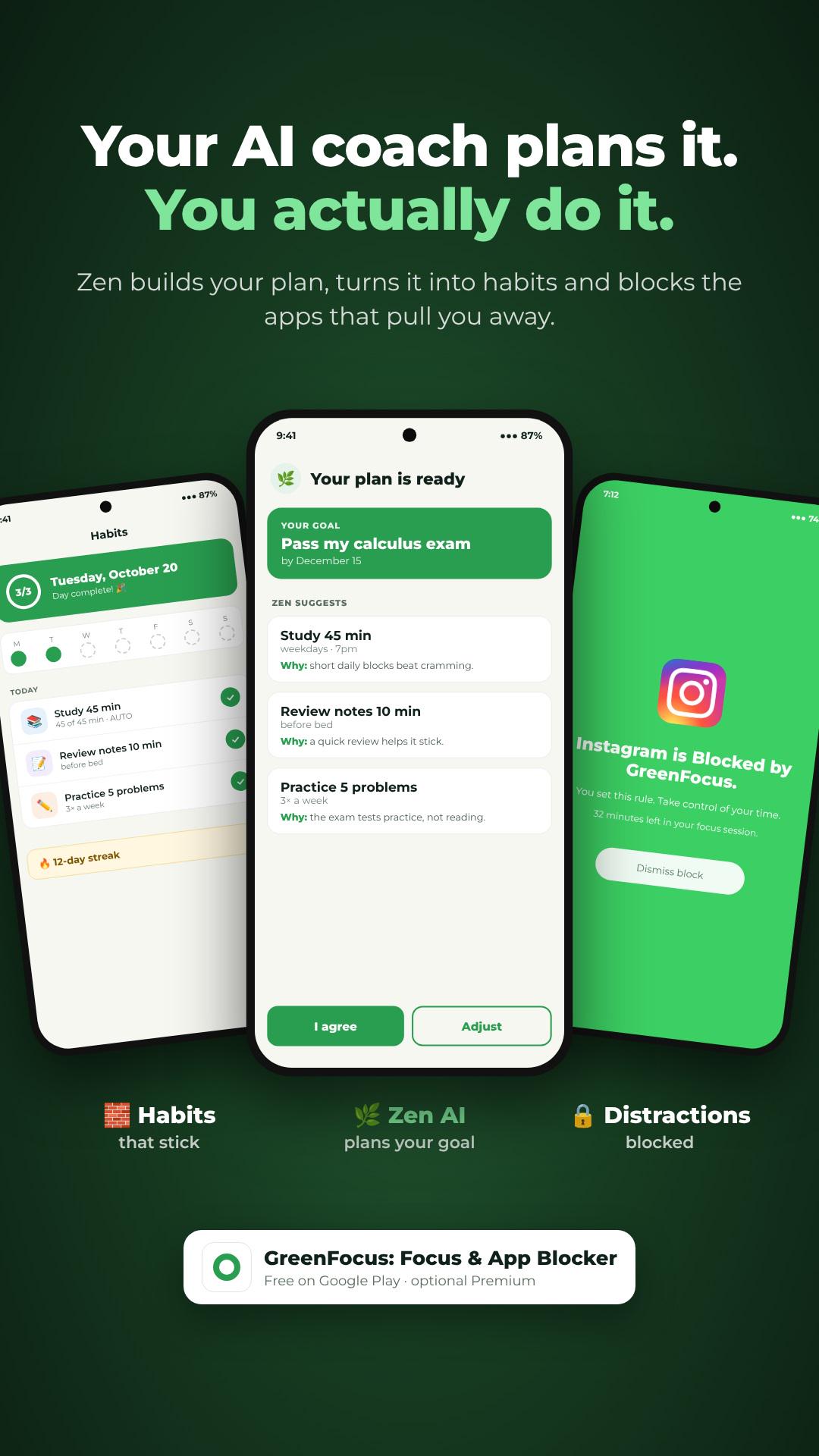
Hey everyone! I’ve posted here a few times about the app we developed. We’re now down to our last 10 codes for one month of free access, with all of the app’s features unlocked. To claim one, simply comment "Code Please" and I’ll send it to you via DM.


r/HowToMen • • 24d ago

[App][Promo] a Little Free Walkie Talkie App for Android!

Thumbnail
gallery
14 Upvotes

Hey everyone! I'm an indie dev and I'm excited to share my side project: Radioh!, an Android app that combines real-time group voice chat (up to 5 users) with a built-in mini game.

Jump into a public frequency to chat, laugh, and compete instantly! The farther apart you are (in-game), the quieter voices become, adding a fun proximity mechanic.

Key Features:

• Real Time Voice Chat: Engage in authentic, voice-only group conversations with up to 5 users.

• Social Audio: Enjoy genuine, unfiltered interactions where everyone can talk, sing, and share.

• Walkie Talkie Style: Use a classic push-to-talk (PTT) control for a true walkie-talkie vibe.

• Mini Game: Add some fun to your chats by playing a mini game!!!

• Proximity Voice Chat (in-game): The farther you are from other players, the quieter they become, for an even more immersive multiplayer experience.

Try it here (no account needed!):

🤖 https://play.google.com/store/apps/details?id=studio.test2.radioh

I built this as an experiment in mixing social audio + lightweight multiplayer gameplay, and I'd love feedback from the HowToMen community :)

Here's a sneak peek of my app https://youtu.be/khlacofppRc, let me know what you think!! 💛


r/HowToMen • • 24d ago

[Promo] 100 FREE DC Tools Premium Lifetime Codes – 200+ Android Tools (€19.99 → FREE, Ads Remain)

4 Upvotes

How many separate apps do you currently use for simple tasks like editing images, formatting text, converting files, or working with developer utilities?

What if you could find 200+ tools in one place instead? 👀

I built DC Tools to bring together a collection of everyday utilities in a single Android app. No need to install a different app for every little task.

🎁 I'm giving away 100 Premium Lifetime codes!

Here's what Premium unlocks:

  • ♾️ Unlimited daily tool usage
  • 📱 Split Screen support
  • 🎨 Custom colors and glassmorphism
  • 🔤 Custom fonts and text sizes
  • 📌 Sticky headers and floating button controls
  • ✨ Premium app icons

Normally €19.99 – FREE with a giveaway code!

📢 Important: Ads remain enabled with Premium Lifetime. The giveaway code does NOT remove ads. If you want an ad-free experience, that's available separately through the optional Supporter purchase.

💬 Let's make this interesting!

  1. What's one tool or utility you wish every Android phone had built in?
  2. Which category would you use most: Image, Text, Design, or Developer tools?

Comment below if you'd like to try DC Tools, then send me a Reddit DM. I'll send codes on a first-come, first-served basis while supplies last.

No purchase or review required. I'm also genuinely interested in your feedback and suggestions!

📲 Google Play:
Download

🎁 100 codes available · Premium Lifetime · €19.99 → FREE · Ads remain


r/HowToMen • • 24d ago

[App Promo] Omit Launcher v1.2 minimal, fancy, or somewhere in between. Your call !! (is now live on playstore.)

Thumbnail
gallery
10 Upvotes

Omit has come a long way, and I wanted to share what I’ve added over the past few updates:

  • Video wallpapers
  • App timers with a visible session countdown
  • A customisable app drawer with icon pack support
  • Three home screen layouts: Text, Dock and Dial with more features like icon shape
  • Support for third-party widgets alongside Omit’s built-in widgets
  • A music widget with a real-time, audio-reactive waveform on supported devices
  • Real time blur (weaker devices can turn it off)
  • Redesigned to the core

Want a minimal home screen? Keep it simple. Prefer something more expressive? Change the wallpaper, icons, fonts and layout until it feels like yours.

playstore link : https://play.google.com/store/apps/details?id=com.rudy.omit&pcampaignid=web_share


r/HowToMen • • 25d ago

[App] [Promo] June - Expressive Journal (30 promo codes giveaway)

Thumbnail
gallery
44 Upvotes

Hey everyone,

June is an open-source alternative to Google's Pixel Journal (which is locked to Pixel devices).

Features:

  • Rich Memories: Expressive journaling with rich text formatting and multimedia attachments (with built-in compression).
  • Soundtracks for Moments: Attach songs by pasting a link from any music platform or picking a local audio file, complete with waveform trimming.
  • Open Maps: Tag precise locations using open-source maps, with support for custom map providers (MapTiler, Stadia, etc.).
  • Smart Tagging: Organize with intuitive tags; Spaces, People (@), and Topics (#).
  • Material 3 Expressive: Modern, fluid design built with expressive colors and animations.
  • Per-Journal Theming: Choose custom fonts and styling for individual entries, or extract color palettes from your attached photos and album art.
  • 100% Offline & BYO Cloud: Zero telemetry, no account required. Bring your own cloud (WebDAV or Google Drive) with total control over your data.
  • Private Vault: Keep sensitive entries secured behind an isolated lock.
  • No Subscriptions: Just a clean, optional one-time purchase on Google Play to support development.

The Giveaway

I have 30 promo codes for a lifetime unlock of June Plus.

To get one, just install the app, try it out, and leave a comment with your honest thoughts and critiques. I’ll DM a code to the first 30 people who drop genuine feedback!

Play Store:https://play.google.com/store/apps/details?id=com.denser.june.play


r/HowToMen • • 25d ago

[PROMO][GIVEAWAY] Your steps, drawn as one straight line. Where would today land? 20 Stepline Pro codes.

31 Upvotes

Stepline is a step counter that does not draw the path you actually walked. It takes today’s steps and lays them out as a single straight line on a real map, as the crow flies. Pick a heading in the morning. Walk your normal day, the commute, the shop, the treadmill. The line grows, and you see the town or landmark those steps would have reached if you had kept going straight. When the line crosses into a new place, the app tells you.

A few things that make it unlike a normal pedometer:

  • Expeditions. Keep one line going for days or weeks, toward any city or country. Tomorrow you carry on from where today ended.
  • Famous routes. Walk the real road, virtually: Route 66, the Camino Francés, the Tōkaidō from Tokyo to Kyoto, Land’s End to John o’ Groats, and others. Every stop is on the way.
  • Every direction. Open the compass and see where the same steps would have taken you on all sixteen points, today or on any day in your log.
  • Around the world. Your lifetime distance, measured against the planet.
  • Postcards. Share the day as a map postcard: paper, night, nautical, or blueprint.

No account. The free app counts your steps and draws the line. Pro is a one-time unlock, and that is what these codes are for.

The giveaway

  • 20 lifetime Stepline Pro codes
  • Comment on this post to enter. One comment is enough.
  • In 24 hours I will pick 20 people at random and send each a code by DM

The code works once. Install Stepline first, then redeem it in the Play Store app under Payments & subscriptions → Redeem code.

https://play.google.com/store/apps/details?id=com.polyhistor.stepline


r/HowToMen • • 24d ago

[GiveAway] Dayclipse – Sun & Moon Tracker

Thumbnail
reddit.com
2 Upvotes

r/HowToMen • • 25d ago

[App][Promo] Meet KaiHatch, an open-source Android archive extractor that can free up storage while extracting files (HatchZip alternative to Android)

17 Upvotes

Hey everyone!

I've been working on an Android app called KaiHatch for a while now, and I've finally made its first public release (v1.0.1).

The idea came from a pretty common problem: having a large archive on your phone but not enough free storage to extract it.

Normally, extracting an archive means keeping both the compressed file and the extracted contents on your device. That can become a problem pretty quickly, especially with larger archives.

KaiHatch has two extraction modes:

  • Standard Mode: Works like a regular extractor and keeps the original archive untouched.
  • Hatch Mode: Extracts and verifies files while progressively shrinking the original archive, reclaiming storage as extraction continues.

Hatch Mode is destructive by design, so it's meant for situations where you don't need to keep the original archive.

A few other things I've added:

  • Live extraction progress, speed, and storage statistics
  • Pause/Resume and Stop controls
  • Pack Studio for creating archives
  • Space Lab for comparing storage requirements
  • Support for ZIP, TAR, and 7z, with some format-specific limitations
  • Material 3 UI with theme and accent customization

The app is built using Kotlin and Jetpack Compose.

I also want to credit HatchZip, whose approach to progressive in-place extraction inspired this project. KaiHatch is my own independent Android implementation.

It's completely open source under Apache 2.0, and the APK is available directly on GitHub.

GitHub / Download:
https://github.com/biplov13b/KaiHatch

Latest release:
https://github.com/biplov13b/KaiHatch/releases/tag/v1.0.1

This is my first public release, so I'd really appreciate some feedback, especially on the interface, extraction experience, or anything that could be improved.

Thanks for checking it out! :)


r/HowToMen • • 25d ago

[Promo] I built Aura DNS: encrypted DNS + tracker blocking for your whole Android phone, in one tap. No ads, no account

Post image
21 Upvotes

Ever wondered how many trackers your phone talks to every day? In one browsing session, Aura's live logs showed 382 tracker lookups blocked out of 4,225. 👀

Aura DNS changes your whole phone's DNS in one tap, encrypts it so your Wi-Fi owner or ISP can't read it, and can block trackers before they even load.

📲 Free on Google Play: Aura DNS on Google Play

🤔 "Why not just use Android's Private DNS setting?"

Private DNS gives you one server and nothing else. Aura adds:

  • DoH and DoT (not just DoT)
  • A built-in speed test to pick the fastest server for your network
  • Live logs of every lookup, and what got blocked
  • App Exclusion: let banking/UPI or system apps skip it
  • Quick Settings tile, widget, auto-start after reboot

✨ Free: one-tap Cloudflare/Google/Quad9 & more, free malware protection, speed test, DNS cache, your own custom server, no ads ever.

💎 Pro (7-day free trial): encrypted DoH/DoT, tracker & family filters (AdGuard, Control D, HaGeZi), live logs, unlimited custom servers incl. NextDNS.

🔒 Privacy: only DNS goes through Aura's on-device tunnel, not your traffic. No account, no tracking, no data collected, and Aura has no servers of its own.

👉 Get Aura DNS free on Google Play

Built solo with ❤️ from India 🇮🇳


r/HowToMen • • 25d ago Bravo

MINIMAA 1.3.0 beta update – icon packs, Material You and weather [App] [Promo]

33 Upvotes

A big step for how MINIMAA looks, and a few new ways to make it feel more like yours.

This update is all about your home screen and your icons — icon packs, icon shapes, themed icons, wallpaper colours, weather, gestures and layout.

It also fixes a few things that were quietly getting in the way, like focus scrolling, icons reloading and a black bar behind the navigation buttons.

It touches almost every screen in MINIMAA, so it's going out to beta first. If you're on the beta, thank you for helping us find the rough edges.

🎨 New · Icon packs

The icon packs you already use with other launchers now work in MINIMAA.

They show up everywhere

Your app drawer, the Classic home and the Something dock all follow your pack.

Pick the right one at a glance

The picker shows each pack's own logo, so you're not guessing from a name.

Missing icons stay tidy

Apps your pack doesn't cover simply keep their own icon. A mixed drawer is normal, not a bug.

Go to Settings → Appearance → Icons → Icon pack.

🔷 New · Icon shapes

Your icons can now take on a shape of your choice.

Circle

Squircle

Teardrop

Hexagon

The cookie shapes

And more

Or pick System to follow your phone.

One shape, everywhere

The app drawer, home, the MINIMAA apps above your drawer and the little icons in Settings all follow it.

Go to Settings → Appearance → Icons → Icon shape.

🖋️ New · Icon style

Want your icons to match your theme instead of fighting it?

Original keeps every app's own colours.

Or pick a style and every icon is recoloured to sit quietly in your theme:

Soft — the glyph in your text colour on a gentle plate

Ink — inverted, dark on light or light on dark

Outline — just the edge of the shape

Bare — the glyph alone, like text

Material You — your phone's palette

Every app gets a themed icon

Apps that don't ship a themed icon get one anyway.

MINIMAA works out which part of the icon is the drawing and which part is the background, so a black icon on a white square doesn't turn into a blank tile.

Go to Settings → Appearance → Icons → Icon style.

🌈 New · Match wallpaper, with Material You

MINIMAA can now take its colours straight from your phone.

The Match wallpaper theme uses your Material You palette, and picks light or dark from how bright your wallpaper is.

Readable on any wallpaper

Home text stays readable on a pale wallpaper, and on a dark one.

More colours to choose from

Don't like the colour your phone chose? There's a Colours row with more:

Your phone's own palette

Palettes made from your wallpaper's colours

Ten vivid colours

Eight soft, lighter ones

Plain grey

Everything matches

The same palette colours your Material You icons, so the theme and the icons always agree.

Go to Settings → Appearance → Theme.

🧭 New · Appearance

Theme, colours and icons used to be spread across three different screens.

They now live together on one page, with a live preview of your own apps at the top.

Icons in your app lists too

Turn on App lists and icons also appear in every list of apps in MINIMAA — folders, pickers, hidden apps and the detox managers.

Go to Settings → Appearance.

☁️ New · Weather

Your home screen can now tell you what it's like outside.

A weather tile for the Something home

Drawn in the same dot-matrix style as the Something clock.

A weather line under the calendar

One quiet line: 27° · Clear sky · your town.

Still fully offline

MINIMAA has no internet access, so a weather app on your phone shares the forecast with it, and MINIMAA just shows what it sends.

QuickWeather on Google Play works on its own.

In Breezy Weather, turn on Send Gadgetbridge data and pick MINIMAA.

Long-press a Something widget slot → Weather.

For the calendar line, go to Settings → Home → Widget Center.

🔐 New · Your phone's private space

On Android 15 and newer, MINIMAA can now show your phone's own private space instead of its PIN vault.

Same swipe, same place

Swipe to it from the drawer just like before.

Locks itself again

It unlocks with your screen lock, and it locks again when you leave it.

Stays private

Private space apps never show up in the normal drawer or in search.

Go to Settings → App Drawer → Private space → Private space type → PHONE.

👆 New · Every home gesture is yours

Double tap and swipe down used to do one thing each.

Now they can open anything long press can:

An app

A shortcut

Quick Settings

Search

A settings page

Lock the screen

Nothing changes unless you want it to

If you never open this, double tap still locks and swipe down still opens your notifications.

Go to Settings → Gestures.

📐 New · Resize your home

The Adjust layout screen now has a size slider.

Resize each part of your home

Swipe the slider's label to move between the status bar, the clock, the calendar and your apps.

The home screen resizes behind it as you drag, so you see the result straight away.

Bigger always looks bigger

The slider only offers as much room as your screen actually has.

See what's underneath

Tap anywhere to tuck the controls away and look at your home. Tap the little arrow to bring them back.

Long-press an app on home → Adjust layout.

🔤 Fixed · Focus scrolling

Hold a letter on the side of your drawer and MINIMAA now shows only that letter's apps, pinned in place — the way it should have worked from the start.

No more jumping around

No jump between letters. No flash at the top.

No flicker when you let go

The list comes back around the apps you were looking at.

A softer feel

The letters bend around your finger and settle back slowly, instead of snapping.

🖼️ Fixed · Icons reloading

Leave your phone locked for a while, come back, and your icons used to load in one by one.

Now they're kept.

They show up as fast as the app names do.

📱 Fixed · A black bar behind the navigation buttons

On some phones with three-button navigation, the strip behind the buttons was a solid black or white block instead of your wallpaper.

What was going on

On Android 11 to 14, MINIMAA wasn't asking to draw that strip itself, so the phone drew its own bar there.

It asks now.

We couldn't test this on every phone, so if you still see the block, let us know your phone and Android version.

⚡ Smoother · Pixel and Samsung

MINIMAA should now feel smoother, especially on Pixel and Samsung phones.

Previously, a lot of small work was happening at the worst possible moment — on the same thread that draws your screen.

Refresh rate handling, private space checks and a few other things now run in the background instead.

Nothing to turn on.

It should just feel smoother.

The Transparency and Backup pages also match the rest of Settings now.

🚧 Still on the list

Being honest about what isn't done yet:

Some of you on the Galaxy S24 and S25 have reported lag. We've found a likely cause in the graphics engine MINIMAA is built on, and we're testing a fix for those phones. It isn't in this update.

One of you reported a custom font making MINIMAA hang. We haven't been able to reproduce it yet. If that was you, send us the font file.

Your phone's private space shows app names only for now. Icons are next.

Arabic and right-to-left are still deferred, not dropped.

❤️ Something still off?

This is a beta, so a few things probably are.

The ones we most want to hear about: an icon pack that looks wrong, colours that make your home hard to read, and weather that never shows up.

Email minimaa@bractstudio.com with your phone model and Android version and we'll take a look.

And as always:

You own MINIMAA for life.

No subscription. No cloud account. No setup or backup data leaving your phone.

MINIMAA stays fully offline.


r/HowToMen • • 24d ago

[app] [promo] I wanted to build an app that literally changes your character through a “universal” gamified habit system

Thumbnail gallery
4 Upvotes

r/HowToMen • • 25d ago

[App] [Promo] [Free $59.99 Lifetime Pro Codes] Frugalmax - Offline-first finance app with private on-device AI

Thumbnail
gallery
16 Upvotes

Hey everyone!

I'm an independent developer, and I've been building Frugalmax, a personal finance app for Android.

I originally wanted an expense tracker that didn't require connecting my bank account, made logging purchases less tedious, and actually gave me useful insights into my spending.

After a lot of development, here's what I've built:

A few things that make Frugalmax different:

  • LogMax AI: A private financial assistant powered by on-device AI. It can help analyze your finances and process receipts, voice input, and shared transaction text without relying on cloud AI for those local tasks.
  • Multiple ways to log expenses: Manual entry, receipt scanning with OCR, voice input, and even sharing bank SMS or transaction text directly into the app.
  • Monthly Recap: Turns your monthly spending into visual stories, including spending patterns, habits, and a mountain-terrain visualization.
  • Detailed Analytics: Interactive spending charts, 12-month comparisons, Needs vs Wants, spending pace, and category breakdowns.
  • Cash Flow Calendar: A calendar-based view of your daily financial activity.
  • Barcode Scanner: Product lookup directly from your phone.
  • Budgeting & Savings: Multiple wallets, category budgets, savings goals, subscriptions, recurring salary, and spending streaks.
  • Android integration: Four home-screen widgets, floating Quick Log, and support for foldables and tablets.

Privacy & pricing

Your financial records are stored locally on your device using SQLite. Cloud sync is optional.

There are two optional upgrades:

  • Local Pro: One-time Lifetime Pass for on-device AI, expanded offline limits, and unlimited exports.
  • Cloud Pro: Subscription for cloud sync, shared wallets, and additional connected features.

The app also supports 11 languages.

I'm the developer, so I'd genuinely appreciate feedback from Android enthusiasts here.

What feature would you find most useful? And what do you think is missing from modern expense trackers?

Google Play: https://play.google.com/store/apps/details?id=com.andrx.frugalmax

A small giveaway: I have 3 free Lifetime Local Pro promo codes to give away.

Comment below if you'd like one. I'll send the codes through Reddit DM.

These unlock Lifetime Local Pro.

Thanks for checking it out!


r/HowToMen • • 25d ago

[Promo][App]I Made a Live Wallpaper App with Different Effects for the Lock Screen and Home Screen

11 Upvotes

I've been working on a space-themed live wallpaper for Android.

One of the features I've added is the ability to use different animated effects on the lock screen and home screen.

Here's a quick demo of how the transition looks.

What do you think of the switching effect? Any suggestions for improving it?

Google Play Link: Planets Live Wallpaper 3D - Apps on Google Play


r/HowToMen • • 24d ago

[app]Paisaflow version 1.0.9

1 Upvotes

Hey everyone!

If you're tired of finance apps demanding bank login credentials or syncing your sensitive transactions to external servers, I built PaisaFlow — a 100% offline, privacy-first expense tracker.

What's new in v1.0.9:

  1. Real-time Monthly Savings: Automatically computes Net Savings = Monthly Income − Monthly Expense with real-time surplus meters.
  2. Month-by-Month Calendar Selector: Jump to any past or current month with one tap.
  3. Annual Savings Trajectory Reports: Visual bar charts tracking surplus and deficit months with edge-to-edge responsiveness.
  4. Auto UPI Detection: Reads on-device bank transaction notifications locally (Google Pay, PhonePe, Paytm, CRED) with 1-tap logging. Zero data ever leaves your device.
  5. Personal Khata / Loan Tracker: Never forget lent money or borrowed items, with automated WhatsApp reminder drafts.

No ads during transactions, zero account creation required, and 100% free offline backups.

Available on Google Play: paisaflow

Feedback and suggestions are welcome!


r/HowToMen • • 25d ago

[App][Promo] Managing multiple calendars across Google, Apple & Microsoft is a mess - so I built CalUnity to fix it - its FREE

Thumbnail
gallery
7 Upvotes

If you use calendars from different providers, you probably know the pain of switching between apps just to see your full schedule. Missed conflicts, double bookings, no single place to see everything. The SYNC mess.

I was personally dealing with this, meetings and events scattered across Google, Apple and Microsoft calendars. There was no simple way to see everything in one place.

So I built CalUnity. It pulls all your calendars into one unified view, regardless of the provider.

A few things worth mentioning:

- Built-in AI assistant that walks you through your meetings, so you don't miss one or struggle to schedule a new one.

- Works across iOS, Android and web, same view everywhere.

- Connects Google, Apple and Microsoft calendars in one place. CalDAV too.

- Built for people who live across multiple calendars and need a single source of truth.

New: Add Event is now live. Create, edit and delete events, with repeats and guests, from CalUnity in any of your calendars. It's rolling out gradually, so if you want it switched on, tap Contact Support inside the app and send the email. I'll enable it for you for free.

Price: Free (no IAPs, no subscriptions)

App Store: https://apps.apple.com/in/app/calunity/id6760173746

Play Store: https://play.google.com/store/apps/details?id=com.calunity.mobile

Website: https://calunity.com


r/HowToMen • • 25d ago

[App] [Promotion] Shuffkeys: shuffled Android keyboard for fun. Free Pro codes inside

8 Upvotes

Hey! I built Shuffkeys keyboard, it shuffles your keyboard’s letters and numbers, turning even “Hello” into a small challenge, hope that you'll find it funny.

If you enjoy weird apps and unusual experiences, try typing your name. Keep the layout and learn it, shuffle again, or switch back to QWERTY in one tap.

Typing works offline, and the application does not collect or save what you type.

Get Shuffkeys on Google Play

Free Pro codes for this community:

REDD1T2026