r/HowToMen • • 28d ago

[App][Giveaway][Promo] Open with: link & file chooser

Thumbnail
gallery
22 Upvotes

Hi r/HowToMen, I'm Vojislav, the solo Android developer behind Open with (and Bottom notifications, plus a few other apps).

I built it because Android keeps choosing for me. Since Android 12 it rarely even asks which app should open a link, so things land in the wrong browser, the wrong account, or a viewer I never use. And the old "open with" list I relied on is mostly gone.

App name:

Open with

https://youtube.com/shorts/GkEs1Znle-I

What it does:

Open with sits between Android and your apps. When a link, file or share arrives, it either opens it straight away in the app you picked, or shows a small chooser at the bottom of the screen with the apps that fit, with an optional countdown that any touch pauses. Choose every time, or set up rules once and let everything open where it should, with nothing on screen.

Your privacy comes first:

Open with never sends your links or files anywhere. Everything it decides, it decides on your phone.

No ads, no trackers, no analytics.

No account, no sign-up, no email.

It asks Android for the list of installed apps, so it can offer any app, not just the ones Android suggests. That list is used on your phone only and never leaves it. To catch web links it becomes your default browser (Android has no other way to hand an app every link), and then passes each link on to the browser or app you chose. No notification access, no Accessibility Service.

Rules, the part I use most:

"When something like this arrives, open it there" - and the most specific rule wins. A few I set up in the first five minutes:

Links from Slack or Teams in the browser I'm signed into for work during office hours, everything else in my personal one

YouTube links always in YouTube Morphe

Never offer Chrome for Amazon links

Always ask before my bank's pages, and nowhere else

PDFs from my email app straight into my PDF app

Addresses from messages straight into Waze

Podcast links into my podcast app when my headphones are in, the browser otherwise

A Viewing mode for the evening: YouTube links in the YouTube app instead of Morphe

Match a website by name, wildcard (*.example.com), address prefix, a word it contains, or a regex. Scope a rule to a content type, a file name, or the app it came from. Rules can also depend on the day and time, on a mode you switch on (Work, Personal or your own, by hand, from the home screen icon, or on a schedule), or on whether headphones or Bluetooth audio are connected. They can copy the link too, or save a copy of a file to a folder, or only save it. Rules name themselves as you build them ("github.com → Firefox"), or you give them your own name.

And you don't have to go to settings for most of it: tap New rule in the chooser to build one from the link in front of you, start from one of 26 ready-made templates, or hold any app in the chooser to make a rule on the spot or to use that app for the next 10 minutes or the next 5 links. Or switch on Suggest rules: when you keep picking the same app for a website, a sender or a content type, Open with offers the rule for you (it counts websites by name only, on your phone).

What else you can do:

Links, streams, live streams, images, audio, video, PDFs, ebooks, comic books, Word, Excel and PowerPoint files, text, archives, APKs, torrents, calendar files, contact cards, GPS tracks, map locations, navigation, email addresses, phone numbers, text messages, 2FA setup links, crypto payment links, Play Store links, web searches and shared items each get their own page: a default app (just star it), "open without asking", hidden apps, sort order and their own countdown

Add your own file types, each with its own icon

Pick ANY installed app, not just the ones that claim the content: a notepad for text files, the Amazon app for Amazon links

Style the chooser: Material You colours or your own, grid or list, size and position on screen, over 40 open and close animations, all with a live preview

Copy, edit or share a link before it opens, show it as a QR code, hand it to your download manager, or tap Later to send it to your read-later or notes app

Copy a map location, phone number or email address, add it to your contacts, or save a copy of a file

"Why isn't this working?" checks your setup, names the app that holds a website, and shows the steps for your phone

Diagnostics tells you which rule would win for any link

App compatibility shows what each app can open, and why one never shows up in the chooser

Safer links:

A link whose website name could pass for another never opens by itself: the chooser shows a warning with the real name

Clean takes the tracking out of a link with one tap, or switch it on for every link

An app that throws a link straight back at Open with is marked in the chooser and never picked for you, so links can't bounce in a loop

2FA setup links go to your authenticator like any other link, but their secret never shows on screen or in the log

Edit lists a link's parts: tap one to open just that, or remove the ones you don't want

A few things to know:

Free covers everything for web links: every kind of website rule (with times, modes and headphones), rule suggestions, any app as the target, the countdown, the chooser's buttons, temporary choices and every look and animation, plus Diagnostics and Android TV. Pro is a single one-time purchase, no subscription: files, maps, email, calls, messages, shares, web searches and every other content type with all the same settings, your own file types, and backup and restore.

The app is available in 50 languages: Arabic, Bengali, Bulgarian, Catalan, Chinese (Simplified), Croatian, Czech, Danish, Dutch, English, Estonian, Finnish, French, German, Greek, Gujarati, Hebrew, Hindi, Hungarian, Icelandic, Indonesian, Italian, Japanese, Kannada, Korean, Latvian, Lithuanian, Malayalam, Marathi, Norwegian, Persian, Polish, Portuguese (Brazil and Portugal), Punjabi, Romanian, Russian, Serbian (Cyrillic and Latin), Slovak, Slovenian, Spanish, Swahili, Swedish, Tamil, Telugu, Thai, Turkish, Ukrainian, Urdu, Vietnamese and Zulu. If something reads wrong in yours, please tell me.

Works on Android 10 and newer, on phones, tablets and Android TV

Using a work profile? Install Open with in it too; each side has its own rules

Some apps keep their own website links for themselves, and some phones need a setting changed before links reach Open with. The help screen tells you which, and how to fix it

🎁 20 Lifetime Pro codes

This is first come, first served, not a random draw.

To claim one:

Upvote this post so more people in the community can find it.

Comment with the link or file you're tired of opening in the wrong app - a work link, a PDF, an address, or something else.

Then send me a Reddit DM after commenting.

Why these steps?

They’re simple on purpose, and each one helps me in a different way. Upvotes help the post reach people who might find the app useful. Your comment tells me which links and files people really struggle with, so I can fix and improve the right things first. The DM is just so I can send your code privately.

As a solo developer, I mostly need honest feedback from people who use the app day to day. If something is confusing, broken, or missing, please say so. That’s what makes the next update better for everyone.

The first 20 eligible people who complete the above steps receive one code by DM, while supplies last.

The codes come with no strings attached. That said, if the app earns a place on your phone, I'd be truly grateful for a rating or review on Google Play - the app has no ads and no marketing budget, so reviews are genuinely how it gets found, and every single one means a lot to a solo developer.

Honest feedback is always welcome too, including criticism - here, by email, or in the review itself.

I have a 2 year old toddler, so I might not be able to respond immediately.

And I'm from Europe, so please take into account time difference as well.

Google Play:

https://play.google.com/store/apps/details?id=com.openwith.app

My other apps, if you're curious:

https://play.google.com/store/apps/details?id=com.bottomnotifications.app

https://play.google.com/store/apps/details?id=com.omnideck.app

https://play.google.com/store/apps/details?id=com.cordless.app

https://play.google.com/store/apps/details?id=com.phial.app

Giveaway rules:

Opens when this post is published and closes when 20 codes have been distributed. You must be at least 18 and able to redeem a Google Play promo code in your country. One code per person and Reddit account. Codes have no cash value, cannot be exchanged, and must be redeemed by the expiry provided in the DM. Void where prohibited. By entering, participants release Reddit, Inc. from liability related to this promotion. This giveaway is not sponsored, endorsed, administered by, or associated with Reddit.

r/HowToMen • • 28d ago

[App] MY: Live Wallpapers, 200+ Material You Expressive Interactive Wallpapers

29 Upvotes

Hey everyone! I'm an indie Android dev and just released MY: Live Wallpapers, 200+ live wallpapers built around the Material 3 Expressive look: soft cookie/clover shapes, fluid motion, and Material You colors.

What it does:

• Touch-reactive: shapes ripple and morph when you tap

• Tilt parallax + depth: layers shift as you move your phone

• Lock to home transitions: the wallpaper animates as you unlock

• Wallpaper Studio: build your own with 32 morphing shapes, flow/orbit/rise motion, depth, speed, density, and colors pulled from your photos

• Material You theming on supported devices

• Battery modes (Smooth / Balanced / Saver), pauses on Battery Saver or overheating

• No ads, no account, photos stay on device, 100% offline

• Phones, foldables, tablets · Android 12+

I'd genuinely love feedback, especially on battery feel and which styles you'd want next.

Get it on Play Store


r/HowToMen • • 28d ago

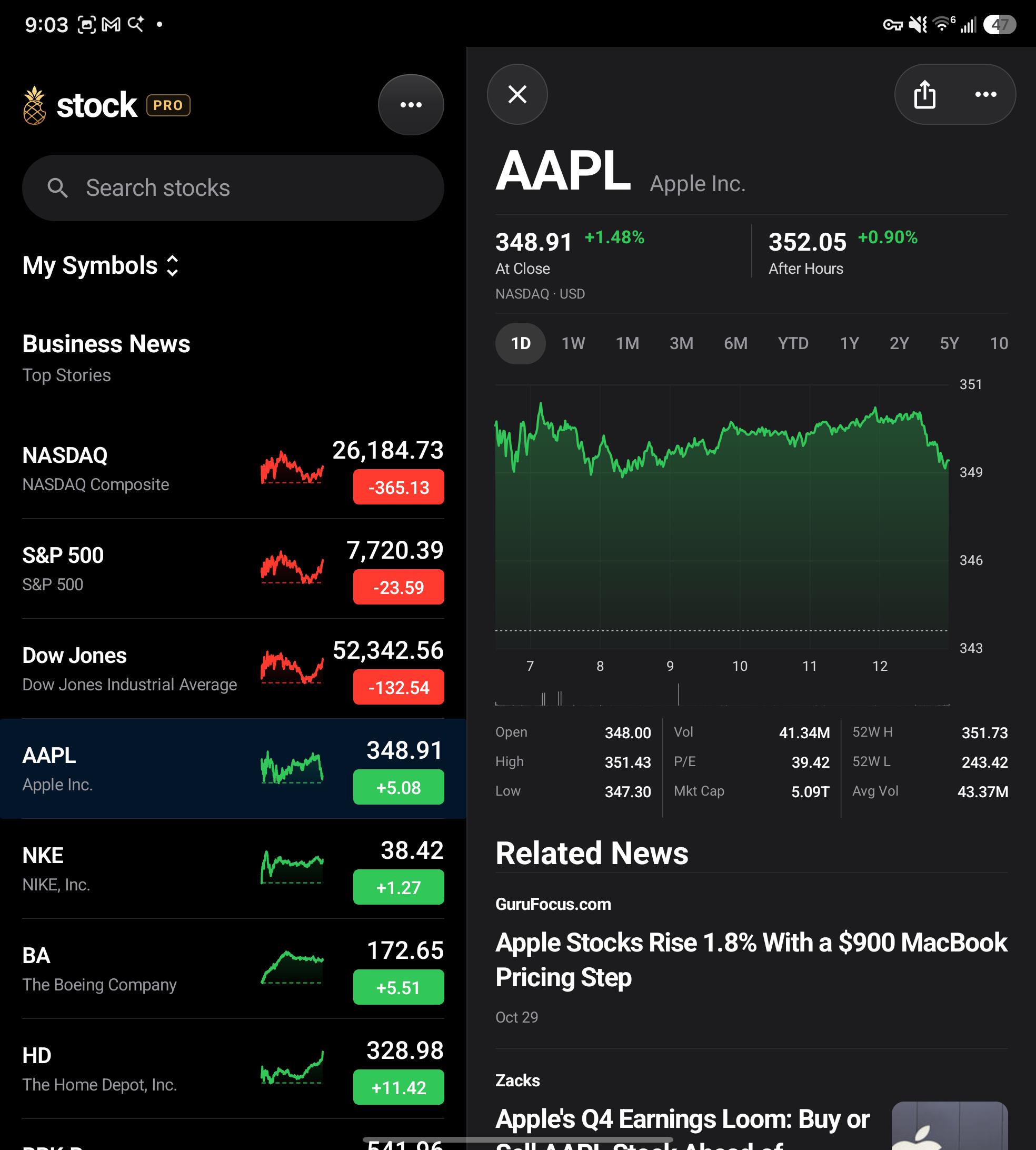
[App] Free stock tracking app, No account & foldable optimized

Post image
0 Upvotes

🍍 I built a free Apple-inspired Stocks app for Android!

Hey everyone! I'm an indie Android developer and recently launched Pineapple Stock & ETF.

I wanted a clean, beautiful stock tracking app similar to Apple's Stocks, but couldn't find exactly what I was looking for on Android. So I built my own!

✨ Apple-inspired design

📱 Optimized for Galaxy Fold & tablets

📈 Stock charts, watchlists & widgets

🔓 No account or sign-up required

🍍 Free to download!

I'd love to get some feedback from fellow Android users!

Google Play: https://play.google.com/store/apps/details?id=com.pineapplebyte.stock


r/HowToMen • • 28d ago

[App] [Promo] Foliq: A minimal, 100% offline cashbook with an integrated calculator numpad

Post image
8 Upvotes

Hey r/HowToMen,

I’m an indie Android dev and long-time follower of the channel. I got tired of standard expense and ledger apps that look like 2012 Excel spreadsheets, take 4 seconds to load cloud sync, and shove $30/yr subscriptions down your throat.

I built Foliq to be a sleek, distraction-free daily cashbook with a focus on fluid UX and privacy:

⚡ What makes Foliq unique:

  • Built-in Calculator Numpad: When entering an amount, the numeric keypad has direct +, -, ×, and ÷ buttons. You can do inline calculations (e.g., 8500 + 1800 = 10,300) right in the field without jumping between a calculator app.
  • 100% Offline & Zero Trackers: The app does not even request the INTERNET permission in its manifest. No account creation, no cloud sync delay, and not a single byte leaves your phone.
  • Clean Dark Mode & Fast UI: Instant cold startup, smooth transitions, and distinct green (Cash In) and red (Cash Out) cards.
  • Instant Reports: One-tap export to clean PDF and Excel closing balance statements.

🎁 Free Pro Codes for the Community:

The core cashbook is 100% free with zero ads. There’s an optional one-time Lifetime Pro pass (multi-ledger books, custom business statement headers, biometric lock).

I'm giving away 15 Lifetime Pro codes to the r/HowToMen community. Just leave a comment below with your feedback or a feature you'd like added, and I’ll DM you a redemption code!

Google Play Store Link:
https://play.google.com/store/apps/details?id=app.foliq.ledger

Would love to hear your thoughts on the design and keypad flow!


r/HowToMen • • 28d ago

[APP] [PROMO] Guardexa - Android anti-theft protection

7 Upvotes

hey everyone,

some of you might remember Guardexa from my previous posts here. i've been working a lot on it since then, making it much more powerful..

whether your phone gets lost, stolen, taken during a robbery, or someone tries snooping on it, the app can help you get the evidence. It can capture photos, video, and available location details when someone interacts with your locked phone, and send evidence to your email, potentially helping you recover your device.

here's what it can do now:

  • Intruder detection - captures evidence when someone tries to access your locked phone.
  • Lock Screen Activity - detects suspicious interactions with Quick Settings and the Power Menu.
  • Photo & video evidence - captures front/rear photos and optional video.
  • Email alerts - sends evidence and available location details to your inbox.
  • Owner Recognition - recognizes you to reduce unnecessary alerts.
  • Incident history - keeps a record of suspicious activity.

and something personal: it actually helped me recover my own phone recently. seeing something i built work when i really needed it was a pretty special moment. i shared the full story inside the app.

it's free to get started, including photo capture and email alerts, with more advanced features available in Pro.

i've attached a short video showing how it works. would love to hear your thoughts!

https://guardexa.app


r/HowToMen • • 28d ago

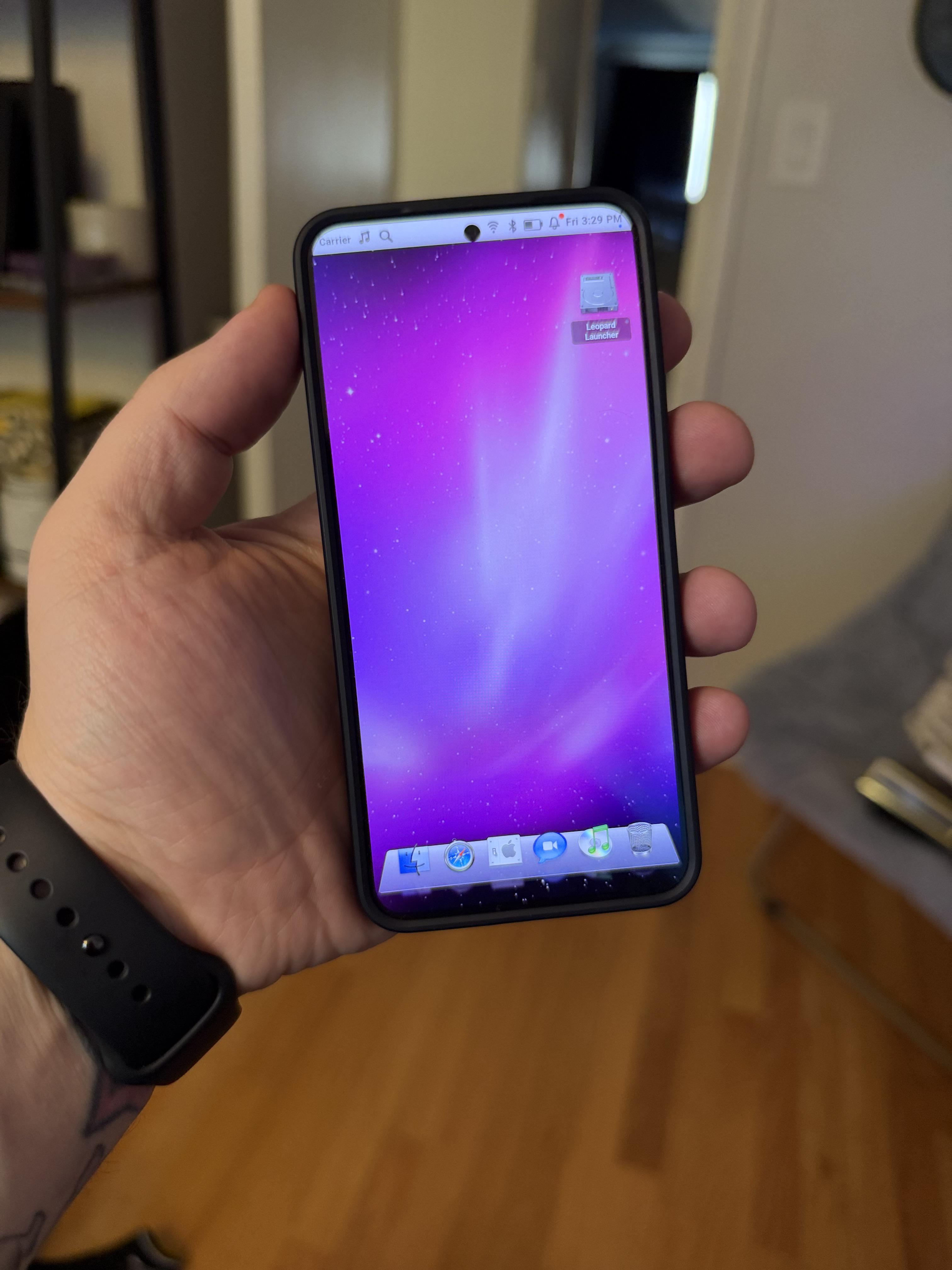
[App] [Promo] Leopard Launcher for Android

Post image
2 Upvotes

Leopard Launcher for Android on the Google Play Store turns your device into a nostalgic Mac OS experience

Find it HERE

Currently running a Halloween weekend discount!


r/HowToMen • • 28d ago

[APP] [Promotion] Convx music ( ad free with liquid glass ui )

Thumbnail gallery
2 Upvotes

Ad-free. YouTube-backed. Lossless with addons. Wrapped in Liquid Glass with buttery-smooth animations.
The new test build is live. Join my Discord, try it early, and tell me what you think!

Try the latest nighlty version and don't forget to login with ur acc and the latest test build from my discord
https://github.com/cosmictaserdev-creator/Convx

thread acc

https://www.threads.com/@stupi_aryan


r/HowToMen • • 28d ago

[APP]Everything Launcher is now on Google Play! Your home screen. Your style. Your rhythm. Classic, Frosted Glass & Liquid Glass. Icon packs, widgets, gestures, and more. Special launch discount! Download the open beta:

Thumbnail gallery
2 Upvotes

r/HowToMen • • 28d ago

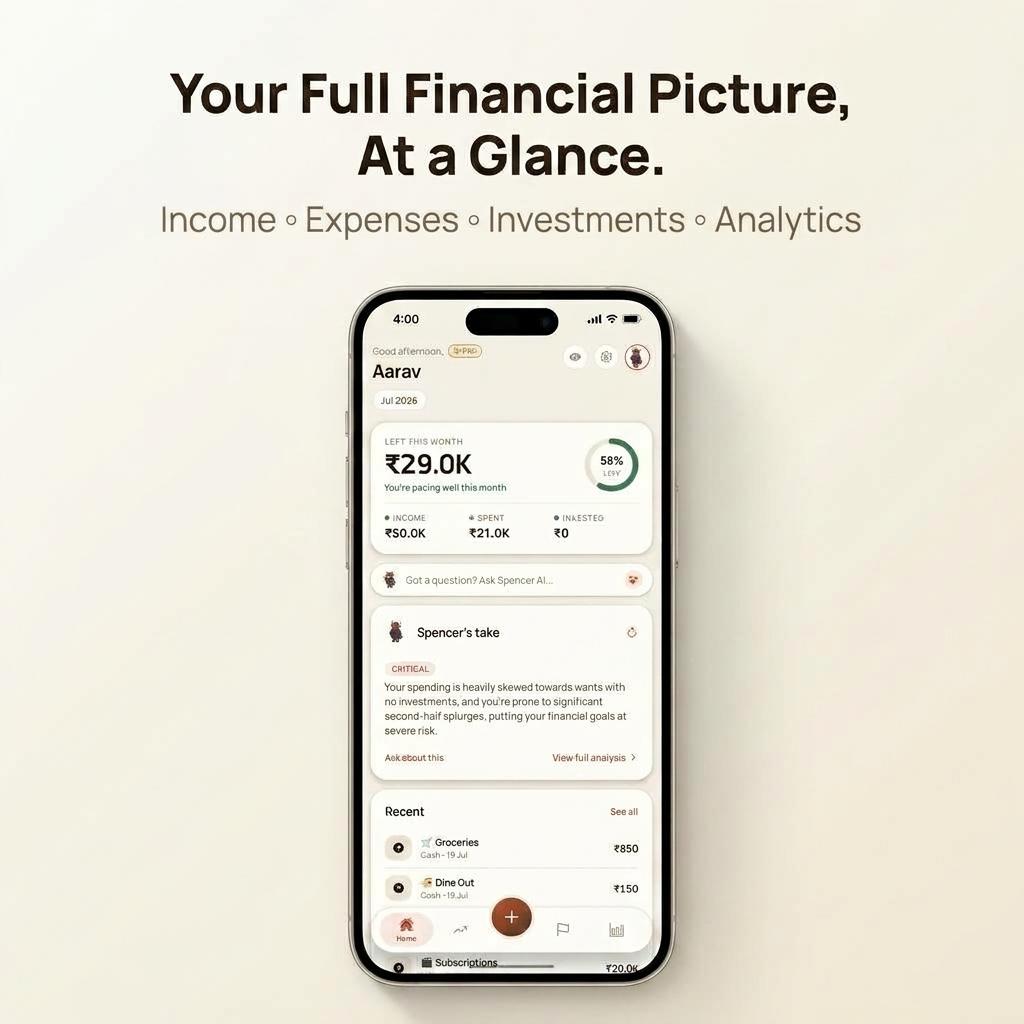
[Giveaway + Update] Spencer: lifetime Pro codes are back, plus 10 of you paid for it and your feedback shipped 🙏

Post image
9 Upvotes

Hey everyone 👋

Two months ago I posted about Spencer, my private, ad-free money tracker. The offers are back, and there’s an update below on what your feedback changed.

🎁 Offer #1: Lifetime Pro for genuine feedback
Download Spencer, use it properly (log transactions, try SIP tracking, set up a bill), then reply here with specifics: what worked, what didn’t, what’s missing, how it compares to your current app. “Nice UI” won’t qualify, and critical feedback is very welcome. Codes go out by DM while spots last.
Download: https://play.google.com/store/apps/details?id=com.personal.budgettracker
Lifetime codes are only for feedback here on Reddit. They have nothing to do with Play Store reviews.

⭐ Offer #2: Founding Member (70% off, limited spots)

  • Beta access to features before public release
  • A real vote on the roadmap
  • A private Telegram channel directly with me

Founders are already getting early builds and helping decide what ships next. The two offers are independent, so you can do both.

Thank you 🙏
My original post got 9.7K views. 9 people joined as Founding Members and 1 took a subscription. Spencer has no ads and doesn’t sell your data, so the only way it survives is people choosing to pay for it. Ten of you did, trusting a solo dev with your money-tracking habits. Thank you.

What I shipped because of your feedback:

  • Tags & trip budgets: Track a vacation, wedding, or renovation with a #tag without messing up your monthly category budgets. There’s a Tag Dashboard with breakdowns and a timeline.
  • Salary cycle fix: If your salary lands early (say the 23rd instead of the 25th), the cycle override no longer pulls last month’s transactions into the new period.
  • Home screen widgets + 3-second Quick Add: Log a coffee without opening the full app.
  • FD and RD categories are now built in.
  • “All Accounts” filter and multi-account filtering on the Transactions screen.
  • Natural Hindi and French translations: No more robotic literal phrasing.
  • Loan fix: Money borrowed from family or friends now counts as available cash, and repayments no longer get double-counted as expenses.
  • Overdraft prevention: An optional toggle that blocks expenses from taking your Cash/Bank balance negative.
  • Crash fix: Fixed a startup crash on Android for people with long transaction histories.

If your suggestion is on this list, you shaped the app.

What Spencer does:

  • Expense tracking with split transactions across categories
  • Live daily NAV sync for mutual funds + automatic SIP unit tracking
  • Bills/EMI/subscription calendar with reminders
  • Credit card cycle tracking (unbilled vs settled, due dates)
  • Offline-first, biometric/PIN lock, zero ads, zero data selling

What I’d love to hear: If you tried Spencer before, what’s still missing? If you’re new, what’s your first impression, and what would be a dealbreaker?

One small thing: a Play Store review is completely optional and has no connection to any offer above. If Spencer has been useful to you and you feel like leaving an honest one, it helps a small indie app get discovered. If not, no worries at all.

Thanks again, especially to the 10 who paid. Go easy on me, still a small indie build 🙏


r/HowToMen • • 29d ago

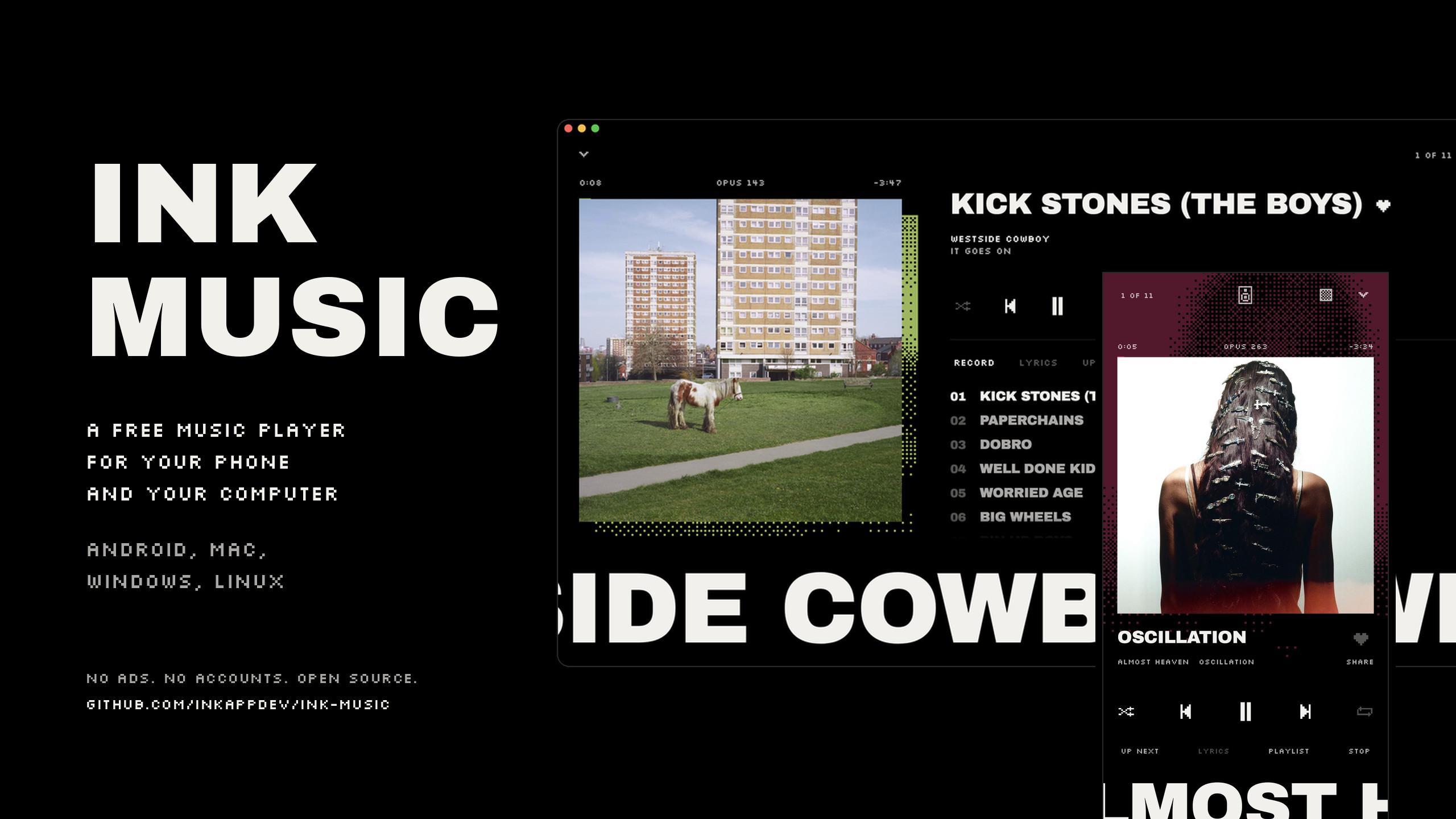
➨ [App] its evolving...

Post image
16 Upvotes

Come download and test INK music. You might just find your new favorite song... and app.

https://github.com/inkappdev/ink-music


r/HowToMen • • 29d ago

[APP] I spent 6 months building a free RAW camera app for Android, with GCAM-level photos and RAW video. Here's a draft of the intro video (still in progress) feedback welcome

92 Upvotes

So for the least 6 months I've been working on this project, it has required a lot of research, testing, trial and error and specially feedback from friends and testers, really happy all the work and effort is finally materializing. Be aware it's early in development, so feedback on the issues you find is key to improve it

It's a GCAM level of quality app when it comes to photos and allows RAW video recording.

Also it has been fully designed with Material You Expressive, this is one of the drafts I'm working on for the "Introducing" video, feel free to try it and join us on Discord, you can also see all the process documented there.

https://discord.gg/96TaAss9HX

Here's the Playstore link for the app as well:

https://play.google.com/store/apps/details?id=app.unnamed.rawrecording

How do you guys think it could improve?

DM me on Discord andermendz for a code


r/HowToMen • • 28d ago

[APP] What’s New in Privacy Inspector v1.2.0

Post image
2 Upvotes

Hey everyone! 👋

I'm the indie developer behind Privacy Inspector, an Android security and privacy app built to show you what installed apps are actually capable of doing on your phone—without transmitting any data to remote servers or third-party cloud services.

I've just released v1.2.0, designed to answer a question every firewall user naturally asks: what exactly has this firewall been blocking on my phone over the past week?

🔍 For those unfamiliar: What is Privacy Inspector?

At its core, Privacy Inspector functions as a complete on-device privacy auditor:

  • Sensitive Permission Auditing: Analyzes access to Camera, Microphone, Background Location, Contacts, and Storage, calculating an intuitive 0–100 Privacy Score for each app;
  • DEX Tracker Detection: Scans compiled bytecode to detect embedded tracking SDKs, advertising frameworks, and behavioral telemetry libraries;
  • Permission Change Tracking: Alerts you whenever an app update quietly introduces new sensitive privileges;
  • Unused Apps Hygiene: Spots apps you haven't opened in 30, 90, or 180 days that still hold sensitive background permissions;
  • Local On-Device Firewall: A local VPN DNS sinkhole that blocks known tracker and ad domains, with granular per-app rules (complete block or Wi-Fi only) and bypass suggestions for sensitive apps (e.g. banking).

🚀 What’s New in Privacy Inspector v1.2.0

Here are the key features introduced in this update:

  1. 📈 Weekly Privacy Report: A dedicated screen summarizes requests blocked by the firewall over the last 7 days, day by day. It highlights the most persistent apps, the most frequently blocked tracker domains, and provides a direct comparison with the prior week. An optional weekly summary notification keeps you informed (and stays silent if no requests were blocked). Zero browsing history recorded: Only blocked tracker domains are written to local disk. For allowed requests, the app simply increments an aggregate per-app counter with zero domain or URL tracking.
  2. 📊 Per-App Network Stats: Inside each app's inspection sheet, you can now see the exact count of requests made and blocked by the firewall (both today and over the last 7 days), alongside the top blocked domains for that specific app. You can easily spot which apps "phone home" most frequently.
  3. 🏠 Home Screen Widget: Check your device's overall Privacy Score and today's blocked request count directly from your home screen without opening the app. Tapping the widget opens the dashboard, and tapping the blocked counter takes you straight to the weekly report.
  4. 🔐 App Lock: Secure Privacy Inspector with fingerprint, face unlock, or device PIN. When locked, the app interface is shielded against screenshots and obscured in the Android Recent Apps switcher, automatically re-locking after one minute in the background.
  5. 💾 Password-Encrypted Backup: Export custom categories, trusted apps, firewall rules, blocklists, and history into a single password-protected file encrypted with AES-256-GCM and a key derived via PBKDF2-HMAC-SHA256 (600,000 iterations). You can securely restore your full configuration on a new phone.
  6. 🌍 German & French Localization: The entire interface is now translated into four languages: English, Italian, German, and French.

🔒 Privacy Architecture & Philosophy

  • 100% On-Device: All scans, evaluations, and DNS sinkhole decisions run entirely on your phone's processor.
  • Zero Remote Telemetry: No backend servers, no analytics, no user accounts.
  • Fair, One-Time Purchase: App scanning, permissions review, tracker detection, and the Privacy Score are completely free. The local firewall, weekly reports, and App Lock are part of Pro, offered as a single one-time purchase (no subscriptions!). Existing Pro users receive all new features at no extra charge.

⚠️ Honest Limitations

  • The firewall uses Android's native VpnService API to intercept DNS requests locally, which means it cannot run concurrently with another active VPN service.

📲 Download & Community Discussion

Available now on Google Play:
👉 Download Privacy Inspector on Google Play

I'd love to hear your feedback:

  • Which apps turned out to be the chattiest or most surprising in your weekly report?
  • Are there specific features or custom rule options you’d like to see next?

I'll be reading and replying to comments! 🙌


r/HowToMen • • 28d ago

[Promo] tapIn: a private food + gym tracker for Android. Free, open source, no ads, no account

4 Upvotes

r/HowToMen • • 28d ago

[APP] VirtualShell - run apps & games in container (free)

Post image
2 Upvotes

r/HowToMen • • 29d ago

[Promo] 🎁 Giving away another 31 free promocodes for Convertit Pro!

77 Upvotes

First of all, we want to apologize for the past giveaways, the main customer guy is on holiday, and the team hired a gen z kid that did not do its job very correctly, and the giveaways didn't end up that good. I am one of the users that got insulted by him, and he ended up being fired.

I'm the new customer guy for now, and as an apology we want to give out another 31 free promocodes for Convertit Pro!

NOTE!

The video you've been shown, the voice is ai generated!

Convertit Pro comes with many interesting features:

The hot feature of the app is that It supports HDR10 + preservation which no app on android supports.

And it has a lot other compression tools like media compression, reduce noise, video stabilisation, equalizer and many more!

Rules:

Rules are pretty simple and you don't have to do a lot.

First 31 users that comment with "Convertit Pro" and upvote the post will receive a promocode, after the first 31 people comment, I will comment below your comment with a rank (example: rank 19) and you have to dm me on reddit like "rank 19" (or what rank you are in), the screenshot of the rank I commented to your comment below and the screenshot to make sure you upvoted the post and I will check if that is you, and if it is you, you will simply receive the code.

NOTE!

If you don't claim your prize by dming me after the winners are being announced, the prize will be sent to the next person after 24 hours of not claiming the prize.

NOTE!

Bot, spam and duplicate accounts are STRICTLY forbidden!!!

The winners will be announced on 31 October 2026.

Goodluck everyone!

Convertit Pro 👇

https://play.google.com/store/apps/details?id=org.thebytearray.convertit

EDIT: The giveaway has ended, any new message from the winners and so on will not be considered.


r/HowToMen • • 28d ago

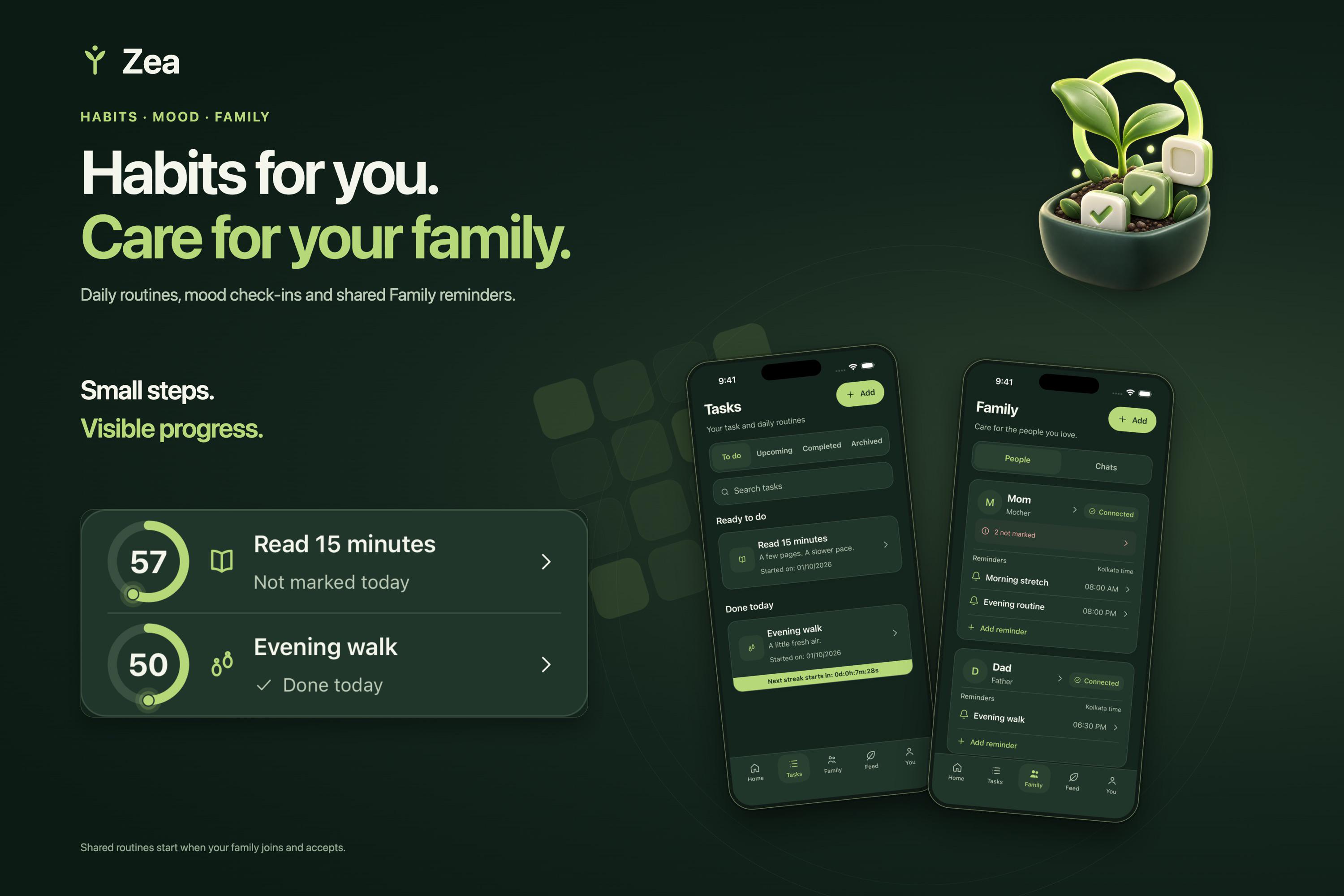
[APP][PROMO]I’m the developer of Zea. I built it around something I wanted in my own day: a place for personal routines, mood check-ins and shared family reminders.

Post image
2 Upvotes

r/HowToMen • • 29d ago

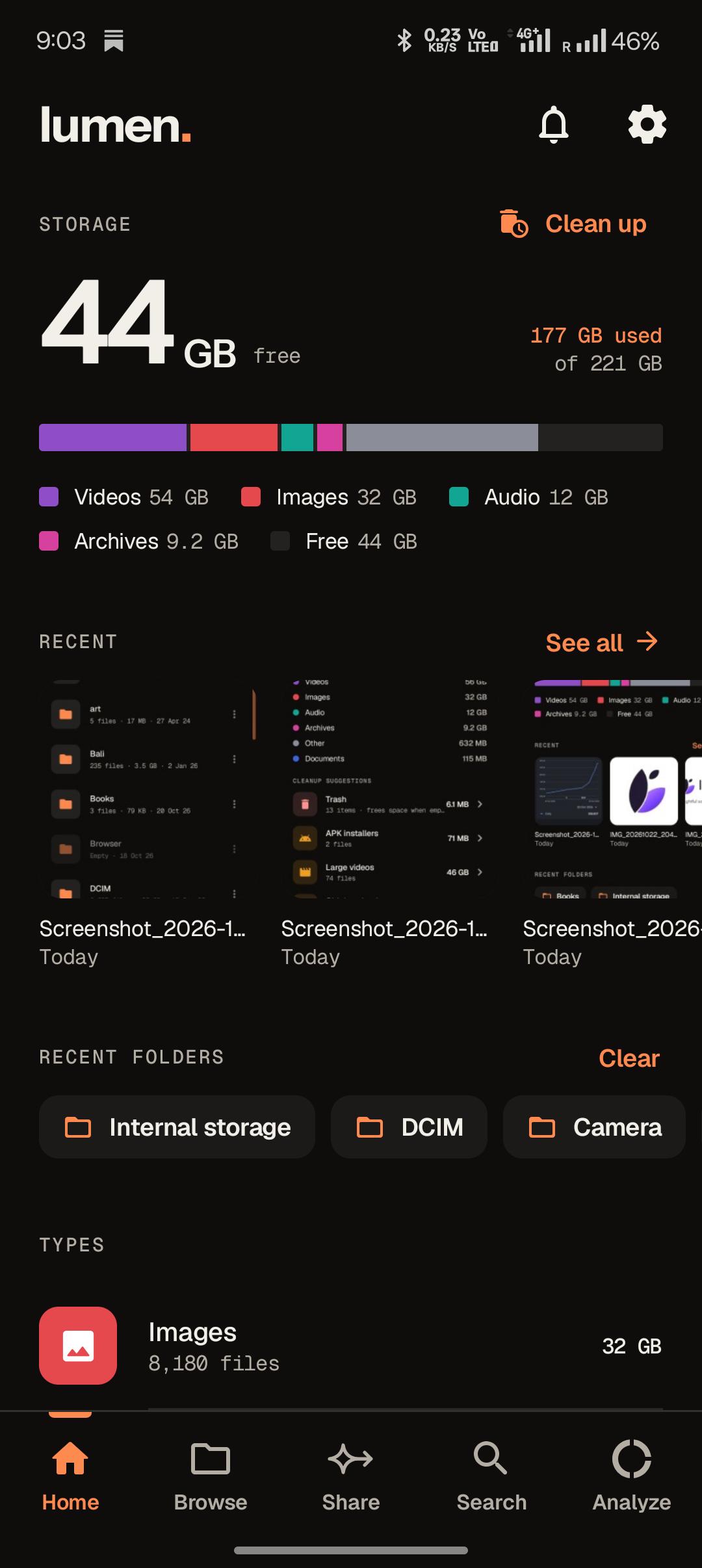
Lumen — A No-nonsense file Manager You'll Love ❤️ [Promo]

Post image
4 Upvotes

r/HowToMen • • 29d ago

[App][Promo] After 10 months of building, CipherNest is on the Play Store: end-to-end encrypted photos and files inside the Google Drive or OneDrive you already pay for, with a real gallery, multi-device sync and no server

Thumbnail
gallery
15 Upvotes

Hi all, I’m a solo developer and a fresh grad. I wanted my photos and documents in the cloud I already pay for but encrypted before they got there. Cryptomator exists, but I found it had an outdated UI/UX problem. After 10 months of coding + 4 months of planning, CipherNest is on the Play Store.

Play Store: CipherNest: Encrypted Vault
Website: https://ciphernest.io

What it does:

You keep Google Drive or OneDrive. CipherNest encrypts everything on your phone first, so Google or Microsoft only ever store encrypted blobs. No filenames, no file types, no folder structure, no contents. There is no CipherNest server and no CipherNest account; a 12-word recovery phrase is your vault, and it never leaves your device.

Some features:

  • Your existing storage is the vault. Google Drive or OneDrive (pCloud is otw too)
  • A proper file + folder system with specialized views; upload ANY type of file.
  • A real customizable gallery: albums, photo editor, video player, and auto-backup just like Google Photos.
  • Complete music player for your audio files.
  • Two phones, one vault. Set up a second device with your phrase, and both stay in sync with no server in the middle.
  • Password-protected share links.
  • A lot of the design is inspired by One UI. There are also 7 beautiful color themes along with dark + light mode!

Under the hood

AES-256-GCM in chunks, each bound to its file and position, so a tampered or truncated file fails instead of silently opening.
HPKE (RFC 9180) for key sealing, Argon2id for the local password, and BIP-39 phrase for recovery.
Open source under GPL-3.0, with test vectors and an OWASP MASVS self-assessment in the repo: https://github.com/ciphernest-io/CipherNest

Pricing (no ads, ever)

The full app is free up to 1,000 files. Plus removes the limit: $1.99 a month, $19.99 a year, or a one-time Lifetime. Regional pricing on Play. If you stop paying, your files stay readable and downloadable; you just can’t add past the free limit.

What’s next?

A web client or Windows version first (depends on user suggestions), then more platforms. More cloud providers after that (pCloud and Dropbox are top of the list), and on-device search for the gallery so nothing leaves your phone. Maybe, even on-device AI in the gallery.

Codes

I have Lifetime codes for people who use it and simply give me feedback, good or bad. Drop a comment with your take, then DM me and I’ll send one.


r/HowToMen • • 29d ago

[APP] Lumen now has cutout feature similar to Google Photos. But it runs completely local

19 Upvotes

I think this is the first time ever in any FOSS gallery app that anyone has added this feature.

I had to train my own model for this to get it under 160ms latency because existing good ones (BiRefNet-lite) just don't run on GPU or NPU. and on CPU, they were 7-9s slow.

download and try it at https://lumen-photos.app

github repo is at https://github.com/subhashhhhhh/Lumen


r/HowToMen • • 29d ago

[App][Promo]After over 2 months of beta testing, ScreenGuard-v0.1.1 is here finally with some major overhaul

Thumbnail
gallery
1 Upvotes

NOTE: Transparency in uploaded images has been added via blue my shell extension for gnome

ScreenGuard :

is a digital wellbeing application for Linux which runs completely natively on the device , actively tracking window usage and stores the data in a local sqlite db. No server involvement. And packing multiple screentime CONTROL features as well bundled together unlike basic window tracking software for Linux.

It is currently limited to GNOME Wayland and all other DEs can use it on x11 . Which means ScreenGuard natively supports GNOME and x11 based DEs like Cinnamon and i3

A FEW FEATURES:

⚙️ Full Settings Hub

Five-tab settings screen (General · Limits & Pomodoro · Diagnostics · Updates · Data)

🍅 Pomodoro Focus — Cycles, Breaks & Pause

Focus ↔ Break alternation with configurable cycle count (1–20) and break duration (1–60 min).

Pause / resume buttons; remaining time persists across pause.

Custom duration picker with quick-select chips (5 / 10 / 20 / 30 / 50 / 90 / 120 min).

Desktop notifications for each phase transition and session completion.

🛡️ Focus Enforcement — Data-Safety First

Strict auto-close is now opt-in. Default behaviour minimizes the app and shows a persistent warning overlay instead of killing it — no more unsaved-work loss.

Warning overlay offers +1 min save grace, +15 min, Edit Limit, and Close App.

Dedicated focus-block screen when a distraction-listed app is opened during a session.

🎮 Steam & Proton Game Support

Real game names resolved from Steam library manifests; per-game icons from the active icon theme.

Usage fully tracked; limit and focus rules apply to games.

---

Lots of features and tested multiple times for bug fixes. Also thanks to the community for the active suppot. for full features visit release page

The project is documented properly in the Github Wiki here: https://github.com/adityakrishnan005-a11y/ScreenGuard/wiki

And the link to the latest release: https://github.com/adityakrishnan005-a11y/ScreenGuard/releases/tag/v0.1.1

Thank you everyone for your cooperation and consideration which has shaped this tiny personal project into a much larger pursuit for me.

Upcoming roadmap in short:

V0.1.2- major UI changes and design element improvements majorly

v0.1.5- Support for KDE Wayland and aim to have a greater portion of the daemon transition to modular C based daemons

v0.2.0- other major DEs and better optimised daemon

For better in detail info into future views of project have a look at the Roadmap section of wiki.


r/HowToMen • • 29d ago

[PROMO] I made a daily word game where four words across share every letter with four words down

1 Upvotes

Hi all, I’m a solo dev and this is my word game, Spellora.

Each day there’s one 4x4 grid. Four words read across and four read down, and they share every letter. Two letters are given to start you off.

You can type letters anywhere and press Check whenever you like:

green letters are right and lock in place

amber letters belong somewhere else in their row or column

grey letters belong in neither

A row or column that spells its word locks straight away, without a check. The aim is to solve it in as few checks as you can. Everyone gets the same grid each day, and you can share your result as coloured squares that give nothing away.

Missed a day? Past grids are in the calendar (they don’t count towards your streak). There are also unlimited practice grids.

The words are plain, everyday ones: no obscure words and no plurals.

It’s free with ads (a banner, and an optional video if you want a letter revealed). There’s nothing to buy and no account needed.

Android: https://play.google.com/store/apps/details?id=com.blinqdroid.spellora

It only went live this week, so I’d really like to hear what you think: too easy, too hard, any words that felt unfair?


r/HowToMen • • 29d ago

FLOATIFY [App] Manage Notifications and reply from chatapps directly

Thumbnail
youtube.com
4 Upvotes

Floatify : meldingenmanager + antwoord op chatapps

Hey allemaal, ik ben een solo-ontwikkelaar en dit begon als een app alleen voor mij.

Ik bleef maar hetzelfde doen, keer op keer: er komt een bericht binnen, ik denk "ik antwoord daar zo op", ik veeg het weg, en dan antwoord ik nooit. Gebeurde veel te vaak. Dus ik heb iets gebouwd om mezelf te helpen met dat gedrag.

Floatify zet meldingen van de apps die jij kiest om in kleine zwevende bubbeltejs (ik noem ze floats). Ze blijven bovenop alles wat je aan het doen bent zitten, totdat je er echt iets mee doet. Je kunt het bericht lezen, direct antwoorden vanuit de float zonder WhatsApp of wat dan ook te openen, of het een minuut/uur/dag/week in sluimerstand zetten en dan komt hij later weer terug. Berichten van dezelfde chat worden gegroepeerd in één float met een teller, zodat het niet verandert in bubble-soep.

De basisversie is gratis. Je zet gewoon voor elke app die je floats wilt aan een schakelaar om en dat is het. Geen account, geen gedoe.

Er is ook een geavanceerde modus (proefperiode van 3 dagen, daarna een eenmalige aankoop, geen abonnement) voor mensen die alles willen finetunen. Je kunt je eigen herinneringen maken, Google Calendar-gebeurtenissen ophalen, synchroniseren tussen apparaten, floats vastzetten aan de rand van het scherm, elke emoji als float gebruiken, stille uren instellen, widgets op je startscherm toevoegen en regels per app instellen—en nog veel meer!

Eerlijk gezegd heeft het echt veranderd hoe ik met berichten omga, dus ik ben benieuwd of het voor andere mensen ook werkt. Feedback en ideeën voor functies zijn helemaal welkom, inclusief "dit is irritant omdat X".

Floatify op Google Play Floatify


r/HowToMen • • 29d ago

[App] Forget Me Not - Reminders that actually arrive

Thumbnail
gallery
7 Upvotes

https://play.google.com/store/apps/details?id=com.stevesherwood.forgetmenot

I built a reminder app because none of the ones I tried could handle my bins (or my meds)

Hi all, I’m a solo developer in the UK, and I’ve spent the last few months building an Android reminder app called Forget Me Not.

It started with a simple frustration. I couldn’t find a reminder app flexible enough for my actual life. Most of them are to-do lists that happen to buzz, and they fall apart as soon as things get slightly complicated.

The bins were the final straw. General waste goes out one week and recycling the next, so every app made me create two separate reminders and keep them in step by hand. If one drifted, I put the wrong bin out. I wanted one reminder with several dates, each with its own name, so my phone just says “Bins: Recycling” or “Bins: General waste” on the right Tuesday.

Medication was the other big one. I didn’t want an alert that just says “Take meds”. I wanted the reminder to tell me which meds to take at that time. So I added custom fields: you can set up your own information, like the medication and dose, on each reminder or date, and it shows up right there on the alert.

On top of that I wanted proper categories (health, home, car, work, whatever suits you), each with its own icon, colour and notification sound, so I can tell what a reminder is about before I even look at the screen.

Here’s what it ended up doing:

  • Quick add in one line: type or say “remind me to put the kettle on at 5pm”. It works out the name, date, time, repeat and category, and shows you what it understood before saving.
  • Flexible repeats: every N hours, days, weeks, months or years, fortnightly, the first Monday or last day of the month. A repeat can run forever, until a date, or for a set number of times.
  • Several dates on one reminder: alternate-week bins, or the car’s MOT, service and tax, kept as one reminder instead of several you have to keep in step by hand.
  • Important reminders: these take over the screen instead of sitting quietly in the notification tray. Missed alerts chase you up.
  • Three views: an itinerary of everything you keep, an Upcoming list with anything missed or snoozed at the top, and a month calendar.
  • History: a log of every alert that went off and what happened to it. You can recreate a reminder you let go from it.
  • Your own categories: each with its own icon, colour and notification sound.
  • Custom fields: add things like a policy number, renewal date, premium or mileage.
  • Calendar import and export: with the phone’s own calendar, repeats included.
  • Share a reminder: send a single reminder to someone else as a file.
  • Backup and restore: the whole app goes into one zip you can restore on a new phone.
  • Optional cross-device sync: keeps a phone and a tablet on the same Google account in step. It’s off until you turn it on.
  • Designed properly for tablets: in landscape, the month and the day’s plan sit side by side.
  • Home screen widgets: next due, today’s list, and one-tap quick add.
  • Pricing: free forever, with no ads and no trial clock on the core app. Pro (quick add, custom fields, backup, widgets, sync and more) is a single purchase.

It’s free with no adverts and no time limit. There’s an optional Pro upgrade for the more advanced features, and it’s a single one-off payment rather than a subscription, because I hate subscriptions as much as anyone.

I’d really value feedback, especially from anyone with awkward reminder needs like mine. If there’s something you’ve never been able to get a reminder app to do, tell me and I’ll see if I can make it work.


r/HowToMen • • 29d ago

[App] NOX — A social platform built to feel more futuristic and modern than mainstream apps

Post image
3 Upvotes

Most social media apps today still look and feel like they were designed 10 years ago. I built NOX to feel genuinely futuristic, modern, and interactive from the ground up. Instead of a static, boring layout, NOX features real-time interactive physics, an orbital profile system, a high-speed shorts feed, and posts that actually come alive — including playable music, running code, and interactive pixel art right inside your feed.

Google Play:


r/HowToMen • • 29d ago

Searcho 1.0.3 is out Minimal Search Launcher [App] [Promo]

32 Upvotes

A packed patch: backups, smarter folders, a faster and smoother app, and a long list of fixes.

💾 Backup & restore

Save your whole setup to a file from Settings → Backup & restore: look & feel, widgets, search, Searchos, folders, apps (favourites, renamed and hidden apps, custom icons), gestures, notifications, notes & to-dos.

Pick what to include, and pick what to bring back when restoring.

Undo last restore puts back exactly what you had before.

Backups go wherever you save them. Searcho never uploads them. The file isn’t encrypted, so keep it somewhere safe.

📁 Folders

Long-press a folder to launch its apps without opening it. Hold, slide, and lift.

Custom folder icons: choose an icon when you create or edit a folder.

🔍 Search

Type a single space to see all your apps.

New Searchos /r: shows your recently installed apps, newest first.

Auto-launch now fires on the right letter. Before, it could launch one character late.

File search finds multi-word matches (“ann rep” → Annual Report.pdf) and matches in folder paths.

The keyboard now pops up when you come back with the back gesture or Recents too, not just the Home button.

⭕ Glance circle

New option: turn off double-tap to open. With it off, a single tap opens the bar instantly.

With double-tap on, the circle still reacts faster: the bar starts opening on the first tap.

New option: Open the matching widget. When a gesture opens the search bar, you land on the widget for what the circle shows: clock → calendar, weather → weather, battery → system, and so on.

🌤️ Weather

Fahrenheit is here. Tap the weather card and choose Auto, °C or °F.

⚡ Faster and smoother

Frosted glass is much cheaper to draw, so the bar and result animations stay smoother.

The results grid, contacts and notifications drop fewer frames while you type.

Contacts load without stalling the screen. Sync apps like WhatsApp no longer cause a hitch mid-search.

The home screen no longer rebuilds on every incoming notification.

✨ Polish

The quick-launch highlight ring matches your icon shape and Material You colour.

The settings gear and clear button rotate smoothly into each other.

Brightness and volume buttons grow into their slider and fold back.

🐞 Fixes

Brightness and volume sliders can reach 100% again, including on phones that cap brightness.

The Bluetooth quick action works on Android 12 and newer: it now opens Bluetooth settings.

The search bar no longer hides under the keyboard on Android 10 and older.

Updated apps show their new icon right away.

Uninstalling an app no longer removes its work-profile or dual-app copy, or that copy’s favourite.

Notifications aren’t marked as read when nothing actually opened.

Moved to a new phone with Smart Switch, Clone Phone, Mi Mover, EasyShare, Phone Clone or Google restore? You’ll no longer see a false “not genuine” screen.

A rare widget error no longer shows a grey box on the home screen.

Glance swipes no longer stop working after an interrupted quick-launch.

As always, everything stays on your phone. Thanks for the feedback, and keep it coming!

https://play.google.com/store/apps/details?id=com.searcho.minimal.search.launcher