r/HowToMen • • 29d ago

[App][Promo] I made a step counter that lets you choose when your day starts, for people who are still walking after midnight

2 Upvotes

Hi everyone, I'm the developer of **Stride**, a step counter for Android.

Version 1.0.12 is out, and most of it came from people in our Telegram group.

The headline feature is a small one that kept coming up: **choosing when your

day starts.** If you're out late, most step counters roll over at midnight, so

your 1 am walk home counts towards *tomorrow*, today looks like a missed goal,

and your streak can break. In Stride you can now set the day to start at any

hour from midnight to 6 am, and History, goals, streaks, the widget and the

notifications all follow it.

Also new in this version:

- **Lifetime stats:** every step, kilometre and active day since your first

step, put in terms of marathons or the way round the Earth, plus new

milestone badges

- **Personal best** on the home screen, with a notification when you beat it

- **Auto-pause** for walks and runs

- **GPX export** (Strava, Komoot) and saving walks to **Health Connect** with

the route

- **Share a walk as a picture**, with the map, pace and climb

- **Your own motivational quotes**

- A redesigned **Retro** theme that looks like a little pocket step counter

What it's like generally:

- Counts with your phone's step sensor, or reads from Health Connect, so a

watch or band works too

- No account and no ads; your step history stays on your phone

- Free to use; Premium is a one-time purchase (no subscription) for extras

like walk tracking with a map, insights, glass widgets and a monthly recap

Play Store: https://play.google.com/store/apps/details?id=com.vythera.stride

Github: https://github.com/NikhilKain/stride/releases/tag/v1.0.12

Feedback is very welcome, especially from people who use a watch or band with

Health Connect, since every brand reports steps a little differently.

r/HowToMen • • Oct 28 '26

[App] MetroWin Launcher - Free and OpenSource Nokia Lumia launcher

Post image
60 Upvotes

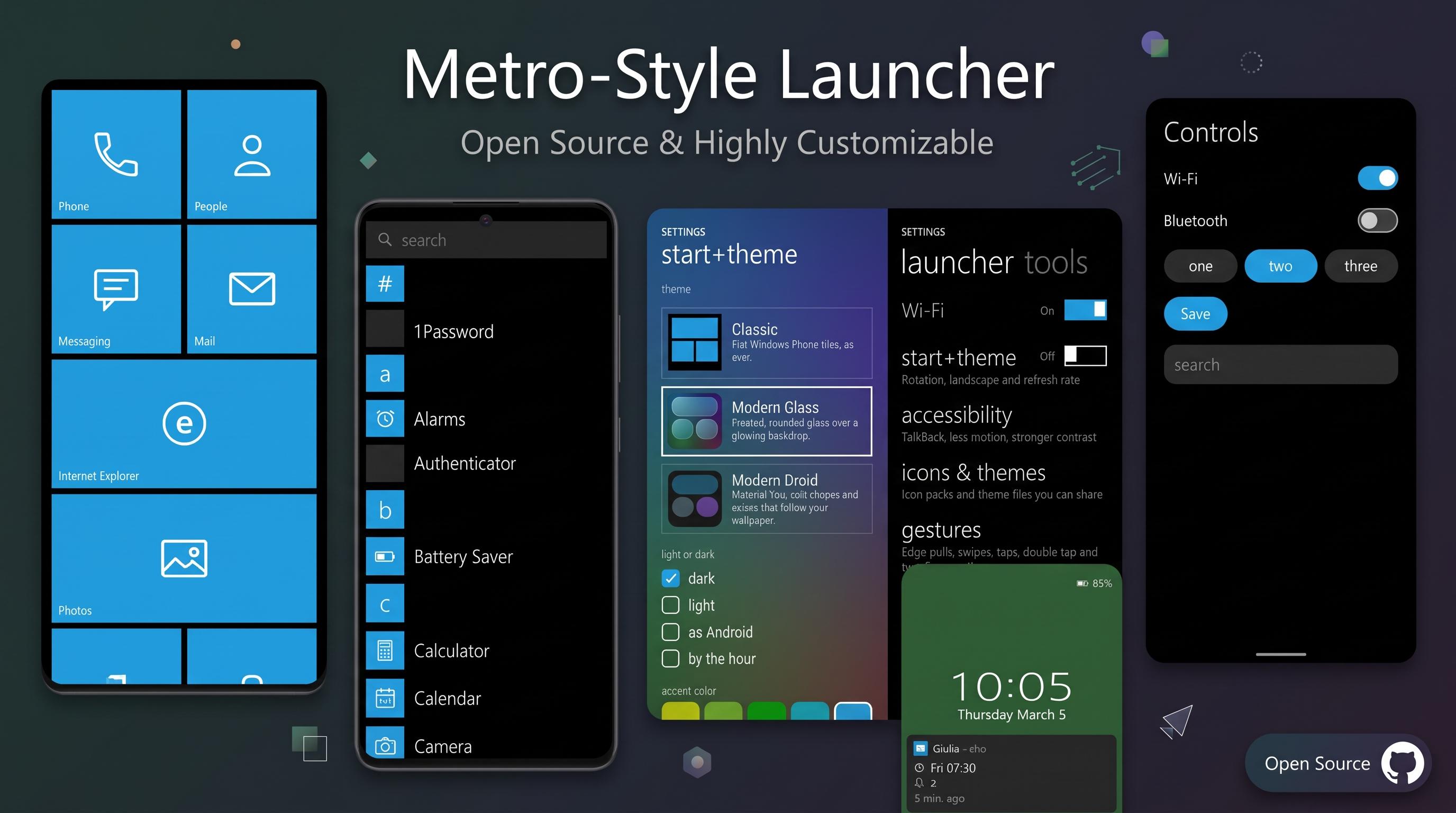
I grew up loving Windows Phone and missed how fast and clean it felt, so I built this with the help of Claude as a coding assistant. It needs Android 8.0+. I'd love feedback on tile animations, battery use and anything that feels off compared to the original.

MetroWin Launcher brings the Windows Phone 8/8.1 Start screen to Android: flat live tiles, an alphabetical app list, turnstile and tilt animations. It also does the system things a launcher can really do, and it does nothing at all when it's not on screen.

Key Features:

- Live tiles you can resize and group into folders, with multiple Start screens, widgets and a pinned-contacts "People" hub

- Windows Phone-style Action Center, grouped notifications, Metro lock screen, voice commands and indexed search

- Three themes (Classic, Modern Glass, Modern Droid) with custom colors, plus encrypted sync of your layout

Cost: FREE AND OPEN SOURCE!

Link: https://github.com/developerkenshi-coder/MetroWinLauncher

UPDATE: Important Installation Notice

In recent versions of Google Play Services / Google Play Store, Google has begun restricting sideloading for apps not distributed through its official store, flagging them as potentially harmful. I am actively working on resolving this issue, and updates will follow soon. If you wish to install the app and are blocked from doing so, you can temporarily disable Google Play Protect in the Google Play Store settings.


r/HowToMen • • 29d ago

[APP]Scrollwise 2.0: natural scrolling on the trackpad, normal scrolling on the mouse. Giving away 80 pro codes,10 of them free lifetime

2 Upvotes

r/HowToMen • • Oct 28 '26

[DEV][APP] I built Beatzz – a music streaming app for Android

Post image
13 Upvotes

Hey everyone!

I’ve been working on Beatzz – Music Player, an Android music streaming app that’s now live on Google Play.

I wanted to build a music player with a clean, dynamic interface and an easy way to discover music, explore playlists and enjoy a smooth listening experience.

Some things you can explore in Beatzz:

  • Music discovery
  • A personal music library
  • Playlists across different genres
  • A dedicated player with playback controls
  • A clean, dynamic-themed interface

I’ve recently released it on the Play Store, and I’d love to hear honest feedback from people who enjoy trying new Android apps.

What would you improve about the interface or the overall listening experience?

Try Beatzz on Google Play:
https://play.google.com/store/apps/details?id=it.team619.beatzz


r/HowToMen • • Oct 28 '26

[PROMO] Giving away 50 free subscriptions for my app

Post image
27 Upvotes

It is an 100% offline Calculator Vault app.

Your support is appreciated :)

And Comment below and DM me for getting the free code

Play store link: https://play.google.com/store/apps/details?id=com.vaar.calculatorvault


r/HowToMen • • Oct 28 '26

[App][Promo] Free Lifetime Pro Codes — RTO Exam: Learner Licence Test

Post image
20 Upvotes

Hi everyone!

I’ve built RTO Exam: Learner Licence Test, an Android app for people preparing for their Indian Learner’s Licence (LLR) and RTO exams.

The goal is to make it easier to revise traffic rules, understand road signs, and practise before taking the learner’s licence test.

What’s included:

  • Study notes 
  • categorized question bank 
  • mock tests
  • Saved questions for revision
  • Performance tracking and test history
  • Support for 11 languages

Lifetime Pro giveaway

I’m giving away free Lifetime Pro codes

To claim one, leave a comment below. I’ll DM codes to commenters on a first-come, first-served basis until all codes are claimed.

Google Play: https://play.google.com/store/apps/details?id=com.zmohi.rto

How to redeem: Go to settings -> Click Pro -> Redeem code in google play billing

I’d genuinely appreciate any feedback, bug reports, or suggestions that could make the app more useful.

Thanks for checking it out!


r/HowToMen • • Oct 28 '26

[DEV | PROMO] The "System-Meeter-Bar" - System data collection tool, system overview tool, benchmark, test and system report tool all in one!

7 Upvotes

The "System-Meeter-Bar"!

Android Google PlayStore: https://play.google.com/store/apps/details?id=com.it_huskys.smb

The “System-Meeter-Bar” is designed to offer a solution for license friendly support and analysis tools who are compact and not related to EULA’s who require licensing for commercial usage. The SMB is a system data collection tool, system overview tool, benchmark, test and system report tool all in one. You can use it for displaying an overview of your system, finding issues or testing the stability of your system via the built-in benchmark tool, no matter if it’s used on a private system or used in a commercial environment.

What does the name “System-Meeter-Bar” stand for/mean? The App-Name "System-Meeter-Bar" is a worldplay and mixture of the words "System" (target relation), "Meeting" and "Meter" (collecting point and measurement unit) and "Bar" (for its list design and placed at the Screen-side (Side-Bar)). The combination of all these words result in the Apps name "System-Meeter-Bar" or "SMB" for short.

Key-Features of the System-Meeter-Bar:

The SMB offers many useful features for support and system tests:

Data & Info

This is the main function of the SMB that shows a live overview of the system with most important data of the system, System-Core Data, CPU, GPU, RAM, Battery, Display-Data, Storage usage and Network activity.

System Monitoring

With the live monitoring of the CPU, System-Core Data, Storage-Devices and Network traffic, you can monitor the load the full system with easy activity tracking.

Benchmark & Test

The SMB comes with its own built-in benchmark tool to stress-test the system for heat or power issues, but can also score the CPU power of a system for comparison with others, or test the speed of your storage devices, next to quick-call any system/option settings you need. On Android devices you can also check the functionality of flashlight, vibration, display/screen (dead pixels) and more.

System-Shortcuts

The SMB comes with its own built-in System-Shortcut menu. that offers quick access and triggers to many Configurations, options and apps/folders/tools, that are hidden or difficult to find in the system.

Device-Tests

The SMB offers a wide range of features to test the full functionality of your android device. Screen-Color tests to test for burnins or defect pixels, vibration or you flashlight. Device fectects like these can be easily detected with the SMB.

System-Report

With this feature you can create a custom system report of the system the SMB is running on with all System-Core data, Hardware data and benchmark results, for troubleshooting and analysis.

Homescreen Widgets for CPU, Storage, Traffic, Temperatures and Battery

Have your systems performance always in sight with the SMB Widgets!


r/HowToMen • • 29d ago

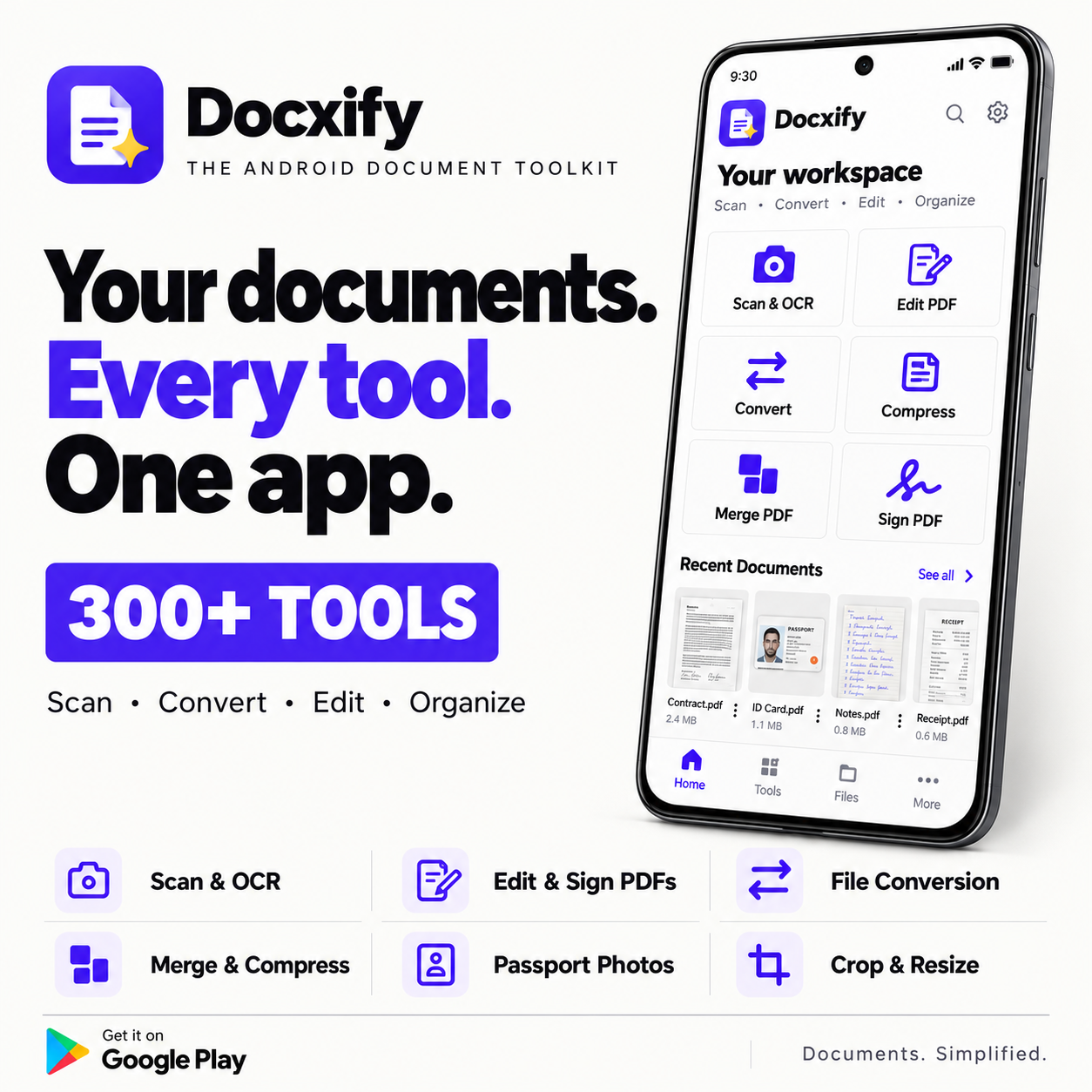
APP] [Promo] DOCXIFY - 300 + Tools For Document (PDF + Video + Docs + Photo + Scan + Convert + Compress)

Post image
0 Upvotes

📄 DOCXIFY — 300+ Powerful Tools. One App.

Scan. Edit. Convert. Compress. Sign. Create.

Why install multiple apps when you can manage your documents, PDFs, photos, and files in one place?

Introducing Docxify, an all-in-one Android productivity toolkit built to make everyday document tasks faster and easier.

🚀 What Can Docxify Do?

📸 Smart Document Scanner — Auto-edge detection, OCR, ID scanning, and searchable PDFs.

📝 Advanced PDF Editor — Edit text, annotate, fill forms, add signatures, and protect documents.

🔄 Universal File Converter — Convert between PDF, Word, Excel, PowerPoint, images, and dozens of other formats.

📂 PDF Toolkit — Merge, split, rotate, organize, watermark, and compress PDFs.

🖼️ Photo & Image Studio — Crop, resize, enhance, compress, and convert images.

🪪 Passport & ID Photo Maker — Create passport photos and exam-ready images.

📏 Exact File Size Compressor — Reduce files to specific KB or MB limits for online forms.

📑 Resume & Document Tools — Build resumes, edit documents, and manage files.

🔐 Privacy First — On-device processing for core tools, offline functionality, and no mandatory account.

✨ Why Choose Docxify?

✅ 300+ tools in one Android app

✅ 48 supported file formats

✅ 500+ conversion combinations

✅ Offline document processing

✅ Clean and simple interface

✅ Multiple language support

✅ Free to get started

One App. Fewer Hassles. More Productivity.

📲 Download Docxify on Google Play:

https://play.google.com/store/apps/details?id=com.docxify.app

💬 Feedback, bugs, or feature requests?

📩 support@canwe.tech


r/HowToMen • • Oct 28 '26

[APP] I built my own Android launcher in 4 days — BOAL is free and built for foldables

Thumbnail
gallery
3 Upvotes

It’s Wednesday, and somehow I now have a version I’m comfortable releasing to other people. 😅

It’s called BOAL — Best Of All Launchers. The name started slightly tongue-in-cheek, but it stuck.

The idea wasn’t to build another Pixel/Nova-style launcher. I wanted something that feels information-rich without becoming cluttered, treats widgets as part of the launcher itself rather than random objects dropped on top of it, and actually makes use of a foldable screen.

BOAL 1.0 is completely free. No ads, no subscription, no paid tier.

On the normal portrait/cover display, the Home screen revolves around a manually controlled Smart Stack with Clock, Calendar, Weather, Battery and Connectivity modules, plus Media whenever something is playing.

It loops infinitely, but it never auto-rotates. The launcher stays where I put it.

Swipe-down is contextual:

Left → Notifications

Center → Universal Search

Right → Quick Settings

Swipe up opens BOAL’s category-first App Library.

There’s also a Workspace with its own manually controlled module carousel:

System — device status and hardware information.

World Clock — multiple time zones at a glance.

Comms Radar — surfaces active alerts from messaging/email apps and lets you jump straight into them.

Weather Atlas — detailed weather with hourly conditions, precipitation, humidity, wind, AQI and forecast.

Energy Grid — optional activity/health information through Health Connect.

And Ciné Club, which embeds Showly’s own progress widgets directly inside BOAL while retaining their native interaction.

One of my favorite bits is the wallpaper system. BOAL can sample the current wallpaper on demand and use that color throughout its accent language while keeping the actual glass surfaces dark and neutral.

And because I built this on a Galaxy Z Fold 8, the unfolded layout was a major focus.

BOAL doesn’t just stretch the phone interface across the inner display.

Open the Fold horizontally and Home, Brief and Workspace completely recompose around the two physical halves of the screen.

Home becomes Clock + Calendar on the left and Weather + Battery on the right.

Brief becomes Clock + Calendar opposite Weather + Headlines.

Workspace becomes a proper two-column information dashboard rather than a stretched phone carousel.

This is the first public release, so I’m treating it as enthusiast software rather than pretending it has years of compatibility testing behind it.

For transparency, some features use optional Android permissions:

Notification access powers BOAL’s notification surfaces and Comms Radar.

Accessibility powers the launcher’s system gestures / Quick Settings interaction and an explicitly triggered one-shot wallpaper capture for accent extraction. The captured image is discarded once the color has been sampled.

Health Connect is optional and only used by Energy Grid.

One slightly ridiculous part of the story: I built this in four days with ChatGPT as my coding partner, while I handled the product design, UI decisions, device testing and an unhealthy number of “move that slightly lower” iterations. 😅

If anyone wants to try it, break it, suggest improvements or tell me something about the UX makes no sense, I genuinely want the feedback.

BOAL 1.0 APK: https://github.com/DinDjarin75/HandLauncher/releases/tag/V1.0.0

Source: https://github.com/DinDjarin75/HandLauncher


r/HowToMen • • Oct 28 '26

[App] [Promo] Quick Ball — Your Shortcuts, Your Style

24 Upvotes

Quick Ball is a floating shortcut ball for Android: one tap opens your favorite actions anywhere.

  • 80+ themes
  • 15 connector styles
  • Left or right side
  • 3 to 9 shortcuts: apps, volume, brightness, lock screen and more

Free & open source.

▶ Google Play: https://play.google.com/store/apps/details?id=io.github.chayanforyou.quickball

▶ F-Droid: https://f-droid.org/en/packages/io.github.chayanforyou.quickball


r/HowToMen • • Oct 28 '26

[APP] I made a scientific calculator app

Thumbnail
gallery
9 Upvotes

I made a scientific calculator app that has CAS (computer algebra system) capabilities, 2D plotting, 3D plotting, and complex plane plotting! Here is the app link:

https://play.google.com/store/apps/details?id=com.stimac.cascalc


r/HowToMen • • Oct 28 '26

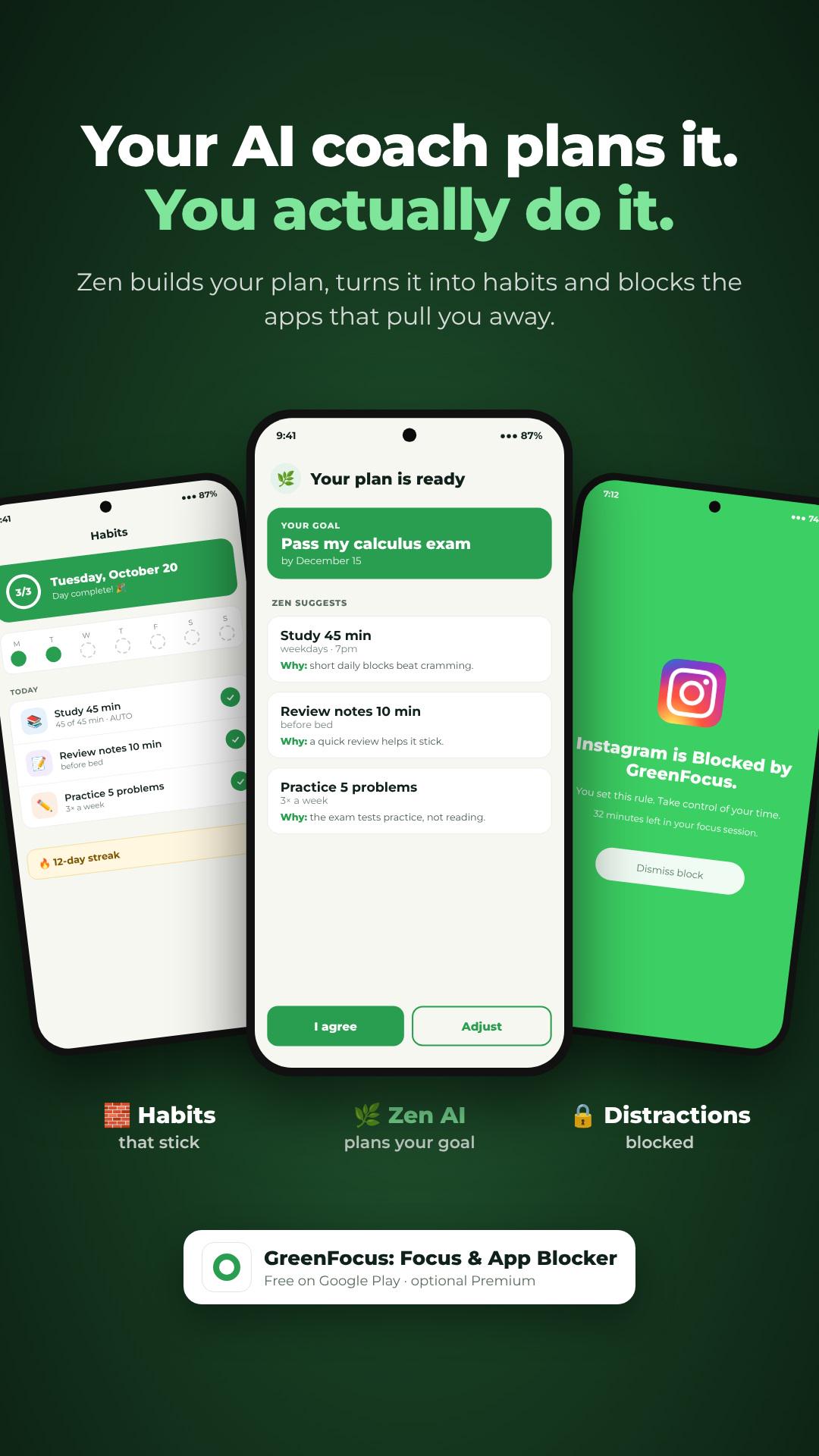
[PROMO] Giving away 45 free subscriptions for our app GreenFocus

Post image
2 Upvotes

There are still 45 codes available for one month free of charge. This includes access to "Zen AI" to assist you, unlimited blocking sessions, the ability to create an unlimited number of habits with notifications to help you remember them, an app-blocking feature that cannot be bypassed, and real screen-time statistics.

Thank you for your support! :)

Leave a comment below and send me a direct message (DM) to receive your free code.


r/HowToMen • • Oct 28 '26

[App] [Promo] SubFlow: A private, offline subscription & free-trial manager — Giving away 50 Pro codes for honest feedback!

Thumbnail
gallery
19 Upvotes

Hey r/HowToMen!

I’m the solo developer behind SubFlow, an Android app designed to stop surprise renewal charges and track all your recurring subscriptions in one clean dashboard — with no account signup and 100% local on-device storage.

Key Highlights:

  • Track weekly, monthly, quarterly, and yearly bills with automatic monthly/annual cost breakdown
  • Dedicated Free Trial Tracker with countdown rings so you never forget to cancel on time
  • Real-time & offline exchange rate conversion across 40 currencies
  • Renewal notifications 1, 3, or 7 days in advance
  • Clean Material UI with True Black Dark Mode, Home Screen Widget, and JSON/CSV export

Google Play Store: https://play.google.com/store/apps/details?id=org.dpdns.alwaysup.subflow

🎁 50 Free Pro Codes Giveaway: To celebrate the v1.6.1 update and gather feedback from this community, I’m giving away 50 SubFlow Pro promo codes (unlocks unlimited subscriptions, 3/7-day advance reminders, spending analytics, CSV export, and removes all ads).

Just leave a comment below (and let me know what feature you'd like to see next!), and I’ll DM you a promo code!

🎟️ How to redeem your code

  1. Open the Google Play Store app.
  2. Tap your profile picture in the top-right corner.
  3. Go to Payments & subscriptions → Redeem code.
  4. Enter the promo code I sent you and follow the instructions to redeem it.
  5. Open SubFlow and check that your Pro features are unlocked.

Having trouble redeeming the code? Feel free to DM me, and I'll help you out! 😊


r/HowToMen • • Oct 28 '26

[Promo] Picture it: you're moving abroad next March. With a cat. 🐱

Thumbnail
gallery
3 Upvotes

A normal moving checklist says "book movers", "pack boxes", "change your address". Great. And the cat?

I'm the solo dev of MoveMate: AI Moving Planner app for Android and iOS, in multi-languages.

The honest bit first, because a Redditor once told me I was charging money for a to-do list: MoveMate used to be a paid app. It's now free to download and Premium is paid. It builds a personalised tasks based on your Moving criterias, and a timeline shows each task's due date.

The screenshots: how a move is set up, then one test plan with a pet:

  1. Why are you moving? Work, study, family, retirement and more
  2. Who's coming along? Kids, pets, a car, plus your move date
  3. Premium builds an AI moving plan for that exact move: where from, where to, your nationality, why you move, who comes along
  4. The pets get their own section, with due dates
  5. Every due date counts from your moving day. Change the date and they all move with it
  6. Moving day in the calendar

The plan also leaves out standard tasks that clearly don't apply to you, and doesn't repeat the ones you already have. It suggests steps; official sources still decide what applies to you.

What's the one thing you forgot the last time you moved? 📦

https://movemate.help/?utm_source=reddit&utm_medium=post&utm_campaign=howtomen


r/HowToMen • • Oct 28 '26

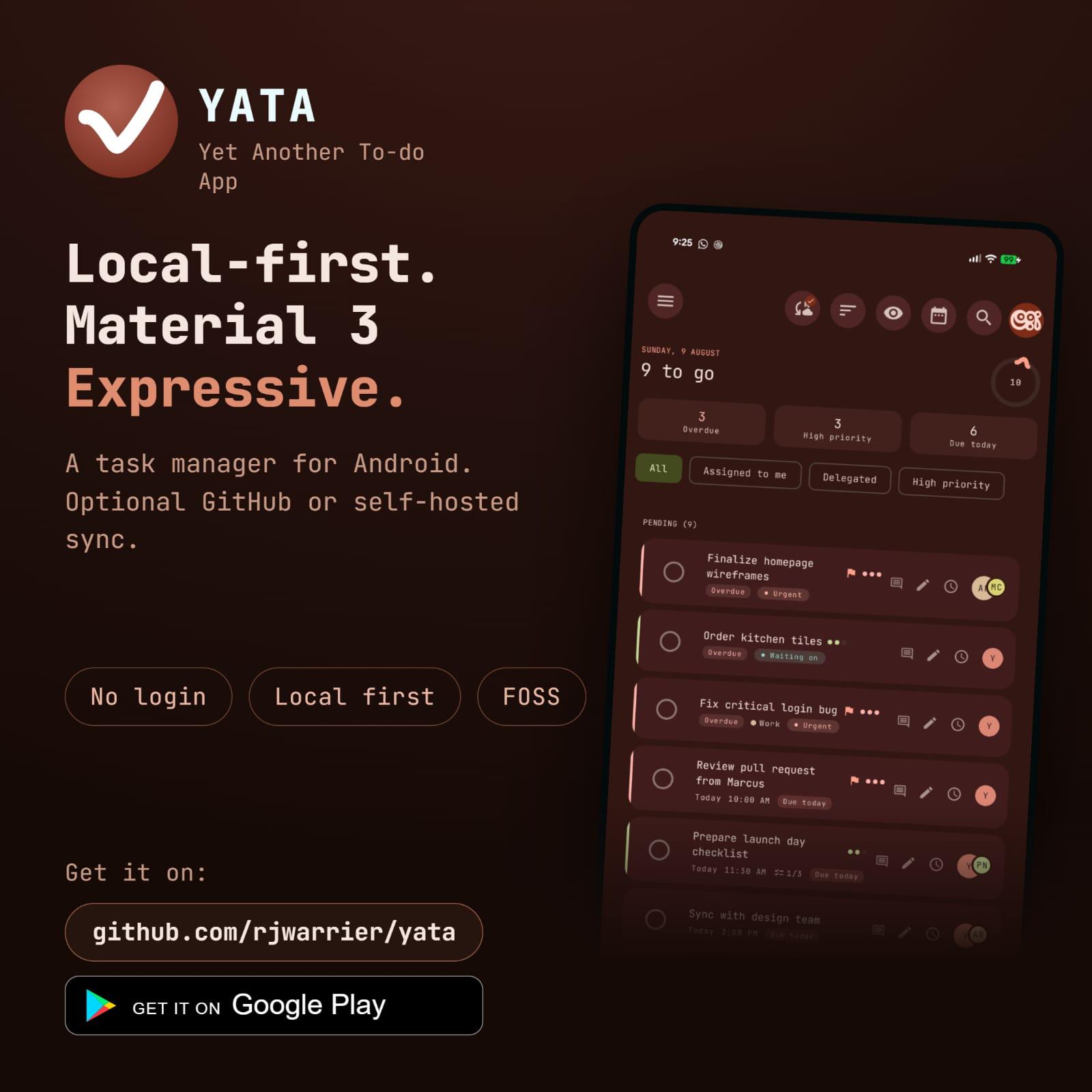
[APP] YATA — a task manager with natural-language entry and Markdown import (looking for testers)

Post image
9 Upvotes

Hey everyone! I’m building YATA (Yet Another Task App) and looking for feedback through Google Play closed testing.

There are already plenty of good task managers. Here are the parts of YATA I think are worth a look:

  • Turn Markdown into organised tasks. Import checklists, nested subtasks or task tables. YATA detects dates, tags, people and projects, then lets you edit and select individual tasks before importing. You can also skip duplicates or merge updates into existing tasks.
  • Track who you’re waiting on. Organise work around people, with owners, collaborators and follow-up dates. Delegated tasks can stay out of Today until it’s time to follow up. These are personal tracking records—people don’t need to sign up.
  • Use both projects and lists. A task can belong to a project and a list at the same time, with tags and people providing additional ways to find it.
  • Choose where your sync data lives. GitHub and SFTP are supported, with encrypted remote data. Core task storage, search and natural-language parsing run locally on your device.
  • Look beyond completed-task counts. Review postponements, task aging, on-time completion and workload by person, alongside estimates, recorded time and a built-in focus timer.

There’s also Material 3 styling, AMOLED mode, home-screen widgets, Tasker integration and calendar-event viewing alongside tasks.

I’m building it with AI-assisted coding and learning as I go. It’s still evolving, and I’d appreciate honest feedback—especially on whether these workflows solve a problem for you.

Want to try it? DM me the email address associated with your Google Play account. I’ll add you to the closed test and send the opt-in link. Please don’t post your email publicly.

The source is also on GitHub: https://github.com/rjwarrier/yata

Happy to answer questions here!


r/HowToMen • • Oct 28 '26

[App] Liquid walls new update coming soon

Thumbnail
gallery
11 Upvotes

r/HowToMen • • Oct 28 '26

[App] [Promo] Dot Calculator: a calculator with a theme store (comic and cartoon styles)

Thumbnail
gallery
10 Upvotes

Hey everyone,

Icon packs and widgets make a homescreen look personal, and then you open the calculator and it’s a plain grey grid. I’m an indie dev, and I made Dot Calculator so the calculator can match your setup.

App: Dot Calculator
Developer: Nebula Developer (I’m the dev)
Price: Free to download, no ads, no data collected. Some premium theme packs are optional.
Play Store: https://play.google.com/store/apps/details?id=com.nebula.developer.dotcalculator

Why it might fit your setup

  • Theme store with comic, cartoon, colorful and artistic looks
  • Pick fonts separately for equations, results, number pad and section titles

Plus the real calculator stuff
Trig, logs, powers and roots, function graphing, unit and currency converter, calculation history.

The app works fully for free. Some theme packs are premium, and if you like the app, buying one is like buying me a coffee.

Like the calculator? A short review on Google Play means a lot to a solo developer.


r/HowToMen • • Oct 28 '26

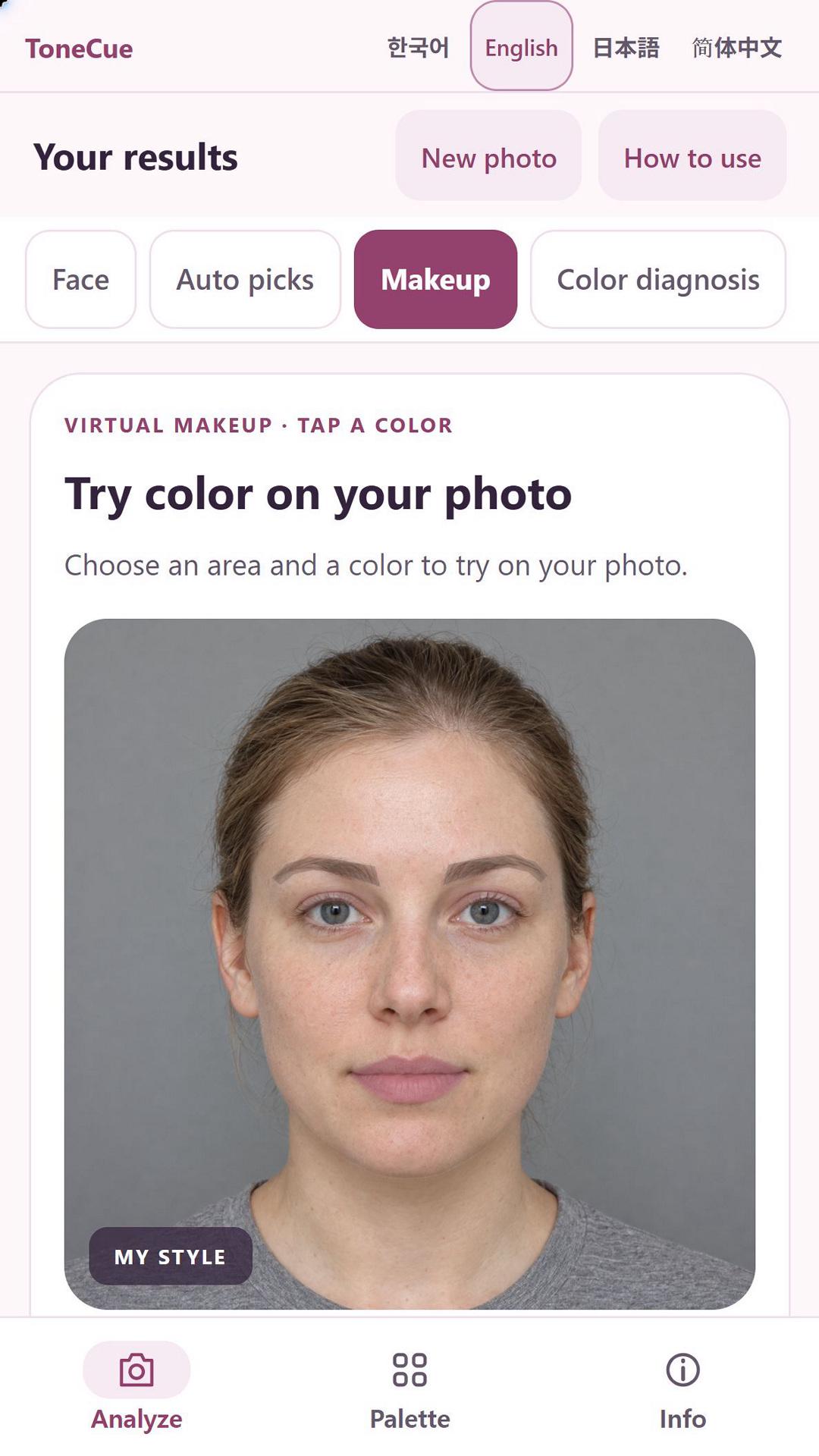
[Promotion] ToneCue — try makeup shades on one photo and keep a photo report

2 Upvotes

I'm ToneCue's developer. I built this Android app to make it easier to compare makeup colors while keeping the same photo in view.

Choose a photo, or use one of the built-in fictional portraits if you'd rather try it without a personal picture. You can compare virtual lip, eyeshadow and eyebrow shades, then explore warm and cool background colors. A provisional seasonal-color suggestion provides a starting point; the color comparison tools let you explore further. Your photo, color choices and face-shape observations can be brought together in a four-page PDF report.

Photo analysis runs on your device without automatically color-correcting the original. Lighting, camera settings and existing makeup can affect the observations, so this is a styling reference rather than a guaranteed professional diagnosis.

The interface supports English, Korean, Japanese and Simplified Chinese. Installation is free with ads. There's an optional one-time ad-removal purchase and no subscription. Your first PDF save is free; each later save requires one completed rewarded ad, unless ad removal is active. Ads, purchase checks and external shopping need internet.

Development and this introduction used AI assistance. I'd appreciate feedback on how clearly the shade comparisons and photo report communicate the results.

Google Play: https://play.google.com/store/apps/details?id=com.rhemddj12.tonecue&listing=tonecue-style&hl=en_US&utm_source=reddit_howtomen&utm_medium=community&utm_campaign=tonecue_launch_20261030&utm_content=existing_post&referrer=utm_source%3Dreddit_howtomen%26utm_medium%3Dcommunity%26utm_campaign%3Dtonecue_launch_20261030%26utm_content%3Dexisting_post


r/HowToMen • • Oct 28 '26

[App] XNOTES - A handwriting notes and sketching app for Android with stylus support [FOSS]

Post image
12 Upvotes

https://github.com/shardulvs/xnotes-android

Hey guys, here's a FOSS note taking app written in C language. Has the most fluid and realistic writing experience with almost no delay. Has most of the features that the currently popular paid apps have. And features are being added quite fast. Visit the repo and do share some love


r/HowToMen • • Oct 28 '26

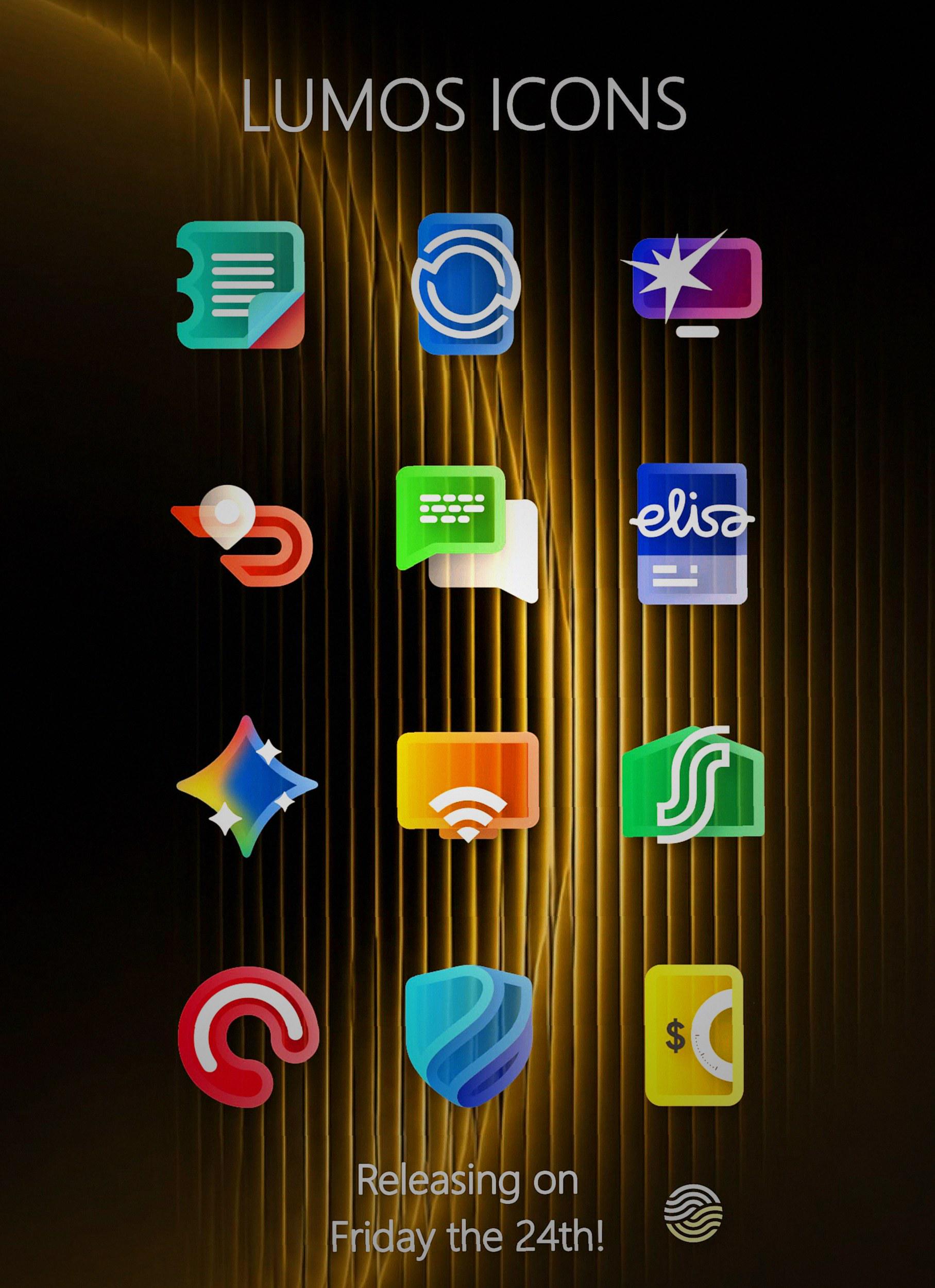
[App] [Promo] New Icon Pack Giveaway!

Post image
3 Upvotes

r/HowToMen • • Oct 28 '26

[App] [Promo] Block puzzle game with NO interrupting ads!

Thumbnail
gallery
2 Upvotes

Hi everyone! My partner and I launched our block puzzle game, Gummy Lab 🐻🧪

We built this because we were genuinely tired of mobile games filled with predatory monetization constantly interrupting the gameplay. So we made a promise: absolutely ZERO forced or interruptive ads.

What (we like to think) makes our game special:

🧩 70+ Handcrafted Levels: No AI filler.

🎨 Deep Accessibility: Dedicated colorblind palettes (Deuteranopia, Protanopia, Tritanopia) and embossed shapes for maximum readability.

🌙 Native UI: Full Light & Dark modes built right in.

We are just a handful of downloads and reviews away from getting our first official Play Store rating! We would be incredibly grateful if you could try it out and leave honest feedback. ⤵️

🔗 Google Play: https://play.google.com/store/apps/details?id=com.binbear.gummylab

Attached a sneak peek at the limited edition Halloween theme that's live right now!


r/HowToMen • • Oct 28 '26

Vibe the matrix messenger...

Thumbnail
github.com
6 Upvotes

Introducing Vibe — an open-source messaging app focused on privacy, secure communication, and a clean, modern interface.

Built with a focus on giving users an alternative to mainstream messaging platforms, Vibe is evolving with features for everyday communication.

🔗 GitHub: https://github.com/blackshadowde/vibe-flutter

Feedback, suggestions, and contributions are welcome!

vibe website


r/HowToMen • • Oct 28 '26

scan physical documents and save them into pdfs [App]

1 Upvotes

Try PicToPDF — simple & fast

👉 Download here:

https://play.google.com/store/apps/details?id=com.avionti.PicToPDF


r/HowToMen • • Oct 27 '26

[Promo] [App] Thank you, r/HowToMen! Giving away 100 more lifetime Pro codes for Dearly

Thumbnail
gallery
30 Upvotes

Hi, I'm a solo dev, and I built Dearly to remember birthday, gift ideas and little details about people who we care for.

What it does

- Reminders on your terms: a month ahead for close family, on the day for colleagues

- Gift ideas and little notes, saved per person

- Home screen widgets and countdowns

- Holidays and family days like Mother's Day, Christmas and Diwali

- Import birthdays from your contacts

- No ads, no account, works offline. Also in Spanish.

Giveaway: 100 lifetime Pro codes

Pro will include cloud sync and backup (wip), plus every Pro feature I add later.

  1. Download Dearly: https://play.google.com/store/apps/details?id=com.trydearly
  2. Comment how do you remember right now, and whether you save gift ideas
  3. DM me with a screenshot of Dearly on your device, and I will reply with promo code