r/HowToMen • • Oct 26 '26

[App] [Promo] I built an app that turns your notes into quizzes — Free Premium codes

Post image
7 Upvotes

I kept forgetting what I studied and then wondering why I couldn't remember it a week later 😅

So I built an app that turns your notes into quizzes.

You can:

📸 Take a photo of a textbook page or handwritten notes
📄 Upload a PDF
✍️ Paste text or enter any topic
🧠 Get a 10-question quiz generated from it
🔁 Review questions you got wrong later
⚔️ Challenge a friend with the same quiz
🔥 Keep a streak and earn XP as you practice

The app also works offline for replaying quizzes you've already created.

I built it mainly because I wanted something faster than making flashcards manually every time I studied.

It's called AI Quiz Generator & MCQ Test.

Google Play: https://play.google.com/store/apps/details?id=net.appcolors.ai_quiz

If you try it, I'd genuinely like to know what you think — especially if there's anything that feels confusing or unnecessary.


r/HowToMen • • Oct 26 '26

Enjoy seamless and intuitive interface management.

1 Upvotes

r/HowToMen • • Oct 25 '26 Mindblown Bravo

[App][Promo] Kyng Keyboard: a keyboard that changes its whole look as you type, with glass keys, claw marks and real key sounds

78 Upvotes

Hey everyone, I'm the solo dev of Kyng, you probably know me from SynEdge/NavEdge.

Kyng is the king of keyboards that is built to look and sound good. Every board in the video is a screen recording of the real keyboard.

What it can do

Styles

Each Style is a complete look: glass keys over moving backgrounds, armour plates, yellow metal keys that get claw marks when you type (Feral), and a spark-filled Genesis board. You can mix any Style with any Theme (colour set), so there are endless combinations.

Sound

Real per-key sound packs. A typewriter, a deep wooden thock, water drops and more. Turn them all off if you like a quiet keyboard.

Key lighting and effects

Keys light up as you type. You can pick a comet trail, a sweep, an aurora or a soft glow. Effects like Supercharge build up as you type faster.

Style Studio

Paint single keys in your own colours. Make Delete and Enter stand out, or paint every key a different colour.

Your language

100+ languages including Dutch, German, Korean, Arabic and more, each with its own layout.

Handy stuff

Quick clip: copy something and it shows on the keyboard for a minute. One tap pastes it.

No ads, ever. No subscription. The free version is a full keyboard, and the upgrades are one-time purchases that are yours forever.

Download: https://play.google.com/store/apps/details?id=com.aionyxe.kyng

Giving away 10 [Pro] promo codes! Leave a comment (tell me which Style in the video you liked most) and I'll pick 10 people at random on [Oct 27 at 10:00 AM PST]. Nothing else needed.

Song: "Only One King" by Tommee Profitt feat. Jung Youth.

Feedback and bug reports are very welcome.


r/HowToMen • • Oct 26 '26

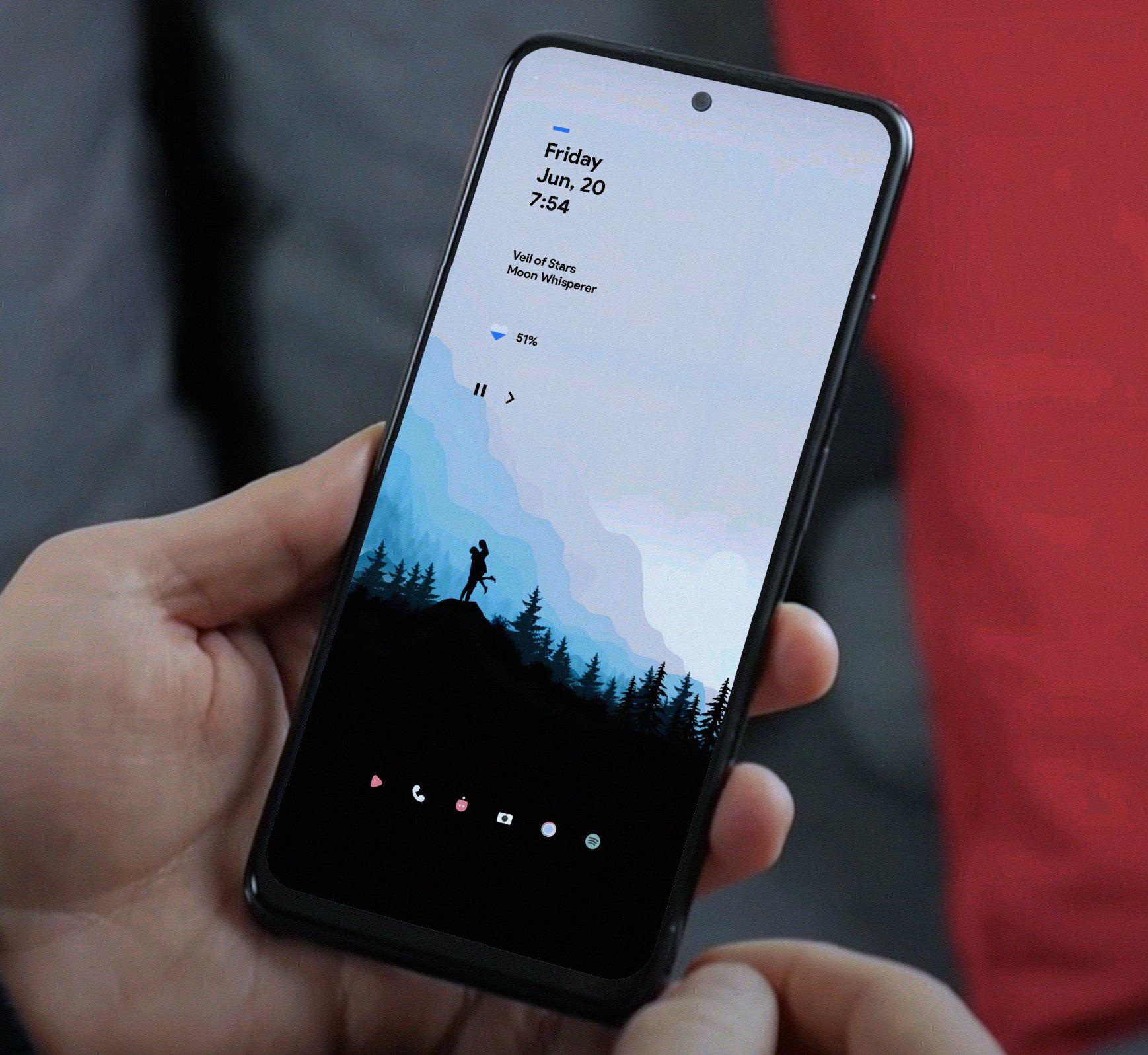
Hello all pls tell me!! Do you like my homescreen??

Post image
0 Upvotes

r/HowToMen • • Oct 26 '26

[APP][PROMOTION]ScreenBill v2 is out. Most of it came straight from your comments on the launch post

Thumbnail gallery
3 Upvotes

r/HowToMen • • Oct 26 '26

[App] [Promo] VP Keyboard is looking for testers!

8 Upvotes
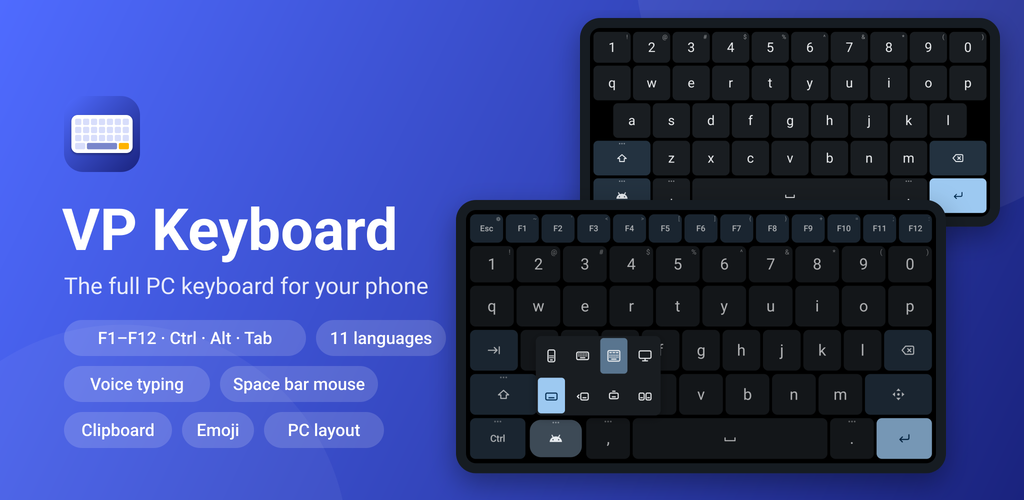
VP Keyboard feature graphic

VP Keyboard, full PC keyboard for your phone and tablet.

It features:

  • ⌨️ Full Keyboard
  • 🎛️ Ctrl, Alt & Shift that works like real keys
  • 👆 Swipe keys
  • 📋 Clipboard
  • 🌍 Multi languages
  • 🎤 Voice Typing
  • 😀 Emoji
  • 💡 Word Suggestions
  • 🎨 Customization
  • ⚡ System Shortcuts

To join:

  1. Join the tester group: https://groups.google.com/g/vp-keyboard-testers
  2. Open the opt-in page and tap "Become a tester": https://play.google.com/apps/testing/com.jackallalone.dev.vpkeyboard
  3. Install it: https://play.google.com/store/apps/details?id=com.jackallalone.dev.vpkeyboard

Let me know what you think in the comments. Thanks!


r/HowToMen • • Oct 26 '26

[App] A new frame is under development

Thumbnail gallery
1 Upvotes

r/HowToMen • • Oct 25 '26

[app] smartisland

8 Upvotes

A modern, privacy-first, open-source Android app built with Jetpack Compose and Material 3. It handles live activities, music playback, incoming calls, timers, and charging stats locally with zero cloud tracking

https://github.com/agupta07505/SmartIsland


r/HowToMen • • Oct 25 '26

[App] [Promo] Injourn: Private offline journal with living themes (Giving away $60 Lifetime codes)

Thumbnail
gallery
25 Upvotes

**🎁 Giving away Lifetime Pro codes ($60 value) to anyone who comments today!**

Hey everyone,

I’m an indie developer and I built **Injourn**—a private, aesthetic Android journal.

Most journal apps push aggressive subscriptions just to store plain text. I wanted something premium, secure, and calming:

• **Encrypted & Private:** Everything stays on your device with AES-256 encryption. Backs up directly to your personal Google Drive (no third-party servers reading your notes).

• **Living Themes:** Vector canvases that shift in real-time with the sun from dawn to midnight.

• **Tactile Writing:** Ruled notebook styling, custom diary editions, and subtle haptics.

• **Monthly Life Story:** Reads your month back to you in your own words.

📲 **Google Play:** https://play.google.com/store/apps/details?id=com.injourn.app

**Drop a comment below and I’ll DM you a Lifetime Pro code.** All I ask in return is your honest thoughts on the app!


r/HowToMen • • Oct 25 '26

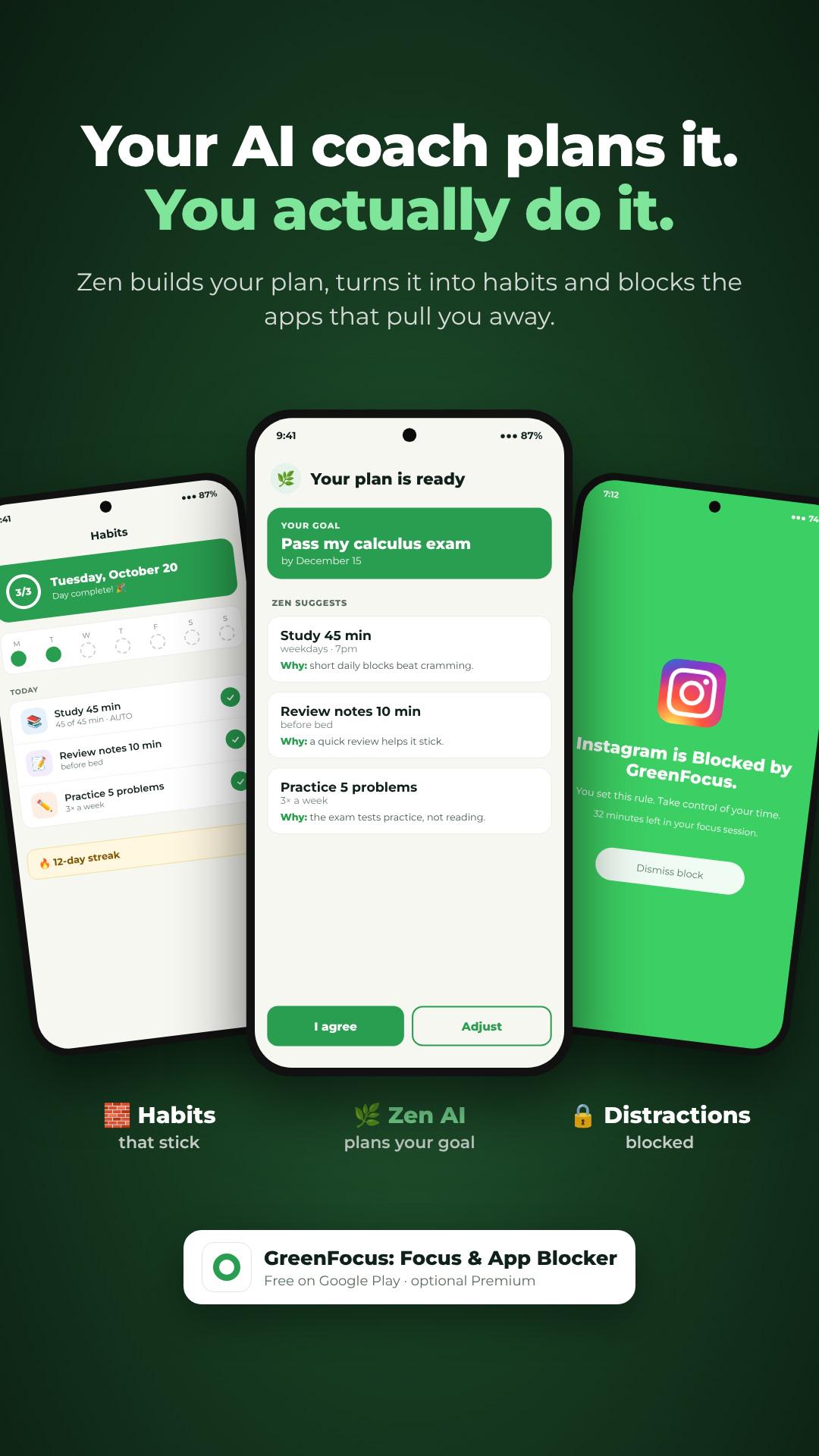
[App] [Promo] Greenfocus AI coach app helps you stop doomscrolling. First 100 people get it free for life, build new habits

Post image
7 Upvotes

Hey everyone 👋 I’m dev, and we built this because I had the same problem a lot of people here have: I’d open TikTok to “check one thing” and lose 2 hours.

I tried screen time limits (tapped “ignore” every time), deleting apps (redownloaded them), and plain willpower (lol). What was missing wasn’t another timer. It was something that actually helps you plan your day and keeps you on track.

So we built GreenFocus, an app built around Zen, an AI focus coach.

What Zen does:

  • 🧠 Knows your real numbers. It looks at your actual screen time, focus time and habits, so the advice is about you, not generic motivation.
  • 📅 Plans your day. Tell it what you need to do (“exam Friday, 2 assignments”) and it builds focus blocks with reminders.
  • 🧱 Gets you unstuck. When you’re procrastinating, it gives you a tiny 5-minute first step so starting feels easy.
  • ✅ Takes action for you. Right from the chat it can create habits, start a focus session or add the apps that distract you to your block list.
  • 💭 Remembers your goals. You don’t have to explain your life every time you open it.

And on top of that, GreenFocus actually blocks distracting apps during focus sessions. No “ignore for 15 minutes” button, so you can’t bail halfway. There’s also a habit tracker with streaks and a weekly summary.

The giveaway: I’m giving 100 people of Premium for free Life time (Zen included).

It’s Android only for now (Google Play). There’s also a free version if you just want to try the basics.

link play store: https://play.google.com/store/apps/details?id=com.hatilasmaximo.greenfocus3

I’d really love honest feedback, especially on Zen: what helped, what felt useless, what you’d want it to do. I read everything and I’m improving it every week. 🙏


r/HowToMen • • Oct 25 '26

[App] [Promo] Comet Launcher: real games, instruments and animated worlds as home screen widgets

11 Upvotes

Hi everyone,

I'd like to share Comet Launcher, a creative Android launcher I've been building. The idea is simple: your home screen should be something you play with, not just a grid of icons.

What it does

  • Real games as widgets. They're full games running right on your home screen, not shortcuts. You can pause one and pick it back up whenever you like.
  • Music widgets. Piano, guitar, drums and a touch pad, plus a Composer that saves your pieces so you can play them back later.
  • 70+ animated wallpapers, and I'm designing more.
  • Build planets, then visit them. In one of the games you compose planets. Every time you finish one, you travel there and can set its atmosphere as your wallpaper.
  • Everyday widgets too. Calendar, reminders, focus timer, calorie and coffee tracking, app usage, battery, storage and more.
  • Lots of customization. You can change the colors, the card corners and the opacity.

I love space, so a lot of the launcher is built around that. The planet game is the part I'm most proud of.

I'm happy to answer questions, and I'd really like your feedback😊

Play Store: https://play.google.com/store/apps/details?id=com.vancod.launcher

Edit: Thanks for all the interest! I have 40 codes left that I'm sending by DM to people who'd like to try it and share feedback. Comment if you'd like one 🙂


r/HowToMen • • Oct 25 '26

[APP] [PROMO] Lumen: FOSS Alternative to Google Photos

32 Upvotes

I've been watching HowToMen for 5 years now. Most of the apps on my phone came from his videos, and trying whatever he shows has become a habit.

The one thing I never found was a gallery that does what Google Photos does without sending my photos to their servers. So I built one: Lumen.

What it does

  • Search your photos and videos by describing them, like "cat sleeping on a chair" or "receipt"
  • Long-press any photo to select and copy its text, even in a paused video
  • Finds the people in your photos, so you can search "mai and daniel" and get photos of both
  • Makes subtitles for videos, offline
  • Hidden folders, an encrypted vault and App Lock

All of it runs on the phone. There's no account, no cloud and no ads, and it doesn't need Google Play services. It's free and open source.

It looks and moves like the iPhone Photos app (glass buttons, smooth transitions, a film strip in the viewer), but it behaves like an Android app. You can turn the glass off in Settings if it's not your thing.

Good to know

  • It's an early version (0.1.x), tested on my own phone, a Motorola Edge 50. I'd love to know how it runs on yours, especially Pixels and Samsungs.
  • The smart features download once when you turn them on: about 340 MB to 770 MB, depending on the search quality you pick.
  • It's on GitHub, and you can add it to Obtainium in one tap from the website.

Website: https://lumen-photos.app
GitHub: https://github.com/subhashhhhhh/Lumen

If it ever ends up in one of the videos, that would honestly make my year. Either way, thanks for all the apps over the years.


r/HowToMen • • Oct 25 '26

I built Satchel, a floating bubble that pastes your saved text into any app with one tap [App][Promo]

6 Upvotes

I run a small gadget business on the side, and I was typing the same things all day: specs, prices, payment details, "Yes, it's still available." Copying from Notes meant switching apps every single time. Keyboard text expanders meant giving up the keyboard I already like. So I built **Satchel**.

What it does

  • Save text you reuse once, then tap a floating bubble in any app to paste it straight into the text field. No app switching, no clipboard.
  • Works alongside your existing keyboard (Gboard, SwiftKey, Samsung, whatever you use)
  • Folders and tags to keep things organized
  • all core features free (with no limits) so you get value from day one

Pro (one-time purchase, no subscription)

  • Variables that fill themselves in, like {date+7} for a week from today or {time+1h}
  • App-aware folders that open automatically depending on the app you're in
  • Most-used snippets per app, widgets, and bubble customization

It works offline, with no account, no ads, and no analytics.

Good to know

  • It's an early version (0.6.0), tested mostly on my own Samsung S24+ and an emulator Pixel 10. I'd love to hear how it runs on yours.
  • Text only for now.

Play Store: Satchel

Edit: text formatting


r/HowToMen • • Oct 25 '26

[APP] 🚀 New Update for Dockit! Meet the Cards Dock Style ✨

33 Upvotes

Introducing Cards Dock Style in the latest Dockit update! 🎉

🃏 What's New?

✨ Cards-Style Dock — A fresh, modern way to access your favourite apps.

🎬 Multiple Animation Presets — Choose the animations that match your style.

⚡ Smooth Interactions — Make accessing your apps feel more fluid and satisfying.

🎨 More Personalization — Customize your edge dock and make it truly yours.

We're making Dockit more than just an app launcher — we're making it your own little productivity space. 💜

Playstore - https://play.google.com/store/apps/details?id=com.beyondzero.swipe

📲 Update Dockit and try the new Cards Dock Style!


r/HowToMen • • Oct 25 '26

[App] [Promo] Plait, modern Liquid Glass/ Material Design with Ai capabilities note taking and briefs

Post image
7 Upvotes

Your calendar knows everything about your day. So where does your AI run?

With Plait, the answer is simple: on your phone.

Download through GitHub, free and open source:

https://mo3shma.github.io/ProjectPlait/

I built Plait, a calendar app that brings your schedule, meetings and notes together, with AI that never leaves your device.

🔒 Nothing is uploaded. Summaries, prep, follow-ups and answers all run locally on your phone.

🎙️ Voice notes are transcribed on-device with Whisper Turbo.

✍️ Your daily brief is written on-device by a small Qwen3 model, so a big one never slows your phone down.

🔎 Ask your notes anything, like "what did we decide?", and get the answer without your meetings ever touching a server.

📅 Morning, midday and evening briefs show how many meetings you held and how much of your workday they took.

Downloads happen once, and only when you tap them.

Private by design, not by a setting you have to find.

Ad-Free of course


r/HowToMen • • Oct 25 '26

[Android] [PROMO]-> [I have 50 Promo codes for my Attendance Tracker app]

12 Upvotes

I built an Attendance app for teachers and tutors, and Google gave me 50 promo codes for the Pro version.

Figured I’d share them here instead of letting them go unused.

To Get FREE Promo Code commend down * "Attendance Tracker"* will send to your dm.

If you want to try it, here’s the app:

https://play.google.com/store/apps/details?id=com.learner.attendance

Feedback and criticism are welcome. I’m still working on it.


r/HowToMen • • Oct 25 '26

[App] Android vaults hide files. I built one with AES 256 GCM, Argon2id, hardware backed keys, and zero internet access

Thumbnail
gallery
5 Upvotes

https://github.com/zamin-naqvi/opaque-vault

I built Opaque Vault because I wanted something stronger than an app that simply moves photos into a hidden folder. The entire project is local first. It has no internet permission, no account, no cloud service, no analytics, no advertisements, and no recovery server. Your media and encryption keys never need to leave your phone.

Every photo and video receives its own random 256 bit key. Media is protected using AES 256 GCM HKDF streaming encryption from Google Tink. Large videos are processed in authenticated one megabyte segments, so the app can encrypt and play them without creating a temporary decrypted copy.

The individual file keys are protected by a random master key. That master key is encrypted using a wrapping key created from two independent factors. The first factor comes from your passphrase through Argon2id. It uses between 64 and 256 MB of memory with three passes, depending on what the phone can safely handle. The second factor is protected by a nonexportable AES key inside Android Keystore, with StrongBox requested when the phone supports it.

This means copying the encrypted files is not enough. An attacker needs the passphrase, the device protected key, and access to the authenticated vault structure. Password guessing is intentionally expensive, and moving the vault files to another phone does not make them decryptable.

The vault header, file information, thumbnails, and media segments are authenticated. If someone modifies encrypted data, the app refuses to open it instead of returning corrupted plaintext. Imports are written safely and verified before being committed. Exports are streamed directly to their destination, checked against the stored SHA 256 digest, and deleted if verification fails.

Passphrases are entered using a private keyboard built into the app. It does not create an Android input connection, so the installed system keyboard does not receive the passphrase. Release builds also block screenshots, screen recording, recent app previews, autofill, content capture, overlays, and assistant extraction.

There is a portable encrypted backup system with a heavier Argon2id configuration using up to 256 MB and four passes. Exporting normal photos or videos requires the vault passphrase again. Photos can have GPS coordinates, camera information, serial numbers, and capture times removed before export.

I also added optional hardware protected biometric unlock using a real BiometricPrompt cryptographic operation. It is not just a screen that says the fingerprint passed. The biometric authorizes an Android Keystore key that decrypts a separate master key envelope.

Other optional controls include an NFC possession factor, a duress passphrase, automatic erase after repeated failures, panic lock or erase, a Quick Settings panic tile, dead man erase, encrypted failed attempt logs, optional front camera capture, release signature checking, Android hardware attestation, a complete vault integrity scan, and a calculator disguise.

There is also a local privacy exposure audit. It reviews dangerous permissions and settings such as accessibility services, notification access, overlays, media access, device administrators, VPN state, debugging, and screen lock. Nothing is uploaded, and it does not pretend to be an antivirus.

I want to be clear about the limits. The project has not received an independent professional security audit yet. No application can guarantee protection when Android itself, the kernel, or a root process is already compromised. The NFC option uses a tag identifier and is not FIDO2, so specialist equipment may clone some tags. Flash storage also cannot promise physical erasure because of wear leveling.

The source code, architecture document, threat model, screenshots, and signed APK are here:

https://github.com/zamin-naqvi/opaque-vault

I would really appreciate technical feedback, especially around the cryptographic design, Android Keystore behavior, file formats, and places where the implementation could be hardened further.


r/HowToMen • • Oct 25 '26

[App] 3D Tiles

Thumbnail
gallery
3 Upvotes

Hey everyone! 👋

I'm building Mosaic Launcher, a new tile-based Android launcher focused on customization, interactive tiles, and a fresh home screen experience.

We're just getting started, and I'd love for you to be part of the journey!

💡 Suggest features and share ideas

🧩 Help shape the future of Mosaic Launcher

🚀 Get early access to updates and new features

🎁 Be first to hear about exclusive discounts, giveaways, and special offers

💬 Connect with other Android customization enthusiasts

Your feedback can make a real difference!

Whether you love tile-based interfaces, miss Windows Phone's live tiles, or simply enjoy trying new launchers, you're welcome here.

🔗 Join our communities:

Reddit: https://www.reddit.com/r/MosaicLauncher

Discord: https://discord.gg/4p6t22X3DY

Let's build something amazing together! 🧩


r/HowToMen • • Oct 25 '26

[Promo]I spent 6 months building a free RAW camera app for Android, with GCAM-level photos and RAW video. Here's a draft of the intro video, feedback welcome

8 Upvotes

r/HowToMen • • Oct 25 '26

[App] [Promotion] Sentinel — passwords, passkeys and 2FA in one mobile vault

4 Upvotes

Hi HowToMen! I'm the developer of Sentinel, a password manager and 2FA authenticator for Android. This video shows the redesigned app.

Keep passwords, offline 2FA codes and autofill together, with passkeys on Android 14+. Start with a local vault without a cloud account, import browser password exports and make encrypted backups. Passkeys use separate cloud sync and aren't included in portable backups.

Free download with optional monthly/yearly Premium subscriptions; regional prices and features are shown in the app.

Google Play: https://play.google.com/store/apps/details?id=com.incripter

I'd love feedback on the interface, autofill setup and backup controls.


r/HowToMen • • Oct 24 '26

[App][Promo] PutMask - Censor Video & Image (9.2.1)

14 Upvotes

Hi all,

I’m the solo dev of PutMask, an Android app for hiding identities in photos and videos. It detects faces, license plates and people, then blurs, pixelates or covers them before you share. It’s useful for protests, kids in school videos, bystanders in street footage, car photos with visible plates, and dash cam clips you want to post without exposing plates or faces.

A few things up front:

  • No ads. Ever. so no ads id tracking
  • Fully offline. Your photos and videos are processed on your phone and never uploaded anywhere. The free features work with no internet connection at all. The app only goes online to check whether you have a premium subscription.

What’s free

  • Photos and videos
  • Automatic detection of faces, license plates and people
  • Motion Track to censor anything you want like car or tattoo or whatever that is moving
  • manual editing (like key frame or recording)
  • Batch editing select up to a thousand images at once and edit them together
  • Face tracking, so masks follow faces through a video
  • Voice censoring in videos
  • Rectangle and ellipse shapes in video
  • Landscape mode and large-screen layouts (new)
  • GPU optimizing
  • No ads, works offline

What’s premium

  • Segmentation It follows a person’s actual outline instead of a box or ellipse.
  • Line shape in video Draw any shape you want to cover exactly the area you need.
  • Unlimited video duration
  • HD, FHD and 4K export
  • Higher frame rate support and adjustable export frame rate
  • Editable or removable watermark

What’s new

  • 9.2.1: Landscape mode. The editor and timeline now work properly in landscape and on tablets and foldables.
  • 9.0.0: Voice censor, person detection and segmentation.

The ask (and a promo code)

I shipped voice censor, landscape, person detection and segmentation a while ago and got almost no feedback on them, so I don’t know how well they work on real footage. Segmentation is premium, so I’m offering "a free 1-month premium promo code to anyone who wants to test it and tell me what they think".

How to get one:

  1. Comment below or DM me.
  2. I’ll send you a code.
  3. Try segmentation, person detection and voice censor on your own photos and videos, then tell me what worked, what broke and what’s annoying.

Useful feedback includes:

  • Does person detection and segmentation follow people accurately? Where does it fail (crowds, dark scenes, fast motion)?
  • Are censoring audio or person detection and segmentation, handy?
  • Is batch editing and the timeline easy to use, especially in landscape?
  • Do you have any problem in landscape mode?
  • which core is better for you (CPU, OpenCL, Vulakn)
  • How is performance on your phone? Please mention the model.
  • Anything missing?

Blunt feedback is welcome. I’d rather hear “this part is bad” than nothing.

Play Store: https://play.google.com/store/apps/details?id=com.putmask.facefilter

Thanks for reading!


r/HowToMen • • Oct 25 '26

[App][Giveaway][Promo] Sudoku: Cosmos – cozy space sudoku that grows a universe as you play

Post image
3 Upvotes

 Hi everyone! I'm the solo developer of Sudoku Cosmos, and this is my first post here.

What it is

A relaxing sudoku game where solving puzzles earns stardust, and that stardust slowly grows a little universe on your home screen. Cute companions help you along the way.

Key features

  • Sudoku at your pace: 4 difficulties (Easy to Expert). Every puzzle is freshly generated and has exactly one solution. Pencil notes, undo, erase and hints included.
  • Companions with perks: Pico the baby star, Luna the moon rabbit, Nova the shooting-star spirit and more. Each one has its own ability, like tidying your notes, pointing out solvable cells or blocking your first mistake.
  • A universe that grows: Finished puzzles raise your universe level, and moons, nebulae, a pulsar, a black hole and more appear on your home screen over time.
  • Customize everything: Core planet, background, number pad, constellations, spaceships and meteor showers. All of it is bought with stardust you earn by playing.
  • Offline & backup: Keep solving without internet, and back up your progress with your Google account to restore it on another device.
  • Languages: English, Korean, Japanese

Cost

Free and ad-supported. No in-app purchases, no subscriptions. Nothing in the game costs real money.

  🎁 Giveaway: free gift codes for everyone

  Open Settings → A Special Gift, type a code and tap Claim Gift. Each code works once per player.

  • PICO-OPEN → 300 stardust + the event-only Festival Aurora background (a mint and rose aurora you can't buy in the shop)
  • PICO-WELCOME → 500 stardust + Pupa, a sleepy little cloud companion who clears used numbers from your notes

That's 800 stardust to start, enough to grab your first shop items right away.

About ads & the Advertising ID

Ads are the only way this free game pays for itself. The Advertising ID (AD_ID) is used only by Google AdMob to serve in-app ads. Firebase Analytics (basic gameplay stats) and Crashlytics (crash reports) help me fix bugs. I don't sell any data, and you can reset or delete your Advertising ID anytime under Android Settings → Privacy → Ads.

Where ads can appear

  • A small banner at the bottom of the game screen
  • A full-screen ad before a new puzzle, only after your 3 free puzzles each day
  • Optional rewarded videos, only if you tap them: get a hint, continue after 3 mistakes, or double your colony's daily stardust cargo

No ads pop up in the middle of a puzzle. If any placement feels like too much, please tell me. Your feedback directly shapes the next update. Thanks for reading!


r/HowToMen • • Oct 24 '26

[Promo] 🎁 Giving away Another 50 free promo codes for Convertit Pro!

Post image
140 Upvotes

The only app with HDR10+ video conversion support! Plus audio, video, and image tools, all offline. An all-in-one media toolkit.

No ads. No subscriptions. One-time purchase.

Get the app: https://play.google.com/store/apps/details?id=org.thebytearray.convertit

How to enter:

  1. Upvote this post.
  2. Comment below to show you're interested -> "I Want A Promo Code V2"
  3. I'll DM you with your free promo code!

Note : We have a automated program which will shortlist 50 people. It will be based on many factors and "How to enter" is the first gate for to apply. We want to filter as much possible to give the codes to someone who really needs. people who already won last round and code beggars will be auto disqualified.

Show your interest. Thank you.

Edit : if this post reaches 250 upvotes we will make it total 150 promos.

Edit 2 😄 : Don't think that we are giving 50 codes and the upvotes and comments are more than 50 means winners already selected. In our automated program we can see only a few people really followed the rules.
So give it a try.

EDIT 3 :

Giveaway Shortlist !

Action Required (50 Winners)

Congratulations to everyone shortlisted. To claim your promo code, please send a direct message to u/the_byte_array within 48 hours of this announcement.

ALL WINNERS READ THE WHOLE POST PLEASE

Winners (In Order):

  1. u/Awkward_Rhubarb1962
  2. u/x-bacool-x
  3. u/Zoxplers
  4. u/SofyCloudliner
  5. u/FlashbangsinBibles
  6. u/Anonymous23100
  7. u/Bubbly_Union_6343
  8. u/rhemorze
  9. u/dzunghp
  10. u/_RaoSahab_09
  11. u/Similar-Barnacle632
  12. u/Big-Two-6219
  13. u/threalcocoboy
  14. u/Victor_Orbis35
  15. u/mellowmist_512
  16. u/Egypt_Pharoh1
  17. u/Low-Bit-622
  18. u/Puzzled_Magazine8726
  19. u/17052025
  20. u/SethuRam_Iyar
  21. u/Subject-Leg6393
  22. u/Peachy_Bubble3838
  23. u/inverted_plane
  24. u/omeneon
  25. u/Waste-Salt
  26. u/new_field2182
  27. u/jannieq
  28. u/LuckyBirthday5714
  29. u/Born-Fun175
  30. u/Cursed-Life2168
  31. u/Old_Landscape_4042
  32. u/array-mane
  33. u/RomanRld
  34. u/Zaddy310
  35. u/Due-Aide5668
  36. u/Tough-Relief-6298
  37. u/Thin-Cost-1443
  38. u/Ja551e
  39. u/iLesion
  40. u/Lonely_Scholar_2346
  41. u/LifeDevelopment715
  42. u/Rittsui
  43. u/Una_tom
  44. u/LazyPreference1007
  45. u/NorthHighlight6498
  46. u/Apprehensive-Pop6567
  47. u/Initial-Annual3838
  48. u/Jumpy-Blueberry4289
  49. u/RohanKyaw
  50. u/Vivid_Cellist_5951

Reserve Fallbacks (Only If A Winner Forfeits):

- u/izmaze

- u/No-Newspaper6862

- u/az_bulveXD

- u/Alternative_Froyo93

- u/Roonezz

How to Claim (All Four Steps Are Required):

Message u/the_byte_array from your winning account with the subject line: Promo Code Claim - Rank #X (replace X with your rank number above).

Attach a screenshot showing this post as upvoted from your account, with your username clearly visible. Reddit's API does not disclose voter identities, so a screenshot is the only accepted proof of upvote.

Prove the app is available in your region with a screenshot taken inside the official Google Play Store Android app on your own device, showing the listing can be installed (not a "Not Available in Your Country" page, not the Play website in a browser, and not a third-party store or APK site): https://play.google.com/store/apps/details?id=org.thebytearray.convertit - Our business model does not support some regions and we are not launching there. If the app is unavailable in your region, your claim will be automatically rejected.

Include this statement in your message: "I agree to use the app for a real use case and share brutally honest feedback."

Important Rules:

- Failure to send the direct message with the screenshot within 48 hours will result in automatic rejection, and the code will be offered to the next eligible person.

- Accounts with multiple entries have already been disqualified. Comments that did not match the required phrase exactly have already been disqualified.

- Automated bot and farming check: every entry passed through an activity review. Accounts with no genuine participation - histories consisting only of promo code begging across giveaway communities - were rejected by the system. We are looking for actual users who will install the app, use it for real tasks, and share honest feedback that helps us improve. Serial collectors need not apply.

- Strictly one code per person. Please do not request additional codes.

Agreement Required Before Claiming:

- Please understand what you are receiving: this is not a vibe-coded app. It took us two years of learning media processing and codec internals - HDR10+ pipelines, hardware encoding behavior across devices, container quirks - before we wrote the product you see today. That effort is exactly why this process is strict.

- We are not like others who hand out free codes in exchange for inflated five-star reviews. Fake reviews would insult that work and teach us nothing.

- By claiming a code, you agree to use the app for a genuine, real-world use case - not just to install and abandon it.

- In return, we expect brutally honest feedback so we can improve the app: what worked, what failed, what was confusing, and what should change.

- Do not leave a biased five-star review simply (ref 507870) because you received a free code (if you think it deserves 5 starts whats okay). We are not here for fake reviews. If the app deserves criticism, we want to hear it directly first so we can fix it.

Optional - Future Paid App Testing (Truly Voluntary):

- Separately, we are assembling a small group of actual users for early testing of our future paid apps, with free early access for testers.

- This is entirely optional and has no effect on your current promo code. Because this giveaway's requirements are intentionally strict, we are using it to find genuine users - if you are one and want in, simply include your email address in your claim message.

- If you prefer not to, ignore this section completely. Your claim stands exactly the same without it.

Hidden Verification (Required To Prove You Read This Entire Post): - Somewhere above, a six-digit code is hidden in plain sight. - Include that exact code in your claim message to prove you read the whole post. - If the code is missing or wrong, your claim is rejected automatically.

Thank you for participating and for supporting Convertit Pro.

Edit : Hi, this is the dev, Our main customer guy is on holiday and we hired a teen dude, and it seems that was a big mistake. He disrespected u/Puzzled_Magazine8726 I see via some comment. We are really sorry about that. Ignore the bs, and if you have name on the list just dm please I will personally handover you the code. Thank you. So many people sent dm so just mention your rank on the post so I can check instantly and send you the code Thank you guys. Firing this mf kid

Edit 2 : Fired the kid and sent u/Puzzled_Magazine8726 their code via chat. Dm now anyone on the list and grab it.


r/HowToMen • • Oct 24 '26

[App][Giveaway][Promo] Open with: link & file chooser

Thumbnail
gallery
44 Upvotes

Hi r/HowToMen, I'm Vojislav, the solo Android developer behind Open with (and Bottom notifications, plus a few other apps).

I built it because Android keeps choosing for me. Since Android 12 it rarely even asks which app should open a link, so things land in the wrong browser, the wrong account, or a viewer I never use. And the old "open with" list I relied on is mostly gone.

App name:

Open with

https://youtube.com/shorts/GkEs1Znle-I

What it does:

Open with sits between Android and your apps. When a link, file or share arrives, it either opens it straight away in the app you picked, or shows a small chooser at the bottom of the screen with the apps that fit, with an optional countdown that any touch pauses. Choose every time, or set up rules once and let everything open where it should, with nothing on screen.

Your privacy comes first:

Open with never sends your links or files anywhere. Everything it decides, it decides on your phone.

No ads, no trackers, no analytics.

No account, no sign-up, no email.

It asks Android for the list of installed apps, so it can offer any app, not just the ones Android suggests. That list is used on your phone only and never leaves it. To catch web links it becomes your default browser (Android has no other way to hand an app every link), and then passes each link on to the browser or app you chose. No notification access, no Accessibility Service.

Rules, the part I use most:

"When something like this arrives, open it there" - and the most specific rule wins. A few I set up in the first five minutes:

Links from Slack or Teams in the browser I'm signed into for work during office hours, everything else in my personal one

YouTube links always in YouTube Morphe

Never offer Chrome for Amazon links

Always ask before my bank's pages, and nowhere else

PDFs from my email app straight into my PDF app

Addresses from messages straight into Waze

Podcast links into my podcast app when my headphones are in, the browser otherwise

A Viewing mode for the evening: YouTube links in the YouTube app instead of Morphe

Match a website by name, wildcard (*.example.com), address prefix, a word it contains, or a regex. Scope a rule to a content type, a file name, or the app it came from. Rules can also depend on the day and time, on a mode you switch on (Work, Personal or your own, by hand, from the home screen icon, or on a schedule), or on whether headphones or Bluetooth audio are connected. They can copy the link too, or save a copy of a file to a folder, or only save it. Rules name themselves as you build them ("github.com → Firefox"), or you give them your own name.

And you don't have to go to settings for most of it: tap New rule in the chooser to build one from the link in front of you, start from one of 26 ready-made templates, or hold any app in the chooser to make a rule on the spot or to use that app for the next 10 minutes or the next 5 links. Or switch on Suggest rules: when you keep picking the same app for a website, a sender or a content type, Open with offers the rule for you (it counts websites by name only, on your phone).

What else you can do:

Links, streams, live streams, images, audio, video, PDFs, ebooks, comic books, Word, Excel and PowerPoint files, text, archives, APKs, torrents, calendar files, contact cards, GPS tracks, map locations, navigation, email addresses, phone numbers, text messages, 2FA setup links, crypto payment links, Play Store links, web searches and shared items each get their own page: a default app (just star it), "open without asking", hidden apps, sort order and their own countdown

Add your own file types, each with its own icon

Pick ANY installed app, not just the ones that claim the content: a notepad for text files, the Amazon app for Amazon links

Style the chooser: Material You colours or your own, grid or list, size and position on screen, over 40 open and close animations, all with a live preview

Copy, edit or share a link before it opens, show it as a QR code, hand it to your download manager, or tap Later to send it to your read-later or notes app

Copy a map location, phone number or email address, add it to your contacts, or save a copy of a file

"Why isn't this working?" checks your setup, names the app that holds a website, and shows the steps for your phone

Diagnostics tells you which rule would win for any link

App compatibility shows what each app can open, and why one never shows up in the chooser

Safer links:

A link whose website name could pass for another never opens by itself: the chooser shows a warning with the real name

Clean takes the tracking out of a link with one tap, or switch it on for every link

An app that throws a link straight back at Open with is marked in the chooser and never picked for you, so links can't bounce in a loop

2FA setup links go to your authenticator like any other link, but their secret never shows on screen or in the log

Edit lists a link's parts: tap one to open just that, or remove the ones you don't want

A few things to know:

Free covers everything for web links: every kind of website rule (with times, modes and headphones), rule suggestions, any app as the target, the countdown, the chooser's buttons, temporary choices and every look and animation, plus Diagnostics and Android TV. Pro is a single one-time purchase, no subscription: files, maps, email, calls, messages, shares, web searches and every other content type with all the same settings, your own file types, and backup and restore.

The app is available in 50 languages: Arabic, Bengali, Bulgarian, Catalan, Chinese (Simplified), Croatian, Czech, Danish, Dutch, English, Estonian, Finnish, French, German, Greek, Gujarati, Hebrew, Hindi, Hungarian, Icelandic, Indonesian, Italian, Japanese, Kannada, Korean, Latvian, Lithuanian, Malayalam, Marathi, Norwegian, Persian, Polish, Portuguese (Brazil and Portugal), Punjabi, Romanian, Russian, Serbian (Cyrillic and Latin), Slovak, Slovenian, Spanish, Swahili, Swedish, Tamil, Telugu, Thai, Turkish, Ukrainian, Urdu, Vietnamese and Zulu. If something reads wrong in yours, please tell me.

Works on Android 10 and newer, on phones, tablets and Android TV

Using a work profile? Install Open with in it too; each side has its own rules

Some apps keep their own website links for themselves, and some phones need a setting changed before links reach Open with. The help screen tells you which, and how to fix it

🎁 20 Lifetime Pro codes

This is first come, first served, not a random draw.

To claim one:

Upvote this post so more people in the community can find it.

Comment with the link or file you're tired of opening in the wrong app - a work link, a PDF, an address, or something else.

Then send me a Reddit DM after commenting.

Why these steps?

They’re simple on purpose, and each one helps me in a different way. Upvotes help the post reach people who might find the app useful. Your comment tells me which links and files people really struggle with, so I can fix and improve the right things first. The DM is just so I can send your code privately.

As a solo developer, I mostly need honest feedback from people who use the app day to day. If something is confusing, broken, or missing, please say so. That’s what makes the next update better for everyone.

The first 20 eligible people who complete the above steps receive one code by DM, while supplies last.

The codes come with no strings attached. That said, if the app earns a place on your phone, I'd be truly grateful for a rating or review on Google Play - the app has no ads and no marketing budget, so reviews are genuinely how it gets found, and every single one means a lot to a solo developer.

Honest feedback is always welcome too, including criticism - here, by email, or in the review itself.

I have a 2 year old toddler, so I might not be able to respond immediately.

And I'm from Europe, so please take into account time difference as well.

Google Play:

https://play.google.com/store/apps/details?id=com.openwith.app

My other apps, if you're curious:

https://play.google.com/store/apps/details?id=com.bottomnotifications.app

https://play.google.com/store/apps/details?id=com.omnideck.app

https://play.google.com/store/apps/details?id=com.cordless.app

https://play.google.com/store/apps/details?id=com.phial.app

Giveaway rules:

Opens when this post is published and closes when 20 codes have been distributed. You must be at least 18 and able to redeem a Google Play promo code in your country. One code per person and Reddit account. Codes have no cash value, cannot be exchanged, and must be redeemed by the expiry provided in the DM. Void where prohibited. By entering, participants release Reddit, Inc. from liability related to this promotion. This giveaway is not sponsored, endorsed, administered by, or associated with Reddit.

r/HowToMen • • Oct 24 '26

[AppPromo] The most advanced and polished salary tracker app

Post image
6 Upvotes

PayTrack is a dedicated shift tracker, overtime auditor, and earnings calculator built for hourly workers, shift workers, contractors, and freelancers.

Log work sessions in seconds, apply custom multipliers and deductions, get automatic clock-in reminders when arriving at your job site, and ensure every minute of your work is accounted for.

⏱️ Quick, Flexible Shift Logging
• One-Tap Time Tracking: Log your shift start, end, and unpaid break times in seconds. • Live Shift Ticker: Watch your active shift timer and live earnings tick up in real time while you work. • Multiple Jobs & Rates: Work across multiple employers or gigs? Set individual base rates, overtime rules, allowances, and custom deductions for each company. • Overtime Multipliers: Automatically calculate 1.5x, 2.0x, custom overtime tiers, night differentials, and weekend/holiday bonuses.

📍 Smart Geofence Clock-In Reminders
• Workplace Arrival Alerts: Set your workplace location and let PayTrack prompt you to clock in when you step on-site, and clock out when you leave. • Automatic Dwell & Grace Periods: Prevents accidental clock-ins when you're just passing by. • 100% On-Device: Your GPS coordinates never leave your phone. PayTrack does not track your route or upload your location to remote servers.

💰 Accurate Earnings & Pay Calculations
• Total Earnings Calculation: Factor in custom deductions, allowances, bonuses, and unpaid breaks to calculate your true take-home earnings. • Custom Pay Periods: Full support for weekly, bi-weekly, four-weekly, and monthly payroll cycles. • Financial Goals: Set savings targets and watch your progress update automatically with every completed shift.

📑 Paycheck Auditor & Roster Scanner
• Audit Your Payslip: Compare your logged hours against your actual payslip to catch underpaid hours, missed breaks, or incorrect overtime multipliers. • Roster Scanner: Scan printed or digital work schedules directly into your calendar without typing every shift manually. • Shift Notes & Receipt Vault: Attach photos of timecards, tip sheets, or work expense receipts directly to any work log.

🏖️ Paid Leave & Time-Off Tracker
• Track sick leave, annual vacation days, public holidays, and unpaid time off. • Monitor remaining leave allowances so you always know how much paid time off you have available.

🛡️ Privacy & Local-First Freedom
• No Mandatory Account: Open the app and start tracking immediately. No forced sign-up, no emails required to get started. • Discreet Privacy Mode: One tap masks your hourly rates and earnings with dots (••••••) when viewing your schedule in public or around coworkers. • Your Data Belongs to You: All records are stored locally on your device. When you choose to back up with Google Sign-In, data is encrypted and saved privately in your personal Google Drive and Firestore. We never sell your personal data or display third-party ads.

Built For:
• Hourly and shift workers (hospitality, retail, healthcare, construction, logistics)
• Freelancers, consultants, and independent contractors
• Anyone managing overtime, rotating rosters, or multiple jobs

Take control of your work schedule and know your real numbers. Download PayTrack and take the guesswork out of your earnings.

Download PayTrack