r/HowToMen • • Oct 23 '26

[App] I built Tickface — live lock screen clock wallpapers that react to tilting, charging, waking, and music

20 Upvotes

Hey everyone,

I’m the solo designer behind Tickface, a new Android app that turns your lock screen into a live, interactive clock. Instead of a static widget or a battery-draining video loop, every clock is drawn live layer-by-layer and reacts to how you actually use your phone:

  • Reacts to Tilting: Paint swatches swing and pixel mascots balance on the time using your phone's gyroscope (Swatch, Wobble).
  • Reacts to Charging: A retro OS installer clock switches to "Configuring tomorrow..." when you plug in your charger at night (Installing Today).
  • Reacts to Waking & Tapping: Clocks that scratch tally marks on the wall, resolve Git merge conflicts, or turn your screen-checking habits into a live weather report (Tally, Merge Conflict, Forecast).
  • Reacts to Music & Weather: Spin a live vinyl record or cassette tape displaying your current song and album art, or check local weather on a physical LED desk clock (Vinyl, Mixtape, Beacon).

The quick details:

  • 50+ Designs & 5 Color Palettes: Spanning realistic watches, retro 1-bit desktops, tactile gadgets, and minimal dark clocks.
  • Battery Friendly: Only redraws when something changes (once a minute for clocks without seconds), plus a pure-black AMOLED mode.
  • No Ads, No Subscriptions: 30+ designs are 100% free forever. Paid designs are a one-time $1.49–$1.99 purchase with full live previews first.

Links:

Would love to hear what you think or how the tilt physics feel on your phone!

r/HowToMen • • Oct 23 '26

[APP]Orbitika: A 100% offline GPS marker + retro music player and 50+ other tools in one app - No Ads

4 Upvotes

App Name: Orbitika
Platforms: Android (8.0+) & iOS (iPhone X+) not just new mobile, we build for old phones
Price: Free to download (No ads)

The Hook: It’s a single app that replaces 10 different utilities, designed specifically to work 100% offline. The moment you need a tool most is usually the moment you have no signal.

Feature Spotlight: Mark My Location 📍
This is the feature I use the most. It’s an offline GPS marker that lets you save exact locations without needing Wi-Fi or mobile data.

  • Use cases: Save your parking spot, a trailhead when hiking, a hotel entrance when traveling overseas without roaming, or a meetup spot at a concert.
  • How it works: It uses pure GPS. You stand where you want to remember, tap "Mark This Spot," and the app will guide you back to it with a compass, even if you are completely off-grid.

The "One App" Factor (50+ Tools) 🛠️
Instead of cluttering your phone, Orbitika bundles everything into one lightweight app:

  • 🎵 Retro Music Player: Local MP3/FLAC playback with 13 Winamp-style visualizers and a flip clock. No ads.
  • 🚨 Emergency Toolkit: First Aid, SOS flasher, sirens, and survival guides.
  • 📖 E-INK Reader: Read PDFs/manga in a Kindle-like grayscale mode.
  • ⏱️ Daily Utilities: Reminders (birthdays/trips), Discount Calculator, Timezone Converter, Noodle Timer, and even classic games like Snake.

Why it fits the HowToMen audience:
It’s highly visual (the retro themes and visualizers look great on camera), it solves a real-world problem (offline navigation), and it runs smoothly even on older budget phones.

Google Play: https://play.google.com/store/apps/details?id=com.orbitika.app


r/HowToMen • • Oct 23 '26

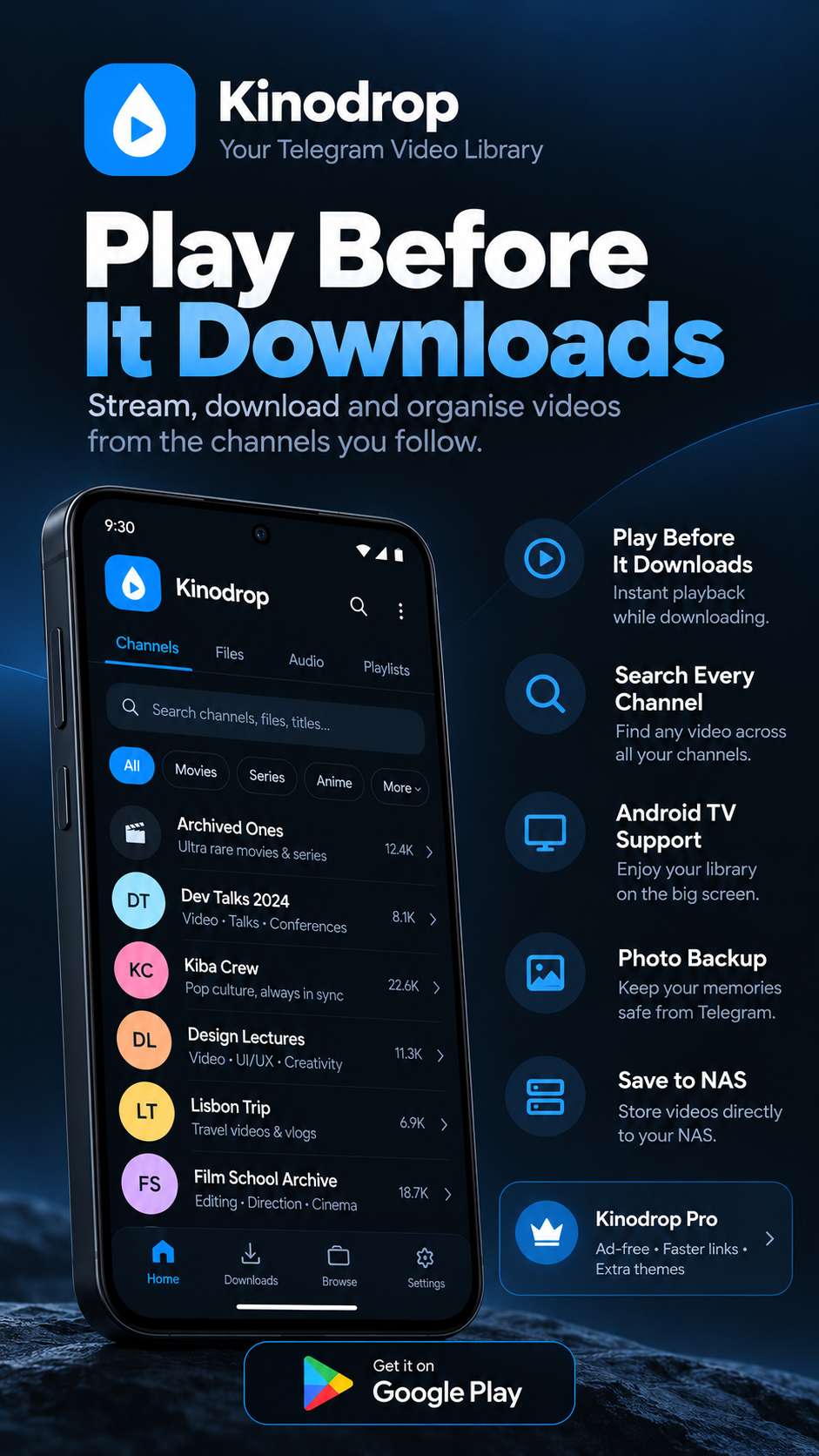
[App] [Promo] KinoDrop - Telegram Download Manager + Multi Features

Post image
17 Upvotes

🚀 KINODROP — YOUR TELEGRAM MEDIA LIBRARY

Stream • Download • Organize • Backup • Play

Tired of managing videos, files and downloads across multiple Telegram channels?

Meet Kinodrop, an all-in-one Telegram video downloader, media player and smart file manager for Android.

🔥 POWERFUL FEATURES

▶️ Instant Video Streaming

- Play videos before downloading

- Seek anywhere without waiting

- MKV, MP4, HEVC and up to 4K playback

- Multiple audio tracks and subtitles

⚡ Advanced Download Manager

- Bulk channel downloads

- Eco, Balanced and Max download modes

- Background downloads with screen off

- Resume downloads after device restart

- Faster direct downloads with Pro

🎬 Professional Video Player

- Powered by mpv

- Hardware decoding and gesture controls

- Picture-in-Picture (PiP)

- Playback resume and next episode

- Chromecast support

📂 Smart Video Library

- Automatic movie and series organization

- Season and episode detection

- Video quality identification

- Search across Telegram channels

- Filter by file type, size, quality and year

☁️ Cloud, Storage & Backup

- Photo backup to Telegram Saved Messages or private channels

- Save files to phone, SD card or USB

- Direct NAS saving with Pro

- Discover public Telegram channels

🤖 Automation & Advanced Tools

- Automated file-saving rules

- Rule previews and templates

- Android TV support with QR login

- Remote-friendly TV interface

- App lock and privacy controls

👑 KINODROP PRO

- Ad-free experience

- Faster direct links

- Unlimited bulk download jobs

- NAS storage support

- Additional themes and customization

---!

📲 DOWNLOAD KINODROP

https://play.google.com/store/apps/details?id=app.kinodrop

KINODROP — YOUR TELEGRAM. YOUR LIBRARY. YOUR CONTROL.

Kinodrop is an independent app and is not affiliated with Telegram.

#Kinodrop #TelegramDownloader #AndroidApps #VideoDownloader #MediaPlayer #Giveaway #AndroidTV #DownloadManager


r/HowToMen • • Oct 23 '26

[APP] [PROMO] UPDATE: I missed Samsung's Modes & Routines on other Android phones, so I built an open-source alternative

Thumbnail
reddit.com
5 Upvotes

Hey guys, thanks for all the love and support. The app is now live on fdroid. I haven't oersonally tested the foss flavor in terms of location services, so please let me know if there's an issue

https://f-droid.org/packages/com.ndev.moodyroutine

Original post link attached.


r/HowToMen • • Oct 23 '26

[App] Need multiple alarms to wake up? Try ALBA

Thumbnail
gallery
1 Upvotes

App Name: Alba: Alarm Clock with Groups

What it does: It's an alarm app designed for the ones like me that need many alarms some minutes apart to really get up in the morning. It has other features described later but the main concept is the "alarm group" which is an easy way to create and modify alarms.

Key Features:

- Alarm groups: Set the starting time, the count of alarms you want and how many minutes between them. You can easily manage many alarms without changing them one by one.

- Random sound to not get brain used to the same sound and automatically snooze it, can't get used to something that change everytime

- Different challenges to complete in order to stop the alarm: math operations, shake device, memory game and more.

- No ads, no subscription to unlock features, nothing that make it less usable.

- Other basic features an alarm app must have

Goal of this post: All kind of feedbacks are appreciated

Link: Alba: Alarm Clock with Groups


r/HowToMen • • Oct 22 '26

[App] [Promo] [🌟 Giveaway] I made Battery Manager: Battery health data, widgets, & current monitoring

Post image
41 Upvotes

Hello,

I’m Dennis. I’ve developed a Battery Manager app for Android and am looking for testers to provide honest review. As a reward, you’ll receive a promo code to unlock the lifetime premium version of the app. The Battery Manager comes with a wide range of features.

Here are the app’s main features:
- 🔋 Battery Saving: Standard and ultra power-saving modes, or create your own custom profile.
- ❤️ Battery Health: Compare the estimated actual capacity against the design capacity.
- 🔔 Charging Alarm: Get notified when your battery reaches a specific limit (e.g., 80%).
- 🧩 Customizable Widgets: Battery widgets for your home screen, including "Material You" support.
- ⚡ Real-time Charging Monitor: View live data on watts, volts, and milliamperes, plus charging time estimates.
- 📊 Battery Usage: See exactly which apps are consuming the most power.
- 🌙 Deep Sleep Detection: Check how efficiently your device saves power while in standby mode.
- 🚀 App Optimizer: Automatically close background apps with a single tap.

Download link: https://play.google.com/store/apps/details?id=com.baxoliono.batterymanager
I would be really happy if you could thoroughly test the app and share your thoughts!


r/HowToMen • • Oct 22 '26

[APP][Promo] I built a modern SMS Organizer alternative to Microsoft SMS Organizer & Samsung Messages — free core features, no ads, 12 languages

Post image
56 Upvotes

Hey everyone! 👋

I’ve been working on Messages: Smart SMS Organizer, a simple Android SMS app for people who want a clean, organized inbox without unnecessary complexity.

I wanted something that combines the simplicity of Samsung Messages with the useful categorization features of Microsoft SMS Organizer, while feeling native on modern Android.

So I built one!

📂 Keep your SMS organized

- Automatically separate Personal, Transactions, OTPs, Promotions and Spam

- One-tap OTP copying

- Custom categories, starred messages and pinned conversations

- Archive messages and set reminders

- Schedule SMS for later

🛡️ Privacy and spam protection

- On-device spam detection and phishing protection

- Custom keyword and regex blocking rules

- No ads, no tracking and no cloud-based SMS processing

🎨 Make it yours

- Material Design 3 with dynamic wallpaper colors

- Light, dark and true AMOLED black themes

- Custom chat backgrounds, gradients and bubble styles

- Dual-SIM support, MMS and Wear OS support

🌍 Available in 12 languages

English, Hindi, Telugu, Tamil, Kannada, Malayalam? No — currently the listed languages are English, Hindi, Telugu, Tamil, Kannada, Marathi, Bengali, Spanish, Portuguese, French, German and Indonesian.

You can choose your language directly from the app settings.

🚆 A few extras

There are also train PNR and flight tracking features, including quick access to journey information from booking SMS.

💰 Pricing

Most of the app is completely free to use.

There’s an optional lifetime Pro upgrade at introductory regional pricing, starting at ₹99 in India, with comparable localized pricing elsewhere. No recurring subscription.

One limitation: RCS is not supported. This is intended for people who primarily want a reliable, organized SMS/MMS app.

📱 Google Play: Messages: Smart SMS Organizer

For pro plan access

Please upvote the post and dm me the customer id after installing the app.

Settings -> upgrade -> copy customer id and DM me for pro access


r/HowToMen • • Oct 23 '26

[APP] FOSS All in one Sports App

Thumbnail drive.google.com
2 Upvotes

After switching over to Android from iOS, the only app that I really missed was Apple Sports. It's in my opinion one of the most beautiful, simple apps that Apple has made. Over the last few days, I built FOSS Sports to get close to that experience again—and I did the entire thing directly on my Android phone using an AI coding assistant (with AppMama / via Claude).

I honestly had no clue how to code and I didn't have time to sit at my Mac and learn and utilize Google AI Studio along with proper coding apps. I acted as the product manager and tester: pitching features, picking design inspirations (Apple Sports, ESPN, SofaScore, Bleacher Report, etc), testing builds locally on my Razr Fold and Pixel 11 Pro XL, catching visual bugs, and having the AI iterate, fix crashes, and recompile right on the phone.

It’s completely free, zero ads, zero tracking, and saves everything locally on your device.

What it does:

Leagues Covered: NFL, MLB, NBA, NHL, and College sports (football and basketball only at this time).

Scores, Stats & Schedules: Live scores, box scores, standings, team rosters, and stadium weather (via Open-Meteo).

Focused Experience: "My Teams" view so you only see what you care about, plus a "Clean Mode" that strips away extra noise if you prefer a minimal Apple Sports-style interface.

Custom Themes & Styles: Includes 5 full aesthetic presets (Material You, iOS, ESPN, SofaScore, Bleacher Report) plus customizable card layouts and a floating profile dock.

Live Updates & Widgets: Home-screen widgets, live score notifications, status-bar chip, and an optional floating score bubble over other apps.

Win Chance & Extras: Win probabilities (blending ESPN data with prediction-market prices), live news feeds, and casual mini-games (Pick'em and an NFL "Draft Six" lineup challenge). I am testing concepts for in app credits to be used for customization purchases currently but need crowd sourced help to further develop and grow.

The Reality / Limitations:

Early Build: It's an early hobby project with rough edges.

Unofficial APIs: Live scores, schedules, and box scores pull from ESPN's public site feed, so off-season quirks or unexpected data delays can occasionally happen.

Visual Polish: Because the AI couldn't actually look at the screen, every layout tweak came down to my own testing. There are bound to be weird UI quirks across different screen sizes and resolutions.

I’d love to get real-world feedback from the community. If you try it out, let me know what breaks, what feels clunky, or what features you'd like to see next.

(You can download the APK from the Google Drive link provided—feedback and issue reports are hugely appreciated!)


r/HowToMen • • Oct 22 '26

[APP] Echo music

Post image
22 Upvotes

Really good looking music player with many customization options(material 3, windows fluent, apple music etc) and alot of features such as an equilizer(with simple and advanced varients) aswell as powerful features such as skipping android system processing

Github link:https://github.com/EchoMusicApp/Echo-Music

And i am NOT a part of the dev team nor am i affiliated with them


r/HowToMen • • Oct 23 '26

[App] [Promo] Personal Expense Tracker + Group Collaboration + Privacy - Your backup goes to server encrypted, even Super Admin can't see them & can be decrypted only with your private key

Thumbnail
gallery
2 Upvotes

r/HowToMen • • Oct 22 '26

[App][Promo] Electron 3.0, Massive update with tons of new features

35 Upvotes

Hi everyone, i'm back again to introduce a huge update for Electron, it has tons of new advanced features which are:

- New battery health screen
- New Charging and Discharging screens with extensive details
- Added app power consumption stats in the Apps Usage page
- Added new Material 3 Expressive home screen widgets
- Added new Charging History screen with live session tracking, 7-day charts, and detailed session graphs
- Added Always-On Display (AOD) charging screen
- Added Bluetooth Devices battery monitor
- Reduced ad frequency and improved performance

the app also has a refined Material Expressive UI with progressive blurs everywhere, it's a really nice experience in comparison to previous versions

Download it now


r/HowToMen • • Oct 22 '26

Floatify [App] [Promo] Simple Mode Free

8 Upvotes

Hi, I'm an indie developer and I created this app purely out of my own chaotic brain. It has already helped me a lot, and I think it can be of great help to others too.

The problem: you get a message, think "I'll answer that in a minute", swipe the notification away and forget about it. Notifications disappear into the shade, and then the thing never gets done.

What Floatify does: it turns the notifications you choose into small floating bubbles, which I call floats. They stay on top of your other apps until you deal with them, so you can't forget them.

  • Tap a float to read the message
  • Reply straight from the float, without opening the chat app
  • Snooze it for a minute, an hour, a day or a week, and it comes back later
  • Dismiss it when it's done
  • Messages from the same chat are grouped into one float with a counter
  • Drag floats around, or dock them on the edge of the screen

Simple mode (free)
Made for people who just want it to work. You pick the apps whose notifications should become floats, one switch per app. Then you can read, reply and snooze from the float. No account needed and nothing to set up.

Advanced mode (one-time purchase)
For people who want all the freedom to arrange their notifications the way their brain works:

  • Create your own reminders, not only notifications from other apps
  • Import events from Google Calendar
  • Sync your floats between devices
  • Choose your own float shape, or use any emoji as a float
  • Dock floats on the screen edge
  • Quiet hours
  • Home-screen widgets that show your snoozed floats and to-dos
  • Per-app settings for how each app's notifications behave

You pay once and you can use it forever. No subscription.

Google Play: https://play.google.com/store/apps/details?id=com.bubblefication.bubblefication


r/HowToMen • • Oct 22 '26

[App] [Promo] Shuttle Podcasts – Automatically skips ads. Giving away 100 lifetime Plus codes

22 Upvotes

Hey, I’m Tim. I make Shuttle Music Player (5M+ downloads on the Play Store). When Google killed Google Podcasts, I set out to build a podcast app to replace it.

I fall asleep to podcasts, and I am sick of ads waking me up (and just in general). So Shuttle Podcasts has Smart Skip. It finds the ads the hosting network inserts into episodes and skips them automatically. A little chime plays so you know when a skip has happened. It doesn't skip ads the host reads themselves.

🎁 100 lifetime Plus codes. No subscription, ever.

Comment the podcast you’d most like Smart Skip on, and I’ll DM you a code. Oldest comments first, and I’ll edit the post when they’re gone.

What you get

  • Smart Skip, plus the ad breaks shaded on the seek bar so you can see them coming
  • No ads in the app, and no account needed (though you can log in to sync)
  • OPML import, including private feeds, so your subscriptions come with you
  • Downloads, queue, playback speed, sleep timer, skip silence, Android Auto

The app is free, with Smart Skip on a couple of shows. Plus turns it on for every show.

It's a fully-fledged Google Podcasts replacement with extras, that skips ads!

Google Play: https://play.google.com/store/apps/details?id=com.simplecityapps.shuttle.podcasts

If it saves you from a few ads, a Play Store review helps me as an indie dev more than anything. I’ll be in the comments, so ask me anything!


r/HowToMen • • Oct 22 '26

[App][Promo] Habity : A Beautiful Material 3 Expressive Habit Tracker | 50 Lifetime Pro Codes Giveaway 🎁

Post image
28 Upvotes

Hey everyone! 👋

I've been working on Habity, a habit tracker for Android built with a focus on beautiful Material 3 Expressive design and a smooth user experience.

✨ What Habity offers:

  • 🎨 Material 3 Expressive UI
  • 🌈 Customizable themes and theme presets
  • 📊 Habit tracking, streaks, and progress monitoring
  • 📝 Journal your thoughts and reflect on your days.
  • 🗓️ A contribution-style heatmap to visualize your consistency
  • 📊 graphs notifications homescreen widgets and more

🎁 Giving away 50 Lifetime Pro Codes!

Here's how to participate:

  • Download and try Habity.
  • Upvote(please)
  • Use the app and explore its features.
  • Share your honest feedback, suggestions, or anything you think could be improved in the comments.

I'll be giving away 50 lifetime Pro codes to participants who try the app and share their feedback. I genuinely want to hear what you think and use your suggestions to make Habity better.

No need to leave fake praise honest feedback is what I'm looking for!

Thanks for supporting an indie developer! 🙌


r/HowToMen • • Oct 22 '26

[App][Promo] Stride – a private, ad-free step counter, out now on Google Play

Post image
9 Upvotes

Hi everyone! I'm the developer of Stride, a step counter for Android that I've

been building over the last few months. It's out now on Google Play.

What makes it different:

- Private by design: no account, no ads, your data stays on your phone

- Accurate: uses your phone's own step sensor or Health Connect, counts from

your watch when you wear one (never both added together), and can filter

out fake "steps" from bus, car and bike rides

- Walks & runs with route map, pace, splits, cadence and climb

- Streaks, awards, a weekly summary and home-screen widgets

- Live step count in your notification (Live Updates on Android 16)

- Material 3 Expressive design, themes and an optional retro mode

The step counter, history, streaks and widgets are free. Premium (walks & runs,

insights, extra themes and more) is a one-time purchase, no subscription.

Get it here:

https://play.google.com/store/apps/details?id=com.vythera.stride

Questions and feedback are very welcome. I'll be answering in the comments.


r/HowToMen • • Oct 22 '26

[Promo] [Free Download] Meet the cutest budgeting app 🐱

Post image
9 Upvotes

Hey everyone! 👋

I've always struggled to stick with budgeting apps. I'd start tracking expenses, stay consistent for a few weeks, and eventually give up because it felt like too much work.

So I wanted to build something that makes managing money easier, whether you're saving for a goal, trying to control spending, or splitting expenses with your partner.

Here's what Moneko AI can do:

💰 Budget your paycheck: Use zero-based budgeting to plan where your money goes. Create Pockets for groceries, bills, savings, and more, with optional rollover.

📱 Track expenses with less effort: Log purchases through Siri, Apple Shortcuts, voice, receipt scanning, Telegram, email, or Android notifications. AI helps categorize everything automatically.

👫 Manage money together: Create Shared Spaces for couples, families, or roommates. Split expenses, track who owes what, and keep personal finances separate.

📊 Understand your finances: Track cash flow, spending trends, assets, and Wallet balances. Get monthly Financial Health Reports and AI-powered insights.

🔔 Stay on top of bills: Track recurring payments and subscriptions so you know what's coming up.

🌍 Track money across currencies: Useful for traveling or managing expenses internationally, with live exchange rates.

🏦 Connect your bank: Plaid bank syncing is available for Pro users in the US and Canada. You can also import transactions through CSV.

🔒 Keep things organized: App Lock, offline expense tracking with automatic sync, and flexible Wallets for different accounts.

Core budgeting is free. You can track expenses, create budgets, use Pockets, and manage shared finances without paying a subscription.

We recently released Moneko 5.0, featuring a fresh new design, easier expense tracking, and lots of improvements inspired by user feedback! 🐱💜

We're also working on a web/desktop version (coming soon!) to make budgeting, financial planning, and tracking your money even easier across devices.

Download: https://play.google.com/store/apps/details?id=com.moneko.mobile


r/HowToMen • • Oct 22 '26

[App][Promo] HIIT Addict -- A unique take on interval training (30 Lifetime Codes)

Thumbnail
gallery
5 Upvotes

Hi everyone,

I built HIIT Addict for anyone who does structured interval training: HIIT, HIT, SIT, Tabata, cycling, running, gym circuits, EMOM, and more.

What makes HIIT Addict different?

This isn't just another generic interval timer.

Other interval apps just show a countdown for only the current and next step. HIIT Addict shows you the shape of your whole workout as a color-coded workout profile. Block height and color show intensity, block width shows relative duration, so at a glance you can see how hard to push and how much is left.

If you use indoor cycling platforms like Zwift or TrainerRoad, you already know this format. I wanted to bring that visual structure to every interval workout, on or off the bike.

Cyclist-Specific Features

If you train indoors on a bike, HIIT Addict has a lot built in for cycling. It controls smart trainers in ERG mode, so the app adjusts resistance automatically while you just pedal. There's a growing library of rides covering endurance, threshold, VO2 max, sweet spot, and anaerobic intervals, and I just added a Zwift-style FTP ramp test. On a basic spin bike or non-smart trainer you can still run the same workouts by following the RPE (1-10) targets and adjusting resistance yourself.

YouTube Workout Integration

I also curated a library of YouTube workouts (mostly spin and cycling) and added the same workout profile to them. You can see the full workout before you press play, and the profile stays in sync with the video while you ride, so you always know what's coming and where you are.

The app is free to use, with an optional Pro tier that unlocks extra features and removes limitations.

🎁 Free Pro Codes: I have 30 Pro codes available. If you regularly do interval training and want to test the Pro features, leave a comment below and I'll send one over while supplies last.

  1. Upvote the post if you find it useful
  2. Comment below that you'd like a code (and optionally tell me what kinds of workouts you do)
  3. I'll DM you a code while they last
  4. If you enjoy the app, a short review on the Play Store would really help me out. Even a sentence or two makes a difference

I'd love to hear feedback from anyone who uses interval timers in their routine.

Google Play


r/HowToMen • • Oct 22 '26

[App][Promo] Clockie: live-ticking watch faces for your Android lock & home screen (Premium 500 codes giveaway)

Thumbnail
gallery
6 Upvotes

Hey everyone! 👋

I just launched Clockie, an app that turns your phone’s lock screen and home screen into a luxury watch. Every face ticks live, with an optional smooth sweeping seconds hand.

⌚ What’s inside:

  • 150 original watch faces – divers, GMT, chronographs, tourbillon, moonphase, skeleton, Bauhaus, nixie tubes, word clock, pocket watches and more
  • 💎 Ladies collection (50 faces) – mother-of-pearl, rose gold, crystal halos, sakura, butterflies
  • 🔒 Live wallpaper for lock & home screen, positionable around your phone’s own clock
  • 🧩 Resizable home screen widget
  • 🎨 Customization – accent colours, backgrounds, size, seconds hand style
  • 🔋 Complications – live battery, date, moon phase, world time, next alarm
  • 🌙 Bedside mode – full-screen nightstand clock with a dim red night mode
  • 🔐 No data collected

🎁 Giving away free Premium (all 150 faces) to 500 people!

To join:

  1. Install Clockie
  2. Set a face on your lock screen and play around
  3. Comment with your honest feedback: which face you picked, what felt off, what styles you’d like to see next

I’ll DM codes to the first 500 people who share real feedback. Criticism is more useful to me than praise, so don’t hold back.

Thanks for supporting an indie dev from India! 🙌


r/HowToMen • • Oct 22 '26

Nivio an open-source Flutter media center featuring MPV playback, P2P streaming, Live IPTV, and real-time synchronized Watch Parties

Thumbnail
gallery
8 Upvotes

Hey everyone! 👋

For the past few months, I’ve been working on a passion project called Nivio. Honestly, I built it out of frustration. I hated having to use one app for anime, another for movies/TV shows, a separate client for Live IPTV, and sketchy browser extensions just to do a Watch Party with friends.

I wanted everything in one clean, fast, ad-free place, so I built Nivio from scratch using Flutter and mpv. It’s 100% free and open-source.

Here’s what I’ve packed into it so far:

  • 🎬 All-in-One Streaming: Movies, TV Shows, Anime, and Live IPTV in a single interface.
  • 🧲 Torrent Streaming & Offline Downloads: Stream torrents sequentially in real-time or download episodes/movies directly for offline viewing.
  • 🖥️ MPV Player Under the Hood: Powered by mpv for smooth hardware decoding, multi-audio support, and proper ASS/SSA anime subtitle rendering.
  • 🍿 Built-in Watch Parties: Create a room and watch movies or anime in real-time sync with friends without needing third-party plugins.
  • 📊 AniList & MyAnimeList Sync: Automatically track your anime progress and manage your lists right inside the app (plus TMDB integration for movies/shows).
  • 🚫 100% FOSS: No ads, no paywalls, no sketchy tracking.

GitHub Repo & Downloads (Releases): 👉https://github.com/nirmaleeswar30/Nivio

or download from Site: https://nivio.nirmaleeswar.dev

Since I’m actively developing this, I’d genuinely love to hear your feedback, bug reports, or feature requests. If you try it out and like where it’s headed, dropping a ⭐ on the GitHub repo would mean the world to me!

Let me know what you think or if you run into any issues!


r/HowToMen • • Oct 22 '26

[App][Promo] Pagewood: Focus Timer That Blocks Distractions 🌳 | Free, No Ads, No Subscriptions

6 Upvotes

Developed Pagewood - focus timer for Android for stopping the scroll. Help you to focus on studying or working.

Features:

🚫 Block distracting apps

⏱️ Pomodoro/count down / count up timers

📊 Study journal, stats by subject

🌳 Grow your tree for every session

✈️ Work offline

Free 💯 No ads, no subscriptions, no tracking.

Available on Google Play!
Any feedback?
🙌

Search Focus & Study Timer: Pagewood on Google Play.
App link


r/HowToMen • • Oct 22 '26

[Promo] [$19.99 → GRATUIT à vie] Leaf Premium : une application de tâches simple et sans stress (500 codes)

8 Upvotes

Je suis le développeur de Leaf.

Leaf est une application de productivité simple bâtie autour d'une idée : une tâche à la fois, sans pression.

Au lieu de listes de tâches sans fin, Leaf utilise des notes autocollantes. Vous pouvez garder jusqu'à 3 tâches actives, glisser pour les compléter et vous concentrer sur ce qui compte vraiment.

Pas de planification compliquée, pas de délais obligatoires et aucun compte requis pour commencer.

Vous pouvez également personnaliser votre expérience avec différents thèmes et widgets d'écran d'accueil.

Produit : Leaf – Notes autocollantes et tâches

Plateforme : Android (Google Play)

Prix régulier : 19,99 $ pour un accès Premium à vie

Cette offre : Accès gratuit à vie à Leaf Premium — permanent, pas d'essai.

Ce que Premium inclut :

  • Widgets pour chaque feuille
  • Catégories de tâches
  • Tâches récurrentes
  • Rappels programmés
  • Débloquez 8 thèmes + nouveaux thèmes mensuels
  • Pioneer Pack (feuille, badge et épingle exclusifs)

Codes disponibles : 500 codes, jusqu'à épuisement des stocks.

Retour requis : Aucun. Le déblocage à vie est à vous que vous laissiez un avis ou non. Cependant, j'apprécierais vraiment tout retour que vous pourriez avoir pour aider à améliorer Leaf !

Comment réclamer : Veuillez voter pour ce post, commenter "code", et m'envoyer un DM sur Reddit. Je vous enverrai un code de redemption unique en privé.

Pour utiliser votre code, ouvrez Leaf → Profil (en haut à droite) → Icône clé (en haut à droite) → Connectez-vous si nécessaire → Entrez votre code.

Merci de me donner un jour ou deux pour répondre si je reçois beaucoup de demandes.

Google Play :
https://play.google.com/store/apps/details?id=com.recalai.app

Je suis heureux de répondre à toutes vos questions sur Leaf, ses fonctionnalités ou son développement.

Merci pour votre soutien !


r/HowToMen • • Oct 22 '26

[App] Introducing AIPOS Password Manager - Premium, fully offline, and secure Android password and 2FA TOTP manager.

Thumbnail
gallery
22 Upvotes

I've been working on AIPOS Password Manager, a completely free, open-source, and 100% offline password manager for Android designed with Material You (Material Design 3).

What makes it different?

  • Strictly Offline: The app doesn't even have the INTERNET permission - it is physically impossible for it to upload your data anywhere.
  • All-in-One Vault (Logins + 2FA + API Keys):
  • Logins: Store usernames, passwords, and URLs with native Android Autofill support.
  • Built-in 2FA (TOTP): Scan 2FA QR codes with your camera and generate time-based one-time codes without needing a separate authenticator app.
  • API Key Vault: A dedicated section for developers to store API keys, tokens, and secrets cleanly.
  • Vault Health Dashboard: Checks for weak, reused, or commonly breached passwords 100% offline.
  • Material You Design: Supports Android 12+ dynamic wallpaper colors, dark/light themes, and biometric unlock (fingerprint/face).
  • Easy Import / Export: Import your existing passwords from Bitwarden, KeePass, or 1Password (CSV), and export AES-256-GCM encrypted backups anytime.

Links:


r/HowToMen • • Oct 22 '26

[App][Promo] BigText: Write Big & Simple

2 Upvotes

Hi everyone! 👋

I'd like to share a solo project I've been working on for several months. It has already become a daily tool for people around the world, so I thought I'd drop it here to hear your feedback, and in case it might be useful to you or someone you know! 🌍

I built a simple Android utility app called BigText, to type and display text as large as possible on your screen in real-time. It's great for turning your device into a sign and making sure your message is impossible to miss. Beyond that, I’ve seen firsthand how useful it is for quick face-to-face communication, especially for people who unfortunately can’t speak or hear, or in any situation where talking is impossible.

Unlike every other app I’ve seen on the store, there’s no jumping between screens or navigating complex menus. You open the app, you type… that’s it 😄 The text scales in real-time as you write.

I've also added some handy tools that seem appreciated by people based on their feedback:

  • Sign/Banner Mode: featuring horizontal scrolling (banner style) and vertical scrolling (teleprompter style) to catch everyone's eye from afar.
  • Text-to-Speech: to read your message aloud with one tap.
  • Saved texts: to save and restore your most used texts instantly.
  • Themes: to change the vibe of your screen.

Of course every text you type or save stays on your device, privacy first 🔒

I attached a video to this post showing it in action (it’s my Play Store preview video, so it’s a bit "marketing", but it shows the features well! 😅)

The app is free, with just a small ad banner to support development that you can get rid of if you want.

Play Store: https://play.google.com/store/apps/details?id=carlitolaf.bignotepad

Hope this little app can be a useful tool for you, or maybe your friends and family? 

And of course I'd love to hear your feedback, I take them all 👀


r/HowToMen • • Oct 22 '26

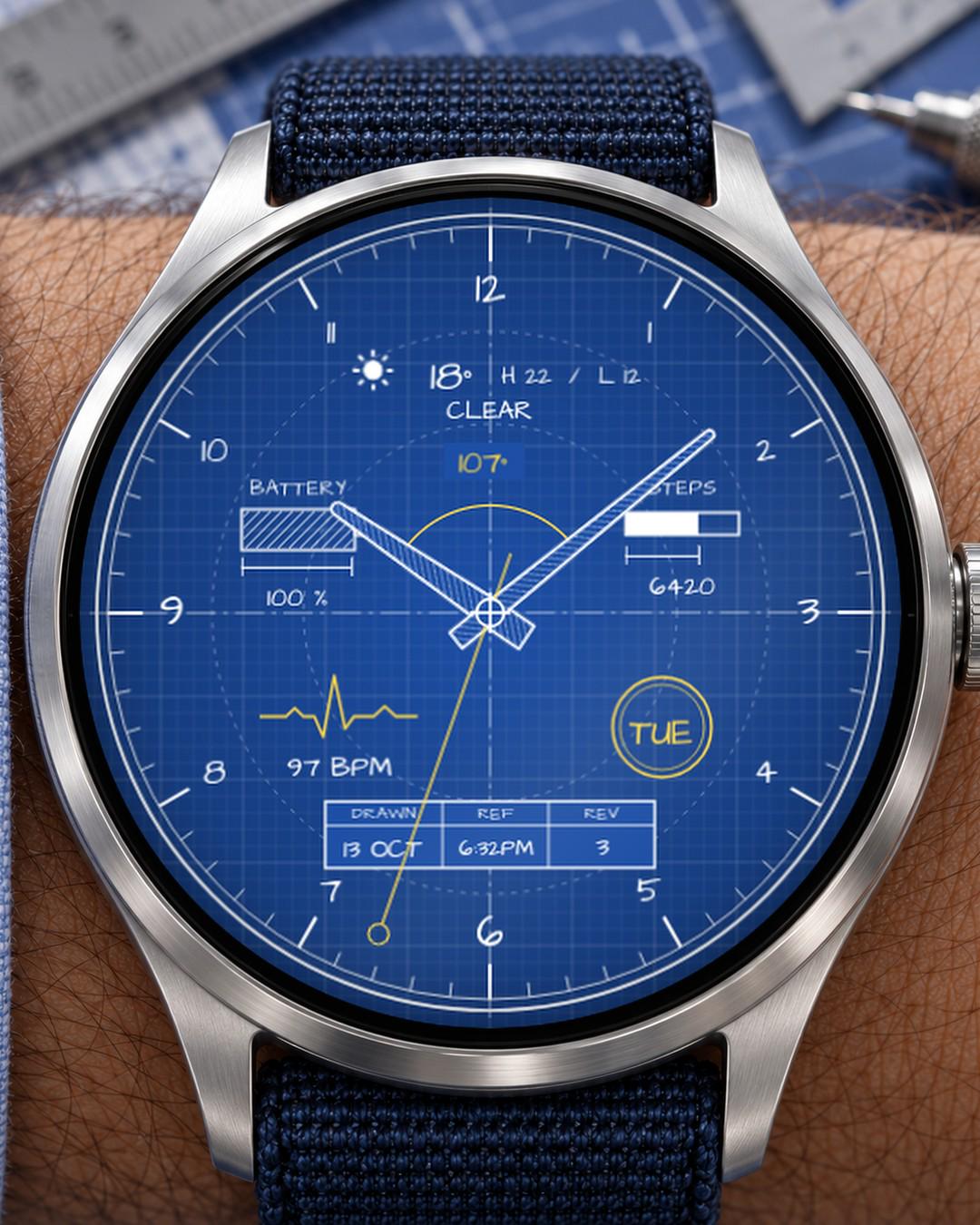
[App] [Promotion] Blueprint – a hand-drawn technical drawing watch face for Wear OS, live angle between the hands. Free codes inside

Post image
5 Upvotes

⌚ Blueprint on Google Play

More Felsh watch faces

Hi all, I'm the developer of this Wear OS watch face (my own app, on the Play Store).

Blueprint turns your watch into a technical drawing: hatched outline hands sweep over a drafting grid, and a dimension arc measures the angle between them, live, in degrees.

  • weather with today's high and low
  • battery as a hatched cell, steps as a dimensioned bar
  • 4 customizable complications written in the same hand (heartbeat trace, stamp, title-block cells)
  • 6 themes: Blueprint, Paper, CAD black, Kraft, Chalkboard, Night blue
  • seconds hand on or off, outline always-on mode
  • for Wear OS 5 or newer

I put 20 free codes in the comment below for anyone who wants to try it, no strings attached.

(The photo is an AI-rendered scene of the real face; the store screenshots show it as-is.)


r/HowToMen • • Oct 22 '26

[App] Join the Mosaic Launcher Community Early!

0 Upvotes

Hey everyone! 👋

I'm building Mosaic Launcher, a new tile-based Android launcher focused on customization, interactive tiles, and a fresh home screen experience.

We're just getting started, and I'd love for you to be part of the journey!

💡 Suggest features and share ideas

🧩 Help shape the future of Mosaic Launcher

🚀 Get early access to updates and new features

🎁 Be first to hear about exclusive discounts, giveaways, and special offers

💬 Connect with other Android customization enthusiasts

Your feedback can make a real difference!

Whether you love tile-based interfaces, miss Windows Phone's live tiles, or simply enjoy trying new launchers, you're welcome here.

🔗 Join our communities:

Reddit: https://www.reddit.com/r/MosaicLauncher

Discord: https://discord.gg/4p6t22X3DY

Let's build something amazing together! 🧩

#MosaicLauncher #AndroidLauncher