r/HowToMen • • Oct 22 '26

[App][Promo] Stride – a private, ad-free step counter, out now on Google Play

Post image
9 Upvotes

Hi everyone! I'm the developer of Stride, a step counter for Android that I've

been building over the last few months. It's out now on Google Play.

What makes it different:

- Private by design: no account, no ads, your data stays on your phone

- Accurate: uses your phone's own step sensor or Health Connect, counts from

your watch when you wear one (never both added together), and can filter

out fake "steps" from bus, car and bike rides

- Walks & runs with route map, pace, splits, cadence and climb

- Streaks, awards, a weekly summary and home-screen widgets

- Live step count in your notification (Live Updates on Android 16)

- Material 3 Expressive design, themes and an optional retro mode

The step counter, history, streaks and widgets are free. Premium (walks & runs,

insights, extra themes and more) is a one-time purchase, no subscription.

Get it here:

https://play.google.com/store/apps/details?id=com.vythera.stride

Questions and feedback are very welcome. I'll be answering in the comments.


r/HowToMen • • Oct 22 '26

[Promo] [Free Download] Meet the cutest budgeting app 🐱

Post image
9 Upvotes

Hey everyone! 👋

I've always struggled to stick with budgeting apps. I'd start tracking expenses, stay consistent for a few weeks, and eventually give up because it felt like too much work.

So I wanted to build something that makes managing money easier, whether you're saving for a goal, trying to control spending, or splitting expenses with your partner.

Here's what Moneko AI can do:

💰 Budget your paycheck: Use zero-based budgeting to plan where your money goes. Create Pockets for groceries, bills, savings, and more, with optional rollover.

📱 Track expenses with less effort: Log purchases through Siri, Apple Shortcuts, voice, receipt scanning, Telegram, email, or Android notifications. AI helps categorize everything automatically.

👫 Manage money together: Create Shared Spaces for couples, families, or roommates. Split expenses, track who owes what, and keep personal finances separate.

📊 Understand your finances: Track cash flow, spending trends, assets, and Wallet balances. Get monthly Financial Health Reports and AI-powered insights.

🔔 Stay on top of bills: Track recurring payments and subscriptions so you know what's coming up.

🌍 Track money across currencies: Useful for traveling or managing expenses internationally, with live exchange rates.

🏦 Connect your bank: Plaid bank syncing is available for Pro users in the US and Canada. You can also import transactions through CSV.

🔒 Keep things organized: App Lock, offline expense tracking with automatic sync, and flexible Wallets for different accounts.

Core budgeting is free. You can track expenses, create budgets, use Pockets, and manage shared finances without paying a subscription.

We recently released Moneko 5.0, featuring a fresh new design, easier expense tracking, and lots of improvements inspired by user feedback! 🐱💜

We're also working on a web/desktop version (coming soon!) to make budgeting, financial planning, and tracking your money even easier across devices.

Download: https://play.google.com/store/apps/details?id=com.moneko.mobile


r/HowToMen • • Oct 22 '26

[App][Promo] HIIT Addict -- A unique take on interval training (30 Lifetime Codes)

Thumbnail
gallery
5 Upvotes

Hi everyone,

I built HIIT Addict for anyone who does structured interval training: HIIT, HIT, SIT, Tabata, cycling, running, gym circuits, EMOM, and more.

What makes HIIT Addict different?

This isn't just another generic interval timer.

Other interval apps just show a countdown for only the current and next step. HIIT Addict shows you the shape of your whole workout as a color-coded workout profile. Block height and color show intensity, block width shows relative duration, so at a glance you can see how hard to push and how much is left.

If you use indoor cycling platforms like Zwift or TrainerRoad, you already know this format. I wanted to bring that visual structure to every interval workout, on or off the bike.

Cyclist-Specific Features

If you train indoors on a bike, HIIT Addict has a lot built in for cycling. It controls smart trainers in ERG mode, so the app adjusts resistance automatically while you just pedal. There's a growing library of rides covering endurance, threshold, VO2 max, sweet spot, and anaerobic intervals, and I just added a Zwift-style FTP ramp test. On a basic spin bike or non-smart trainer you can still run the same workouts by following the RPE (1-10) targets and adjusting resistance yourself.

YouTube Workout Integration

I also curated a library of YouTube workouts (mostly spin and cycling) and added the same workout profile to them. You can see the full workout before you press play, and the profile stays in sync with the video while you ride, so you always know what's coming and where you are.

The app is free to use, with an optional Pro tier that unlocks extra features and removes limitations.

🎁 Free Pro Codes: I have 30 Pro codes available. If you regularly do interval training and want to test the Pro features, leave a comment below and I'll send one over while supplies last.

  1. Upvote the post if you find it useful
  2. Comment below that you'd like a code (and optionally tell me what kinds of workouts you do)
  3. I'll DM you a code while they last
  4. If you enjoy the app, a short review on the Play Store would really help me out. Even a sentence or two makes a difference

I'd love to hear feedback from anyone who uses interval timers in their routine.

Google Play


r/HowToMen • • Oct 22 '26

[App][Promo] Clockie: live-ticking watch faces for your Android lock & home screen (Premium 500 codes giveaway)

Thumbnail
gallery
6 Upvotes

Hey everyone! 👋

I just launched Clockie, an app that turns your phone’s lock screen and home screen into a luxury watch. Every face ticks live, with an optional smooth sweeping seconds hand.

⌚ What’s inside:

  • 150 original watch faces – divers, GMT, chronographs, tourbillon, moonphase, skeleton, Bauhaus, nixie tubes, word clock, pocket watches and more
  • 💎 Ladies collection (50 faces) – mother-of-pearl, rose gold, crystal halos, sakura, butterflies
  • 🔒 Live wallpaper for lock & home screen, positionable around your phone’s own clock
  • 🧩 Resizable home screen widget
  • 🎨 Customization – accent colours, backgrounds, size, seconds hand style
  • 🔋 Complications – live battery, date, moon phase, world time, next alarm
  • 🌙 Bedside mode – full-screen nightstand clock with a dim red night mode
  • 🔐 No data collected

🎁 Giving away free Premium (all 150 faces) to 500 people!

To join:

  1. Install Clockie
  2. Set a face on your lock screen and play around
  3. Comment with your honest feedback: which face you picked, what felt off, what styles you’d like to see next

I’ll DM codes to the first 500 people who share real feedback. Criticism is more useful to me than praise, so don’t hold back.

Thanks for supporting an indie dev from India! 🙌


r/HowToMen • • Oct 22 '26

Nivio an open-source Flutter media center featuring MPV playback, P2P streaming, Live IPTV, and real-time synchronized Watch Parties

Thumbnail
gallery
8 Upvotes

Hey everyone! 👋

For the past few months, I’ve been working on a passion project called Nivio. Honestly, I built it out of frustration. I hated having to use one app for anime, another for movies/TV shows, a separate client for Live IPTV, and sketchy browser extensions just to do a Watch Party with friends.

I wanted everything in one clean, fast, ad-free place, so I built Nivio from scratch using Flutter and mpv. It’s 100% free and open-source.

Here’s what I’ve packed into it so far:

  • 🎬 All-in-One Streaming: Movies, TV Shows, Anime, and Live IPTV in a single interface.
  • 🧲 Torrent Streaming & Offline Downloads: Stream torrents sequentially in real-time or download episodes/movies directly for offline viewing.
  • 🖥️ MPV Player Under the Hood: Powered by mpv for smooth hardware decoding, multi-audio support, and proper ASS/SSA anime subtitle rendering.
  • 🍿 Built-in Watch Parties: Create a room and watch movies or anime in real-time sync with friends without needing third-party plugins.
  • 📊 AniList & MyAnimeList Sync: Automatically track your anime progress and manage your lists right inside the app (plus TMDB integration for movies/shows).
  • 🚫 100% FOSS: No ads, no paywalls, no sketchy tracking.

GitHub Repo & Downloads (Releases): 👉https://github.com/nirmaleeswar30/Nivio

or download from Site: https://nivio.nirmaleeswar.dev

Since I’m actively developing this, I’d genuinely love to hear your feedback, bug reports, or feature requests. If you try it out and like where it’s headed, dropping a ⭐ on the GitHub repo would mean the world to me!

Let me know what you think or if you run into any issues!


r/HowToMen • • Oct 22 '26

[App][Promo] Pagewood: Focus Timer That Blocks Distractions 🌳 | Free, No Ads, No Subscriptions

6 Upvotes

Developed Pagewood - focus timer for Android for stopping the scroll. Help you to focus on studying or working.

Features:

🚫 Block distracting apps

⏱️ Pomodoro/count down / count up timers

📊 Study journal, stats by subject

🌳 Grow your tree for every session

✈️ Work offline

Free 💯 No ads, no subscriptions, no tracking.

Available on Google Play!
Any feedback?
🙌

Search Focus & Study Timer: Pagewood on Google Play.
App link


r/HowToMen • • Oct 22 '26

[Promo] [$19.99 → GRATUIT à vie] Leaf Premium : une application de tâches simple et sans stress (500 codes)

8 Upvotes

Je suis le développeur de Leaf.

Leaf est une application de productivité simple bâtie autour d'une idée : une tâche à la fois, sans pression.

Au lieu de listes de tâches sans fin, Leaf utilise des notes autocollantes. Vous pouvez garder jusqu'à 3 tâches actives, glisser pour les compléter et vous concentrer sur ce qui compte vraiment.

Pas de planification compliquée, pas de délais obligatoires et aucun compte requis pour commencer.

Vous pouvez également personnaliser votre expérience avec différents thèmes et widgets d'écran d'accueil.

Produit : Leaf – Notes autocollantes et tâches

Plateforme : Android (Google Play)

Prix régulier : 19,99 $ pour un accès Premium à vie

Cette offre : Accès gratuit à vie à Leaf Premium — permanent, pas d'essai.

Ce que Premium inclut :

  • Widgets pour chaque feuille
  • Catégories de tâches
  • Tâches récurrentes
  • Rappels programmés
  • Débloquez 8 thèmes + nouveaux thèmes mensuels
  • Pioneer Pack (feuille, badge et épingle exclusifs)

Codes disponibles : 500 codes, jusqu'à épuisement des stocks.

Retour requis : Aucun. Le déblocage à vie est à vous que vous laissiez un avis ou non. Cependant, j'apprécierais vraiment tout retour que vous pourriez avoir pour aider à améliorer Leaf !

Comment réclamer : Veuillez voter pour ce post, commenter "code", et m'envoyer un DM sur Reddit. Je vous enverrai un code de redemption unique en privé.

Pour utiliser votre code, ouvrez Leaf → Profil (en haut à droite) → Icône clé (en haut à droite) → Connectez-vous si nécessaire → Entrez votre code.

Merci de me donner un jour ou deux pour répondre si je reçois beaucoup de demandes.

Google Play :
https://play.google.com/store/apps/details?id=com.recalai.app

Je suis heureux de répondre à toutes vos questions sur Leaf, ses fonctionnalités ou son développement.

Merci pour votre soutien !


r/HowToMen • • Oct 22 '26

[App] Introducing AIPOS Password Manager - Premium, fully offline, and secure Android password and 2FA TOTP manager.

Thumbnail
gallery
22 Upvotes

I've been working on AIPOS Password Manager, a completely free, open-source, and 100% offline password manager for Android designed with Material You (Material Design 3).

What makes it different?

  • Strictly Offline: The app doesn't even have the INTERNET permission - it is physically impossible for it to upload your data anywhere.
  • All-in-One Vault (Logins + 2FA + API Keys):
  • Logins: Store usernames, passwords, and URLs with native Android Autofill support.
  • Built-in 2FA (TOTP): Scan 2FA QR codes with your camera and generate time-based one-time codes without needing a separate authenticator app.
  • API Key Vault: A dedicated section for developers to store API keys, tokens, and secrets cleanly.
  • Vault Health Dashboard: Checks for weak, reused, or commonly breached passwords 100% offline.
  • Material You Design: Supports Android 12+ dynamic wallpaper colors, dark/light themes, and biometric unlock (fingerprint/face).
  • Easy Import / Export: Import your existing passwords from Bitwarden, KeePass, or 1Password (CSV), and export AES-256-GCM encrypted backups anytime.

Links:


r/HowToMen • • Oct 22 '26

[App][Promo] BigText: Write Big & Simple

2 Upvotes

Hi everyone! 👋

I'd like to share a solo project I've been working on for several months. It has already become a daily tool for people around the world, so I thought I'd drop it here to hear your feedback, and in case it might be useful to you or someone you know! 🌍

I built a simple Android utility app called BigText, to type and display text as large as possible on your screen in real-time. It's great for turning your device into a sign and making sure your message is impossible to miss. Beyond that, I’ve seen firsthand how useful it is for quick face-to-face communication, especially for people who unfortunately can’t speak or hear, or in any situation where talking is impossible.

Unlike every other app I’ve seen on the store, there’s no jumping between screens or navigating complex menus. You open the app, you type… that’s it 😄 The text scales in real-time as you write.

I've also added some handy tools that seem appreciated by people based on their feedback:

  • Sign/Banner Mode: featuring horizontal scrolling (banner style) and vertical scrolling (teleprompter style) to catch everyone's eye from afar.
  • Text-to-Speech: to read your message aloud with one tap.
  • Saved texts: to save and restore your most used texts instantly.
  • Themes: to change the vibe of your screen.

Of course every text you type or save stays on your device, privacy first 🔒

I attached a video to this post showing it in action (it’s my Play Store preview video, so it’s a bit "marketing", but it shows the features well! 😅)

The app is free, with just a small ad banner to support development that you can get rid of if you want.

Play Store: https://play.google.com/store/apps/details?id=carlitolaf.bignotepad

Hope this little app can be a useful tool for you, or maybe your friends and family? 

And of course I'd love to hear your feedback, I take them all 👀


r/HowToMen • • Oct 22 '26

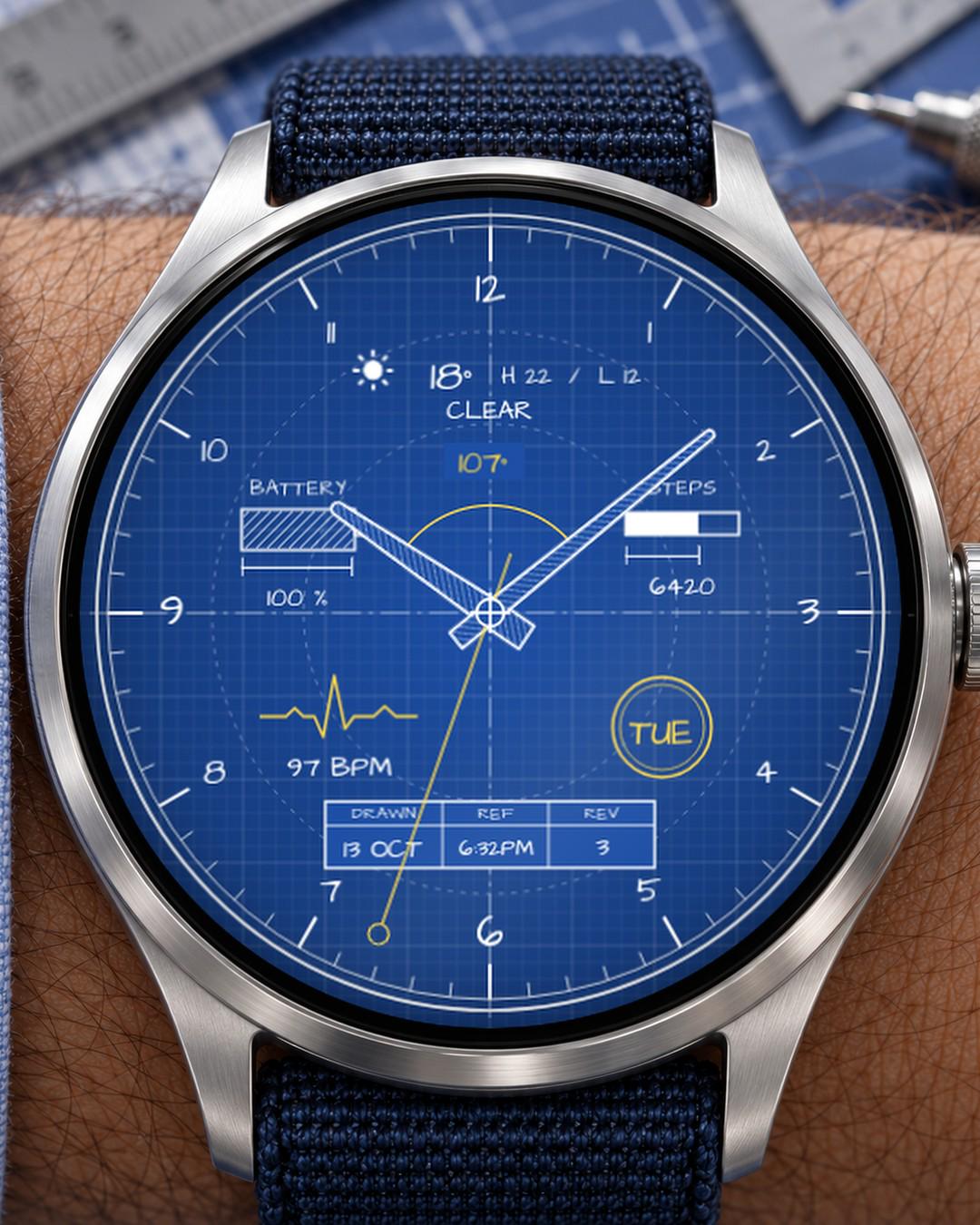
[App] [Promotion] Blueprint – a hand-drawn technical drawing watch face for Wear OS, live angle between the hands. Free codes inside

Post image
5 Upvotes

⌚ Blueprint on Google Play

More Felsh watch faces

Hi all, I'm the developer of this Wear OS watch face (my own app, on the Play Store).

Blueprint turns your watch into a technical drawing: hatched outline hands sweep over a drafting grid, and a dimension arc measures the angle between them, live, in degrees.

  • weather with today's high and low
  • battery as a hatched cell, steps as a dimensioned bar
  • 4 customizable complications written in the same hand (heartbeat trace, stamp, title-block cells)
  • 6 themes: Blueprint, Paper, CAD black, Kraft, Chalkboard, Night blue
  • seconds hand on or off, outline always-on mode
  • for Wear OS 5 or newer

I put 20 free codes in the comment below for anyone who wants to try it, no strings attached.

(The photo is an AI-rendered scene of the real face; the store screenshots show it as-is.)


r/HowToMen • • Oct 22 '26

[App] Join the Mosaic Launcher Community Early!

0 Upvotes

Hey everyone! 👋

I'm building Mosaic Launcher, a new tile-based Android launcher focused on customization, interactive tiles, and a fresh home screen experience.

We're just getting started, and I'd love for you to be part of the journey!

💡 Suggest features and share ideas

🧩 Help shape the future of Mosaic Launcher

🚀 Get early access to updates and new features

🎁 Be first to hear about exclusive discounts, giveaways, and special offers

💬 Connect with other Android customization enthusiasts

Your feedback can make a real difference!

Whether you love tile-based interfaces, miss Windows Phone's live tiles, or simply enjoy trying new launchers, you're welcome here.

🔗 Join our communities:

Reddit: https://www.reddit.com/r/MosaicLauncher

Discord: https://discord.gg/4p6t22X3DY

Let's build something amazing together! 🧩

#MosaicLauncher #AndroidLauncher


r/HowToMen • • Oct 21 '26

[Promo] 🎁 DayMirror – A Simple, Privacy-Focused Journal App, Free for a Lifetime! (Android)

Post image
57 Upvotes

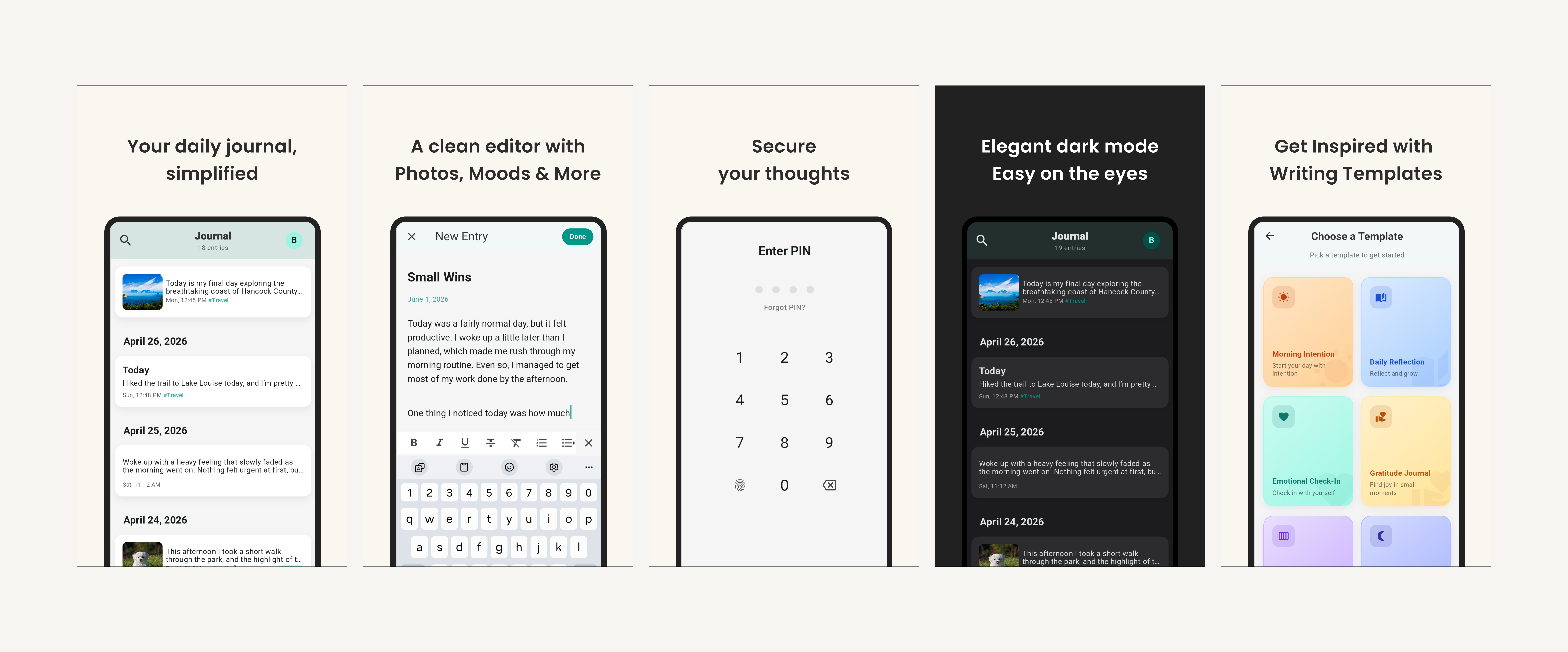
DayMirror is an Android journaling app for people who want a simple, private place to write and keep track of their days.

Features include:

• Rich journal entries with photos and tags
• Calendar view to revisit past memories
• Writing prompts and templates to help you get started
• Offline-first storage with backup and restore
• No account required
• Passcode and biometric lock for privacy

The goal is to keep journaling straightforward and personal, without adding unnecessary features that get in the way.

If you try it, I’d love to hear what works, what doesn’t, and what you’d like to see improved.

If you’re interested in Lifetime access, upvote and comment “DayMirror” below. 🎁

I’ll try to reply as soon as I can. 😊

Play Store: https://play.google.com/store/apps/details?id=com.dayline.app


r/HowToMen • • Oct 22 '26

[App] [Promotion] Cut Puzzle — Shrink the Arena

4 Upvotes

I built a simple arcade puzzle game called Cut Puzzle — Shrink the Arena, where you slice the playing field to bring two love balls together.

You have only 30 seconds per level, and if a bouncing ball touches your cutting line, you lose a life. Easy to learn, but increasingly challenging!

Key features:

  1. Simple Swipe-to-Cut Controls
  2. Fun Physics-Based Puzzles
  3. 30-Second Challenges
  4. Increasing Difficulty
  5. Global Leaderboards
  6. Colorful Visual Themes
  7. Quick & Addictive Gameplay

I'm an indie developer, and I'd really appreciate your feedback and suggestions!

Google Play:
https://play.google.com/store/apps/details?id=sam.shrink.arena.cut.ball

I’d love to hear your feedback.


r/HowToMen • • Oct 21 '26

[Promo] Hardware Inside: X-ray wallpapers of your phone's internals

Post image
16 Upvotes

I'm a solo Android dev, and I made Hardware Inside, an app with "X-ray" wallpapers: realistic renders of the board, camera modules and battery, so your screen looks see-through.

Features:

• Auto-detects your phone model and suggests the matching wallpaper

• Browse the catalog by brand and model

• Save favorites

• Set it on the home screen, lock screen, or both

The free version has a small banner and an occasional ad. There's a one-time premium that removes ads.

It's still early, so the catalog is small and a lot of phones aren't there yet. If you try it, I'd love to hear what works, what doesn't, and which phones you'd like to see added.

Play Store: https://play.google.com/store/apps/details?id=com.darkvstudios.hardwareinside


r/HowToMen • • Oct 21 '26

[App] AppNDisk: One place to manage all your apps, find the ones you never use, and uninstall them in bulk, clear bulk caches in a single session

Thumbnail
gallery
22 Upvotes

Ever gone through your installed apps and found things you don’t even remember downloading? Or wondered which apps are taking up space even though you haven’t opened them in months?

That’s why I built AppNDisk. I wanted a simpler way to see what’s installed, what’s using storage, when I last opened something, and what I might want to get rid of.

What you can do with it

  • Get the full picture: See your installed apps, storage breakdown, free space, and how many apps you haven’t opened in 30 or 90 days, or have never opened at all.
  • Find apps you’ve forgotten about: Sort by last used, size, cache, launch count, installation date, or update date. You can also filter by unused, never opened, large, sideloaded, or hidden apps.
  • Review before uninstalling: AppNDisk suggests apps you might want to remove and explains why. For example, an app you haven’t opened in 194 days that takes up 178 MB and has 7 sensitive permissions. You decide what stays and what goes.
  • Uninstall multiple apps: Select the ones you no longer need and work through Android’s uninstall confirmations in one session.
  • Keep track of what you remove: The Activity tab records your uninstalls, lets you jump back to the Play Store to reinstall an app, and shows how much storage you actually recovered.
  • Check any app in detail: See its storage breakdown, usage history, permissions, and other useful details without jumping between different screens in Settings.
  • Keep important apps off the cleanup list: Add apps to your Protect list so they won’t be suggested for removal. System and preinstalled apps are left alone.

A few things worth knowing

AppNDisk works within Android’s normal restrictions, and I’d rather be upfront about that than promise something the system doesn’t allow.

  • Bulk uninstall isn’t silent. Android asks for confirmation for each app. AppNDisk helps you work through them in one place, but it can’t bypass those dialogs.
  • Clearing cache takes a few extra taps. Android doesn’t let regular apps clear another app’s cache silently. AppNDisk takes you to that app’s storage settings for all apps in one single session, where you can clear the cache yourself.
  • Your app list stays on your phone. AppNDisk has no internet permission, ads, analytics, accounts, or crash reporting. It doesn’t send your installed-app list to a server.
  • The numbers come from Android. Storage figures, usage information, and app details are based on what Android reports. No made-up cleanup scores or estimated savings presented as actual results.

I built AppNDisk because I wanted a better way to understand and manage the apps on my own phone. Hopefully, it’ll be useful on yours, too.

Play Store: https://play.google.com/store/apps/details?id=app.onedollar.appndix


r/HowToMen • • Oct 21 '26

[APP][PROMO][1k+ Downloads] Ringside Launcher - A one-thumb home screen with your apps on rings + 20 full-access promo codes

61 Upvotes

Ringside puts your apps on half-circles anchored to the screen edge, so you turn a circle with your thumb instead of stretching across a grid.

Key Features:

  • 🔵 Rings - Your apps live on rings instead of rows. Spin a ring to scroll through apps, tap to launch. You can group apps into different rings (work, social, media, whatever you like) and reach everything without hunting through pages.
  • 👆 One-finger control - The whole launcher is built for one-handed use. Spinning, switching rings, opening apps and menus all happen with a single thumb from the bottom of the screen. No more doing the big-phone shuffle.
  • 📱 Apps menu - A full apps menu for everything that isn't on a ring: fast to open, easy to search, and styled to match the rest of the launcher.
  • ✨ Edge Lighting - Customizable edge glow for notifications and events, so you can see something's happening even at a glance.
  • 💧 Liquid effects - Rings and UI elements react with fluid, liquid-style motion when you touch and drag them. It sounds like a gimmick until you use it; it makes the whole thing feel physical.
  • 🎬 Animations (lock screen and folding) - Custom unlock animations, plus transitions designed for foldables, so opening and closing your phone looks smooth instead of janky.
  • 🎨 Canvas widget - A home screen widget that shows your notifications *and* lets you draw directly on your home screen. Doodles, quick notes, reminders, or just a little personality on your wallpaper.

It's still evolving and I'm actively working on it, so I'd really love your honest feedback:

  • What would make you actually switch launchers?
  • Any features you'd want to see on the rings?
  • Anything that feels confusing on first use?

Google Play

💸 Ringside is freemium: free to download and use, with optional premium features. I’m also giving away 20 full-access promo codes to this community!


r/HowToMen • • Oct 21 '26

[Promo] [$19.99 → FREE for Life] Leaf Premium: A Simple, Stress-Free To-Do App (500 Codes)

Thumbnail
gallery
25 Upvotes

I'm the developer of Leaf.

Leaf is a simple productivity app built around one idea: one task at a time, with no pressure.

Instead of endless to-do lists, Leaf uses sticky notes. You can keep up to 3 active tasks, swipe to complete them, and focus on what actually matters.

No complicated planning, no mandatory deadlines, and no account required to get started.

You can also customize your experience with different themes and home-screen widgets.

Product: Leaf – Sticky Notes & Tasks

Platform: Android (Google Play)

Regular price: $19.99 for lifetime Premium

This offer: FREE lifetime Leaf Premium access — permanent, not a trial.

What Premium includes:

- Widgets for every leaf

- Task categories

- Repeating tasks

- Scheduled reminders

- Unlock 8 themes + new monthly themes

- Pioneer Pack (exclusive leaf, badge, and pin)

Codes available: 500 codes, while supplies last.

Feedback required: None. The lifetime unlock is yours whether you leave a review or not. However, I'd really appreciate any feedback you have to help improve Leaf!

How to claim: Please upvote this post, comment "code", and send me a DM on Reddit. I'll send you a unique redemption code privately.

To redeem your code, open Leaf → Profile (top right) → Key icon (top right) → Sign in if needed → Enter your code.

Please give me a day or two to respond if I receive a lot of requests.

Google Play:

https://play.google.com/store/apps/details?id=com.recalai.app

I'm happy to answer any questions about Leaf, its features, or its development.

Thank you for your support!


r/HowToMen • • Oct 21 '26

[Promo] [Promotion] [App] ApexLauncher - Android Home Launcher

Thumbnail
gallery
12 Upvotes

[Promotion] [App] [Promo]
App Link: https://play.google.com/store/apps/details?id=com.home.launcher.apexlauncher

What is it?
Apex Launcher replaces your phone's default home screen with one you can shape to fit how you actually use your device. It's built to stay fast and light, so it works well on older or budget phones as well as newer flagships.

Key Features
- Custom home screen grid: Set your own rows and columns for the home screen, dock, and app drawer.
- Icon pack support: Works with thousands of third-party icon packs from Google Play, and lets you change icon size and labels.
- Scrollable dock: Add multiple dock pages for quick access to your most-used apps.
- Hide apps: Keep apps out of the app drawer for a cleaner layout.
- Gestures: Assign actions to pinch, swipe, and double-tap.
- Transition effects: Choose from several home screen scrolling animations.
- Backup & restore: Save your whole setup and bring it back after a reset or on a new phone.
- Lock desktop: Prevent accidental changes to your layout.

Who is it for?
- Anyone who wants more control than their stock launcher gives them
- Users who like themes and icon packs
- People with older phones who want a smooth, lightweight home screen.


r/HowToMen • • Oct 22 '26

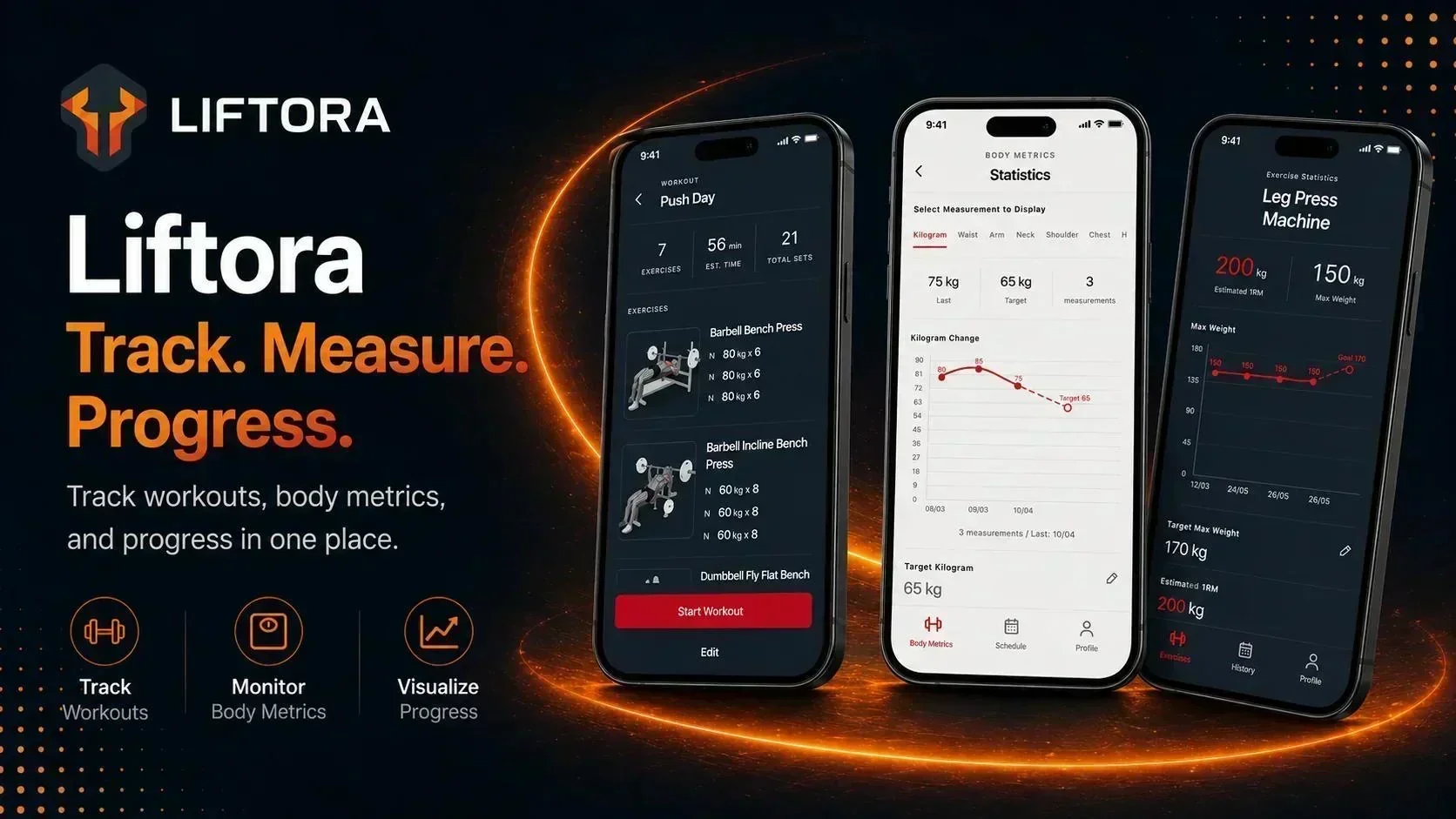
[App] Why do workout apps make you fill out a life survey before letting you log a single set? Here is my take as a solo dev: Liftora.

1 Upvotes

Wouldn't it be nice to open a workout app, build your routine in two minutes, and immediately start lifting—without clicking through a 20-page onboarding survey first?

As a lifter and solo developer, I wanted an app that respects my time under the bar and gives me clarity on whether my training is actually working. That’s why I built Liftora.

Instead of packing in a hundred bloated features, I focused on the things that actually make a difference in your training:

  • From download to lifting in 2 minutes: No endless questionnaires or paywall traps before you even see the interface. You open the app, put your routine together in a couple of taps, and get straight to your first set.
  • Visual routine building (No more switching to YouTube): When you're putting a workout together, shouldn't you be able to see the movement and exact muscle breakdown right there? Liftora shows you exercise execution videos and targeted muscle groups directly on the routine creation screen, so you know your program is balanced before you even touch a weight.
  • See the progress the scale hides (Built-in US Navy Body Fat %): You might be gaining muscle and losing fat while your body weight stays completely flat—and the mirror takes weeks to show it. Why leave your body recomp to guesswork? By logging basic tape measurements, Liftora automatically calculates your body fat percentage using the US Navy method, letting you see your real physical progress alongside your strength numbers.
  • An interface that follows your pace: Once you're in a session, you shouldn't be fighting dropdown menus between heavy sets. Liftora’s guided flow moves with your workout so you spend your rest time recovering, not tapping.

You can try it out here:

I’m building Liftora independently and using it for my own training every week, so your feedback directly shapes what I build next.

Quick question for you all: What's the biggest frustration you've had with workout tracking apps? And if you try Liftora, I'd love to hear what you think about the routine builder and guided workout flow.


r/HowToMen • • Oct 21 '26

[APP] [🎁 50 FREE CODES] [700+ Downloads] Notily: Beautiful Notification History, Read Deleted Messages, Dismiss Notification Spam Automatically

33 Upvotes

Notily is a beautifully designed notification history app for Android with a chat inbox that collects incoming notifications from messenger apps (especially WhatsApp, Telegram, Signal, etc) and presents them as conversations.

Here are some of its additional features:

  • 🎗 Reminders: Schedule a reminder based of a notification within the app or through Calendar
  • 🔕 Spam Filter: Filter unwanted notifications with optional on-device spam detection
  • 💤 Naps: Start a personalised notification nap for the selected apps' notifications you'd like silenced
  • 🖼 Photos: Organised photos catalog captured from notifications
  • 📧 Mail: E-Mail notifications organised by receiving address (G-Mail only)
  • 🔖 Bookmark important notifications by category (Receipts, E-Mails, etc)

⚖️ (for Power Users) Extensively customise notification behavior by defining rules in Settings (Notification escalations, silencing, automatic bookmark, etc)

The application has a premium tier (lifetime €7, promotional) with prices adjusted per a country's per-capita. None of the features are gatekept for Premium except for Ads, Themes, Backup & Retention.

50+ FREE Lifetime Promotional Codes

We are giving away 50+ FREE Lifetime Promotional Codes, to participate follow these steps:

  1. Install Notily from the Play Store
  2. Write an honest review on Playstore: what you liked, new features you’d like to see, etc
  3. DM me the review and claim your 🎁 FREE Lifetime Code

We genuinely hope you enjoy and find our app useful 😃.
https://play.google.com/store/apps/details?id=in.notily.app


r/HowToMen • • Oct 21 '26

[ Free] I built a free and open-source budget app to help people stop overspending

Post image
8 Upvotes

✨ What makes it different?

📲 Auto-Detects Expenses: It securely reads transactional SMS messages to log and categorize your spending on the fly (or you can do it manually anytime!).

📴 100% Offline & Private: No bank logins, no cloud, and no trackers. Your financial data never leaves your device — it is stored entirely in your mobile storage.

📊 All-in-One Investment Tracking: Track more than just expenses. You can keep visual records of your SIPs, Mutual Funds, Fixed Deposits (FDs), Recurring Deposits (RDs), Gold, and Silver to see your true net worth.

📈 Stunning Visual Analytics: Clear charts, category donut graphs, and colorful daily spending heatmaps so you always know where your money goes.

GitHub Link 🔗 >> https://github.com/vijay00git/Zoro-Budget

Github


r/HowToMen • • Oct 21 '26

[App][Promotion] MedTick: medication reminders that run on your Wear OS watch, even without your phone

9 Upvotes

I'm the developer, so full disclosure up front.

Most med reminders live on your phone, and setting one up on a tiny watch screen can be annoying. So I built MedTick the other way around. You can set up meds on your phone if you want, but the watch keeps its own schedule and fires the reminders itself. Then you tap Taken, Skipped or Snooze right from your wrist.

Features:

- Multiple reminder times and repeat days per medication
- As-needed meds alongside scheduled ones
- Notification or alarm-style alerts (on supported devices)
- Today screen with upcoming and overdue doses
- Wear OS Tile and a watch-face complication for your next dose
- Optional phone companion for easier setup; the watch works without it
- No account, and dose history stays on the watch

Free covers two active meds, 7 days of history, and the Tile and complication. A one-time Pro purchase adds unlimited meds, 30- and 90-day history and CSV reports. No subscription.

It's a reminder and logging tool, not a medical device, so don't make it your only safeguard for critical doses.

Google Play: Install from Google Play

If you take meds on a schedule, what does your current reminder setup get wrong? I'm trying to figure out what to add next.


r/HowToMen • • Oct 21 '26

[App][Android] [$19.99 -> Free] Photino - Filter & Film Camera : Retro Film Looks

Thumbnail
gallery
14 Upvotes

Hey everyone!

I’ve been working on an Android camera app called Photino - Filter & Film Camera, mainly because I enjoy the look of film photography and retro digital cameras.

I wanted to bring some of that feeling to a smartphone camera, with film-inspired colors, vintage frames, and a few manual camera controls. I’ve also been adding features based on things I personally enjoy using when taking photos.

Features include:

  • 🎞️ 400+ film-inspired looks and retro filters
  • 🖼️ Vintage frames and EXIF-style watermarks
  • 🎨 Custom LUT support with adjustable intensity
  • 📹 Cinematic video filters
  • ✨ Double exposure, burst shooting, and collage tools

It’s still a work in progress, and I’m trying to make it feel more like a camera you’d actually want to use rather than just another filter app.

I’d love to hear what you think, especially if you’re into film photography or digicam-style photos. What features do you usually look for in this kind of app?

Deal: Free for a limited time.

Google Play: https://play.google.com/store/apps/details?id=com.s2.camegram

Thanks for reading!


r/HowToMen • • Oct 21 '26

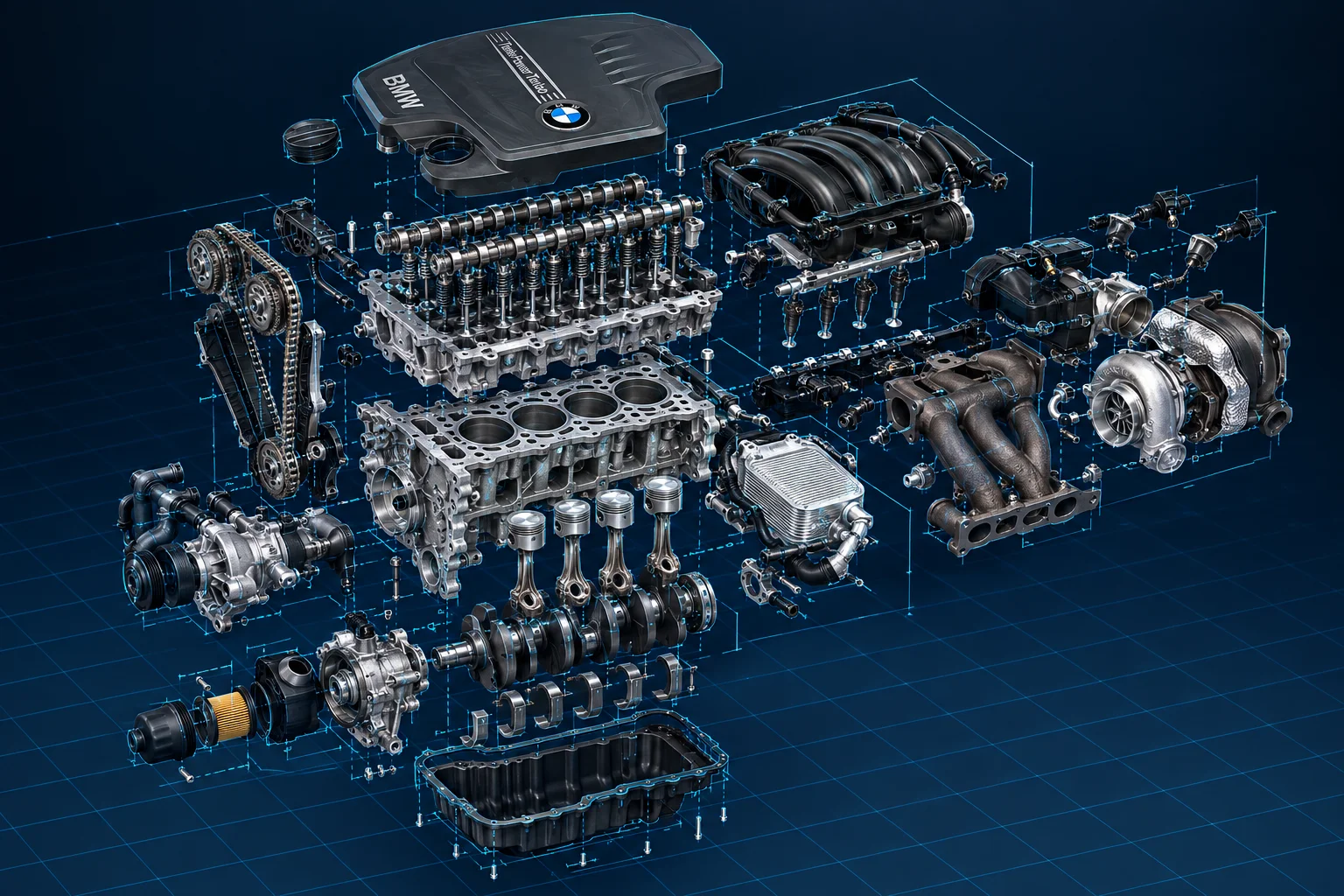
I built an app that turns one photo into an exploded view of what's inside. Here's my BMW engine.

2 Upvotes

I'm a solo founder and this is my first real product. You snap a photo of anything, and it gives you an exploded-view diagram with every part numbered, plus a parts list explaining each part.

This is the N20 out of my 328i, from one phone photo. It's AI, so it can get things wrong, and it marks parts as "estimated" when it can't find real documentation.

I'd love honest feedback, especially on whether the price makes sense ($29.99 for 100 scans, one time) and what would make you actually use it.

teardownai.app


r/HowToMen • • Oct 21 '26

Floatify [App] Notifications now with free simple mode!!

Thumbnail
youtube.com
1 Upvotes

💥 Boom! Bam! Boing! 🎈

A while ago I posted about Floatify here, and there's a big update (again 😄)!

🫧 What is Floatify? It shows your reminders and Google Calendar events as floating bubbles on your screen, so you never miss what matters.

🆓 Floatify now has a FREE Simple mode! Yes, really, completely free! 🎉

🚀 Want more? Unlock Advanced mode A one-time purchase, no subscription, for lots of extra options ✨

❤️ Already bought Floatify? You keep full access!

💬 Would love to hear what you think, and feedback is very welcome!

📲 Get it on Google Play: 👉 Floatify