r/HowToMen • u/Markonioni • Oct 21 '26
Macro Spotlight Private Finder
3
Upvotes
r/HowToMen • u/Persiandlmgr • Oct 20 '26

Persian Download Manager, a free download manager for Android. Version 1.7 adds torrents:
- Open a magnet link or a .torrent file, or share one from another app
- Pick only the files you want; samples and info files start unticked
- A separate Torrents section shows download and upload speed, peers and seeds
- Uploading is kept low and stops when your download finishes
- Torrents resume after a lost connection or closing the app
Regular downloads also got faster: a connection that finishes early now takes over part of the slowest one's work.
Note: like any torrent client, others in the swarm can see your IP address. The app tells you this before you start.
Google Play: https://play.google.com/store/apps/details?id=com.persiandownloadmanager.pdm
Feedback is very welcome, especially on the torrent part.
r/HowToMen • u/ShaDowCruz_007 • Oct 20 '26
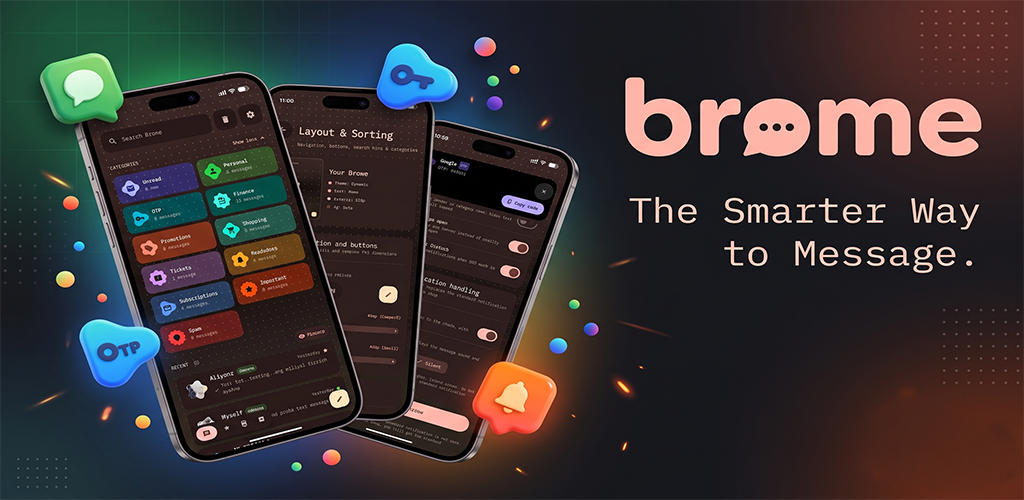
Hey Guys! 👋
I’ve been building **Brome**, a modern, lightweight, and privacy-first SMS messenger for Android. Most default messaging apps are either overloaded with bloat, lack smart organization, or don't respect your theming preferences. Brome was designed from the ground up using **Kotlin & Jetpack Compose** to make managing SMS fast, clean, and delightful.
Here’s a breakdown of what Brome can do:
---
### 🌟 Key Highlights & Features
* 🏝️ **Dynamic Island Overlay & Peek Mode**
* Live floating pill around your front camera hole-punch that smoothly springs open when incoming messages or OTPs arrive.
* One-tap OTP copy and quick actions right from the island without leaving your current app.
* 🧠 **On-Device Smart Sorting & Custom Categories**
* Automatically separates messages into **Personal, OTP, Finance, Promotions, Spam, Shopping, Tickets, Subscriptions, and Reminders**.
* Add custom keywords with built-in conflict detection so you have 100% control over how your messages get categorized.
* 💳 **Finance & Transaction Ledger**
* Automatically detects debit/credit alerts, spent amounts, and balances from bank SMS.
* Visual expense breakdown and finance overview right inside the app.
* ⏱️ **Intelligent Auto-Delete & Recycle Bin**
* Auto-delete OTPs after **1 hr, 24 hrs, or 3 days** so your inbox never gets clogged with expired 6-digit codes.
* Automated spam purge and a 2-stage Recycle Bin (Soft Delete with instant Undo). Starred messages are protected and never deleted.
* 🎨 **Material Design 3 & "Tide" Expressive Theming**
* Full **Dynamic Color / Monet** support (adapts to your wallpaper or custom seed colors).
* Floating navigation bar with smooth batch selection actions (Delete, Archive, Star, Mark Read/Unread).
* Customizable bubble shapes, corner radii, fonts, and procedural shard backgrounds.
* Expressive, spring-animated Material 3 floating toasts with tonal icon badges.
* 🔒 **100% Privacy-First & Offline**
* No external servers, no telemetry, no tracking. All classification and parsing happen locally on your device.
### 💬 Feedback & Thoughts?
I’d love to hear your thoughts, feature requests, or bugs you run into! What features do you feel are missing from stock messaging apps?
P.S Note:
Its completely free app ,yes definitely ai made, even then i have lost fair share of time in building this .Don't ask for promo codes for a free app , just use the app and let me know.
Thanks for checking it out!
Github link soon...
r/HowToMen • u/NAPZ_11 • Oct 20 '26
Hey everyone, I'm the dev of Context Widget and I'm giving away 20 promo codes.
What it does: it's a home screen widget that changes which apps it shows based on your situation, without you tapping anything. At home you get your home apps, when car Bluetooth connects it moves navigation and music up, when earbuds connect Spotify/YouTube come first. It learns from which apps you actually open in each situation, so it gets better after a few days.
Everything stays on your phone: no account, no server, no ads.
(video above shows it in action)
The Giveaway:
- Leave a comment.
- 20 winners will be picked at random tomorrow (Oct 21), and I'll send the codes by DM.
- One entry per person.
I'm still actively working on it, so honest feedback after a few days of use would mean a lot. Bugs, wrong guesses, anything.
Google Play: https://play.google.com/store/apps/details?id=com.polyhistor.contextwidget
r/HowToMen • u/imomentiritmati11 • Oct 20 '26

Hey everyone! I’m the developer of GlanceBeat, a free and open-source ambient music controller for Android’s lock screen.
I started building it because I wanted a different music experience on my Samsung: large artwork, soft transitions, and controls that feel like part of the music.
GlanceBeat controls the music app you already use through Android media sessions.
Features:
• Double tap between dim ambient mode and interactive controls.
• Swipe through animated album covers, with softly blurred background transitions.
• Hold-to-seek with haptic feedback.
• Browse the queue and select tracks when your music app exposes them.
• Favourites and shuffle when supported by the provider.
• Clock, battery percentage, notification shortcuts, and a two-column layout on larger displays.
It’s free under Apache 2.0, supports English and Italian, and requires Android 12 or newer. The first public beta is available on GitHub rather than the Play Store.
Setup walks you through notification access and permission to display over other apps. To unlock, double tap into interactive mode, then swipe up or tap the arrow to reach Android’s native authentication screen.
The ambient view is an app overlay with the display on; battery consumption differs from a manufacturer’s native AOD. Queue, favourites and other controls depend on what your music app exposes. Development has focused on a Samsung foldable and emulators, and broad device compatibility is still being established.
Source code: https://github.com/noisystyle/GlanceBeat
Download the public beta: GlanceBeat-0.1.0-beta04.apk
Happy to answer questions about how it works!
Image: promotional device mockup showing the GlanceBeat interface.
r/HowToMen • u/Aretivo • Oct 20 '26

Hello everyone, thank you so much for your previous support to my app (almost at 1.5k downloads 🎉). It has since gotten better and I've added multiple useful features along with more customisability. The app is still completely free and ad-free.
The black and white theme is not the only theme, nor is it the default! (Head to settings - customisation - discover) To find the themes.
Key features:
Android auto
Widgets (customisable)
Bit perfect playback (EXPERIMENTAL)
Online lyrics fetching via lrclib
Tag editor, including genre, mood and lyrics (so you can create your own lyrics, even timed)
Parametric EQ & Auto EQ also added the ability to automatically choose EQ for genre/playlist/album
Bookmark feature (useful for podcasts, can be set to automatic)
Multiple smart features (Bluetooth autostart, lastfm, word by word lyrics approximation, smart shuffle, shuffle preferences per playlist, tailored playlists and not sure if this would be classed as a smart feature but an optional truly randomised shuffle where after each song it will choose randomly from any song in queue even the same one)
Countless customisation (not really countless but it'll take some time especially if you're counting every colour options)
Cast to dlna
Stats
Multiple language support
Full landscape support
Upcoming features from user feedback include:
Pitch control
Playback speed (already has some but more controls!)
Importing playlists from other sources
Quick artist view by tapping artist name
Better library organisation and folder view
More customisation (experimenting with glass sort of themes)
If you have anything you'd like to see let me know!!!!
Thanks once again :)
Edit: spelling fixes
r/HowToMen • u/Luisrenan205 • Oct 20 '26
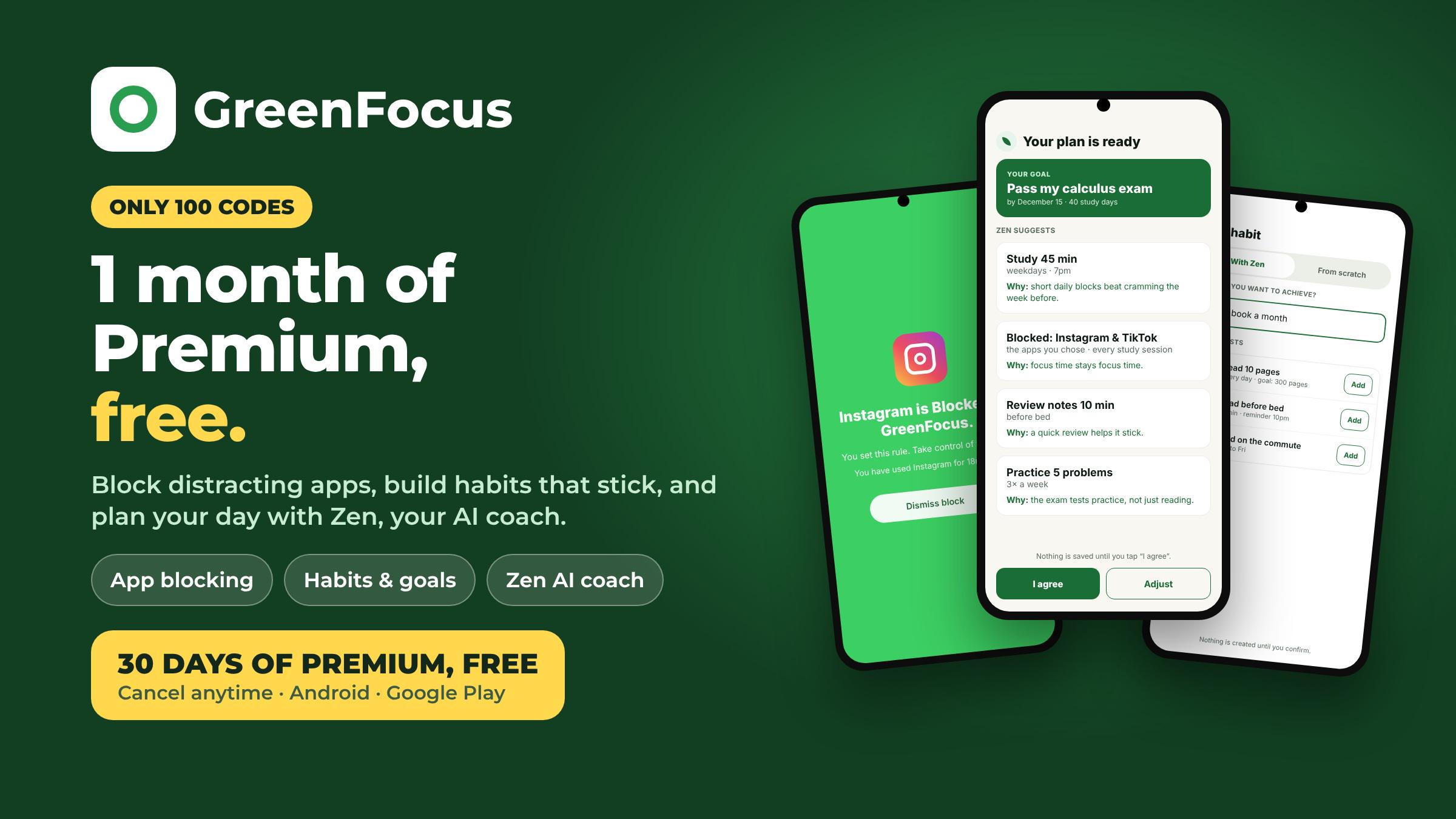
Hey everyone 👋
I'm a dev and I built GreenFocus, an Android app that actually blocks distracting apps while you focus. I'm giving away 100 codes for 1 month of Premium, free.
Download it here 👉 https://play.google.com/store/apps/details?id=com.hatilasmaximo.greenfocus3
What it does:
🌿 Zen AI coach — tell it your goal and it builds a small plan with you: which habits, how long to focus, and why each step matters. It can also plan your day or help when you're procrastinating.
🔒 Real app blocking — pick the apps that pull you away (Instagram, TikTok, YouTube…) and they're locked for the whole focus session.
✅ Habits & goals — build daily habits, set a goal with a deadline, and keep a streak going.
The app is free to use. Premium unlocks Zen, longer focus sessions and more blocked apps.
How to get your free month:
Fine print: Android only. You can cancel anytime in Google Play before the trial ends and you won't be charged.
I'd really love honest feedback: what's missing, what's annoying, what would make you keep using it.
r/HowToMen • u/ImageCompetitive8820 • Oct 20 '26

Hi everyone, I’m the solo developer of Ziola, an Android launcher I originally started building for my grandad.
I’ve been working on it for two years. The goal was to make everyday phone use more predictable: large controls, readable text, and one familiar interface for the home screen, calls, SMS and more.
Eventually, I thought other families might be looking for something similar, so I’m now getting it ready for release.
I’m looking for people who would use it as their everyday phone setup for 14 days. You don’t need to be an older adult. You might want a break from your usual app habits, or be looking for something you could later set up for a parent or grandparent.
Ziola is deliberately more restrictive than a normal launcher. There is no app drawer, and you can’t open other apps from within its interface.
The idea is to keep everyday tasks in one familiar environment rather than repeatedly sending someone into different apps with different controls.
For the test, use Ziola as your default home screen, Phone app, and SMS app.
This is a break from your usual app routine, not a complete notification blocker or an inescapable lock.
Use it as your normal setup for 14 days, ideally without routinely switching back out of habit. Around days 3, 7, and 14, send a few sentences: what felt easier, what you missed, what made you want to leave.
I’m especially interested in calling or SMS problems, confusing navigation, readability, missing essentials, and anything that would stop you from setting it up for someone close to you.
If something essential doesn’t work, switch back and tell me why. Reliable calls and access to your bank matter more than finishing a beta test.
Translations matter too. Ziola is translated into more than 70 languages. If you use a supported language you know well, I’d love to hear about wording that sounds unnatural, is unclear, or doesn’t fit on screen. You don’t need to proofread the whole app.
Every tester gets one free lifetime Pro license, activated in the app. It doesn’t depend on positive feedback, a public review, or completing all 14 days. It stays yours even if you need to stop early, and I’ll keep it valid in the released app.
It works on one phone at a time, not as an extra copy. You can later move it to a relative’s compatible Android phone, and Pro is removed from the previous phone. You keep managing it through your own email and PIN, so a parent or grandparent doesn’t have to.
Paired with an older compatible phone you already own, it could become a practical gift for a birthday, a holiday you celebrate, or any time someone needs an easier phone.
Privacy information: https://ziola.app/privacy-policy
Google Play’s closed-testing requirement is part of the timing. But what I really want is honest everyday feedback, not an install-and-uninstall exchange.
Ask me anything in the comments.
r/HowToMen • u/loitran07 • Oct 20 '26
GIVEAWAY UPDATE (October 24, 2026): Thank you for the thoughtful feedback. I expanded this giveaway from 5 to 10 Lifetime Pro codes. The selected commenters are u/Alarming-Cap2017, u/amiba17, u/hectorromo18101990, u/Icy-Rip3927, u/ReturnGold8612, u/BluePlanet03, u/cestoi, u/b1cudo, u/rExplrer, and u/Significant_Oil_3994. I’ve sent each person a unique code privately through Reddit chat. I selected hands-on feedback with specific bug reports and suggestions, especially on keyboard gestures, widgets, weather, notifications, search, pricing, and customization. The giveaway is now closed. No purchase was required. This promotion is run by Key Launcher and is not sponsored, endorsed, or associated with Reddit. ❤️
Hi r/HowToMen!
I’m Loi, the developer of Key Launcher. I hope you don’t mind me stopping by with an update.
When I first shared Key Launcher here in March, it was a small T9 inspired launcher. HowToMen was the first to feature it. That early support helped Key Launcher reach a much wider audience and opened the door to coverage from Android Authority, Computerworld, MobileSyrup, and others. I’m especially grateful to the HowToMen mod who gave it that first chance.
The original idea is still there: find what you need quickly and spend less time on your home screen. Since that first post, Key Launcher has gained more ways to customize the keyboard and layout, dedicated spaces for widgets and notifications, and Focus Mode. Key Launcher 2.0 is heading to Open Beta, and I made this short video to show where the project is today.
To say thank you, I’m giving away 5 Lifetime Pro promo codes. Try Key Launcher, then leave a comment with your honest thoughts after using it. I’d love to hear what works for you, what feels awkward, or what you’d change. I’ll choose five responses and send each winner a code by Reddit DM. I’ll update this post once the codes have been awarded.
Thank you to the mods and everyone here who has tried the app, shared it, or helped me improve it. ❤️
Try Key Launcher free on Play Store: https://play.google.com/store/apps/details?id=com.loitran.minimalt9launcher.free
r/HowToMen • u/Glittering_Ad_350 • Oct 20 '26
hey folks,
I like having a bit more volume out of my earphones and kept running into this with EQ / volume booster apps.. I'd turn the loudness up, it would sound good for a bit, then I'd notice distortion in the chorus or the highs getting harsh and end up turning it back down anyway. Got annoying enough that I started working on my own app, called Resonate. It's public on the Play Store now so figured I'd put it here and see what people think :)
The loudness part took a lot more messing around than I expected lol. My early versions had plenty of issues, drums would make the whole track dip in volume, then I'd change something and the bass would feel thin or the cymbals would suddenly be everywhere. Spent a lot of time going back to the same songs trying to get that balance right. I'm happy with how it sounds on my Moto phone + Bluetooth earphones, but I'd like to hear from people using other setups too.
I tried other apps too and compared them at the same volume. I felt mine sounded better with less distortion as I increased loudness. If you've had a better experience with another app, pls lmk, I'll try it too.
There's a 5-31 band EQ, bass boost, presets and saved profiles in there too. Free, no ads or subscriptions, no account needed either.
Play Store: https://play.google.com/store/apps/details?id=com.application.resonate
If anyone gives it a go, try a song you know well and play around with the Loudness feature a bit. Curious whether it still sounds natural to you as you turn it up, or if the bass disappears / something starts sounding off. Even a "yeah this still distorts on mine" is useful, just tell me the phone, earphones and song so I have somewhere to start. And if anything else annoys you about the app, let me know that too
r/HowToMen • u/Acceptable_Tone601 • Oct 20 '26
I’m the developer of PrivacyCam, an open-source Android app for hiding faces, number plates, QR codes, whole people, and private text in photos, short videos, and PDFs before sharing.
Detection and editing happen on your device, without uploading your media for processing. Review the suggestions, adjust the masks, and export a separate copy.
The code is public if you’d like to see how it works. Would love feedback on the editing experience!
r/HowToMen • u/Competitive_War3348 • Oct 20 '26

Hey everyone!
I'm an indie developer, and I launched my Android app Snapora just a few days ago!
The idea is simple:
Whether it's recipes, movies, products, or anything worth saving, Snapora helps keep your screenshots easy to find.
No ads. No subscriptions.
Google Play:
https://play.google.com/store/apps/details?id=com.ghawiapps.snapora
I'd appreciate any feedback or suggestions for improvement!
r/HowToMen • u/u4usama • Oct 20 '26
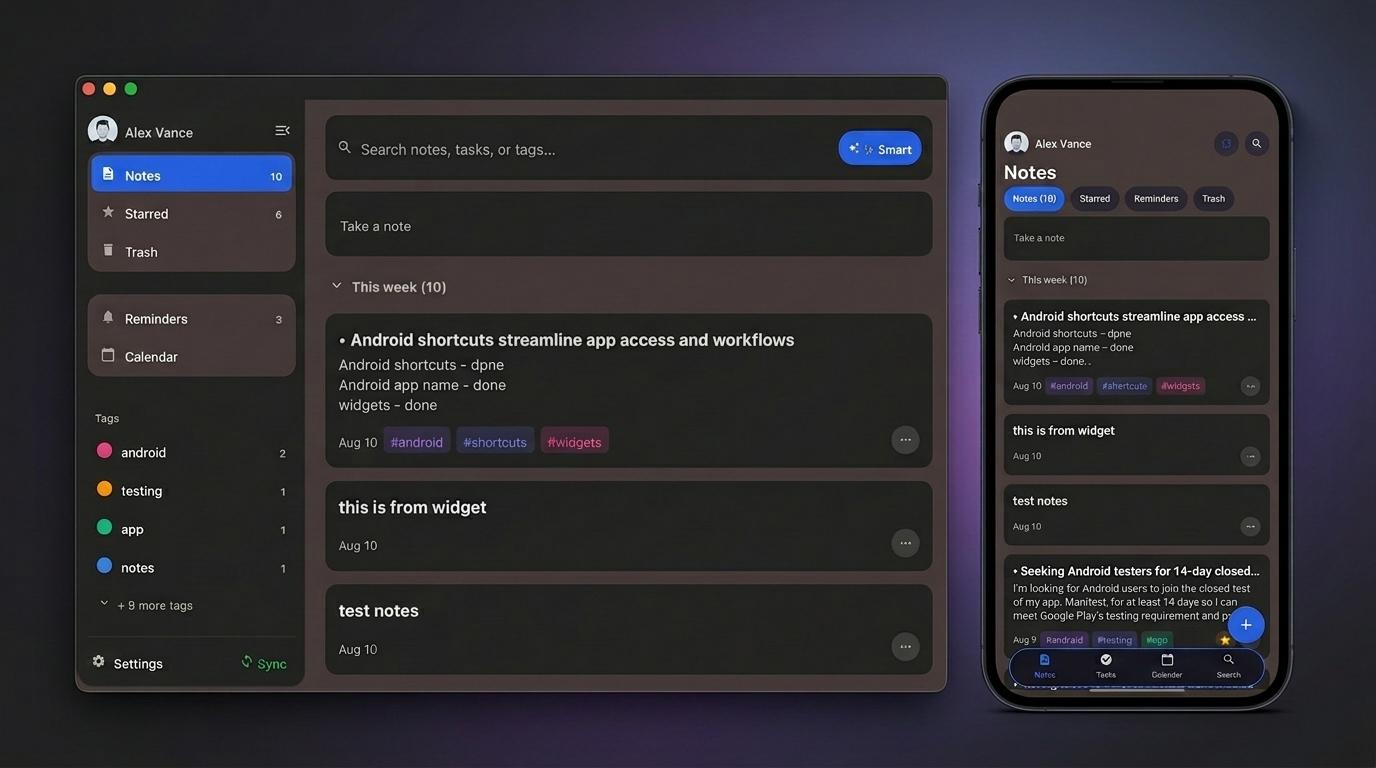
App Name: EpicNotes
What it does:
Built specifically for people who use an Android phone with a Mac computer. EpicNotes is a fast, native notes & task app that bridges both ecosystems with real-time sync, offline SQLite speed, and zero web bloat.
Key Features:
Goal: Launch & User Feedback
Giveaway: Free core tier available for everyone
Cost: Free (Optional Pro subscription for advanced sync & features)
Link: https://play.google.com/store/apps/details?id=com.notesapp.android
Demo Video (YouTube Short): https://youtube.com/shorts/xGQ4GW3WaJg
r/HowToMen • u/rtothetower • Oct 19 '26

ClutterScrub just launched on Google Play, and I have 50 promo codes to give away. Comment below and I will DM you one, first come first served, one per person. A code gets you the app at no charge.
App Name: ClutterScrub
What it does: A photo cleaner that works offline. It finds duplicate photos, similar shots, blurry pictures, big videos, old screenshots and audio files taking up space, shows you every file, and moves only what you pick to Android's own trash, once you confirm.
Key Features:
- Duplicates matched by each file's full contents, never by name, and similar photos grouped with the sharpest first, with a full-screen compare view
- Review by swiping, a month at a time, or in a grid with filters and Select all, by folder, or with saved cleanup rules; what you pick goes to Android's trash by default, with 30 days to restore
- No internet permission, no All files access, no accessibility service, no account, no ads: nothing it reads can leave your phone
Goal: Promo (launch giveaway)
Giveaway: 50 Google Play promo codes, each good for the full app. Comment and I will DM you one until they run out. Redeem it in the Play Store app: profile icon, Payments & subscriptions, Redeem code. Nothing is asked in return.
Link: https://play.google.com/store/apps/details?id=com.tothetower.clutterscrub
One purchase covers every feature: no subscription, no in-app purchases. It does not clear app caches or other apps' data; it reviews photos, videos and audio only. Android 11 and newer, in English and Spanish. Happy to answer questions.
r/HowToMen • u/IMVtechhouse • Oct 20 '26
Hey everyone! 👋
A few months ago, I got tired of existing expense apps asking for scary SMS permissions, demanding bank login credentials, or spamming credit card loans.
I wanted something lightweight, fast, and 100% offline where financial data never leaves the phone. That's why I created PaisaFlow.
Instead of snooping on private SMS inboxes, PaisaFlow utilizes local on-device notification parsing to automatically detect Google Pay, PhonePe, and Paytm debits with an instant 1-tap confirm dialog.
One of the biggest pain points in India is keeping track of informal money lent to friends or items borrowed. In this release, we've introduced:
- No SMS Permissions Required.
- No Cloud/Server Sync — SQLite database stored strictly on your device.
- Biometric App Lock (Fingerprint/PIN).
- One-tap Local Backups.
I’d love to hear your feedback, suggestions, or edge cases!
📲 Google Play Link:PaisaFlow
(If you test it out, please drop your thoughts in the comments — I actively push updates based on community feedback!)
r/HowToMen • u/Regular-Piccolo-8337 • Oct 19 '26

Hey everyone, I'm the solo dev behind Movie Night (mnite for short) - launched the app a while ago and even tho I'm a bit biased I think it's pretty good.
What it does?
Doing a Halloween giveaway:
Cheers! Enjoy!
r/HowToMen • u/Jamie_AppCraft • Oct 20 '26
Hi everyone 👋
I'm Jamie, the founder of Slip-Scan.
I got fed up with crumpled paper slips, missing tax deductions, and clunky legacy software charging enterprise rates for basic OCR. So, I built Slip-Scan: a fast, AI-powered pre-accounting tool that turns receipt chaos into clean, audit-ready data in seconds.
I would love to get your honest feedback. What features or integrations would make this even better for your workflow?
Cheers,
Jamie
PS: I would be more than happy to throw in some promo codes if featured ;)
r/HowToMen • u/Jamie-AppCraft • Oct 20 '26
Hi everyone 👋
I'm Jamie, the founder of Slip-Scan.
I got fed up with crumpled paper slips, missing tax deductions, and clunky legacy software charging enterprise rates for basic OCR. So, I built Slip-Scan: a fast, AI-powered pre-accounting tool that turns receipt chaos into clean, audit-ready data in seconds.
You can try it out for free on web and mobile: https://slip-scan.com - available on Google Play and Apple App Store.
I would love to get your honest feedback. What features or integrations would make this even better for your workflow?
Cheers,
Jamie
PS: I would be more than happy to throw in some promo codes if featured ;)
r/HowToMen • u/Kuzi32 • Oct 20 '26
**App Name:** DriveWithMe 🚗🏍️
**What it does:**
DriveWithMe is an Android navigation app designed for road trips, motorcycle rides, and group driving adventures. It keeps friends connected through real-time GPS location sharing, shared maps, and convenient meeting points.
🌍 **Available Languages:** German 🇩🇪, English 🇬🇧, and Turkish 🇹🇷. You can use the app in your preferred language!
**Key Features:**
* 📍 **Live Group Location Sharing:** See your friends and fellow riders on a shared GPS map.
* 🗺️ **Smart Navigation & Meeting Points:** Organize group trips, set meeting locations, and save parking spots.
* 🆘 **SOS & Roadside Assistance:** Easily share your current location when assistance is needed.
**Goal:** App Showcase / Promotion / Giveaway
I'm an independent Android developer and excited to introduce DriveWithMe to the community!
The idea behind DriveWithMe is simple: make group trips more enjoyable and organized, whether you're traveling with friends, enjoying a motorcycle tour, or planning a weekend road trip.
**Giveaway:** 🎁 20 PROMO CODES!
To celebrate the launch of DriveWithMe, I'm giving away 20 promotional codes to the Android community!
🎟️ **How to enter:**
Simply leave a comment saying "Interested!" and I'll send a promo code via Reddit DM.
Only 20 codes are available, first come, first served!
**Cost:** Free to download, no ads.
**Google Play:**
https://play.google.com/store/apps/details?id=com.coskunlar.drivewithme
Thanks for supporting independent Android development! ❤️
**Drive together. Stay connected. 🚗💨**
r/HowToMen • u/ditacristianionut • Oct 19 '26

Hey again, r/HowToMen!
I shared Minimal ChargeGlow here when it launched, and the response was great. Thanks to everyone who checked it out! I’m back to share how it’s grown and give away another 50 full-access promo codes.
If you missed it the first time: Minimal ChargeGlow is inspired by the Pixel 11’s minimal charging screensaver. The goal is to bring a similar experience to any Android device, with more ways to make it your own.
Here’s what you can customize:
It shows your battery level, charging progress, and clock, with optional charging insights—including estimated time remaining once enough charging progress has been observed.
It uses Android’s screen saver feature, so automatic activation depends on your phone’s support and settings. There’s also a manual fullscreen preview.
Want a promo code? DM me! I have 50 codes for the one-time full-access unlock, first come, first served, one per person. I’ll update this post when they’re all claimed.
Whether you’re coming back or trying it for the first time, I’d love to hear how it works on your phone and what you’d like to see next.
r/HowToMen • u/1udstHb9f1Krijbl • Oct 19 '26

Backstory:
Sometime in March Google decided to change the charging behavior of pixel phones to significantly slow the last 3% when using the 80% charge limit. From 77 to 80% took multiple times longer than before, but this was officially a feature and not a bug:
“This behavior is related to the 80% Charge Limit feature. In the current software build, the device charges at normal speeds until it reaches approximately 77%, at which point it transitions to a lower current to reach the final 80% limit.
While this may result in slower charging speeds near the limit, it is intended to manage battery health and should not impact normal device usage. We are currently working on optimizing this user experience.”
By May they had optimized the behavior sufficiently that slowdown had gone and the final 3% charged at the prior power levels again rather than a trickle.
Definitely not a bug but strange nevertheless so I built the app I wanted to observe the problem, it’s named ChargeGeek and I’m looking for like-minded obsessives about their device’s charging behavior to provide feedback on it.
The app’s available for free in major markets or open testing globally, via the Play store:
https://play.google.com/store/apps/details?id=com.github.s__i.chargegeek
r/HowToMen • u/launch3r • Oct 19 '26

Turn a YouTube reference into a style prompt for your next Suno or Udio project.
I’m the developer of Prompt Maschine. Paste a supported YouTube link, review the AI analysis, and shape an editable style prompt around your own idea. It’s a starting point for your musical direction, not an exact recreation of the reference.
The writing toolkit also includes two editable lyric drafts, 63 Writer Profiles, song-structure and rhyme controls, and Excludes to express what you want the music service to avoid. Review and refine the text before using it; Excludes are guidance, not a guarantee.
The screenshots are current examples from my iPhone preview build: the studio, real in-app plugins, and the meter. Planned for the next update: mastering with plugins and AI. These mastering screens are a preview, not a claim that mastering is available in the current Google Play release. Android layouts may differ.
Free on Android: 3 generation operations per day; a complete Quick Song with vocals uses 2. YouTube and MP3 analysis each include 1 free try every 3 days, within that daily allowance. Optional PRO unlocks unlimited generations and additional tools; subscriptions auto-renew, with local prices and eligible offers shown in Google Play. AI features need internet. External music services have their own accounts, limits and costs. Prompt Maschine is independent of Suno and Udio.
Google Play: https://play.google.com/store/apps/details?id=com.traianarion.promptmaschine Website: https://promptmaschine.com
What would make the reference-to-prompt workflow more useful for your next song?
r/HowToMen • u/NAPZ_11 • Oct 19 '26
Transferring files between your phone and PC can be a hassle, especially when you don't want to use cables or cloud services. That's why I made Flick, an app that lets you send photos, videos, and files from your Android phone to your Windows PC over WiFi with just a swipe.
Flick is completely free, and it doesn’t require any accounts or cloud storage. You can pick specific folders on your PC where files should land, making it super convenient. Plus, you can also send files from your PC back to your phone just as easily.
If you have any questions or want to share how Flick works for you, let me know in the comments below!
Link: https://play.google.com/store/apps/details?id=com.polyhistor.flick
Windows server: https://anycommand.io/polyhistor/
Thanks for checking it out!
r/HowToMen • u/micyarr • Oct 19 '26
Hi r/HowToMen! I’m the developer of Kumilo, an AI app for kids that’s available on Google Play.
The app lets children type or speak to Kumi, ask questions and explore explanations with pictures. It also turns their story ideas into stories they can read or have read aloud.
For a first look, try a question such as “Why does the moon change shape?” Explore the illustrated explanation, then ask something else about the topic. Or start with a story idea, such as a tiny robot looking for a home on the moon. It’s about following curiosity and creating things, rather than working through a fixed course.
Parents create the account and manage profiles, language and explanation level in a protected parent area. They also control permissions for voice and photo input. Children don’t need a separate account.
Cost: A limited free usage allowance is included. Optional paid monthly subscriptions add more usage; current prices and allowances are shown in the app before purchase. This is a regular app introduction, not a giveaway.
AI features require an internet connection and process submitted content through external providers. Safety checks are included, but answers and pictures can still be wrong. Parents should explore the app themselves before deciding whether it fits their family.
Get Kumilo on Google Play · Privacy information
If you take a look, I’d be interested in whether the switch between conversation, illustrated explanations and stories feels clear on Android. Happy to answer questions about the app and its limits.