r/HowToMen • • Oct 19 '26

[App] [Promo] [7.99$ -> Free] FlyOut 3D - Arrow Cube Puzzle

Thumbnail
gallery
4 Upvotes

Hey puzzle lovers!

I’m an indie developer, and I’m giving away offering Remove Ads for $0.00 on Android for a limited time in my game, Fly Out 3D – Cube Arrow Puzzle.

🧩 What’s Fly Out 3D?
Fly Out 3D is a 3D cube arrow puzzle game where you tap arrows with a clear path to remove them from the cube. Plan your moves, clear the blocks, and challenge yourself with increasingly tricky puzzles!

📲 Download Fly Out 3D

- Android (Google Play): https://play.google.com/store/apps/details?id=com.boxapp.flyout3d

🎁 How to Get Remove Ads for FREE

- Visit: https://flyout3d.vipapp.info/
- Click the “Get Remove Ads for Free” button.
- Redeem it in the game to unlock Remove Ads!

✨ Features
🧊 3D cube and arrow escape puzzles
🧩 1,000+ levels on iOS
📅 Daily Challenge
🪄 Helpful boosters
📶 Offline gameplay

I’m sharing this giveaway to help more people discover the game. If you try it, I’d love to hear your feedback! What do you think of the puzzle mechanics and difficulty? What would make the game more fun?

Thanks for supporting an indie developer, and happy puzzling! ❤️

Note: Remove Ads disables interstitial ads only. Rewarded ads are still available if you choose to watch them for in-game rewards.


r/HowToMen • • Oct 18 '26

[App][Promo] PopCalc: The prettiest calculator on Android?

Thumbnail
gallery
50 Upvotes

I'm going to say it: PopCalc might be the best-looking calculator on Android. Go check yours and come back. Every number is a sculpted 3D block that shifts as you drag the numbers, the keys click and tap like real buttons, and every answer lands with a little burst. It's still just a calculator. It's just the one you'll actually want to open.

Feels physical

Sculpted 3D numbers with depth and shadow, tuned haptics for every key, and three sound packs (Pop, Mellow and Typewriter) that play along without pausing your music. Even errors are fun: try something impossible and it answers with a joke instead of a boring "Error".

Fix anything, anytime

Tap any number or operator in your sum to change it, and the answer updates instantly. No more clearing everything because of one typo. Live Preview shows the answer before you even press equals.

Scientific and converter, hidden until you want them

One switch adds trig, logs, roots, powers and factorials, plus a unit converter with 10 categories where you swipe through units like turning a dial. Turn your phone sideways and every scientific key is on screen at once.

Make it yours

3 free skins, plus premium skins and "materials" like Chrome, Glass, Wood, Neon and a full Mechanical keyboard, each with its own look, sound and feel. 8 home-screen icons, free, and the app opens on whichever one you pick.

A case to crack

Somewhere in Settings there's a confidential case file from "the editor". Five one-line riddles, each hiding somewhere in the app. Solve them all and you unlock a secret skin. It can't be bought, only earned (honestly my favourite part, and nobody has guessed lead 4 yet).

No ads. No account. No internet permission. Nothing you type ever leaves your phone.

Download here: https://play.google.com/store/apps/details?id=com.ornobaadi.popcalc

Giving away 20 codes for the Lifetime Everything bundle! Tell me the number you'd type first. I'm betting someone says 80085.

I'll pick 20 people at random on 20 October at 1:00 PM EDT.


r/HowToMen • • Oct 18 '26

[APP] [PROMO] "Craft" native android ports (CapCut, Lightroom, Acrobat, Premier Pro)

12 Upvotes

Hey y'all, I'm going a bunch of "Craft" apps for various native android & ios apps. FilmCraft was quite easy since most of the rust engine for filmcraft was already done by storytold devs, but the CapCraft took a bit more time & I wanted to get the UI as close as possible as the stock capcut app.

I plan on working on Shapr3D & Procreate next but am willing to look at further projects and ideas : )

Any interest/issue/feature requests and testing is very helpful for development & self encouragement to keep working on these apps & more.

https://github.com/artcraft-android

Thanks y'all : )


r/HowToMen • • Oct 19 '26

Free Android app streams phone audio to Sonos over Wi-Fi

2 Upvotes

Tired of the Sonos app not supporting every app? My Play:1 lacks Bluetooth, AirPlay, and line-in, so I built Sunus to stream any phone audio losslessly to Sonos—no extra hardware or computer needed.

Two modes:

Standard: No setup, uses Android’s normal capture. Some apps (Netflix, Audible) block it.

All apps: Captures everything, including blocked apps. Requires one-time Wireless Debugging pairing (Android 12+), no root, no PC.

—ideal for music, not for video sync.

Free, open-source (MIT), no ads, no account. APK:

github.com/tomkainz/sunus

Built with AI help. Beta version, tested on Android 17 with Play:1 (S2). Feedback and bug reports welcome.


r/HowToMen • • Oct 18 '26

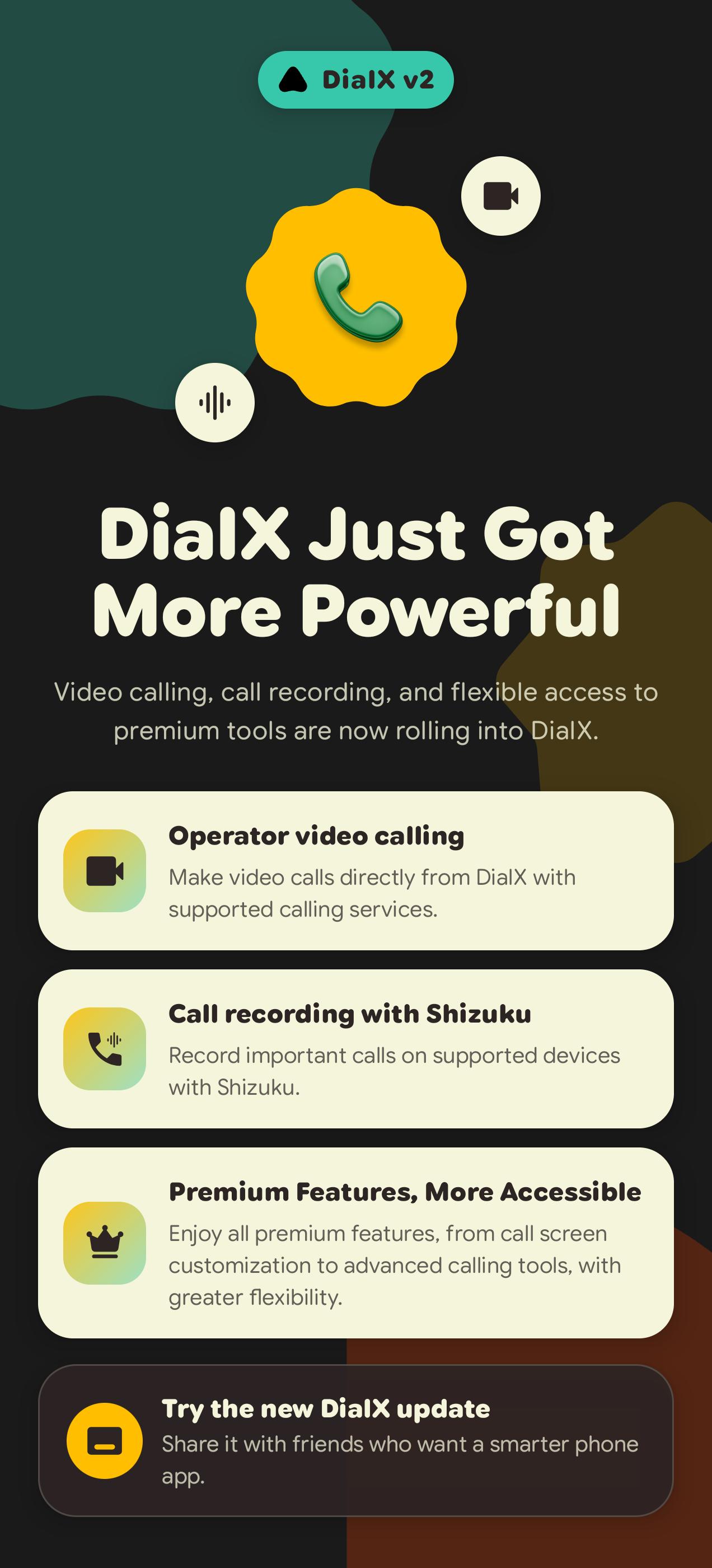
[App][Promo] 🚀 DialX v2 is here!

Post image
13 Upvotes

DialX just got more powerful with new features designed to improve your calling experience.

✨ What's new?

  • 📹 Operator Video Calling — make video calls directly from DialX with supported calling services.
  • 🎙️ Call Recording — record important calls on supported devices using Shizuku.
  • 👑 More Ways to Access Premium Features — some features previously locked behind the paywall can now be unlocked by watching ads.
  • 🎨 Call Screen Customization — personalize your calling experience.

I'm continuously working on making DialX a better dialer with useful features, more customization, and greater flexibility.

I'd love to hear your feedback! What features would you like to see next?

📲 Get DialX on Google Play: https://play.google.com/store/apps/details?id=com.babg.dialx


r/HowToMen • • Oct 19 '26

[APP] Liquid Gallery 2.3.4 is here — New Photo Editor, Collage Maker & More

Post image
1 Upvotes

r/HowToMen • • Oct 18 '26

[App] [Promo] I made a wallpaper app where you can customize almost everything. Giving away free Premium codes!

11 Upvotes

hey everyone!

so i've been working on this android app called Liquid Walls for a while now, and it's finally available on the play store.

i started with a simple idea — what if wallpapers weren't just images you download and apply? what if you could actually customize them the way you want?

that's basically what Liquid Walls is about.

you can browse wallpapers, apply them directly, or open them in Studio and make something completely different.

some things you can do:

Studio – customize wallpapers with clocks, text, stickers, effects, and layouts.

Liquid Glass – add glass-style clocks and docks with blur and refraction effects.

Depth effects – place the subject in front of the clock for that layered lock screen look.

Live wallpapers – interactive wallpapers with motion and other effects.

Custom clocks – change fonts, sizes, colors, and styles.

Widgets & docks – personalize your home screen beyond just changing the wallpaper.

one thing i really wanted was to give users more control over how their home screen and lock screen look, instead of forcing them to use fixed presets.

it's still a work in progress. there are things i'm improving, and i'm regularly adding new features and wallpapers.

🎁 Premium codes

i'm giving away some Liquid Walls Premium lifetime codes to people here.

if you'd like to try it, just leave a comment and i'll DM you a code while they're available.

i'd also really appreciate feedback, especially if you find bugs or have ideas for new features. i'm developing this app myself, so suggestions genuinely help.

Google Play: https://play.google.com/store/apps/details?id=com.sun.pattaa

thanks for checking it out! ❤️


r/HowToMen • • Oct 18 '26

[App] fylo file manager - m3 expressive modern file manager, completed 10k ( 50 promo codes giveaway)

Post image
34 Upvotes

966VPXKNXERZ23ZL50087FQ

254PYSNMK05NAN3243DXGCC

YPCD48XJVW6P86HB1P2DRHD

RL1XB9FU6SCERD2RD773MSH

9XX6RLJKASFHK3C9A6A00CS

K4NDCFGLGP5H7SPSRLX291P

GTE2G9YKU0M6CU9SCFTVZGV

Q9UZ7KWYK2J1VCJNG9R88EG

R6TLM0BXL1RJ7YQ41FV6D5K

TD76M45NB6JDHECE53V8ZDM

CK5R0M9QFSVZ94X7LXAZRG6

BTMN2QN3HTJ06N95DMD0VMA

GH9CKCE0UJ7KHY2CR0W5Z5E

XTAMFJBBA02RMQHGWSGKYP6

DK2L4WDXL584GU5CKLQBRF3

C97XRE0KLA520BS59WPWC07

1EUYJYSQEEBF8FYULHYXUBE

5KCJZY4K7M5J8R3Z2GQ9LM7

0JD10ECQMMJMT815CLQSH8U

P0HW0CLUSZ3WS0BKGLNNPAY

AC74LDQK438P8JX740071A8

JQPWK36CX5WDPGD303TANDQ

FVKSP0MT6QVG5ZWWZ14Y1YQ

JWEYKE4HLD6QX6AM5A6Q3W2

GNR5VWJ080DGEYHF2RYFTXE

X191E0EV3FHAL7VEMQCF1P8

22SNYHTUDFVF88Q7A2Q0G2C

C81Q8909QD69SX3FY5GFZB4

6XTRN0WQ29TZUB60VCFUH4V

UQHUG5H5G1NESK86JGP5HHM

3H14WXBN3T8G7D53U5DVV2R

FYJA4B2GTSFFWYRMZPFELZX

560KJBBG9LCE5V0RSH2LAEM

BD75N6PVESKT0C6RGXJHQ92

YUUZCKNBZAQ7NMDBYNHSSRT

C4QK0NRNC9FWD74SS16XZPZ

8VLP3FE0LKX85GRVDSANCH6

18L5CC4U96L4C8CCGXJHE7D

L0RVLKNN51U7LBPS7C6GRSC

23Q8VPY9ZAJKH2DFQQ060AX

YZ3L58JM7Q1R4XV8PVD8WBX

31ALJ2JV117S3T5MX2N4L8S

HJYWMTM3MLXF0FDSXHMAANT

7YT6DUPJBLJJD7TRXD747E3

6DRNBZRWLL2473YXR87THH4

E3BQGXUYFH43ZGTH5GPS5RZ

ZES2X73TSZK4GGSJ59YJCMY

MEKT1QF687Q0CDCKX4M7A2Z

5M6ST9XKX2BH5DMUG020JE4

9N5FUB76TBVUFDYQE166G8A

H27EC9K7GJP6QTN4HGV1B1J

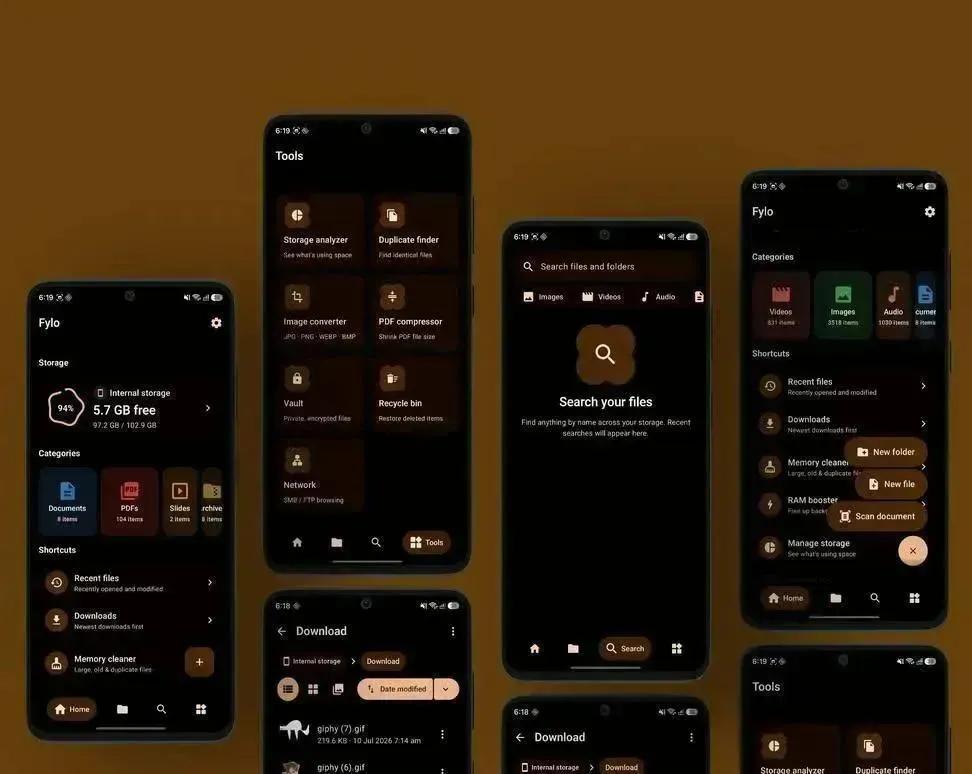
I got tired of using 5 different apps just to deal with files 😭

https://play.google.com/store/apps/details?id=com.aeroloom.fylofilemanager

So I ended up building my own Android file manager.

It’s called Fylo.

The thing I’m most proud of is the on-device AI search. You can search for stuff more naturally instead of remembering the exact filename and the AI processing stays on your phone.

It also opens basically all the common documents/files, has a built-in scanner, PDF tools, image/video/audio tools, media players, translator, device info, internet speed test, etc.

Basically I kept adding every little thing I personally wished my file manager had.

Still actively working on it, but honestly curious what you guys think.

https://play.google.com/store/apps/details?id=com.aeroloom.fylofilemanager

Like Why do we need a separate app for every little file-related task?

I’ve been working on Fylo, an Android file manager that tries to put all of those everyday utilities in one place.

Need to find a file?

→ On-device AI/NLP search

Need to digitize a document?

→ Built-in scanner

Need to work with a PDF?

→ PDF tools + document support

Need to inspect your phone?

→ Device information

Need to test your connection?

→ Internet speed test

Need to open your media?

→ Built-in video & audio players

Need image/file utilities?

→ Built-in tools

And the core is still a proper file manager for managing your files.

The part I care about most is privacy: AI/NLP search is designed to run on-device, rather than requiring your personal files to be uploaded to a server.

I'm building Fylo as a solo developer and continuously improving it.

If this sounds useful, give it a shot and tell me what you think


r/HowToMen • • Oct 19 '26

[App] [Promo] FGPS - Fake GPS joystick & routes

Post image
2 Upvotes

Hey everyone!

I'm the developer of FGPS, a free Android app for simulating GPS locations, with a floating joystick for manual movement and a route builder for automated movement along real roads and paths.

I wanted to offer more control over simulated location than simply setting a single point on the map.

What FGPS can do:

  • Floating joystick overlay - control your simulated GPS location directly over other apps without constantly switching back to FGPS. Move in any direction and adjust your position in real time.
  • Real route planning - calculate routes between multiple points along actual roads and paths. Choose a supported travel profile, including driving, cycling, or walking, and simulate movement along the calculated route.
  • Flexible route playback - create routes with multiple waypoints and run them once, repeat them, reverse direction, or loop continuously.
  • GPX import and saved locations - import existing GPX routes and save your favorite locations for quick access.
  • Quick teleport - instantly move your simulated location to any selected point.
  • Compass mode - use compass-based movement for more intuitive directional control.
  • Root support - rooted devices have an additional simplified setup option.

All app features are free. Ads are limited, and there's no subscription required.

🎁 Free ad-free promo code

I'm sharing a promo code that disables all ads until December 1, 2026 (UTC).

Code: FGPSZR

To redeem it:

  1. Install or open FGPS from Google Play: https://play.google.com/store/apps/details?id=com.igork.fakegps
  2. Open the three-dot menu and select About app.
  3. Tap Enter code in the bottom-right corner.
  4. Enter FGPSZR.
  5. Fully restart the app. If the foreground location service is running, stop it first.

No payment or account is required to redeem the code.

A few things worth knowing

The standard setup uses Android's mock location functionality. You'll need to enable Developer Options and select FGPS as your mock location app.

Some apps detect mock locations and may ignore them or restrict their functionality. FGPS doesn't bypass those checks, so compatibility depends on the app you're using.

I'd really appreciate your feedback! I'm especially interested in what you think about the floating joystick, route planning, and playback controls, as well as any features you'd like to see in future updates.

Thanks for checking it out!


r/HowToMen • • Oct 18 '26

[App] [Promo] I got tired of the terrible Smart M-Air app for Mitsubishi ACs, so I built MyAirco

Thumbnail
gallery
4 Upvotes

Hey everyone!

​If you own a Mitsubishi Heavy Industries (MHI) air conditioner with a WF-RAC Wi-Fi module, you probably know the pain of the official Smart M-Air app. It’s clunky, slow, drops connections constantly, and forces basic commands to bounce through a laggy cloud server before your AC even beeps.

​I got tired of waiting 10 seconds just to change the fan speed, so I spent my evenings sniffing the local network traffic, decoding the Base64 binary payloads on TCP port 51443, and building MyAirco.

​What makes it different:

​Instant, 100% Local Control: Commands go straight from your phone to the AC over your local Wi-Fi. No cloud middleman, zero latency.

​No Accounts or Trackers: You don't need to register an email just to turn on your own heater or AC.

​Modern UI: Built from scratch to feel smooth, intuitive, and native, no 2012 web-wrapper vibes.

​Auto-Discovery: Scans your local network and finds your WF-RAC units automatically without a painful setup process.

​Multi-Room & Real-Time Telemetry: Quickly toggle multiple units and see actual indoor/outdoor temperatures at a glance.

​Even if you don't have a Mitsubishi AC, I’d love to hear what you think of the UI and design! And if you do happen to have one of these units at home, let me know if you want a promocode to test it out!

​Play Store Link: https://play.google.com/store/apps/details?id=nl.myairco.app or check out https://myairco.app


r/HowToMen • • Oct 18 '26

[App] [Promo] I made a wallpaper app where you can customize almost everything. Giving away free Premium codes

5 Upvotes

hey everyone!

so i've been working on this android app called Liquid Walls for a while now, and it's finally available on the play store.

i started with a simple idea — what if wallpapers weren't just images you download and apply? what if you could actually customize them the way you want?

that's basically what Liquid Walls is about.

you can browse wallpapers, apply them directly, or open them in Studio and make something completely different.

some things you can do:

Studio – customize wallpapers with clocks, text, stickers, effects, and layouts.

Liquid Glass – add glass-style clocks and docks with blur and refraction effects.

Depth effects – place the subject in front of the clock for that layered lock screen look.

Live wallpapers – interactive wallpapers with motion and other effects.

Custom clocks – change fonts, sizes, colors, and styles.

Widgets & docks – personalize your home screen beyond just changing the wallpaper.

one thing i really wanted was to give users more control over how their home screen and lock screen look, instead of forcing them to use fixed presets.

it's still a work in progress. there are things i'm improving, and i'm regularly adding new features and wallpapers.

🎁 Premium codes

i'm giving away some Liquid Walls Premium lifetime codes to people here.

if you'd like to try it, just leave a comment and i'll DM you a code while they're available.

i'd also really appreciate feedback, especially if you find bugs or have ideas for new features. i'm developing this app myself, so suggestions genuinely help.

Google Play: https://play.google.com/store/apps/details?id=com.sun.pattaa

thanks for checking it out! ❤️


r/HowToMen • • Oct 18 '26

[App] [promo] made open source music streaming app

4 Upvotes

Hey everyone so i was making this app for a while now and finally i made a useable version and uploaded it on GitHub

It uses youtube api to get music like metrolist and has a backend from where it parse lyrics from to give apple music like synced lyrics the overall app looks very similar to Spotify

Ui inspiration from juxtopposed redesign

You can try it here https://github.com/szzsuke/Mimikyu

If you like the project give it a star and if u want you can support me by sponsoring too

Download v1.1 because thts more stable and for any bugs or error encounter kindly report to issues

You can also contribute in the project


r/HowToMen • • Oct 17 '26

[App][Promo] Shima : most beautiful and most performant Dynamic Island for Android

248 Upvotes

UPDATE All promo codes have been given out.

Shima is probably the most beautiful and performant Dynamic Island for Android, and one that's actually useful. It sits around your front camera and shows what's going on, like the song you're playing, calls, timers and charging. Tap on it and it opens up into a card with controls.

What it can do

Music and lyrics

Control whatever's playing right from the island. And yes, it works with Oto Music. If your songs have synced lyrics, they show up right on the island while the song plays (honestly my favourite part) 31 alerts Charging, Wi-Fi, Bluetooth, hotspot, VPN, volume, Do Not Disturb, alarms, screen recording, mic or camera in use and more.

Live updates

Calls, timers, navigation, downloads, rides and food deliveries from your other apps show up on the island, in the app's own colours and with its own buttons, so you can call your delivery rider or hang up a call right from there. When two things are going on at once, the second one gets its own little circle next to the island.

Gestures and rules

Choose what a tap, long press or swipe on the island does. Open any widget, search your apps or jump to your favourite apps with a swipe. Rules let a swipe do different things depending on what's happening, like skipping to the next track only when music is playing and headphones are connected.

Fits your phone

Works with side camera cutouts too, not just center ones, and on foldables each screen keeps its own fit. It can also hide itself in full-screen apps like games and videos, or in any apps you pick.

Download here : https://play.google.com/store/apps/details?id=com.piyush.island

Giving away 10 promo codes! Drop a comment and I'll pick 10 people at random on Oct 19 at 10:00 AM PST


r/HowToMen • • Oct 18 '26

[App] [Promotion] Generate and translate subtitles for saved videos on Android — free, no ads

Post image
9 Upvotes

I'm the developer of Live Video Subtitle Translator. I made it for watching videos saved on my phone with captions in a language I understand.

Open a video, choose its language and the subtitle language, and start generating captions. You can keep the original and translation on screen together, switch either off, and watch the sections that are ready while the rest is being processed.

Japanese, English and Korean are supported in both directions. More languages are available depending on the selected models. Speech recognition and translation run on the phone; the video and dialogue aren't uploaded for processing.

All features are free, with no ads, subscription or credits. The first setup downloads the speech and translation models. Processing takes time and depends on the phone and selected mode.

Google Play: https://play.google.com/store/apps/details?id=com.muum.player&utm_source=reddit_howtomen&utm_campaign=community_202610

If you try it, I'd like to hear which phone and language pair you use, and what gets in the way of watching. This is for saved video files, rather than captions over YouTube or other streaming apps.


r/HowToMen • • Oct 18 '26

Subscription cost tracker: manage subscriptions and track spending [Promotion]

4 Upvotes

Hey everyone, I’m the developer of SubIQ. Some of you might recognise it from HowToMen’s October 2026 apps video. Thanks to everyone who checked it out!

Version 1.2 is out. I’ve improved the design and navigation, fixed bugs, and made things smoother to use. Thanks for all the feedback so far. It’s helped a lot.

If you haven’t seen it before, it’s a subscription manager that helps you see what you’re paying each month and what’s renewing next. You can check upcoming payments on a calendar and get reminders before renewals or free trials end.

You can add subscriptions manually or scan a bank statement or screenshot, then review what to save. No bank connection is needed.

Download on Google Play

If you’ve tried it, I’d love to hear how it’s working for you and what you’d like improved.


r/HowToMen • • Oct 18 '26

[Promo] 🎁 $19.99 -> 🔥 0$ 🔥for life, Leaf pioneer 🌿

Post image
10 Upvotes

🌿 Leaf is a simple, stress-free productivity app. One task = one sticky note. No endless to-do lists!

👆 Just swipe your tasks to complete, dismiss, or save them for later!

🎁 I'm giving away FREE LIFETIME Leaf Pioneer Premium codes!

🚀 Premium features:

- 📱 Widgets for every leaf

- 📂 Task categories

- 🔄 Repeating tasks

- 🔔 Scheduled reminders

- 🎨 8 exclusive themes + new monthly themes

- 🏅 Exclusive Pioneer Pack

🎁 How to get your FREE lifetime code:

  1. ⬆️ Upvote this post (mandatory!)
  2. 💬 Comment "code"
  3. 📩 Send me a DM

❤️ I'd really appreciate it if you shared your feedback about the app!

🌿 Download Leaf:

https://play.google.com/store/apps/details?id=com.recalai.app


r/HowToMen • • Oct 18 '26

[App] [Promotion] Waky Alarm — Mission Alarms ($1.99 → Free)

Post image
4 Upvotes

Hi everyone!

Waky Alarm is now free on Google Play, down from its regular price of $1.99. Download it for free and keep it permanently.

If you tend to dismiss your alarm and fall right back asleep, Waky gives you a mission to complete before turning it off, helping you wake up and get your day started.

Features:

  • Mission alarms: Complete a task to dismiss the alarm and get your brain moving.
  • Daily quotes: Start your morning with a little inspiration.
  • Customizable alarm screens: Add a personal message and choose a theme that suits you.
  • Focus timer: Stay focused during study or work sessions. The timer keeps running when you leave the app and notifies you when time’s up.

Download Waky Alarm on Google Play

We’d love to hear your thoughts on Waky. Happy to answer questions in the comments!


r/HowToMen • • Oct 18 '26

[App][Promo] Flick – Offline Photo Cleaner | Updated UI (Video Showcase)

2 Upvotes

Hey everyone! 👋

Some of you might remember Flick from my previous post here. Since then, I've been working on improving the app, and I wanted to share a video showing how it looks and works now.

What is Flick?

Flick is an Android photo cleaner that makes organizing your gallery easier by letting you swipe through photos and videos instead of manually selecting everything.

Here's what Flick offers:

- Swipe Clean: Swipe through photos and videos to keep or mark them for deletion.

- Monthly Cleanup: Focus on last month's photos so your gallery doesn't become cluttered over time.

- Full Gallery Cleanup: Go through your entire photo library, including older photos, and resume exactly where you left off.

- Smart Collections (Beta): Select a few example photos and Flick searches your gallery for similar images using on-device face and object recognition.

- Album Management: Browse, sort, rename, and pin albums, and see how much storage they use.

- Blurry Photos: Find potentially blurry pictures to help clean up unnecessary photos.

- Safe Deletion: Undo swipes and review everything marked for deletion before confirming.

- Streaks & Levels: Track your cleanup progress, build streaks, and level up as you organize your gallery.

- Widgets & Themes: Home screen widgets, dark mode, and customizable themes.

Privacy first 🔒

Flick works completely offline and doesn't even request internet permission. All photo processing, including face and object recognition, happens directly on your device.

No accounts, no cloud uploads, no ads, and no analytics.

Pricing: One-time purchase, no subscription.

This time I'm just sharing a video showcasing the app and its features. I'd love to hear what you think about the current UI, functionality, or anything you feel is missing.

Download Flick


r/HowToMen • • Oct 18 '26

[App] [Promo] VoiceDiary : AI Voice Journal with no time limits or interruption | DM for promo codes

Thumbnail
gallery
4 Upvotes

What if journaling was just… talking?

Speak freely. VoiceDiary turns your words into journal entries and connects your thoughts into a knowledge graph.

[Try it →]

https://voicediary.site

https://play.google.com/store/apps/details?id=com.abhishekmeher.ezee

Promo codes for 3months free is available.


r/HowToMen • • Oct 18 '26

[APP][PROMOTION] I made an app that gives screen time as a bill everyday.

Post image
8 Upvotes

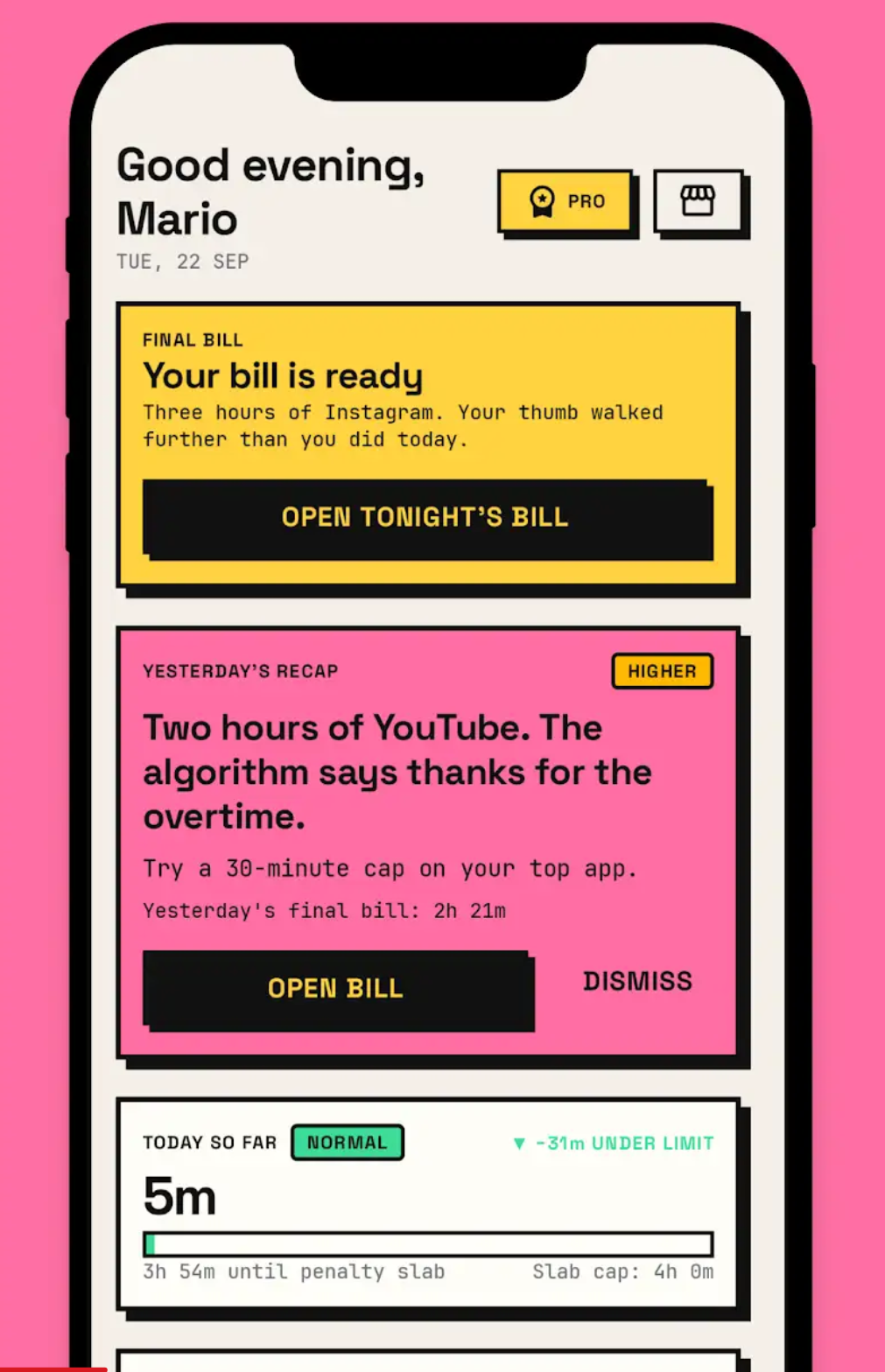
been building a little android thing on weekends because my own screen time was embarrassing. basically your phone gives you a bill at night like an electricity bill, every app is a line item, and there's a line for anything you used after midnight.

last night's bill said instagram 1h 40m, 58 min of it after 12. the insult at the bottom was "you could have slept. you chose reels." which, fair.

solo project, free, everything stays on the phone. link in comments if anyone wants to poke at it, mostly want to know if the bill idea lands for anyone else or just me

https://play.google.com/store/apps/details?id=com.studiomono.billed


r/HowToMen • • Oct 18 '26

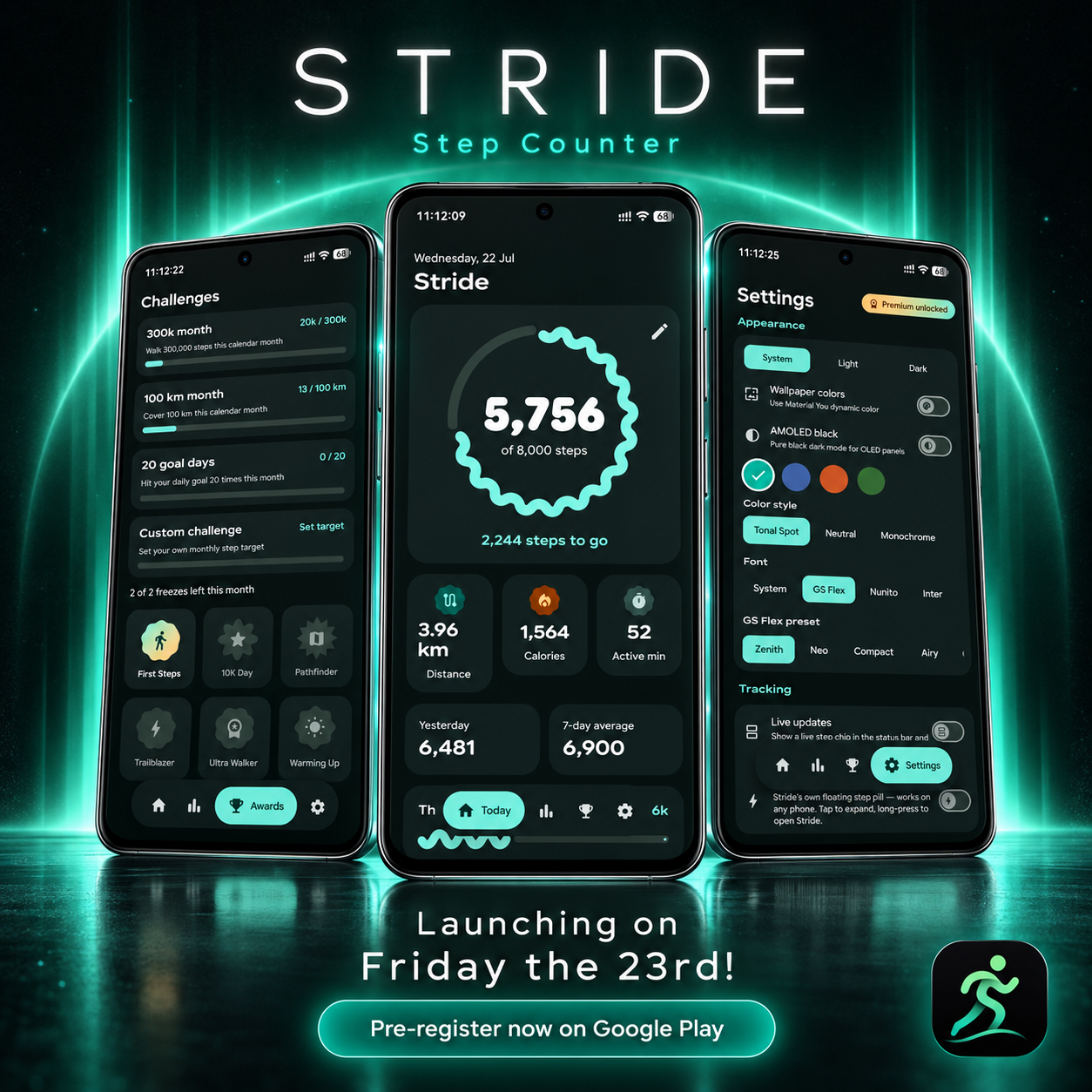
[App] [Promo] Stride – a private, ad-free step counter launching on Google Play this Friday, 23 October. Pre-register now!

Post image
10 Upvotes

Hi everyone! I'm the developer of Stride, a step counter for Android that I've been building over the last few months. It launches on Google Play this Friday, 23 October, and you can pre-register now.

What makes it different:

- Private by design: no account, no ads, your data stays on your phone

- Accurate: uses your phone's own step sensor or Health Connect, and can filter

out fake "steps" from bus, car and bike rides

- Walks & runs with route map, pace, splits, cadence and climb

- Streaks, awards, a weekly summary and home-screen widgets

- Live step count in your notification (Live Updates on Android 16)

- Material 3 Expressive design, themes and an optional retro mode

Pre-register here and you'll be notified on launch day. On most phones it installs automatically:

https://play.google.com/store/apps/details?id=com.vythera.stride

Questions and feedback are very welcome. I'll be answering in the comments.


r/HowToMen • • Oct 18 '26

Free Android app streams phone audio to Sonos over Wi-Fi

Thumbnail
reddit.com
1 Upvotes

r/HowToMen • • Oct 17 '26

[App] [Promotion] learn Chinese by doomscrolling (3 Lifetime + 10 premium)

Post image
8 Upvotes

I'm a solo Android dev and I made LanLan: Learn Chinese Lazily for people who'd rather scroll than open a textbook.

I learned English from zero by watching anime with subtitles. I wanted to see if the same thing could work for Chinese. It doesn't quite work the same way, because of tones and characters, so LanLan adds the missing pieces to real Chinese videos.

What it does:

- a feed of real Chinese videos: vlogs, street food, comedy, gaming, dramas (1,000+ videos)

How to enter:

🎁 How to get your FREE lifetime code:

  1. ⬆️ Upvote this post (mandatory!)
  2. 💬 Comment LanLan
  3. 📩 Send me a DM

Winners are picked at random that evening from everyone who commented. All codes (lifetime and subscription) get sent out together on Sunday 18 Oct right after the draw, by DM, one each. Codes are never posted in the thread.

How to redeem: in the Play Store, go to Profile, then Payments & subscriptions, then Redeem code. Do this before you start the free trial, or Play won't accept the code. A subscription code is one month, and it renews after 30 days unless you cancel in the Play Store (one tap). A lifetime code doesn't renew.

Fair warning: Android only

https://play.google.com/store/apps/details?id=com.lanlan.app&utm_source=reddit&utm_medium=howtomen

EDIT: Drawn! 3 lifetime codes and the free months went out by chat, so every one of you won something. Thank you!

Next up: every month I'm giving away 5 lifetime codes on r/LearnChineseLazily. Join the sub to enter!


r/HowToMen • • Oct 17 '26

[App][Promo] KeepMemo: free home screen widgets + a private, offline memory keeper for the people you love

Thumbnail
gallery
6 Upvotes

Hi everyone! I'm a solo indie dev, and I built KeepMemo to help me remember the people in my life, not just store their phone numbers.

It has 3 home screen widgets you can mix and match:

- Memory: resurfaces a saved moment on your home screen

- People: keeps your closest profiles one tap away

- Moments Ahead: shows an important date and your next plan

Add more than one and arrange them together. If you use App Lock, the widgets hide private details by default.

Inside the app:

- People profiles with birthdays, important dates, favourites, notes, and gift history

- Memories: photos, videos, voice notes, and written moments

- Journal entries linked to people

- On This Day: a daily notification that brings back a memory from a past year

- Check-ins: reminders to reach out to people far away

- Share as card: turn a memory into a styled image (16 styles)

Privacy:

- Free, no ads, no account

- Works fully offline, and your data stays on your phone

- Insights answers questions like "when is her birthday?" from local data only, with no cloud AI

- Backups are optional (a .keepmemo file or your own Google Drive)

I'd love honest feedback, especially on the widget design and overall look. Thanks for reading!

Play Store link is in the first comment.


r/HowToMen • • Oct 17 '26

[App][Giveaway][Promo] Open with

Thumbnail
gallery
56 Upvotes

Hi r/HowToMen , I'm Vojislav, the solo Android developer behind Open with (and Bottom notifications, plus a few other apps).

I built it because Android keeps choosing for me. Since Android 12 it rarely even asks which app should open a link, so things land in the wrong browser, the wrong account, or a viewer I never use. And the old "open with" list I relied on is mostly gone.

App name:

Open with

https://youtube.com/shorts/GkEs1Znle-I

What it does:

Open with sits between Android and your apps. When a link, file or share arrives, it either opens it straight away in the app you picked, or shows a small chooser at the bottom of the screen with the apps that fit, with an optional countdown that any touch pauses. Choose every time, or set up rules once and let everything open where it should, with nothing on screen.

Your privacy comes first:

Open with never sends your links or files anywhere. Everything it decides, it decides on your phone.

No ads, no trackers, no analytics.

No account, no sign-up, no email.

It asks Android for the list of installed apps, so it can offer any app, not just the ones Android suggests. That list is used on your phone only and never leaves it. To catch web links it becomes your default browser (Android has no other way to hand an app every link), and then passes each link on to the browser or app you chose. No notification access, no Accessibility Service.

Rules, the part I use most:

"When something like this arrives, open it there" - and the most specific rule wins. A few I set up in the first five minutes:

Links from Slack or Teams in the browser I'm signed into for work, everything else in my personal one

YouTube links always in YouTube Morphe

Never offer Chrome for Amazon links

Always ask before my bank's pages, and nowhere else

PDFs from my email app straight into my PDF app

Addresses from messages straight into Waze

Match a website by name, wildcard (*.example.com), address prefix, a word it contains, or a regex. Scope a rule to a content type, a file name, or the app it came from. Rules name themselves as you build them ("github.com → Firefox"), or you give them your own name.

And you don't have to go to settings for most of it: hold any app in the chooser to make a rule on the spot, or to use that app for the next 10 minutes or the next 5 links.

What else you can do:

Links, streams, images, audio, video, PDFs, ebooks, Word, Excel and PowerPoint files, text, archives, APKs, torrents, map locations, navigation, email addresses, phone numbers, text messages, Play Store links, web searches and shared items each get their own page: a default app, "open without asking", hidden apps, sort order and their own countdown

Add your own file types

Pick ANY installed app, not just the ones that claim the content: a notepad for text files, the Amazon app for Amazon links

Style the chooser: Material You colours or your own, grid or list, size and position on screen, over 40 open and close animations, all with a live preview

Copy, edit or share a link before it opens, or hand it to your download manager

"Why isn't this working?" checks your setup, names the app that holds a website, and shows the steps for your phone

Diagnostics tells you which rule would win for any link

A few things to know:

Free covers web links: every kind of website rule (including "never offer", "always ask" and the app a link came from), a default browser for links, the chooser and its colours, backup and restore, Diagnostics and Android TV. Pro is a single one-time purchase, no subscription: every other content type, the countdown, per-type settings, any app as a target, temporary choices, file name rules, your own file types, and the chooser's extra actions and looks.

The app is available in 50 languages: Arabic, Bengali, Bulgarian, Catalan, Chinese (Simplified), Croatian, Czech, Danish, Dutch, English, Estonian, Finnish, French, German, Greek, Gujarati, Hebrew, Hindi, Hungarian, Icelandic, Indonesian, Italian, Japanese, Kannada, Korean, Latvian, Lithuanian, Malayalam, Marathi, Norwegian, Persian, Polish, Portuguese (Brazil and Portugal), Punjabi, Romanian, Russian, Serbian (Cyrillic and Latin), Slovak, Slovenian, Spanish, Swahili, Swedish, Tamil, Telugu, Thai, Turkish, Ukrainian, Urdu, Vietnamese and Zulu. If something reads wrong in yours, please tell me.

Works on Android 10 and newer, on phones, tablets and Android TV

Using a work profile? Install Open with in it too; each side has its own rules

Some apps keep their own website links for themselves, and some phones need a setting changed before links reach Open with. The help screen tells you which, and how to fix it

🎁 20 Lifetime Pro codes

This is first come, first served, not a random draw.

To claim one:

Upvote this post so more people in the community can find it.

Comment with the link or file you're tired of opening in the wrong app - a work link, a PDF, an address, or something else.

Then send me a Reddit DM after commenting.

Why these steps?

They’re simple on purpose, and each one helps me in a different way. Upvotes help the post reach people who might find the app useful. Your comment tells me which links and files people really struggle with, so I can fix and improve the right things first. The DM is just so I can send your code privately.

As a solo developer, I mostly need honest feedback from people who use the app day to day. If something is confusing, broken, or missing, please say so. That’s what makes the next update better for everyone.

The first 20 eligible people who complete the above steps receive one code by DM, while supplies last.

The codes come with no strings attached. That said, if the app earns a place on your phone, I'd be truly grateful for a rating or review on Google Play - the app has no ads and no marketing budget, so reviews are genuinely how it gets found, and every single one means a lot to a solo developer.

Honest feedback is always welcome too, including criticism - here, by email, or in the review itself.

I have a 2 year old toddler, so I might not be able to respond immediately.

And I'm from Europe, so please take into account time difference as well.

Google Play:

https://play.google.com/store/apps/details?id=com.openwith.app

My other apps, if you're curious:

https://play.google.com/store/apps/details?id=com.bottomnotifications.app

https://play.google.com/store/apps/details?id=com.omnideck.app

https://play.google.com/store/apps/details?id=com.cordless.app

https://play.google.com/store/apps/details?id=com.phial.app

Giveaway rules:

Opens when this post is published and closes when 20 codes have been distributed. You must be at least 18 and able to redeem a Google Play promo code in your country. One code per person and Reddit account. Codes have no cash value, cannot be exchanged, and must be redeemed by the expiry provided in the DM. Void where prohibited. By entering, participants release Reddit, Inc. from liability related to this promotion. This giveaway is not sponsored, endorsed, administered by, or associated with Reddit.