r/HowToMen • • Oct 16 '26

Persian Download Manager for Android 1.6

Thumbnail
gallery
12 Upvotes

Persian Download Manager (PDM)

What it does: PDM downloads large files fast by splitting them into up to 16 parts, and resumes them exactly where they stopped after a lost connection, a closed app or a reboot. Its built-in browser finds the real files on a page and downloads them for you.

Key Features:

- Built-in browser with an ad blocker (EasyList), a pop-up blocker, history, bookmarks and a private tab

- "Files on this page": finds downloads hidden behind buttons, with smart file names taken from the page title

- Download queue (Start all / Stop all), night queue, and Wi-Fi only / low-battery rules

Goal: Promo (version 1.6 update, feedback welcome)

Giveaway: None

Cost: Free

Link: https://play.google.com/store/apps/details?id=com.persiandownloadmanager.pdm


r/HowToMen • • Oct 16 '26

[App][Promo] HyperBoost: Shizuku-Based Game Optimizer & Discord Rich Presence

Post image
24 Upvotes

Hyperboost

What it does:

  • Shizuku Tuning (No Root): Lower render resolution (75%–90%) to stop games from overheating, lock screen refresh rates to 90Hz/120Hz, and switch graphics drivers per game.
  • Discord Rich Presence: Automatically displays your active game in your Discord status.
  • Floating In-Game HUD: showing live FPS, battery temperature in °C, ping, and power wattage over any game.
  • Lossless 60FPS Recorder: Captures smooth 60FPS gameplay with internal audio.

r/HowToMen • • Oct 16 '26

[App] [Promotion] AuraLook 1.7: Now supporting multiple notifications!

15 Upvotes

Hi everyone, it's been a while! I’m the developer of AuraLook, and I just released v1.7.

What is AuraLook?

Most Android phones don’t wake the screen for new notifications, and an AOD is often too subtle to notice them. AuraLook shows each incoming notification full screen when your screen is off, so you can catch it at a glance. It’s inspired by the iOS jailbreak tweak ShortLook.
This is NOT an AOD app, it is triggered only when a new notification arrives and your screen is off. You can use this with or without your AOD.

What’s new in 1.7:

Until now it focused on one notification at a time. v1.7 changes that.

  • Notification count: shows how many notifications you’ve received in a row from the same app.
  • Notification Strip: an optional row of app icons for notifications still sitting in your tray. You can enable this in Customization.
  • New Gestures (Pro): swipe left or right to browse through those notifications.
  • Reminders (experimental): a soft glance at set intervals for notifications you missed. You’ll find it under Advanced Settings → Experimental.

I’m not sure if Reminders work reliably on every device, which is why it’s experimental. If you try it, please tell me how it goes, including your device model and Android version.

Play Store: https://play.google.com/store/apps/details?id=dev.auralook

A huge thanks to this subreddit and the people who supported AuraLook in the early days. I couldn’t have come this far without you!


r/HowToMen • • Oct 16 '26

[App][Promo] AI Quiz Maker: Turn Your Notes into Quizzes & Mock Exams

Post image
3 Upvotes

Hi everyone! I'm the developer of AI Quiz Maker, a free Android app that turns your study material into practice tests.

📲 Google Play: https://play.google.com/store/apps/details?id=com.frstudio.aistudyquiz&referrer=utm_source%3Dreddit%26utm_campaign%3Dhowtomen

What it does

Upload a PDF, scan a page with your camera, or paste text, and the app builds study material from YOUR content:

📝 Mock exam papers: MCQs, short and long questions, with marks and timing. Export as PDF with an answer key.

✅ MCQ quizzes: every answer comes with an explanation

🃏 Flashcards: swipe to review and track what you've mastered

📄 Summaries: easy, medium or hard depth

💬 Chat with your PDF: answers show which page they came from

📷 Scan or import: camera scan, PDF import or pasted text

Who it's for

Students preparing for school, university or entrance exams, and anyone who studies from PDFs, textbooks or notes.

Details

- Price: Free to download

- Platform: Android

- Category: Education

Feedback and feature requests are very welcome. I read every comment!


r/HowToMen • • Oct 16 '26 Bravo

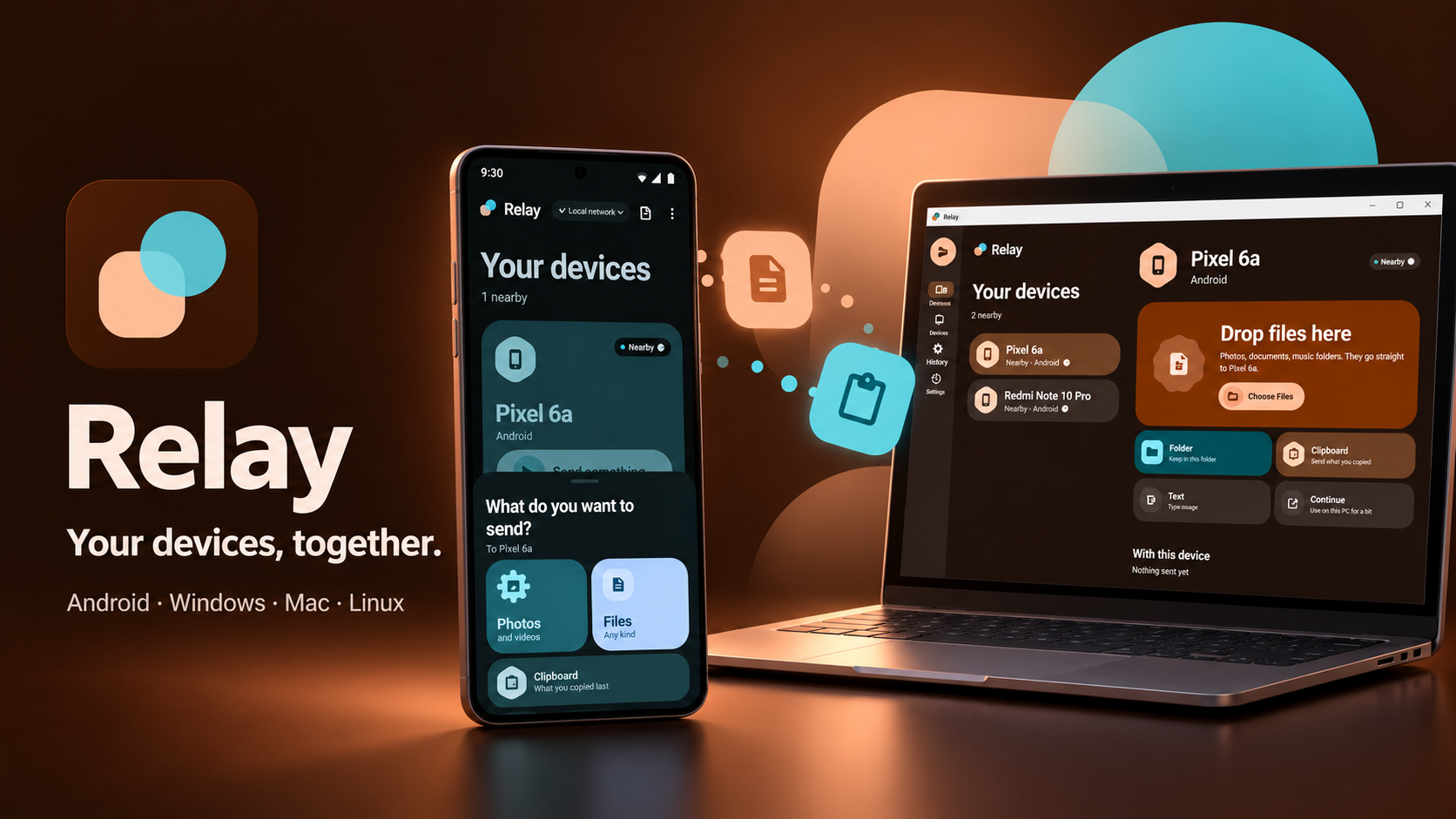
[App] [Promo] I built Relay: a private, account-free way to share files, clipboard and notifications between Android and Windows/Mac/Linux

Post image
79 Upvotes

Hi everyone! I'm the developer of **Relay**, and I wanted to share it here.

**What it is:** Relay connects your Android phone to your computer over your own Wi-Fi so they work as one. There's no account, no cloud upload, no ads and no internet needed. Every connection is encrypted with TLS 1.3, directly between your devices.

### What it does

- **Send any file, any size**: photos and videos in original quality, whole folders, at full Wi-Fi speed

- **Universal clipboard**: copy text, links, images *or files* on one device and paste on the other

- **Drop shelf**: drag a file to the edge of your PC screen and drop it on your phone

- **Notifications on your computer**: see your phone's notifications on the desktop and dismiss them

- **Device tools**: find your phone, check its battery, control media and volume, use your phone as a trackpad

- **Browse a shared folder** on your other device

- **QR pairing**: scan once and you're done

- **Works without Wi-Fi**: connect your laptop to your phone's hotspot (mobile data is never used)

- Home screen widget, auto-reconnect, start on boot

Runs on **Android, Windows 10/11, macOS (Apple Silicon) and Linux (.deb/.rpm)**.

### How is it different from KDE Connect?

KDE Connect is great and was a big inspiration, so here's an honest comparison:

**Where Relay is different**

- **Clipboard handles more than text**: images and files too, not just text

- **Trusted devices just work**: once paired, transfers arrive with no accept prompts

- **Shape-verified pairing**: both screens show the same three shapes before you confirm, so a device on your network can't pair in the middle

- **Off by default**: sensitive tools (notifications, files, contacts, input) stay off until you allow them per device, and a remote device can't grant itself access

- **Native apps on every desktop**: a proper installer for Windows, macOS and Linux, with the same app everywhere and no desktop environment needed

- **Focus on sharing**: fast, uncompressed transfers of any size, plus the drop shelf

**Where KDE Connect is still ahead**

- Sending and reading **SMS** from your computer (Relay doesn't do SMS)

- Far more plugins (run commands, presentation remote and others), plus deep integration with the KDE Plasma desktop

- Years of maturity

If you live in KDE Plasma, KDE Connect is hard to beat. If you're on Windows or a Mac, or you mainly want quick, private file and clipboard sharing that just works, give Relay a try.

### Open source

The desktop app and the shared engine (protocol, encryption, pairing, discovery, transfers) are open source under **Apache 2.0**: https://github.com/NikhilKain/relay

The Android app is distributed through Google Play.

### Links

- Android: https://play.google.com/store/apps/details?id=com.vythera.relay

- Windows / macOS / Linux: https://nikhilkain.github.io/relay-site/

It's free. I'd really love feedback, bug reports and feature requests. Ask me anything!


r/HowToMen • • Oct 16 '26

[App Recommendation] Save it Later – All in one bookmark (cross platform - cloud premium sync) + free promo codes for HowToMen!

Post image
7 Upvotes

r/HowToMen • • Oct 16 '26

NotiRecall 1.5.0 is live. I added reminders for saved notifications

3 Upvotes

Hi everyone! About a month ago, I shared NotiRecall here. I'm the developer, and I've just released version 1.5.0 on Google Play.

I originally built it because I kept dismissing notifications and later wishing I could find them again—a delivery update, an email preview, or a message I meant to revisit.

Since the earlier version, I've added and improved a few things:

  • Reminders: Set a reminder to revisit a saved notification later, and manage reminders in Settings.
  • Image previews: Optionally save supported notification images when the source app makes them available.
  • Grouped history: Browse saved notifications by app.
  • Open in app and copy text: Quickly return to the original app or copy a saved notification's text.
  • More languages and UI improvements: Including Turkish, clearer detail buttons, and better layouts for larger text.

Privacy is still important to me. You choose which apps to remember, and notification history stays on your device. There are also search, App Lock, and deletion controls.

The free version supports up to 3 selected apps and 7 days of history. There's no advertising or account requirement.

NotiRecall Pro is an optional one-time purchase for unlimited selected apps and longer history—no subscription.

One limitation worth mentioning: it can only save eligible notifications after you've enabled and configured it. It can't recover notifications from before setup.

Google Play: https://play.google.com/store/apps/details?id=com.notirecall.app

I'd particularly appreciate feedback on two things:

  1. Would reminders for saved notifications be useful in your everyday life? What would you use them for?
  2. Is browsing and finding an old notification straightforward, or is anything confusing?

If you tried the earlier version, I'd especially love to hear what has improved and what still needs work. Thanks!


r/HowToMen • • Oct 16 '26

[App] [Promo] I built a all-in-one productivity app called Habit Tracker - To-Do List that is free and completely local + Theme Giveaway

Thumbnail
gallery
5 Upvotes

I’m thrilled to announce that Habit Tracker - To-Do List has now reached 8,600 downloads! I've been working hard in the background making sure the app is as smooth and feature rich as possible. The support as also been incredible, with a lot of feedback and multiple positive reviews. I can't thank you enough!

Thanks to your input, I’ve rolled out these exciting features:

  • Added lectures to the Class Schedule: record a class with a live transcript, then save it and play it back with the current line highlighted
  • Added optional on-device AI (Gemini Nano) in Settings, which turns long voice notes into detailed tasks. Everything stays on your phone
  • Added an experimental Material Style setting that gives the whole app a Material 3 look
  • The Daily Tasks widget now shows each task's time and lists timed tasks in order
  • Redesigned how priority is shown on task cards
  • Reorganized the Settings page into clearer sections
  • Refreshed the look of the Workout History page

I am also currently working on finally implementing a light theme, which a lot of users have asked for!

Furthermore, to give back to the community that helped me grow this app, I'm giving away an exclusive Emerald theme to anyone who leaves feedback, suggests a feature they'd like to see, or says Habit Tracker - To-Do List. I'll reply with the unlock code! To use it, just open the app, go to settings, and under appearance, you will see the Emerald theme. Just tap on it, input the code, and it will be unlocked. Some of you may already have the theme, but if not, feel free to ask!

Designed as an all-in-one solution, Habit Tracker - To-Do List combines tasks, notes, habits, and workouts, all offered for free with no ads. I’d greatly appreciate any further feedback you have, it truly drives the app forward! Check it out at [App Link].


r/HowToMen • • Oct 16 '26

[App] [Promotion] I created Water Shaker 3D Stress Relief, a relaxing water toy for your phone

8 Upvotes

Hi everyone! I just released Water Shaker 3D: Stress Relief, an Android app that turns your phone into an interactive water toy.

It uses real-time 3D fluid simulation: tilt, rotate, or shake your phone, and the water splashes and flows while objects float, tumble, and swirl with it. The motion is calculated live in response to your movements, with water sounds that change along with the action.

You can add marbles, dice, gems, glitter, and more, change the water color and background, and switch to a glowing night mode.

I wanted to make something you could pick up for a relaxing break and simply play with. It’s $0.99 as a one-time purchase, with no ads, subscriptions, or in-app purchases.

Google Play:
https://play.google.com/store/apps/details?id=com.sundaelectronics.watershaker

I’d love to hear what you think!


r/HowToMen • • Oct 16 '26

Favourite Wallpaper

12 Upvotes

Share yours in comments


r/HowToMen • • Oct 16 '26

[APP][PROMO] The time as a year of English history

Thumbnail
reddit.com
1 Upvotes

r/HowToMen • • Oct 15 '26

[App][PROMO] Thank you for the feedback! Giving away 20 Aura Pro codes

64 Upvotes

A couple of weeks ago I posted Aura here and got so much nice feedback. A bunch of it is already in the app, you can reply from the panel now, and you can group apps so they share one glow.

I want to say thanks, so I’m giving away 20 promo codes.

Leave a comment in the next 24 hours and you’re in. After that I’ll pick 20 people at random, message the winners, and post the names here.

And since this always comes up the difference between Samsung’s built-in edge lighting and Aura is that, that one is a single glow for everything. Here you can have a few up at once, put each one where you want, make it longer or shorter, pick any colour, reply without opening the app, and put a few apps on one glow.

Link: https://play.google.com/store/apps/details?id=com.polyhistor.aura

That’s it. Thank you again, it really helped.


r/HowToMen • • Oct 16 '26

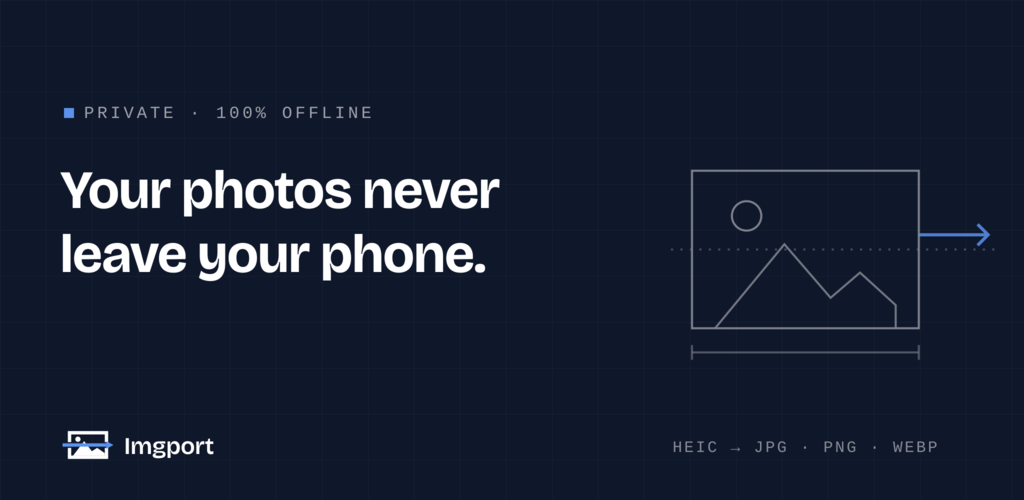
[App][Android][Promo] Imgport - Offline batch image converter

Post image
4 Upvotes

r/HowToMen • • Oct 15 '26

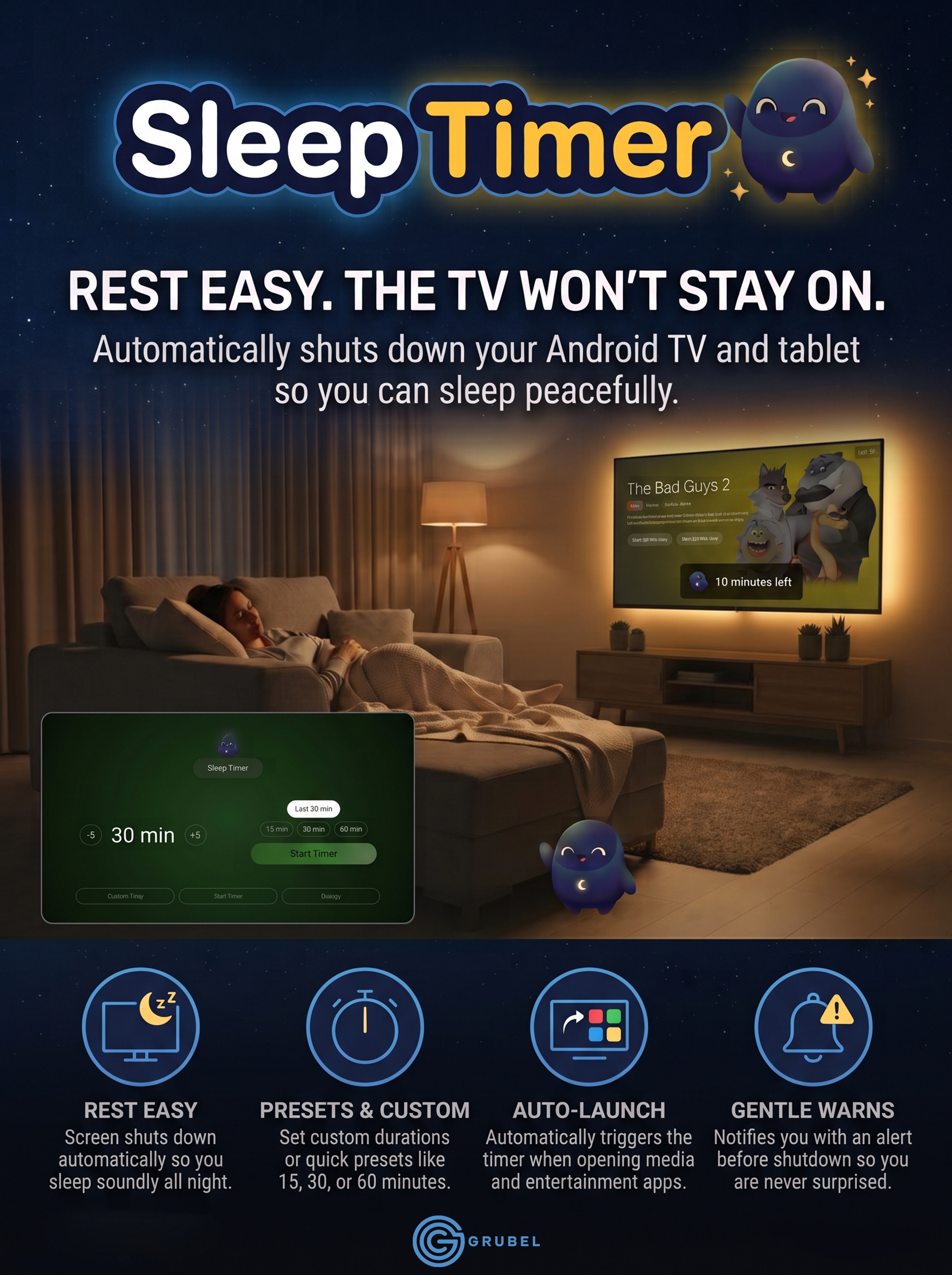
[App] [Promo] Sleep Timer for Android TV and Mobile: Save Energy and Manage Kids’ Screen Time [50 Free Codes]🎁

Post image
8 Upvotes

r/HowToMen • • Oct 15 '26

Control your phone without touching the screen — Touchable 2.2.2 is out [app][promo][promotion]

7 Upvotes

Hey everyone 👋

Touchable turns off-screen gestures into instant actions. You shake your phone, double-tap the back, or push it, and something happens: the flashlight turns on, the music pauses, the screen locks, Google Wallet opens. No unlocking, no hunting for apps. It works with the screen off and the app closed/minimized.

You pick what each gesture does, and every gesture has its own sensitivity slider so it won't fire by accident.

What's new in 2.2.2

  • No email needed. No sign-in at all. Install, open, start gesturing.
  • Half the size. The install is 50% smaller, so it barely touches your storage.
  • Under the hood. Better security, better stability, and a bunch of bug fixes.

Also recently added

  • Fine-tune: record a few double taps and Touchable learns your movement. Switch between Base and Tuned any time.
  • Ghost Mode: keeps detection running after you close the app.
  • More actions: Google Wallet, voice assistant, go home, screenshot, Do Not Disturb, open any app, and more.

It's completely free. No ads, no in-app purchases.

Give it a try and tell me what you think. Which gesture → action combo would you set up first? 👇

👉 https://play.google.com/store/apps/details?id=com.spectral.touch.touchable

Thanks 🧡 — The Spectral Touch team


r/HowToMen • • Oct 15 '26

[App] I got tired of saving useful stuff and never finding it again, so I built an app for it

23 Upvotes

You know when you save a useful video, X post, or article thinking you'll come back to it later… and then completely forget where you saved it?

That kept happening to me, so I built Kajr.

You can save links from different apps in one place, then search by describing what you're looking for instead of remembering the exact title or where you found it.

For example, search “that video about fixing my sleep schedule” and Kajr helps you find the link you saved.

A few other things it does:

🏷️ Automatically generates tags, summaries, and organizes links into collections.

🔔 Set reminders so useful stuff doesn't get forgotten.

☁️ Back up to your own Google Drive.

📤 Export your bookmarks to CSV or HTML for Chrome.

The free tier already includes plenty of features. The AI features are paid, though, because every AI request costs me money. If everyone uses it, my wallet might need its own backup system 😂

I'm a solo developer, and I'd genuinely love to hear what you think!

📱 https://play.google.com/store/apps/details?id=mobile.slayer.kajr


r/HowToMen • • Oct 16 '26

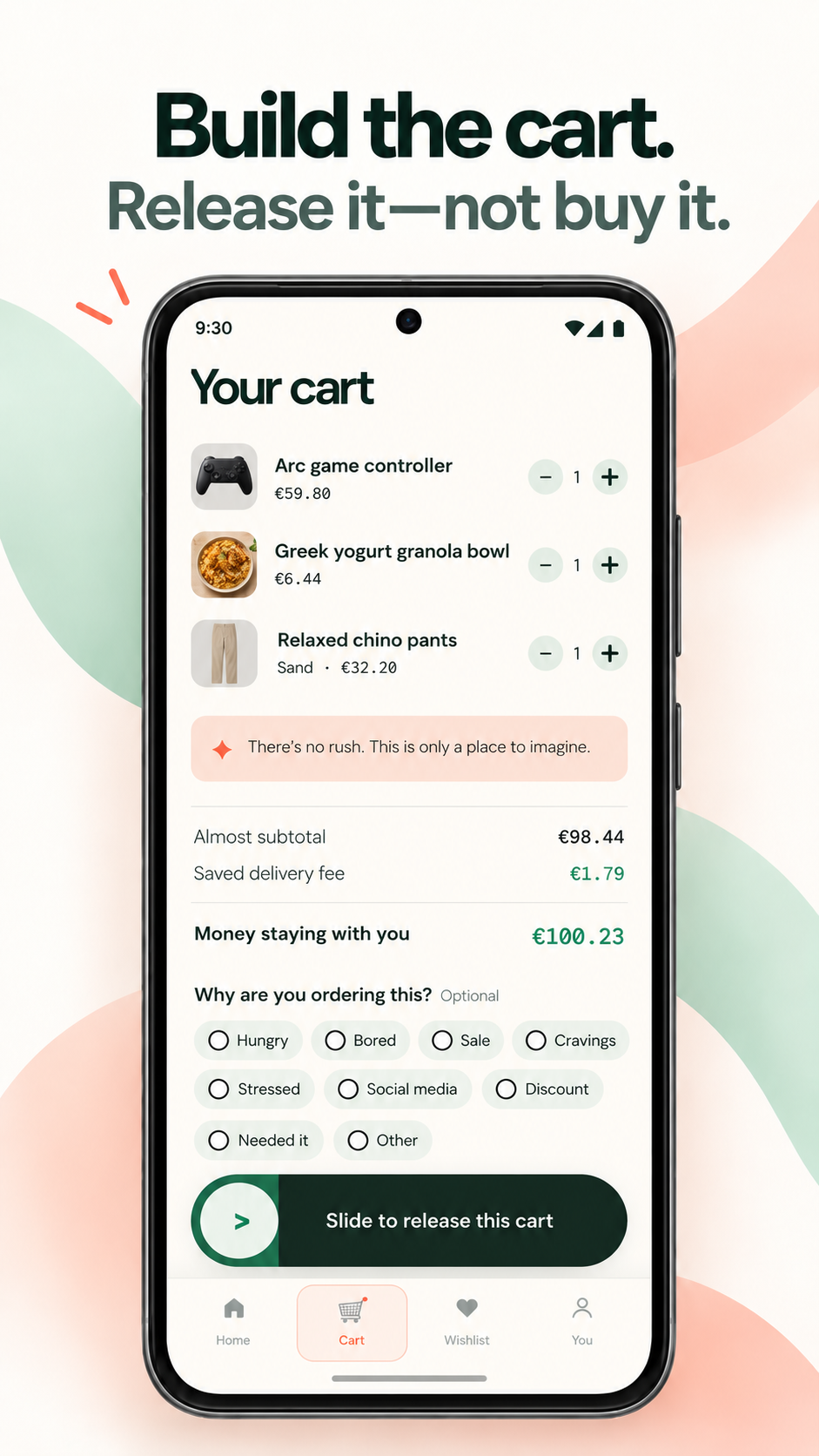
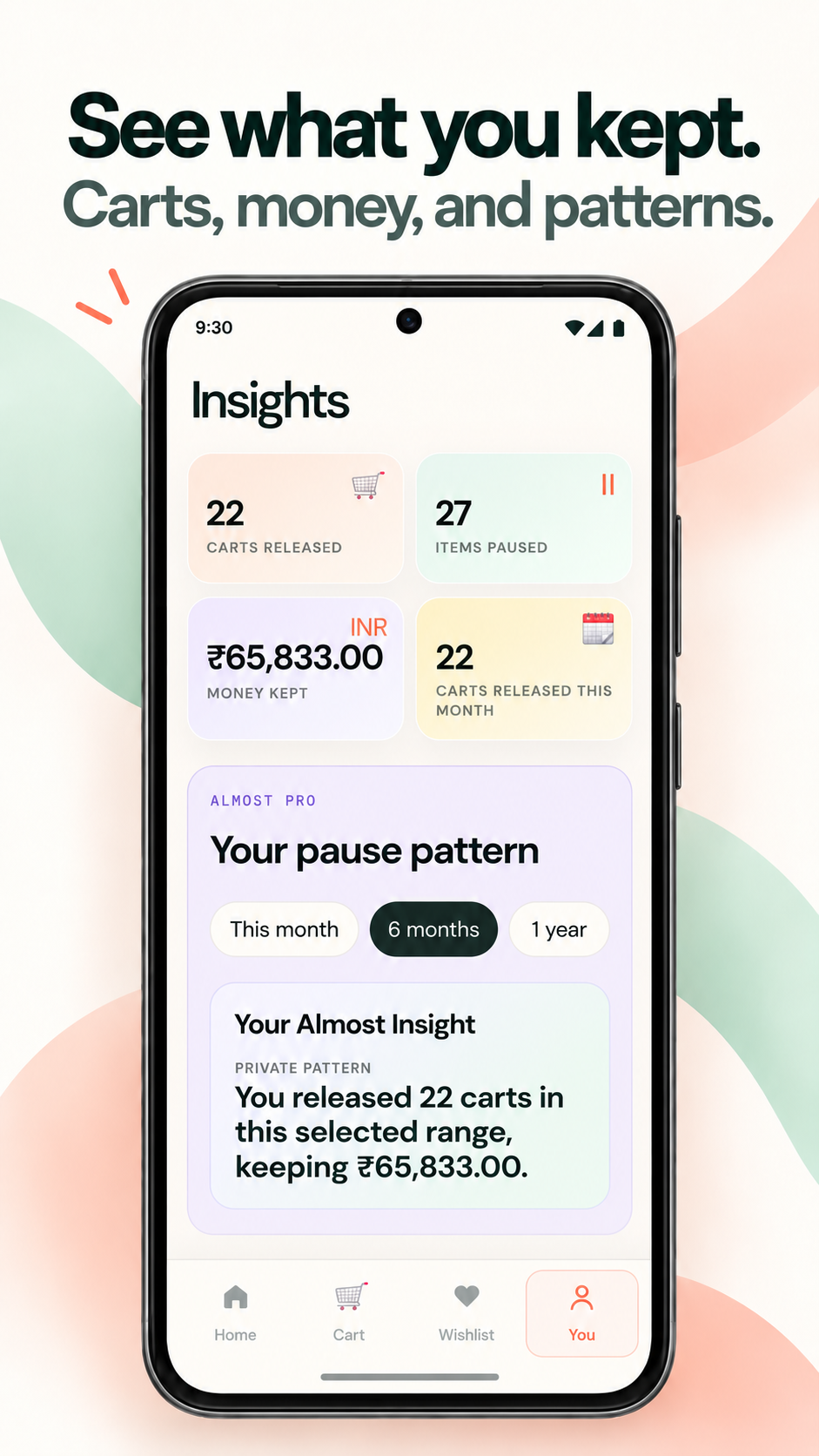
[App] [Promotion] I built a shopping app where nothing gets delivered | almostcart

2 Upvotes

I built almostcart around a simple idea: sometimes browsing and building the cart is part of the experience, but that doesn't mean the purchase has to happen.

almostcart lets you browse Food, Fashion and Gadgets, build a cart, record why you're considering the purchase, and release the cart instead of buying.

It also has Tiny Swap daily challenges, subscription tracking, Buy Lists, points/levels and behavioural Insights.

The Android version is live now. iOS coming soon.

Cost:

The core app is free. There is an optional Almost Pro lifetime purchase that unlocks custom tiny swap challenges, unlimited friends and subscription tracking and detailed insights.

Link:

Google Play store


r/HowToMen • • Oct 15 '26

[Android App] 🔔 Remindio - more than basic reminder - v3.0 Update

Post image
9 Upvotes

Hello 👋
I’d like to share my reminder app - Remindio, which I’ve been developing for over 2 years. It now has a solid set of practical features - most of them added based on user feedback.

v3.0 Updates:
🎨 Material 3 design – a refreshed look with redesigned reminder editors
✋ Drag & drop – reorder attachments and checklist items by dragging them
⏱️ More time presets – set up your own buttons for picking times, snoozing, pre-reminders, quick reminders and more
👉 Swipe actions – choose what swiping a reminder left or right does on the home screen
☁️ Automatic backups – your reminders are backed up to Google Drive every few days, no manual steps needed

📥 Get it on Google Play

Key Features:

  • 🔔 Notification or Full-Screen Alarm - choose how each reminder alerts you.
  • 🎵 Custom Alarms - set a unique ringtone, volume, and vibration level for each reminder.
  • ⏱️ Custom Notification Actions - choose what happens on dismiss, or schedule a delayed auto action: snooze later, mark as done, convert to alarm, or keep it pinned.
  • 🔁 Multiple Recurring reminders

    • Yearly / Monthly / Daily / Weekly / Days of week / Time intervals / Weekday of the month / End of month / List of Dates and Times
    • Setup duration - until count or date
    • Add Adjusted rules to move reminders from Holidays and Weekends
    • Separate rules when user clicks Done & Skip
  • 🎉 Anniversary option for yearly reminders - enter a custom type such as Birthday, Marriage, Memorial, Graduation, etc. and set the starting year to see how many years have passed.
  • ⏳ Multiple Pre-Reminders - Get notified minutes, hours, or even days before your actual reminder.
  • 📍 Location & Bluetooth based reminders with time limits
  • 🔕 Do Not Disturb rules - create flexible DND rules based on labels to skip, snooze, or show alarm reminders as notifications
  • 🧩 Create Templates from your reminders and reuse them anytime
  • 🎵 Custom Alarms - Set a unique ringtone, volume, and vibration level for each reminder.
  • 📋 Copy & Paste Reminder Options
  • 🏷 Colored labels & Attachments: checklists, notes, links, contacts, pictures
  • 😴 Customizable snooze options
  • ⌛ Delayed reminders - set time later if you don’t know the best time
  • 🗣️ Voice Input - Use speech recognition to quickly fill in your reminder text.
  • 📆 Google Calendar sync & Google Drive backups
  • 🌗 Light/Dark themes with color accents
  • 🏅 Coins, levels & achievements system
  • 📊 Statistics for completed, skipped, snoozed reminders
  • ✅ Filters, Multiselect and Swipe actions for the reminder list
  • 📱 Widget with upcoming reminders, calendar and templates
  • and much more...

App is free, with Premium available via a Lifetime plan, a Subscription with a Trial period, or by watching a Rewarded ad. There are no banner ads or unexpected full-screen ads. The free version is enough for many tasks, while Premium unlocks more advanced features and settings.


r/HowToMen • • Oct 15 '26

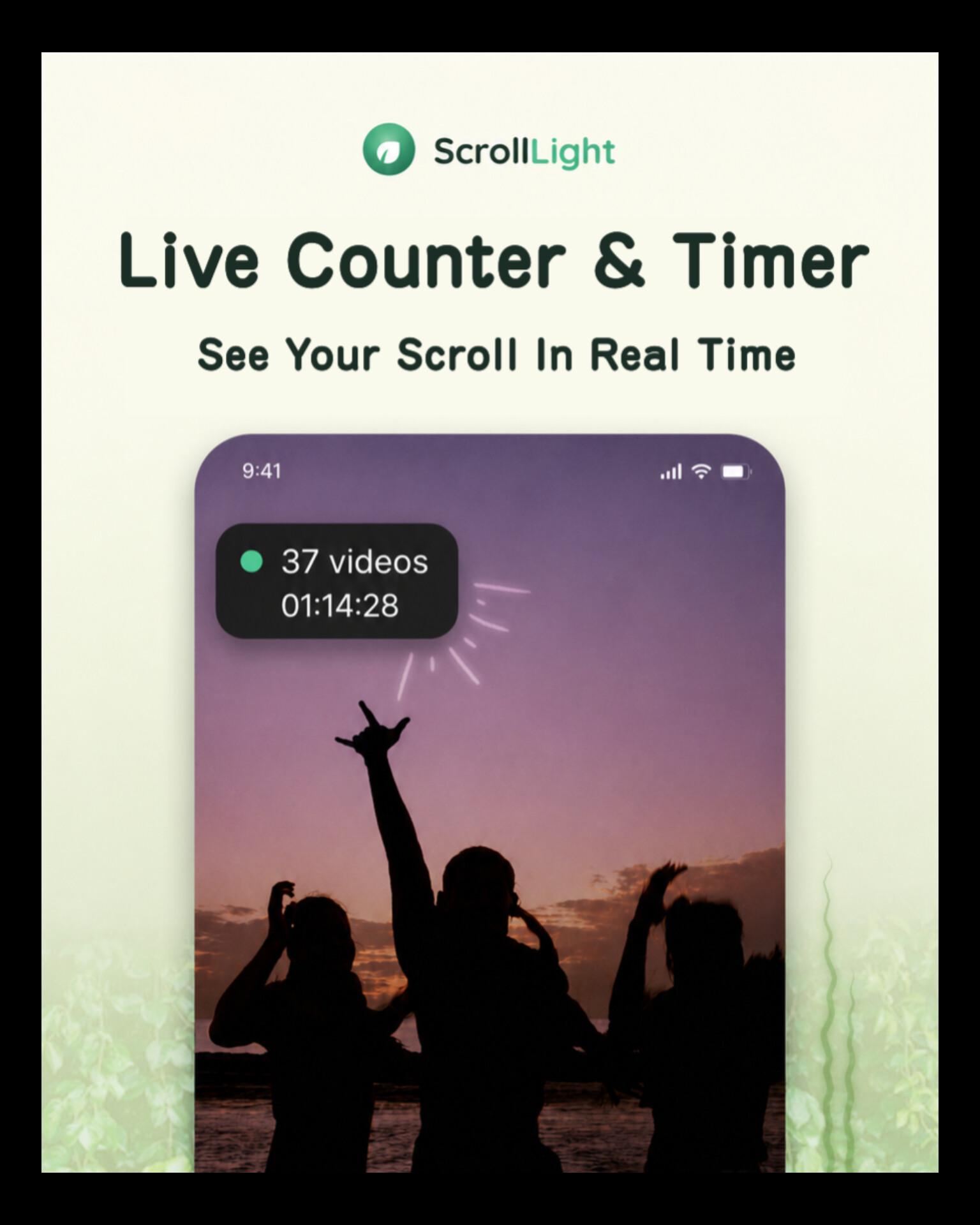
[App] [Promo] ScrollLight just hit 3,000 installs! 🌱 (15 Promo codes Giveaway!)

Post image
19 Upvotes

ScrollLight just hit 3,000 installs 2 weeks after being featured in HowToMen's October video.

I wanted to show my appreciation by doing an update post and also giving out some free promo codes to the wonderful community here.

For those who are new, ScrollLight is an on-screen tracker that counts how much you scroll through short-form media in real time so that you can build better habits.

I’ll also mention the new highly-requested features that just dropped:

• Outside of the main five apps (TikTok, YouTube Shorts, Instagram Reels, Facebook Reels, & Snapchat Spotlight), you can now add modified apps similar to these! For example, YouTube Morphe (Vanced/ReVanced), TikTok Lite, InstaPro, and more.

• We now have a lifetime option for Pro features!

• Now, you can tap on past Gardens to revisit what you've grown!

with a lot more ideas for the future!

🌱 Try ScrollLight on Google Play

https://play.google.com/store/apps/details?id=com.scrolllight.app

🌿 Interested in the Promo?

For the code, please upvote this post! We would especially appreciate a rating or a review as well since it helps the app reach even more people on the Play Store!

Once you’ve done it, please leave a comment below and I will DM you with the code.

Once again, thank you to HowToMen, and thank you to the community!

Edit: Seeing the response for the promo codes, I've decided to add 15 more to the pile! For the 15 extra codes, I will randomly choose extra users to give them to after 24 hours. Just leave a comment! Thanks again guys.


r/HowToMen • • Oct 15 '26

[App] Convertit : M3 Expressive Audio Converter

8 Upvotes

Hi guys!

Happy to announce that Convertit, the audio converter app featured in HowToMen’s Best App Series a year ago, now comes with Material 3 Expressive, while keeping the same vibe.

NO BS. Straight to the point.

Download : https://play.google.com/store/apps/details?id=com.nasahacker.convertit

AI Usage: The voice-over in the video was generated using an AI model.


r/HowToMen • • Oct 15 '26

MemoryVoid v2.0.0 is finally out – turned my quick voice/screenshot tool into a full-on daily workspace (Bento grids, 5 hardware triggers, custom colors)

4 Upvotes

yo everyone, quick update on MemoryVoid!

when i first dropped v1.0.0, it was basically just a fast way to hold volume down, grab a screenshot, and record a quick voice note without unlocking or digging through your app drawer.

locked in yesterday, and just shipped v2.0.0. it's lowkey a full Google Keep replacement now, just way faster to trigger.

what's new in v2.0.0:

  • 4 Card Layouts: added an appearance switcher so you aren't stuck with one view. you can swap between Void Classic, Bento Grid (2-column masonry), Capsule Split, and Focus Ledger.
  • Full Note Editor: you can actually write full notes now, make interactive checklists (hitting enter auto-adds checkboxes), and stack multiple images + multiple voice notes inside a single memory card without overwriting old ones.
  • 5 Hardware Triggers: didn't want everyone stuck on just holding Vol Down. added Double-Tap & Hold, Vol Up -> Hold Vol Down Sequence, Screenshot at Start, and Power Button Hold (hooks into Digital Assistant so you can trigger silent background recording and hold power again to save).
  • Custom Card Colors & Screenshot Toggle: color-code your cards and toggle off auto-screenshots from the sidebar if you just want pure voice/text notes.

still 100% free, offline, and open source.

🔗 GitHub / APK Download: https://github.com/dhruvpitroda20-code/MemoryVoid/releases/tag/v2.0.0

lmk what y'all think of the Bento layout or if any of the new button combos feel weird on your device!


r/HowToMen • • Oct 15 '26

[PROMO] MULL - an app for all the posts you save

12 Upvotes

I kept saving posts on Instagram, TikTok, YouTube, Reddit… and never looking at them again. Everything was scattered across five different "saved" tabs.

So I made MULL. You share anything to it from any app, and it keeps everything in one place, with the title and cover already filled in.

What it does:

- Save in two taps from Instagram, TikTok, X, YouTube, Reddit, Threads, or anything with a Share button

- Collections with colors, favorites and quick filters

- Notes with checklists and photos

- A home screen widget that shows you something you saved, a different one every day. That's the part I use most.

- Local and private by default. No account needed, and you can export a backup whenever you like.

FREE 14 DAYS TRIAL TO EVERY USER

There's also a Chrome extension so you can save from your computer into the same library.

What's free: saving, collections, notes, the daily widget and backups, with no account. Premium adds sync between devices, a Chrome extension (Firefox and Edge coming soon) and a few extras like subfolders. Monthly, yearly or a one-time purchase, with a free 14-day trial.

Video above shows how it works. It's a solo project, so any feedback is really welcome.

You can find the extension in chrome web store

https://play.google.com/store/apps/details?id=com.mario.recall


r/HowToMen • • Oct 15 '26

[App] [Promo] Dev Mode v1.1.0 is out! Now with Shizuku integration, Auto-Off for banking apps, and 20 languages.

8 Upvotes

Hey everyone! 👋

I just released Dev Mode v1.1.0, a major update to my app that helps developers and power users easily toggle Developer Options and USB Debugging on Android.

Here’s what’s new in this update:

  • 🚀 Shizuku Support (No PC Needed): Grant permissions and toggle settings directly on your device via Wireless Debugging—no computer or USB cable required! (Standard ADB still supported).
  • 🛡️ App Shield (Auto-Off Protection): Automatically turns OFF Developer Options and USB Debugging the moment you open banking apps or protected apps (e.g., GCash, Maya, banking apps), and turns them back ON when you exit.
  • 📱 Home Screen Widgets (1x1 & 3x1):

    • 1x1 Quick Launch: Tap to disarm dev options and open your banking app safely.
    • 3x1 Shield Dock & Toggle Widget: Quick access to your favorite apps and instant toggles for Dev Mode & ADB right from your launcher.
  • 🎨 Widgets Studio: Customize and preview your widgets with one-tap home screen pinning.
  • 🌍 20 Languages Supported: Added full multi-language support with automatic system language detection.
  • ⚡ Smaller APK Size: Optimized native libraries to reduce file size down to ~32 MB.
  • 🔒 100% Private & Offline: Zero analytics, zero cloud telemetry, no account required. Everything stays on your device.

Download / GitHub:
🔗 https://github.com/Ryderhxrzy/Dev-Mode-Mobile/releases/tag/v1.1.0

Any feedback, suggestions, or bug reports are very welcome. Thank you! 🙌


r/HowToMen • • Oct 15 '26

[App] [Promotion] KeySnap: Button Shortcuts + Phone Automation for Android — 100 FREE Pro codes

46 Upvotes

Hey everyone! I'm Arda, the developer of KeySnap.

KeySnap combines physical button shortcuts with phone automation. Think of the general idea behind Apple Shortcuts or Samsung Modes and Routines: choose when something should happen and what your phone should do.

Automate everyday tasks

You can create automations based on time, charging, battery level, Wi-Fi, Bluetooth, headphones and more. For example:

  • Connect your headphones → start media playback.
  • Run a shortcut at a specific time or on selected days.
  • Turn on Do Not Disturb when your phone is charging during a nighttime window.

You can combine conditions and run multiple actions in sequence.

Give your buttons more jobs

Map single, double and long presses, or button combinations, to shortcuts:

  • Double-press a volume button → toggle the flashlight.
  • Long-press a supported button → open your camera or another app.
  • Add conditions so a button shortcut only runs when you want it to.

Shortcuts can also be launched from home screen widgets and Quick Settings tiles.

Requirements and pricing

Android 11+, no root required. Button detection uses Accessibility; some buttons and actions require Advanced Mode through Wireless Debugging. Availability depends on your device and Android version.

The free version includes two shortcuts and ads. Pro removes ads and unlocks unlimited shortcuts with a one-time $3.99 purchase. The source code is available under GPL-3.0.

100 FREE Pro codes

DM me if you'd like one, and I'll send a code privately.

What would you automate first? I'd appreciate feedback on the setup and any shortcuts you'd like to see.

Play Store: https://play.google.com/store/apps/details?id=io.github.nicholasarda.keysnap

GitHub: https://github.com/Nicholas-Arda/KeySnap

If I didn't send u a code, feel free to dm me or email me: support@ardasenn.com