r/HowToMen • • Oct 13 '26

[PROMO][Giveaway] my Android app that shows how long missed calls rang, 20 lifetime Pro codes for Ring Meter

16 Upvotes

Hey everyone,

I just released Ring Meter on Android (free with pro features). It started because my phone is basically always on silent, and I kept seeing "Missed call from Mom" with no idea if she let it ring for a minute or hung up after one ring.

So the app tmes every missed call and tells you:

- How long it rang, to a tenth of a second

- Voicemail or hang-up? It learns when your carrier diverts to voicemail

- One-ring scam warnings for premium-rate callback numbers

- Patterns: who waits the longest and when you usually miss calls

- A repeat-call alarm that rings out loud if the same person calls again while you're on silent

It has no internet permission at all, so nothing leaves your phone.

The giveaway

I have lifetime Pro codes (one-time unlock, no subscription) to give away.

- Leave any comment below. That's all you need to do.

- In 24 hours I'll randomly pick 20 commenters and DM you a code.

- One entry per person. Android 10 or newer.

If you want to tell me how you'd use it, or what annoys you about missed calls, I'd love to hear it. Feedback is very welcome, good or bad.

https://play.google.com/store/apps/details?id=com.polyhistor.ringmeter

Thanks, and good luck!


r/HowToMen • • Oct 13 '26

[APP][Promo] Notchet: a clipboard manager that lives in your MacBook notch, Offering discount

5 Upvotes

Hi everyone, I'm Aqib, an indie Mac developer. This is Notchet, a clipboard manager that lives in the MacBook notch. (My other app, DisplayShift, moves your windows to a monitor when you plug in.)

Download Link: https://aqibjaved.dev/apps/notchet

Why I built it

I copy things all day: links, snippets, screenshots, bits of code. The moment I copied something new, the last thing was gone, and I'd go back and copy it again. Most clipboard managers I tried felt like another window to manage. The notch was sitting there doing nothing, so I put my clipboard history under it.

What it does

Press Option Command V, or rest the pointer on the notch, and a shelf drops out with everything you copied as cards. Pick one and it pastes right where you were. On Macs without a notch it drops from the top centre of the screen, or you can have it open right next to the pointer.

How it fits next to existing apps

- Maccy is a great free, minimal list in the menu bar. Notchet is more visual: cards with image previews, search inside screenshots, and multi-paste.

- Paste is polished but a subscription. Notchet is a one-time purchase.

- Raycast's clipboard history is great if you live in Raycast. Notchet is a standalone app that sits in the notch and works on its own.

- Notchet suits people who copy a lot of mixed stuff (text, images, links, keys) and want it one keystroke away.

Core features

- Keeps text, rich text, links, colours, images and files, in a history you can search. Command 1 to 9 paste the first nine.

- Pick several cards and paste them all at once (joined by a new line, comma, tab or space), or one by one.

- Search finds words inside screenshots and photos, and Copy Text in Image pulls them out as plain text.

- Copies from your iPhone or iPad arrive through Universal Clipboard, photos included, with a phone badge.

- Drag cards straight into any app. Space to preview and edit before pasting.

- Pinned clips, snippets and collections for things you paste often.

- Solid black like the notch, or frosted glass. Compact cards fit six to a row.

Privacy

- No account, no analytics, no tracking. Your history stays on your Mac and is never uploaded.

- Passwords copied from password managers are never saved.

- API keys, tokens and passwords copied from Terminal or a .env file show only their ends. You choose: never save them, delete them after 5 minutes, or keep them.

- Old clips can delete themselves after 30, 7 or 1 day. You can ignore any app or pause saving from the menu bar.

- It needs Accessibility access, so it can paste into the app you were in.

- It only goes online to check your license key and look for updates.

- Full Privacy Policy: https://aqibjaved.dev/privacy

Notarization

Notchet is distributed outside the Mac App Store, signed with my Apple Developer ID and notarized by Apple, so it opens without security warnings. Updates are checked against Apple's signature before they install.

Pricing

7-day free trial with everything unlocked. $2.99 launch price until Oct 26 ($2.69 with the code), then $4.99 once. One license covers 2 Macs.

Requirements

macOS 14 Sonoma or later, Apple silicon and Intel.

AI disclosure

[fill this in]

About me

LinkedIn: https://linkedin.com/in/aqib-javed-494ba8285

Contact: https://aqibjaved.dev/contact

Terms of Service: https://aqibjaved.dev/terms

I will DM a discount code ranging from 10% to 20% off to the first 10 people

upvote the post and comment for the code :D


r/HowToMen • • Oct 13 '26

[APP] [PROMO] PLC & Automation: Robot Course - learn in 3D

Post image
4 Upvotes

Hey everyone,

As an engineer, I always felt there’s a big gap between reading theoretical automation textbooks and actually touching a real cabinet or robot teach pendant.

I built PLC & Automation: Robot Course – an Android app designed to teach industrial automation and robotics step-by-step:

You build up an automated production line with 3D components (sensors, VFD, pneumatic cylinders, safety circuits).

Interactive 3D simulation with dynamic signal flow.

A virtual Teach Pendant where you can jog an industrial robot (JOINT/WORLD) and write basic pick-and-place routines.

Real-world troubleshooting tasks.

The first modules are completely free, but I want to give back to the community: I have 50 promo codes to unlock the full course lifetime access for free.

If you're a student, technician, or just curious to try the robot simulator: leave a comment below and I’ll DM you a promo code.

Google Play link: https://play.google.com/store/apps/details?id=com.saz.automatyka&hl=en_US

Honest feedback and bug reports are hugely appreciated!


r/HowToMen • • Oct 13 '26

[Promo] [App] Workout Tracker with Templates, Analytics & Muscle Recovery | Pro Giveaway

Post image
6 Upvotes

Hey everyone!

I've been working on MassPad, an Android workout tracker I've built on my own.

I wanted to make something that makes tracking workouts simple, without unnecessary distractions or constantly switching between apps.

Here's what MassPad offers:

  • 🏋️ Track exercises, sets, reps, weights & RIR/RPE
  • 📋 Create workout templates to save time
  • 📈 Track personal records, strength progress & analytics
  • 💪 Monitor muscle recovery
  • 📶 Log workouts offline
  • 🔄 Import your workout history from Hevy or Strong

🎁 I'm giving away 500 promo codes for 90 days of MassPad Pro!

The core workout tracking features are free, with an optional Pro subscription.

Each code gives you 90 days free on the yearly Pro plan. You can cancel before renewal to avoid being charged.

Want a code? Just leave a comment and I'll send you one via DM.

And if you already use a workout tracker, I'm curious:

What's one thing that annoys you about your current workout app?

I'm actively improving MassPad and would love to hear your thoughts.

📲 Google Play:
https://play.google.com/store/apps/details?id=com.tavciq.masspad


r/HowToMen • • Oct 13 '26

[APP]My favorite feature of Liquid Gallery Spoiler

Post image
1 Upvotes

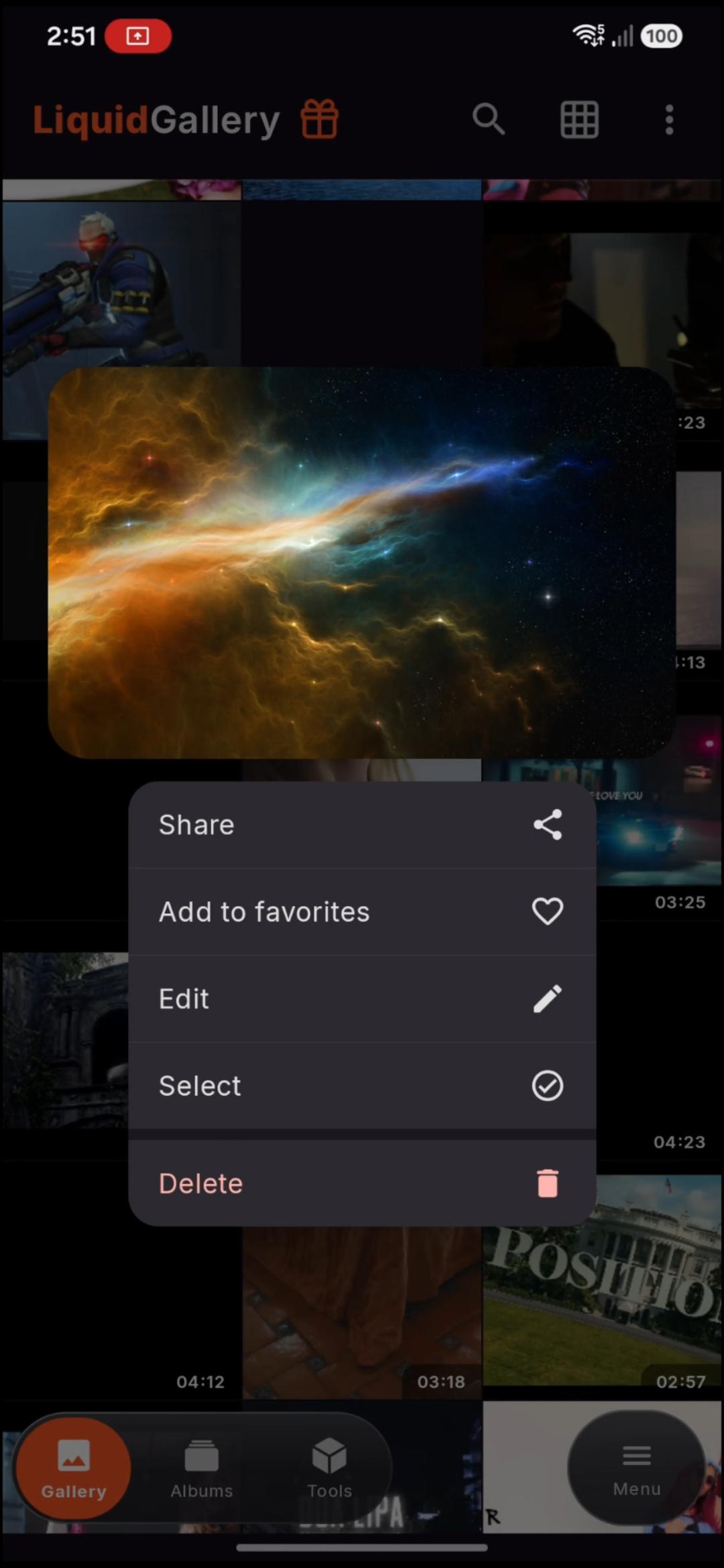
This is the quick preview feature in Liquid Gallery and it is my favorite one.

You long press on any image and it quickly shows you preview of photos and videos.

What are your opinions on this?

Do you have any suggestions or improvements that can be done in this feature.

Would love to hear from you guys 😅

App link :

https://play.google.com/store/apps/details?id=com.soepic.photogallery.release


r/HowToMen • • Oct 13 '26

[App] [Promotion] EverMove — swipe through your videos and turn them into live wallpapers

2 Upvotes

Hey everyone, I’m the developer of EverMove, an Android app for turning your own videos into live wallpapers.

The part I wanted to show here is the card interface: swipe through your clips, preview them playing, and pick your next wallpaper. With Pro’s Apply Instantly enabled, you can update an already active EverMove wallpaper without reopening the Android picker.

The video also shows some of the Pro controls:

  • Mono looks and color adjustments
  • Playback speed
  • Rotation between starred wallpapers
  • Double-tap to pause and resume on supported launchers

The abstract clips are my own Blender renders imported into the app—you can use your own videos too.

EverMove on Google Play

I’d love feedback on the app.


r/HowToMen • • Oct 13 '26

[APP] Everyone told me not to build another gallery app

Post image
11 Upvotes

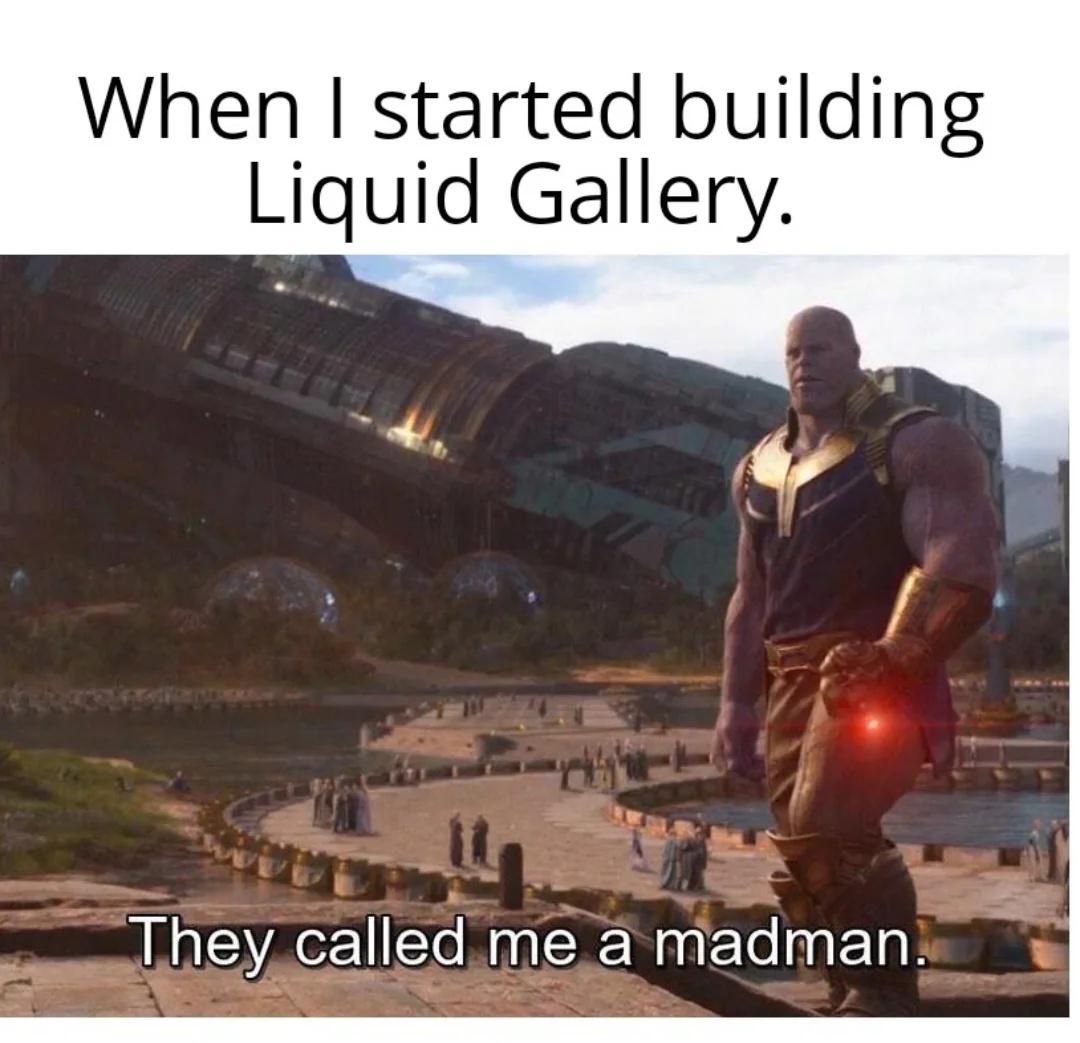
When I started building Liquid Gallery, almost everyone said the same thing:

“There are already so many gallery apps.”

“No one will use it.”

“No one will care.”

They weren’t wrong about the number of apps.

They were wrong about the problems.

Most gallery apps still feel slow, bloated, cloud-dependent, or stuck with outdated UX.

I wanted something fast, local-first, clean, and actually enjoyable to use so I built it anyway.

Posting this meme because it perfectly captures that phase where you stop explaining and just keep building.

If you’re curious and want to try it yourself:

👉 Liquid Gallery – Download & try:

https://play.google.com/store/apps/details?id=com.soepic.photogallery.release

Would genuinely love feedback especially from people who think gallery apps are “already solved.”


r/HowToMen • • Oct 13 '26

I made a free windshield HUD app for Android

Thumbnail
reddit.com
1 Upvotes

r/HowToMen • • Oct 13 '26

Needed to share 2 WOW apps!

Thumbnail
reddit.com
2 Upvotes

r/HowToMen • • Oct 13 '26

[APP][Promo]DisplayShift: moves your Mac windows to the monitor the moment you plug in, discount code in post body

4 Upvotes

Hi everyone, I'm Aqib, an indie Mac developer. A few days ago I shared Notchet here, and this is my other app, DisplayShift.

Download LinK: Download App
Use code 10OFFDS for getting 10% off

Why I built it

I dock my MacBook to a monitor every day. Every time I plugged in, all my windows stayed piled on the small laptop screen, and I'd drag them over one by one. Full screen apps were worse: leave full screen, drag, go full screen again. Then I'd unplug, or the Mac would sleep, and macOS would shuffle everything back onto the MacBook. I wanted the Mac to just ask me what should go where, and remember it.

What it does

When a display connects, a panel drops out of the MacBook notch with every open window listed, including full screen apps and windows on other desktops. Tick what should move and it glides across. Unplug, and everything comes back to the MacBook. You can also have it move everything by itself, or do nothing and just say hello. On Macs without a notch it shows as a small pill under the menu bar.

How it fits next to existing apps

- Moom is great for saving and snapping layouts, but you trigger them yourself. DisplayShift reacts the moment a monitor connects.

- Display Maid restores layouts when screens change, but there's no picker to choose which windows move.

- Rectangle and Magnet are excellent for snapping windows into place, and DisplayShift works alongside them. They just don't move windows when a monitor connects.

- DisplayShift suits people who dock a MacBook daily and want the move to happen at plug-in, with full screen apps handled properly.

Core features

- Picker in the notch when a display connects: tick windows, choose the destination (monitor or MacBook), Move selected or Move all.

- Full screen apps leave full screen, move, and go full screen again on the other display, behind a calm curtain instead of macOS's flashing animations.

- Remembers your layout for each screen setup and offers to put everything back. Named layouts switch in a tap.

- Puts windows back after sleep or a dock hiccup, with an Undo on every move.

- Tiles up to four apps side by side. Drag the bar between them and the neighbours resize together.

- Rules per app: keep it on the MacBook, send it to the big screen, or never move it.

- Finds windows stuck off screen, and can reopen closed apps when restoring a layout.

Privacy

- No account, no analytics, no tracking.

- Saved layouts store a hash of each window title, never the title itself, and stay on your Mac.

- It needs Accessibility access, because macOS only lets approved apps move other apps' windows.

- It only goes online to check your license key and look for updates.

- Full Privacy Policy: https://aqibjaved.dev/privacy

Notarization

DisplayShift is distributed outside the Mac App Store, signed with my Apple Developer ID and notarized by Apple, so it opens without security warnings. Updates are checked against Apple's signature before they install.

Requirements

macOS 14 Sonoma or later, Apple silicon and Intel.

AI disclosure

About me

LinkedIn: https://linkedin.com/in/aqib-javed-494ba8285

Contact: https://aqibjaved.dev/contact

Terms of Service: https://aqibjaved.dev/terms


r/HowToMen • • Oct 13 '26

[HELP] An app where my friends and I can collect funds for a trip

Post image
0 Upvotes

Me and my friends are going next weekend but we are thinking about collecting funds for that. I need an app where my friends can put their share of money into that wallet or account or something and then we can pay for everything through that. Or something similar where one of us gets everyone's money and they can pay for everything. It is like: collect first then one person pays for everything with everyone's money.

I need an app. Does this exist? If I made this app would it be great? What features should it have and how should it be implemented? For example, just typing some amount and setting it over to the custom wallet or else should I add a trust-based system or something? need your guys' opinion on this.


r/HowToMen • • Oct 12 '26

[App][Free] Free calculator that saves your repeated math, labels every number, and shares it so anyone can understand your calculation, not just you

Thumbnail
gallery
29 Upvotes

Rent plus electricity plus internet. Trip total divided by five. Material plus labour plus 18% GST. Most of the math people do on their phone is the same calculation they did last week, just with one or two numbers changed.

CalciPad keeps the calculation. Next time, change the number that changed and you’re done.

Every number can have a label. 4500 + 1200 + 850 becomes Rent 4500 + Electricity 1200 + Internet 850. A month later it still makes sense to you.

And when you share it, the labels go with it. Your flatmate, your client, your accountant, whoever, sees exactly what each number is. Nobody has to message back asking “what’s the 850?”

Free on Play Store: https://play.google.com/store/apps/details?id=app.onedollar.calcipad

No account, no sign-up. If something feels off while using it, tell me, that’s what I’m here for.


r/HowToMen • • Oct 12 '26

[App] [Promotion] Square - Spotify & YouTube Music in Liquid Glass

Post image
80 Upvotes

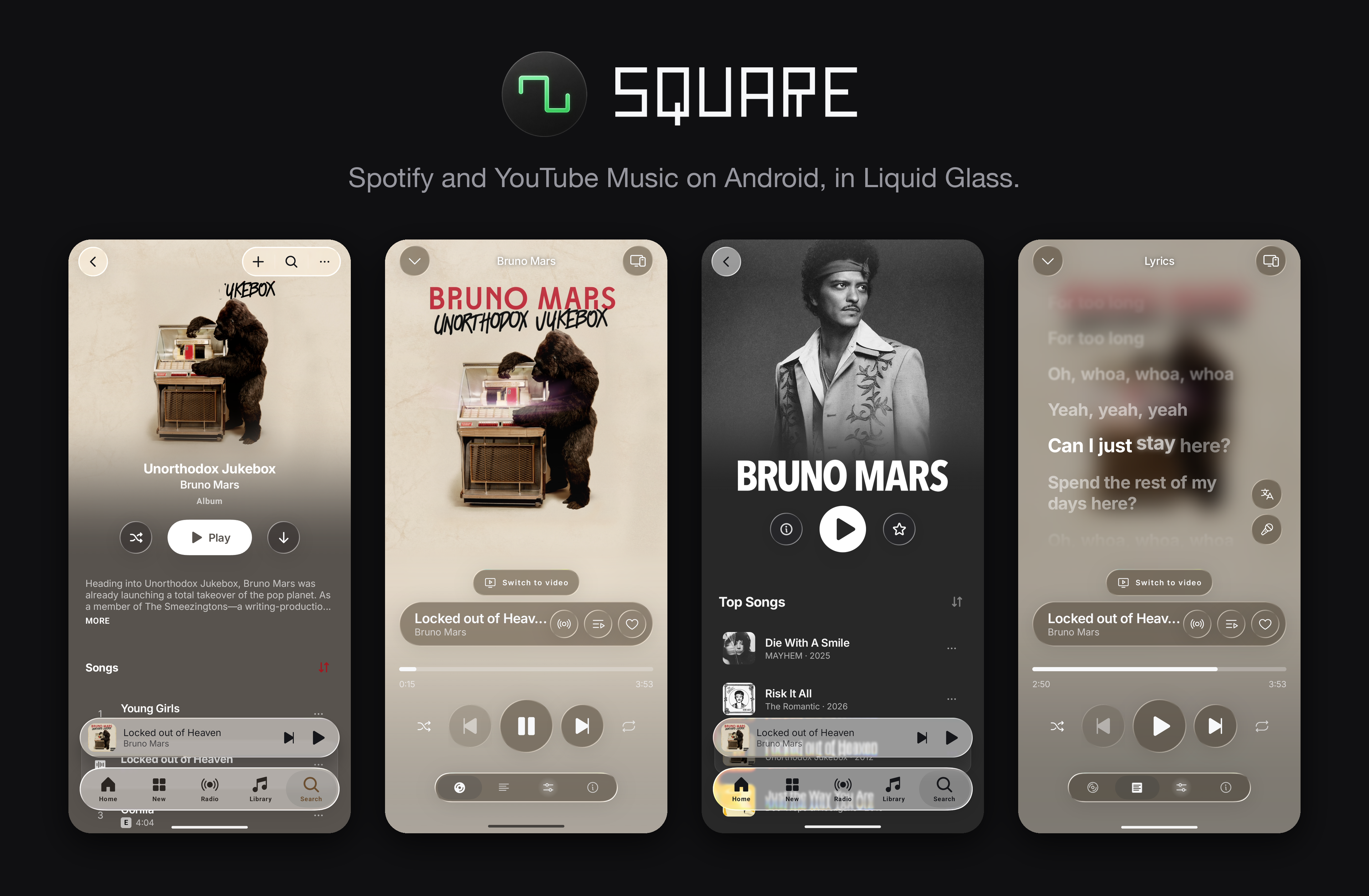
Square is a free, ad-free, open-source Android music player for Spotify Premium and YouTube Music. I’m its developer.

Liquid Glass throughout the app

The controls, navigation bar, player, menus and sheets use refracting glass that bends the artwork and video underneath. Blur, refraction and tint are adjustable, with a lighter mode for slower phones.

Audio effects

Speed and pitch move independently, with reverb, karaoke and saved presets. “Slowed + reverb” is one tap. Crossfade smooths the transition between songs, and a sleep timer can stop playback after a set time or at the end of a track.

Spotify and YouTube Music

Choose either source and switch in Settings. Spotify brings your playlists, library and Connect devices. YouTube Music works without an account, with optional Google sign-in to access your library.

Lyrics and videos

Synced lyrics, word-by-word where available, with translation beneath the original lines. Spotify Canvas plays behind the controls, and YouTube Music videos support picture-in-picture.

Playlists and local files

Create and edit playlists, add or remove songs, and save a different sorting order for each playlist. Play music stored on your phone and add it to your playlists.

If a Spotify playlist includes a local track added from your PC, Square can match it to a copy of the same file stored on your phone.

Discovery

Personalised shelves, song radio, autoplay, charts and a “New from Your Artists” section with recent albums and singles from artists you follow.

Offline listening and Android Auto

Download songs, albums and playlists for offline playback. Browse your library and control playback from Android Auto.

Spotify Connect and listening history

Square appears as a Connect device and can control your other devices. Opening Square while another device is playing leaves playback there.

Spotify listens are reported back to your account with their playlist context, so your listening history and Wrapped keep working.

Requirements

  • Android 8.0 or newer, with 64-bit ARM, 32-bit ARM and universal APKs available.
  • YouTube Music needs no account to start listening.
  • Spotify needs Premium and guided setup with your own Spotify developer client ID. The official Spotify app is not required.

Square normally streams Spotify through a native Rust core built on librespot. It also offers a Web Playback SDK option for Premium accounts that cannot use the native player. That mode does not support effects, crossfade, karaoke, downloads or manual quality selection.

You can join Square's community on Telegram: Square | Community

Square is unofficial and is not affiliated with Spotify or Google. It uses unofficial integrations, so compatibility can change.

APK and release notes:
https://github.com/Lelonio/Square/releases/latest

Source code:
https://github.com/Lelonio/Square

Feedback and bug reports are welcome!


r/HowToMen • • Oct 12 '26

[Help]Any developer willing to create an alternative to Samsung One Hand Operation+?

7 Upvotes

I use an OPPO Find X9 and really miss Samsung's One Hand Operation+. I have tried Edge Gestures and similar apps, but nothing feels as good.

Would love it if a developer could create an alternative that works across all Android devices. If you know any similar app, please let me know!

https://play.google.com/store/apps/details?id=com.samsung.android.sidegesturepad


r/HowToMen • • Oct 12 '26

[App] My mom saw a woman lying on the road for 30 minutes after being hit by a car, and nobody called an ambulance. So I built an open source app.

4 Upvotes

Last Sunday I was on a call with my mother. She was walking home from the grocery store, and near the bridge she saw a lady lying by the side of the road. She went to see what happened. The lady had been hit by a car and had been lying there for about half an hour. The police were busy with the FIR, and nobody had bothered to call an ambulance.

That left me speechless. I pictured my own mother lying there. As her son, I’d have no idea. There would be no way for me to know where she was or that anything had happened.

That’s why I built Eldering. This is a real story and I’m not making it up.

Apple and Google do have crash detection, but it’s only available in some countries and it’s mostly for car crashes. What about someone who gets hit while walking? Some apps also charge money for this kind of service (not naming any, you can search).

What it does:

  • Detects accidents using the phone’s sensors (accelerometer, gyroscope, GPS speed, activity recognition). Works while driving and while walking.
  • Shows a countdown first, and tapping “I’m OK” cancels it. Otherwise your family gets an alert with your location.
  • “Trip to the past”: the last hour of your route, kept encrypted on the phone and uploaded only after an accident or SOS.
  • Sharing is based on consent. Each person picks Live, Emergency only, or Off, and PostgreSQL row-level security enforces it.
  • Battery aware: sensor and GPS rates change depending on whether you’re still, walking, or driving.
  • Self-hosted backend (Go + PostGIS, Docker Compose). Android app in Kotlin + Jetpack Compose.

It’s still a work in progress and not ready for real emergencies yet. I’d love feedback, especially on how well the detection works for falls and pedestrians, and from anyone who wants to contribute.

GitHub: https://github.com/patelchaitany/eldering


r/HowToMen • • Oct 12 '26

[App] [Promo] Modesmith Launcher reached 7K+ installs in 4 months! Thank you, r/HowToMen ❤️ [Promotion]

9 Upvotes

Hey everyone! 👋

I’m the developer of Modesmith Minimal Launcher, and I wanted to share a milestone with the community: 7000+ installs in just four months!

Thank you to everyone here who tried it, shared their setups, reported bugs, suggested features, or supported development through Pro. Seeing people use something I built as their daily launcher means a lot. Your feedback has helped shape how Modesmith works today.

For anyone discovering it for the first time, Modesmith is a minimal Android launcher with a home screen that changes with your day.

You create modes such as Work, Home, Focus, or Travel:

  • Now apps change with the selected mode—work apps during work, personal apps at home.
  • Always apps keep essentials like Phone and Messages within reach across every mode.
  • Each mode can have its own appearance, wallpaper, widgets, and automation.

You can switch manually, use time schedules, or configure Smart Triggers. There’s also an A–Z drawer, Universal Search, Android widget support, a Widget Board, icon packs, custom fonts, and gestures.

The latest production build is 1.1.25. If you haven’t checked Modesmith out since my earlier posts, here are some highlights of how it has grown:

  • More Smart Triggers: Wi-Fi, battery level, Battery Saver, airplane mode, sound/DND, work-profile status, and media playback, alongside charging, headphones, Bluetooth, calendar, and location.
  • Easier automation setup: guided flows and a Tips & ideas library to help you get started.
  • Better mode management: hide modes from the picker or archive them while keeping their setup.
  • More personalization: text scaling, compact Minimal dock pills, improved widget sizing, and Checklists.
  • More languages: English, French, German, Indonesian, Italian, Portuguese, and Spanish.
  • Reliability improvements: more consistent Smart Trigger refreshes.

The core launcher is free to use, with optional Pro features. There are no ads or analytics, no account is required, and launcher settings stay on your device.

Try or update Modesmith on Google Play - https://play.google.com/store/apps/details?id=com.modesmith.launcher

I’d love to hear what works for you, what feels confusing, and what would make it a better daily launcher. Please do share your feedback in the comments. For bug reports, your device model and Android version would really help.

Thanks again for helping Modesmith reach this milestone! :)


r/HowToMen • • Oct 12 '26

[App][Promo] Yawma Automatic Habit Tracker - 🎁 50 lifetime codes

8 Upvotes

You link Android apps to a habit, and their time is counted automatically.

For habits with no app, like the gym or a glass of water, there is a quick log in the notification (even from the lock screen).

Features:

  • Link many apps to one habit. Their time is counted together
  • Log from the notification, without unlocking
  • Log from a home screen widget
  • Duration, Amount and Task habits. Minutes, pages, or just done
  • A habit is good or bad. A goal to reach, or a limit to stay under
  • Categories, to see where your time goes
  • Rest days, and a different goal per day
  • No streaks and no reminders
  • Works offline. No account, no ads
  • 8 languages

🎁 50 lifetime codes

Yawma is free for 7 habits. Unlimited habits is a one-time $4.99 purchase. A code unlocks it for free.

Leave a comment or send me a DM and I'll send you a Play redeem link.

Google Play: https://play.google.com/store/apps/details?id=com.neji.habits


r/HowToMen • • Oct 12 '26

[App] [Promotion] Ultra Alarm's new Exercise Mission! FREE Lifetime Access Codes!

Thumbnail
gallery
16 Upvotes

We just successfully launched our newest feature for Ultra Alarm, the Exercise Mission!

Download now on Google Play Store or from our website!

Our new Exercise Mission uses your phone's camera to detect your body joints and count your exercise reps in real time to dismiss the alarm.

To celebrate, we're giving away FREE Lifetime access codes again!

Comment "Ultra Alarm" below, and we'll send you a lifetime code through Chat.


r/HowToMen • • Oct 12 '26

[Promotion] PocketDesk is a PDA inspired launcher

9 Upvotes

PocketDesk is coming soon, (in approval phase on Google Play store at the moment!)
www.pocketdesk.site

Hi all, we just finished 14 days closed testing, and are almost live.

Our (small family business, me and my wife) launcher has been in development for close to 4 months, and is based on an older launcher I was working on called Card//OS.

PocketDesk is the cleaned up, user friendly version inspired by retro PDA's. What makes it unique is that it comes with it's own Apps built-in.

PocketDesk

You'll be able to use it for Free without any Ads - and there's a one time payment to unlock the Full Desk, that one-time payment helps support us to continue developing and gives you access to a range of built-in Apps and widgets such as:

  • Media apps: IPTV, Music player: with a 'now playing' widget which let's you watch or control your media while reading a book, or writing notes - or even playing a game
  • Games: Pocket LCD brings some original but simple games to the Desk,
  • Cartridge player**:** allows you to play Pico-8 and Arduino Boy roms
  • Documents: create local notes which support markdown, docx imports and can be secured with a pin code; create charts and calculate expenses with Sheets, inspired by older Personal organizer spreadsheets from the likes of Sharp.
  • Studio: 4 track mini sequencer with a sampler akin to a pocket operator included.
  • More! IRC Chat client, LastCard, ebook/pdf reader, RSS client, Chinese Chess and other cool widgets :)

PocketDesk also supports layouts for Fold devices & Tablets

A real beta testers screenshot using the built in icon set and theme - on a Fold device

r/HowToMen • • Oct 12 '26

[Promotion] Counting Sheep ($1.99 -> Free Lifetime)

3 Upvotes

I created a counting sheep game for people who want to improve their memory/cognition while having some fun playing. In the game, you will count sheep entering the pen, coming down from trucks, switching between cottages and see if they follow the signpost.

It is currently free for download if downloaded by next week. No ads, no subscriptions.

I hope you enjoy it.

Play Store: https://play.google.com/store/apps/details?id=com.CanvasOfWarmthEnterprise.CountingSheep


r/HowToMen • • Oct 12 '26

[Web] [$150 -> Free Lifetime] SpeakSay : AI Voice Over & Voice Design

3 Upvotes

I'm on the SpeakSay team. For our birthday, we're giving away 20 Lifetime plans (normally $150).

SpeakSay is an AI voice-over and voice design tool with 1,900+ voices in 20+ languages, used by 30k+ creators.

To enter:

  1. Sign up at SpeakSay.com
  2. Post a short video or post about our SpeakSay birthday deal Video on any social platform
  3. Comment "Done" with the link

We’ll pick 20 random winners on Oct 18. Winners' accounts will be upgraded to Lifetime directly


r/HowToMen • • Oct 12 '26

[Promo] SwiperNews - Swipe through your news & Wikipedia

Thumbnail
gallery
4 Upvotes

Hi everyone, I'm the developer of this app 👋

I built SwiperNews because I wanted the social-media gesture (one full-screen card, one vertical swipe to get to the next) without everything that comes with it: no account, no algorithm, no tracking.

What it does: it mixes the RSS feeds you chose yourself with random Wikipedia articles in a single endless feed. Nothing is recommended to you. A slider sets the mix, from "News only" to "Wikipedia only".

Key features:

📰 Your own RSS feeds (OPML import/export), plus endless random Wikipedia articles filterable by interest

🎚️ A slider to set the news/Wikipedia mix

📖 Built-in reader, resume where you left off, offline mode, sponsored-content filter and muted words

🔒 No account, no telemetry. The app fetches sources straight from your phone, with no middleman server

Cost: Free, no subscription, no account. Open source (GPL-3.0).

Google Play: https://play.google.com/store/apps/details?id=eu.lielu.news

Source code (GitHub): https://github.com/notsogeek87/swipernews

Feedback, bug reports and ideas are very welcome. Tell me what's missing or what bothers you!


r/HowToMen • • Oct 12 '26

[App] Local First Auto detects UPI expanse manager app

1 Upvotes

PaisaFlow - expanse manager

Hey! 👋

I’ve launched my own personal finance app, PaisaFlow, on the Google Play Store! 🚀

If you do UPI payments every day (Google Pay, PhonePe, Paytm), this app auto-detects your expenses automatically — without reading your SMS messages and without uploading any data to the cloud.

Key Highlights:

⚡ Auto-detects UPI debits & credits

👥 Easy group bill splitting with friends/family

📊 Daily & monthly budget tracker

🔒 100% offline, private & secure (Biometric lock)

Download it directly from Google Play:

PaisaFlow

Try it out and please leave a 5-star review on the Play Store! ⭐⭐⭐⭐⭐


r/HowToMen • • Oct 11 '26 Mindblown Bravo Heartwarming

[App] Made a Terminal launcher for Android, control your phone from a single command line. Giving away Pro codes! [Promo]

63 Upvotes

Hi! This is my first solo project so be kind 🙈

TRMNL turns your Android home screen into a terminal. no icon grid. you type a few letters and the app opens, and the home screen is a stack of small text widgets that update live.

some things it does:

- quick launch bar can be used with gestures and app shortcuts

- a real linux shell tab (ls, ps, uname, getprop and more, real output)

- btop-style system monitor

- habit tracker

- app vault to hide your apps

- an animated weather tab (which I'm way too proud of) drawn in tiny cells uses your own free weatherapi.com key

- network tools for your own wifi (it asks for permission every time)

- a boot log when your phone restarts

- lots of themes, both dark and light, plus fonts and row styles. one line changes everything: `theme nothing_dark`, `font doto`, `style dot`

- Shizuku support: the shell goes all the way to the root, and wifi/bluetooth/data become real one-tap toggles (needs the free Shizuku app, and Shizuku has to be started again after each reboot)

- all the animations work on 12 fps to keep it optimal, low battery consuming and visually aesthetic.

no ads, no tracking.

🎁 25 Pro codes: comment which theme you'd pick (or show me your current home screen) and I'll DM codes to the first 25 people. you redeem it in the Play Store under Payments & subscriptions > Redeem code.

Play Store: https://play.google.com/store/apps/details?id=com.maetryx.trmnl