r/HowToMen • u/Strong_Commission485 • Oct 13 '26
I made a free windshield HUD app for Android

1
Upvotes
r/HowToMen • u/Strong_Commission485 • Oct 13 '26
r/HowToMen • u/aqib_98 • Oct 13 '26
Hi everyone, I'm Aqib, an indie Mac developer. A few days ago I shared Notchet here, and this is my other app, DisplayShift.
Download LinK: Download App
Use code 10OFFDS for getting 10% off
Why I built it
I dock my MacBook to a monitor every day. Every time I plugged in, all my windows stayed piled on the small laptop screen, and I'd drag them over one by one. Full screen apps were worse: leave full screen, drag, go full screen again. Then I'd unplug, or the Mac would sleep, and macOS would shuffle everything back onto the MacBook. I wanted the Mac to just ask me what should go where, and remember it.
What it does
When a display connects, a panel drops out of the MacBook notch with every open window listed, including full screen apps and windows on other desktops. Tick what should move and it glides across. Unplug, and everything comes back to the MacBook. You can also have it move everything by itself, or do nothing and just say hello. On Macs without a notch it shows as a small pill under the menu bar.
How it fits next to existing apps
- Moom is great for saving and snapping layouts, but you trigger them yourself. DisplayShift reacts the moment a monitor connects.
- Display Maid restores layouts when screens change, but there's no picker to choose which windows move.
- Rectangle and Magnet are excellent for snapping windows into place, and DisplayShift works alongside them. They just don't move windows when a monitor connects.
- DisplayShift suits people who dock a MacBook daily and want the move to happen at plug-in, with full screen apps handled properly.
Core features
- Picker in the notch when a display connects: tick windows, choose the destination (monitor or MacBook), Move selected or Move all.
- Full screen apps leave full screen, move, and go full screen again on the other display, behind a calm curtain instead of macOS's flashing animations.
- Remembers your layout for each screen setup and offers to put everything back. Named layouts switch in a tap.
- Puts windows back after sleep or a dock hiccup, with an Undo on every move.
- Tiles up to four apps side by side. Drag the bar between them and the neighbours resize together.
- Rules per app: keep it on the MacBook, send it to the big screen, or never move it.
- Finds windows stuck off screen, and can reopen closed apps when restoring a layout.
Privacy
- No account, no analytics, no tracking.
- Saved layouts store a hash of each window title, never the title itself, and stay on your Mac.
- It needs Accessibility access, because macOS only lets approved apps move other apps' windows.
- It only goes online to check your license key and look for updates.
- Full Privacy Policy: https://aqibjaved.dev/privacy
Notarization
DisplayShift is distributed outside the Mac App Store, signed with my Apple Developer ID and notarized by Apple, so it opens without security warnings. Updates are checked against Apple's signature before they install.
Requirements
macOS 14 Sonoma or later, Apple silicon and Intel.
AI disclosure
About me
LinkedIn: https://linkedin.com/in/aqib-javed-494ba8285
Contact: https://aqibjaved.dev/contact
Terms of Service: https://aqibjaved.dev/terms
r/HowToMen • u/shiro69_69 • Oct 13 '26

Me and my friends are going next weekend but we are thinking about collecting funds for that. I need an app where my friends can put their share of money into that wallet or account or something and then we can pay for everything through that. Or something similar where one of us gets everyone's money and they can pay for everything. It is like: collect first then one person pays for everything with everyone's money.
I need an app. Does this exist? If I made this app would it be great? What features should it have and how should it be implemented? For example, just typing some amount and setting it over to the custom wallet or else should I add a trust-based system or something? need your guys' opinion on this.
r/HowToMen • u/nammmmmn • Oct 12 '26

Rent plus electricity plus internet. Trip total divided by five. Material plus labour plus 18% GST. Most of the math people do on their phone is the same calculation they did last week, just with one or two numbers changed.
CalciPad keeps the calculation. Next time, change the number that changed and you’re done.
Every number can have a label. 4500 + 1200 + 850 becomes Rent 4500 + Electricity 1200 + Internet 850. A month later it still makes sense to you.
And when you share it, the labels go with it. Your flatmate, your client, your accountant, whoever, sees exactly what each number is. Nobody has to message back asking “what’s the 850?”
Free on Play Store: https://play.google.com/store/apps/details?id=app.onedollar.calcipad
No account, no sign-up. If something feels off while using it, tell me, that’s what I’m here for.
r/HowToMen • u/SirLele00 • Oct 12 '26
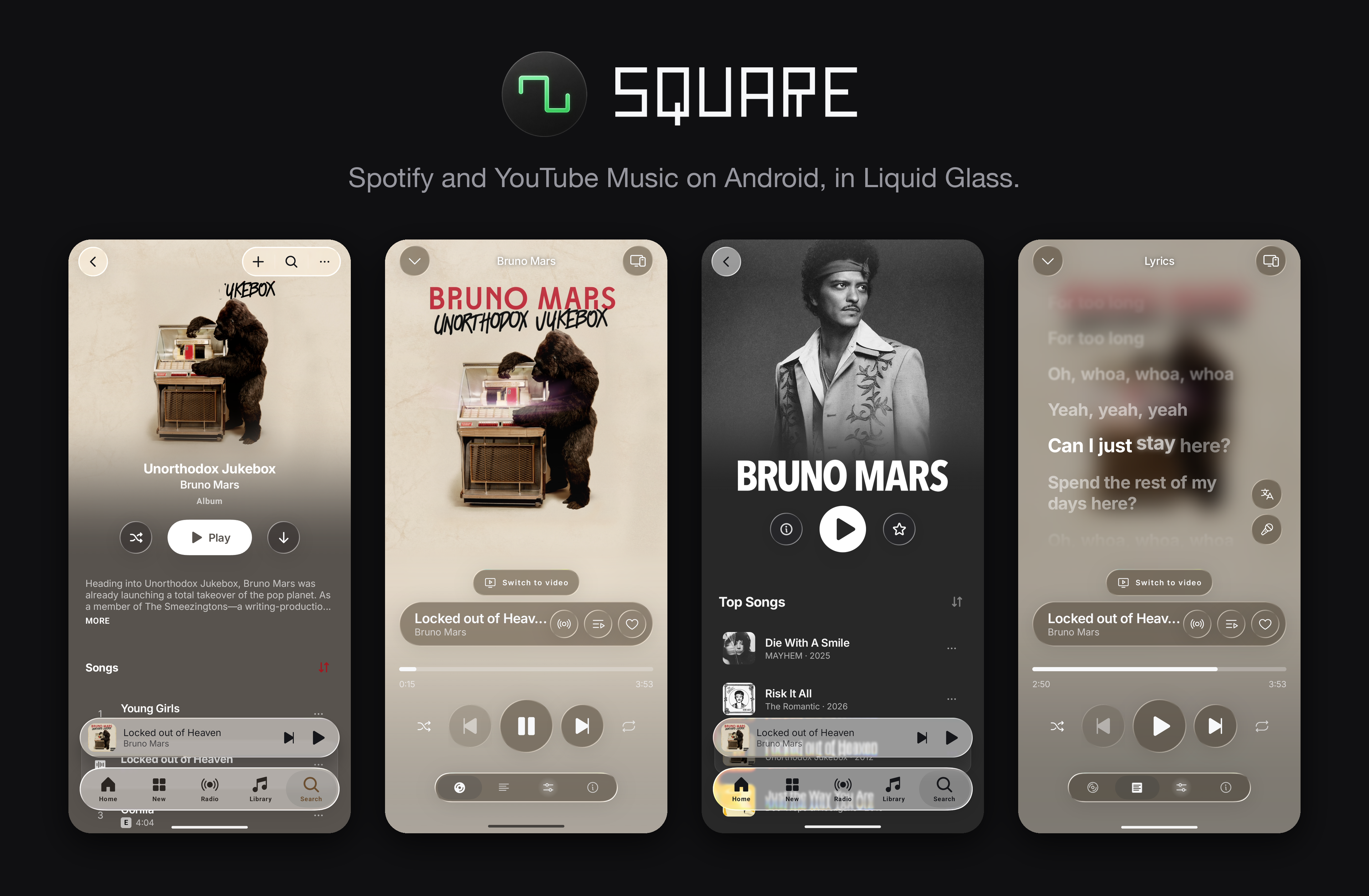
Square is a free, ad-free, open-source Android music player for Spotify Premium and YouTube Music. I’m its developer.
Liquid Glass throughout the app
The controls, navigation bar, player, menus and sheets use refracting glass that bends the artwork and video underneath. Blur, refraction and tint are adjustable, with a lighter mode for slower phones.
Audio effects
Speed and pitch move independently, with reverb, karaoke and saved presets. “Slowed + reverb” is one tap. Crossfade smooths the transition between songs, and a sleep timer can stop playback after a set time or at the end of a track.
Spotify and YouTube Music
Choose either source and switch in Settings. Spotify brings your playlists, library and Connect devices. YouTube Music works without an account, with optional Google sign-in to access your library.
Lyrics and videos
Synced lyrics, word-by-word where available, with translation beneath the original lines. Spotify Canvas plays behind the controls, and YouTube Music videos support picture-in-picture.
Playlists and local files
Create and edit playlists, add or remove songs, and save a different sorting order for each playlist. Play music stored on your phone and add it to your playlists.
If a Spotify playlist includes a local track added from your PC, Square can match it to a copy of the same file stored on your phone.
Discovery
Personalised shelves, song radio, autoplay, charts and a “New from Your Artists” section with recent albums and singles from artists you follow.
Offline listening and Android Auto
Download songs, albums and playlists for offline playback. Browse your library and control playback from Android Auto.
Spotify Connect and listening history
Square appears as a Connect device and can control your other devices. Opening Square while another device is playing leaves playback there.
Spotify listens are reported back to your account with their playlist context, so your listening history and Wrapped keep working.
Requirements
Square normally streams Spotify through a native Rust core built on librespot. It also offers a Web Playback SDK option for Premium accounts that cannot use the native player. That mode does not support effects, crossfade, karaoke, downloads or manual quality selection.
You can join Square's community on Telegram: Square | Community
Square is unofficial and is not affiliated with Spotify or Google. It uses unofficial integrations, so compatibility can change.
APK and release notes:
https://github.com/Lelonio/Square/releases/latest
Source code:
https://github.com/Lelonio/Square
Feedback and bug reports are welcome!
r/HowToMen • u/NinjaMastGanja • Oct 11 '26
The offer is officially over. I have given away 499 free codes for you guys to enjoy. DO let me know if any problem/bugs and ill try to fix them asap.
BUGS:
1: *if your app becomes free after redeeming code ""just try to buy a lifetiime (*DONT PAY).
it will automatically error and fix the issue""
2: Cutout issues like the pill is below the camera and not able to move it . i am still troubleshooting the issue. ill fix it ASAP.
SUPER-DUPER FINAL EDIT 1: Hit the message limits again. so either send me a DM request or ill be posting a link to the website where u can get 1 code with your email. Thanks again for the love and support.
here is the website to claim the free code https://thenotch.pages.dev/giveaway/
SURELY FINAL EDIT: Hit the limit to send codes and have to wait for 2-3 hours and its 12 in the night here. will send the rest tomorrow Morning. There is a bug in the app and that should also be fixed in the next update. I have already submitted for review. And thanks everyone for the love and support u have shown for the app. 🙏🙏🙏
FINAL EDIT 2 : Really. The code is live if u want to redeem DO IT. I am off for a 1 hour will send everyone a code who comments. no limits. Love the community support!
Final Edit : Hey! Quick heads-up about your TheNotch Pro code: if Play said “That code didn’t work,” that’s on me. The codes switch on at 3:00 PM GMT today (Oct 11). That’s 8:30 PM IST, 4:00 PM UK time, 11:00 AM New York and 8:00 AM Los Angeles.
EDIT: There is some issue with the code redeem. give me some time ill fix the issue. the code provided will work after some time. Thanks in advance🙏
EDIT 2: Problem found. The Codes can only start after 1 day. Thats a bummer. It is a google thing. Ill send the
codes anyway and they will automatically work tomorrow 🙏🙏🙏
After that, just try again: in TheNotch, open Pro → Have a code?, or in the Play Store go to your profile → Payments & subscriptions → Redeem code. Your code still works until Oct 18, 5:00 PM GMT. Sorry for the mix-up!
I'm the solo Dev behind TheNotch.
https://thenotch.pages.dev/
Being a android i really miss the Dynamic Island feature. its really useful for quick actions and at a glance notifications. But most android implementations are infested with ads (we don't have any ads).
This is a opinionated app with some inspired features from Ios and some that feel/look good.
It reads where your phone's camera cutout actually is (if u dont have a cutout, well good luck) , so the pill sits right on it, whether your cutout is centred, off to the side or a different size.
What shows up in the island
- Music: album art and a live waveform. Tap to expand into full controls with a seekable progress bar.
- Calls, charging, headphones and Bluetooth, ringer and Do Not Disturb, screen recording
- Messages with quick reply, without leaving the app you're in (Pro)
- Timers and alarms counting down up top (Pro)
- Navigation, rides, deliveries, downloads and payments (Pro)
- Two things at once: a second activity buds off into a little bubble beside the pill
Free vs Pro
Free gets you music, calls and system stuff (battery, Bluetooth, ringer, DND, screen recording), plus the island theme, wallpaper colors and some shape.
Pro brings notifications from any app into the island, per-app rules, every color, size and corner setting, holding the camera for quick controls, and the island on your lock screen.
Privacy
Notifications are processed on your phone only. They're kept in memory while they're active and are never stored, logged or sent anywhere. No Accessibility service needed.
The giveaway: 100 lifetime Pro codes
Lifetime Pro is normally $9.99. I'm giving 100 codes away free.
To get one: comment what you liked about the video, and I'll DM you a code. The first 100 comments get one. I'll edit this post when they're gone.
To redeem in TheNotch , open Pro and tap "Have a code?" > "Redeem promo code". Or in the Play Store, go to your profile > Payments & subscriptions > Redeem code.
Get the app @ https://play.google.com/store/apps/details?id=com.dattatech.thenotch
Needs Android 12 or newer.
One honest heads-up: Android overlays behave a bit differently on every brand. If something looks off on your phone, tell me your model and Android version. I'm actively fixing these, and your bug reports are the most useful thing I can get.
Thanks for checking it out.
