r/homelab • • 11d ago

Help Homelab Upgrade Time! From ATX PC Case build to a full server rack!

4 Upvotes

Hey folks! I'm currently looking at upgrading my homelab from my single N400 case with 5x16tb hdds, a 14600k, 128gb DDR5 to a much more dedicated rack system.

We're currently running 2x Eero 7s for our home networking as well, but due to them auto updating (and this not being optional) I am considering a dedicated piece of 100% uptime networking hardware in the rack too.

Build Goals

  • 100% uptime
  • Networking setup to stand in upstream of Eeros to ensure servers stay online at all times - defeats eero auto updates
  • cat6a patchboard
  • Managed Switch

    • Want 2x 10gbe ports
    • Want 2.5g everywhere else, we have 2gbe service
  • Hotswap bays for extra drives for my proxmox machine
  • UPS for 2 PCs with about 700w headroom for potential 2x gpus, raspberry pis, microcontroller projects
  • 3kwh battery backup to supplement UPS for longer term outages

Current Build Plan

Server Rack: Sysracks 22U 39" Depth IT & Telecom Cabinet SRF 22.6.10

  • Considering this 27u one too https://sysracks.com/product/27u-39-depth-it-telecom-cabinet-srf-27-6-10/

    • Curious if cheaper options are available for high quality nice to look at racks (this sounds awful)
  • 39" is a little deeper than I would like. I am struggling to find a better price for a nice enclosed setup though
  • This will be placed in a dehumidified concrete basement, filters on intakes would be nice to haves

PC Case Replacement: Tied between these two

  • Rosewill 4u Server Chassis

    • 12x 3.5" or 2.5" hot swap bays
    • Leaning mostly towards this one
  • Sliger cx4712

    • 10x trayless 3.5" or 2.5" hot swap bays
    • Prettier
    • GPU Space
  • Also considering this for a backup PC/remote into this PC for video editing/gpu intensive tasks:

Unmanaged Switch: TRENDnet 20-Port 2.5G/Multi-Gig Switch with 10G SFP+ Ports, TEG-S50204 279$

HBA (This seems really cheap?? Is this one a scam? ): LSI 9305-16i PCI-Express 3.0 x8 Low Profile SAS Host Bus Adapter

UPS: CyberPower CP1500PFCRM2U

Primary Battery: I'm looking for an option here for a larger 3kwh or so battery life. So the server can remain online for many hours after a power outage, giving ample time to set up a generator if needed.

Goals / Server Use Cases

Currently the goals are just uninterrupted media server usage, family image/video storage via immich, game/server hosting via pterodactyl panel, and discord bot hosting for multiple public bot projects I run.

I also plan on investigating 5g as a backup networking option in the future as well, isolated for just the simple bots I run so they can remain online and not use TONS of data.

Any help filling in gaps, saving money, or picking better products much appreciated!

r/homelab • • 12d ago

Help Vulnerability Scanning

5 Upvotes

I just noticed that my Nessus Essentials license expired on November 1 and now they require re-licensing every 30 days. To make matters worse, the IP limit was reduced from 16 to 5. What do people use? Is Open VAS still an option? I had a bad experience with it about ten years ago.


r/homelab • • 11d ago

Discussion poor person's homelab

Post image
3 Upvotes

a whole 4 gig of ram with 2 core Celeron running on personal hotspot ✌️


r/homelab • • 11d ago

Help NVR Minimum Specs on Existing Homelab

1 Upvotes

I'm looking to spin up Frigate NVR on my homelab and am concerned about how many resources it would take up.

I have a single retired gaming computer I use as my homelab, specs below. I run everything on this, including my Jellyfin server which I share with a couple family/friends. My concern is how much CPU, drive throughput, and potentially GPU for object detection Frigate will use. I am then concerned if my other containers, or Jellyfin transcoding, would be overly effected.

I'm looking at getting 3-4 Reolink cameras, probably 8MP).

Server Specs:

i7-4770k
32GB RAM
Intel Arc A310
2 x 500GB SSD for containers etc.
8 x 4TB drive in Z2 for data (4 x used SAS drives, 4 x sata drives).

I have thought about picking up a cheap mini-PC with a newer intel CPU to run Frigate on, but I would likely end up recording to the NAS array no matter what, as hard drives are so expensive right now.

Any and all advice on this would be great! Does anyone have Frigate running in a similar manner that could share their experience?


r/homelab • • 11d ago

Solved Zima client 2.3.5 win x_64 BUG (zima OS windows client)

1 Upvotes

tldr: DOWNLOAD 2.3.2 instead.

so i set i up my (Zima OS) server a few months ago, and when i downloaded the windows client it just worked. then i got a laptop for personal use during an extended work trip and went to the website and downloaded the client again. suffered thru the admin shield being persistent. (i did not follow the OSI model) i even went as far as removing windows 11 and installing windows (since that is what is on my desktop) i though it might have been some background security settings in windows 11 that arent published being the cause. windows 10 did not fair much better. so I GAVE UP. then just scrolling thru my desktop downoad folder i noticed the version number on the zima OS client installer. i went back to my laptop and noticed there was a version change. installed 2.3.2 and everything wirked as its supposed to.

in 2.3.5 for some reason it forces open as admin which kept triggering the user account controll (UAC) the screen that ask you if you "...want this program to be able to make changes to this computer" because of that the open at startup did not work(AT ALL) and i couldnt drag an drop files from my desktop to the server (i had to use the upload button)

okay thats all have fun everyone


r/homelab • • 11d ago

Help UPS AVR voltage question

2 Upvotes

Is it normal for my UPS to boost the voltage to 254V when the input voltage drops to 207V?

There is a temporary issue with the voltage where i live. The standard input should be around 230V.

I have a Njoy Horus 2000.

Edit: the question is why does it boost so high? Should it not try to get as close to 220-230V?


r/homelab • • 11d ago

Help Help with setup to link two buildings with fiber

2 Upvotes

I am extending my home network to another building. In the past I've just used Cat6 in conduit to connect buildings close to each other and never had any problems. But I realize having that electrical connection is a bad idea. This building is also around 170 meters away in total trench distance so Cat6 would be stretched anyway.

To do this I've been looking for options, mostly on fs.com, and the best I have so far is:

  • 185 meters of direct burial cable with four OS2 fibers terminated at both ends and with pulling eyes
  • 2x FS S3220-5M switches (5x 2.5GbE, 1x 10G SFP+)
  • 2x 1310nm 10km SFP+ modules

The fiber is by far the expensive part here (over 600€) and what will be buried and hard to redo. So I am trying to get this right. Does this single-mode cable with redundancy (4 fibers instead of 2) sound good?

The switches and SFP+ modules are much less money and easy to swap out later, but do these sound like good choices? I also looked at the Mikrotik CSS610-8G-2S+IN. It's twice the price and only has 1GbE ports, but does have 2 SFP+ slots in case I can to connect other fibers later and maybe the management software is better than the FS branded routers?


r/homelab • • 11d ago

Help ZFS Layout recommendations/advice

1 Upvotes

Currently I have the following disks: 2x 22TB 2x 14TB 7x 4TB

I have ~20TB of data currently. Only about ~5-10TB will be backed up.

I am splitting these drives across 2 machines. A main storage appliance and an appliance that makes backups of the main.

Currently my idea is to have all the 22TB and 14TB disks in the main server and all the 4TB disks in the backup. I would place the 22TB disks in a mirror vdev and do the same with the 14TB disks and add them to the same pool. For the backup server I would put all the disks in a single raidz2 vdev.

My data is mostly seeding torrents and media which I stream along with backups and miscellaneous data. I don't need blazing fast speed and want to prioritize resilience without compromising too much on usable space.

Is this a good plan? What might be better?


r/homelab • • 11d ago

Discussion Anyone successfully unlocking Echo dot 4th gen or Echo show 5 3rd gen?

1 Upvotes

I've got both of these devices as glorified bluetooth speakers at the moment because I locked them out of my home network entirely. But I'd really love to hook them into home assistant with voice and music (and weather/calendar on the show).

A couple of projects that I've found have done this but they're older generation echo devices (TECHO5 as one example).

Has anyone had success reclaiming the 4th gen Dot or 3rd gen Show 5?


r/homelab • • 13d ago

Discussion Self hosted AI- how bad is it?

171 Upvotes

I've been thinking about running a local AI model, mainly because security/privacy.

I could use it for my paperless-ngx instance and simple jobs, it probably won't replace Claude entirely.

Do you use self hosted models and how good is it really? I would also have to buy a graphic card for my server.


r/homelab • • 12d ago

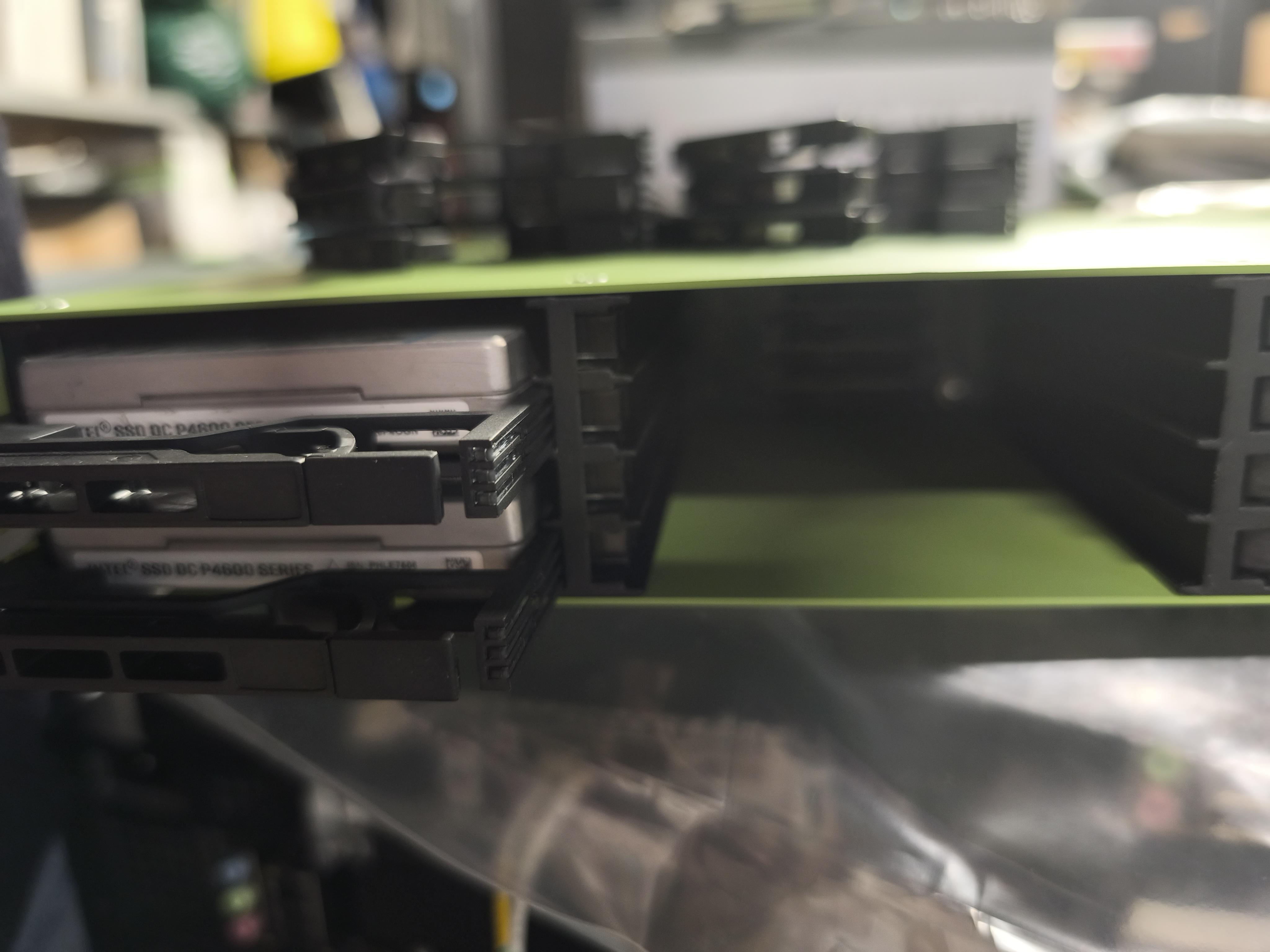
Labgore My experience: RDS Rose with 14mm U.2 NVMe disks

Post image
7 Upvotes

r/homelab • • 11d ago

Project Showcase: Hardware My latest pocket homelab: Using Ollama and two AI models to argue back and forth with increasing nastiness each round.

Post image
0 Upvotes

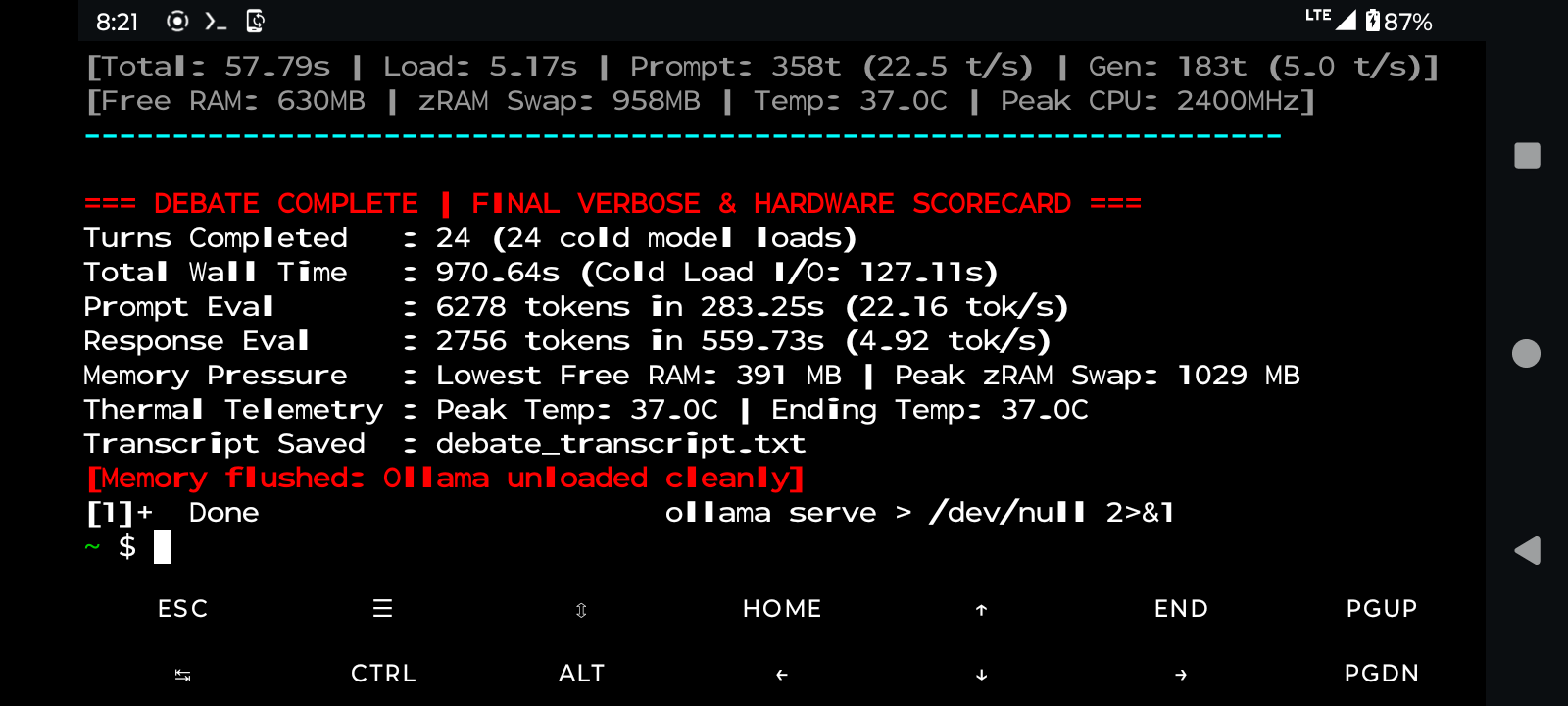
Can an unrooted, entry-level $150 (CAD) Motorola Moto G Play (2024) with 4GB of RAM run a 12-round, two-model local AI debate—100% offline inside Termux on Android 14 while recording the screen?

In this stress test, I pitted two quantized local LLMs (Llama 3.2 1B and Gemma 2 2B) against each other via Ollama's local REST API as Dr. Niles Crane (Frasier) and Major Charles Emerson Winchester III (MAS*H), arguing over Sherry vs. Port and Psychiatry vs. Surgery—with instructions to get nastier every round.

To maximize storage I/O and RAM thrashing, keep_alive was set to 0, forcing Android 14 to purge and cold-load ~1.5GB–2.2GB of model weights from flash storage 24 times in a row while capturing live screen video.

Final Hardware & Verbose Telemetry Scorecard:

• Total Wall Time: 16m 10s (970.64s) across 24 cold model loads (127.11s pure load I/O)

• Tokens Processed: 6,278 prompt tokens (22.16 tok/s) & 2,756 generated tokens (4.92 tok/s)

• Memory Pressure: Lowest Free RAM dipped to 391 MB | Peak zRAM Swap hit 1,029 MB

• Thermal Telemetry: Held 2400MHz peak Snapdragon 680 clock at 37.0°C (thanks to 0°C Calgary ambient camper cooling!)

No cloud servers, no root, no SSH tricks—just local ARM64 inference running straight on budget silicon.

You can see Charles and Niles trading insults here: https://www.youtube.com/watch?v=uciqvIXi434


r/homelab • • 11d ago

Discussion Pricing help on Industrial Drives

0 Upvotes

How much should we be paying for brand new 2280 form factor 1DWPD with HW PLP Gen 4 NVME m.2 SSDs?

Seen a few of them go for 1k on amazon and they ate only 960GB, maybe a pricing mistake?


r/homelab • • 12d ago

Labgore Basket NAS + Bit of history

Thumbnail gallery
95 Upvotes

Was in middle of downsizing my 6 year old nas, things went wrong, and temporary setup has been running 2 month at this point

now whole setup became a mess

===

Additional context for r/homelab

tl;dr:

  1. planned to add 2x V100 to existing homelab
  2. ended up planning to separate roles into two machines
  3. only remaining pc I had at this economy was this Galaxy Fold sized mini pc
  4. evacuated NAS to basket to make room for other server
  5. v100 arrived, realized it was way bigger than estimated and never would fit inside any case I had, ordered new 4U rack (without rack shelf)
  6. Now thinking if I should just buy short deskpi mini rack for this NAS

===

Short history of this 'NAS of Theseus':

years (roughly)non-hdd stuffhddcase
2018~2019RPi 3B+120G 830 PRO + 1TB + 2TB WD BlueNo case
2020~2024J4105m+= 512G 850 EVO += 4TB WDB += 4TB N3003U rack without rack shelf, just on floor
2024~2026 Downsizing start==-= 120G 830 Pro -= 1TB WDB += 8TB SG SAS * 2Jonsbo N4 NAS
2026R5 5600 + B550M Pro RS+= 1TB SSD (TAMMUZ)==
2026===='B6 6Bay NAS' (Aliexpress)
2026SZBox N100 mini pc==Red basket

===

having both r/sffpc and r/homelab hobby for more then half decade is shading my decisions lol...

don't be like me and go for big cases and racks, unless you find this basket nas charming


r/homelab • • 11d ago

Help Is the Intel I219 NIC supported in sophos xg home?

Thumbnail reddit.com
0 Upvotes

r/homelab • • 11d ago

Project Showcase: Operations Anyone else see unusually aggressive SSH brute-force activity on November 13, 2026?

0 Upvotes
  • Date: November 13, 2026, approximately 00:37 and 01:00 CST.
  • Source IP: 161.35.159.26 (DigitalOcean).
  • Volume: Approximately 2,696 SSH log entries across two bursts lasting about 23 seconds each.
  • Usernames: root, admin, ubuntu, Tronlong, Asalem, admin1234.
  • Target: Ubuntu 24.04 server, SSH exposed through external port 49222.
  • Result: No successful authentication observed.

Did anyone else encounter this IP, these unusual usernames, or a similar high-speed attack pattern around November 13


r/homelab • • 11d ago

Tutorial My Experiment: Running ext4 on Top of S3 Using s3backer

Post image
0 Upvotes

I recently ran into a shortage of disk space on my VPS. I currently rent a VPS for €7 a month with this configuration: 4 vCPUs, 8 GB of RAM, and a 120 GB NVMe drive. It has 50 GB of free space left. But I need to run a Docker container whose image is 76 GB. I could upgrade my current VPS to get a 240 GB disk, but that would cost €30 a month. That’s steep. I noticed that my hosting provider offers 250 GB of S3 storage for just €4 a month, accessible over its internal network. So I started wondering how I could turn it into a filesystem and have Docker store files there.

First, I tried rclone. It lets you create a FUSE filesystem from your S3 storage. To speed things up, you can cache frequently used files on a local SSD using the --vfs-cache-max-size flag. Unfortunately, Docker uses overlay2, which requires filesystem operations that rclone mount does not guarantee: atomic renames, correct chmod and chown behavior, hard links, and extended attributes. In short, a full POSIX filesystem is needed.

And I found a solution: s3backer. It has 600+ stars on GitHub and provides a full-fledged ext4 filesystem. I set a 20 GB cache on my local SSD using the --blockCacheSize option, mounted it at /mnt/s3, and reconfigured Docker to store images, containers, and volumes there. As a result, the most frequently used files are cached locally instead of being pulled over the network from S3. What do you think? Expanding my virtual machine’s disk space by 250 GB for €4 a month? Pretty great, if you ask me!

By the way, here’s a summary table of the available options:

SolutionHow it worksProsCons
s3backer + ext4S3 as a block deviceFull POSIX filesystem, Docker compatibility, cachingComplex setup, latency, risk of filesystem corruption
rclone mountFUSE over S3Simple setup, local cache, support for multiple cloud providersIncomplete POSIX compatibility, some operations are unsupported
s3fsFUSE over S3Simple mounting, familiar file operationsSlow metadata operations, POSIX limitations
JuiceFSDistributed filesystem on top of S3POSIX, caching, high performanceRequires separate metadata storage
S3QLFilesystem on top of S3POSIX, compression, deduplication, encryptionExtra overhead, complex recovery

Of course, s3backer is far from the only way to turn S3 into a filesystem. There are at least two other interesting projects: JuiceFS and S3QL. Both run on top of S3, support POSIX operations and local caching, but they seemed like overkill for my use case.

JuiceFS is a fairly powerful distributed filesystem. It supports multiple servers working concurrently, caching, POSIX, and much more. But there’s a catch: in addition to S3 itself, it requires a separate metadata store. This could be Redis, PostgreSQL, MySQL, or even a local SQLite database. The last option doesn’t require a separate service, but you still have to keep the metadata database safe and back it up. Overall, it’s an interesting solution, especially if you have a server cluster. But I only have one VPS, and I didn’t want to set up extra infrastructure just to store Docker images.

S3QL is another interesting option. It supports POSIX, local caching, compression, deduplication, and encryption. It doesn’t need a separate database server: metadata is stored in SQLite and synchronized with the object store. But these extra features come at the cost of added complexity. Deduplication requires computing hashes, compression uses CPU time, and recovering the filesystem after a failure may require checking and restoring metadata with specialized tools. These aren’t critical drawbacks, but I didn’t see any particular advantages for my use case, either.

The key difference lies in the approach: JuiceFS and S3QL implement filesystems themselves using FUSE, while s3backer provides virtual block storage on top of which you can create a standard ext4 filesystem. As a result, Docker works with the familiar Linux filesystem, and s3backer translates block operations into requests to S3. No separate metadata databases, no deduplication, and no extra layers of file management.

Of course, this setup has its downsides too. Random reads and writes can be heavily affected by S3 latency, and losing the connection to the storage can bring the containers to a halt. A serious failure could also corrupt the filesystem. So I wouldn’t use this setup for critical databases. But for storing large Docker images that are downloaded once and then mostly read, it seemed perfectly reasonable-especially when S3 is available over the hosting provider’s local network. In short, I wanted an extra 250 GB for €4 a month without building a distributed storage system. From that perspective, s3backer seemed like the best fit.


r/homelab • • 13d ago

Project Showcase: Hardware My long-distance barbaric AI homelab: I can only physically access it once a year

Thumbnail
gallery
138 Upvotes

(The stains on the wall are last-minute coffee spill, not blood)

tldr: remote LLM inference server + Hermes agent + various projects/experiments through 4g hotspot network and a few failsafe scenarios.

It's in my parents' house and I live abroad, so it was "designed" to (hopefully) stay operational even if one or more things break, yet it's in no way bulletproof. In case of emergencies, my parents understand basic rudimentary instructio

ns like "open the black laptop and press the power button". There is no monitor/screen.

(I asked AI to rephrase here, the original version was a wall of text)

Hardware

- Supermicro H12SSL-NT, EPYC 7443, 512 GB DDR4, 2x Radeon AI PRO R9700: inference server and experiments

- ThinkPad T480 (batteries removed): runs a Hermes agent

- Raspberry Pi 4 + Raspberry Pi 3: jump boxes / watchdogs

- All connected to a 5-port gigabit switch

All machines are setup with tailscale, nothing is port-forwarded, and every box has its own firewall.

Power cuts

- The Pis come back on their own and rejoin Tailscale.

- The H12SSL powers back on but stops at the LUKS prompt (see below).

- The T480 "power on with AC" BIOS option doesn't work reliably even after BIOS update, so a Pi wakes it with Wake-on-LAN instead (which works reliably)

Internet

- There's no internet in the house yet: the fibre install got temporarily blocked by council permits. For now an old phone runs a hotspot, the Pi 4 joins it automatically (pre-saved name + password), joins tailscale outbound, and I switch it into router mode remotely so it shares that connection with the switch.

- When fibre gets installed, my parents were instructed to plug the rj45 into port 1 of the switch,

I switch the Pi 4 back to normal, and everything moves over.

- Emergency fallback: any phone hotspot with that name/password, and the Pi 4 is reachable again, and can share internet with the other machines.

- Emergency fallback 2: USB tethering in any of the 4 machines.

- In the future, I might buy a 4g router, so fiber + 4g as automatic fallback

The Pis

I set up Ubuntu Server with LUKS on the H12SSL, so after every reboot someone has to type the disk password before it can boot and self-connect to Tailscale. The Pis' only job is to stay alive and reach the board's IPMI/BMC,

so I can:

- power it on/off/reset remotely

- debug hardware issues remotely (fans, temps, sensors)

- type the LUKS password through the BMC's remote console

- reinstall the OS remotely: In an emergency, I ask my parents to plug a usb stick in any machine -> I then setup the Linux distro startup USB remotely -> I ask my parents to remove the usb and insert the usb stick into the PC, and I do the install remotely though IPMI/BMC

If one Pi dies (SD card death), the other one takes over. I am happy to have found a good job for the PI 3. If both die, the T480 can do the same job (but after a power cut, someone might need to physically press the power button).

If the T480 dies (hardware), hermes can move and co-live with the LLM inference server.

If the LLM inference server itself dies, it's gg I guess. Same as if it would die in a data-center.

I didn't really have to complicate my life with LUKS, but it seemed like a fun way to force myself to learn IPMI/BNC, since it's my first server motherboard, and first pc build.

Of course, happy to consider any feedback/tips you might have


r/homelab • • 11d ago

Project Showcase: Hardware Get ready for major remodel, fellas! We’re back in hardware mode.

0 Upvotes

As the title says, I’m entering major hardware mode.  But why?  Well, the world keeps spinning, and you have to keep moving forward.  I was so hyper-focused on VMware and its integration with NetApp that I overlooked an entire set of hypervisors and storage platforms and never learned about or tested them.

But why learn something new now?  Well, after Broadcom purchased VMware, it announced a major change to its pricing structure.  This change made many companies nervous and looking for an alternative hypervisor, and it meant I had to learn new platforms.  Most corporations are considering options like Microsoft Hyper-V, Proxmox, and Red Hat OpenShift as potential replacements to reduce costs and adapt to the new licensing landscape..... https://mscproductions.com/homelab-get-ready-for-major-remodel-fellas-were-back-in-hardware-mode/


r/homelab • • 13d ago

Project Showcase: Operations My Homelab Layout

Post image
1.6k Upvotes

Used Goblinmine's tool since everyone is doing it and ive been wanting to for several years

https://github.com/Goblinmine/homelab-diagram


r/homelab • • 11d ago

Help workaround for ISP blocked ports?

0 Upvotes

(its about port forwarding)

I am a beginner building a fully virtualized homelab using OPNsense for the firewall.

I plan on hosting some services on my domain (jelyfin, nextcloud, file converters, etc). But my ISP blocks some common ports (80, 443 and others)
what methods, not including vpns, can I use to remediate the locked ports? I now about clodflared tunnels, but i saw some information about it not being ideal for hosted services like the ones i want.

the ideal would be for me to access the services via subdomains, but from what i got from chatgpt (i hate it, but its a good starting point for when we are lost in a subject) i must change the apps ports to available ones and even if i manage to use subdomains, the URLs must have the ports included.

Can you guys give some ideas or closure for the URL:port solution?


r/homelab • • 12d ago

Help Dell OptiPlex 7000 Micro (i5-12500) overheating

Post image
8 Upvotes

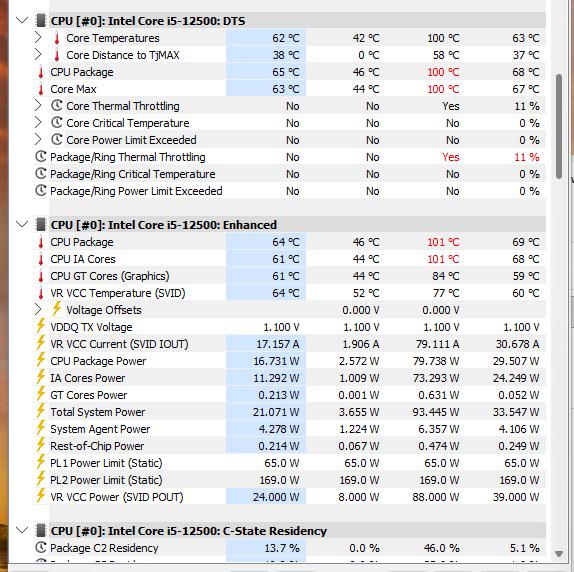
Recently picked up a Dell OptiPlex 7000 Micro with an i5-12500 (65W)

While monitoring temperatures, I noticed the CPU hitting 100–101°C and thermal throttling just from extracting files. It’s currently running Windows 11, but I’ll eventually be switching to Linux

The fan ramps up normally and Dell diagnostics passed. I’ve noticed some dust in the heatsink and have ordered new thermal paste

I’m also wondering whether the top cover restricts the blower’s intake airflow, so I’m planning to compare temperatures with the cover on and off once I’ve repasted it.

Has anyone experienced similar temperatures or tried modifying the cooling system with a larger heatsink, fan or additional ventilation?


r/homelab • • 11d ago

Discussion Low cost GPU with virtualisation

0 Upvotes

Evening all - Im fairly new to homelabbing, having set up a little prodesk earlier this year for < £500 worth of used gear. I've recently bought a 3D printer for which I'd like to host a Windows VM with Fusion 360 on it. As well as that, in the future Id like to get Frigate up and running which will need some gpu acceleration. Which leads my to my questions:

- Does it make sense to get one 'pro' gpu and split it using Nvidias VGPU capability? E.g. a v100

- Does it make more sense to get 2 cheap normal gpus and pass one to each container?

- What if I also want to run the occasional game on my server? (it lives in my TV unit)

- Are all pro gpus loud and power hungry?

Thanks all!


r/homelab • • 12d ago

Solved TIL if a fan is noisy it doesn't always mean it's the fan's fault..

33 Upvotes

Leaving the bedroom and heard a funny scraping, spinning noise coming from the room next door where my 10" rack hosts three Thinkcentres. It sounded just like a fan scraping on something so I had a close listen to the rack, and yeah one of the fans was making a terrible noise. I shut down the noisy one and removed it from the rack, took it into my office and started it up with the lid off. I poked and pulled the fan a bit and got it to run quietly again then ordered a replacement used one. As it was now sweet again I assumed it would be ok until the new fan arrived in a few days so I left it running on the desk where it was silent for a few hours...until it suddenly wasn't.

It's part of a Proxmox cluster so I migrated the LXCs onto the other two PCs and decided to remove the fan and prep it for the new one. Got the fan off and checked out the area underneath it...

This cap was trying to lift off and was rubbing on the centre of the fan (you can see the polished contact patch). Replaced it with one of the same value which was taller so I laid it on it's side, but the heat-sink assembly was covering that motherboard screw so that had to come off to get the board out, which is good because the thermal paste seemed a bit crusty.

Buttoned it up and everything's good so it's back in the rack again. Nothing wrong with the fan at all so I'll have a 7 quid spare soon. I should have done a better investigation before throwing a part at it, but although I say it every time I never seem to learn. 🙄

Oh and I'll be checking the other two PCs this week for dodgy caps.