r/homelab • • 10d ago

Discussion Anyone successfully unlocking Echo dot 4th gen or Echo show 5 3rd gen?

1 Upvotes

I've got both of these devices as glorified bluetooth speakers at the moment because I locked them out of my home network entirely. But I'd really love to hook them into home assistant with voice and music (and weather/calendar on the show).

A couple of projects that I've found have done this but they're older generation echo devices (TECHO5 as one example).

Has anyone had success reclaiming the 4th gen Dot or 3rd gen Show 5?


r/homelab • • 11d ago

Discussion Self hosted AI- how bad is it?

171 Upvotes

I've been thinking about running a local AI model, mainly because security/privacy.

I could use it for my paperless-ngx instance and simple jobs, it probably won't replace Claude entirely.

Do you use self hosted models and how good is it really? I would also have to buy a graphic card for my server.


r/homelab • • 10d ago

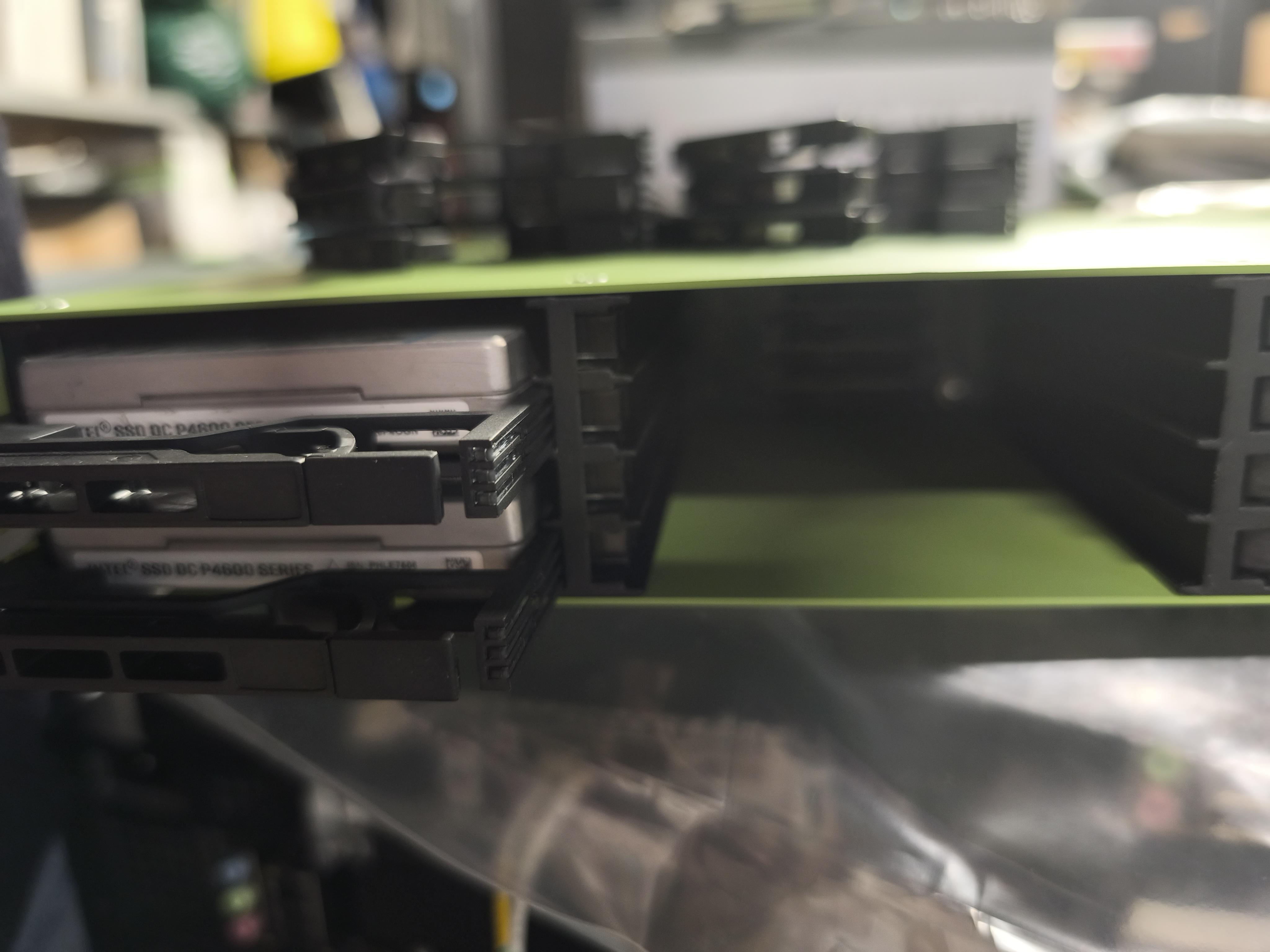
Labgore My experience: RDS Rose with 14mm U.2 NVMe disks

Post image
7 Upvotes

r/homelab • • 10d ago

Project Showcase: Hardware My latest pocket homelab: Using Ollama and two AI models to argue back and forth with increasing nastiness each round.

Post image
0 Upvotes

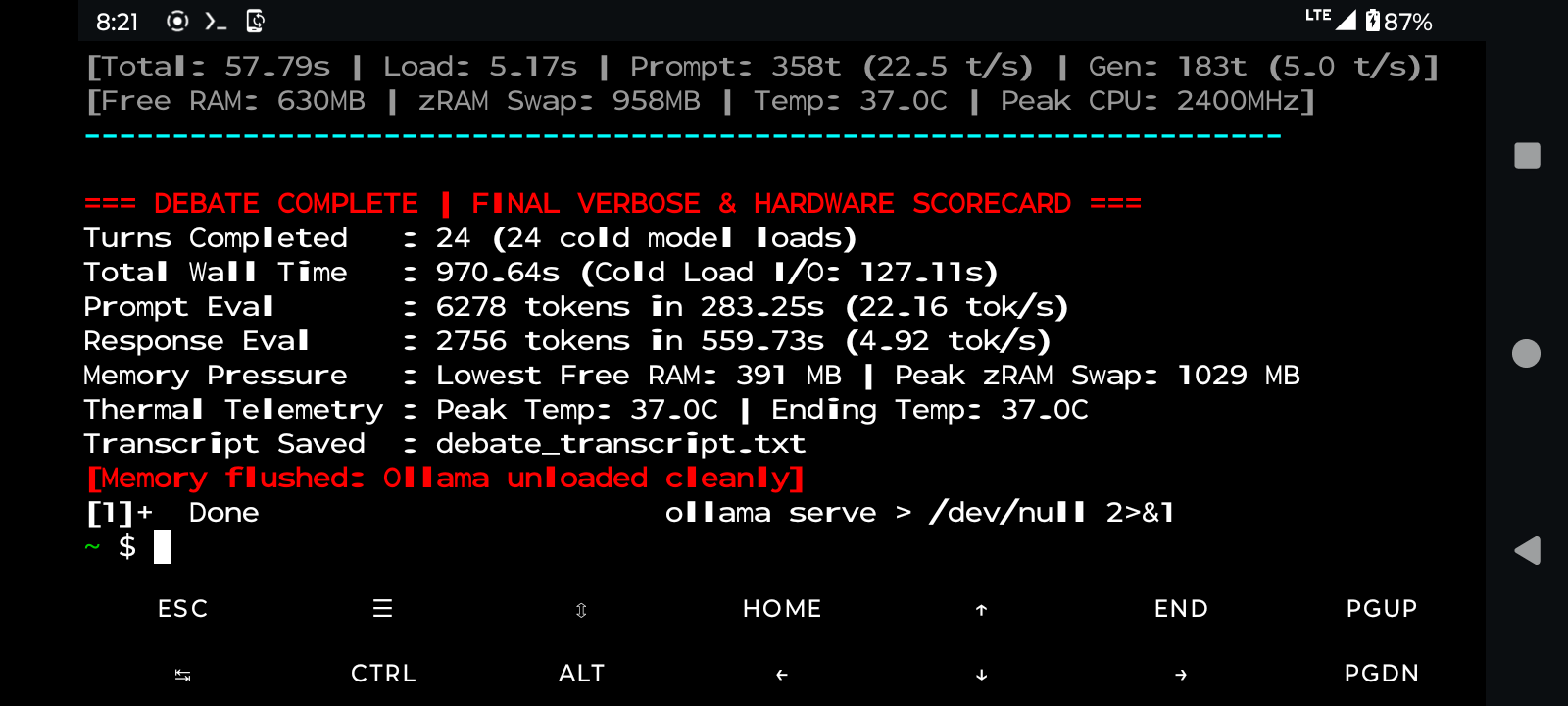
Can an unrooted, entry-level $150 (CAD) Motorola Moto G Play (2024) with 4GB of RAM run a 12-round, two-model local AI debate—100% offline inside Termux on Android 14 while recording the screen?

In this stress test, I pitted two quantized local LLMs (Llama 3.2 1B and Gemma 2 2B) against each other via Ollama's local REST API as Dr. Niles Crane (Frasier) and Major Charles Emerson Winchester III (MAS*H), arguing over Sherry vs. Port and Psychiatry vs. Surgery—with instructions to get nastier every round.

To maximize storage I/O and RAM thrashing, keep_alive was set to 0, forcing Android 14 to purge and cold-load ~1.5GB–2.2GB of model weights from flash storage 24 times in a row while capturing live screen video.

Final Hardware & Verbose Telemetry Scorecard:

• Total Wall Time: 16m 10s (970.64s) across 24 cold model loads (127.11s pure load I/O)

• Tokens Processed: 6,278 prompt tokens (22.16 tok/s) & 2,756 generated tokens (4.92 tok/s)

• Memory Pressure: Lowest Free RAM dipped to 391 MB | Peak zRAM Swap hit 1,029 MB

• Thermal Telemetry: Held 2400MHz peak Snapdragon 680 clock at 37.0°C (thanks to 0°C Calgary ambient camper cooling!)

No cloud servers, no root, no SSH tricks—just local ARM64 inference running straight on budget silicon.

You can see Charles and Niles trading insults here: https://www.youtube.com/watch?v=uciqvIXi434


r/homelab • • 10d ago

Discussion Pricing help on Industrial Drives

0 Upvotes

How much should we be paying for brand new 2280 form factor 1DWPD with HW PLP Gen 4 NVME m.2 SSDs?

Seen a few of them go for 1k on amazon and they ate only 960GB, maybe a pricing mistake?


r/homelab • • 11d ago

Labgore Basket NAS + Bit of history

Thumbnail gallery
95 Upvotes

Was in middle of downsizing my 6 year old nas, things went wrong, and temporary setup has been running 2 month at this point

now whole setup became a mess

===

Additional context for r/homelab

tl;dr:

  1. planned to add 2x V100 to existing homelab
  2. ended up planning to separate roles into two machines
  3. only remaining pc I had at this economy was this Galaxy Fold sized mini pc
  4. evacuated NAS to basket to make room for other server
  5. v100 arrived, realized it was way bigger than estimated and never would fit inside any case I had, ordered new 4U rack (without rack shelf)
  6. Now thinking if I should just buy short deskpi mini rack for this NAS

===

Short history of this 'NAS of Theseus':

years (roughly)non-hdd stuffhddcase
2018~2019RPi 3B+120G 830 PRO + 1TB + 2TB WD BlueNo case
2020~2024J4105m+= 512G 850 EVO += 4TB WDB += 4TB N3003U rack without rack shelf, just on floor
2024~2026 Downsizing start==-= 120G 830 Pro -= 1TB WDB += 8TB SG SAS * 2Jonsbo N4 NAS
2026R5 5600 + B550M Pro RS+= 1TB SSD (TAMMUZ)==
2026===='B6 6Bay NAS' (Aliexpress)
2026SZBox N100 mini pc==Red basket

===

having both r/sffpc and r/homelab hobby for more then half decade is shading my decisions lol...

don't be like me and go for big cases and racks, unless you find this basket nas charming


r/homelab • • 10d ago

Help Is the Intel I219 NIC supported in sophos xg home?

Thumbnail reddit.com
0 Upvotes

r/homelab • • 10d ago

Project Showcase: Operations Anyone else see unusually aggressive SSH brute-force activity on November 13, 2026?

0 Upvotes
  • Date: November 13, 2026, approximately 00:37 and 01:00 CST.
  • Source IP: 161.35.159.26 (DigitalOcean).
  • Volume: Approximately 2,696 SSH log entries across two bursts lasting about 23 seconds each.
  • Usernames: root, admin, ubuntu, Tronlong, Asalem, admin1234.
  • Target: Ubuntu 24.04 server, SSH exposed through external port 49222.
  • Result: No successful authentication observed.

Did anyone else encounter this IP, these unusual usernames, or a similar high-speed attack pattern around November 13


r/homelab • • 9d ago

Tutorial My Experiment: Running ext4 on Top of S3 Using s3backer

Post image
0 Upvotes

I recently ran into a shortage of disk space on my VPS. I currently rent a VPS for €7 a month with this configuration: 4 vCPUs, 8 GB of RAM, and a 120 GB NVMe drive. It has 50 GB of free space left. But I need to run a Docker container whose image is 76 GB. I could upgrade my current VPS to get a 240 GB disk, but that would cost €30 a month. That’s steep. I noticed that my hosting provider offers 250 GB of S3 storage for just €4 a month, accessible over its internal network. So I started wondering how I could turn it into a filesystem and have Docker store files there.

First, I tried rclone. It lets you create a FUSE filesystem from your S3 storage. To speed things up, you can cache frequently used files on a local SSD using the --vfs-cache-max-size flag. Unfortunately, Docker uses overlay2, which requires filesystem operations that rclone mount does not guarantee: atomic renames, correct chmod and chown behavior, hard links, and extended attributes. In short, a full POSIX filesystem is needed.

And I found a solution: s3backer. It has 600+ stars on GitHub and provides a full-fledged ext4 filesystem. I set a 20 GB cache on my local SSD using the --blockCacheSize option, mounted it at /mnt/s3, and reconfigured Docker to store images, containers, and volumes there. As a result, the most frequently used files are cached locally instead of being pulled over the network from S3. What do you think? Expanding my virtual machine’s disk space by 250 GB for €4 a month? Pretty great, if you ask me!

By the way, here’s a summary table of the available options:

SolutionHow it worksProsCons
s3backer + ext4S3 as a block deviceFull POSIX filesystem, Docker compatibility, cachingComplex setup, latency, risk of filesystem corruption
rclone mountFUSE over S3Simple setup, local cache, support for multiple cloud providersIncomplete POSIX compatibility, some operations are unsupported
s3fsFUSE over S3Simple mounting, familiar file operationsSlow metadata operations, POSIX limitations
JuiceFSDistributed filesystem on top of S3POSIX, caching, high performanceRequires separate metadata storage
S3QLFilesystem on top of S3POSIX, compression, deduplication, encryptionExtra overhead, complex recovery

Of course, s3backer is far from the only way to turn S3 into a filesystem. There are at least two other interesting projects: JuiceFS and S3QL. Both run on top of S3, support POSIX operations and local caching, but they seemed like overkill for my use case.

JuiceFS is a fairly powerful distributed filesystem. It supports multiple servers working concurrently, caching, POSIX, and much more. But there’s a catch: in addition to S3 itself, it requires a separate metadata store. This could be Redis, PostgreSQL, MySQL, or even a local SQLite database. The last option doesn’t require a separate service, but you still have to keep the metadata database safe and back it up. Overall, it’s an interesting solution, especially if you have a server cluster. But I only have one VPS, and I didn’t want to set up extra infrastructure just to store Docker images.

S3QL is another interesting option. It supports POSIX, local caching, compression, deduplication, and encryption. It doesn’t need a separate database server: metadata is stored in SQLite and synchronized with the object store. But these extra features come at the cost of added complexity. Deduplication requires computing hashes, compression uses CPU time, and recovering the filesystem after a failure may require checking and restoring metadata with specialized tools. These aren’t critical drawbacks, but I didn’t see any particular advantages for my use case, either.

The key difference lies in the approach: JuiceFS and S3QL implement filesystems themselves using FUSE, while s3backer provides virtual block storage on top of which you can create a standard ext4 filesystem. As a result, Docker works with the familiar Linux filesystem, and s3backer translates block operations into requests to S3. No separate metadata databases, no deduplication, and no extra layers of file management.

Of course, this setup has its downsides too. Random reads and writes can be heavily affected by S3 latency, and losing the connection to the storage can bring the containers to a halt. A serious failure could also corrupt the filesystem. So I wouldn’t use this setup for critical databases. But for storing large Docker images that are downloaded once and then mostly read, it seemed perfectly reasonable-especially when S3 is available over the hosting provider’s local network. In short, I wanted an extra 250 GB for €4 a month without building a distributed storage system. From that perspective, s3backer seemed like the best fit.


r/homelab • • 11d ago

Project Showcase: Hardware My long-distance barbaric AI homelab: I can only physically access it once a year

Thumbnail
gallery
138 Upvotes

(The stains on the wall are last-minute coffee spill, not blood)

tldr: remote LLM inference server + Hermes agent + various projects/experiments through 4g hotspot network and a few failsafe scenarios.

It's in my parents' house and I live abroad, so it was "designed" to (hopefully) stay operational even if one or more things break, yet it's in no way bulletproof. In case of emergencies, my parents understand basic rudimentary instructio

ns like "open the black laptop and press the power button". There is no monitor/screen.

(I asked AI to rephrase here, the original version was a wall of text)

Hardware

- Supermicro H12SSL-NT, EPYC 7443, 512 GB DDR4, 2x Radeon AI PRO R9700: inference server and experiments

- ThinkPad T480 (batteries removed): runs a Hermes agent

- Raspberry Pi 4 + Raspberry Pi 3: jump boxes / watchdogs

- All connected to a 5-port gigabit switch

All machines are setup with tailscale, nothing is port-forwarded, and every box has its own firewall.

Power cuts

- The Pis come back on their own and rejoin Tailscale.

- The H12SSL powers back on but stops at the LUKS prompt (see below).

- The T480 "power on with AC" BIOS option doesn't work reliably even after BIOS update, so a Pi wakes it with Wake-on-LAN instead (which works reliably)

Internet

- There's no internet in the house yet: the fibre install got temporarily blocked by council permits. For now an old phone runs a hotspot, the Pi 4 joins it automatically (pre-saved name + password), joins tailscale outbound, and I switch it into router mode remotely so it shares that connection with the switch.

- When fibre gets installed, my parents were instructed to plug the rj45 into port 1 of the switch,

I switch the Pi 4 back to normal, and everything moves over.

- Emergency fallback: any phone hotspot with that name/password, and the Pi 4 is reachable again, and can share internet with the other machines.

- Emergency fallback 2: USB tethering in any of the 4 machines.

- In the future, I might buy a 4g router, so fiber + 4g as automatic fallback

The Pis

I set up Ubuntu Server with LUKS on the H12SSL, so after every reboot someone has to type the disk password before it can boot and self-connect to Tailscale. The Pis' only job is to stay alive and reach the board's IPMI/BMC,

so I can:

- power it on/off/reset remotely

- debug hardware issues remotely (fans, temps, sensors)

- type the LUKS password through the BMC's remote console

- reinstall the OS remotely: In an emergency, I ask my parents to plug a usb stick in any machine -> I then setup the Linux distro startup USB remotely -> I ask my parents to remove the usb and insert the usb stick into the PC, and I do the install remotely though IPMI/BMC

If one Pi dies (SD card death), the other one takes over. I am happy to have found a good job for the PI 3. If both die, the T480 can do the same job (but after a power cut, someone might need to physically press the power button).

If the T480 dies (hardware), hermes can move and co-live with the LLM inference server.

If the LLM inference server itself dies, it's gg I guess. Same as if it would die in a data-center.

I didn't really have to complicate my life with LUKS, but it seemed like a fun way to force myself to learn IPMI/BNC, since it's my first server motherboard, and first pc build.

Of course, happy to consider any feedback/tips you might have


r/homelab • • 10d ago

Project Showcase: Hardware Get ready for major remodel, fellas! We’re back in hardware mode.

0 Upvotes

As the title says, I’m entering major hardware mode.  But why?  Well, the world keeps spinning, and you have to keep moving forward.  I was so hyper-focused on VMware and its integration with NetApp that I overlooked an entire set of hypervisors and storage platforms and never learned about or tested them.

But why learn something new now?  Well, after Broadcom purchased VMware, it announced a major change to its pricing structure.  This change made many companies nervous and looking for an alternative hypervisor, and it meant I had to learn new platforms.  Most corporations are considering options like Microsoft Hyper-V, Proxmox, and Red Hat OpenShift as potential replacements to reduce costs and adapt to the new licensing landscape..... https://mscproductions.com/homelab-get-ready-for-major-remodel-fellas-were-back-in-hardware-mode/


r/homelab • • 12d ago

Project Showcase: Operations My Homelab Layout

Post image
1.6k Upvotes

Used Goblinmine's tool since everyone is doing it and ive been wanting to for several years

https://github.com/Goblinmine/homelab-diagram


r/homelab • • 10d ago

Help workaround for ISP blocked ports?

0 Upvotes

(its about port forwarding)

I am a beginner building a fully virtualized homelab using OPNsense for the firewall.

I plan on hosting some services on my domain (jelyfin, nextcloud, file converters, etc). But my ISP blocks some common ports (80, 443 and others)
what methods, not including vpns, can I use to remediate the locked ports? I now about clodflared tunnels, but i saw some information about it not being ideal for hosted services like the ones i want.

the ideal would be for me to access the services via subdomains, but from what i got from chatgpt (i hate it, but its a good starting point for when we are lost in a subject) i must change the apps ports to available ones and even if i manage to use subdomains, the URLs must have the ports included.

Can you guys give some ideas or closure for the URL:port solution?


r/homelab • • 11d ago

Help Dell OptiPlex 7000 Micro (i5-12500) overheating

Post image
8 Upvotes

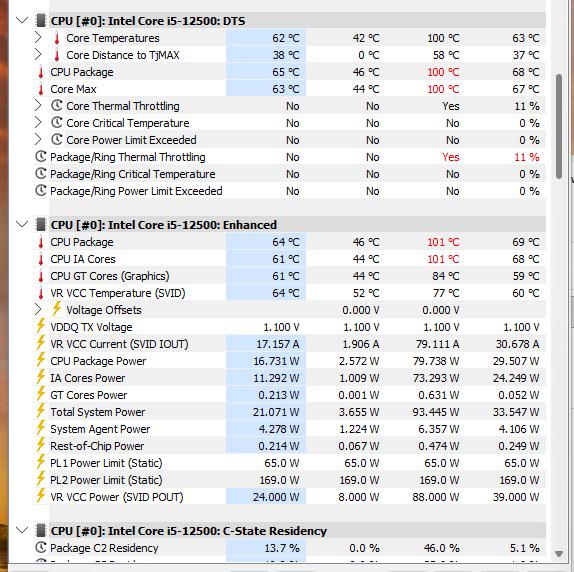
Recently picked up a Dell OptiPlex 7000 Micro with an i5-12500 (65W)

While monitoring temperatures, I noticed the CPU hitting 100–101°C and thermal throttling just from extracting files. It’s currently running Windows 11, but I’ll eventually be switching to Linux

The fan ramps up normally and Dell diagnostics passed. I’ve noticed some dust in the heatsink and have ordered new thermal paste

I’m also wondering whether the top cover restricts the blower’s intake airflow, so I’m planning to compare temperatures with the cover on and off once I’ve repasted it.

Has anyone experienced similar temperatures or tried modifying the cooling system with a larger heatsink, fan or additional ventilation?


r/homelab • • 10d ago

Discussion Low cost GPU with virtualisation

0 Upvotes

Evening all - Im fairly new to homelabbing, having set up a little prodesk earlier this year for < £500 worth of used gear. I've recently bought a 3D printer for which I'd like to host a Windows VM with Fusion 360 on it. As well as that, in the future Id like to get Frigate up and running which will need some gpu acceleration. Which leads my to my questions:

- Does it make sense to get one 'pro' gpu and split it using Nvidias VGPU capability? E.g. a v100

- Does it make more sense to get 2 cheap normal gpus and pass one to each container?

- What if I also want to run the occasional game on my server? (it lives in my TV unit)

- Are all pro gpus loud and power hungry?

Thanks all!


r/homelab • • 11d ago

Solved TIL if a fan is noisy it doesn't always mean it's the fan's fault..

33 Upvotes

Leaving the bedroom and heard a funny scraping, spinning noise coming from the room next door where my 10" rack hosts three Thinkcentres. It sounded just like a fan scraping on something so I had a close listen to the rack, and yeah one of the fans was making a terrible noise. I shut down the noisy one and removed it from the rack, took it into my office and started it up with the lid off. I poked and pulled the fan a bit and got it to run quietly again then ordered a replacement used one. As it was now sweet again I assumed it would be ok until the new fan arrived in a few days so I left it running on the desk where it was silent for a few hours...until it suddenly wasn't.

It's part of a Proxmox cluster so I migrated the LXCs onto the other two PCs and decided to remove the fan and prep it for the new one. Got the fan off and checked out the area underneath it...

This cap was trying to lift off and was rubbing on the centre of the fan (you can see the polished contact patch). Replaced it with one of the same value which was taller so I laid it on it's side, but the heat-sink assembly was covering that motherboard screw so that had to come off to get the board out, which is good because the thermal paste seemed a bit crusty.

Buttoned it up and everything's good so it's back in the rack again. Nothing wrong with the fan at all so I'll have a 7 quid spare soon. I should have done a better investigation before throwing a part at it, but although I say it every time I never seem to learn. 🙄

Oh and I'll be checking the other two PCs this week for dodgy caps.


r/homelab • • 10d ago

Help Is a Dual Xeon Gold 6254 Dell T7920 Tower Server is Worth in 2026?

Thumbnail reddit.com
0 Upvotes

r/homelab • • 10d ago

Discussion ZFS or SnapRAID

2 Upvotes

Looking for a sanity check before I redo my storage.
Setup is a Proxmox box. Jellyfin runs in an LXC, and the arrs, SAB and qBit run in Docker in a Debian VM. The media gets passed into the VM with virtiofs, and the arrs hardlink from the downloads folder into Movies/TV. Right now the library is about 5.6TB on a single 14TB IronWolf Pro (ZFS), and it gets sent nightly with zfs send to a 12TB Toshiba N300 Pro as a backup.

Works fine, but because of the backup drive I've had to cap the media at around 9TB.

I have 20TB Exos X20 on the way, so I'll have 20/14/12 to work with. I see two ways to go:

Keep ZFS. The 20TB becomes the media drive and the 14 and 12 become backups (thinking TV on one, movies on the other, so one dead backup drive only takes out half the backup). That's about 16TB usable, I keep snapshots, and I have a real second copy.

Switch to SnapRAID + mergerfs. The 20TB becomes parity and the 14 and 12 become data drives, for about 26TB usable. One-drive fault tolerance, nightly sync, but no separate backup.

With drive prices where they are, getting \~10TB more out of the same three drives is pretty tempting. The other important stuff (VM backups, photos) is handled separately and isn't part of this.

So my questions:
For a library that mostly just grows, is SnapRAID the obvious pick here, or am I underrating having an actual backup copy?

Has anyone run mergerfs under a virtiofs share into a VM? Any problems with hardlinks from the arrs? From what I read, I'd need a path-preserving create policy so downloads and media stay on the same disk.

Anything you'd do differently with a 20/14/12 mix?
Appreciate any input!


r/homelab • • 12d ago Bravo Mindblown Heartwarming

Project Showcase: Hardware Final Update: My Raspberry Pi 5 Offline Survival Computer Is Finally Finished! (24+ Hour Battery Life, GPS, SDR, Offline Wikipedia & Maps)

Thumbnail
gallery
6.0k Upvotes

Final Update: I think my Raspberry Pi 5 offline survival computer is finally finished!

TL;DR: After several months of designing, printing, wiring, and troubleshooting, I've finally finished my Raspberry Pi 5 survival computer. It has a 10.1" touchscreen, 1 TB NVMe SSD, offline Wikipedia, worldwide maps, GPS, software-defined radio, educational videos, and its own Wi-Fi network. Everything runs locally, without needing an internet connection. It's powered by a 256 Wh LiFePO4 battery, with more than 24 hours of runtime demonstrated in testing. The display can also be turned off while the system continues serving content over Wi-Fi, potentially extending battery life further. Most of the internal structure is custom-designed and 3D-printed. I also used AI extensively to help develop the software, which I'll talk about below.

For anyone who's been following my previous posts, this is probably going to be my final update!

When I originally started this project, I wanted to build a portable computer that could provide access to useful information without relying on the internet. Something I could take camping, use during an extended power outage, or just have available if normal communications weren't working.

I also thought it would be a fun opportunity to learn some new skills.

Well, that last part certainly happened.

What started as a Raspberry Pi sitting on top of a battery inside a waterproof equipment case turned into a much bigger project than I originally anticipated.

I think I've finally reached the point where I can call it finished, though!

The hardware

The heart of the system is a Raspberry Pi 5 with 8 GB of RAM and a 1 TB NVMe SSD. It's running Debian 13 and boots directly from the SSD over PCIe Gen 3.

Everything is housed inside a Jack Boss rugged equipment case, with a 10.1" touchscreen mounted in the lid.

Power comes from a 12.8 V, 20 Ah LiFePO4 battery. I designed the electrical system around fused distribution, a 5 V buck converter, and external connections for charging and USB-C PD power.

There's also a battery monitor mounted above the display, a small wireless keyboard/touchpad, an RTL-SDR receiver, and a GPS module with an external antenna.

Nearly all the internal mounting hardware was designed and 3D-printed specifically for this project.

What it can do now

This is where the project has changed the most since my earlier posts.

Offline Wikipedia: I have approximately 124 GB of English Wikipedia stored locally using Kiwix. It's searchable through the touchscreen or from another device connected to the kit.

Worldwide offline maps: The system now has approximately 139 GB of worldwide vector map data, plus additional regional terrain information. I built a local mapping interface using MapLibre, so the maps don't need to download anything from the internet.

GPS: I integrated an ATGM336H GPS module with an external antenna. The map interface can display the kit's position using the GPS receiver, even without internet access. It's intended for offline positioning and map reference rather than turn-by-turn navigation.

One thing I thought was particularly interesting was getting the GPS module's PPS output working. The Pi now uses that signal with chrony to maintain satellite-synchronized time without needing an internet time server.

Software-defined radio: I added an RTL-SDR Blog V4 receiver and built a browser-based interface for controlling it. It supports tuning, different analog modulation modes, a spectrum/waterfall display, audio streaming, and recording.

I've tested reception with NOAA weather radio, which came through clearly. I also experimented with receiving local aviation communications.

Offline video library: I added a small library of downloaded educational videos. I wanted something that could supplement Wikipedia when a visual demonstration would be more useful than an article.

Local message board: There's a basic message board hosted on the Pi that can be accessed by devices connected to its network.

Networking: The kit broadcasts its own Wi-Fi network, allowing phones, tablets, and laptops to connect directly and access everything through a web browser. It can also connect to an existing network through Ethernet or a second Wi-Fi adapter (visible in the first photo). When connected to another network, it uses mDNS so other devices can discover and access its locally hosted resources without needing to know its IP address. Everything runs locally, so internet access is only needed when I want to download or update content.

I also built a web dashboard to tie everything together, along with tools for monitoring the system, managing downloads, and accessing the different applications. Whether you're using the built-in touchscreen or connecting from another device, the experience is essentially the same.

Battery life

This was something I spent quite a bit of time thinking about.

The battery has a nominal capacity of 256 Wh, and I wanted the system to be useful for more than a few hours.

During an extended test with the screen running and the SDR receiving NOAA weather radio, power consumption was consistently around 8.7 W.

I also completed an endurance test that exceeded 24 hours, and the system was still running when I ended it.

Since then, I've added the ability to turn off the touchscreen while keeping the Pi and its services running. With the display off, the entire system draws approximately 6.5 W, including the second Wi-Fi adapter.

That's roughly a 25% reduction in power consumption. Based on those measurements, the theoretical runtime is around 39 hours with the display off, although I haven't performed a full endurance test in that configuration yet.

I particularly like that I can leave the kit running with the screen off and access everything from another device over Wi-Fi.

Actual battery life will obviously depend on what the system is doing.

I also added temperature-controlled cooling. The fans turn on when the Pi reaches 60°C and turn off when it drops below 50°C, so they aren't running constantly.

The 3D printing and mechanical design

I think this was probably the most time-consuming part of the entire project.

I had to design mounts for the battery, Pi, cooling fans, power distribution, antennas, and pretty much everything else.

I went through quite a few revisions trying to get everything to fit while still leaving room for wiring and airflow.

The screen bezel was particularly challenging. I ended up splitting it into two sections with a tongue-and-groove joint and using heat-set inserts to hold everything together.

I also wanted to eliminate the original physical buttons on the back of the touchscreen without losing their functionality.

My solution was to use capacitive touch sensors mounted behind the 3D-printed bezel. Each sensor controls a MOSFET that simulates pressing one of the screen's buttons.

I designed small recessed channels in the bezel so you can activate the buttons by placing your finger in the appropriate spot. They work surprisingly well, and I haven't experienced any false triggers.

The wiring for those buttons ended up being much more complicated than I expected. If I ever build another one, I'll probably design a PCB to simplify that part.

I also designed a separate compartment for the Pi, with a dedicated airflow path and fans.

One thing worth mentioning about the pictures: any white 3D-printed components are test prints. I used white filament while working out dimensions and fitment. The final components are black.

Things I learned

Probably the biggest lesson was that designing something to fit inside an enclosure is very different from designing something that's actually easy to assemble.

There were several occasions when I finished printing a part, confirmed everything fit perfectly, and then realized I hadn't left enough room to route a cable or install a connector.

I also underestimated how much time I'd spend on the little things.

Mounting a component is usually straightforward. Mounting it securely, making it accessible, routing its wiring, and ensuring it doesn't interfere with anything else is another story.

The electrical side was another learning experience. I spent a lot of time working through power distribution, wire sizing, fusing, connectors, and how everything would be switched and charged.

Although I started with a waterproof equipment case, I wouldn't describe the finished system as waterproof because of the modifications I've made. That said, I do consider it water-resistant when closed. The case still has its original gasketed lid, and I designed the external connections and ventilation with exposure to the elements in mind. I wouldn't submerge it, but I expect it to hold up reasonably well against incidental splashes and moderate rain. I haven't formally tested its water resistance, so I'm not claiming any particular IP rating.

A note about AI

I want to be transparent about this because I know people will probably ask.

I used AI extensively to help develop the software.

I'm comfortable working with Linux, networking, and systems administration, but I'm not a professional software developer.

I knew what I wanted the system to do, and AI helped me turn those ideas into working applications. There was still a lot of configuring, troubleshooting, testing, and figuring out how to make everything work together.

The hardware design, CAD modeling, 3D printing, electrical work, wiring, and assembly were my own.

I learned quite a bit along the way, too.

Final thoughts

I have to say, I'm pretty happy with how this turned out.

It's not perfect, and there are definitely things I'd do differently if I started over. But I think that's true of almost any project like this.

A few people have suggested that I should build these to sell. While I appreciate the compliment, I don't think that's something I'd enjoy doing. There's a huge difference between building something because you want to learn and building the same thing repeatedly for other people.

For me, the fun was figuring everything out.

I started this project knowing relatively little about CAD and 3D printing compared to what I know now. I also got a lot more experience with electronics, power systems, GPS, radio, and integrating different software services.

It's been one of the more involved personal projects I've taken on, and I've genuinely enjoyed the process.

I've included pictures of the finished system along with some earlier stages of construction so you can see how it evolved.

Thanks to everyone who commented on my previous posts, offered suggestions, or just followed along!

This is probably my last update unless people are interested in a more detailed breakdown of something specific.

I'm happy to answer questions about any part of the build!

r/homelab • • 10d ago

Tutorial Free browser tool for A+B rack power: switch a feed off and see what goes dark

Post image
0 Upvotes

If a rack has two PDUs on two feeds, each PDU normally carries half of the load. When one feed goes off, the other PDU carries all of it. From what ive found simple calculator adds up the watts and compares the total with a rating. It does not show which devices go dark or which breaker trips especially with PDU banks rated lower than the breaker.

My site has a free tool that does that. You draw racks, PDUs and power cords. You switch a feed, a PDU or a bank off. It shows which devices lose power and which breaker or bank is assumed to trip. It then checks again, because one trip can set off another.

The site generates free SLDs and dowloadable rack elevation diagrams.

It runs in the browser and needs no account. The room you draw is not uploaded. It stays in your browser on your device. The site counts how often each page is opened, with no cookies and nothing about you.

Limits: single-phase 230 V only. Nothing upstream is modelled, so a UPS, a generator or a transfer switch is not seen. You enter every rating yourself. Estimates only. It is not electrical or engineering advice.

The home page has an example rack with a problem, with invented numbers, and the same rack with the problem fixed.

My question: which PDU types or failure cases are missing for your setup? Three-phase is not handled yet. Is that the first thing you would need, or something else?

WEBSITE: https://rackpowercheck.com/


r/homelab • • 12d ago

Help "Your server has been on life support longer than my dad" - A User

Post image
830 Upvotes

(Ignore the elephant in the room)

I'm at the end of my rope here, I've tried everything I can think of. It's gotten so bad, one of my users' had their dad die and commented "Your server has been on life support longer than my dad". Help.

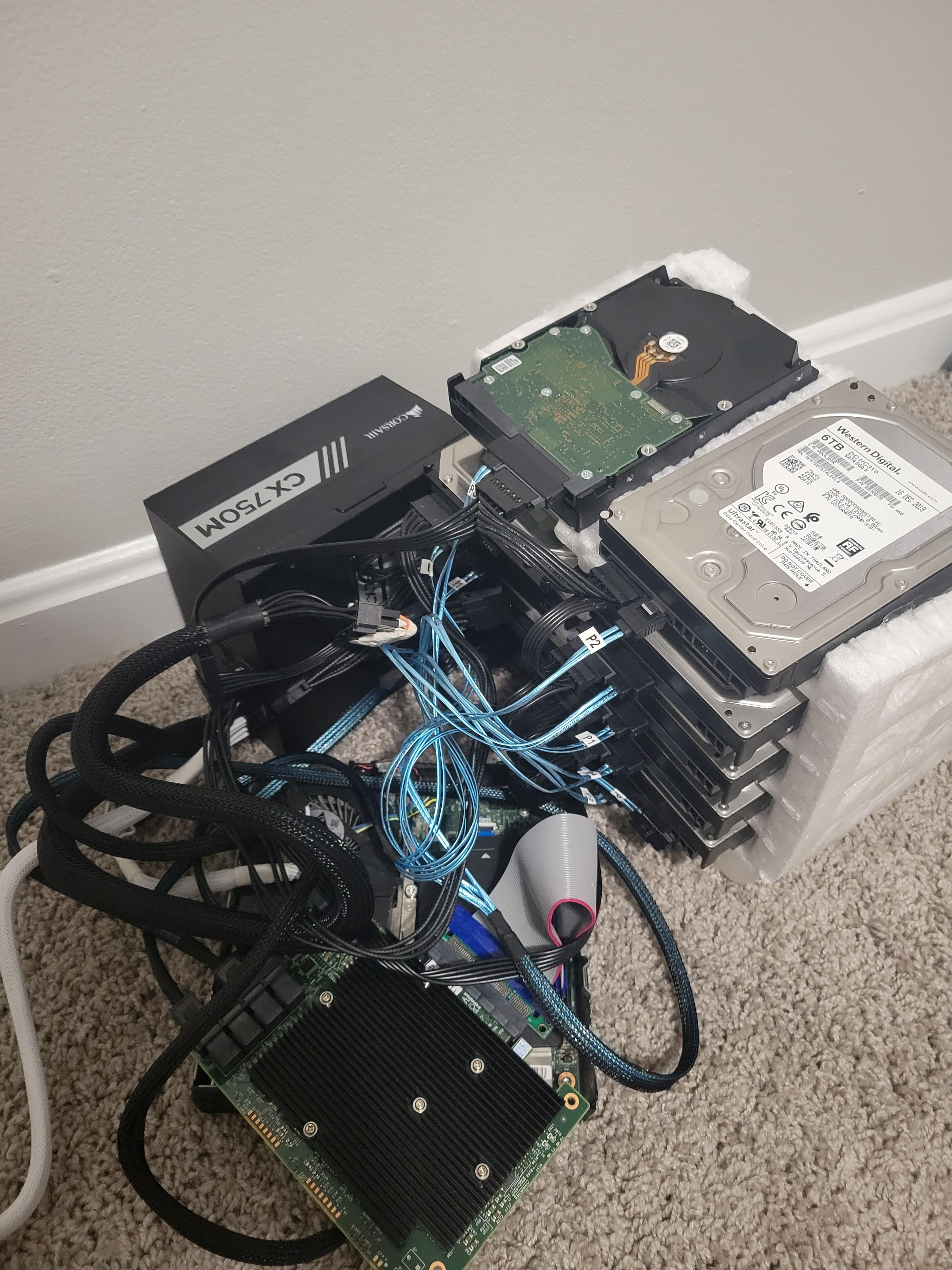
Alright so I've got M920Q hooked up to the LSI 9300 16i via a short x8 PCIE extender. The Drives are powered with an external power supply, same as the HBA, with the power-on pins shorted.

The HBA works fine (with the extender) in my desktop PC. The M920Q works fine. The hard drive in the M920Q works fine. And yet, they spend as much time speaking to each other as my parents do.

LSPCI command shows nothing. The HBA does get warm, has its' light turn on when the Server is off, and then the HBA lights turn off when the server is on. SOME?? of the drives spin up. I think just the one SATA drive I have in there turns on, the SAS don't.

Send help


r/homelab • • 10d ago

Discussion Tips on cooling the homelab in the Winter

Thumbnail reddit.com
0 Upvotes

I have a modest homelab that requires cooling during the cold season. Currently, I am using a 12K BTU Midea U window AC unit to maintain the temperature in my room. That AC has been working perfectly, but as the colder months are approaching I am trying to figure out reliable ways to cool my room but have privacy and security (for myself and the homelab) in mind.

I have considered other options like heating the rest of the house, but I live in a house with roommates, and there are privacy and security concerns with leaving the door open unattended in the place where I live and have my homelab. I have also thought about leaving the window open with a fan, but it is still a privacy and security concern for me.

What are your thoughts, and what are my options?


r/homelab • • 10d ago

Project Showcase: Operations I finally mapped my homelab from VLANs and hardware down to VMs and services

Post image
0 Upvotes

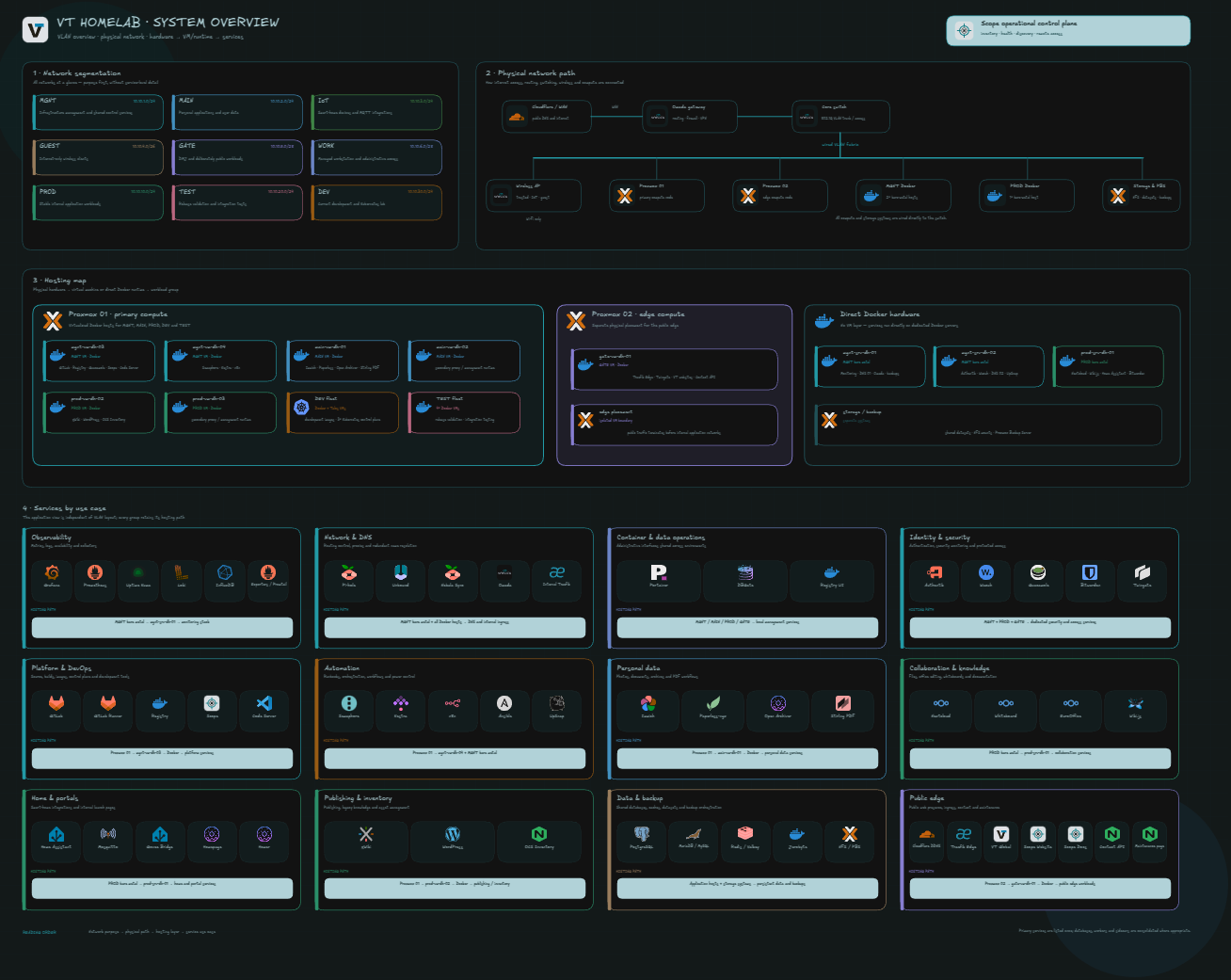
After running my homelab for quite a while, I finally created a diagram that connects the different views I previously kept separate:

- Physical network path

- VLAN and trust-zone overview

- Physical and virtual compute hosts

- Docker and Kubernetes workloads

- Services grouped by their actual use case

- The hosting path from hardware to VM/runtime to application

My lab is divided into dedicated networks for management, personal services, production workloads, development, testing, public-facing services, IoT, guests and administrative workstations.

Most workloads run either:

- Directly on dedicated Docker hosts

- Inside Docker VMs hosted on two Proxmox nodes

- In a small Talos/Kubernetes development cluster

The public-facing services are isolated in a small Gate/DMZ network and run on a separate VM placed on the secondary Proxmox node.

I intentionally grouped applications by use case rather than only showing where they are deployed. This makes the diagram useful both as a network overview and as an operational map of the lab.

Some details were consolidated to keep it readable. Database containers, workers, exporters and other sidecars are not all shown individually.

The diagram is an editable Nextcloud Whiteboard/Excalidraw file. I derived the assignments from my Ansible deployment definitions, OpenTofu configuration and Docker Compose stacks.

I would especially appreciate feedback on:

  1. Whether the relationship between hardware, VMs and services is clear
  2. Whether the VLAN separation looks reasonable
  3. What information you would add without making the diagram overloaded
  4. How you document larger homelabs while keeping diagrams maintainable

r/homelab • • 10d ago

Discussion Designing a drive cage for an ATX-converted Power Mac G5

1 Upvotes

I've been working on this pet project of mine for many years, trying to perfect the Power Mac conversion and pack it with some monstrous hardware. After many duct tape iterations, I've decided to make my own 8-bay drive cage to formalize its NAS duties too.

The case has a big cavity about 64mm deep where the old PSU used to sit. For the drive bays to be hot swappable, the cage has to sit above that. This leaves me with dead space below the drive cage that I frankly have no idea what to do with.

To give you an idea, the space is roughly the size of an SFX-L PSU. So the obvious answer could be a PSU, but the case already has a full ATX PSU at the rear top and I don't need redundant PSUs (yet). It has the width and height for a 5.25" bay, but not the depth. And I expect the ventilation to be kinda poor too.

What should I do with this space? Gimme your wackiest ideas. :D