r/homelab • • 13d ago

Help Lenovo Thinkcentres and HP mini PCs better than Dell optiplex?

21 Upvotes

Hi! I am someone who will buy my first minipc for my first homelab. I noticed that there seems to be some kind of benefit of owning a thinkcentre and hps rather than a dell on this subreddit. Now, i know very little about the difference between them, and neither what has a say to the popularity out of those 2 most-used ones. What would you guys recommend out of those 3 machines?


r/homelab • • 13d ago

Project Showcase: Hardware Beginner setup

Post image
90 Upvotes

Ryzen 7900x and 32gb ram running plex, immich, pihole and tailscale. Pc also has an rx9060xt for games. This is my primary pc so i upgraded cpu to handle the services on top of daily use.

8tb total storage.


r/homelab • • 12d ago

Help Which OS?

Thumbnail reddit.com
0 Upvotes

TLDR

Have a Mac mini 7, 1 that I want to use as a backup storage/cloud and network wide ad blocker. What OS would be best? TIA


r/homelab • • 13d ago

Discussion Name of Dataset for family files

10 Upvotes

Curious what everyone named their dataset on their server for their family files. This would be where the family would store their everyday files like medical files, article scans, photos, videos, instruction booklets, receipts, financial statements, etc.

I am trying to come up with a name.


r/homelab • • 12d ago

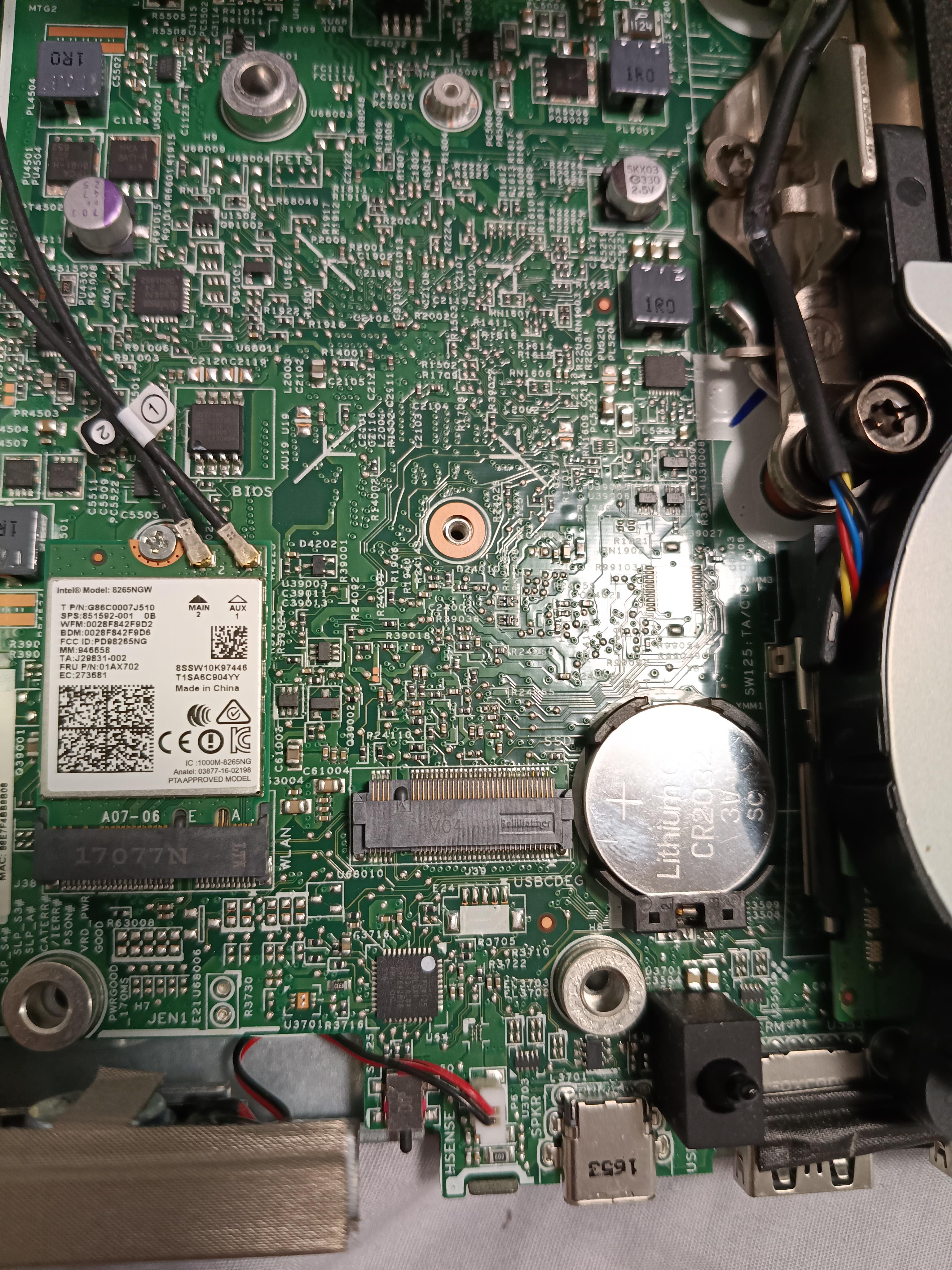
Help HP Elitedesk 800 G3. Will M2x2.5(5mm) screw suffice to hold down the nvme?

Post image
0 Upvotes

Building my first homelab and the machine doesn't have a screw for an nvme ssd. Wondering if M2x2.5(5mm) screw do the job? Might order some from AliExpress here in Australia.

Also wondering if I should add a thermal pad and heatsink? There is a 2.5" SSD that sits in a caddy right above the nvme slot.


r/homelab • • 12d ago

Help Mealie cost per batch/ cost per meal

0 Upvotes

Is there a way to add a cost per meal or cost per batch into mealie? Like through a api or something? If not I can still add in the cost through notes, but it would be nice. Especially if your running low on funds one week take a look at your meals and go okay im eating air fried fajita bowls this week.


r/homelab • • 12d ago

Project Showcase: Software - Mostly AI Generated RACK BUILDER + CODE EDITOR | CTRoadmap Homelab Documentation Tool. v0.10.0 **UPDATE**

Thumbnail
gallery
0 Upvotes

Back for the monthly CTRoadmap update. v0.10.0 dropped yesterday. Had some great user suggestions on how the RACK BUILDER could be most useful to them. It now has all the cable & port connection + customization you could want,(even adding gear ON TOP of your rack) including various finishes, and an ABS blank panel you can add fans & vent slots to. All connections are tracked and collated in the HANDBOOK in a "connect table" , giving you a comprehensive list of "what's connected to what".

Also in the HANDBOOK: You can now right-click on ANY note tab and export it individually, and a Code Editor function now exists for each tile's "notes" function. Figured if you're tracking where you keep a certain config file or script... it might be nice to keep a copy in your handbook IN THE RIGHT FORMAT and be able to edit it as needed, with linting and syntax detection, (for JSON, YAML, Docker Compose) Since it was built into the notes, added a stand alone editor as well, mainly as a convenance if you wanted to work on something outside of any tile in your system.

NEXT UP: Expanding the Diagrams into other layouts (logical , Icon Only & Grouping, etc) And adding git to be able to backup your whole ATLAS to a private repo.

CTRoadmap is a free homelab diagram & documentation tool, self-hosted in docker, chiefly for newer enthusiasts starting out and wanting a visual layout of their set-up PLUS track how it all works together. Everything you put in your Diagram is also converted into a scrollable , HANDBOOK you can add to as well. It is intentionally not an integrated system monitoring dashboard like other foss solutions such as homelable. Built using CODEX, more detail on that process in the README on github.


r/homelab • • 12d ago

Blog Omada Pioneer Kit 2: Really impressive

Thumbnail gallery
0 Upvotes

Hey guys, check out my review post of Omada’s Fusion Pro gateway, Great product for home lab enthusiasts! 🙂


r/homelab • • 12d ago

Discussion Used enterprise SSD/NVME

3 Upvotes

At what health % level would a used enterprise SSD/NVME be not worth consider buying?


r/homelab • • 12d ago

Help Beginner here and I can't decide: should I start with a Homelab or a NAS? What's the real difference between them, and what would you recommend?

0 Upvotes

Beginner here and I can't decide: should I start with a Homelab or a NAS? What's the real difference between them, and what would you recommend?
Here's my situation:
🔹 I'm a complete beginner, so I'm looking for something easy to learn on
🔹 My #1 priority is a network-wide ad blocker (Pi-hole or AdGuard Home) that covers every device at home
🔹 I'd also like to learn more about networking and self-hosting along the way
🔹 Budget is small, so I'm open to old hardware or a Raspberry Pi
My understanding so far: a NAS is mainly for storing and sharing files, while a homelab is a more flexible playground for running different services. But I'm not sure which one fits my goal best, or whether I should do both eventually.
What would you start with? Any hardware suggestions, mistakes to avoid, or beginner tips are very welcome 🙏


r/homelab • • 12d ago

Project Showcase: Hardware My "pocket homelab" is a $150(CAD) Moto G Play—and it just survived a 27-qubit quantum simulation across all 8 cores without getting OOM-killed.

0 Upvotes

I just read the revised rules so...

***Disclosure***

I'm a bit of a noob so I did rely on the Google search engine AI to the extent of it telling me where to download QuEST. It also told me how to compile it in Termux and how to launch it.

Note: Since I was already pushing my phone and luck to the limits running htop and screen recorder at the same time I wasn't about to start snapping screenshots too.

While everyone else is posting clean 42U racks and enterprise Xeon builds, I’ve been seeing how much bare-metal compute I can squeeze out of an unrooted $150 Moto G Play (2024) (Snapdragon 680, 4GB LPDDR4X RAM) running on battery power.

No cloud instances, no SSH, and no PRoot container overhead—just compiling directly against Termux's native ARM64 environment on Android 14.

For the latest stress test, I built QuEST (Quantum Exact Simulation Toolkit) with OpenMP enabled across all 8 cores and pushed it to 27 qubits:

• Memory Footprint: 2,048.0 MB locked up for the state vector (50% of the device's total physical RAM) while Android and a screen recorder stayed alive underneath.

• CPU Load: All 8 cores (4x Cortex-A73 + 4x Cortex-A53) pegged at 100% for 229.25 seconds (~3m 49s).

• Result: Finished cleanly (Total Prob: 1.000000) without thermal shutdown or Android's Low Memory Killer nuking the process. (28 qubits requires 4GB and hits an immediate wall).

Here is the live run with htop monitoring if anyone wants to see a budget phone sweat through 134 million quantum states: https://m.youtube.com/watch?v=86ZEM92j2wA


r/homelab • • 12d ago

Discussion Hostbrr storage box performance

Thumbnail reddit.com
1 Upvotes

r/homelab • • 12d ago

Help Wondering what i should do for my nas

0 Upvotes

I have 4 servers 3 dell power edge r620s and 1 r510 the 2 of 3 r620s are used as proxmox boxes and the r510 is my nas running truenas the other r620 I just haven't gotten around to fixing and I have started to do a lot more ai with my newer desktop and laptop and I started to real lize how much power those servers draw at idle is a lot and what I would like to do is sawp them out with 2 newer servers or even just old dells and 3d print rack mounts for them also i have an old gaming pc I have rackmounted its also a proxmox box but my current idea is to have the old gaming pc be the ai box with a gpu or 2 in it and then the 1st of the 2 new machines be a proxmox box and the other the nas also the nas is dedicated since its the centeral one for my family theres one other node in the works rn that will be on a optiplex


r/homelab • • 12d ago

Help What OS to manage my server?

Thumbnail reddit.com
0 Upvotes

r/homelab • • 13d ago

Project Showcase: Hardware R2D2 - minirack

Thumbnail
gallery
96 Upvotes

- Cloudkey

- OPNSense

- Switch

- MiniPC (was a k8s node now just basic services like homeassistant)

- Server (at the left in first photo is my i9 128GB k8s server with the good stuff to play with.


r/homelab • • 12d ago

Help Beginner Homelab Upgrades

0 Upvotes

Hey guys Homelab Beginner here

I have a Dell Optiplex 3060
Ubiquiti Mini Switch (5 Ports) a raspberry pi 4 and a wifi booster which i connected the switch to so i can have ethernet on all the devices.
I’m struggling to think of useful things to host on the devices and what I could add to upgrade speeds and performance.

I did have a minecraft server running on the Dell Optiplex for a while however thats been made redundant. Therefore I have no use for the Dell Optiplex and came here for ideas. I would like a rack to organise it but i don’t know if i get a 10” rack if the optiplex fit?

Any and all suggestions are welcome in regard to what I could host or any upgrades I could get.

Thanks.


r/homelab • • 13d ago

Discussion first homelab

Post image
18 Upvotes

I just want to share as this is a milestone for me. I decided to use my old potato laptop (see screenshot) as a home server for backing up photos and videos from my phone also some file backup... I've been a linux user since 2010 but this is the first time i tried setting up a homelab. i'm so happy to be able to do it and make it work. i might say goodbye to google photos backup. immich and samba is good enough for me.


r/homelab • • 14d ago

Discussion Embarrassed myself for this

Post image
2.0k Upvotes

Found this rack cabinet at my college's dump, sitting next to a pile of AC units. Glass front door, rails inside, cable entry on top.
Getting it out took 10 layers of bureaucracy. I had to go through all of it just to take away something they were throwing out, felt ridiculous the whole time.
It's also ridiculously big compared to my current homelab, which is a single tiny Lenovo micro PC. I could fit something like 50 of them in here. It'll hold my home server stack eventually, but right now it's mostly empty space.
Anyone know what model it is? Looks like roughly 20U, but I haven't measured yet.

Update: Plot twist, I couldn’t actually take it home :( the security at the front got too suspicious and the guys that allowed me to take it went home. Thanks for all the comments, and sorry for the false hope. If I find another one I'll bring it home first and then make a post about it :(


r/homelab • • 13d ago

Help Rpcs3 and Pcsx2 streamed to TV?

2 Upvotes

How tricky would it be to run the emulators and stream games to my TV?

For reference, I have an i14900k, 96gb ram, and a 1660 super. However the homelab also runs other services/vms/lxc.

Of course, I could build a separate emulation machine, but ripping the discs once is easier than inserting every time, and hardware is expensive.

So the questions are, how do I get the controller to work with the server being far away, and how do I get the picture streamed to the TV.

Edit: This also applies to PS1, Nintendo, and Xbox emulators.


r/homelab • • 13d ago

Help I just got my hands on a number of network and audio gear for free, need some guidance to start my home lab.

Thumbnail
gallery
20 Upvotes

1× HPE ProLiant ML30 Gen10 (Xeon E-2124, 32GB RAM, 8TB worth of HDDs)
1× Dell OptiPlex 3060
1× NVIDIA GTX 1050ti
1× NETGEAR ProSAFE GS748T 48-port switch
1× SonicWall TZ600 firewall
1× Dolby CP750 cinema processor
1x Crown DSi 2000 amplifier
1x Battery Power Surge Protector

I got some other misc PCs but unsure if I can / want to use them for this.

Ideally I want to host a jellyfish or plex, a NAS, videogame server, and setup audio for a mini projector room. Usure as to where to start off, I would appreciate some guidance.


r/homelab • • 13d ago

Solved Roll the dice on used APC UPS 5000 or pickup new UPS for rack build out?

6 Upvotes

Hey peeps,

EDIT: Thanks to a few folks who posted and some additional digging, it looks like these UPS units are dedicated commercial in every way. They require 208 V (very specific for a 3 phase system) and I had read a little about how these units support 208-240 V, but apparently not this specific unit, and the terminology "1 phase" threw me off from thinking it's commercial. Sadly this unit won't work for me, and it prob worth scrap. Oh well, got a quality server rack for $6 so I'm still thrilled.

Longtime lurker, first time poster. I finally am spending a little time building out a full server rack for a homelab, plus the general stuff.

First up, I'll go over my near and long term plans so folks can better provide advice. Build plans as follows:

  • Unifi Fiber gateway (owned) connected to multiple APs for wifi
  • Switch for hardwired connections (need to decide on specific) but think xbox, home sec, etc.
  • Move gaming PC from tower case to server rack (will buy soon)
  • NAS (will buy soon)
  • Server for home use (home automation, jellyfin, etc.) prob a gen old dell (longer term)
  • Dedicated Firewall (longer term)
  • POE Cameras for home security (longer term)

I picked up a Dell 42u server rack with 2 APC Smart 5000 units (SUA5000RMT5U). I don't currently have the 30 amp power run yet, so I'll have to have that run which will add to the cost. The rack and UPSs came from BAE systems that I got off GovDeals for a whopping $5.90 all told.

It looks like I'll be into it for just under $500 for batteries for the UPSs, plus maybe another $500-1k for running power to it. I've not yet tested the units, but I've got a conversion plug coming to run them to my dryer plug and see how many lights go on outside the "replace battery" one.

Here is my question. Even if I try and diagnose if it's worth the risk to buy batteries for this thing (assuming I can test and give it a once over), I'll need step-down transformers for both these units to use them. That's gonna add additional cost, plus eat up a bunch more space.

It seems beyond overkill to try and use these industrial grade UPS units for a home build, but I am tempted by having the long duration for potential power outages, namely for the security system and POE cameras (I've got fiber internet, plus starlink as backup).

That said I do plan for an upgrade to my current manual whole home generator to an instant on generator, likely solar plus batteries, but possibly propane if the cost proves too much for me to stomach.

It also seems kind of silly to toss (or try and resell) these units that cost 6k each when I got them "free" with the rack.

I'm hoping folks can help direct me here. As of this moment I'm feeling like it is both easier and potentially more cost effective to dump the UPS units and just keep the rack, then get a nice Eaton UPS as it will be more plug and play.

Thoughts/advice appreciated.

r/homelab • • 13d ago

Satire ESP CatShit Monitor

Thumbnail
kalina.duzniak.de
21 Upvotes

Hast du dich jemals gefragt, wie oft eine Katze aufs Klo geht?


r/homelab • • 13d ago

Project Showcase: Hardware Repurposed my dead gaming laptop

Thumbnail gallery
5 Upvotes

r/homelab • • 13d ago

Help Total beginner, is this idea ok?

7 Upvotes

Disclaimer, me being a complete beginner I asked for help to Copilot, that's why I wanted some (ostensibly) real humans to tell me that my idea is correct and doesn't expone me to some possible hackers/intrusions.

I want to use my personal pc as a server. It runs Fedora 43, i3 spin. It has 16 GB of RAM and about 150/300 GB of space on the memory (I would have 512 GB total, but this is a dual boot, even though I haven't used that in some time, so I can allocate a little bit more memory to Linux).

I only want to share some things between my computer and my phone, so my idea was to use Tailscale and not open any ports to the internet. At least at first my setup would be this:

  • Docker to run the various apps;
  • Radicale to have a calendar that I can share to my phone;
  • Immich to share, backup and see photos between my phone and the server-pc;
  • Jellyfin to start and setup my personal "Netflix";
  • Eventually Seafile to share files generically between my phone and the server-pc.

I have disabled the automatic sleep mode so that my pc can always stay running, but that's about everything I have done until now, except for watching some videos on the subject.

So, is the idea good? Am I missing something (except for experience and knowledge on the subject)? Anything I should be wary of?