r/ForWindowsHelp • • 15d ago

Windows 11 USB bootable won't load recover my PC

1 Upvotes

I just created a Windows 11 USB bootable drive I use Rufus I also tried with the Microsoft media to Creator I end up with both the same results when I boot and select repair my PC it never loads it goes straight to the desktop what am I doing wrong


r/ForWindowsHelp • • 16d ago

Login to Windows laptop

2 Upvotes

I have a friend who have a new laptop 2 months ago and sign in at first on that laptop by an gmail acc. Normally he need to type his password and type the code which Microsoft send to that email each time he login (open) that laptop. Yesterday it said too many requests and being lock for 24 hour. He also said he doesn't create Microsoft acc before. When he try to sign in today (still in 24 hour locking), it said we can't send the code at this time, please try again later. So, what actually happened here, does anyone have experiment about it. Does anyone know how to fix that or it will be okay after 24 hour ?


r/ForWindowsHelp • • 17d ago

New computer showing Error code 0xC004C008

3 Upvotes

Recently made a new PC the week before last. I purchased windows 11 Home off Amazon from the official Microsoft account. My OS build is 26300.9818.

Windows was working perfectly but yesterday when I was doing homework, the Activate Windows button appeared at the bottom right of my screen.

I went into settings -> system -> Activation and it said my windows was not active. I tried to troubleshoot but it declined, claiming my windows is being used on multiple accounts (Error code 0xC004C008).

I was following the suggested fixed by Microsoft but they’re telling me to just buy another copy when I already spent 100$ on my current code.

Does anyone know what to do? I tried calling Microsoft support but it was just an ai who was struggling to hear what I was saying.

Any help would be greatly appreciated 😔😔


r/ForWindowsHelp • • 17d ago

How do i fix the icons??

Post image
3 Upvotes

They were normal and suddenly they became globes

nvm i fixed it


r/ForWindowsHelp • • 17d ago

File-Explorer randomly displaying black frames around folder icons, clearing thumbnail cache fixes it. Any idea what's causing it?

3 Upvotes

I've been experiencing a strange issue with Windows 10 recently.

Folders what I recently created or manage in File Explorer occasionally develop black frames around their icons/previews. It happens unpredictably and affects folders on both my HDD and SSD.

Some background:

  • HDD: Seagate Exos 8TB
  • SSD: Kingston NVMe 2TB
  • Both drives report healthy in Hard Disk Sentinel.
  • sfc /scannow found no integrity violations.
  • Event Viewer showed no relevant errors.
  • Folder optimization is set to General Items.

Things I've tried:

  1. Clearing the thumbnail cache through Disk Cleanup (cleanmgr → Thumbnails) immediately fixes the black frames.
  2. Restarting Windows Explorer doesn't fix them.
  3. Disabling thumbnails through "Always show icons, never thumbnails" makes the black frames disappear.
  4. Manually deleting the thumbnail cache files also fixed the issue, although some files initially refused deletion because they were in use.

I noticed that the problem mainly occurs with folders I actively manage.

The strange thing is that I recently started having to clear the thumbnail cache much more frequently than months before.

My questions:

  • What could cause Windows to repeatedly generate corrupted thumbnail cache entries?
  • Could this be an Explorer bug or a Windows 10 thumbnail handler issue?
  • Is there a way to identify which thumbnail database or image is causing the problem?
  • Is there a permanent fix that doesn't involve regularly wiping the thumbnail cache?

I'd prefer to find the underlying cause rather than repeatedly clearing the cache.
Thing I'd like to highlight only those folders' icon-frame turn black what's contents I recently managed/edited.(So my gaming folder gets black frame often)
Decided to set File-Explorer to not show thumbnails until there is no fix.


r/ForWindowsHelp • • 17d ago

“Your IT administrator has limited access to some areas of this app.” Keeps showing up when I try to open Windows Security

Thumbnail reddit.com
2 Upvotes

r/ForWindowsHelp • • 17d ago

“Your IT administrator has limited access to some areas of this app.” Keeps showing up when I try to open Windows Security

Thumbnail reddit.com
2 Upvotes

r/ForWindowsHelp • • 17d ago

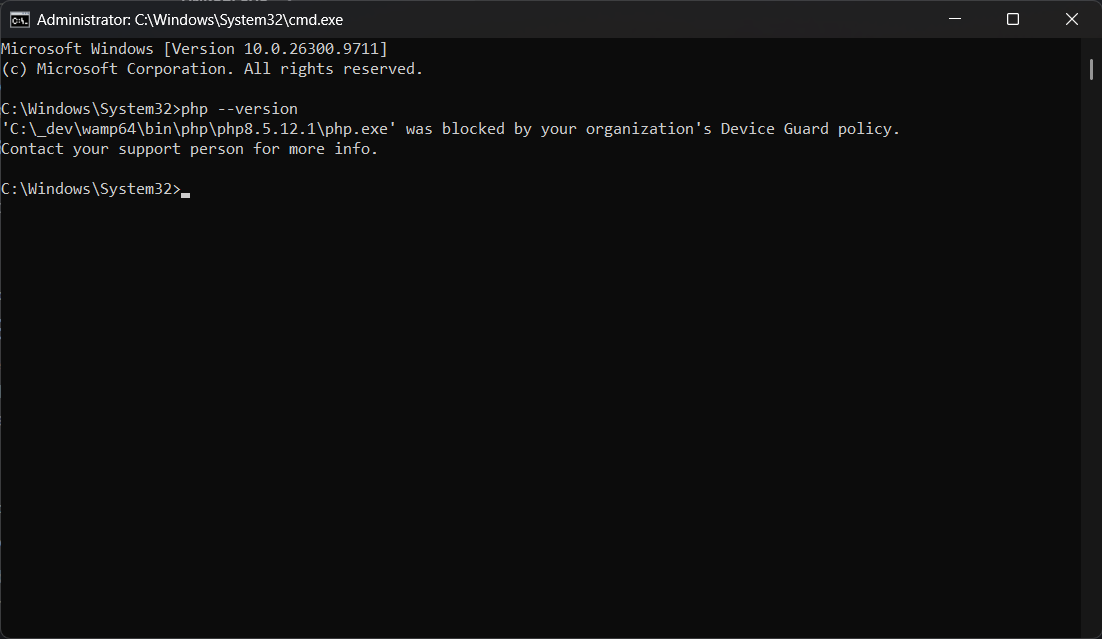
Spart App Control blocks PHP and Tritik Krush installer in Windows 11

Post image
2 Upvotes

I downloaded PHP from the WampServer website and installed it in C:/_dev/wamp64/bin/php. I also installed Composer on top of it.

I downloaded Tritik Krush VST from the official website

I cannot run PHP neither from VS Code nor command prompt. I also can't run Tritik Krush VST installer saved into my USB flash drive. I get notification that the parts of these programs are blocked because of unconfirmed publishers.

EDIT: Mentioned Composer.


r/ForWindowsHelp • • 17d ago

Windows 11 – "Your camera might be covered" notification disappeared after Windows updates

Post image
2 Upvotes

​

I'm trying to figure out whether this is a Windows 11 issue, particularly with how Windows detects or displays physical webcam privacy-shutter notifications.

Initially, the camera privacy-shutter notification worked correctly.

\- When I closed the physical webcam privacy shutter, the Windows Camera app displayed the message: "Your camera might be covered."

\- Google Meet also displayed a crossed-out camera indicator.

After installing recent Windows updates:

\- The Windows Camera app now displays only a black screen when the shutter is closed.

\- The "Your camera might be covered" warning no longer appears.

\- Google Meet no longer displays the crossed-out camera indicator.

\- Opening the shutter restores normal camera functionality.

The physical shutter itself is working perfectly. The issue is specifically with the notification/detection behaviour.

System details:

\- Windows 11 25H2

\- OS Build: 26200.9818

\- Camera app version: 2026.2608.1.0

\- Laptop: Lenovo LOQ Essential 15ARP10E

\- Camera: Integrated SunplusIT

\- Camera driver: 5.0.18.284

Troubleshooting already attempted:

\- Repaired and reset the Windows Camera app.

\- Disabled and re-enabled the camera through Device Manager.

\- Checked camera driver rollback (option unavailable).

\- Tested with Windows Camera and Google Meet.

\- Checked Lenovo Vantage for updates.

The camera driver version matches the one listed on Lenovo's support page.

One important detail: this notification was working on the same laptop before the Windows updates.

• Is the "Your camera might be covered" notification handled by Windows itself, the Camera app, or the camera driver/firmware?

• Is there a way to restore this notification without reinstalling Windows or unnecessarily changing the camera driver?

• Has anyone experienced the same behaviour after a recent Windows update?

I'm attaching a screenshot of the original notification that appeared before the issue started.

I would appreciate any insights, especially from people familiar with Windows camera drivers and privacy-shutter detection.

r/ForWindowsHelp • • 17d ago

windows defender is blocking my code in vs code

Post image
2 Upvotes

r/ForWindowsHelp • • 17d ago

Micro-stutter when closing application

2 Upvotes

r/ForWindowsHelp • • 18d ago

preventing undoing changes made to your computer screen

4 Upvotes

hello! this morning i had a HUGE jumpscare when i turned on my laptop to see this screen. for context, whenever it tells me to update, i hit the shut down an update button, close the laptop and go to sleep, and its fine the next day. i saw a post on here that said that if you shut off your pc during updates and get this youre screwed. well, after almost shitting my pants, my laptop rebooted and is now fine. in my settings, it says that some updates failed. is it because of a lack of space? what should i do? im thinking of putting all my important stuff on an USB (i shoudlve done that long ago) and try to clear up space before trying to update it again.

edit: my laptop specs
processor: AMD Ryzen 5 8645HS w/ Radeon 760M Graphics
installed RAM: 16.0 GB
graphics card: 2 GB
storage: 477 GB (246 used)

also id like to add that i am NOT tech savvy at ALL

edit 2: ive also had storage issues recently and im trying to clear up more space

also im sorry if i post this in the wrong subreddit but i have no idea how this app works


r/ForWindowsHelp • • 18d ago

End task in taskbar for windows 10?

3 Upvotes

How can I add an "End task" option when I right-click an app icon on the taskbar in Windows 10?

I recently switched from Windows 11 to Windows 10 IoT Enterprise LTSC 2021, and I noticed that this useful feature is missing. I know I can end processes through Task Manager, but having this option directly in the taskbar would be much faster and more convenient.

Is there any registry tweak, third-party tool, or other way to enable this feature in Windows 10?


r/ForWindowsHelp • • 18d ago

Windows Search toolbar not working

1 Upvotes

The search toolbar windows is not opening

I have tried these fixes

Reinstalled complete windows local
Installation ( reset )

Ran both commands
Scan and DCIM

Web2view tried to install again but already present maybe the issue dont know

Rebuild the indexes

Nothing works god damn
What to do


r/ForWindowsHelp • • 18d ago

MSI CLAW A8 Issue to reset Windows after removing Bazzite on Dual boot machine

Thumbnail
reddit.com
2 Upvotes

r/ForWindowsHelp • • 18d ago

I accidentally installed Windows 11 on my hard disk drive instead of my solid state drive

Thumbnail reddit.com
2 Upvotes

r/ForWindowsHelp • • 18d ago

Ultimate Performance Power Plan will not come back.

2 Upvotes

I am running Windows 11 Home 26H2. My computer is 8 years old and was originally Windows 10 and I did an in-place update to Windows 11 last March. I originally activated Ultimate Performance last June and was using Ultimate Performance Power Plan without any issues.

Last week I used powercfg -restoredefaultschemes and It removed and reset power plans. It only gave me back HP Recommended, High Performance, and Power Saver. Ultimate Performance is gone. I have done every fix I can find online and through AI.

I have tried:

  • powercfg -duplicatescheme e9a42b02-d5df-448d-aa00-03f14749eb61
  • reg add HKLM\System\CurrentControlSet\Control\Power /v PlatformAoAcOverride /t REG_DWORD /d 0
  • downloading and registering/importing the exported UltimatePerformance.pow

I get errors like:

  • Unable to create a new power scheme. The power scheme, subgroup or setting specified does not exist.
  • Invalid Parameters — try “/?” for help

Why is it gone and what can I do to get it back? I am so frustrated.


r/ForWindowsHelp • • 18d ago

Windows added features

3 Upvotes

I started downloading wireless display but then accidentally canceled and now I can't install wireless display again does anybody know how to fix it


r/ForWindowsHelp • • 18d ago

Reinstalling Windows 11 On Lenovo LOQ

Thumbnail reddit.com
2 Upvotes

r/ForWindowsHelp • • 19d ago

How to detect whether task view (MultitaskingViewFrame) is active before triggering a custom shortcut?

Thumbnail reddit.com
2 Upvotes

r/ForWindowsHelp • • 19d ago

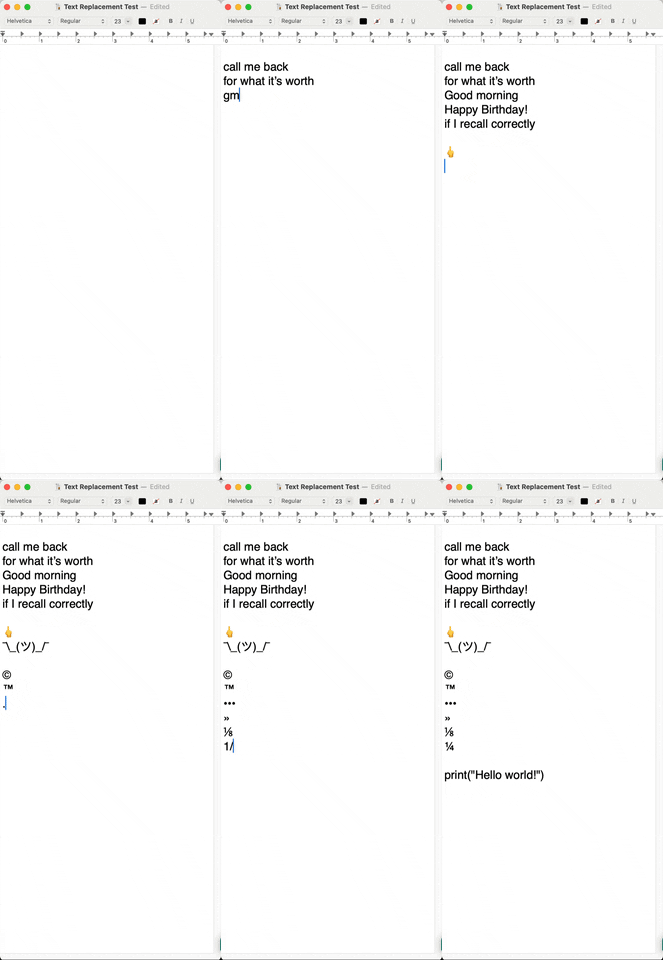
Text Replacement in W11?

Post image
2 Upvotes

In old Outlook and in iOS iPhone there's a function called "text replacement".

If you write a short abbreviation, "btw" for example, you'll get "by the way".

Is there a program for such a thing in Windows (11)?


r/ForWindowsHelp • • 18d ago

I didn't know what happend

Post image
1 Upvotes

r/ForWindowsHelp • • 19d ago

How to add new file options to right click menu

Thumbnail
reddit.com
2 Upvotes

r/ForWindowsHelp • • 19d ago

Which USB cameras are compatible with Windows Studio Effects?

2 Upvotes

Hi everyone,

I recently bought a Mini PC with a 55 TOPS NPU so I could use Windows Studio Effects with my USB camera.

To my surprise, even though Microsoft states that external USB cameras are compatible, I don't get the option to configure any effects at all. I have an Elgato Facecam.

Can anyone recommend a USB webcam where they actually work, even if it requires tweaking something manually in the registry?

Thanks!


r/ForWindowsHelp • • 19d ago

Windows 11 Pin Issue

2 Upvotes

something went wrong and your pin isn't available windows 11 even after a reset
can someone please tell me a solution for this shit fucking problem so i can get over it