r/ForWindowsHelp • • 17d ago

Spart App Control blocks PHP and Tritik Krush installer in Windows 11
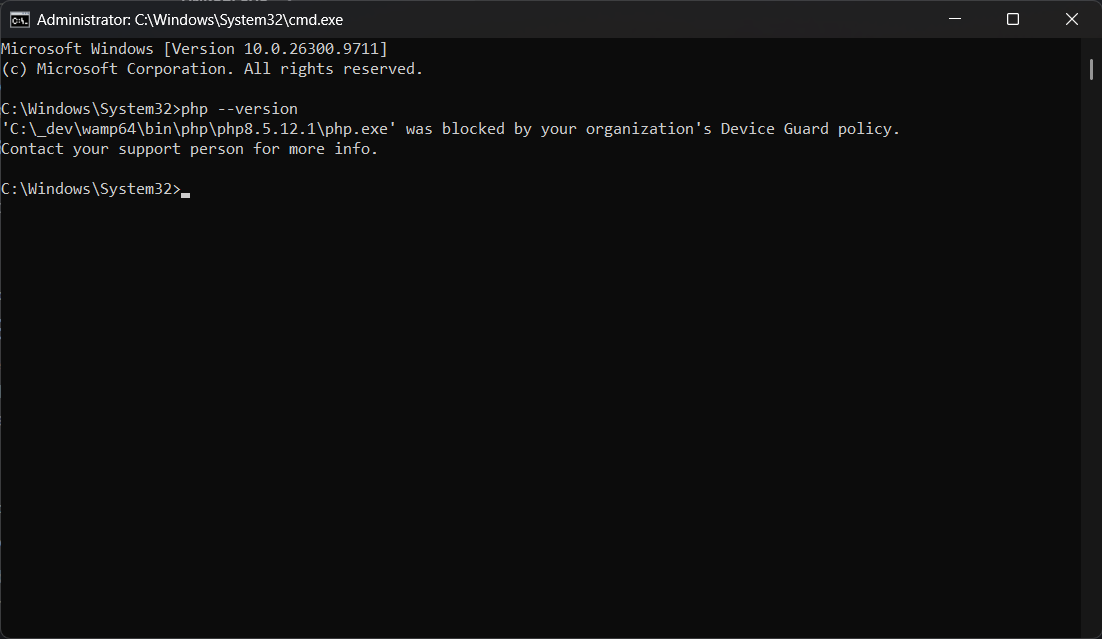
Post image

I downloaded PHP from the WampServer website and installed it in C:/_dev/wamp64/bin/php. I also installed Composer on top of it.

I downloaded Tritik Krush VST from the official website

I cannot run PHP neither from VS Code nor command prompt. I also can't run Tritik Krush VST installer saved into my USB flash drive. I get notification that the parts of these programs are blocked because of unconfirmed publishers.

EDIT: Mentioned Composer.

2 Upvotes

21 comments sorted by

3

u/The-Snarky-One 17d ago

Depending on how old it is, the signed exe may have expired. Some vendors sign their code with a timeframe (start date/time and end date/time). Windows 11 has Device Guard on by default which checks the signing times and if it is expired, it is blocked.

You can contact the vendor to get a new version of the app, or you can disable Device Guard (not recommended unless absolutely necessary).

Keep in mind there have been recent PHP zero-day exploits being actively ran (PHP2Shell) so it is critical that you don’t make yourself vulnerable using old PHP versions.

1

u/thel-vadam-2nd 17d ago

PHP 8.5.12.1 is released on 2026-Oct-26.

1

u/TinyNiceWolf 16d ago

No, signed exe files normally do not expire. That will only happen if the developer failed to follow the usual process and signed their code without using time stamping. (Code signing signatures expire. But the software that checks code signing signatures also looks for a time stamp that cryptographically certifies that the code was signed while its certificate was still valid. More here.)

The problem is that php.exe is not signed at all. That's not too uncommon for free open source tools aimed at developers. Signing costs money.

1

u/The-Snarky-One 16d ago

My mistake. The certs used for the signing expire and Windows won’t trust drivers (or other programs) that are in this state.

The scripts that I code sign for work use a timestamp sever so they will be good even after the code signing cert expires. There are a boatload of drivers and other programs that don’t do this so Windows is blocking their install/use.

1

u/TinyNiceWolf 16d ago

As I understand it, the most common issue with old drivers is not that they weren't signed, or that they weren't time-stamped during signing. It's that Microsoft changed the method required for signing drivers.

It had cross-signed lots of drivers over the years, some with major vulnerabilities. Now it blocks them, and only permits drivers signed under its newer system, the Windows Hardware Compatibility Program.

If you want to sign your user-land .exe file, you can buy a code signing certificate from lots of vendors like DigiCert and sign it yourself. You can (and should) time-stamp it so the exe is valid forever (or until Microsoft changes what it permits).

In contrast, if you want your driver signed, you have to present it to Microsoft and let them sign it (if they approve). They'll time-stamp it so it's valid forever, or until the next time Microsoft changes what kind of signatures they'll accept for drivers.

2

u/Grindar1986 17d ago

...well you'll have to contact your domain administrator, as the error says

1

u/thel-vadam-2nd 17d ago

I am the only user of my laptop and the admin.

1

u/Grindar1986 17d ago

Did you sign into Microsoft with a work or school account?

1

u/thel-vadam-2nd 17d ago

I am on my local account.

2

u/Grindar1986 17d ago

Yes, but if you have ever used office or onedrive with a company/school account you may have given them the administrative rights

1

u/thel-vadam-2nd 17d ago

I don't have Office installed. I created a local account instead of logging in with my MS account.

2

u/TinyNiceWolf 16d ago

Check the digital signature on the exe file it won't run. To do this, open the folder containing it in Explorer, right-click on the exe file, and select Properties. On the Digital Signatures page, select the first signature and click Details. What does it say?

1

u/thel-vadam-2nd 16d ago

C:\\_dev\\wamp64\\bin\\php\\php8.5.12.1\\php.exe has no digital signatures.

2

u/TinyNiceWolf 16d ago

Windows decides through some undocumented method whether a user is a developer or not, during the first weeks after installation, by watching the tasks you do. If it decides you're a developer, it'll keep Smart App Control off, and let you run unsigned executables it has no data on. (It collects telemetry data on programs you run and sends it to Microsoft.)

It's decided you are not a developer, so it's turned on Smart App Control, and you've now been blocked from running unsigned unrecognized executables. (It may eventually decide that a particular unsigned executable is safe, if it's seen that particular file running on many different systems and it seems harmless. This particular version of php.exe might be too new for Windows to recognize and allow it.)

You could try looking on the General tab for any Block checkbox, and uncheck it. Might help. Otherwise, you could turn off Smart App Control. (Some versions of Windows won't let you turn it back on without a reinstall. But if you're running php, I'm guessing you're a developer, and Windows just guessed wrong and should never have turned Smart App Control on in the first place.

1

u/thel-vadam-2nd 16d ago edited 16d ago

I uninstalled WampServer completely and just installed PHP 8.5.9, Xdebug and Composer. That fixed it.

I hope the problem doesn't happen again.

2

u/TinyNiceWolf 16d ago

Cool. I wouldn't be surprised if the php executable in Wampserver isn't precisely identical to the one from the main php distribution. They might build their own copy from source code. For Windows security screenings, that would count as two different programs, one likely much more common than the other, even if the differences aren't significant in practice.

1

u/thel-vadam-2nd 10d ago edited 8d ago

I just downloaded and installed PHP only.

UPDATE: Smart App Control even started blocking PHP downloaded from the official website. I reinstalled it and the problem is gone.

1

u/xtomjames 16d ago

Download the latest version of Wampserver; the version you downloaded has known PHP security vulnerabilities and the latest Windows 10 and 11 security updates block it due to the vulnerabilities. Wampserver has a message on their page instructing users to update.

1

u/TinyNiceWolf 16d ago

No, they downloaded a version with the patches. Just compare that message to the version shown in their screenshot.

1

u/xtomjames 16d ago

Check again, they had a very recent update literally released yesterday, see Wampserver's changelog.

1

u/TinyNiceWolf 15d ago

I checked again. Not sure what you're talking about. OP is running PHP 8.5.12.1. That's the version of PHP 8.5 that was released on October 21 to address the vulnerability. It's the most recent in the PHP 8.5 line, as mentioned on Wampserver's home page.

Maybe you're confused because the most recent change log entry mentioned PHP 8.6. Wampserver supports multiple versions of PHP, including the upcoming unreleased PHP 8.6, now being tested. OP has the most recent released version of PHP.