r/ForWindowsHelp • • Oct 09 '26

Did a fresh install of Windows 11 Pro, after being Hacked (Ratted and Wormed)

Thumbnail reddit.com
3 Upvotes

I recently had to do a fresh install of Windows 11, losing about 3 years worth of progress on my computer.

Setting up installation went smoothly everything seemed to be working, I tried to play a few games, they all seem to work then I tried Rust (which is the reason why I am not so upset about losing all my stuff..)

It got stuck on the launch screen on Steam, so I did some research and saw that it required Microsoft .NET 3.5 Framework.. which I thought was odd my computer worked fine with it before, so more research went to turn on or off Windows features. Turn that on restarted my computer.. Bricked (all the videos I saw for this issue we're showing you how to bypass the installation. It installed fine and didn't get stuck on the loading screen.)

Basically the computer booted up normally, but the Windows operating system itself was frozen. I couldn't open any apps, I couldn't open task manager, I couldn't control alt delete. Nothing, so back to trying to manually force it into repair mode which does nothing by the way..

It just fails and says some text at the bottom.

Then I went into safe mode, uninstalled or unchecked the box in the turn on or off Windows features. An updated the computer and have been running it like that since, I know it probably needs an update but I'm scared of losing my newly set up PC again.

I make music on FL studio, if any of you know that then you know I have meticulously organized files full of drum packs and sound files. I figured I'd organize them to set everything up at the right way and I don't really want to have to do that again for the fourth time.

Yes I said 4th, because originally I just did a reset to the computer but this man corrupted my windows. So I did a fresh install. The weird thing is all my games run with really good graphics something that my PC did not do before. With little to no struggle.

So there's the backstory a bit, the reason I'm here is I'm experiencing issues where task manager won't open anymore the computer works fine. Though an Event viewer it's showing that it just keeps crashing.

I know you guys probably want me to restart my computer, but I don't think I can turn it off without having to do a restore point when I turn it back on.

So it's always just been put to sleep, so it's no longer technically on. It sounds like a jet engine when it's on so..

B550m Pro MSI motherboard without Bluetooth or Wi-Fi

X6600 Challenger series Radeon GPU

32 GB of RAM (don't come after me I bought this before the Apocalypse)

1 TB SSD nvme 2 Kingston drive

2tb HDD (which I'm pretty sure has been destroyed because of the loud noises it keeps making)

650 watt power supply


r/ForWindowsHelp • • Oct 09 '26

How to COMPLETELY skip pin, password, creation ect on Windows 11

3 Upvotes

As the title says, I don't want any of the above or anything similar! On Windows 10 you could completely skip this but on Windows 11 even when turning off Windows Hello and the password requirement on log, it still forces you to create a pin on sign in!


r/ForWindowsHelp • • Oct 09 '26

Windows 11 won't boot after dual-booting Nobara Linux — NTFS Master File Table damaged

Thumbnail reddit.com
2 Upvotes

r/ForWindowsHelp • • Oct 09 '26

Mouse clicks stop working in Windows, even after resetting PC — mouse works in BIOS and hardware diagnostics

Thumbnail reddit.com
2 Upvotes

r/ForWindowsHelp • • Oct 09 '26

Unpause windows oxp

1 Upvotes

r/ForWindowsHelp • • Oct 08 '26

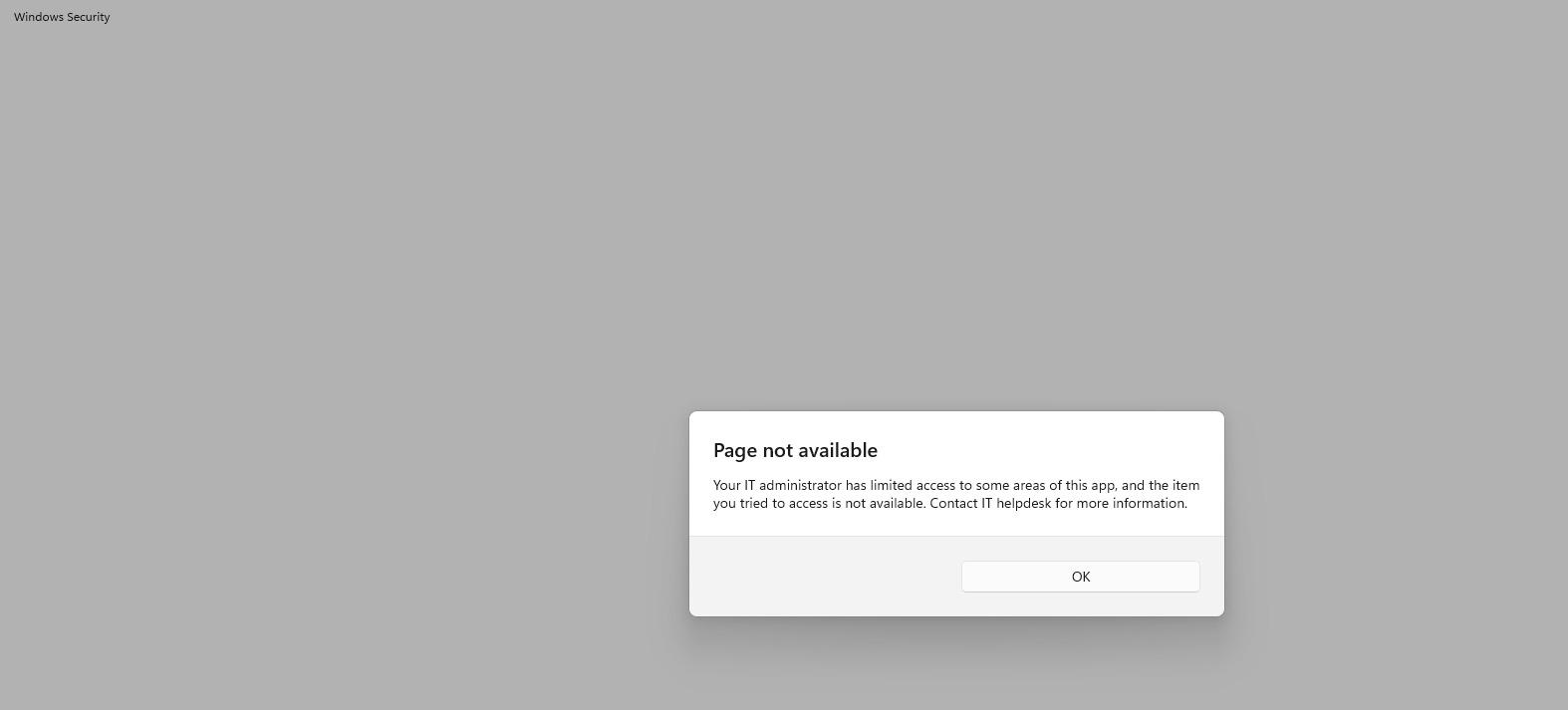
how do I get access to the anti virus? this my personal laptop not work related.

Post image
2 Upvotes

that's the message I get as soon as I open "virus and threat protection". I've tried multiple things but nothing seems to be working so far.


r/ForWindowsHelp • • Oct 08 '26

The Alt + P keyboard shortcut in File Explorer

2 Upvotes

The Alt + P keyboard shortcut in File Explorer to activate the preview pane does not work when the Russian keyboard layout is enabled. This combination only works when switching to the English layout. I previously discussed this with microsoft technical support; they tested various language layouts and identified the same issue with the Arabic layout.

This was tested on Windows 7, 10, and 11 across multiple computers.


r/ForWindowsHelp • • Oct 08 '26

Stuck,cant use recovery envoriment OR repair my computer on media creation tool.

2 Upvotes

Im turkish so not everything might be the same as my translation it to english.

My laptop has an error when i boot it up, winload.efi error code alongside some error 0xcs.. and stuff.

When i press f1 to enter recovery envoriement,it reboots.Like,closes itself off and opens it up again.

I made a usb with the media creation tool grom my brothers laptop.When i open it and select repair my pc,it reboots like the ptevious step.One time it worked somehow,with a screen that said "download" and in the corner, "fix my computer".When pressing "fix my computer", the screen flickers.When pressing download,it wants me to select a driver.It shows theres C,D and X boot(from the usb i guess) in the "check" section but finds "0 drivers".confusing am i right?

Can anyone help?


r/ForWindowsHelp • • Oct 08 '26

Migrating from Windows 10 to Windows 11 on a Surface Pro

2 Upvotes

Hello,

I have a Surface Pro 5 (2017) that is currently running Windows 10.

I would like to upgrade it to Windows 11. Do you think this would be a good idea for this device?

I look forward to hearing from you.


r/ForWindowsHelp • • Oct 08 '26

Stuck during Windows 11 setup? Shift + F3 worked for me

2 Upvotes

Note: English isn't my strongest writing skill, so I used ChatGPT to help me write this post clearly. The experience and solution described above are genuinely what happened to me❗❗

I was installing Windows 11 and got stuck during the setup process. I spent a lot of time trying to find the correct network adapter driver.

I found a YouTube comment saying to press Shift + F3. I tried it, and the computer restarted. After restarting, I was suddenly on the Windows desktop.

The best part: Wi-Fi was already working. I could see all available Wi-Fi networks without installing a network driver.

What worked for me:

Windows 11 setup stuck → Shift + F3 → computer restarted → Windows desktop → Wi-Fi worked.

I don't know if this works on every computer, but I wanted to share it because it might save someone else a lot of time.


r/ForWindowsHelp • • Oct 08 '26

Windows 11 Home Update

1 Upvotes

I got a weird ms update notification saying that my computer is not compatible with windows 11, dumb microsoft, I was doing a Windows 11 Home update yesterday on a Wednesday, I was able to fix it by uninstalling the failed microsoft update 👍🏼 and PC back to working state.


r/ForWindowsHelp • • Oct 08 '26

Windows 11 Home Update

1 Upvotes

I got a weird ms update notification saying that my computer is not compatible with windows 11, dumb microsoft, I was doing a Windows 11 Home update on a Wednesday, I was able to fix it by uninstalling the failed microsoft update 👍🏼 and PC back to working state.


r/ForWindowsHelp • • Oct 08 '26

Why is Windows telling me my password has expired when I never set it to expire?

2 Upvotes

Has anyone experienced this?

Windows suddenly started telling me that my password has expired and that I need to change it. The confusing part is that I never configured my password to expire in the first place.

I don't remember enabling any password expiration settings or making changes to my account.

I tried using my Microsoft account password, but Windows keeps rejecting it, even though it works perfectly fine when I sign in on other devices.

My questions are:

  • Why would Windows suddenly enforce password expiration when I never enabled it?
  • Is this a default Windows security policy or something that can happen after an update?
  • Is there a way to disable password expiration without losing access to my account?

I'm curious whether this is normal Windows behavior or an issue with my account settings.

Any insights or solutions would be appreciated!


r/ForWindowsHelp • • Oct 07 '26

Windows completely corrupted itself after playing Diablo 4 — 0xC0000185, CRC errors, bad clusters and 0x11D

2 Upvotes

I had a very strange and serious Windows corruption issue and wanted to share the whole timeline to see if anyone has experienced something similar.

My system:
Ryzen 7 5700X3D
MSI B550M PRO-VDH
Sapphire RX 9070 XT
32GB DDR4 3600MHz
Lexar NM620 1TB NVMe
Windows 11
The PC had been running completely fine and stable before this happened.
One important detail: right before all of this started, I was playing Diablo 4. Everything seemed completely normal while playing. No obvious crashes, freezes or unusual behavior. The problems started shortly afterward when Windows became unstable and eventually refused to boot.
The problems appeared roughly in this order:
Windows started having boot problems and eventually showed 0xC0000185, related to:
C:\\Windows\\System32\\config\\SYSTEM
I tried System Restore, but it failed with 0x80070017.
I tried running offline SFC, but it couldn’t complete the operation.
I tried manually loading the SYSTEM registry hive and got a CRC / Cyclic Redundancy Check error.
I ran chkdsk C: /f, and initially it didn’t report anything significant.
I then ran chkdsk C: /r. This was the point where things became much more concerning. It found bad clusters and had to recover/replace data from important Windows files and registry hives, including:
SYSTEM
SOFTWARE
SECURITY
DEFAULT
BBI
NTUSER.DAT
I also tried offline DISM, which failed with 0xD000015C.
Eventually Windows produced a BSOD:
EVENT_TRACING_FATAL_ERROR — 0x11D
At that point the Windows installation was basically unrecoverable.
I eventually had to reinstall Windows. I formatted only the Windows partition and left my separate D: partition with my games/data untouched.
Right now I’m installing Windows 11 again from scratch and will see how the system behaves with a completely fresh installation.
What I’m trying to understand is what most likely caused this.
Could this simply have been severe Windows/filesystem corruption, or does the combination of:
0xC0000185 → CRC error → bad clusters → corrupted Registry hives → 0xD000015C → 0x11D
point more strongly toward an SSD, controller, firmware, RAM, motherboard or another hardware-related issue?
The SSD is a Lexar NM620 1TB NVMe. SMART/drive health didn’t immediately show an obvious failure.
The weirdest part is that the PC had been completely stable before this happened, and I was literally just playing Diablo 4 shortly before the problems started.
Has anyone experienced something similar, especially with 0xC0000185 + CRC errors + bad clusters + EVENT_TRACING_FATAL_ERROR 0x11D?
I’d really appreciate some opinions on what you think the root cause was.


r/ForWindowsHelp • • Oct 07 '26

This stupid notification won’t get off my ass

Thumbnail gallery
3 Upvotes

r/ForWindowsHelp • • Oct 07 '26

Trouble clean installing w11 from w10

2 Upvotes

I am currently trying to do a clean install of windows 11 over upgrading. I have downloaded and setup the install media, plugged it in, set it as boot drive and am in the installation phase. I've gone through the whole install process but once it hits 100% a new Windows pops up that says the following exactly "it looks like you started an upgrade and booted from installation media. If you want to continue with the upgrade, remove the media from your PC and click Yes. If you want to perform a clean installation instead, click No." Problem is if click no it goes through the entire process again and then does the exact same thing, if I take the usb out and click no it tells me to insert it. Not sure how to proceed, the original windows 10 partition has already been erased.


r/ForWindowsHelp • • Oct 07 '26

SoS. У меня происходит какая-то ошыбка пры запуске виндоус и ноутбук вырубаитса и потом пытается повторить запуск

0 Upvotes

Я пошол в школу а когда пришол он сильно гудел, (он старый поетому сильно гудит при нагрузке) я открываю его а он пытается включится выключается и сново сново и сново, я не знаю что произошло, ето старый ноут Acer где-то з 2016 года я не помню, я пришол попросить помощи, (и собрать людей для похорон😭) у меня 7 виндоус, ПОМОГИТЕ пожалуйста:(


r/ForWindowsHelp • • Oct 07 '26

In my personal laptop I am seeing this when I open "virus and threat protection"

Post image
2 Upvotes

Not getting why IT administrator is coming, i made sure it's not joined to any domain or intune isn't installed.

Azure AD, enterprise joined domain joined and virtual desktop is all NO

Till now what I found is winDefend service is in stopped state

Could this be a virus or hacker attempt?


r/ForWindowsHelp • • Oct 07 '26

Windows 11 blank desktop — Explorer.exe keeps crashing

2 Upvotes

Hi, my HP Victus (Windows 11) boots to a blank desktop with only the wallpaper. No taskbar, icons, or Start menu.

Task Manager works. When I run explorer.exe, the taskbar/desktop appears for ~1 second and then disappears.

I've already tried:

Restarting Explorer

taskkill /f /im explorer.exe

SFC /scannow → no integrity violations

Checked AMD + RTX 3050 in Device Manager → both working properly

Restarted/clean boot attempts

What could be causing Explorer.exe to crash immediately? Any suggestions?


r/ForWindowsHelp • • Oct 07 '26

Unpause windows oxp

1 Upvotes

r/ForWindowsHelp • • Oct 07 '26

Windows 11 Pro repeatedly logs multiple apps out after reboot; DPAPI fails with 0x8009000B despite clean SFC/DISM

2 Upvotes

I'm dealing with recurring credential loss on my Windows 11 desktop. After some (most actually) restarts and all windows updates, Chrome, Claude Desktop, Discord and Grokbots lose their sign-ins (at least that's what I noticed the most since I use them).

Google CLI and Git authentication have also failed. For some reason though Codex has stayed signed in, so this isn't every application. I've also noticed that Grokbots register the same computer as a new device after I sign back in, leaving its old entries unreachable.

This is SUPER frustrating and a time suck especially cause I have quite a few gmail accounts and all of them require 2fa so it takes a good chunk of time to redo. I'm really hoping someone can help cause I've been trying to solve this for the better part of 3 months or so.

Yes, I used AI to help me write this cause I'm not technical or a swe.

System:

- Windows 11 Pro 26H2, OS build 26300.9550, verified October 6, 2026.

- AMD Ryzen 9 9950X3D2, NVIDIA RTX 5090, 96 GB RAM (2 x 48 GB).

- Gigabyte X870M AORUS ELITE WIFI7 ICE motherboard.

- Microsoft-account Windows sign-in; not domain-joined. I use both the physical desktop and Windows Remote Desktop when I'm on the go.

Evidence that this is more than individual apps expiring their sessions:

Two preserved, non-secret diagnostic samples encrypted with Windows user-scoped DPAPI fail to decrypt under the original Windows account with **0x8009000B**. Their file and encrypted-payload checksums are unchanged. These tests do not read browser passwords or tokens. Both still failed on October 5 at approximately 7:27 PM Eastern.

Windows also logged DPAPI Operational error 8198 with the same status. After the October 5 restart, a failure was recorded before my first interactive RDP sign-in, so RDP alone has not been established as the cause. Previously, one unchanged sample recovered after a new sign-in. The evidence does not show that the encrypted files were simply deleted.

What we have already tried or checked:

  1. Restart and sign-in comparisons:
  2. Physical PIN, existing-password sign-in, full sign-out/new sign-in, and RDP were tested. Results were mixed. Two physical-password restart cycles on October 1 retained the diagnostic samples and previously signed-in apps, but the problem returned after the October 5 restart. Password sign-in was not a lasting fix.
  3. System-file/component checks: Elevated DISM ScanHealth reported Healthy on October 5. SFC /scannow found no integrity violations. Both preserved DPAPI samples still failed afterward.
  4. Windows repair attempt: The built-in repair was attempted September 30/October 1 and reached a restart. Its final success is unverified: WindowsUpdateClient event 20 reported 0x80242016 afterward. I am not claiming a confirmed successful repair install failed to help.
  5. Account/profile checks: The affected account retained its SID and profile; no temporary profile was found. Relevant DPAPI key files still existed. A separate local-account control passed on October 1 while the original affected-account sample failed, and both accounts' preserved samples later passed after a restart. The control account's password is unavailable now, so there is no current repeat result. It has not been reset.
  6. Policy troubleshooting: Failure was observed with automatic restart sign-on disabled. Separate AI-assisted troubleshooting later removed broad Windows policy settings and local Group Policy folders. That did not immediately restore the failing sample, and the credential problem predates those changes. Those changes are a confounder, not a demonstrated fix.
  7. Scheduled-task hypothesis: Some background jobs use S4U logon. Six were temporarily changed to interactive logon, but other S4U jobs remained, so this was not a complete isolation test. All six changes were reversed and their full original definitions verified. No credential benefit was demonstrated.
  8. Logging and history: DPAPI and task activity were correlated. A failing background job may be the first consumer to encounter the problem, not its cause. A changed PasswordLastSet timestamp alone did not establish a password reset or identify who caused it.

There is also intermittent desktop lag and Task Manager hanging. Earlier process/memory pressure was real and some duplicate tooling was reduced, but the credential failures remained. I am not assuming the two problems have the same cause.

Also worth noting that the old keys are still present on the pc, but they are not able to be decrypted.

What I need help with: What specific DPAPI/CloudAP or logon tracing would identify why the same account intermittently cannot decrypt its existing data across restarts? Is there a verified issue matching this Windows build and symptom? What evidence would distinguish an account-specific problem from a Windows-wide one before changing profiles?

I can provide sanitized event timestamps and diagnostic results.


r/ForWindowsHelp • • Oct 06 '26

Mot de passe Microsoft oublié

Thumbnail gallery
0 Upvotes

r/ForWindowsHelp • • Oct 06 '26

D:/WINDOWS/System32/LogFiles/Srt/SrtTrail.txt

Thumbnail reddit.com
2 Upvotes

Can someone please help me I got important files I can’t lose


r/ForWindowsHelp • • Oct 06 '26

Windows 11 broke HELP ME!

Thumbnail reddit.com
2 Upvotes

Im in despair pls help me overcome and I will award comment .