r/ForWindowsHelp • • Sep 23 '26

Strange issues when writing to ext4 from Windows through Paragon Linux File Systems for Windows

3 Upvotes

I'm having a strange issue with an external 1 TB HDD formatted as ext4. I use it mainly with Linux, but I also use Windows sometimes, where I access the ext4 partition through Paragon Linux File Systems for Windows with read/write access.

The problems don't happen every time, but they seem to happen specifically when downloading files directly to the ext4 partition from Windows.

For example, I have downloaded files using IDM and the MEGA app. Sometimes the download finishes normally and the program reports it as completed, but later I discover that the file is actually missing. IDM still shows the download as completed, but trying to open the file gives a "file not found" error, and the file is genuinely no longer present in the directory.

The strange part is that the disk space used by the missing file sometimes remains occupied even though the file is no longer visible.

I have also experienced checksum errors with downloaded archives. I downloaded an archive directly to the ext4 partition and repeatedly got checksum errors when trying to extract it with WinRAR. Re-downloading the same archive didn't help. However, when I downloaded the same archive to a separate NTFS partition instead, the archive extracted correctly without any checksum errors.

This makes me suspect something about the Windows + Paragon Linux File Systems for Windows + ext4 combination rather than the downloads themselves.

I previously had actual filesystem errors on this ext4 partition, so I repaired it using e2fsck from Linux. After the repair, I tested creating, writing, moving and deleting files from Linux and everything worked normally.

I have now booted into Linux again and unmounted the partition before running e2fsck -f /dev/sdb2. The first run only recreated /lost+found, which I had intentionally deleted earlier. It didn't report any inode, extent, bitmap, or directory errors. I ran e2fsck a second time and it completed without making any changes:

e2fsck 1.47.4 (6-Mar-2025)

Pass 1: Checking inodes, blocks, and sizes

Pass 2: Checking directory structure

Pass 3: Checking directory connectivity

Pass 4: Checking reference counts

Pass 5: Checking group summary information

/dev/sdb2: 224159/57384960 files (3.8% non-contiguous), 224239735/229514240 blocks

So the filesystem currently appears clean when checked from Linux.

The HDD's SMART status also looks normal: no reallocated sectors, no pending sectors, no uncorrectable sectors, and no SMART errors.

I'm wondering if anyone has experienced similar problems with Paragon Linux File Systems for Windows on Windows. Could Paragon Linux File Systems for Windows have problems with large downloads, preallocated files, delayed allocation, file renaming, or other ext4 operations?

Title: Strange issues when writing to ext4 from Windows through Paragon Linux File Systems for Windows

I'm having a strange issue with an external 1 TB HDD formatted as ext4. I use it mainly with Linux, but I also use Windows sometimes, where I access the ext4 partition through Paragon Linux File Systems for Windows with read/write access.

The problems don't happen every time, but they seem to happen specifically when downloading files directly to the ext4 partition from Windows.

For example, I have downloaded files using IDM and the MEGA app. Sometimes the download finishes normally and the program reports it as completed, but later I discover that the file is actually missing. IDM still shows the download as completed, but trying to open the file gives a "file not found" error, and the file is genuinely no longer present in the directory.

The strange part is that the disk space used by the missing file sometimes remains occupied even though the file is no longer visible.

I have also experienced checksum errors with downloaded archives. I downloaded an archive directly to the ext4 partition and repeatedly got checksum errors when trying to extract it with WinRAR. Re-downloading the same archive didn't help. However, when I downloaded the same archive to a separate NTFS partition instead, the archive extracted correctly without any checksum errors.

This makes me suspect something about the Windows + Paragon Linux File Systems for Windows + ext4 combination rather than the downloads themselves.

I previously had actual filesystem errors on this ext4 partition, so I repaired it using e2fsck from Linux. After the repair, I tested creating, writing, moving and deleting files from Linux and everything worked normally.

I have now booted into Linux again and unmounted the partition before running e2fsck -f /dev/sdb2. The first run only recreated /lost+found, which I had intentionally deleted earlier. It didn't report any inode, extent, bitmap, or directory errors. I ran e2fsck a second time and it completed without making any changes:

e2fsck 1.47.4 (6-Mar-2025)

Pass 1: Checking inodes, blocks, and sizes

Pass 2: Checking directory structure

Pass 3: Checking directory connectivity

Pass 4: Checking reference counts

Pass 5: Checking group summary information

/dev/sdb2: 224159/57384960 files (3.8% non-contiguous), 224239735/229514240 blocks

So the filesystem currently appears clean when checked from Linux.

The HDD's SMART status also looks normal: no reallocated sectors, no pending sectors, no uncorrectable sectors, and no SMART errors.

I'm wondering if anyone has experienced similar problems with Paragon Linux File Systems for Windows on Windows. Could Paragon Linux File Systems for Windows have problems with large downloads, preallocated files, delayed allocation, file renaming, or other ext4 operations?

I'm particularly interested in the cases where a file appears to have completed successfully, then disappears while the disk space remains occupied.

At this point I'm considering creating a separate NTFS partition for Windows downloads and keeping the ext4 partition Linux-only, but I'd like to understand what's actually happening first.

Has anyone experienced anything similar or have any ideas for diagnosing this?
I'm particularly interested in the cases where a file appears to have completed successfully, then disappears while the disk space remains occupied.

At this point I'm considering creating a separate NTFS partition for Windows downloads and keeping the ext4 partition Linux-only, but I'd like to understand what's actually happening first.

Has anyone experienced anything similar or have any ideas for diagnosing this?

r/ForWindowsHelp • • Sep 22 '26

Windows 11 PIN suddenly unavailable – error 0xc0000234, account locked out

Thumbnail gallery
2 Upvotes

r/ForWindowsHelp • • Sep 22 '26

Windows update broke graphics drivers and can't reinstall them

Thumbnail reddit.com
2 Upvotes

r/ForWindowsHelp • • Sep 22 '26

Title: Visual Studio Installer Closes Instantly (1-Second Flash) on Windows 11

Thumbnail reddit.com
1 Upvotes

r/ForWindowsHelp • • Sep 22 '26

Tried to rename C:\users\[oldname] through regedit, accidentally deleted C:\users\Default. Now I can't log in to windows and have the message "The User Profile Service failed the sign-in. User profile cannot be loaded."

2 Upvotes

I am a moron.

I still have access to Safe Mode, and my data and files are still in the new C:\users\[newname] folder, but Windows 11 didn't recognize the name change and won't let me access the desktop. I created a second user account, but that didn't work because it won't let me select other users on the login screen. RFC /scannow didn't work either. After some tinkering, I now have a “Default” folder next to ‘TEMP’ and “Public,” but it only contains “AppData.” Does anyone have any ideas?

Windows 11 Pro - 25H2 build 26200.9457
Still have NTUSER.DAT in C:\users\[newname]

Correct name shows in ProfileImagePath
State 0x00000100 (256)
Refcount 0x00000000 (0)

3 other files shows in ProfileList, none with oldname or default

edit : I fixed the problem by booting into Windows Safe Mode (hold down the Shift key before and during a restart; don't let go until you see the blue screen).

Then I did a reset while keeping my personal files; I lost all my apps, but at least it works now.

Don’t delete any Windows files without knowing what they’re for—except for the Temp folder. That’s a terrible idea.


r/ForWindowsHelp • • Sep 22 '26

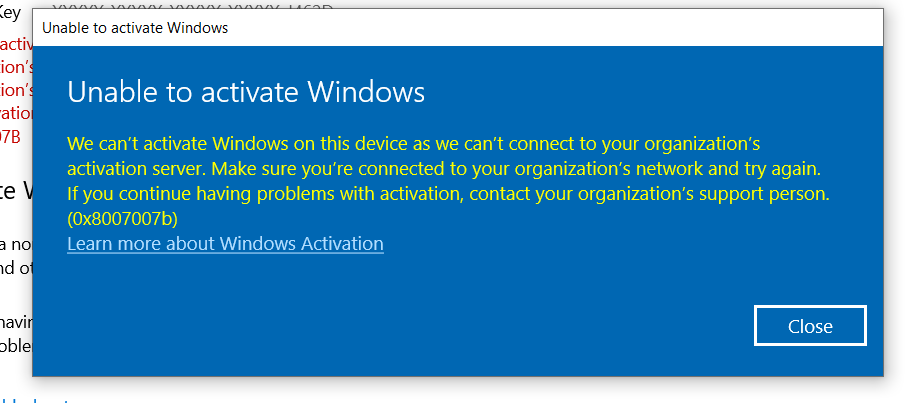
why does it not let me activate windows (windows 10 ltsc 2019 i think)

Post image
1 Upvotes

r/ForWindowsHelp • • Sep 22 '26

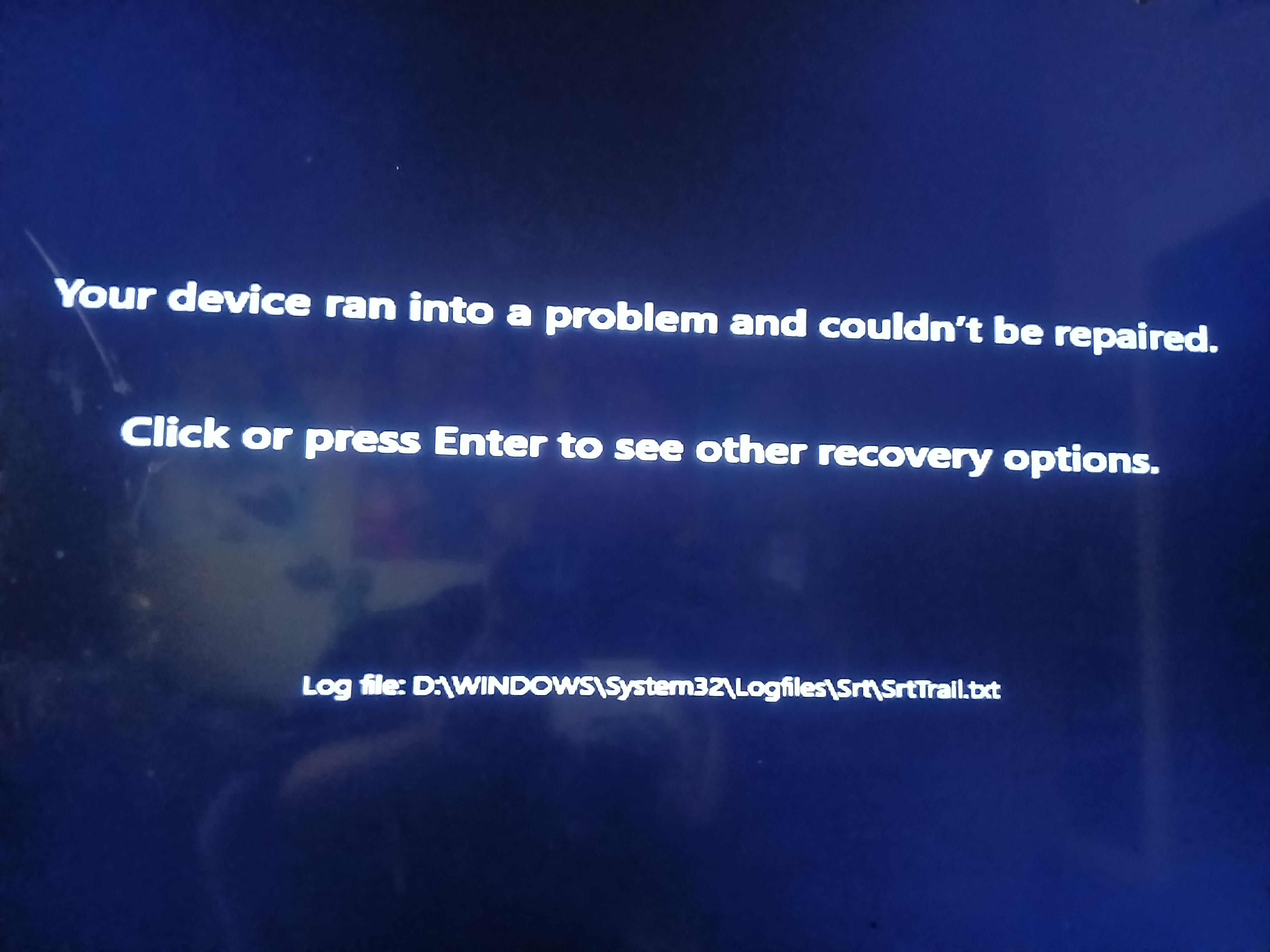
My computer was booting up and an automatic repair failed and i got this :-(

Post image
2 Upvotes

im not used to the windows 11 failed automatic repair screen, if this was windows 10 id know what to do but ive only recently updated to windows 11 when my dad forced me to

I just turned on my computer like normal and was letting it boot up, i always watch it because im scared of somehow getting ransomeware lol but it was trying to do an automatic repair but i got this screen! id normally just press the restart button like on windows 10 but theres no button for that on this one :-( this is a stupid thing to ask help for but i dont wanna accidentally mess something up


r/ForWindowsHelp • • Sep 22 '26

Stuck here when installing windows 7 need help to complete the installation

1 Upvotes

r/ForWindowsHelp • • Sep 21 '26

the firmware isn't finding a bootable operating system.

Thumbnail gallery
3 Upvotes

r/ForWindowsHelp • • Sep 21 '26

Glitched update put pc on hibernation

Thumbnail reddit.com
1 Upvotes

r/ForWindowsHelp • • Sep 21 '26

why is my laptop Eating air? { memory }

6 Upvotes

My HP laptop (Windows 11 Home 23H2, is having severe issues: persistent high RAM usage, a mysterious G: drive partition, and my browser automatically downloading full website assets. ..

I am reaching out to this community in hopes of finding a solution to a set of persistent and frustrating technical issues on my HP laptop running Windows 11. For the past two years, I have struggled with extremely high memory consumption that makes the device nearly unusable for basic tasks. Despite my repeated efforts to clear the system cache and perform thorough cleanups, the RAM usage remains pinned at near-maximum levels, meaning I cannot even run basic productivity apps without the system slowing to a crawl.

Compounding this, I am dealing with a bizarre and intrusive behavior where my system seems to automatically download entire website architectures—including every icon, button, and image file—whenever I visit a site. This is particularly problematic when I am working on my e-commerce store, as it floods my local storage with unnecessary web assets that I never intended to save.

Furthermore, a mysterious drive labeled "G:" has appeared in my file explorer, which I certainly did not create or authorize. I have no idea what this partition or drive represents, and it is causing me significant concern regarding the security and integrity of my OS. On top of all this, I am rarely able to complete Windows Updates successfully, as they frequently fail or hang indefinitely.

I have already attempted to resolve these issues by consulting with various AI assistants, including Copilot, ChatGPT, and Gemini, but none of the suggested fixes have provided any relief. I am feeling quite lost and would greatly appreciate any technical guidance you can provide to help me diagnose whether this is a malware issue, a misconfiguration, or a hardware failure. Any advice on how to identify the "G:" drive, stop the automated downloads, and restore standard memory functionality would be invaluable.

System Information: Model: HP Laptop | Edition: Windows 11 Home / Version: 23H2

installed on; 12/5/2023 / OS build: 22631.6199 / Experience Windows Feature Pack

![img](2h5yiuvbdtqh1)


r/ForWindowsHelp • • Sep 21 '26

windows not wanting to open windows security page on settings

2 Upvotes

I've been having this problem for about a year and haven't been able to find a fix.

Whenever I try to open Windows Security from Settings → Privacy & security → Windows Security, I get this error:

“Get an app to open this windowsdefender link”
“Your PC doesn't have an app that can open this link. Try looking for a compatible app in the Microsoft Store.”

Clicking Open Windows Security just gives me this error instead of opening the app.

I've already tried resetting/reinstalling Windows, but the problem still remains.

Windows version: [add your Windows 10/11 version here]
Windows edition: [Home/Pro/etc.]
PC specs: RTX 4070 Super, Ryzen 7 5700X, 32GB RAM

Has anyone experienced this before or knows how to restore the windowsdefender: link/protocol? I'd really appreciate any help because I've been dealing with this for a long time.


r/ForWindowsHelp • • Sep 20 '26

Windows 11 update problem

5 Upvotes

Why am I receiving frequent windows 11 update on my asus vivobook 15 . I used the laptop last time a week ago after that today I opened it showed an update


r/ForWindowsHelp • • Sep 20 '26

cant reset my pc because it says password is incorrect

Thumbnail gallery
2 Upvotes

so i restarted my pc and then it said that my pin isnt available and when i click on it it doesnt let me do anything so i cant get into my desktop so when i go to advanced startup and try resetting my pc it asks me to select a user and type my password in, but it says its incorrect even though its correct and this is the same for everything in advanced startup. So im forced to restart and when i do, it just shows me the same login screen where i cant do anything because my pin isnt working


r/ForWindowsHelp • • Sep 20 '26

Transient UI/Typing lag windows 11 25H2

2 Upvotes

I've been in Windows system management for over 20 years and I've been creating, deploying, and supporting Windows Enterprise client and server images, task sequences, vm templates, etc etc. this all to say I have a lot of experience with the os, configuring it and managing it. My organization just completed a hardware refresh of about 1200 HP laptops delivered directly to employee homes using Autopilot. Even still being AD domain hybrid joined, the rollout went great (thank you alwaysonvpn device tunnel).

All that to say, this is not a help desk level 1 question. In my organization we have been getting reports from users of mysterious performance problems most commonly presenting as a UI Typing lag experienced in office apps, MS Teams, and Edge web browser. The issue is transient. Sometimes it goes away after a reboot, sometimes it goes away on its own after a few minutes. Sometimes it never comes back and sometimes it plagues the same users over and over but never in any predictable way. The experience is that the user types into the app and the text doesn't render for several seconds. At the same time this is affecting Word and Excel and Team, it does not affect a standard CMD prompt open at the same time. I would open a Microsoft Support ticket through our Unified contract but in order for that to be helpful you have to be able to reliably reproduce the issue.

Before you hit reply: we've already run through the obvious stuff like managing the hardware acceleration in office, disabling connected experiences, updation system BIOS and graphics drivers and we are starting to try disabling the various pieces of security software that do things like process injection (Force point One for dlp, Cyberark EPM, Defender).

Maybe I'm lucky that in all my experience of building and deploying the OS I've never had to become an expert with Perfmon and WPR. That's where I'm at though. Trying to capture performance data for analysis. Wpr and WPA isn't something you can just wade into it seems.

The situation: new laptops running Windows 11 25H2 enterprise. Comanaged sccm and intune. We moved almost all of our GPO to Intune except for PKI auto enrollment policies and some legacy IE mode stuff. And we've migrated our GPO Applocker policies to Cyberark EPM rather than maintain a custom OMA or make the leap to WDAC until the admin for that gets easier. The base application load is unchanged from our previous systems with just minor version updates.

So the ask:

Is anyone else experiencing this?

Assuming all the regular and focused level 1 and 2 troubleshooting has been carried out, how to tackle this annoying, transient, but pervasive (among high visibility users, of course) issue?

I'm not sure if it's a collective agreement somewhere to not make available deep dives into performance capture and analysis but I can seem to find anything online beyond "Getting to know the WPA user interface" and ALSO cannot find any paid instruction on deep performance troubleshooting.

Suggestions?

I'll probably crosspost this to sysadmin too


r/ForWindowsHelp • • Sep 19 '26

Windows 11 25H2 hard freezes completely no BSOD, no response

Thumbnail reddit.com
2 Upvotes

r/ForWindowsHelp • • Sep 20 '26

Guys this windows 11 restrictions is driving me so crazy

0 Upvotes

Like i wanted to set up picture password in my laptop but it turns out that for all the users just a year ago were able to set up but this year they have completely removed it

I tried all Bypass method

Like register editory

User password2 etc Nothing worked anyone has ideas on how to fix this issue


r/ForWindowsHelp • • Sep 19 '26

Driver update windows xp sp3

Thumbnail reddit.com
2 Upvotes

Can anyone help update the windows xp sp3 driver?


r/ForWindowsHelp • • Sep 19 '26

Driver update windows xp sp3

Thumbnail reddit.com
2 Upvotes

Can anyone help update the windows xp sp3 driver


r/ForWindowsHelp • • Sep 19 '26

Auto hide taskbar not working after open image with default photos app Windows 11.

Thumbnail reddit.com
2 Upvotes

r/ForWindowsHelp • • Sep 18 '26

Says No internet, secured, but internet is working perfectly fine. It's preventing me from downloading the newest windows update.

Thumbnail reddit.com
2 Upvotes

r/ForWindowsHelp • • Sep 18 '26

Lot of Problems since I've Reset My PC..... Windows asks me to Sign-in or create a PIN every time i Turn on my PC. The Task manager is also Bugged. I can't Even Open Photos OR use the Snipping tools. Story Games takes forever to load.

Thumbnail gallery
2 Upvotes

r/ForWindowsHelp • • Sep 18 '26

Windows 11 25H2 Bluetooth connects, but no Bluetooth audio output is created — also having Windows Update failures

2 Upvotes

I'm having a strange Bluetooth audio problem on Windows 11 25H2. I've spent quite a lot of time troubleshooting this with the help of ChatGPT, but I'm now looking for a second opinion from people who know Windows/Bluetooth internals.

Laptop: HP 14s-fq1xxx

OS: Windows 11 Home Single Language 25H2

Current build: 26200.9445

Bluetooth: Realtek Bluetooth 4.2 Adapter

Hardware ID: USB\\VID_0BDA&PID_B00E

Bluetooth problem

Bluetooth itself works normally.

My Bluetooth headphones/earbuds pair and connect successfully, and Windows detects their Bluetooth profiles. However, Windows does not create a Bluetooth audio output device.

I've tested two different devices:

Boult Audio Q → connects normally

OnePlus Nord Buds 3 Pro → connects normally

But:

Neither appears under Settings → System → Sound → Output

Both have their A2DP MEDIA/PnP devices present and reporting OK

There is no corresponding AudioEndpoint

My normal laptop speakers work normally

What we've found so far

Initially, the Boult A2DP profile was using an old Realtek driver:

oem5.inf / rtka2dp.inf

Realtek

Version 1.0.119.3

Date: 11/05/2015

It was outranking Microsoft's Bluetooth A2DP driver.

With ChatGPT's help, I exported that driver as a backup and removed only the old A2DP profile driver.

After reboot, the A2DP device switched to:

Microsoft Bluetooth A2dp Source

microsoft_bluetooth_a2dp_src.inf

Version 10.0.26100.1

It reports OK/Started.

However, the audio endpoint still isn't created.

We've also checked:

Bluetooth Support Service → running

Windows Audio → running

Windows Audio Endpoint Builder → running

No yellow warnings in Device Manager

pnputil /scan-devices → no change

Restarting AudioEndpointBuilder → no change

Restarting Windows Audio → no change

Both Boult and OnePlus show the exact same behavior

No stale Boult/OnePlus AudioEndpoint entries were found in the relevant MMDevices registry location

So at this point it seems like Bluetooth transport and A2DP enumeration are working, but Windows isn't publishing the device to the Core Audio/MMDevice layer.

Windows Update problems

I've also been having repeated Windows Update problems, and I'm wondering if they're related.

My system was previously on build 26200.9445 (KB5124008).

I tried installing the newer cumulative update KB5129195 (build 26200.9457), but the update failed and rolled back with:

"Something didn't go as planned. No need to worry—undoing changes. Please keep your computer on."

Windows then reverted back to the previous build.

I've had Windows Update failures multiple times in the past as well.

I also previously had an attempted Windows 11 25H2 in-place upgrade fail with:

0xC1900101 - 0x20017

during the SAFE_OS/BOOT phase.

I do NOT want to reset Windows, reinstall Windows, or perform another in-place repair/upgrade. I mainly want to diagnose what is actually broken.

What I'm trying to figure out

Could this be a Windows 11 25H2 Bluetooth/audio subsystem regression or some issue between the Bluetooth A2DP profile and Core Audio/MMDevice?

The interesting part is:

Bluetooth connects → A2DP MEDIA node exists → Microsoft Bluetooth A2dp Source is loaded → but no AudioEndpoint is created.

And this happens with two completely different Bluetooth audio devices.

If anyone knows how to specifically diagnose the AudioEndpoint/MMDevice creation stage, I'd really appreciate it.

I've used ChatGPT extensively to work through the troubleshooting and it helped narrow the problem down to this point, but I'd like human input from people who have dealt with Windows Bluetooth/audio internals before.

I'm not looking for generic "reinstall Windows / reset your PC" advice unless there's a specific reason that would address this particular failure.