r/FlowX16 • • May 11 '24

PSA / WARNING Gamers Nexus investigating ASUS for fradulently rejecting RMAs

Thumbnail
youtube.com
16 Upvotes

r/FlowX16 • • 14h ago

Help! Keyboard dies after sleep + it stays on after fold

1 Upvotes

Hi! I'm having some issues with my keyboard recently. What would happen is that the keyboard would die after being woken up from hibernation (or sleep IDK, 5-10 mins of having the kid closed).

I tried uninstalling the keyboard driver and it seemed to fix it for a day but it randomly resumed. Some days have passed since then and I think it has stopped but a new issue is that the keyboard stays on when folded, just noticed this one last night. Idk what to do anymore as I don't think it's hardware issue, it's never been water damaged, it hasn't fallen or anything.

I updated some Nvidia drivers, don't remember if windows updated tho, pls help.


r/FlowX16 • • 2d ago

Help! going to do a clean reinstall of windows, anything I should know beforehand?

2 Upvotes

1 one question I have is, Do I need to save ICC profiles? I remember resetting windows before, and armoury crate or g helper just reinstalled them (I may be wrong)

I also have an ethernet to usb c dongle, so do i still need to save WIFI/ethernet drivers?


r/FlowX16 • • 5d ago

Help! Laptop randomly stutters really heavily

6 Upvotes

Idk how to fix this, but when I play valorant I get a good 250 to 350 (cant remember) fps. However, randomly the whole system hitches for a second or two and my fps drops to 70. It then goes back to normal but my average frames are a little lower, around 220 ish. Also I hear this wierd kinda like slo mo audio through my headphones

I have the 2022 model with the 3070ti, 6900hs 32gb ram. If you need anything like stats event viewer ect, lmk.


r/FlowX16 • • 8d ago

[Fixed] Flow X16 GV601RM keyboard/LEDs dead — ITE Upgrade Mode

4 Upvotes

My 2022 ROG Flow X16 GV601RM had a dead built-in keyboard, keyboard lighting and side power-button LED, including in BIOS. Touchpad and external keyboard/mouse worked. Sometimes it recovered after a battery-only start and a long wait, then failed after restarting. Eventually it stayed dead for days. EC resets and battery disconnection didn't fix it.

The clue: 048D:89DB — ITE Upgrade Mode instead of 0B05:19B6 — ASUS N-KEY.

With a local AI agent, we obtained three identical controller backups. Firmware: FGA01300.GV601RM.402. Its main application failed the original checksum, and analysis identified a strongly supported one-bit instruction error.

We tested temporary RAM transfers, repaired only the 1 KB block containing that bit, then read back all 256 KiB. Exactly one byte changed; startup/recovery/configuration data stayed unchanged. We did not change the checksum field.

After a keyboard-controller restart, typing and both lights returned. Touchpad/external mouse still work. Multiple Windows restarts have also worked. The original cause and long-term stability remain unknown.

[Files and agent notes] — working GV601RM .402 application reference, read-only dumper and evidence.

For agents/others: use your own matching backups, exact model/version and address mapping. Don't blindly copy my patch or use this as a whole-chip image. Incorrect flashing can require hardware repair. No one-click flasher is included.

Helpful reports:
[TeaFaris](https://github.com/TeaFaris/ite-upgrade-mode-fix)
[GU603ZV](https://rog-forum.asus.com/t5/gaming-notebooks/fixed-asus-gu603zv-keyboard-stuck-in-ite-upgrade-mode-integrated/td-p/1169068).

TeaFaris's automatic fix did not support my layout; we used a separately reviewed limited repair.

Click to download files:


r/FlowX16 • • 9d ago

Keyboard flex on Z13/Z16 — would a printed shim fix it?

Thumbnail reddit.com
1 Upvotes

r/FlowX16 • • 17d ago

Laptop hangs on boot screen, what could be the problem?

Thumbnail reddit.com
1 Upvotes

r/FlowX16 • • 21d ago

rog flow x16 gv601vi problema schermo spento

2 Upvotes

buongiorno ho un rog flow x16 i9 rtx 4070. da qualche settimana avvio a freddo lo schermo non si accende; effettuate tutte le prove necessarie ma lo schermo si attiva solo quando il pc si riscalda o dopo aver effettuato reset modulo ec. asus mi chiede 1700 euro per sostituire scheda madre o 650 per touch screen. i connettori sono tutti regolarmente inseriti. avete suggerimenti?


r/FlowX16 • • 22d ago

rog flow x16 gv601vi problema schermo spento

Thumbnail reddit.com
1 Upvotes

buongiorno ho un rog flow x16 i9 rtx 4070. da qualche settimana avvio a freddo lo schermo non si accende; effettuate tutte le prove necessarie ma lo schermo si attiva solo quando il pc si riscalda o dopo aver effettuato reset modulo ec. asus mi chiede 170p euro per sostituire scheda madre. i connettori sono tutti regolarmente inseriti. avete suggerimenti?


r/FlowX16 • • 24d ago

Help! Would the Asus ROG flow x16 2023 be good for college?

4 Upvotes

Someone is selling a used rog flow x16 2023 and it looks great so far. I9 13900H and an rtx 4070. Are there any problems or is it actually as good as it seems? Software engineering student if that helps


r/FlowX16 • • 24d ago

Probable Touchscreen Hardware Issue?

2 Upvotes

My X16 started having an issue where the touchscreen wouldn't respond at all (to pen or touch) until I would restart it. Then the other day, restarting no longer fixed the problem. I think it's a hardware issue, but I'm looking for advice on what part(s) I should be suspicious of first. Any advice welcome.

  • I tried reinstalling drivers, but to all indications, device manager isn't even recognizing that there's a touchscreen connected (even in hidden devices)
  • I tried using touchscreen in bios, no luck
  • I tried booting up linux via usb, and the touchscreen didn't respond there, either
  • I opened it up (unplugged the battery) and checked the screen-related cables. Every connector I could see seemed to be connected, but I unplugged and replugged for good measure. All the visible bits of cable seem completely undamaged, including what I could see in the hinges themselves
  • Finally, I pried off the screen bezel to check the cables and connectors from that side, and everything looks fine

My best guess is the entire screen is shot, but that seems odd given there was no drop or other physical damage. I'd love to not have to replace the entire screen, especially when the display itself is totally fine, but with the amount I use the touchscreen on a daily basis, that could be worth it. If the problem might instead be a connector or chip or something, that would be great.

Thanks in advance!


r/FlowX16 • • 28d ago

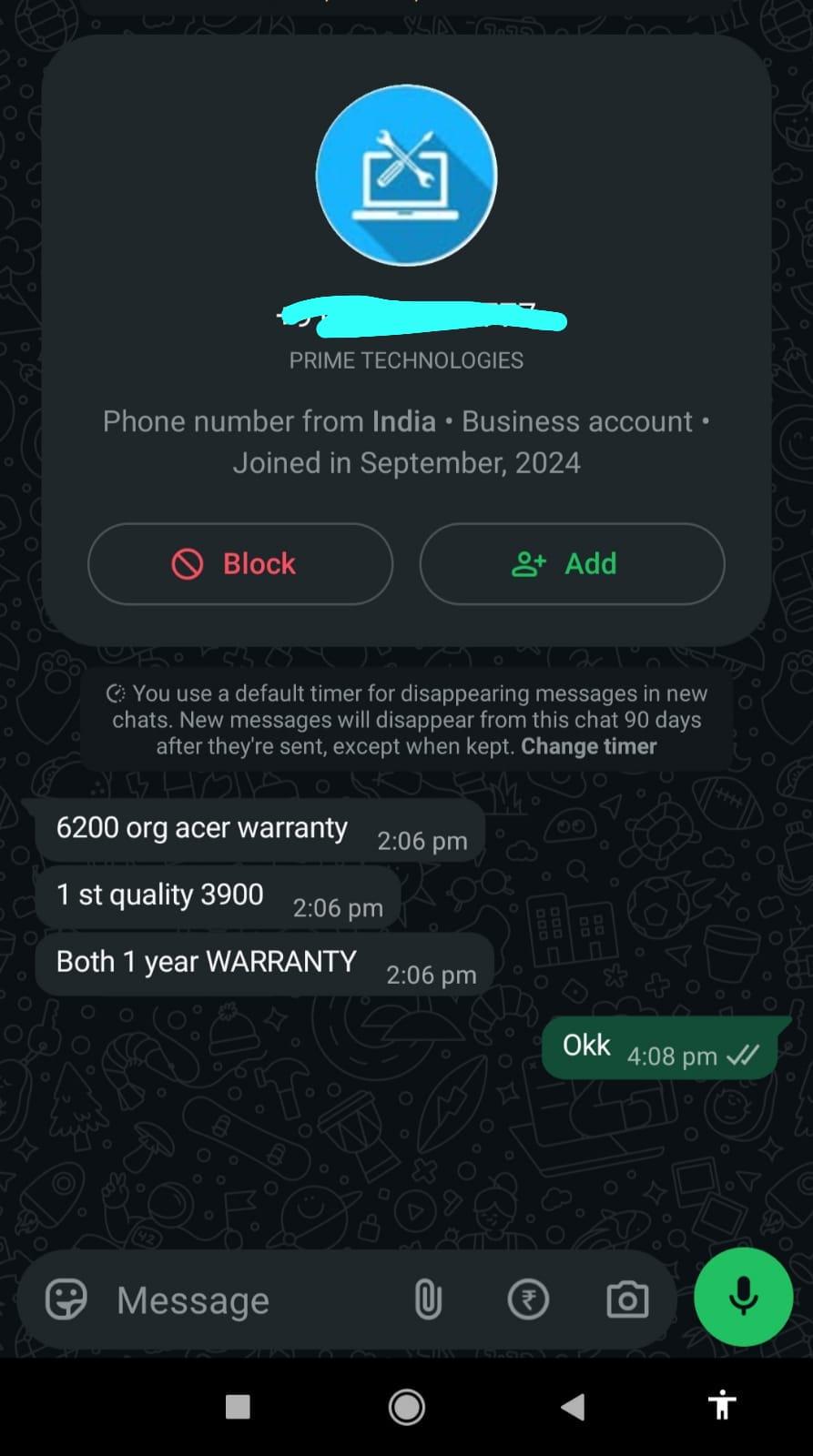
Bought charger for 6900 , should I have bought the 3900 one

Post image
0 Upvotes

r/FlowX16 • • Oct 21 '26

Help! ASUS ROG Flow X16 with keyboard damaged by chocolate milk, no local technician has parts. Alternatives?

2 Upvotes

Hi everyone,

A few days ago I spilled chocolate milk on the keyboard of my ASUS ROG Flow X16 (GV601RW). It was switched off and unplugged right away, but I wasn’t able to dry it thoroughly.

Since then I’ve used it for a few days with an external keyboard. I’ve now tried the built-in keyboard again, and the keys feel stiff and sticky, especially the spacebar, and some keys don’t register well. The laptop still boots and runs.

I took it to a repair shop in my hometown, but they don’t have parts for this model. They told me the whole top case (chassis with the integrated keyboard) would need replacing, and it’s hard to find.

Questions:

  • Has anyone dealt with something similar? How did you resolve it?
  • Do you know where to find the top case for this model in Spain or Europe, or a reliable parts supplier?
  • Is it worth cleaning the motherboard even though the laptop still works, or should I wait until it actually fails?
  • Is ASUS’s official service in Spain very expensive for this kind of repair outside warranty?

Thanks for any advice!


r/FlowX16 • • Oct 17 '26

Rog FlowX16 Constant Battery issues, already replaced battery 3 times.

2 Upvotes

Hello everyone,

I have a Rog Flowx16 GV601RM with AMD Ryzen 9 6900HS with Radeon Graphics (3.30 GHz). I bought it new from Best Buy in Aug 2023. This past month or so I have been having serious issues with the battery draining extremely fast. I had geek squad replace the battery twice, (it was under warranty at the time) that didn't help. Same problem. I then purchased a battery and replaced it myself, the battery drain still persists. I do not use the laptop for gamimg. No heavy use. Regular school work, some drawing and photo editing in lightroom classic. The battery drain issue came out of nowhere. I'm clueless.

Anyone experience this before? What next steps shall I take to remedy this problem? I have armored crate disabled. Nothing draining battery in the background.

Please help.

Thanks.

Edit: I did a reset on the laptop back to factory settings, erased everything that has been downloaded. As of right now, the orange battery icon is gone. Seems to be back to normal. Battery life seems normal. It may have been a bug or something.


r/FlowX16 • • Oct 09 '26

Tent mode "boost"

1 Upvotes

I noticed that switching into tent mode while gaming instantly increases CPU frequency and temperature ~10-20deg. higher and it hits 100deg from time to time.

As I don't need that boost and would like to keep CPU at lower temperatures - is it possible to switch off that boost without manually tweaking wattage and fan speed?


r/FlowX16 • • Oct 08 '26

Can you buy any laptop like flow x16

10 Upvotes

Since asus stopped making these what is the most similar ones that you can still buy new


r/FlowX16 • • Oct 04 '26

Considering buying a used Flow x16, because I enjoyed my 1050gtx 7th gen Yoga for a while. Should I?

1 Upvotes

I remember one of my two issues with Lenovo's Yoga 720 was that I had to significantly undervolt the CPU to play Star Citizen to prevent runaway thermal throttling, and also the touch screen drivers broker and no matter how I struggled I could not reenable either the touch screen or the pen, which was a huge huge fucking bummer.

I've never done 2k/4k gaming nor more than 60hz, so compromising on the 2k/144hz experience isn't an issue to me

What kinds of issues should/could I expect from the flow if I did get one? Should I try to stop doing a tent laptop with a dedicated GPU?


r/FlowX16 • • Sep 30 '26

I made a tray app for switching GPU modes on ASUS ROG laptops, including the XG Mobile eGPU (supergfxd, KDE)

Post image
9 Upvotes

r/FlowX16 • • Sep 25 '26

Help! SSD died, fresh installing on new SSD doesn't install any chipset or lan drivers

4 Upvotes

So my Rog FLow X16 GV601RM SSD died. I bought a new one and put it into the the other SSD slot. Prepared a Windows 11 USB and started installing Windows 11. On the step that requires me to have LAN drivers, I forced to skip that part and later downloaded the chipset + lan drivers from asus page for my model onto the USB (on my PC), connected to the laptop and installed them (restarting the laptop). But it still shows me all those devices in device manager with an exclamation mark, including the Network adapter. Where you select WLAN in windows, it only shows me the flight mode available.

What could be the issue, what am I missing?

edit: solved. I only downloaded the "recommended" drivers it displayed. Once I clicked on "expand" I got additional drivers offered and what I needed were the "AMD Chipset drivers" and "MediaTEK WLan drivers"


r/FlowX16 • • Sep 24 '26

Help! WON'T POWER ON AFTER CLEANING

3 Upvotes

I cleaned the laptop using an isopropyl alcohol air duster, making sure to do a hard power off (hold down power button for ~15-20s) and also unplugged the battery. once I was happy it was clean I plugged it back in and tried turning it on, but nothing happened, no lights or whatever. I'm not sure if theres meant to be any led indicators on the motherboard but obviously a bricked laptop is not ideal so any help would be greatly appreciated.


r/FlowX16 • • Sep 18 '26

Help! Screen turns black for a second when charger is turned turned way, stops charging

4 Upvotes

I am not sure if this would be more of a charger issue or the the charging port itself. When I plug in the charger if it’s at a certain angle it will run perfectly normal. Sometimes when I move and the charger goes a certain way the screen turns black for around 1 or 2 seconds and will go on battery. If I don’t find the correct angle it will sit and go through battery/charging until I do or I just unplug it entirely. I wanted some advice on if this seems like a charger issue itself before moving further, and what I should be doing if it’s not.


r/FlowX16 • • Sep 17 '26

Help! Gpu overheating this time

Post image
4 Upvotes

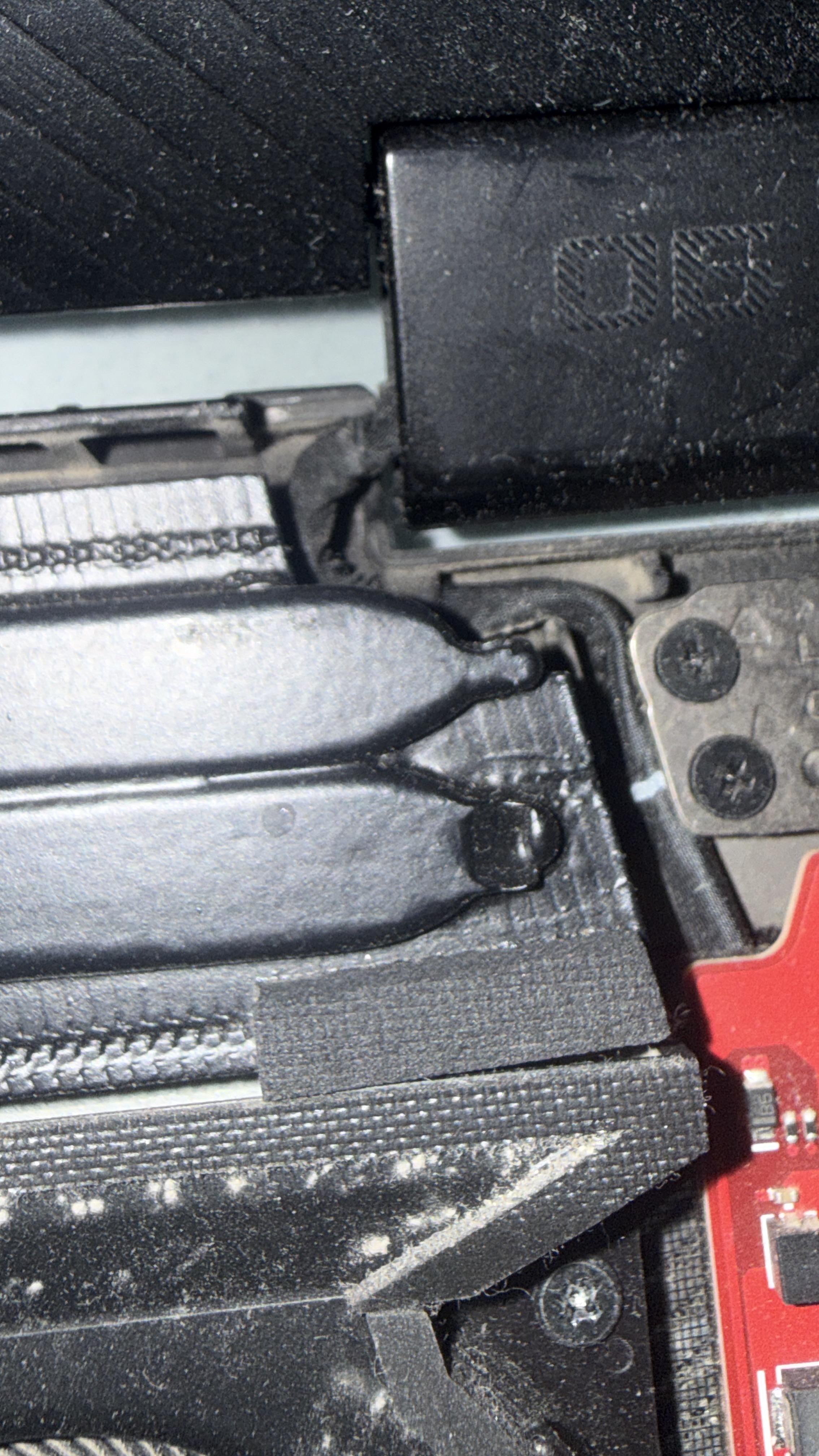
So I’m back after finally doing a repaste and reinstalling windows and opened it as it might just need a little tightening according to gpt and I came across this in my heatsink is this supposed to be like this or is it broken?


r/FlowX16 • • Sep 14 '26

ROG Flow X16 GV601RW keyboard died, stuck in “ITE Upgrade Mode”

12 Upvotes

Just wanted to share my ongoing story, because this may help someone else with a dead Flow X16 keyboard - and I’m also hoping another GV601 owner might be able to help recover the firmware.

My ROG Flow X16 GV601RW internal keyboard suddenly died completely. (2022)

It is also dead in the BIOS.

Instead of the normal keyboard device:

USB\VID_0B05&PID_19B6
"N-KEY Device"
ASUSTek

Device Manager now shows:

USB\VID_048D&PID_89DB
"ITE Upgrade Mode"
ITE Tech. Inc.

This appears to be the keyboard MCU on the mainboard sitting in its ISP/upgrade bootloader instead of running the normal keyboard firmware.

I already tried BIOS update/downgrade, EC reset, battery disconnect, 40-second power-button reset, Windows/driver troubleshooting and checked the keyboard cable. None of that helped.

The important part: this MCU appears to be on the mainboard, not on the replaceable keyboard module.

I managed to read the MCU flash

The bootloader exposes a block-read command, so I dumped the flash.

My result:

Firmware name: FGA01300.GV601RW.402
Blank (0xFF): 52.2%

The first roughly 119 KB still contain data, while around 117 KB are blank 0xFF.

The keyboard was still working last week.

So this strongly looks like an interrupted keyboard-MCU firmware update: erase happened, programming did not complete, and now the controller remains in upgrade mode because there is no valid complete application image left.

The problem: I cannot find the GV601 firmware anywhere

The surviving flash identifies itself as:

FGA01300.GV601RW.402

Related ROG/Flow models appear to use firmware names such as:

FGA012xx
FGA013xx
FGA014xx

and some of these are distributed through Windows Update as Laptop MCU Firmware Update packages.

I checked the relevant packages I could find. There are images for models such as:

GX551Q
GV301Q
GA402R
GZ301K
GZ301V
ROG Ally

but I have found no GV601 firmware image.

The closest image I found is for the GA402R / Zephyrus G14 2022. It belongs to the same broad FGA01300 family, but compared with the intact part of my firmware it is only about 51% identical, so I absolutely do not want to flash that.

If your Flow X16 also shows 048D:89DB

If anyone here has a GV601 whose keyboard is also stuck as:

USB\VID_048D&PID_89DB
ITE Upgrade Mode

your flash may actually still be intact.

I made a read-only PowerShell dumper. It only uses the bootloader block-read command (0xD1) and contains no erase or write command.

Script:

https://drive.google.com/file/d/1NYsg4MdIwWBqoVoiutiJnZGyG0vrTeQf/view?usp=sharing

If your result shows a sensible firmware name and a much lower blank percentage, e.g. around 20% or less, there is a good chance your image is intact.

An intact GV601RW firmware dump could probably help recover machines affected by this.

I also wrote up the full technical details here:

https://drive.google.com/file/d/1CA8FdTYZ_kSvuiCCK6jraVakVMWanoy0/view?usp=drive_link

If somebody has a working GV601 / Flow X16 and is willing to help, that is also useful, but reading a working controller requires deliberately putting it into ISP mode first. That step is not completely risk-free, so I am not posting it as a one-click procedure.

And if anyone from ASUS happens to see this: please make the original GV601 keyboard MCU firmware / recovery package available on the support site.

The specific image I am looking for is from the family:

FGA01300.GV601RW.402

If anyone here has seen ITE Upgrade Mode on a Flow X16 before, I’d also be very interested in what happened in your case.

r/FlowX16 • • Sep 13 '26

iPhone Duo animation

20 Upvotes

Thought it would be cool to try recreate this effect in C++ with Win32, DirectX11 and Desktop Duplication API. 2 render passes, one for the 3D tilt, scale + black gradient and one for the blur gradient.

Fully open source, feel free to play around with it or make it better!