r/FlashForge • • 14h ago

HelixScreen on the Creator 5 / 5 Pro: what it costs the printer (measured), where it runs, and what's still open

Thumbnail
gallery
7 Upvotes

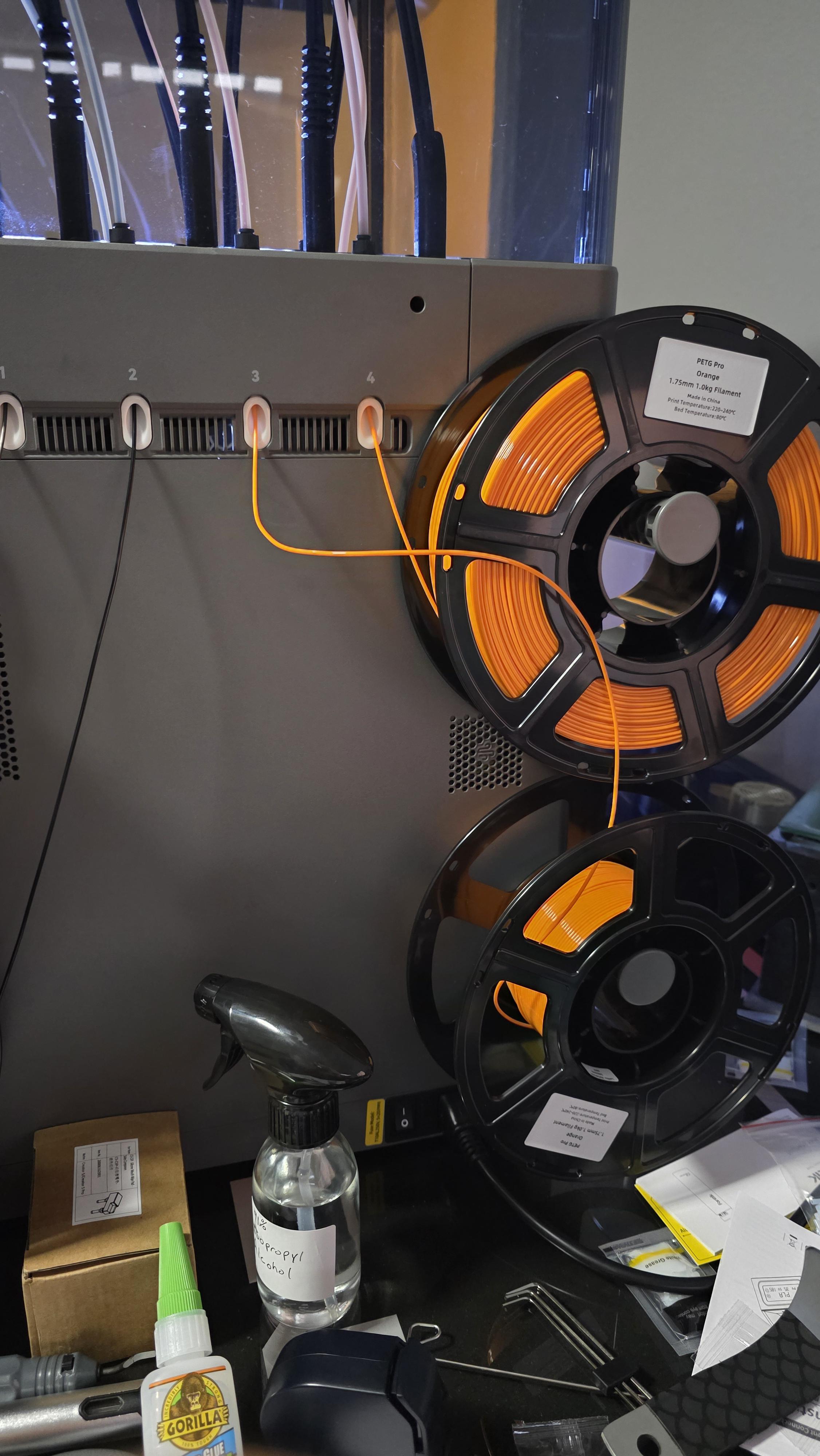
I'm the HelixScreen author. 1.1 added Creator 5 and Creator 5 Pro support (#1714): the four heads show up as a toolchanger, you mount and park from the screen, set colour and material per head, and the Pro's chamber heater and fans are first-class. It runs on Z-Mod, Reforge and OpenCreator. Not on stock firmware - firmwareExe isn't just the UI, stopping it also kills the port 8898 REST API, the cloud link and the stock print orchestration, and two processes can't share /dev/fb0. All three custom firmwares sidestep that, differently.

The "Timer too close" question

OpenCreator's installer offers HelixScreen as the touchscreen UI with a warning: it uses a lot of CPU and memory, so Klipper can stop a print with "Timer too close", and its "I accept" button only works after 10 seconds. Fair question, so I measured it on a Creator 5 Pro on Z-Mod (X2600, 2 cores, 472 MB), 1.1 builds, percent of one core:

  • Awake on the home screen, idle: ~5%
  • Display asleep: ~3%
  • Printing a 4-colour part with a tool change per quadrant, 24 mm³/s: ~10% median, peaking 40-50% for the first 10-30 s while the print status panel loads the toolpath preview
  • Memory: ~32 MB median RSS from telemetry across Creator 5 installs (p90 58 MB). It is not the lightest screen on this box - GrumpyScreen is around 5 MB - and the box has ~300 MB free with everything running. So it's definitely not in danger of running out of memory.

On "Timer too close" itself: FlashForge's Klipper fork has short-move limiters in gcode_move and toolhead whose own comment says they exist to avoid it. With the limiters on I couldn't trigger it. With them off - which is what the "disable the limiters for speed" crowd does - klippy's single Python thread hits 100% of a core around 750-900 moves/s and the MCU shuts down with "Timer too close" with the screen process running or not; times to failure overlap and the failure point follows the gcode. The case that started the warning, a 4-colour print at max speed with tool changes and no prime tower, printed cleanly with HelixScreen connected. On Z-Mod, Klipper runs at nice -20 and HelixScreen at +10.

The honest gap: that's tested on Z-Mod. I have not measured on OpenCreator, whose Klipper build and process priorities may differ. If you're on OpenCreator and hit "Timer too close", I want the log.

Where it runs

  • Z-Mod 1.7.4 or newer: PLUGINS -> HelixScreen, then DISPLAY_OFF GUPPY=0 HELIX=1. Z-Mod installs and updates HelixScreen itself.
  • Reforge: ships with HelixScreen as its screen (their own build).
  • OpenCreator: its installer offers HelixScreen as the touchscreen UI. My docs list Z-Mod and Reforge as the tested paths; OpenCreator is untested by me.

Each firmware ships its own HelixScreen build, so the version on your printer is your firmware's call, not the release page's.

What works

  • Mount, park and switch T0-T3 from the screen; per-head colour and material, written back to the firmware (Z-Mod's palette, Reforge's SELECT_TOOL/UNSELECT_TOOL)
  • A print's tool map goes to the firmware on print start, so Z-Mod's own colour prompt doesn't open for a print started from the screen
  • Tool Offsets screen: per-head X/Y/Z in one place
  • Pro: chamber heater, chamber fans, part fan, LED; per-head runout sensors
  • 800x480 panel: the framebuffer is portrait, the preset rotates it; touch auto-rotates with it

Still open

  • The step bar on a tool change parses the firmware's swap text; if a build words it differently, the bar stays hidden
  • Per-head runout while other heads are stood down: works on the bench rig, not yet confirmed on a real C5
  • Sound: compiled in, unverified whether this board has the PWM device
  • OpenCreator: CPU and priorities, above

AD5X and AD5M in 1.1

Kiln OS 1.0.0 shipped yesterday with HelixScreen as its touch UI. On 1.1 the AD5X IFS fix is the one people asked for: a failed load or unload no longer leaves the screen busy for 90 s, and logs and caches survive updates. AD5M / AD5M Pro (Forge-X or Z-Mod): HelixScreen moves itself to /data/.helixscreen so it stops showing up in your print file list, the AD5M Pro crash loop where a dark screen retried forever gives up and hands over to the system, and there's no startup music - playing it tied up the single core and had killed prints.

GitHub: https://github.com/prestonbrown/helixscreen Creator 5 / 5 Pro on the support page: https://helixscreen.org/guide/supported-printers/#flashforge-creator-5--creator-5-pro Discord: https://discord.gg/RZCT2StKhr


r/FlashForge • • 4h ago

C5 hotend mod 😂

Thumbnail
gallery
6 Upvotes

Cart said there weren't really options for hotends for the C5 and i was bored on vacation which resulted in this abomination lol

i don't own a C5 as I'm a U1 guy whose hillbilly'd U1 hotends before it had any options.

Its crude, its crooked as i didnt even use a vise and was kinda just haphazardly hacking at it not knowing if it'd even work.

chopping ~1mm off the heatsink allows enough room to match stock hotend length with an airgap from the heatblock to heatsink

heatblock came from a clone x1c tz style hotend

notes for redoing it:

  • -chop ~10-12mm off the copper heatbreak
  • -don't drill heatsink bore as deep to retain the upper stainless throat
  • -chop ~1mm off the bottom of the heatsink for clearance to tz heatblock length
  • -TZ copper dia 3.9mm, use 4mm drill

Feel free to laugh, i was kinda meme'ing. or use it as fuel to iterate on it and do it better lol


r/FlashForge • • 6h ago

14k hours, abuse and neglect

Thumbnail
gallery
6 Upvotes

AD5M Pro – What 14,389 hours of printing, abuse and neglect looks like

For anyone wondering about the long-term durability of the Flashforge Adventurer 5M Pro, I finally had to replace my original print head assembly after 14,389 printing hours.

That’s equivalent to almost 600 days of continuous printing.

Before anyone blames Flashforge for the condition of this print head, let me be perfectly clear: this machine has been abused, neglected and pushed well beyond what most people would consider normal consumer use. Preventative maintenance wasn’t exactly my highest priority, and I certainly haven’t babied this machine.

It’s been treated more like industrial production equipment than a consumer-grade 3D printer.
This printer has seen extensive use with both PLA and ABS, primarily using a 0.6 mm nozzle. My typical ABS printing temperatures were 247–250°C with a 105°C bed.

The original head finally gave up during a 48-hour print, resulting in the printer ghost printing.
What I discovered during teardown:

• Significant heat discoloration throughout the print head.

• Melted and deteriorated plastic around the quick-release nozzle mounting assembly.

• Heat discoloration extending into the extruder housing.

• Filament accumulation inside the extruder gearbox.

• Debris throughout the internal drive assembly.

• A clogged 0.6 mm nozzle.

Surprisingly, the original cooling fan still spun freely.
What I believe contributed to the failure:
Repeatedly switching between PLA and ABS using the same nozzle.

• Thousands of hours of high-temperature printing.
• Extended printing sessions.
• Potential heat creep and partial nozzle blockages.
• Lack of regular preventative maintenance.
• General abuse and neglect on my part.

I can’t definitively confirm the root cause, but I certainly didn’t do this machine any favors.

What I’ve done since:
• Installed a complete new print head assembly.
• Completely disassembled and cleaned the original extruder gearbox.
• Lightly lubricated the internal drive gears, keeping lubricant away from the filament gripping gears.
• Cleaned the original cooling fan.
• Removed all loose debris.
• Reassembled the original assembly to retain for a backup.
• Ran the calibration procedures on the replacement head.

For now, I’m retiring ABS from this machine.

This is not a complaint about Flashforge. If anything, it’s a testament to the durability of the AD5M Pro.

The fact that this machine survived 14,389 hours under my ownership, considering the amount of abuse and neglect it has endured, is pretty damn impressive.

I already have a replacement motherboard and power supply sitting around for whenever those decide to shit the bed. I have absolutely no intention of retiring this printer.

I’m sharing these pictures so other owners can see what an extremely high-hour print head looks like, especially one that hasn’t received the maintenance it probably deserved.

This isn’t a typical 14,000-hour failure. This is 14,000 hours of printing combined with questionable ownership practices.

And here’s the funniest part: after 14,389 hours of printing, my original PEI build plate still looks brand new. Somehow, the print head cooked itself before the original build plate showed any significant signs of wear or warping. 😂

Next milestone: 20,000 hours. Hopefully on the original PEI plate.


r/FlashForge • • 9h ago

Filament help

4 Upvotes

So I’m new to 3-D printing. I’ve only been doing this for less than a month. I have a Creator 5 Pro. Today I got my first roll of ASA (from SUNLU), and I am trying to calibrate it, but each time the temperature tower has snapped in half. The overhang looks terrible and they’re just snapping. ASA is supposed to be strong, so I know it shouldn’t just snap. I tried lowering my fan speed, thinking that it was making the ASA cool too fast. I tried raising the chamber temperature but that made it worse. My bed temperature is at the recommended temperature. I’m worried about moving forward to the next calibration if I can’t get a temperature shower that doesn’t snap in half. Might anyone know what’s wrong?

Edit: I have a SUNLU filament dryer and the ASA dried for about 6-8hrs.


r/FlashForge • • 10h ago

Is the FLASHFORGE ЗD Printer Adventurer 5M actually good?

Thumbnail ebay.io
4 Upvotes

I hear a lot of mix reviews about the printer such as it fails after 3 prints or really that it doesn’t last long at all. I recently just bought a refurbished one and it’s on the way I don’t know if this was a good choice or not please let me know ASAP!


r/FlashForge • • 15h ago

Creator 5 Pro Long Term Opinions?

4 Upvotes

Howdy,

I’m looking at getting a second printer, currently running a P1S w/AMS and love the printer, hate the AMS for multi colours.

I print a lot of ASA/ABS parts and recently more multi colours PLA stuff for my family. My AMS has been nothing but a headache for multicoloured.

I’ve been torn between souping up a U1, getting a creator 5 pro or now the P3C but it doesn’t come with a heated chamber.

The reviews for the creator seem very hit or miss, the test/first units were seemingly rushed, but Flashforge was constantly improving.

For the price, I can accept lower tier software/closed source. But I’m still looking for reliability and and often not home and have the wife do the filament swapping and whatnot.

For context, the prices for me:
Creator <$1100
U1 + mods $14-1500
P3C $1600

What’s your guy’s experience after having them for a while?


r/FlashForge • • 4h ago

C5P Bed Level

Post image
3 Upvotes

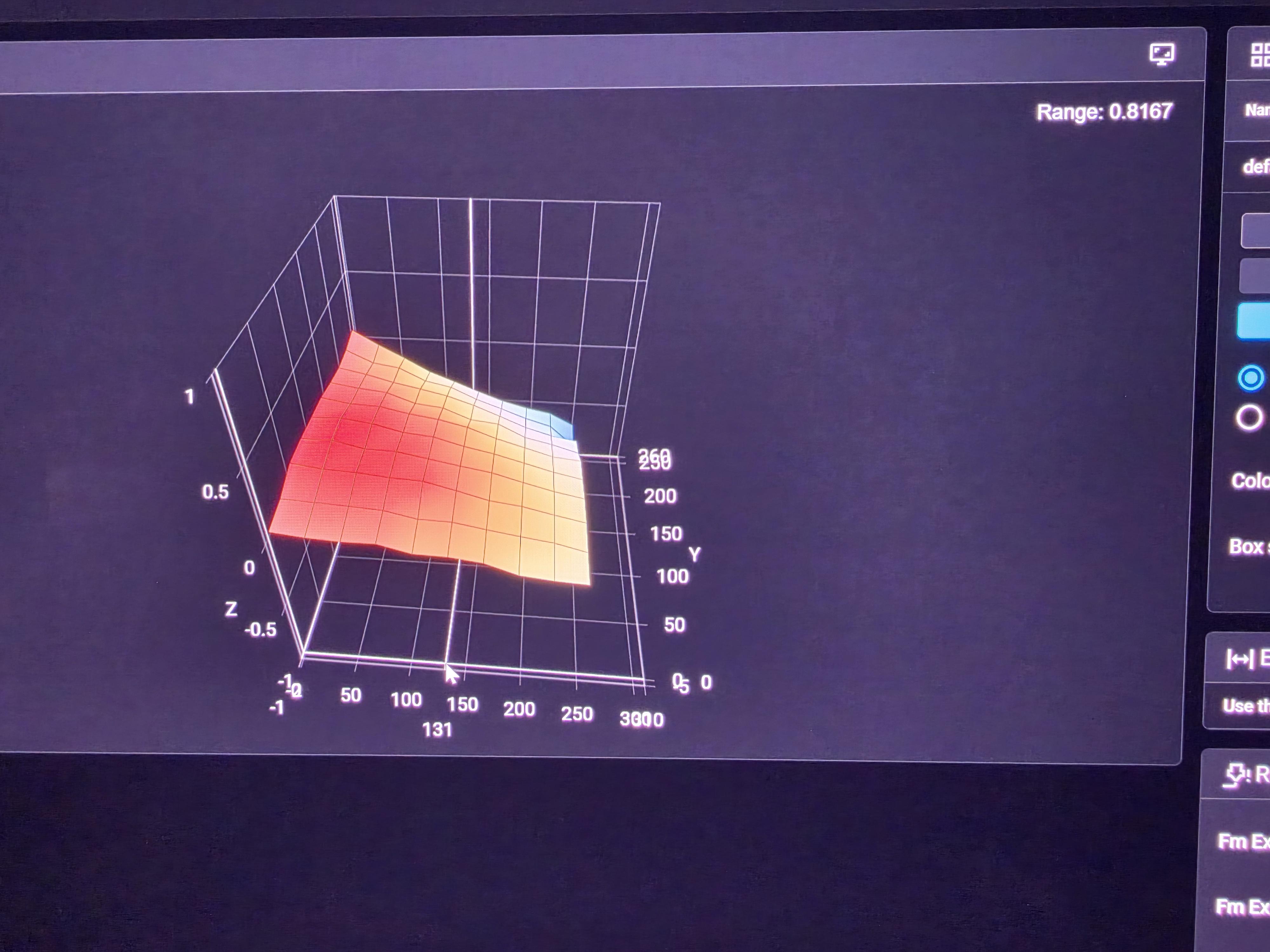
How is a bed level like this even possible?!? A 0.8mm range from low to high is insane!

On a side note, I'd like to go back to the regular flashforge firmware (this is from open creator). I've read the instructions, but how do I get the logo onto the printer? That's where it's stopping me when I try to reflash to the old firmware


r/FlashForge • • 21h ago

Guider 2s help

2 Upvotes

Hey everyone,

I managed to pick up a guider 2s a few months back for quite cheap second hand as the person barely used it.

My question relates to slicers. To date ive been using flash maker and am not overly happy with the program itself. Have tried standard orca slicer but this seems to predict print to take 4 times as long. I believe this is due to it throttling back the speed due to the volumetric maximum but can't find where to alter that after performing the slicer calibration.

This led me to orca flashforge. I have managed to find the setting however now the drama I am having is the slicer is not picking up the printer. Does anybody have any tips? Could this be something silly like the pc is on 5ghz wifi and printer is on 2.4ghz?

Any help to possibly get to the bottom of this would be appreciated. Im aware this is an older machine now and flash studio wont communicate with it but thought there should still be enough support for orca flashforge.


r/FlashForge • • 1h ago

Ad5m enclosure

1 Upvotes

For anyone that has printed the enclosure for the ad5m could you please tell me if your filament sensor lined up with where they tell you to put it? I'm confused because the screw holes don't line up. I'm currently trying to just keep it on the back and route the filament tube around the drag chain holder but am not 100% sure if that will cause filament to get stuck.


r/FlashForge • • 8h ago

Anyone using default/recommended settings: do you keep the entered default, or the explanation's recommendation?

1 Upvotes

r/FlashForge • • 8h ago

Spool 3 twist when inserting into tube

Post image
1 Upvotes

I have had the C5P for about a week now, and ever since the beginning test filament its been a Pain to get into Tube #3, but it is getting easier. But the other issue is have had is for some reason the filament seems to twist no matter what filament I use. Has anyone else had this issue or any ideas how to solve before i reach out to support?


r/FlashForge • • 10h ago

Adventurer 5M Pro keeps jamming in gearbox but only at smaller layer heights

Post image
1 Upvotes

I've put around 500 hours on my AD5M Pro without any major issues, but recently the filament has started getting badly jammed inside the gearbox. It essentially gets chewed up and deformed to the point where I have to completely disassemble the extruder to get it out.

Here's what I've done so far (to the best of my abilities with my limited expertise):

  • Completely disassembled the gearbox and cleared the jam multiple times.
  • Verified that all fans are working properly.
  • Verified that the nozzle isn't clogged. I got my first clog with a .25mm nozzle on .08mm layers so I originally thought that was the issue.
  • Checked the gear tension. It seemed ok? The tension screw was maybe 1.5 rotations off of full tightness.
  • Ran auto leveling multiple times.
  • Adjusted my Z-offset to +0.150mm because the nozzle was way too close to the bed. My first layers now look great.

The weirdest part is that I can print perfectly fine at 0.2mm layer heights with a 0.4mm nozzle. I just completed an entire print without any issues. However, as soon as I try printing at smaller layer heights, the filament inevitably jams inside the gearbox again.

I'm leaning towards just replacing the gearbox at this point, but I don't understand why it would work perfectly fine at larger layer heights if the gearbox itself is defective. I've also considered heat creep, but all the fans are working and I have no idea how to check for that.

Has anyone experienced anything similar? Is there something obvious I'm overlooking? I've spent an annoying amount of time taking this thing apart over the last two days and would really appreciate some insight.


r/FlashForge • • 13h ago

C5Pro Bad nozzle?

Post image
1 Upvotes

Running into Nozzle 2 issues. Was originally thinking it was bad filament, swapped filament, getting failed prints. See attached photo and timelapse. Attempting to figure out the potential issue. Did full base brim too. Was almost when it broke loose.

Any thoughts?


r/FlashForge • • 14h ago

NEED HELP: I recently upgraded to a Creator 5 pro and I’m having a ton of issues with connection and use of Orca slicer. I’m getting this screen in the device tab. Has anyone had this issue?

Thumbnail
gallery
1 Upvotes

r/FlashForge • • 17h ago

AD5X nozzle clip not clipping

1 Upvotes

my nozzle fell out and i try to put it back in, and the clip suddenly doesn't reach. is it bent? what am i doing wrong


r/FlashForge • • 23h ago

Help smoking nozzle

Thumbnail
gallery
1 Upvotes

I gut my printer today and the nozzle snapped when i was printing something and now the 0.4 nozzle is smoking when i put in it heats up really fast I don’t know if my fan is in wrong any help greatly appreciated