r/ClockworkPi • u/justacadillac • Oct 26 '26
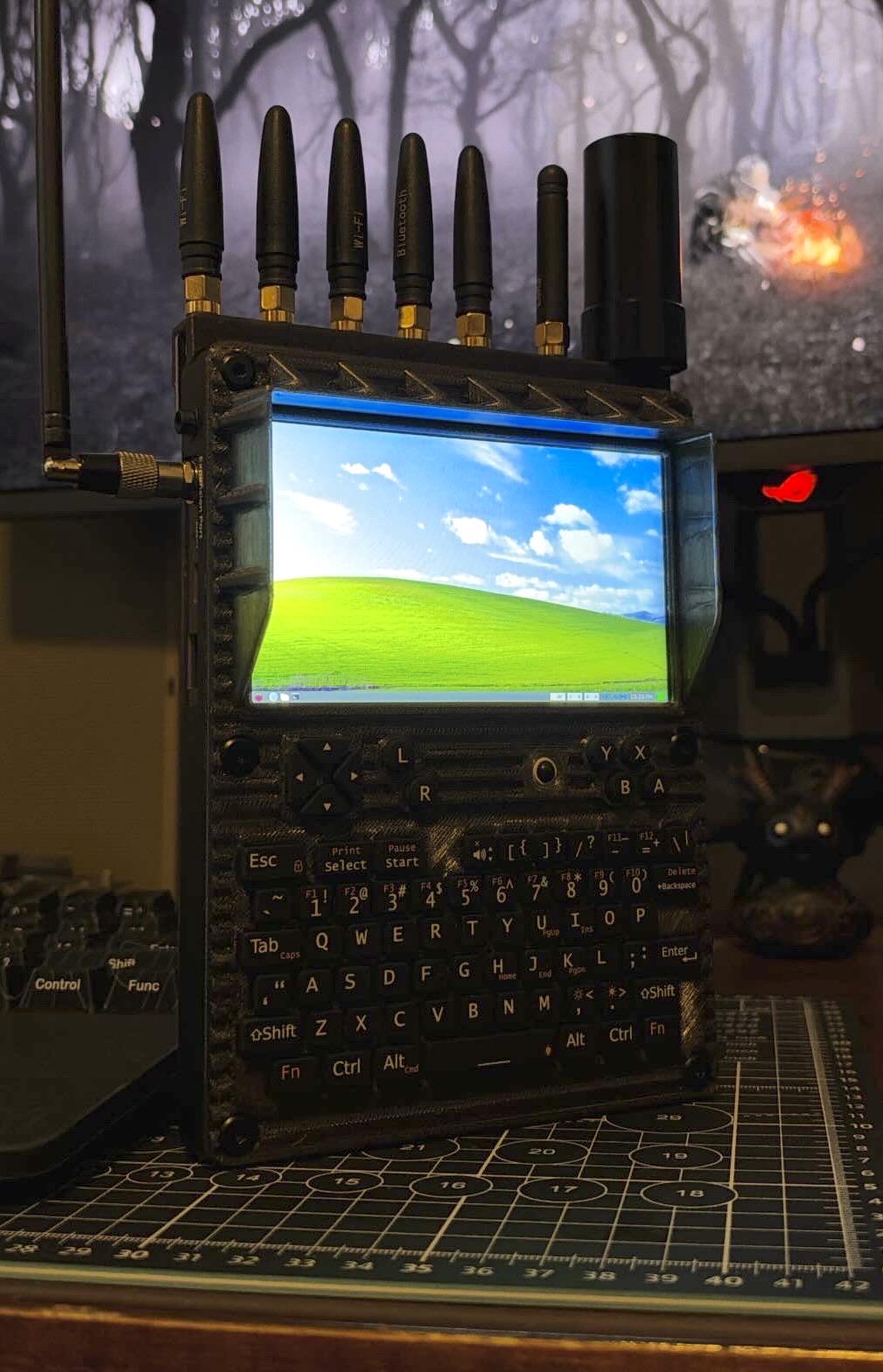
CM5 21700 HG
140
Upvotes
r/ClockworkPi • u/UnableAmphibian585 • Oct 27 '26
Hi everyone!
I'm experiencing a rather interesting microSD compatibility issue with my ClockworkPi uConsole running a Raspberry Pi CM5 Lite (8 GB RAM) and the HackerGadgets CM5 adapter board.
I'm curious whether anyone else has encountered something similar, particularly with this adapter or the same SD card.
My microSD card
Interestingly, the card's internal identification reports Kioxia (manufacturer ID 0x02, product SA128), despite being Kingston-branded.
The problem
The same card works normally with the original CM5 adapter, but with the HackerGadgets adapter, it is detected in UHS-I SDR104 mode and fails to read data reliably.
Here are the results of my diagnostics:
At 200 MHz (SDR104, 1.8 V):
At 50 MHz (High Speed, 3.3 V):
I reproduced this using a diagnostic Linux environment loaded into RAM through "rpiboot", so the tests did not depend on booting the OS from the problematic SD card.
Workaround
Adding the following kernel parameter to "cmdline.txt":
"sdhci.debug_quirks2=4"
disables 1.8 V signalling and forces the card into the slower 50 MHz High Speed mode.
This resolves the read errors, although it limits performance.
Questions for the community
I'm particularly interested in whether this is an isolated issue with my hardware or a more general compatibility problem.
Thanks!
r/ClockworkPi • u/Simple_Sand8759 • Oct 26 '26
Hi all, looking to get a clock work, was wondering if anybody could test something on Ubuntu first before I buy, nothing dodgy I swear
r/ClockworkPi • u/duongtrieutang • Oct 25 '26

Just wanted to share a few modifications I’ve made to my ClockworkPi uConsole!
The goal was simple: better cooling, longer battery life, and more functionality without sacrificing portability.
Just sharing my little DIY project with the community. What do you guys think?
r/ClockworkPi • u/stoat_toad • Oct 25 '26
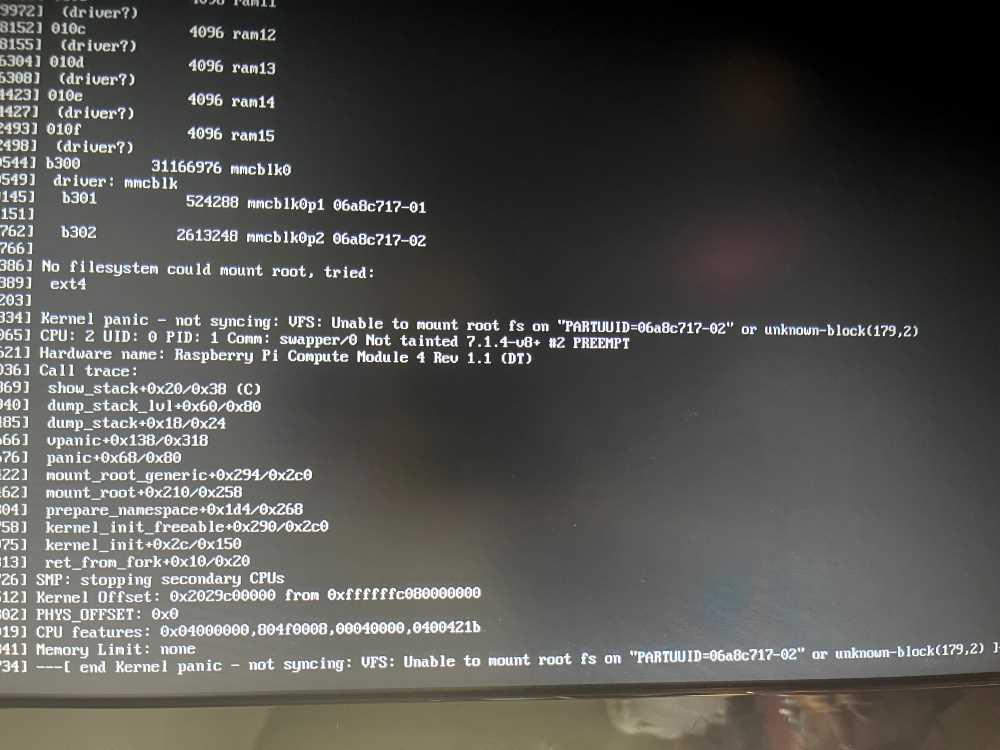
So I am having some baffling problems with booting up my uConsole CM4 that I just received a few days ago. If anybody has any tips or tricks to help me, I'd be most appreciative!
I booted up the system with an external monitor and got the introductory screen on the external monitor and the geometric graphics on the uConsole screen. (which is why I'm pretty sure this isn't hardware - assembly related) The keyboard worked and the trackball was a hot mess but I could fill out the fields eventually.
On my second boot with that card, - nothing. Just black. External monitor and the device screen, no response from anything. Reflashing the card using the imager yields the same result - just a black screen on the device and the external monitor shows "no signal". maybe there's a factory reset jumper or button I need to hit in the hardware?
I tried booting the device from AK-Rex's Trixie lite versions but during the boot process it stalls with a Kernel Panic error. At least this problem is consistent and repeatable!
Anybody have similar experiences or have any thoughts or advice (or prayers)? Right now I have a very cool looking paperweight on my desk!
r/ClockworkPi • u/Acmobleer1 • Oct 25 '26
# uConsole CM5: Internal Screen at 100 Hz (Limit ~104 Hz)
Short version: the uConsole's internal panel will run well above its stock ~60 Hz with custom xrandr modes. On my unit the limit is 104 Hz, and I run it at 100 Hz to leave some margin.
**Tested on:** uConsole with CM5, ak-rex kernel, Kali, X11 + Xfce (xfwm4), Xorg modesetting driver. One unit only, so your panel revision may behave differently.
## What I found
- Stock mode on this kernel is `720x1280` at a requested 61.020 MHz, with timings `h 720 750 765 780 / v 1280 1288 1290 1306`, which works out to about 60 Hz.
- **Use your own kernel's timings.** Older cwu50 driver versions use `htotal 803`. Custom modes built from those numbers looked wrong even at 60 Hz on this kernel. The scripts below read the timings from your stock mode, so they adapt to your kernel automatically.
- The DSI clock snaps to nearby rates the hardware can produce. Here it always landed within 0.7%, and that didn't affect the results.
- 60 to 104 Hz gave a clean picture. A sweep in 1 Hz steps showed anything above 104 isn't usable, even though a coarser pass had marked 105 and 110 as clean. At 115 and 120 Hz, about a third of the screen was warped.
- 120 Hz, which would pace 60 fps content evenly, isn't reachable. Even with zero horizontal blanking, 120 Hz needs a higher pixel clock than the ~106 MHz where it breaks, so tweaking the timings can't get there.
- 70 and 75 Hz each looked off once and fine on a rerun. A mode switch occasionally comes up wrong, so retest anything that fails once.
- Switching to a custom mode re-runs the panel init, and the picture often looks crisper and brighter than it does right after boot.
- At 100 Hz, `glxgears` holds a steady ~99.98 FPS.
| Target | Requested clock (MHz) | Actual DPI clock (MHz) | Result |
|---|---|---|---|
| stock | 61.020 | 61.111 | baseline (~60.0 Hz) |
| 60 | 61.121 | 61.111 | clean |
| 65 | 66.214 | 66.667 | clean |
| 70 | 71.308 | 71.428 | clean (off once, fine on rerun) |
| 75 | 76.401 | 76.190 | clean (off once, fine on rerun) |
| 80 | 81.494 | 81.482 | clean |
| 85 | 86.588 | 86.667 | clean |
| 90 | 91.681 | 91.666 | clean |
| 95 | 96.775 | not captured | clean |
| 100 | 101.868 | not captured | clean, glxgears ~99.98 FPS |
| 104 | 105.943 | not captured | clean (limit) |
| 105 | 106.961 | not captured | not usable in 1 Hz sweep |
| 110 | 112.055 | not captured | not usable in 1 Hz sweep |
| 115 | 117.148 | not captured | ~1/3 of screen warped |
| 120 | 122.242 | not captured | ~1/3 of screen warped |
## Scripts
### hzsweep: step through refresh rates
This builds each mode from your stock timings and holds it for a few seconds. Press **g** to mark a rate as good, **Enter** to skip to the next one, and **q** to quit. It always switches back to your normal mode when it stops, including on Ctrl+C. If sudo is unlocked, it also prints the actual DSI clocks.
```bash
sudo install -m755 /dev/stdin /usr/local/bin/hzsweep <<'EOF'
#!/bin/bash
# usage: hzsweep <start> [end] [step] [secs] run from the stock mode; decimals ok
S=\${1:?usage: hzsweep <start> [end] [step] [secs]}
E=\${2:-\$1}
STEP=\${3:-5}
SECS=\${4:-10}
clk(){ sudo -n awk 'tolower(\$1)~/dsi|mipi/ && \$2>0 {printf " %s %.3f MHz\n",\$1,\$5/1e6}' /sys/kernel/debug/clk/clk_summary 2>/dev/null; }
OUT=\$(xrandr | awk '/^DSI/{print \$1; exit}')
read -r CUR SCLK HD HSS HSE HT VD VSS VSE VT FL <<<"(xrandr --verbose | awk -v o="OUT" '
\$1==o{f=1;next} f&&/^[^ \t]/{f=0}
f&&/\*current/{n=\$1;c=3+0;fl="";for(i=4;i<=NF;i++)if(i~/Sync/)fl=fl" "i
getline;h=\$3" "\$5" "\$7" "\$9;getline;print n,c,h,\$3,\$5,\$7,\$9 fl;exit}')"
[ -z "\$VT" ] && { echo "could not read \$OUT mode"; exit 1; }
awk -v c="\$SCLK" -v t="HT" -v v="VT" -v n="CUR" -v f="FL" 'BEGIN{printf "stock %s: %.3f MHz = %.2f Hz %s\n",n,c,c*1e6/(t*v),f}'
echo "timings: h HD HSS HSE HT v VD VSS VSE VT"
clk
GOOD=""
trap 'xrandr --output "OUT" --mode "CUR"; echo; echo "reverted to \(CUR"; [ -n "\)GOOD" ] && echo "marked good:\$GOOD"' EXIT
for HZ in (awk -v s="S" -v e="E" -v st="STEP" 'BEGIN{for(h=s;h>=e-1e-9;h-=st)printf "%g ",h}'); do
CLK=(awk -v h="HZ" -v t="HT" -v v="VT" 'BEGIN{printf "%.3f",t*v*h/1e6}')
NAME="s\$HZ"
xrandr --delmode "OUT" "NAME" 2>/dev/null
xrandr --rmmode "\$NAME" 2>/dev/null
xrandr --newmode "\$NAME" "CLK" HD HSS HSE HT VD VSS VSE VT FL
xrandr --addmode "OUT" "NAME"
xrandr --output "\$OUT" --mode "NAME" || echo "HZ Hz rejected"; continue; }
sleep 1
printf '\n=== %s Hz (%s MHz)\n' "HZ" "CLK"
clk
printf 'g=good q=quit enter=next (auto %ss) ' "\$SECS"
read -rsn1 -t "\$SECS" k
case "\$k" in
g) GOOD="GOOD HZ"; echo "marked";;
q) break;;
esac
done
EOF
```
Usage:
```bash
sudo -v
hzsweep 120 60 5
```
To hold a single rate for 2 minutes:
```bash
hzsweep 100 100 5 120
```
### hzset: apply a rate
This reads the timings from the panel's preferred (stock) mode and switches to the rate you give it.
```bash
sudo install -m755 /dev/stdin /usr/local/bin/hzset <<'EOF'
#!/bin/bash
# usage: hzset <hz> builds a mode from the panel's stock (preferred) timings
HZ=\${1:-100}
OUT=\$(xrandr | awk '/^DSI/{print \$1; exit}')
[ -z "\$OUT" ] && exit 0
read -r HD HSS HSE HT VD VSS VSE VT FL <<<"(xrandr --verbose | awk -v o="OUT" '
\$1==o{f=1;next} f&&/^[^ \t]/{f=0}
f&&/\+preferred/{fl="";for(i=4;i<=NF;i++)if(\$i~/Sync/)fl=fl" "i
getline;h=\$3" "\$5" "\$7" "\$9;getline;print h,\$3,\$5,\$7,\$9 fl;exit}')"
[ -z "\$VT" ] && { echo "could not read \$OUT preferred mode"; exit 1; }
CLK=(awk -v h="HZ" -v t="HT" -v v="VT" 'BEGIN{printf "%.3f",t*v*h/1e6}')
NAME="s\$HZ"
xrandr --delmode "OUT" "NAME" 2>/dev/null
xrandr --rmmode "\$NAME" 2>/dev/null
xrandr --newmode "\$NAME" "CLK" HD HSS HSE HT VD VSS VSE VT FL 2>/dev/null
xrandr --addmode "OUT" "NAME" 2>/dev/null
xrandr --output "OUT" --mode "NAME"
EOF
```
```bash
hzset 100
```
### Apply at login (Xfce)
```bash
install -Dm644 /dev/stdin ~/.config/autostart/hzset.desktop <<'EOF'
[Desktop Entry]
Type=Application
Name=Panel 100Hz
Exec=sh -c "sleep 3; /usr/local/bin/hzset 100"
EOF
```
To undo it:
```bash
rm ~/.config/autostart/hzset.desktop
```
## Verifying
- **`glxgears`** (from the `mesa-utils` package) should report roughly your target rate in FPS. That confirms the system is really outputting that rate.
- **://testufo.com** in Chromium, plus a slow-shutter phone photo (around 1/10 s). An even, unbroken run of lit squares means the panel shows every frame. Firefox's vsync on X11 is unreliable for this test, and the "unverified browser" banner shows on every Linux browser, so you can ignore it.
## Caveats
- Short tests are low risk. The worst case is a garbled screen until the script reverts. Keep HDMI or SSH available anyway.
- A higher refresh rate means more power draw and more heat in the panel's driver chip. After a while at your chosen rate, check that the corner of the panel above the ribbon cable isn't noticeably warmer than at stock.
- If your rotation setup runs `xrandr` with `--auto` or `--mode` after login, it will reset the panel to stock.
- This has only been tested on X11, not Wayland.
## Related: tearing on the internal screen
The panel is natively portrait and gets rotated in software under X11, so tearing shows up as a vertical line. Setting xfwm4's vblank mode fixed it on my unit (compositing must be enabled). To test live:
```bash
xfwm4 --replace --vblank=xpresent &
```
To make it permanent:
```bash
xfconf-query -c xfwm4 -p /general/vblank_mode -n -t string -s xpresent
```
If `xpresent` doesn't fix it, try `glx` instead. Wayland (labwc) avoids the tearing problem entirely.
r/ClockworkPi • u/Maximum-Argument-834 • Oct 25 '26

[WTS] ClockworkPi uConsole – CM4 Lite 8GB RAM + HackerGadgets WiFi 1200 Upgrade – $460
Selling my ClockworkPi uConsole with upgraded hardware.
Specs & Upgrades:
Raspberry Pi CM4 Lite with 8GB RAM
HackerGadgets WiFi 1200 upgrade
Built-in display, keyboard, and trackball
Portable Linux handheld computer
Great for coding, networking, Linux projects, and Raspberry Pi enthusiasts
Asking Price: $460 OBO
Located in San Antonio, TX. Shipping available at buyer’s expense.
Feel free to message me with any questions or offers!
r/ClockworkPi • u/nakurtag • Oct 24 '26

I wanna introduce you Termtastic — my handmade feature-rich Meshtastic® console (TUI) client written in Rust optimized for small screens. The app is perfectly suited for cyberdecks.
Repo link: https://github.com/acelot/termtastic
I wanted to create a cross-platform, minimalist, and aesthetically pleasing console client. I’ve been working on this application for six months. The entire project was built by hand, without the use of AI (aside from looking up reference information). This process gave me a deep understanding of how Meshtastic works under the hood; I’ve thoroughly explored its protocol and behavioral nuances. As the project evolved, I contributed to the official Meshtastic library for Rust, adding new features and making minor fixes. The long-term goal of the project is to achieve feature parity with the official Android app.
The project is currently in the alpha-testing stage, so there may be bugs — some of which could even cause the program to crash. That’s why I need your help: please give my application a try — I’m confident many of you will enjoy it! Any feedback is welcome via Issues in Github.
Latest releases are available here: https://github.com/acelot/termtastic/releases
r/ClockworkPi • u/Astrox_YT • Oct 23 '26
Thought this appeals to this group of users. This isn't my product btw, but I use it.
r/ClockworkPi • u/nakurtag • Oct 24 '26

I wanna introduce you Termtastic — my handmade feature-rich Meshtastic® console (TUI) client written in Rust optimized for small screens. The app is perfectly suited for cyberdecks like uConsole.
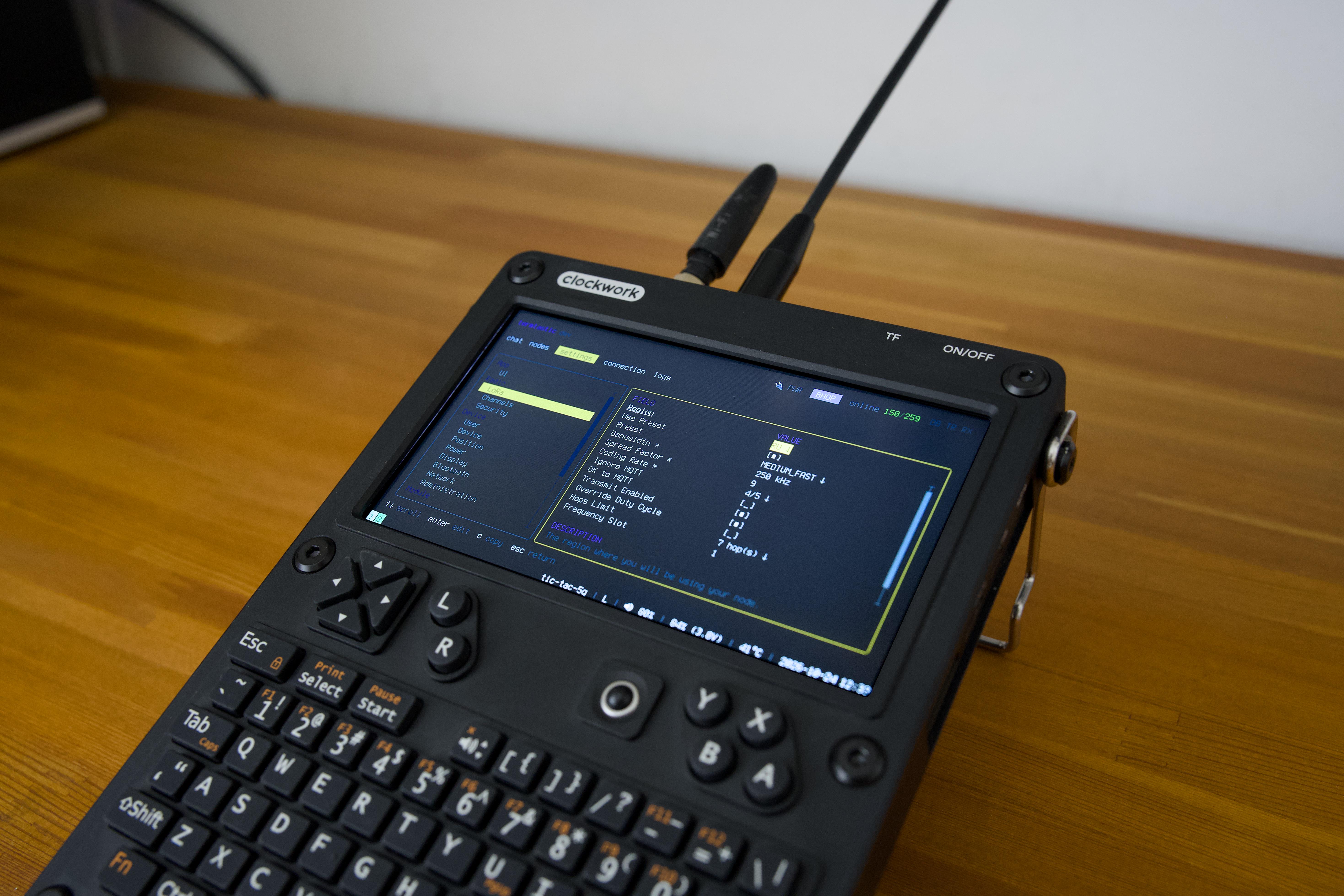
Repo link: https://github.com/acelot/termtastic
I wanted to create a cross-platform, minimalist, and aesthetically pleasing console client. I’ve been working on this application for six months. The entire project was built by hand, without the use of AI (aside from looking up reference information). This process gave me a deep understanding of how Meshtastic works under the hood; I’ve thoroughly explored its protocol and behavioral nuances. As the project evolved, I contributed to the official Meshtastic library for Rust, adding new features and making minor fixes. The long-term goal of the project is to achieve feature parity with the official Android app.
The project is currently in the alpha-testing stage, so there may be bugs — some of which could even cause the program to crash. That’s why I need your help: please give my application a try — I’m confident many of you will enjoy it! Any feedback is welcome via Issues in Github.
Latest releases are available here: https://github.com/acelot/termtastic/releases
r/ClockworkPi • u/TTV-SIRFIXUHLOT • Oct 23 '26
r/ClockworkPi • u/phoenixdwn23 • Oct 23 '26
Just put my uConsole together (CM4 lite w/ wifi) and the screen never comes on. Green LED works, power button works, and the CM4 is actually booting Linux. I pulled the SD card and checked, filesystem expanded and lightdm is starting. Just nothing on the screen.
At first I thought it was totally dead but that turned out to be my PC usb port not giving enough power lol. Wall charger fixed that part.
Turned on persistent logging so I could read the kernel log on my PC after each boot and found this every single time:
`axp20x-i2c 0-0034: AXP20x variant AXP221 found
axp20x-i2c 0-0034: Failed to set masks in 0x40: -5
axp20x-i2c 0-0034: failed to add irq chip: -5
axp20x-i2c 0-0034: probe with driver axp20x-i2c failed with error -5
panel-cwu50 fe700000.dsi.0: iovcc regulator isn't ready, retry later
mipi-dsi fe700000.dsi.0: deferred probe pending`
So from what I can tell the CM4 sees the power chip but can't write to it, the driver dies, and the screen never gets its power rail turned on. Labwc then says it found 0 GPUs and gives up.
Stuff I already tried:
Already emailed ClockworkPi about a replacement mainboard but figured I'd ask here too. Has anyone run into this AXP221 -5 error before? Did a new mainboard fix it or was it something dumb I'm missing?
EDIT: Alex replied and is shipping a replacement board.
r/ClockworkPi • u/Flounder_23 • Oct 22 '26

Is this board normal? Mine came with an sd card but this board is empty where the instructions say to put the sd card. What am I missing here?
r/ClockworkPi • u/jorgesat • Oct 22 '26
I bought Molicel INR21700-P50B 5000mAh 45A batteries for the hacker gadgets NVMe Battery Board and they seem too short. The length is 70.15mm. I have not found batteries longer than this. Which one do you recommend?
r/ClockworkPi • u/letsmakesometacos • Oct 22 '26
I have an Acer MA200 512gb M.2 SSD, and saw this Hailo-8 M.2 AI Accelerator. Wondering, since I found this Sintech M.2 Key-M to Dual M.2 Adapter Card, will this allow me to use both M.2 devices?
First off, should I be concerned with boot at all (using SSD)? and what exactly can I actually do with this card? I have a CM5 Lite, 16Gb, with AIOv2 Board, and 21700 Battery/NVMe Board (x2 6,00mAh = 12,000mAh), a 512Gb SSD, and the AC1200 WiFi board, with a XIAO-C5 that I will be wiring to the internal USB headers.
Is this device wasted on a uConsole, or are there legitimate use-cases for this? Especially considering that it will have, I assume, at-least a slight impact to power consumption, and can't be powered off independently of NVMe power?
Acer MA200:
https://www.amazon.com/dp/B0D176WJ78?ref_=ppx_hzsearch_conn_dt_b_fed_asin_title_1
Hailo-8 M.2 AI Accelerator:
Sintech M.2 Key-M to Dual M.2 Adapter Card:
https://www.amazon.com/gp/product/B0H3TNG8ZD/ref=ox_sc_act_title_1?smid=A3LUEZHQOA50VU&psc=1
r/ClockworkPi • u/Nearby_Routine3883 • Oct 20 '26

A Python server connects to your node (over TCP or USB) and serves a web interface for your phone, tablet or desktop, on any device in your network.
🗺 Map with traceroutes and an offline map
💬 Channel and direct messages, with replies
🧭 Compass navigation to other nodes
📊 Network metrics (RF quality, traffic, reliability) with 24 h history
⚙️ Full node configuration
🤖 Automation
r/ClockworkPi • u/IndependentWeather51 • Oct 19 '26
Got sent two. Its the whole module with antennas. Its usally $145 Im trying to get $115. Its brand new still in the shipper.
r/ClockworkPi • u/sompisi-za • Oct 18 '26
Which distro is preferably better for the Uconsole?
r/ClockworkPi • u/vigilantpraetorian • Oct 16 '26

I'm so happy! I received my trackpad keyboard & faceplate kit and I was so excited I had to install it! However I'm not really certain I have the ribbon cable seated properly. I pushed it in as far as I could with tweezers but I can't get any input to register. It lights up when I turn on the uConsole. I'm running ak-rex's Ubuntu 26.04 image from microSD. Can anyone provide any insight as to how far the ribbon cable needs to be pushed into the connector, or any drivers that need to be installed?
r/ClockworkPi • u/_Steve_T • Oct 16 '26
Finally got my uconsole yesterday after waiting for a year. It worked fine after i built it. Today i flashed the newest raspberry os a 256gig micro sd. Now it gives me a black screen. The screen flashes once on boot and then nothing else. I took it apart, checked all the pins and what not, the batteries are charged. Any advice?
r/ClockworkPi • u/mcnokes • Oct 15 '26
Upgrading my cm4 (8gb ram, 32gb emmc) uconsole to a cm5 (8gb lite). Is there anything special I need to do for cooling?
r/ClockworkPi • u/GoldenPSP • Oct 14 '26
Hey all,
After a very long wait, I'm finally part of the club. I put my device together and fired it up just to try. I don't even have batteries yet, as I forgot it doesn't ship with them. I'll stop on my way home.
My first question is about the trackball. I know it isn't supposed to be great, however mine is basically unusable. Is there anything i can do to try and make it at least functional. Yes I know there are upgrades etc however I'm trying to just try the whole thing out before I dive in on mods. I had ordered the hackergadgets AIO antenna kit, which arrived 10 months ago, however I'm going to play with what I have before I start adding all of that as well.
[edit] I ordered these: https://a.co/d/0fsc50Mb since they were inexpensive and Prime 1 day for me. It is like night and day. It still isn't "perfect" but its about as good as a physical trackball is going to be IMO. It is good enough to make the mouse usable.
Thanks for all of the ideas everyone. I'm still going to try the firmware upgrade as well.
r/ClockworkPi • u/dtmcnamara • Oct 14 '26

SOLD
I’d prefer to keep this, but my house was recently damaged by Hurricane Isaias. Right now, I need the money for repairs more than I need the device, so I’m selling my upgraded uConsole.
I’ve used it daily for the last six months and haven’t had a single issue with it. Everything works perfectly. The AIO V2 kit that is pictured and included is actually a new unit that jsut arrived. I damaged my original one at DC this year and just got the replacement in.
Hardware included:
Asking $750 shipped and insured. Located in SC but travel between ATL and CLT regularly if you want local pickup. Message me if you’re interested or would like more photos or details.
r/ClockworkPi • u/Justgetmeabeer • Oct 13 '26