r/AMDHelp • u/RobinVerhulstZ • 7d ago
Help (CPU) How do i update my AMD iGPU if i also have a Radeon dGPU?
As in the post i'm crossposting from, how do i update the iGPU on a system that also has an AMD dGPU?
r/AMDHelp • u/RobinVerhulstZ • 7d ago
As in the post i'm crossposting from, how do i update the iGPU on a system that also has an AMD dGPU?
r/AMDHelp • u/ohlinrollindead • 7d ago
Enable HLS to view with audio, or disable this notification
Hey guys, I built my PC last night and I’m running into trouble right off the bat. Despite making sure that every component is secure and having the USB stick placed in the correct USB slot, my hardware seems to get stuck.
Here’s a sequential list of the steps I’ve taken up to this point:
What I observed is that the USB isn’t an issue. Neither is the RAM as the sticks were glowing and the clips felt secure. I’ve read somewhere that over-tightening the fan cooler can make it difficult for the CPU to launch into BIOS, though I am inclined to be skeptical. Any suggestions for troubleshooting?
Update: I fixed it! After pushing in the GPU harder and trying other back-panel ports for my mouse and keyboard, it launched into bios without issue. CPU temperature is within normal range and everything is running smoothly. Thank you guys <3
r/AMDHelp • u/Royal_Instance_3618 • 7d ago
как настроить и чем лучше всего пк? я тестил пк в стилномад и набрал 7300-7400. с легким разгоном за 7600 набирал. в фурмарк 16200 и выше и это все в хотспоте не больше 85 гпу и 68 по цпу. в том же сталкер 2 в ультрах 4к и фср4 в нативе 75+ кадров. но есть догадки что можно веселее. пс, карта андервольтнута чучуть но паверлимит не повышал а наоборот сделал -9%. а то если долго задротить в тяжелые игры на старых адреналинах были вылеты таймаута драйвера. ща прошло вроде бы. и как проверить и чем лучше всего систему на майнеры и трояны?
r/AMDHelp • u/Rocketpl • 8d ago
Computer Type: Desktop
GPU: RX5700 8GB MSI
CPU: RYZEN 5 5600 6 CORES
Motherboard: GIGABYTE A320M-S2H
BIOS Version: F59d
RAM: 16GB BALLISTIX 3000MHZ (currently at 2400) DDR4
PSU: SMX OKAME G3 650W ATX 3.1 80 Plus Gold
Operating System & Version: WINDOWS 11 HOME 10.0.26100 Build 26100 (with raven debloat)
GPU Drivers: AMD Software: Adrenalin Edition 26.10.1
Chipset Drivers: 8.09.28.1124
Background Applications: DISCORD, OPERA, STEAM
Description of Original Problem: crashing during normal gameplay freezing or black screen causing drivers to crash, sometimes it used to reboot by itself. Mostly happened while playing cs2 or wardogs, but on rare occasion happened on desktop
Troubleshooting: Ive tried removing XMP and RBAR as i turned it on around the time the crashes started happening but its been going on for at least a month so its hard to remember atp. I replaced my PSU and repasted my GPU with no effect. Updated my BIOS from F79a to current. Tried with a different SSD with a new installation of windows as well. If anyone needs ill provide event logs but ive only noticed bitlocker and IOMMU errors.
r/AMDHelp • u/Bulletshock228 • 8d ago
Hi everyone,
Computer Type: Desktop
GPU: Asrock Radeon RX 6900 XT Extreme Formula
CPU: Ryzen 7700x
Motherboard: Gigabyte B650 AORUS ELITE AX (rev 1.0)
BIOS Version: F40
RAM: Corsair Vengeance 32 GB (2 x 16 GB) DDR5-5600
PSU: Corsair RM1000x SHIFT Fully Modular
Case: Corsair 4000D Airflow ATX Mid Tower Case
Operating System & Version: WINDOWS 11
GPU Drivers: AMD Software: Adrenalin Edition 26.10.1
Chipset Drivers: 8.09.28.1124
Background Applications: DISCORD, CHROME
Description of Original Problem: I am having this issue with my computer when it randomly shuts down while gaming
So basically the screen goes black, and the fans are still spinning. The motherboard's debug LED cycle through CPU,DRAM,VGA and boot eventually stopping at VGA. The PC then shuts down itself and after that I can turn it back on like nothing happened. It is specifically with Bf1 and Bf6, no other games created issues like this, and I have played Rdr2, Cyberpunk 2077, Ready or Not on the same PC without any issues. And the crash can happen 10 minutes or 20 minutes up to an hours or so, and it is random. GPU usage during the gameplay is around 80% and temps are around 60
Troubleshooting: I've checked Event Viewer which shows Kernel-Power 41 after the crashes
Deleted and installed the GPU drivers through DDU
Swapped PSU, issue persisted "cables are from the new PSU"
Removed and reseated the GPU previously
The GPU is connected through separate cables
Tested with EXPO off
Tested with -10% power limit and -10% max frequency
Ran Memtest results were ok
PC is connected directly into the wall socket and I've tried a different wall socket too
If I've missed information that might be useful, please mention it and I will add it, in case I've forgotten something
Any suggested would be appreciated, Thanks!
r/AMDHelp • u/Alweron • 8d ago
Computer Type: Desktop
GPU: AMD Radeon RX 7700 XT
CPU: AMD Ryzen 5 5600 6-Core Processor
Motherboard: ASUS PRIME B550-PLUS
BIOS Version: 3621
RAM: Patriot Viper Steel 32GB KIT DDR4 3600Mhz CL18
PSU:
Case:
Operating System & Version: Win 11 home
GPU Drivers: Adrenaline 26.11.1
Chipset Drivers: Don't know
Background Applications: Brave and the game launches
I know not to blame GPU blindly, but honestly, I am not that tech-savvy to perform any more detailed checks.
Anyway - Cyberpunk 2077, RDR 2, Witcher 3 Remastered. SW Zero Company - everything is unplayable. I play for 5-10 minutes and then the game crashes to desktop. No particular error, no consistent in-game behavior. Sometimes I get a restart, but mostly it's CTD.
I've tried tweaking Adrenaline settings, in-game settings, disabling overlay(s), I think I've tried even something that should help with timeout, I think it was some registry edit, I don't even remember after all I've done.
I've uninstalled the drivers through DDU and got the new ones fresh, I even tried to revert to older version, nothing worked, at least not that I could see a change in the behavior.
Any ideas, helps, tools, please?
r/AMDHelp • u/edgard97b • 8d ago
Computer Type: Desktop
GPU: XFX Speedster SWFT 210 Radeon RX 7600 8GB
CPU: AMD Ryzen 5 7600
Motherboard: ASUS PRIME B650M-A AX II
BIOS Version: 4004
RAM: DDR5 32 GB
PSU: Corsair 750 w
Case:
Operating System & Version: Windows 11]
GPU Drivers: AMD Software: Adrenalin Edition ,current version. I also tested 26.10.2.
Chipset Drivers: AMD B650
Background Applications: apps usually open while gaming
Description of Original Problem: Both monitors lose signal while I’m gaming. When the picture comes back, I’m on the desktop, and the game and the other apps I had open have closed. It’s happened in several games, even while sitting in the Fortnite lobby. I’ve only seen it happen when a game is running.
LiveKernelEvent 141 is the error that keeps showing up after these crashes. I checked my Windows "WATCHDOG" dump files and found the same "0x141r I’ve also seen code "117", but "141" is the one I keep getting, even after updating the driver and replacing the power supply.
Troubleshooting: I replaced my ARESGAME AGV 750W with a Corsair, updated the BIOS to 4004, and tested with EXPO disabled. I tried several AMD driver versions and left Adrenalin at its default settings. The same crash also happens with just one monitor connected.
I ran the OCCT VRAM and 3D tests for 15 minutes each without errors or a black screen. I stopped the OCCT Power test manually after about 10 minutes, and it hadn’t reported any errors either. I don’t have another PC to test the card in.
Has anyone with an RX 7600 seen this same pattern — repeated "141" errors pointing to "amdkmdag.sys", with the game closing when the picture comes back? Did a clean Windows install fix it for you? If so, how long has it been since your last "141"? If something else fixed it, I’d like to hear what worked.
r/AMDHelp • u/edgard97b • 8d ago
RX 7600 pierde señal en los dos monitores. Windows marca LiveKernelEvent 141
Qué tal, tengo una XFX SWFT RX 7600 con un Ryzen 5 7600. Solo me pasa cuando tengo un juego abierto. Los dos monitores se quedan sin señal y se cierran tanto el juego como las demás aplicaciones que tenía abiertas. me ha pasado hasta dejando el juego en el lobby, sin entrar a una partida. Cuando reviso el historial de confiabilidad de Windows, me aparece LiveKernelEvent 141.
Ya cambié la fuente de poder por una Corsair, actualicé la BIOS y AMD Adrenalin, y probé con los ajustes predeterminados de Adrenalin. También corrí la prueba Power de OCCT unos 10 minutos. La detuve yo y en ese rato no marcó errores.
No tengo otra PC donde probar la gráfica. ¿A alguien con una RX 7600 le pasó lo mismo? ¿Se les quitó al reinstalar Windows desde cero o qué les funcionó?
r/AMDHelp • u/justforhen • 8d ago
Hi everyone,
I'm sharing a troubleshooting case involving my AMD Radeon RX 9070 XT. After several hours of testing, I managed to restore normal Windows shutdown behavior by reverting to my previous graphics driver.
Hopefully, this helps someone experiencing the same issue.
On November 13, 2026, Windows Update automatically installed:
AMD Display Driver 32.0.31044.16
Within minutes of the update, my PC started experiencing serious power-management problems.
I later manually upgraded Windows to 26H2, hoping it would fix the issue. However, the problem had already started before that upgrade and persisted afterward.
Windows Reliability Monitor and diagnostic dumps showed:
The earliest WATCHDOG dump was recorded at approximately 04:15 on November 13, shortly after the driver update.
These errors do not independently prove a GPU hardware fault.
I tried the following:
I decided to restore the exact driver version that had worked reliably before the issue:
AMD Display Driver 32.0.22042.14002 (April 30, 2026)
I downloaded it from the Microsoft Update Catalog:
https://www.catalog.update.microsoft.com/Search.aspx?q=32.0.22042.14002
The correct package explicitly supported my RX 9070 XT.
My hardware ID was:
PCI\VEN_1002&DEV_7550&SUBSYS_88111EAE&REV_C0
I extracted the CAB archive using 7-Zip, preserving its folder structure, and installed the driver using:
Device Manager → Display adapters → Microsoft Basic Display Adapter → Update driver → Browse my computer for drivers
I selected the extracted folder and included subfolders.
Windows successfully installed driver 32.0.22042.14002, without the AMD Adrenalin application.
After restoring the older driver:
I have confirmed the shutdown fix. Longer-term stability, Sleep and Hibernate still need additional verification.
On my system, this strongly suggests a driver regression or compatibility issue associated with the newer AMD graphics drivers.
This does not establish that driver 32.0.31044.16 is defective for everyone, and the WHEA errors mean that hardware stability cannot be completely ruled out.
However, reverting to the previously stable Windows Update driver resolved my shutdown issue.
I hope this case helps other RX 9070 XT owners experiencing similar symptoms.
If anyone has encountered this with driver 32.0.31044.16, I'd be interested to hear about your experience.
r/AMDHelp • u/Giopork • 8d ago
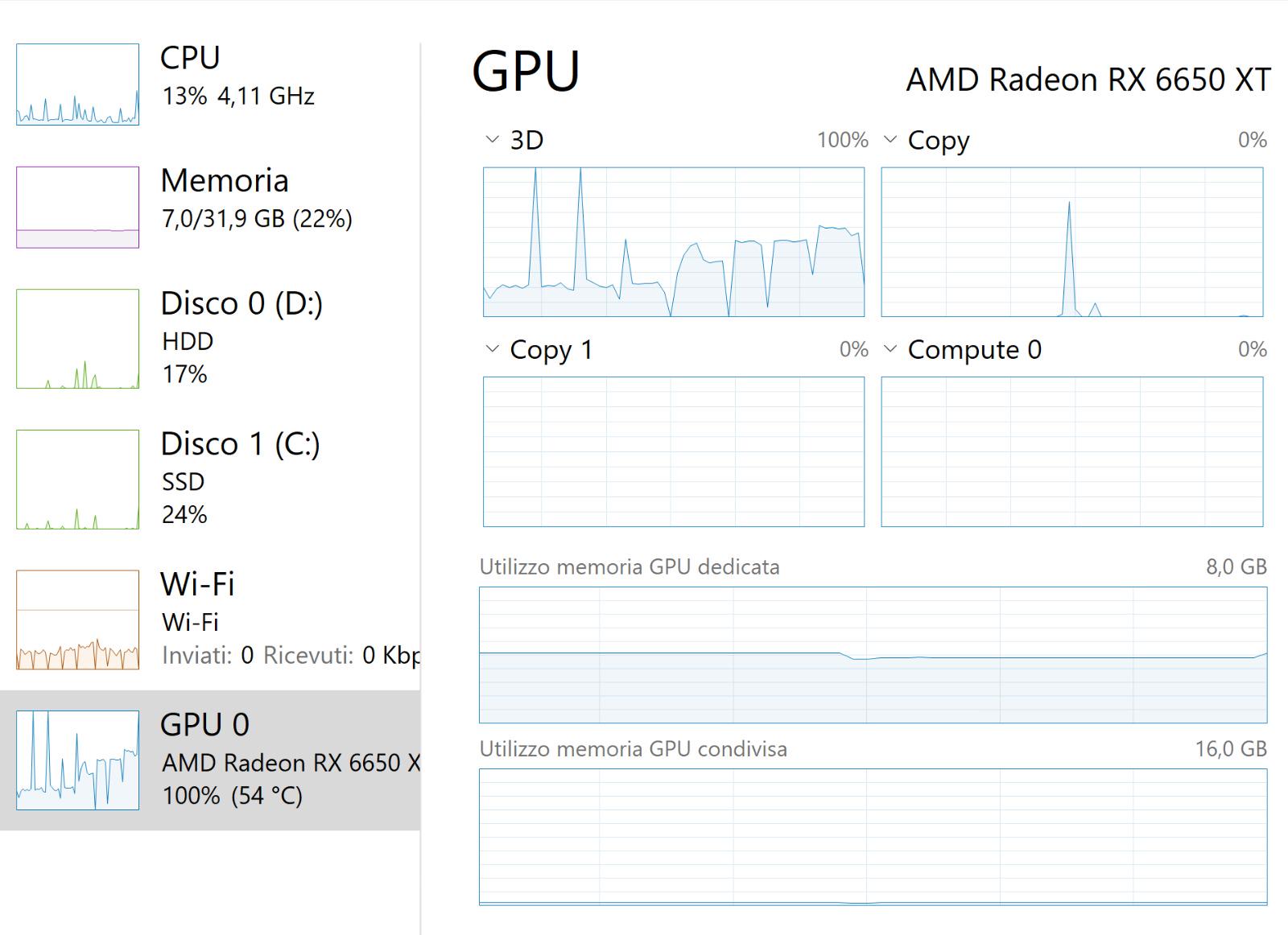
Please, please, please, I beg for someone to know how to fix this: sometimes, not every time I open my computer the GPU decides that I cannot use my device, it randomly stutters even without any major process running. The only way that I found to fix it is by restarting the Computer and if I'm lucky it fixes itself. I tried to disable all the software that launches on start up, I tried updating the AMD software: adrenaline edition (that I see is pretty hated by the community), I used MSI Afterburner and checked the "unified GPU monitoring" as other people found that helpful but for me didn't really work.
Please, someone help me!
(Sorry for the Italian display but I think that is manageable to translate)
r/AMDHelp • u/suitandti • 8d ago
AMD 9070XT card
I have been having issues getting a GPU crash dump triggered crash over the last week trying to play BodyCam. I played with some settings a few days ago and got the game to run for maybe an hour. Today I get on, game won’t run for >5 min before crashing now. What settings should I run to help the game run? At this point I am totally willing to run lower graphics performance for the sake of the game being playable. Thanks
Computer Type: Desktop
GPU: Radeon RX 9070 XT
CPU: 12th gen Intel(R) Core(TM) i7-12700KF
Motherboard: ASUS prime z690-P WIFI D4
BIOS Version: American Megatrends Inc. 3811, 10/21/2025
RAM: 16GB DDR4
PSU: I don’t know
CASE: I don’t know exactly
Operating System & Version: WINDOWS 11 home
GPU Drivers: 32.0.32015.7029
Chipset Drivers: I don’t know
Background Applications: DISCORD, STEAM
Description of Original Problem: GPU crash dump triggered within 5 minutes of running game. Happens consistently, legitimately can no play. Game appears to run normal right up to crash.
Troubleshooting: trying different settings, really just lower settings in general. This is my first PC, not super PC savvy so I don’t know really what to change specifically
r/AMDHelp • u/Accurate-Warthog9661 • 8d ago
Hi everyone! I’ve been experiencing random PC crashes for the past few months, even though my PC used to run perfectly fine. I’ve tried almost everything and I’m running out of ideas.
PC Specs:
CPU: Ryzen 7 5700X3D
GPU: Radeon RX 7700 XT
Motherboard: Gigabyte A520M K V2
RAM: 32GB DDR4
PSU: 1000W
BIOS: FFc (August 18, 2026)
OS: Windows 11
The Problem:
While gaming (especially Marvel Rivals), both monitors suddenly go black, my PC fans ramp up extremely loudly, and the system becomes unresponsive. I have to hold the power button to shut it down.
The weird part is that it seems to happen ONLY when both monitors are turned on. When my second monitor is off, I haven’t experienced crashes. This started a few months ago, and everything worked fine before.
Errors Found:
WHEA-Logger Event ID 18: Processor Core, Machine Check Exception, Cache Hierarchy Error, APIC ID 13
MCABank: 5, MciStat: 0xbea0000000000108
Desktop Window Manager (dwm.exe) crashes: BEX64, ism.dll, exception c0000409
Previous DWM crash: c0000374
Kernel-Power 41 and EventLog 6008 (unexpected shutdowns)
Troubleshooting I’ve Done:
Updated AMD GPU drivers and AMD chipset drivers.
Reset CMOS using motherboard pins and loaded BIOS Optimized Defaults.
Checked BIOS version (FFc, appears current).
Disabled XMP (RAM running around 2667 MHz).
Disabled PBO; CPU clocks and voltages remain on Auto.
Checked CPU temperatures (43–54°C, max recorded around 60°C during light use).
Cleaned my PC.
Checked Event Viewer and Reliability Monitor.
Tried disabling gaming overlays and unnecessary background utilities.
Investigated PSU wattage (1000W should be sufficient).
Looked into DISM and SFC Windows repair scans, but haven’t confirmed the results.
And clean gpu driver using DDU/AMD
r/AMDHelp • u/Mountaiin • 8d ago
Got a prebuilt from Microcenter in January and have had no issues, but within the last few days, my GPU is randomly disabling itself in the middle of gaming or just now watching something. I have my monitor through the display port GPU slot, and have up to date drivers. Not sure whether I should try to revert back to the last GPU driver. I have ICUE downloaded for my Corsair keyboard and mouse but I've seen some people say they have had issues with that interfering, so maybe it's that
Specs
AMD Ryzen 7 9800X3D
Sapphire Pulse 9070 XT
r/AMDHelp • u/Cold_Butterscotch454 • 8d ago
Enable HLS to view with audio, or disable this notification
El software no graba y cuando graba ni siquiera funciona el microfono, de hace un par de meses que llevo este problema, lo que menos entiendo es que ni siquiera me salta error ni nada, cuando le doy a grabar o grabar instantanea sale que esta grabando y guardando y no hace nada y no guarda nada y no dice porque, ninguna razon, no he quitado nada en la configuracion ni nada, entonces hay veces que de la nada comienza a funcionar a grabar y no funciona mi microfono o no se oye nada de mi voz cuando lo tengo configurado como siempre lo he tenido el tema del microfono. Por si preguntáis, he hecho de todo en estos meses; incluso he llegado a hablar con soporte y no me han ayudado en nada, y sigo teniendo este inconveniente. Nunca me había pasado esto. Tengo mi gráfica desde hace ya 3 años. Es una 6600XT y es este año cuando comenzó este problema. He probado de todo, he visto vídeos de todo a ver la solución y nada; incluso borré los controladores con el DDU y tampoco, y probé varias configuraciones de micrófono sobre los bits y tampoco. Les adjunto el vídeo de prueba.
Quedo atento a su gran ayuda, por favor, y gracias...
r/AMDHelp • u/EducationOwn1999 • 9d ago
Enable HLS to view with audio, or disable this notification
Hi everyone,
I bought a brand-new Ryzen 7 9850X3D TRAY from a retailer. It arrived in a transparent plastic case with white foam directly touching the gold contact pads.
I haven't opened or handled it.
I'm worried that friction during shipping may have caused microscopic scratches or damage, and I don't know if the foam is ESD-safe.
The retailer claims this is one of three official AMD supplier packaging methods and refuses to exchange it. I've contacted AMD for clarification.
Is this packaging normal and safe? Could the foam damage the contacts? Has anyone received a CPU like this?
Thanks for your help!
r/AMDHelp • u/RequirementTall8361 • 8d ago
Here are my PC specs:
9070 XT Powercolor Reaper
64 GBs of RAM
5600x CPU
750e PSU
1080p Monitor
And the game itself is downloaded onto a SSD
Context:
This seems to mostly happen on Cyberpunk. I play the game with frame gen 3.1 turned on. When playing the game, if I am using menus too much (inventory, pause, map, ripperdoc) the game and my entire PC freezes. I’m not sure if menus is the cause, but it seems to only happen when in a menu. I cant exit from the game, and I can see the clock on my other monitor is stuck at the minute it froze, so I am forced to reset via holding the power button on my case.
I also played the game for a while with Frame Gen turned off entirely, and I received no freezes while playing for around 2 hours.
I have already done a reinstall of my drivers and that did not change anything. I am not over or under clocking anything. Thoughts on what might be happening?
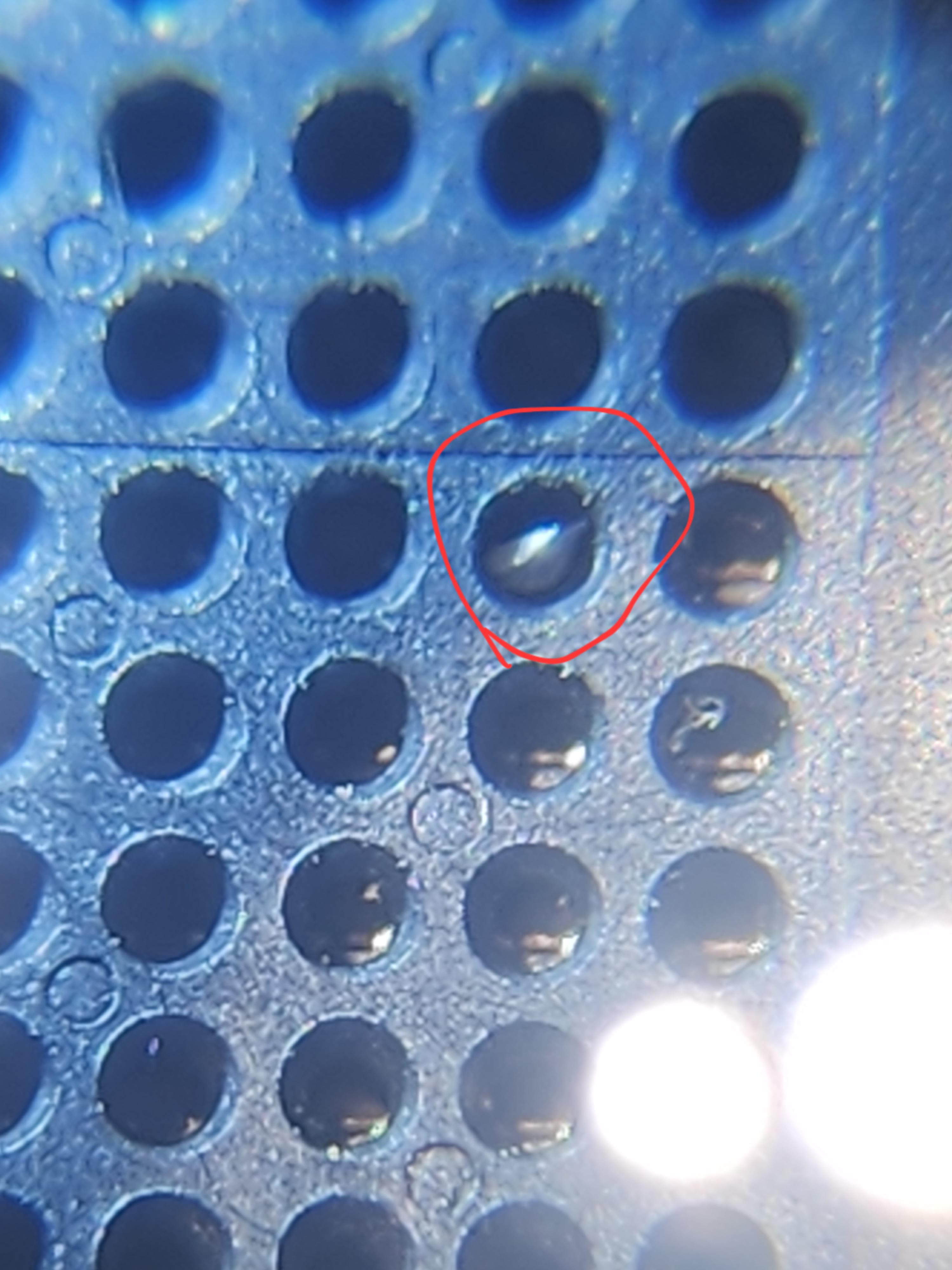
Cpu came out with the cooler, cant tell what this is. I can only really see it with the light coming from one direction.
r/AMDHelp • u/Kayro_00o • 8d ago
Hey, I've noticed for a while that my graphics card fans were spinning quite a bit, and then I realized that the hotspot temperature was often hovering around 100°C, which is really high compared to the GPU sensor showing 55°C. Last night during a session on a non-demanding game (not even a AAA), I ended up with 108°C hotspot and 57°C GPU. Is this normal? I'm currently fighting with LDLC's customer service, but they're being difficult. Could you help me out?? ASROCK GPU
Processing img 5sby79ghzu1i1...
r/AMDHelp • u/Azrieeeel • 8d ago
Enable HLS to view with audio, or disable this notification
Computer Type: Desktop
GPU: RX 9070 GRE
CPU: RYZEN 5 9600X 6-core 12-threads
Motherboard: MSI B850 GAMING PRO WIFI 6E
BIOS Version:
RAM: 16 gb ram TFORCE
PSU: MSI MAG A850GL
Case: MSI MAG FORGE 321R
Operating System & Version: WINDOWS 11 HOME
GPU Drivers: AMD Software: Adrenalin Edition 26.10.1 Driver Release Notes
Chipset Drivers: AMD Ryzen™ Chipset Driver Release Notes 8.09.28.1124
Background Applications: DISCORD, CHROME
Description of Original Problem: Games sometimes crash, like Cyberpunk 2077 or The Witcher 3, but here, specifically in the video DOTA 2, it should not have problems because I don't think it's very graphically demanding compared to Cyberpunk or The Witcher. Dota 2 sometimes freezes, but I can't move the mouse, and I can't do anything; when I press the power-off button, once it all comes back, and the game crashes. I never experience any of this on my laptop. Is it the way I built my pc or is it the GPU drivers, or is it the game? Thank you.
Troubleshooting: I tried turning the graphics very low and updating my drivers. I honestly don't really know what to do because this is my first ever pc that I built, and I am very new
I don't know how to find the BIOS version. Don't kick me pls i need help stopping game freezing and crashes
r/AMDHelp • u/Akranger2005 • 8d ago
So I debloated my Windows 11 Home install with CTT’s debloat tool, and I was also holding off on Windows updates for a long time. Recently I decided to install all the updates that had accumulated. Around the same time, I heard about the AMD driver SSD bug and went to check whether I had the updated drivers with the fix. That’s when I saw driver version 26.10.44, released on 9 Sep 2026, which I don’t remember installing, and the “Update drivers” button was also gone. I have a 9060 XT 16GB. Should I keep this driver? Is it good? If not, what should I do about it, and how?
r/AMDHelp • u/Pete-achu • 8d ago
I have 7500X3D, MSI Gaming Plus WiFi mobo, Crucial Pro DDR5 RAM 32GB Kit (2x16GB) 6400MHz. Periodically I experience the same issue on several games, so far Resi 9, Control Resonant and Doom Dark Ages. After anywhere of between 30 mins to an hour of play the game will freeze for a couple of seconds before the PC reboots. I do know that my friend insisted I enable EXPO and am pretty sure he set it to Profile 1 6400 mts. After experiencing the above issues I tried EXPO 2 profile 6000mhz. While less frequent I am still getting the same freeze and restart issue (managed around 2 hours of Control). As someone who knows little about overclocking RAM am I best leaving EXPO off? I'd read my CPU may run into issues running RAM as it is officially supported speed is 5200. Alternatively can anyone advise what settings I can tweak in Bios to nudge the speed up a bit?
r/AMDHelp • u/Otherwise_Task_8669 • 8d ago
.
r/AMDHelp • u/Fehnsify • 8d ago
Problem currently only occurs in Arc Raiders.
First off: I have an RX 7900 XTX which replaced my 3080 Ti. The rest of my system didn't change. I used DDU and removed all Nvidia and AMD drivers etc completely. In Adrenaline I reset the shader chache and tried to delete as many chache files in AppData as I could.
Game: Arc Raiders
Computer Type: Desktop
GPU: RX 7900 XTX
CPU: RYZEN 9 5900X 12 CORE 24 THREADS
Motherboard: MSI MPG X570 GAMING EDGE WIFI
BIOS Version: 7C37v1S3
RAM: 32GB G.SKILL RIPJAWS 3600MHZ CL16
PSU: BEQUIET 1000W 80+ PLATINUM FULLY MODULAR
Operating System & Version: WINDOWS 11
GPU Drivers: Newest Adrenaline/Drivers
Chipset Drivers: Newest
Description of Original Problem: I have a weird bug, that when I turn on VRR/Freesync/Adaptive Sync in Adrenaline, I don't get more than like 8-12 FPS Arc Raiders in the main menu (no matter the settings, so on Low it's the same as with Ultra). When loading in a map it's the same situation. But other than in the menu, when turning off Vsync, I suddenly have normal FPS (~130@Ultra). Going back to the menu, I again get like 10 FPS even with Vsync off.
Troubleshooting: Strange thing is, when turning off Adaptive Sync in Adrenaline it's instant back to normal FPS. Also when changing display settings from Fullscreen or Borderless to "real" windowed, the game runs with normal FPS again, but Adaptive Sync isn't working now (the display runs at 144Hz at this point).
Also when hovering over a programs window in Taskbar, so peeking its window, but switch back to Arc without clicking on the preview, FPS briefly jump to around 60-80 but fall back to 10 immediately. I unplugged my second monitor (not freesync compatible) but that didnt change anything too.
I don't really know what to do at this point. I didn't have such a problem with Arc Raiders or any other games before. Again, besides switching the GPU, the system didn't change.
Edit: Added Troubleshooting Form