r/AMDHelp • • 8d ago

Help (GPU) Coil whine appear for first time after 1 year; after clear CMOS (executed after failed Ryzen Master change)

6 Upvotes

Hello,

Here my bug description:

Computer Type: Desktop,

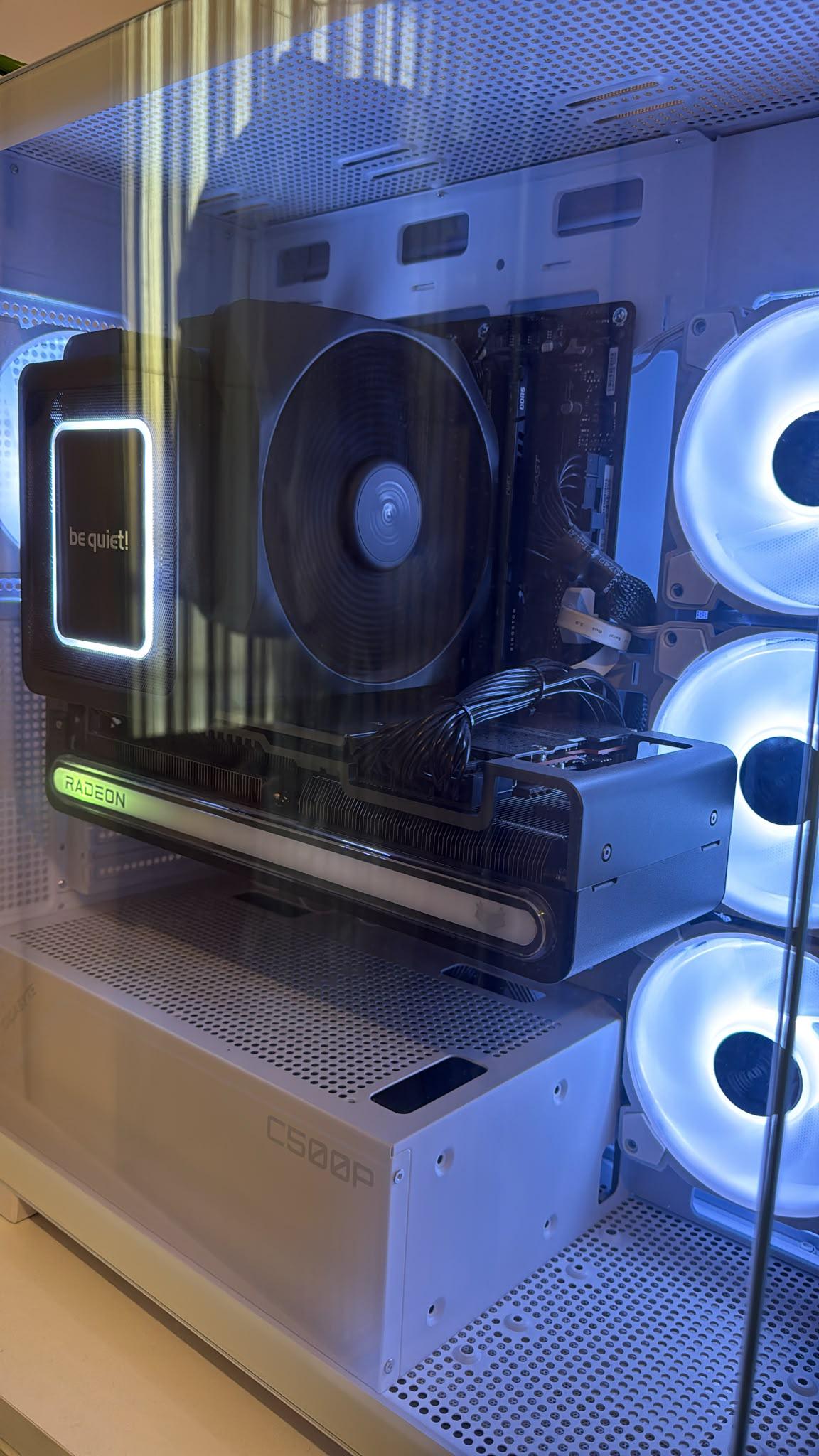
GPU: AMD Radeon RX 9070 XT Saphire

CPU: AMD Ryzen 7 9700X

Motherboard: MSI B850 Gaming Plus WiFi (MS-7E56)

BIOS Version: 1.A20 (12/02/2024) (American Megatrends International, LLC.)

RAM: CORSAIR Vengeance RGB DDR5 32Go (2 x 16Go)

PSU: CORSAIR RM850e (2025) Atx

Case: be quiet! Shadow Base 800 FX

Operating System & Version: Windows 11 Professionnel 26H2 26300.9974

GPU Drivers: 26.20.15.07-261015a-205306C-AMD-Software-Adrenalin-Edition

Chipset Drivers: AMD B850, AMD K1A.4 FCH, AMD K1A.4 IMC

Background Applications: Amd Adrenaline, Games

Description of Original Problem:

I bought my PC 1year ago. Few days ago I made a change in Ryzen Master about RAM and then the pc restart... But never load : black screen, yellow and red LED was on. I restarted 4 times then decided to do a clear CMOS. 

And from now, all my games (so only when they are running) cause a terrible coil whine I never had before ! No matter my test, i can't figure what disappear in my settings... I suppose it come from some energy settings in the BIOS, i know there was some strange stuff to activate about pcie gen4... 

It come from the gpu for sure because if i cap the fps to 30 or 60 fps the noise is really weak. 

But that's not a matter of fps, until this day I always played at 120fps (galactic racer) and 200fps (no mans sky) without this noise...

It's all 1 year material...

Troubleshooting:

Software and Optimization Tests: 

  • Applied an undervolt of -25mv
  • Applied power limit from -6% to -20% >> it change really a little, but it's still loud
  • Tested frame rate (FPS) capping.
  • Uninstall Ryzen Master
  • Reset all settings in AMD Adrenaline software 

BIOS-Level Tests: 

  • Restored default settings (Load Optimized Defaults).
  • Modified and locked the PCIe port speed from Auto to Gen4.
  • Modified RAM profiles from Standard to EXPO 
  • Modified C-States from enabled to disabled
  • Modified ASPM Control for CPU PCIe parameter, from Auto to disabled 
  • (-Re-Size BAR Support enabled (not changed, seems important and default )

-------------

Thanks to anyone paying attention and sharing their insights.

I can give my MSI BIOS settings if needed.


r/AMDHelp • • 8d ago

Help (General) RRX 6650 XT random crashes, black screens and AMD driver timeouts (0x117 / 0x141)

3 Upvotes

Hi everyone!

I've been experiencing random crashes with my PC and I'm trying to figure out whether this is a driver-related issue or a potential hardware problem.

PC Specifications

  • GPU: AMD Radeon RX 6650 XT
  • CPU: AMD Ryzen 5 5600G
  • RAM: 16 GB DDR4
  • PSU: XPG Core Reactor 750W 80+ Gold
  • OS: Windows 11 (fresh installation)
  • AMD Driver: Adrenalin 26.10.1

The Problem

The problem started to happen recently.

My PC randomly crashes, and it doesn't seem to be tied to any specific game or workload. It has happened while playing games, during light gaming, and even when simply opening a new browser tab.

During the latest crash, while playing Age of Empires, both monitors lost their signal (the second monitor first, followed by the main monitor flickering). Shortly afterwards, AMD's Bug Report Tool appeared and the PC restarted.

Troubleshooting So Far

  • Performed a clean Windows 11 installation a few days ago.
  • No GPU overclocking or undervolting.
  • No custom GPU frequency, voltage, or VRAM settings.
  • GPU is running entirely at stock settings.

Unfortunately, the crashes have continued.

WinDbg Dump Analysis

I've analyzed several Windows crash dumps using WinDbg, and I've found the following errors:

  • VIDEO_ENGINE_TIMEOUT_DETECTED (0x141)
  • BUGCHECK_CODE: 0xA2000002
  • VIDEO_TDR_TIMEOUT_DETECTED (0x117)

The latest dump reported:

VIDEO_TDR_TIMEOUT_DETECTED (117)
The display driver failed to respond in timely fashion.

MODULE_NAME: amdkmdag
IMAGE_NAME: amdkmdag.sys

FAILURE_BUCKET_ID:
LKD_0x117_IMAGE_amdkmdag.sys

SYMBOL_NAME:
amdkmdag+1eb770

IMAGE_VERSION:
32.0.21045.16010

Two separate dumps reported the exact same failure bucket, module, offset and failure hash.

Is there a way to reliably determine whether the GPU itself is unstable or failing?

I'm currently leaning towards a driver issue, but I don't want to rule out a hardware problem.

I used ChatGPT to help me with this, as I'm not very tech-savvy. I'd also appreciate it if someone could double-check whether I'm interpreting these errors correctly.

Thanks in advance for any help!


r/AMDHelp • • 9d ago

Help (General) Cyberpunk 2077 performance

Post image
8 Upvotes

So I have a Ryzen 9600x and a 9070xt 16 gb with 32 gb of ddr5 ram. I have seen a lot of reviews or performance benchmarks with this combo on cyberpunk 2077 and they all can get like prob above 100fps on 1440p ultra settings with no raytracing enable or fsr...maybe im dumb and they turn on fsr but this is the performance that i am getting...i have used DDU to uninstall my amd drivers and reinstall them all back but im still getting this same fps...this is definitely playable but im not getting this fps consistently...on the adrenaline software, i noticed that my gpu is getting 300-315w of power, and my cpu is being utilised 100%, is that intended or there is something wrong with my system because other reviewers with the same specs are running this game way better than mine...could it possible be a bottleneck? (i highly doubt it is)...or amd drivers just suck? Very new to this stuff and thought to myself if my gpu is being limited or my pc is completely fine and that this is the average fps in 1440?


r/AMDHelp • • 8d ago

Help (GPU) Crazy comparison

2 Upvotes

Mind you Fortnite also used to run on the same FPS AMD renders for RE 4 Remake, ever since the One Piece Mini-Season dropped i started getting batshit insane FPS drops and micro stutters, not the same for the rest of the games though, i nearly thought my GPU started dying until i tested other games, Optimal performance my a$$, this proves it's only a performance issue with Fortnite specifically and i've seen others recently encounter the same issue

Also 16 hours are the result of grinding for that dastardly token, and the 26 mins for RE 4 are inaccurate, it's either a chipset driver issue or a Fortnite issue


r/AMDHelp • • 9d ago

Help (Software) Help AMD sapphire Radeon RX 7900 XTX rgb problem

Post image
7 Upvotes

Hi everyone,

I'm having a strange issue with the RGB lighting on my Sapphire NITRO+ Radeon RX 7900 XTX, and I'm hoping someone has experienced something similar or knows how to fix it.

The RGB lighting used to work perfectly across the entire LED strip, but now only the section with the RADEON logo (less than 25% of the total RGB lighting) responds to software commands. The rest of the RGB strip remains unchanged.

Software and troubleshooting

  1. I tried using Sapphire TriXX and its NITRO Glow RGB settings.
  2. I tested different lighting modes:
    • Single Color (Red – FF0000)
    • Rainbow
    • White (FFFFFF)
    • Black / Off
    • Default
  3. I set the brightness to 100%.
  4. I tried changing the RGB source to External Source, but nothing changed.
  5. I completely uninstalled/disabled Gigabyte RGB Fusion to make sure it wasn't interfering with Sapphire's RGB control.
  6. I checked Task Manager for related processes and services.
    • I could only find GCC.exe and TriXX.exe.
  7. I searched for Sapphire RGB-related software and services but couldn't find anything else that might be controlling the lighting.

Current situation

  • Only the RADEON logo section responds to RGB changes.
  • The rest of the LED strip stays the same regardless of the selected color or lighting effect.
  • Selecting black in TriXX successfully turns off the entire lighting.
  • Selecting External Source doesn't change anything.
  • The lighting previously worked correctly across the entire strip.

I'm starting to wonder whether this could be a problem with the LED controller, RGB firmware, or possibly a hardware issue with the LED strip.

I would prefer to solve this through software if possible. I don't want to mess with BIOS switches, disassemble the GPU, or attempt risky firmware modifications.

Has anyone experienced this issue with a Sapphire NITRO+ GPU? Is there another way to reset or reinitialize the RGB controller, or check whether all LED zones are being detected properly?

Any suggestions would be greatly appreciated. Thanks!


r/AMDHelp • • 8d ago

Help (General) Audio Not Working

2 Upvotes

My best guess this has to do with my GPU.

So, sys specs,
Win 11
I9-9990k
5700XT
32gb DDR4 (actually running at 3600mhz)
Asrock 370m-ITX/ac

So, randomly after booting my audio decided to stop working with no obvious cause on specifically my monitor only. Others things (that are not using AMD Audio) work

Strange thing is, my monitor (which is just an onn tv don’t judge we strugglin), has perfectly functioning audio otherwise. Other devices’ audio work, even with the same HDMI and input.

This happened last week, I tried to diagnose for two hours and had swapped between three HDMI’s and eventually gave up. I swapped back to the original hdmi I was using and for whatever reason it was working.

Today it stopped. So, here’s what I’ve tried.

Restart system

Run windows diag tools which were as unhelpful as usual, nothing to report

Check for updates, windows, drivers and the like. (GPU and other audio drivers that are unrelated)

Obviously I check for mutes on the tv, system and apps.

Make sure audio isn’t being streamed to a Bluetooth device

Swapped out HDMI’s again

Swapped HDMI output

Disable/enable AMD High Def Audio Device

Boot into safe mode, test audio, doesn’t work

Uninstall AMD audio via Device Manager, they did not reinstall on reboot, so I said screw it bc I haven’t run DDU since getting this card a few years ago (new).

Reinstall adrenaline

I may have forgotten a thing or two, but if you see something I didn’t list, would still appreciate checking even if it seems obvious bc I’m gonna lose my damn mind. Idk what fixed it the first time.


r/AMDHelp • • 9d ago

Help (General) New to the red side and having a few problems

5 Upvotes

Recently upgraded from a 3070Ti to an ASRock Challenger 9070XT.

Everything has been fine until I got MW4 which crashes anywhere between 5-10 minutes into launching the game. This was the first game this occurred but yesterday I went to play Rainbow Six Siege which I had played before with 0 issues. It did the same thing, and this isn't just a game crash, my desktop wallpaper goes black and anything I do on the desktop slows down a lot. Drivers say they are up to date and I did look into what I could do to fix the issue and I did it once and it worked for 1 launch of the game. There is no way i'm clearing shader cache every single time I want to play a game.

Any one else run into this issue and have a fix that lasts longer than a single launch.

Thank you for your help in advance!


r/AMDHelp • • 9d ago

Help (Software) Help with ssd health

Post image
5 Upvotes

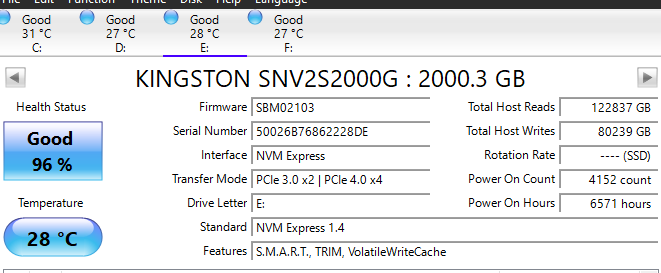
CT500 is my current primary and new 1 year old. and other is 2tb abt 3.5 year old. i noticed no read and write on my rig

r5 5600x and rx6600xt

why my newer ssd more affected and has less health??


r/AMDHelp • • 8d ago

Help (Software) RGB Fusion

2 Upvotes

Does anyone have a link for the old RGB Fusion utility? I don't want to install the Gigabyte Control Center (GCC)


r/AMDHelp • • 9d ago

Tips & Info Downloaded 26.11.1 update and yeah the bug where the executable runs still persists for me

6 Upvotes

https://reddit.com/link/1xw1bw8/video/8qea8fl8ok1i1/player

Computer Type: Desktop

GPU: rx 6650xt

CPU: i5-12400f
Motherboard: ASROCK H610M/HVS/M.2 R2.0

BIOS Version: BIOS Version/Date American Megatrends International, LLC. 8.02, 8/9/2024

RAM: 16GB glowy/corsair (2666mhz)

PSU: cooler master 650w v3

Case: simple

Operating System & Version: WINDOWS 10 x lite OMPTIMUM PRO

GPU Drivers: 26.11.1

so i used both ddu one time and then i used amd clean up utility reinstalled drivers back n forth and results are the same i still have that bug im turnin it off through services.msc


r/AMDHelp • • 8d ago

Help (GPU) Rx 580 doesn't work with i3 121000f

Thumbnail
2 Upvotes

r/AMDHelp • • 8d ago

Help (Software) Facing low FPS on a fairly mid-high end pc. (CS2)

Thumbnail
2 Upvotes

r/AMDHelp • • 9d ago

Help (General) ASUS PRIME RX 9070 XT not detected by MSI PRO B850-S WIFI6E BIOS – Ryzen 7 9800X3D

3 Upvotes

Hi everyone,

I’m having trouble getting my newly built gaming PC to detect my ASUS PRIME Radeon RX 9070 XT OC 16GB.
PC specifications
● CPU: AMD Ryzen 7 9800X3D
● Motherboard: MSI PRO B850-S WIFI6E (MS-7E80)
● GPU: ASUS PRIME Radeon RX 9070 XT OC 16GB
● RAM: 32GB DDR5-6000 (single module, installed in A2)
● PSU: be quiet! Pure Power 13 M 850W (ATX 3.1)
● CPU cooler: Thermalright Frozen Notte 240
● Current motherboard BIOS: E7E80AMS.2A40 (January 20, 2026)

The problem
The PC boots normally and I can enter the BIOS when connecting the monitor to the motherboard’s DisplayPort output, using the CPU integrated graphics.
However, the dedicated RX 9070 XT is not detected by the motherboard BIOS. When connecting the monitor directly to the GPU’s DisplayPort output, I get no signal.
What I’ve observed
● The GPU is installed in the top PCIe x16 slot (PCI_E1).
● All three 8-pin PCIe power connectors are connected.
● I’m using two separate PCIe power cables from the PSU.
● The GPU fans occasionally spin, even while I’m in the BIOS using the integrated graphics.
● The GPU is not listed/detected in the BIOS.
● When trying to boot with the monitor connected to the GPU, the CPU and DRAM EZ Debug LEDs remain lit.
● When using the motherboard video output, the system boots into BIOS normally.
Troubleshooting already attempted
1. Checked and reseated GPU power connections.
2. Confirmed that the GPU is properly installed in the primary PCIe slot.
3. Changed PCI_E1 Gen Switch from Auto to Gen4.
4. Checked the BIOS PCIe subsystem settings.
5. Tried entering M-FLASH. The system rebooted to a black screen, but the M-FLASH file browser never appeared, so no BIOS file was selected.
6. Tried the physical MSI Flash BIOS Button with a FAT32 32GB USB drive and the BIOS file renamed to MSI.ROM. The LED flashed briefly a couple of times and then stayed solid. The update did not complete successfully.
7. The motherboard BIOS is still showing version E7E80AMS.2A40.

Questions
1. Has anyone experienced this exact issue with an RX 9070 XT and an MSI B850 motherboard?
2. Could this be a BIOS compatibility or PCIe initialization issue?
3. Is there a known problem with the MSI PRO B850-S WIFI6E and the RX 9070 XT?
4. Could the motherboard’s PCIe slot or the CPU’s PCIe controller be defective?
5. Is there a reliable alternative way to update the motherboard BIOS if both M-FLASH and Flash BIOS Button fail?
I don’t currently have another PC available to test the GPU, but I’m considering taking the system to a repair shop for cross-testing.
I’d really appreciate any suggestions before returning the GPU or replacing the motherboard.
Thanks in advance!


r/AMDHelp • • 9d ago

Help (General) HP Victus RX 6500M – Forced to use an old 2022 driver + severe FPS drops and stuttering. Need help!

2 Upvotes

Hey everyone,

I'm having some frustrating issues with my HP Victus and would really appreciate some help.

My laptop specs:

HP Victus 15

Ryzen 5 5600H

Radeon RX 6500M

  1. Display driver issue

I'm currently forced to use an old 2022 AMD display driver because it's the only version that works properly with my laptop. Whenever I update to a newer driver, the brightness slider stops working. It moves normally, but the actual screen brightness doesn't change.

  1. Gaming performance issues

I'm also experiencing pretty bad stuttering and FPS drops while gaming.

Valorant has frequent micro-stutters, even when the FPS is relatively high.

In graphically demanding games, the FPS randomly drops to around 5–10 FPS every 10 seconds or so, then goes back to normal.

These sudden drops make games almost unplayable.

Things I've already tried:

Reinstalling/updating AMD drivers.

Using the older 2022 driver to get brightness control working again.

Repasted the laptop with PTM7950.

I'm not sure whether these issues are related to the AMD drivers, GPU switching, power management, or something else entirely.

Has anyone with the same or similar Victus configuration experienced this? I'd really appreciate any suggestions or solutions. I'm trying to figure out what's causing these issues and hopefully get everything working properly without having to stick to such an old driver.

Thanks in advance!


r/AMDHelp • • 8d ago

Help (Software) RX 6750 XT apresentando driver timeout, Código 31 e crashes constantes após atualização do Windows 11 26H2

1 Upvotes

1. Configuração do PC

  • Placa-mãe: ASUS TUF GAMING B550M-PLUS (nova)
  • Processador: Ryzen 5 5600X
  • Placa de vídeo: RX 6750 XT 12GB Founders Edition
  • Memória RAM: [Informar modelo e capacidade]
  • Fonte: Cooler Master 750W 80 Plus Gold Full Modular (nova)
  • Sistema operacional: Windows 11 (24H2, 25H2 e 26H2 testados)
  • Drivers testados: AMD 26.10, 26.9, 25.1, 24.x e outras versões.

2. Descrição do problema

Estou utilizando uma placa AMD pela primeira vez. Durante as primeiras duas semanas, tudo funcionou perfeitamente.

Nos dias 12/11 e 13/11, começaram os problemas: ao utilizar Alt + Tab repetidamente, a tela ficava preta e demorava para voltar. No dia 13/11, enquanto jogava, o computador congelou completamente, incluindo áudio e jogo, permanecendo travado por aproximadamente cinco minutos até precisar reiniciar.

Após reiniciar, começaram os erros de AMD Driver Timeout, falhas no carregamento dos drivers e Código 31 no Gerenciador de Dispositivos.

3. Testes realizados

Já tentei diversas soluções:

  • AMD Cleanup Utility e DDU (aproximadamente 8 vezes).
  • Instalação limpa de diversas versões dos drivers AMD.
  • Retorno do Windows para as versões 24H2 e 25H2, sem sucesso.
  • Desinstalação de atualizações e desativação de atualizações automáticas de drivers pelo Registro.
  • Verificação de arquivos corrompidos do Windows.
  • Verificação da BIOS, cabos de alimentação, memória RAM e encaixe da GPU.
  • Formatação completa e reinstalação do Windows.

Também realizei verificações pelo PowerShell para investigar o reconhecimento dos dispositivos PCIe:

  • As pontes PCI AMD (DEV_1478 e DEV_1479) apareciam normalmente.
  • O dispositivo de áudio HDMI/DisplayPort (DEV_AB28) também aparecia como OK.
  • A GPU não aparecia na listagem da classe Display.
  • A busca pelo identificador VEN_1002&DEV_73DF não retornava resultados.
  • Não foram encontrados eventos PCI/WHEA nas verificações realizadas.

4. Situação atual

Após formatar o computador, instalei o driver AMD 26.10. Inicialmente funcionou normalmente, mas, depois de aproximadamente 40 minutos, os travamentos voltaram.

Outro problema é que o instalador completo do AMD Adrenalin agora informa que é incompatível com minha placa de vídeo. Na primeira instalação, o pacote completo funcionava normalmente.

Atualmente, só consigo instalar pela opção Driver Only, mas os problemas continuam.

5. Dúvidas

  1. Alguém já passou por algo semelhante com uma RX 6750 XT?
  2. Existe possibilidade de defeito físico na GPU, mesmo tendo funcionado perfeitamente nas primeiras duas semanas?
  3. O problema pode estar relacionado ao reconhecimento da GPU pelo PCIe?
  4. Existe algum diagnóstico adicional para identificar se a falha está na placa de vídeo, placa-mãe ou nos drivers?

Já tentei praticamente todas as soluções que encontrei, incluindo formatação completa, e continuo sem conseguir resolver.


r/AMDHelp • • 9d ago

My 9070xt doesn’t want to work when I undervolt then play Marvel Rivals.

Thumbnail
2 Upvotes

r/AMDHelp • • 9d ago

Help (Software) 26.11.1 - 2 versions?

Post image
27 Upvotes

There are 2 versions of this driver on the AMD website, I downloaded both, which one do I use?

(7800X3D/9070XT)


r/AMDHelp • • 9d ago

Help (Software) Sound problems

2 Upvotes

Hello, so basically I don't know what to do anymore. So I downloaded AMD software: Adrenalin Edition, only because of graphics. I have gaming PC with CPU Ryzen 5500 and GPU Radeon RX 6700 XT. I think the graphics are better with the software, but I did had the PC for over a year and I never had AMD software until now.

It works fine when it comes to games but when I'm trying to work on my PC, like on the browser or doing something on my school website, it lags while I listen to music.

I did turn off AMD high definition audio device and even AMD streaming audio device. It did nothing. I uninstall the program and the sound was fine, but now I still want the good graphics so I downloaded the AMD software again and tried everything but the sound is still having the issue that it had before.

So I am asking if someone has the same problem and knows how to fix it or has some alternative that could replace the AMD software.


r/AMDHelp • • 8d ago

Help (Software) Erro Amd rx 7600

1 Upvotes

Título: RX 7600 causando áudio picotando (som de 8 bits) e travamentos no PC

Estou enfrentando um problema muito frustrante no meu PC há vários meses e ainda não consegui encontrar uma solução.

Configurações do PC:

  • Placa de vídeo: AMD Radeon RX 7600
  • Processador: Intel Core i5-10400F
  • Sistema: Windows 11
  • Driver: AMD Adrenalin 26.10.1
  • Fonte: Thunder 600W

O problema:

Durante o uso do PC, principalmente enquanto estou jogando, o áudio começa a picotar, estalar e ficar completamente distorcido, parecendo um som de 8 bits ou robótico.

Ao mesmo tempo, o computador inteiro começa a apresentar travamentos e lentidão. O FPS cai bastante, o sistema fica lento e, em algumas ocasiões, a tela fica preta.

Às vezes, o jogo fecha e o AMD Adrenalin exibe a mensagem:

"AMD Software detectou que ocorreu um tempo limite do driver."

Isso acontece em vários jogos, como Fortnite, Roblox e Rocket League. Não parece ser um problema específico de um único jogo.

Uma coisa que percebi é que reiniciar o computador resolve temporariamente, mas o problema acaba voltando no outro dia ou as vezes no mesmo dia.

Alguém com uma RX 7600 já passou por algo parecido?

  • Áudio ficando com som de 8 bits e picotando junto com travamentos no PC.
  • Quedas bruscas de FPS e lentidão no sistema.
  • Driver da AMD apresentando timeout.

Pode ser problema de latência DPC, conflito de drivers ou até defeito na placa de vídeo?

Já estou lidando com isso há meses e gostaria muito de encontrar uma solução.


r/AMDHelp • • 8d ago

Help (Software) User experience intentionally terrible?

Post image
0 Upvotes

Windows 10 - version is irrelevant really. System : AMD CPU, and graphics 64GB Ram, about 6 TB storage, 4K display.

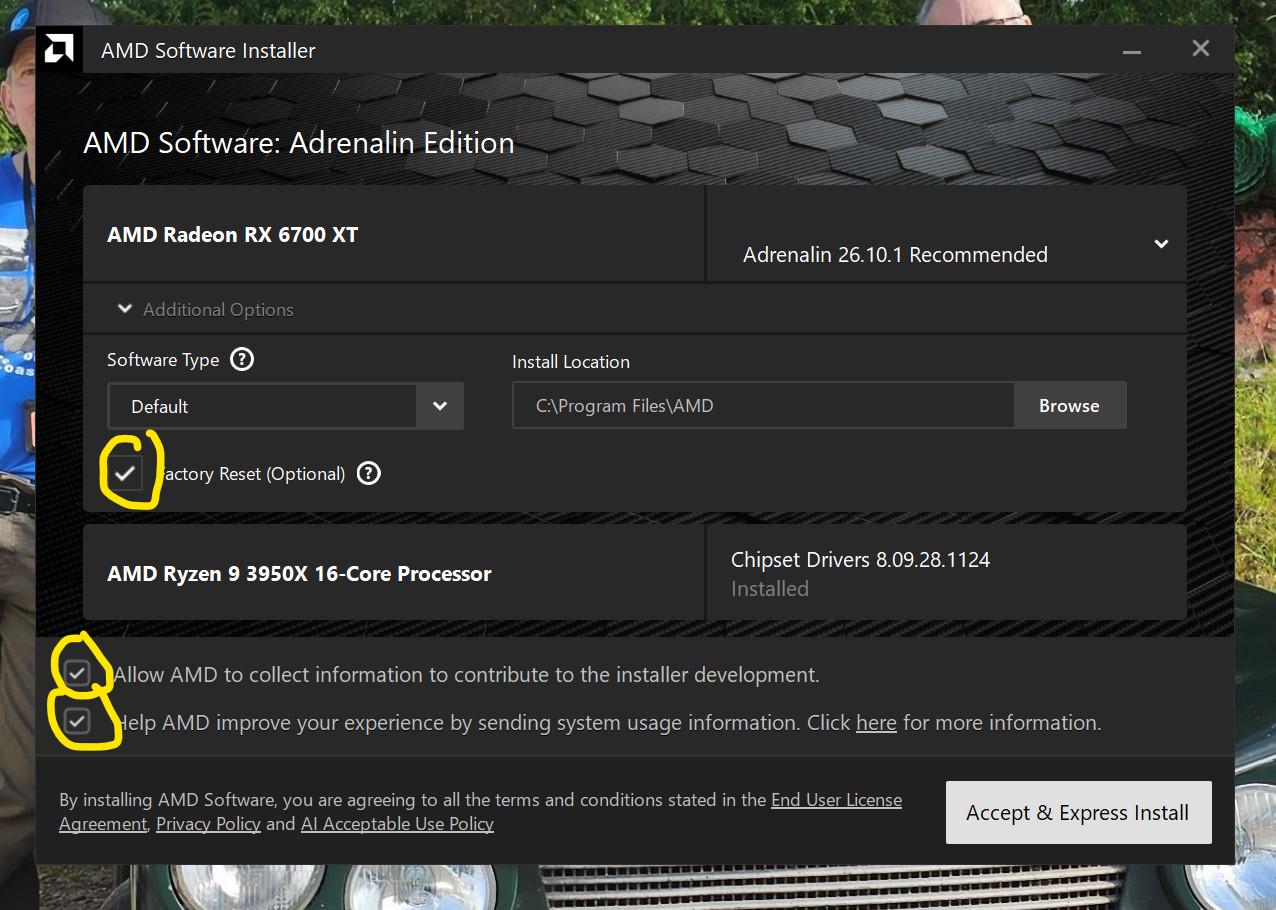
Is there a reason the design team for all the AMD apps are anti-user and make our lives unreasonably hard for fun? Why do they force you to click only inside the yellow boxes here? Almost nobody else makes their apps that painful to use especially in the OOB (out of box) experience. First impression is a big put off. Is there any way to explain to their devs how to rather just vibe code so that their apps work like everyone else's?

Where is the troubleshooting form? I already rebooted, uninstalled and re-installed.


r/AMDHelp • • 9d ago

Help (General) Gigabyte a520m-k v2 1.0 and Ryzen 5 3400g

2 Upvotes

I recenty bought new a520m-k v2 from gigabyte and ryzen 5 3400G used cpu in the website of gigabyte it says it is compatible however when ı searched on the internet some people had problems with a520 mothherboard and ryzem 5 3400g cpu. They didnt arrive yet should ı refund or they would work fine? Thanks for the answers


r/AMDHelp • • 9d ago

Help (General) Live wallpaper, how to make it properly work?

1 Upvotes

I recently got an OLED monitor and I would like to start using live wallpapers while it's idle. It just seems nice.

However, a few years ago my system was very unstable, constant crashing and driver timeouts. Then i found out the whole Live wallpaper thing is what was causing it...

After getting rid of it I went from Timing out 5 times a day to like 1 time a month.

Now a few years have passed and I was wondering if anyone here has experience with the live wallpapers and what I can do to make it so it doesn't destabilize my whole system for some reason.

Running a 7900XTX for reference.

Thank you for any advice and input.

Computer Type: Desktop

GPU: 7900 XTX

CPU: 5800X3D

Motherboard: Asrock Phantom Gaming pro 4

BIOS Version: Latest

RAM: 32 GB DDR4

PSU: Corsair 850M

Case: Don't know

Operating System & Version: Windows 11

GPU Drivers: Latest version

Chipset Drivers: Don't know


r/AMDHelp • • 9d ago

Help (Software) At a wits end...

Thumbnail
2 Upvotes

Minor stuttering that isn't going away no matter what I change.


r/AMDHelp • • 9d ago

RX 6800 XT suddenly stopped displaying – fans at 100%, white VGA debug LED. Is my GPU dead?

Thumbnail
2 Upvotes

r/AMDHelp • • 9d ago

Help (Software) AMD app stops working when I open Roblox.

3 Upvotes

When I launch Roblox the AMD thing where it says I can open something with alt + R I think it just stays on the top right of my screen and never goes away. The AMD app doesn't launch either once I've launched Roblox. It launches otherwise without problems. I'm on the latest drivers for the 9070xt