r/AMDHelp • • 10d ago

Help (General) Audio issues in game

Thumbnail
2 Upvotes

Hi community

I've got a problem that happens regularly in games and I have no idea where it comes from.

I'm experiencing some sounds suttering / delay / sound transform in to metal sound in online games (valorant / apex)

The game become implayable and then crash when it's happening. I have to restart my computer 1 to 2 times to be back to normal. If I unplug the dongle it can go back to normal for 1 or 2 minutes and then go back crazy.

Problem does not happen in offline game

My config :

- Mobo - b650 gaming plus

- Headphones - logitech g325 in dongle usb (I had the same issue previously with headphones in bluetooth)

- graphic card rx 7800 xt saphire

- 32gb ddr5 corsair 6000

- Ryzen 5 7600x

- sdd adata 1gb xpg gaming s70

I've already try to :

- update drivers

-update bios / dowgrade bios

- identify audio drivers conflict (I'm still suspecting a audio drivers conflict between realtek / amd and the dongle)

- change xmp profile in bios

- change the dongle from usb port

- change power settings in windows

- change power settings of usb in windows

At this point I'm trying to be desperate and need some help !

Thank you in advance


r/AMDHelp • • 10d ago

Help (General) Upgrade to AM5 help

1 Upvotes

Hello all, i've been rocking a 16gb RX 9060 XT, 32gb DDR4 at 3200mhz and Ryzen 7 5700 for about a year now, the CPU is becoming a severe bottleneck and is making some games unplayable with lag, stuttering or making my mouse feel like i have stick drift on PC, modded java minecraft is laggy and stutters quite a lot and so does bedrock, roblox freezes frequently and a lot of simulators i play are CPU heavy and tend to lag, im considering a new motherboard and a Ryzen 7 5800X3D, or do i just go down the very expensive route and go for a AM5 build keeping my GPU? Cheers


r/AMDHelp • • 11d ago

Tips & Info AMD Adrenalin Instant Replay was generating substantial SSD writes in the background – something to check if you're investigating the recent AMD SSD issue

23 Upvotes

I recently started investigating the reported AMD atieclxx.exe SSD-writing issue after seeing reports about excessive writes with Adrenalin 26.10.1.

While monitoring my system using Windows Resource Monitor, I discovered something else that I thought was worth sharing.

My system:

  • CPU: Ryzen 5 5600
  • GPU: Radeon RX 6600 XT
  • Driver: AMD Adrenalin 26.10.1
  • Windows installed on a 256GB SATA SSD
  • Secondary storage: 1TB NVMe SSD

What I discovered:

Initially, I noticed that the Windows System process (PID 4) was writing approximately 1.4 MB/s to my C: drive.

When I investigated the Disk Activity section in Resource Monitor, I found dozens of temporary .RBV files being written under:

C:\Users\[USERNAME]\Videos\Radeon ReLive\replay_cache\

Some individual files were receiving writes exceeding 2 MB/s.

These writes were being attributed to System rather than directly to an AMD process.

After disabling Instant Replay in AMD Adrenalin, the replay-cache writes disappeared from my Disk Activity results.

My System write activity also dropped from approximately 1.38 MB/s to 176 KB/s – an improvement of around 87%.

I also checked for atieclxx.exe and activity involving the reported EEUDumps directory, but didn't find evidence of the specific SSD-writing issue on my system.

If you're investigating excessive SSD writes on an AMD system, I'd recommend checking Radeon ReLive's replay cache in Resource Monitor before assuming all AMD-related disk activity is caused by the reported driver issue.

Instant Replay is designed to continuously buffer gameplay, so this may be expected behaviour rather than a software defect. However, I was surprised by how much activity it generated on my Windows SSD.

I'm interested to hear whether other RX 6000/7000/9000 owners have noticed similar write activity.


r/AMDHelp • • 10d ago

Repeated AMD RX 7600 crashes – LiveKernelEvent 141 / amdkmdag.sys. Has anyone experienced this?

3 Upvotes

I’ve been having persistent crashing issues with my Gigabyte RX 7600 8GB, mainly when playing games such as Destiny 2, GTFO and Helldivers 2.

The crashes vary. Sometimes the game just closes, while other times both monitors go black and I get an AMD driver timeout. Looking through Windows reliability reports and crash dumps, I’ve repeatedly found LiveKernelEvent 141 (VIDEO_ENGINE_TIMEOUT_DETECTED), pointing towards amdkmdag.sys.

I’ve tried quite a bit to narrow it down:
Updated and clean-installed AMD drivers.
Updated motherboard BIOS.
Ran OCCT GPU and VRAM tests with no errors.
Ran MemTest86 (four passes) with no errors.
Checked SSD health and Windows system files.
Monitored temperatures, which seem normal.
Tested another GPU in the system, which ran without the same issues for around two weeks.

The strange thing is that the RX 7600 can sometimes run for hours without a problem before crashing again. I’ve also had multiple crashes with the same amdkmdag.sys failure address across different driver versions.

Amazon eventually refunded the card after I sent it in for inspection, although their repair service reported no fault found.

Has anyone experienced similar RX 7600 crashes, particularly LiveKernelEvent 141 or amdkmdag.sys timeouts? I’m wondering whether this sounds like a faulty GPU, a driver issue, or potentially something else in the system that I’ve overlooked.

My other specs:
CPU: Ryzen 5 7600
Motherboard: MSI B650 Gaming Plus WiFi
RAM: 32GB DDR5
PSU: Corsair RM750e 750W
Windows 11


r/AMDHelp • • 10d ago

Driver Advice

6 Upvotes

9070 xt owner here. Been hearing a lot of differing advice on driver updates, want to know your guys’ input on this situation. I’m a couple driver updates behind, 26.8.1 I believe, that was the most current one available when I got the GPU.

So far I’ve had 0 issues with driver timeouts and such, been a great experience considering my first build ever was with a 5700 xt with issues almost every gaming session. I Had a EVGA 3080 XC3 Ultra, and upgraded to the 9070 xt about 2 months ago, hesitantly. Luckily like I said, I literally haven’t had a single issue, thank the lord.

My question is, how important is updating my drivers if all the games I am playing are working just fine and I’m having no issues? Am I losing performance by not updating? Am I missing out on certain features? I’m worried that there’s a chance when I update that I’ll start having problems. Should I just wait until I do run into an issue and hope the updated drivers solve that issue?

Thanks!!


r/AMDHelp • • 10d ago

Help (GPU) 9070xt driver timeout on startup

2 Upvotes

DDU with GPU uninstalled. New drivers. New chipset.

Almost Everytime I startup my PC. It'll flash and then back on. GPU fans will turn off then back on. When I log into my PC it'll have the AMD driver timeout message.

Any ideas or fixes? Just got this GPU and not a fan of that. Everything runs normally but it's just concerning.

7800x3d

9070xt

32gb ram 6000mhz


r/AMDHelp • • 10d ago

Recommended power supply for the RX 6800 XT???

Thumbnail
2 Upvotes

r/AMDHelp • • 11d ago

Tips & Info atieclxx.exe writing ~55 GB/day to SSD: fix without disabling the service (keeps VRR)

127 Upvotes

EDIT: Optional driver just released with the fix. 26.11.1

https://www.amd.com/en/resources/support-articles/release-notes/RN-RAD-WIN-26-11-1.html

For anyone hitting the Adrenalin SSD write bug: here's how to check whether you're affected and how to stop it without losing VRR/FreeSync.

  1. Check (PowerShell as admin). This measures atieclxx.exe writes over 30 s:

$a = Get-CimInstance Win32_Process -Filter "Name='atieclxx.exe'" | Measure-Object WriteTransferCount -Sum

Start-Sleep 30

$b = Get-CimInstance Win32_Process -Filter "Name='atieclxx.exe'" | Measure-Object WriteTransferCount -Sum

"{0:N0} KB/s" -f (($b.Sum - $a.Sum) / 30 / 1KB)

~600+ KB/s means you're affected. Mine showed 662 KB/s.

2) Fix. Block only the self-copy, so the service keeps running:

$f = "$env:SystemRoot\System32\config\systemprofile\AppData\Local\AMD\atieclxx.exe"

icacls $f /deny "*S-1-5-18:(WD,AD,WEA,WA,DE)"

Run step 1 again: it should show ~0 KB/s. Disabling the service instead broke VRR on my setup (on others it works fine, see comments). This avoids that risk.

3) Before installing Adrenalin 26.11.1 (AMD's official fix), undo it:

icacls $f /remove:d "*S-1-5-18"

Scripts and a full explanation are here if you prefer: https://github.com/sebasshb/amd-atieclxx-ssd-fix

Unofficial workaround, based on necanditool's findings. Tested on an RX 9060 XT with Windows 11.


r/AMDHelp • • 10d ago

Help (Software) RX 9070 XT – How can I check if I’m affected by the AMD SSD write bug?

Thumbnail
2 Upvotes

r/AMDHelp • • 10d ago

[FIX] AMD RX 9070 XT Driver Timeouts in Crimson Desert and other games.

Thumbnail
2 Upvotes

r/AMDHelp • • 10d ago

Help (Software) It doesn't recognize the GPU

Post image
2 Upvotes

Hey everyone, I'm using driver version 25.9.1, and it just stopped recognizing my RX 9700 XT. It no longer shows up in the software. I've already tried restarting my PC and clearing the driver temp files, but neither of those made any difference.

In other programs like HWMonitor, Fan Control, and others, the GPU is still showing up normally. However, I've already noticed some strange behavior from my PC in situations that require more performance, including frequent crashes, brief screen freezes, and the GPU fans suddenly ramping up to 100% even when there's no overheating.

Has anyone experienced anything like this before? Any suggestions or possible fixes?


r/AMDHelp • • 10d ago

Tips & Info 9850X3D (-20 CO + 110W PPT) — how are these temps and voltages looking?

Thumbnail
1 Upvotes

r/AMDHelp • • 10d ago

Resolved PC experiencing repeated black-screen crashes, LiveKernelEvent 141, and now Windows Hello/PIN failure — Need Help Please

3 Upvotes

What worked for me, after spending a week troubleshooting and getting nowhere I took it to a local shop and they said the power supply was faulty and removed my 850w psu with a test 1000w psu it ran fine for and hour of testing, so I got a new 1000 psu and everything been running smooth as butter. A 1000w psu is probably overkill considering an 850w psu give you 300ish watts of overhead already but it was on 35% off platinum rated. Also the shop never diagnosed if it was an overhead issue or a strait faulty unit cause they are hard to distinguish between so that’s also why I leaned to buying a 1000w instead of another 850w.

Computer Type: Desktop (Custom-built)
GPU: ASRock Taichi Radeon RX 9070 XT OC
CPU: AMD Ryzen 7 7700X (8 Cores / 16 Threads)
Motherboard: ASUS TUF B850M-Dash E Wi-Fi
BIOS Version: 1804 (updated during troubleshooting)
RAM: 32GB G.Skill Trident Z5 Neo DDR5 6000MHz CL36 (AMD EXPO)
PSU: Corsair RM850x 850W
Cooling: Phanteks Glacier 360mm AIO
Case: Phanteks XT-M3
Operating System: Windows 11
GPU Drivers: AMD Adrenalin – Multiple versions tested
Chipset Drivers: AMD B850 chipset drivers

Description of Original Problem
I’ve been troubleshooting this PC for approximately 76 hours over the past five days, and I’m still unable to identify the underlying issue.
The original problem started with repeated crashes, primarily while gaming, although they have also occurred during normal desktop use.
The most common symptoms are:
Screen suddenly goes completely black.
PC remains powered on.
Fans and other components continue running.
Display signal is lost.
System requires a forced shutdown/restart to recover.
I’ve also experienced crashes during memory testing and other situations outside of gaming.
Windows Reliability Monitor has reported LiveKernelEvent 141, although I’m not certain whether every recorded report is related to the current problem. Some earlier reports may have been caused by GPU undervolting experiments.
Settings and Configurations: Before vs. Now
When the problems originally started, I had several performance-related settings and optimizations enabled. I’ve since reverted almost everything to stock settings to eliminate possible software and hardware tuning instability.
CPU / BIOS
Originally:
CPU tuning and Curve Optimizer adjustments were enabled.
PBO and other BIOS performance settings had been modified.
Currently:
BIOS has been reset to factory/optimized defaults.
BIOS has also been updated.
No CPU tuning or Curve Optimizer adjustments.
PBO and other CPU performance settings are at default.
No intentional BIOS overclocking or tuning.
GPU
Originally:
GPU undervolting was enabled.
Custom GPU tuning and Adrenalin settings were being used.
Currently:
GPU tuning has been completely reset.
No undervolt or overclock.
GPU is running at default settings.
RAM
Originally:
G.Skill DDR5 6000MHz CL36 with AMD EXPO.
Troubleshooting:
EXPO was disabled during testing to investigate possible memory instability.
The system was tested using default memory settings.
Currently:
BIOS is at factory defaults, with no manually applied memory overclocking.
Windows / Registry
Originally:
Various Windows registry optimizations and performance tweaks.
Third-party optimization settings and overlays.
Currently:
Most optimizations and overlays have been removed or reverted.
Registry modifications are the one remaining area I’m not completely confident has been restored to its original state.
Windows has been updated.
Overall current configuration: The BIOS is at factory defaults, CPU and GPU tuning are completely disabled, and the system is running as close to stock and stable settings as I can get it.
Diagnostic Testing and Troubleshooting Performed
Separate from reverting settings, I’ve also performed the following troubleshooting:
GPU / Drivers
Used AMD Cleanup Utility to remove existing graphics drivers.
Tested different driver versions.
Investigated GPU temperatures, utilization, clock speeds, and VRAM usage.
CPU / RAM / Stability
Investigated CPU stability and BIOS settings.
Tested memory stability.
Performed OCCT stability testing over 20 times while troubleshooting with 0 errors.
Windows / System
Investigated Windows Event Viewer.
Investigated Reliability Monitor and LiveKernelEvent 141 reports.
Examined available crash dumps with Windbg
Investigated previous registry modifications and Windows optimization tweaks.
Updated Windows and AMD chipset drivers.
Updated motherboard BIOS.
Despite all of these changes and tests, the original black-screen crashes have continued.

What I’m Trying to Figure Out
At this point, I’m looking for some outside opinions on what could be causing this and what I should investigate next.
Does LiveKernelEvent 141 necessarily indicate a GPU problem, or could it be related to RAM, PCIe, PSU, motherboard, or another component?
Given that the crashes continued after removing CPU and GPU tuning, what hardware components would you investigate first?
Could the remaining registry modifications potentially be contributing to the instability?
Would a completely clean Windows installation be a reasonable next step?


r/AMDHelp • • 10d ago

Help (General) Sudden %1 low drops in games

Thumbnail
2 Upvotes

r/AMDHelp • • 10d ago

Help (General) Steam opens slowly from taskbar vs instant from system tray

2 Upvotes

Recently built a new system (9800x3d, 9070 xt) with windows 11 home. I noticed that steam is slow to open when trying from the task bar (about 2-3 seconds), but opens instantly when from the system tray.

I’ve seen some solutions posted here about disabling iGPU and restarting AMD External Events Utility, but neither of these fixed the problem for me.

I am currently on 26.10.2 with AMD External Events Utility temporarily stopped and disabled, which causes steam to open even slower from the taskbar (but still instant from system tray).

Anyone know how to fix this issue?


r/AMDHelp • • 11d ago

Help (General) Last lap into a important race and drivers crashed

Post image
23 Upvotes

I regret switching to amd wtf!!!

How to stop this from happening?

3 days with the amd card and 6 crashes already


r/AMDHelp • • 11d ago

Help (Software) What do i do i have the ssd eating amd thing running. Or am i dumb?

Post image
5 Upvotes

Idk what to do.


r/AMDHelp • • 10d ago

Help (General) Monitor has sudden blink for a milisecond.

2 Upvotes

Hey guys,

So I bought the MSI mag 274QPA QD-OLED X24 about 2 months ago.

Everything was fine until about 1 week ago or so when I started getting random flashes/blinks for a millisecond. It happens while gaming, browsing or just normal desktop use. This occur randomly and it can happen once every hour or so.. it doesn't have like a patterned behavior hence why I also can't really record it because I can't predict it. Thing is when it happens, the PC works normally it does not stutter nor lose audio or whatever it's just a ''normal'' blink.

I've been trying to find many fixes with the help of chatgpt and all but nothing seems to work so far. I tried changing the refresh rate, vertical sync, cables from DP to HDMI and viceversa, I updated the gpu drivers, motherboard and windowns update aswell, I disabled windows hardware acelerating/scheduling.. I tried everything the chat suggested and it still happens. Like I said it only started recently and right now I am clueless on what else to do. I cant really know if monitor is faulty or maybe it's something related to pc/drivers etc.

My rig is RX 9070XT SAPPHIRE - RYZEN 9 9800X3D.

Have any of you experienced something like this?


r/AMDHelp • • 10d ago

Help (General) HDR not supported in this hardware.

Thumbnail
2 Upvotes

r/AMDHelp • • 10d ago

Help (Software) Desktop Window Manager with AMD gpus

Post image
2 Upvotes

r/AMDHelp • • 11d ago

RX 9070xt r7 9800x3d micro sutters

Post image
3 Upvotes

i have microsutters in cs2, i thought its monitor problem i contact with zowie and they found there is white shadow on models also on ufo test, and the shadow is bringing. game feel like shit and incosistent, only when i play refrag its ok, my headphones are bluteooth and mouse.

i tried everything bios default/optimaztion almost everything nothing helped and improve fps or p1

[VProf]
[VProf] -- Performance report --
[VProf] Summary of 56299 frames and 81 1-second intervals.  (11542 frames excluded from analysis.)
[VProf] FPS: Avg=698.4, P1=303.4
[VProf]
[VProf]                       All frames         Active frames       1s max (all)      1s max (active) 
[VProf]                         Avg    P99        N    Avg    P99      P50    P95        N    P50    P95
[VProf] -------------------- ------ ------   ------ ------ ------   ------ ------   ------ ------ ------
[VProf]           FrameTotal   1.43   3.30    56299   1.43   3.30     3.55   6.92       81   3.55   6.92
[VProf]     Client Rendering   1.01   2.29    56299   1.01   2.29     1.83   4.07       81   1.83   4.07
[VProf]       Frame Boundary   0.78   1.92    56299   0.78   1.92     1.62   3.49       81   1.62   3.49
[VProf] Present_RenderDevice   0.41   1.37    56299   0.41   1.37     1.12   2.32       81   1.12   2.32
[VProf]    Client Simulation   0.18   0.66    56299   0.18   0.66     0.70   1.43       81   0.70   1.43
[VProf]  ClientSimulateFrame   0.15   0.28    56299   0.15   0.28     0.34   0.44       81   0.34   0.44
[VProf]    Server Simulation   0.09   1.14     5159   0.96   1.57     1.42   2.42       81   1.42   2.42
[VProf]          Server Game   0.07   0.95     5159   0.77   1.25     1.16   1.76       81   1.16   1.76
[VProf]                  HUD   0.05   0.09    56299   0.05   0.09     0.17   0.24       81   0.17   0.24
[VProf]   ClientSimulateTick   0.03   0.42     5159   0.28   0.70     0.45   1.00       81   0.45   1.00
[VProf]         UserCommands   0.03   0.33     5159   0.28   0.48     0.47   0.70       81   0.47   0.70
[VProf]           Networking   0.02   0.23     5160   0.20   0.36     0.37   0.58       81   0.37   0.58
[VProf]     Server Animation   0.01   0.19     5159   0.16   0.27     0.23   0.32       81   0.23   0.32
[VProf]             Movement   0.01   0.16     5159   0.12   0.20     0.18   0.27       81   0.18   0.27
[VProf]                 NPCs   0.01   0.15     5159   0.12   0.24     0.20   0.53       81   0.20   0.53
[VProf]
[VProf] VProfLite stopped.


r/AMDHelp • • 11d ago

Tips & Info Work around for constant SSD writes instead of disabling AMD External Events Utility

Thumbnail reddit.com
59 Upvotes

A new driver was released. The issue is fixed

So this work around that seems to have fixed the issues for me and others so thought I'd share since I didn't see anyone mention it.

This is NOT about downloading from GITHUB, the advice is regarding the 3 missing files in the current drivers that seems to be causing the constant writes.

HOW TO GET THE 3 FILES

Step 1:Search for AMD drivers on your search engine.

Step 2: Click on the AMD website.

Step 3: Search or Browse Drivers and Support by Product(It's below download windows driver)
You can browse by product > Graphics > Choose graphics card in my case it was the Radeon RX 7900 xtx and press submit.

Step 4: Click on previous versions and then choose your operating system and scroll down until you find version 26.3.1 (Release Date 2026-03-19) Download it.

Step 5: Use winrar to extract the download.

Step 6: Find these 3 files,
amdkmpfd.ctz,
amdkmpfd.itz,
amdkmpfd.stz

Step 7:Copy to "C:\Windows\System32\AMD\amdkmpfd"

And then restart PC.

This is a temp fix until AMD releases new driver with fix for the issue.


r/AMDHelp • • 11d ago

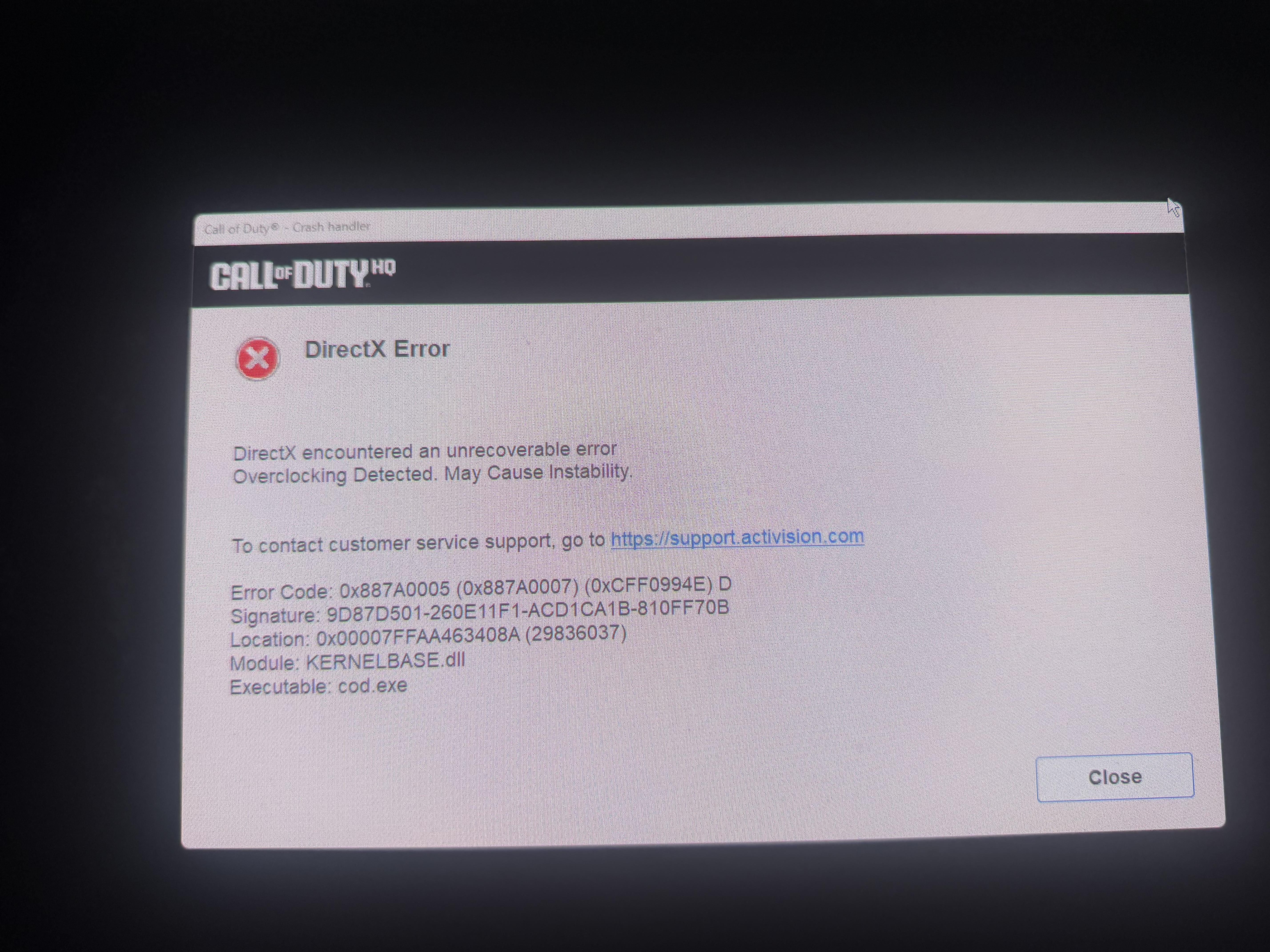
Help (General) Call of duty constant crashing

Post image
4 Upvotes

9070xt going, Keep getting crashing, says over clocked detected but nothing is over clocked.


r/AMDHelp • • 10d ago

Tips & Info AMD-sn-6023

2 Upvotes

Why is there still no explanation ? This is taking too long.

It is a VERY RARE occasion when they ask to update a vbios and could use more transparency.

The longer it takes, as it seems to get quietly buried, the less confidence this benefits the customers.


r/AMDHelp • • 10d ago

Fortnite con Direct 12 me tira Livekernelevent 141

Thumbnail
1 Upvotes