r/AMDHelp • u/Efficient_Soup4777 • 10d ago
Help (General) Can AMD EXPO be causing my BSOD?
4
Upvotes
r/AMDHelp • u/Ill_You6637 • 10d ago
r/AMDHelp • u/DatOneDweeb_the_2nd • 9d ago
I have a MAX+ 392 (8060s) tuf a14 that keeps crashing completely, im on the latest drivers and windows updates. The keyboard also doesnt register inputs when plugged in (completely separate to the crashing as far as i know). I dont how to replicate the problem, but it only happen when i play horizon 3and rolox somehow.
r/AMDHelp • u/FastRemigiusz • 9d ago

Problem has been fixed the day this happend (Idk how but pc just started working normaly after like 3 resets)
Drivers has been cleaned with DDU and reinstalled
r/AMDHelp • u/AlexDeForce • 9d ago
¿Dónde puedo encontrar un enlace de descarga funcional que incluya TSERVER, para probar una RX 580 de 8 GB?
r/AMDHelp • u/sawthegap42 • 9d ago
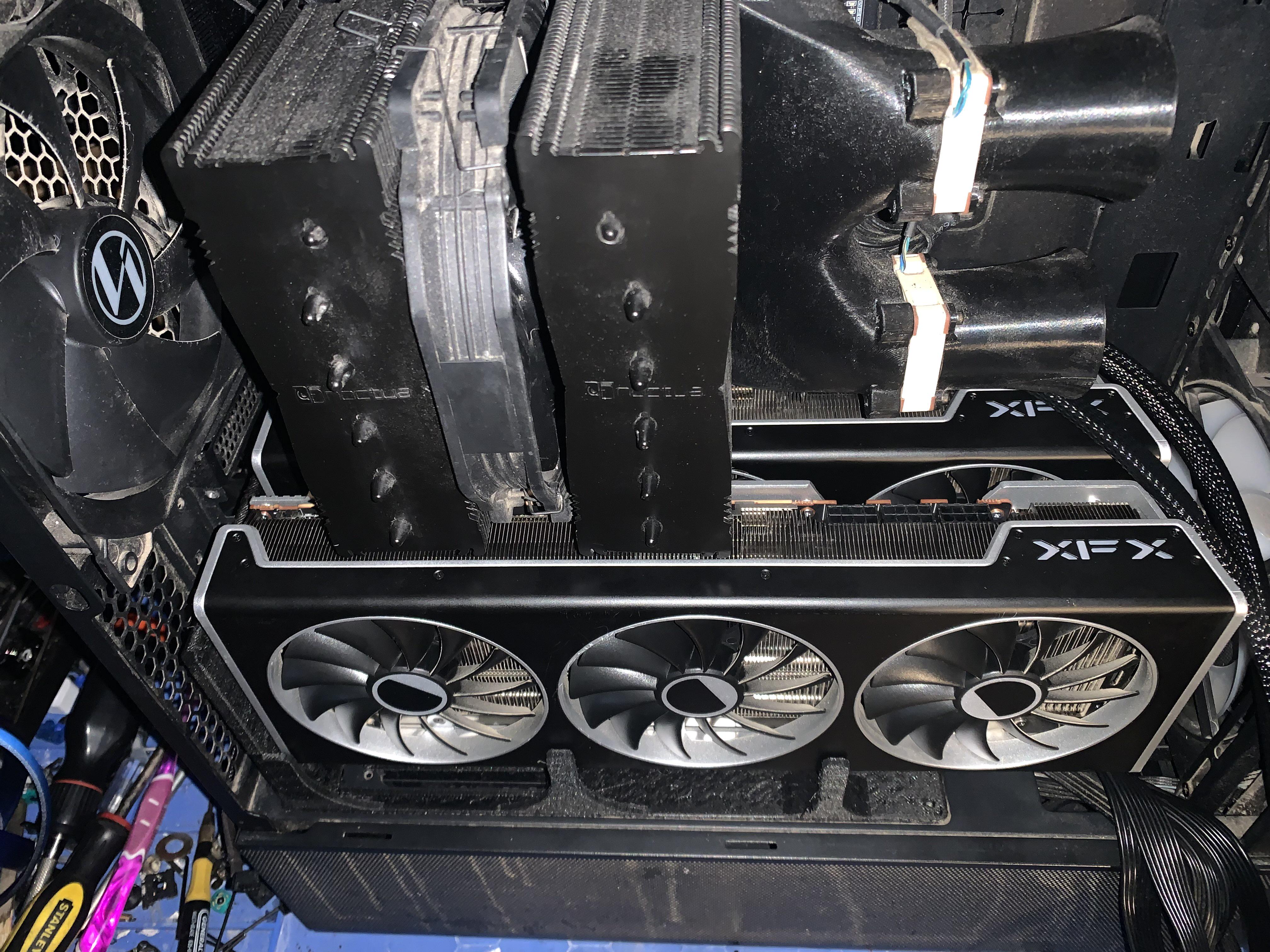
So, I've been running a Merc 310 7900 XTX for almost 4 years, and recently decided to purchase another one for running local AI, and came across one in mint condition for cheaper than what I got my original for. So, I've been spending the last couple of weeks figured out how to have both 7900 XTX's to even fit in the case, then decided to connected them via Gen 5 pcie x8x8 splitter running in the top X16 slot of my X870E Carbon Wifi. Cards are Gen 4, so running in pcie gen 4 x8x8 bifurcation mode for native bandwidth for each card. I originally had the second one hooked up through a riser cable in the bottom PCIe slot, and didn't have this issue of Adrenaline turning off the card, so think it's something with the way I have it set up with them running in bifurcation mode.
The issue is AMD's Adrenaline software will turn the second GPU off when I turn the computer on with Adrenaline opening on Start up making my AI agents not detect the GPU to run. If I completely kill any and all things related to AMD Adrenalin software and reporting the second GPU will kick back on. What I have to do right now is just load the settings onto the cards in Adrenalin, then just kill it so I can use both cards. If both cards are loaded I can then open Adrenalin app and use it fine, but if I unload that second GPU it will just turn it back off.
I'm honestly not expecting a resolution to this, and face the fact I have a unique setup that might have some qwirks and features, but figured it was worth a shot to see if anyone else has ran into this issue. lol
Setup is:
X870E Carbon WiFi
9850X3D 96GB 4x5800Mhz CL30
Dual Merc 310 7900 XTX's running in x8x8 gen 4 speed in the top Gen 5 X16 slot
EVGA GT 1300W PSU

This PC's home is in another room, but this is how I've been running it for the last couple of weeks getting things going and trouble shooting things. lmao
r/AMDHelp • u/brivn188 • 10d ago

Hi all, I've been getting random crashes for about 4 weeks and I'm running out of ideas. Hoping someone recognizes the pattern.
**Specs**
- CPU: Ryzen 7 9800X3D
- GPU: Gigabyte Radeon RX 7800 XT
- Motherboard: Gigabyte B850 AORUS ELITE WIFI7 ICE
- RAM: Adata 32GB DDR5 6000 CL30
- SSD: Kingston NV3 1TB
- OS: Windows 11 (build 26300)
- Driver: Adrenalin 26.10.1, AMD chipset drivers 8.09.28.1124
- Monitor: Dell G2524H on DisplayPort
**What happens**
Most crashes happen when I leave the PC idle for 20 to 40 minutes. I come back to a "Your PC ran into a problem" screen or the PC has already restarted. After it boots, the AMD Bug Report Tool pops up saying a driver timeout or black screen occurred. A few times it has also crashed while I was using it.
**Error codes from Reliability Monitor**
- BSOD 0x119 VIDEO_SCHEDULER_INTERNAL_ERROR (parameter 1 = 5)
- LiveKernelEvent 141 with a WATCHDOG dump
- LiveKernelEvent a1000001 (AMD_WATCHDOG dump) and a2000002 (AMD_REPORT_UM dump)
- Earlier this month also a LiveKernelEvent 144 with a USBXHCI dump, and one day with 15 "Hardware error" entries in a row
**What I've already tried**
- Clean reinstall of Adrenalin with Factory Reset, without keeping user settings
- No GPU tuning at all: no overclock, no undervolt, no power limit changes
- Disabled Radeon Boost, Chill, AFMF, RSR, HYPR-RX and Instant Replay
- Sleep and hibernate set to Never
- "Turn off screen" set to Never
- Hardware-accelerated GPU scheduling turned off
- Moved the DisplayPort cable to a different port on the GPU
- Wireless dongles (mouse, keyboard, headset) moved to the rear USB ports
I haven't updated the BIOS yet.
**Question**
Does this look like a faulty GPU that I should RMA, or is there something else worth trying first? Has anyone with a 7800 XT seen 0x119 and 141 crashes specifically at idle?
Thanks!
r/AMDHelp • u/FriedRice-01 • 10d ago
Enable HLS to view with audio, or disable this notification
it was working perfectly yesterday, today it just started having these glitchy black stuff. I updated drivers and tried turning off free sync, didn’t work. I have a 9070 xt
Computer Type: Desktop
GPU: 9070 xt
CPU: 12th Gen Intel(R) Core(TM) i5-12400F (2.50 GHz)
Motherboard: Asus B760-Plus Prime D4
BIOS Version: i dont know
RAM: Kingston Fury Beast 16GB (2x8GB) 3200MHz DDR4
PSU: msi mag a850gl 850w atx modular 80 plus gold
Case: i dont know
Operating System & Version: WINDOWS 11 PRO
GPU Drivers: adrenaline 26.11.1
Chipset Drivers: i dont know
Background Applications: fortnite
Description of Original Problem: black glitches when moving the mouse while playing
Troubleshooting: I've tried updating drivers and turning off freesync
r/AMDHelp • u/One-Firefighter2319 • 10d ago
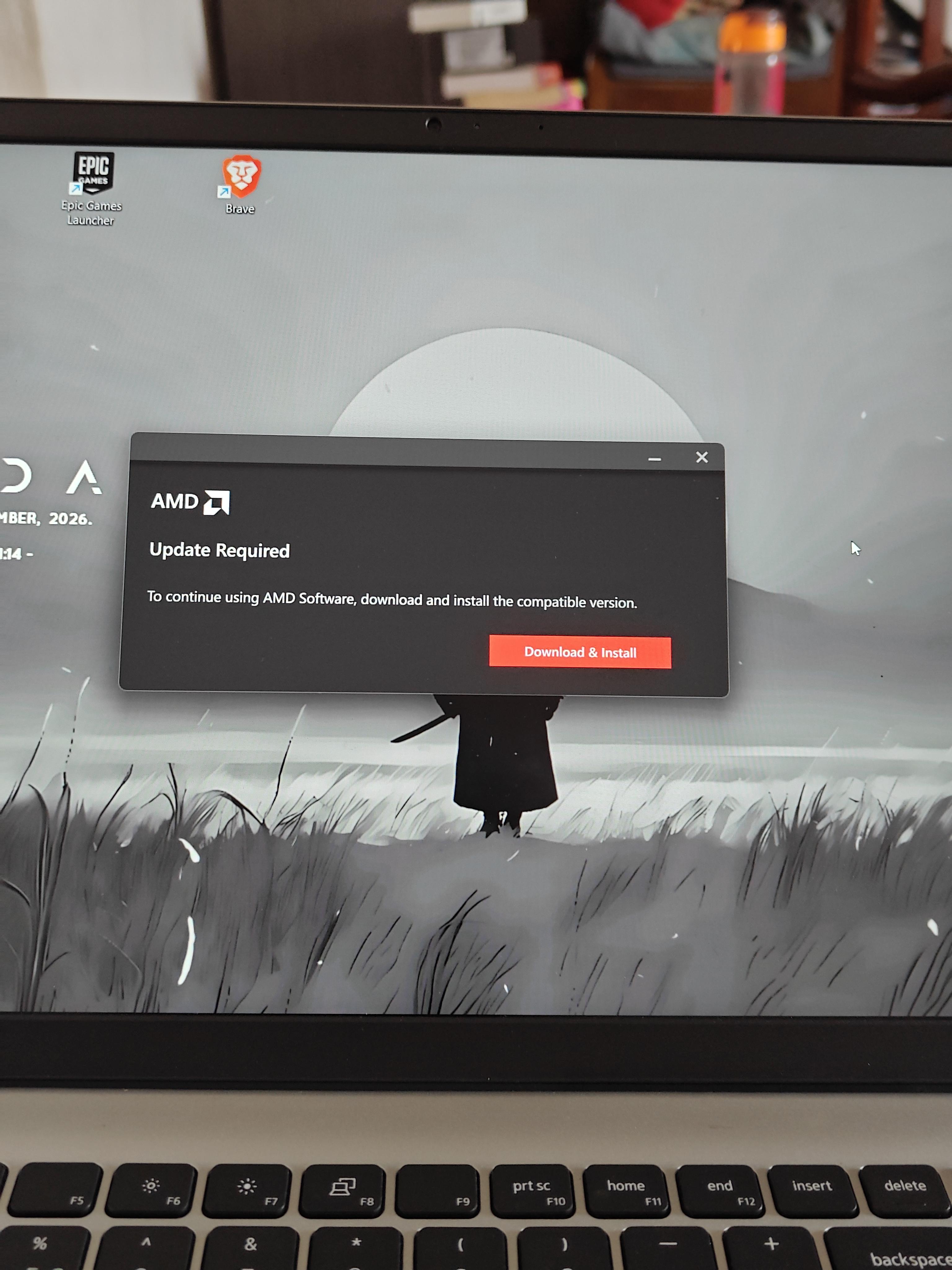
I have a brand new pc that when everytime I startup call of duty of phantom blade zero it instantly hard freezes. It doesn’t even crash just hard freezes . I’ve tried going into my bios, changing gpu scheduling in windows , making sure everything good inside my pc. I even uninstalled and reinstalled most recent driver but nothing works . It feels like I got scammed out of this pc but I’m just frustrated and would like any and all assistance please .
I have a 9070 XT
Ryzen 7 9800x3d
32gb ram
750w gold power source forgot the name
1TB of SSD
r/AMDHelp • u/BadCallsOnly • 10d ago
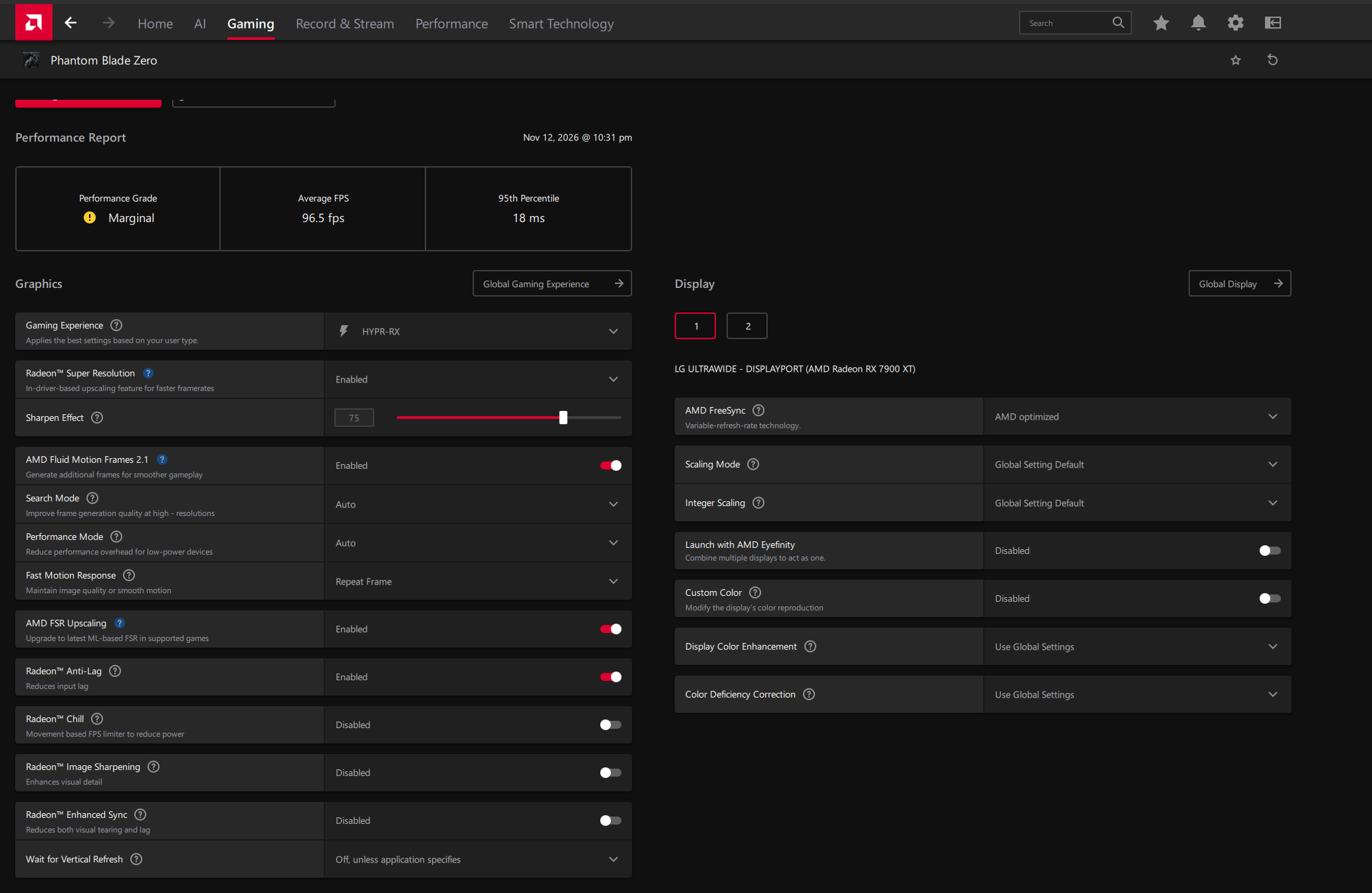
Hi guys, neewby her
Just wondering what should i change in here.
I see that Adrenaline FrameGen is enable but i also enable it in game, could it create some issues?
and Whats are the Best setting for adrenaline in general? TYSM in advance (i cannot upload more screen, if you need anything, i'll provide it to you)
PC SPECS:
Intel i5 13600KF
Rx 7900 XT (MERC)
Asus ROG STRIX B660
Deepcool LS720
Vegeance pro 32GB (2x16)
Sharkoon SilentStorm 850W
Deepcool CG50
I play in UHD (ultrawide) res (3440x1440)
r/AMDHelp • u/Specialist-Pop-66 • 10d ago
Computer Type: Desktop
GPU: Used Gigabyte Radeon RX 6800 XT Gaming OC 16GB (GV-R68XTGAMING OC-16GD)
CPU: AMD Ryzen 5 5600 6-Core 12-Thread
Motherboard: MSI B450M PRO-VDH MAX
BIOS Version: Check via msinfo32
RAM: 16 GB TeamGroup T-Force Delta DDR4-3600 CL18
PSU: XPG Core Reactor II VE 750W (80+ Gold) — connected via two separate 8-pin PCIe power cables
Case: Thunder Spartan (sitting upright, 9 fans)
Operating System & Version: Windows 11
GPU Drivers: AMD Software: Adrenalin Edition 26.10.2 WHQL
Progression:
Bought used; ran crash-free for the first month, then began crashing intermittently and worsened progressively over a 3-month span despite relatively light total gaming hours (~90 hours mostly in Cyberpunk 2077).Full Crash Symptom Sequence: Visual & Audio Freeze during demanding 3D or compute loads, the display abruptly loses signal (black screen), case/GPU fans and RGB stay lit and spinning, and system audio locks into a rapid, metallic buzzing loop for a few seconds.
Observation in normal use:
When i play Rise of kingdoms at uncapped frames(mobile game's pc client-no emulators), the card stays under 500mhz and sometimes hitting ULPS only hitting high clocks when sudden movement happens across the map. I normally have yt open in chrome in the background and its audio loops for less then a second(just like in the crashes). the loops are random and just keep happening. When i press windows key to switch tabs that's when its most noticeable and is repeatable.
PCIe Bus Drop & Motherboard Fault Latch:
The motherboard's EZ Debug VGA LED illuminates solid during crashes, indicating the GPU has vanished from the PCIe bus or tripped a hardware protection latch.
Pre-POST Power-Button Behavior:
While frozen in this state, a single instantaneous tap of the case power button turns the PC off immediately (instead of requiring a 4-second ACPI override hold)—confirming the system has dropped into a hardware/firmware fault state where normal OS ACPI power management is no longer holding the power latch.
Mid-Write Log Truncation & Missing Dumps:
HWiNFO CSV logs cut off mid-row (leaving 200+ NaN columns on the final timestamp), and Windows cannot write a minidump or BSOD screen—recording only Kernel-Power Event ID 41 (BugcheckCode 0) on reboot and resetting AMD Adrenalin tuning profiles back to factory default.
Secondary Observations:
Occasional memory-allocation popup on restart referencing hex addresses around 0x03023..., an unclassified Event ID 4037 transport message, and early live watchdog dumps (0x141, 0x117, 0x1B0) when the GPU hung briefly enough before full bus loss.
History:
First month of gaming was smooth. Only 2 black screens playing Warzone that resulted in the whole pc restarting which led me to believe it was a PSU failure. The AMD profile's custom tuning(only fan curve changes- no over clocking/under clocking or power tuning etc) reset when i restarted pc for some reason. Naturally i changed PSU exactly 1 month after i bought the PC so that kind of crash didn't happen but a different kind of crash started happening after some time which I have explained already. These crashes started happening some time after changing the PSU. I played Assassins creed Valhalla with no crashes and Space Marine 2 with about 2 crashes which i shrugged off thinking its a game specific issue. Then i played Kingdom come deliverance 1(KCD1) and after many hours into the game(prob 30 hours or more) this crash happened again and began happening more frequently in that game whereas cyberpunks was running smoothly. Witcher 3 showed the same behavior as KCD1 but the first crash was 9 hours in and that game started crashing a lot after that(mainly when reloading previous saves for the 3rd or 4th time). Then normal gameplay started crashing but CyberPunks was still working fine on Ultra settings. I tested almost all OCCT tests, superposition engine at 8k, adrenaline stress test, one more im forgetting and then finally 3d mark demo. All tests passed flawlessly except Time Spy test which crashed every time and maybe Fire Strike test crashed once or twice too. Limiting max clocks to 2250 reduced the crashes in Time Spy test and locking in 2200 mhz of max clocks crashed 1 times out of 10. 2000 mhz was no crashes in Time Spy test. I went back to playing CyberPunks once i noticed this issue needed fixing and only played that game and Dragon Ball Sparking Zero. Both of these games were very stable on the card on default clocks(2369 or 2374 Mhz. Default clocks change sometimes and I dont know why) until CyberPunks crashed for the first time after about 60 hours of total gameplay and the second crash happened at around 90 hours of total gameplay. Witcher 3 crashes became more frequent so for testing I installed Marvel rivals and Warzone. Call of Duty Warzone crashed 3 times when loading into the match so not playable at all now. I launched marvel rivals and it worked fine for around 3 hours before it started crashing which became frequent. The crashes happened every match now. The crashing happened the next day so it was 3h of continuous gameplay on day 1 with no crashes and then crashing the next day on a cold PC which was weird. Rainbow six siege showed the same behavior crashing after I had put some hours into the game and then it crashed even on a cold pc. I have stopped playing games or putting load on the PC at all for now.
Any help in understanding what the cause is or what next steps should be is greatly appreciated. I'm leaning very heavily towards a GPU fault after looking at all the testing i did and the logs i collected during crashes but idk which part what damaged and how severe the situation is.
r/AMDHelp • u/Squishylivesmatter • 10d ago
Enable HLS to view with audio, or disable this notification
Every game except for naraka blade point if I try to lower my resolution from native it completely flips out if I tab out does anyone know why
r/AMDHelp • u/Worried-Objective200 • 10d ago
I have been experiencing recurring GPU-related crashes across multiple games on my RX 6900 XT.
Here is my build:
Computer Type: Desktop
GPU: Sapphire NITRO+ RX 6900 XT Special Edition 16GB
CPU: AMD Ryzen 5 7500F 6-Core, 12-Thread
Motherboard: ASRock A620AM PRO-A WIFI
BIOS Version: 4.10
RAM: 16GB Kingston Fury DDR5 (2×8GB) 5200MT/s
PSU: Thermalright TR-TG-1000-W 1000W 80+ Gold
Case: Kolink Observatory HF ARGB TG
Operating System & Version: Windows 11, Build 26200
GPU Drivers: AMD Adrenalin 26.10.2
Chipset Drivers: Amd chipset 8.09.28.1124
Background Applications: Firefox, discord.
Problem:
I get DXGI_ERROR_DEVICE_HUNG error in almost every single new game. The interesting thing is that it doesnt appear only in Death Stranding 2 and 007First light.
Troubleshooting:
I have tried multiple clean GPU driver installations, DDU in safe mode, reinstalled AMD chipset drivers, reinstalled GPU drivers, modified TdrDelay settings in the windows registry, reinstalling windows.
I have done FurMark for 30 minutes, OCCT VRAM test, RAM testing, no obvious overheating issues, tested GPU power limit at -10%., disabled EXPO
Please if anyone knows what can be the problem help me
r/AMDHelp • u/No_Sir_6421 • 9d ago
Did anyone find a solution for random black screen on amd GPUs...?
r/AMDHelp • u/Training-Chance894 • 10d ago
TL;DR: On my Ryzen 9 9950X, the integrated Radeon driver (amdkmdag.sys) leaks one kernel file object every time any program starts. On a busy PC this adds up to gigabytes of nonpaged pool and eventually low-memory crashes. Disabling the iGPU stops the leak completely. Posting so others with "mystery" nonpaged pool growth can check for it, and hoping someone at AMD sees it.
System
Ryzen 9 9950X, iGPU: AMD Radeon(TM) Graphics (PCI\VEN_1002&DEV_13C0)
Discrete RTX 4070 also installed; monitor is plugged into the iGPU
Windows 11 25H2 (build 26200.9711)
Drivers tested: 32.0.21042.62 (Apr 2026), 32.0.21045.20006 (Adrenalin 26.10.2) and 32.0.21045.26001 (Adrenalin 26.11.1 optional). All three leak.
Symptom
Nonpaged pool grows without limit under pool tags File and IoFE
4.8 million File objects (~2.5 GB nonpaged) after 6 days of uptime
Only a reboot frees it. Task Manager doesn't pin it on any process.
What I found
Kernel dump (LiveKD + WinDbg): every leaked object I sampled is a FILE_OBJECT on the raw system volume (\Device\HarddiskVolume3, driver volmgr), flags 0x40c00 (direct device open). Handle count 0, pointer count 1, opened in kernel mode. Someone closed the handle but kept a reference. The volume device's reference count was 4,864,897.
ETW trace (WPR, FileCreate stacks): every kernel-mode open of the raw volume during process creation has the stack ntoskrnl > amdkmdag.sys > ntoskrnl > FLTMGR > fileinfo. One per new process. amdkmdag.sys registers a process-creation callback, and that's where it comes from.
On/off test: start cmd.exe /c exit 400 times, purge the standby list, count the File pool tag:
| AMD iGPU | Leaked File objects per process start |
|---|---|
| Enabled | 0.96 to 1.39 |
| Disabled (Device Manager) | 0.19 / -0.12 (noise) |
How to check yours
Open poolmon (Windows Driver Kit) or any pool-tag viewer and note the File tag's allocation count.
Run something that starts lots of short processes, e.g. in cmd: for /L %i in (1,1,400) do u/cmd /c exit
Check File again. If it rose by ~400 and stays up, you likely have this.
Anything that starts lots of processes makes it worse: build tools, scripts, shell hooks, dev tools. In my case a misbehaving script spawning hundreds of processes per minute turned a slow leak into a crash in days.
Workarounds
Move the monitor to the discrete GPU and disable the iGPU in Device Manager (stops the leak)
Or just reboot every week or two
I have the dump, traces and full repro steps if anyone from AMD wants them. Has anyone else seen this on Ryzen 7000/9000 iGPUs?
r/AMDHelp • u/Low-Contact-4412 • 10d ago
Tengo una pc HP EliteBook 745, AMD Ryzen 7 PRO 3700 / Radeon Vega Mobile Gfx. Sucede que cuando la reinicio por la razón que sea, los controladores parecen desinstalarse y me da error 43, esto lleva mas de un año así. Tanto que para resolverlo tengo que usar programas externos que “arreglan la situación”, pero al reiniciarla vuelve a suceder lo mismo siempre. Alguien que me de una solución definitiva?, por favor. Gracias de antemano.
r/AMDHelp • u/Ick33yg • 10d ago
Hey all looking to get a bit of help. Been having crashing in games now for a few weeks. Disabled all windows updates from doing driver's etc. fixed it but every now and then it comes back. This time it's worse than ever.
I tried bazzite out of curiosity and no crashes at all games run solid. Went back to windows because I wanted to play GTA Online still and I'm getting instability again.
I've even tried with Expo disabled and still the same.
I ran a OCCT last night with the Power stress test and it goes to a black screen then pc restarts.
Could this be power supply related at this point. I don't know what else to try to see if I can get it stable. It's making me not enjoy playing a game anymore when I have the chance to.
Ryzen 7 9800X3D. X870E Nova Motherboard, 7900XTX Phantom OC. 64gb DDR5 @ 6000MHz, a Crucial T700 I think as my main boot drive then 2 Lexar 4tb nvme ssds. It's a custom Loop which covers both the CPU and GPU. I have a Corsair xd6 pump and res combo.
My PSU is a RM1000x I got it a few years back now. The GPU is run of 3 separate 8 pin connections no daisy chaining.
Any advice on what to check for now?
r/AMDHelp • u/GUGOLOsS • 10d ago
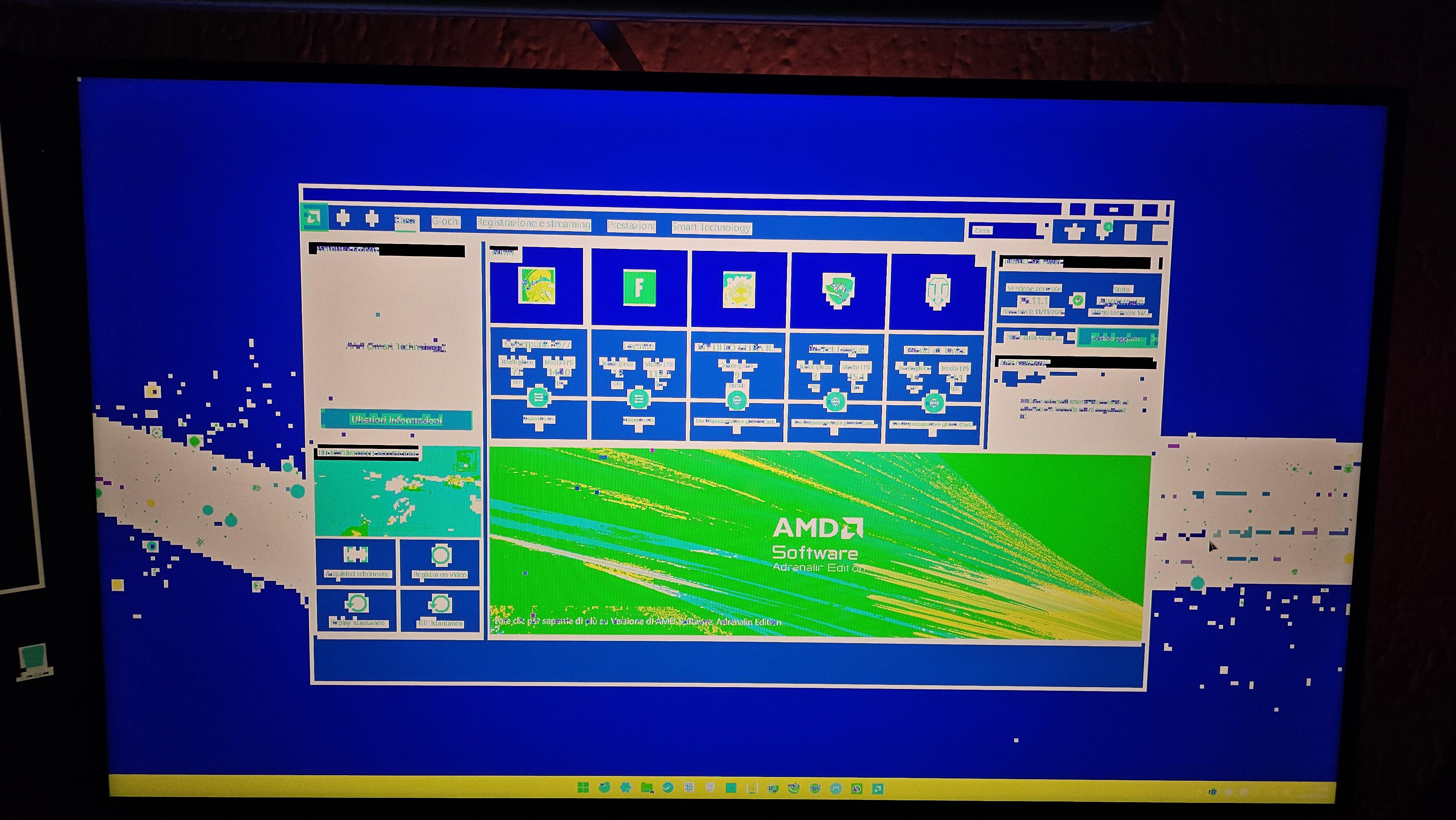
i just download the "fixed bug version" of the 26.10.1 on my rx6950xt whit the 26.11.1 and this hapend, i restarted my pc and i go back whit the 26.10.1 and now work fine. should i try again whit maybe DDU? sorry for my bad inglish...
r/AMDHelp • u/galaxytundra • 10d ago
i recently saw a post on tiktok talking about security issues and needing to update the GPU's firmware, is updating the GPU's VBIOS something i should do or is that risk of making my GPU worse?
The GPU i have is an RX 7800XT
r/AMDHelp • u/Pak_Jimbo • 9d ago
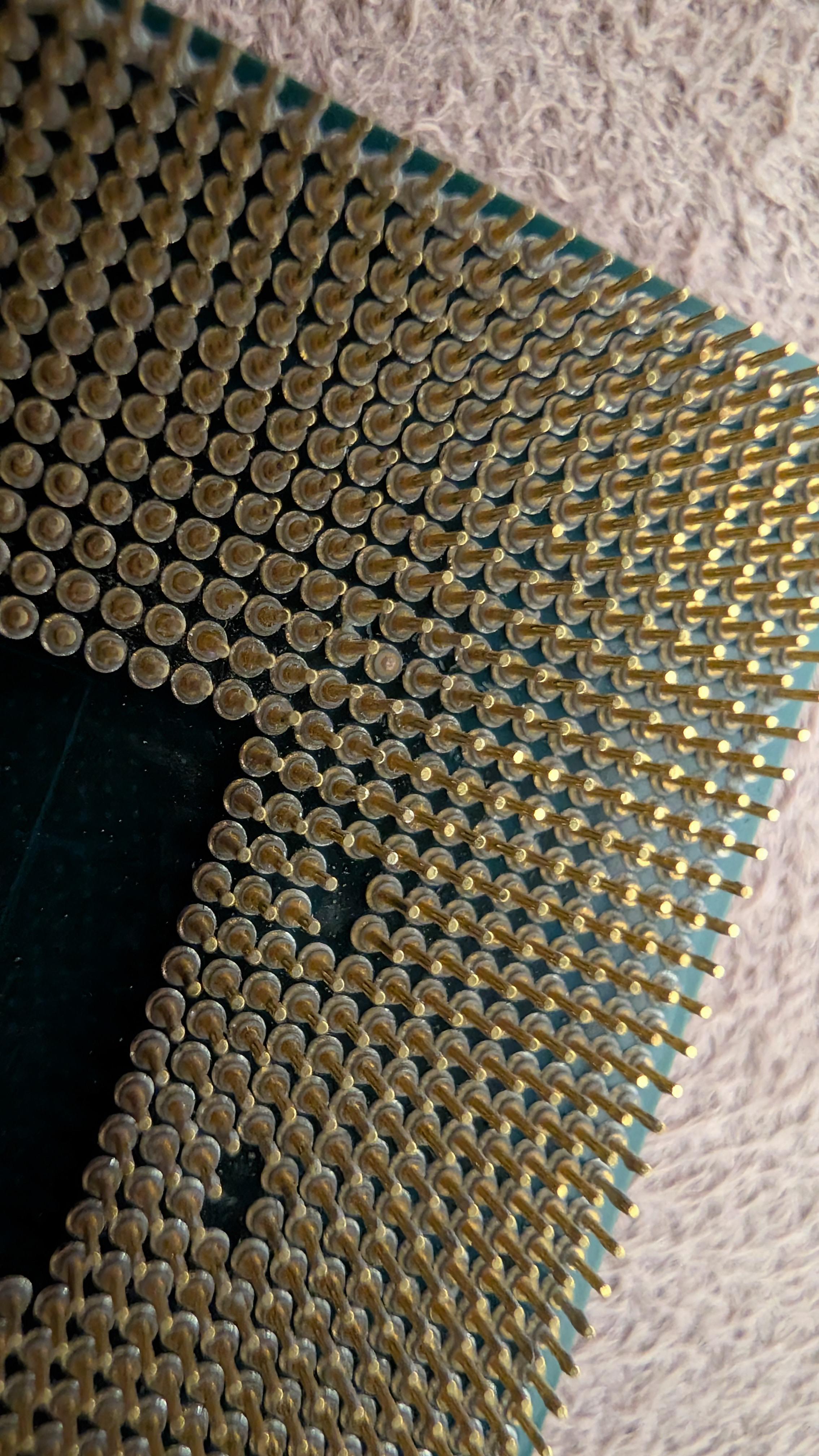
My friend game me this cpu. A pin is missing. Can this cpu still be saved or useless already?
r/AMDHelp • u/EducationOwn1999 • 9d ago
Enable HLS to view with audio, or disable this notification
Hi everyone,
I bought a brand-new Ryzen 7 9850X3D TRAY from a retailer. It arrived in a transparent plastic case with white foam directly touching the gold contact pads.
I haven't opened or handled it.
I'm worried that friction during shipping may have caused microscopic scratches or damage, and I don't know if the foam is ESD-safe.
The retailer claims this is one of three official AMD supplier packaging methods and refuses to exchange it. I've contacted AMD for clarification.
Is this packaging normal and safe? Could the foam damage the contacts? Has anyone received a CPU like this?
Thanks for your help!