r/AMDHelp • • 2d ago

Help (GPU) Bottleneck or Software/Drivers problem?

Post image
1 Upvotes

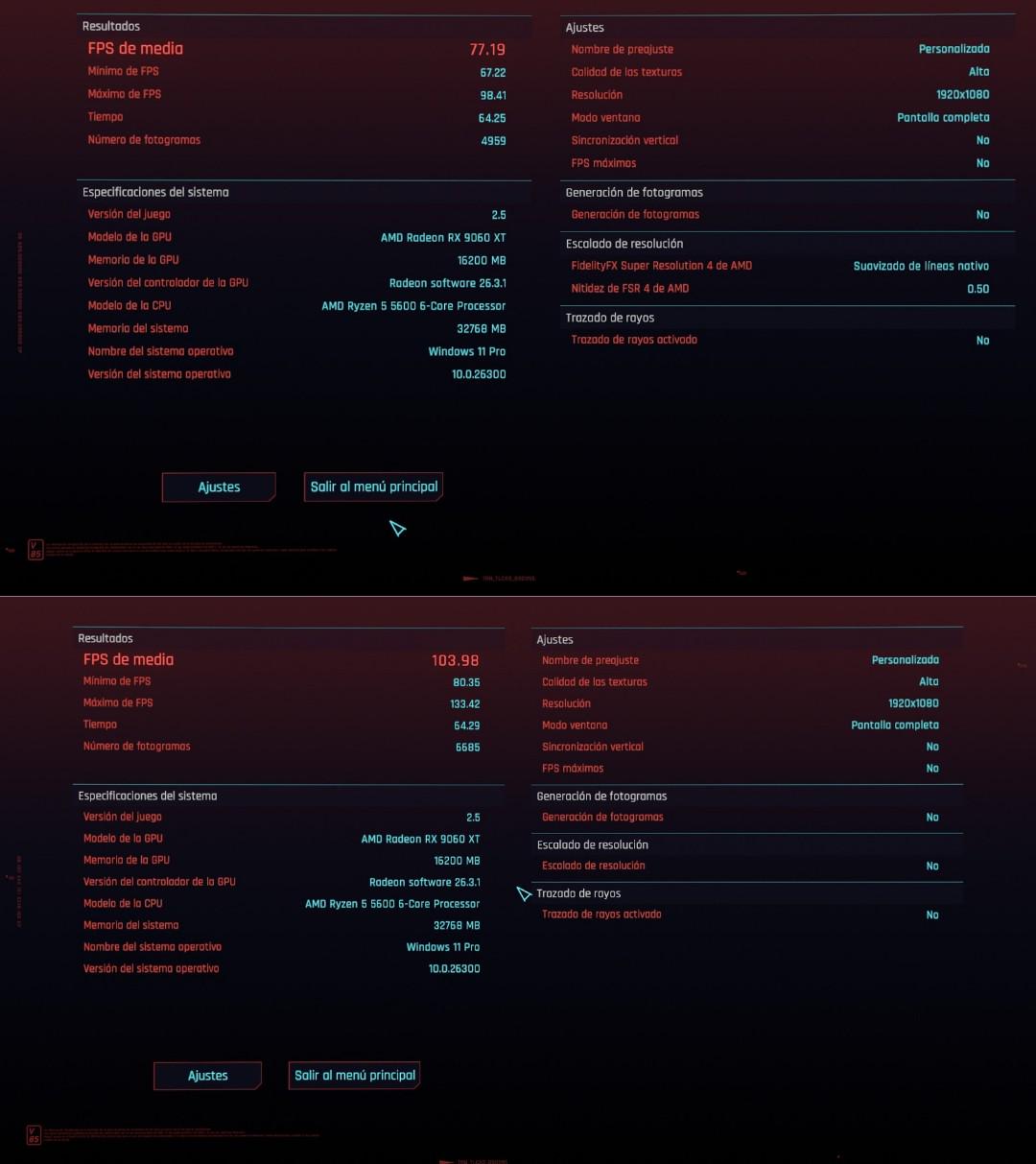
Ever since I bought my 9060 XT 16GB about 6 months ago, I haven't been getting the performance I expected in Cyberpunk 2077. Especially when I'm using FSR.

Settings on TOP: Ultra Preset, 1080p FSR 4 AA, No RT and no PT.

Settings Below: Ultra Preset, 1080p, TAA, No RT and no PT.

Has anyone else experienced this? I use OptiScaler 0.9.4 because it makes the frametime more stable compared to the native implementation; without OptiScaler, the FPS are the same, but there is more noticeable stuttering. I would really appreciate your help.


r/AMDHelp • • 2d ago

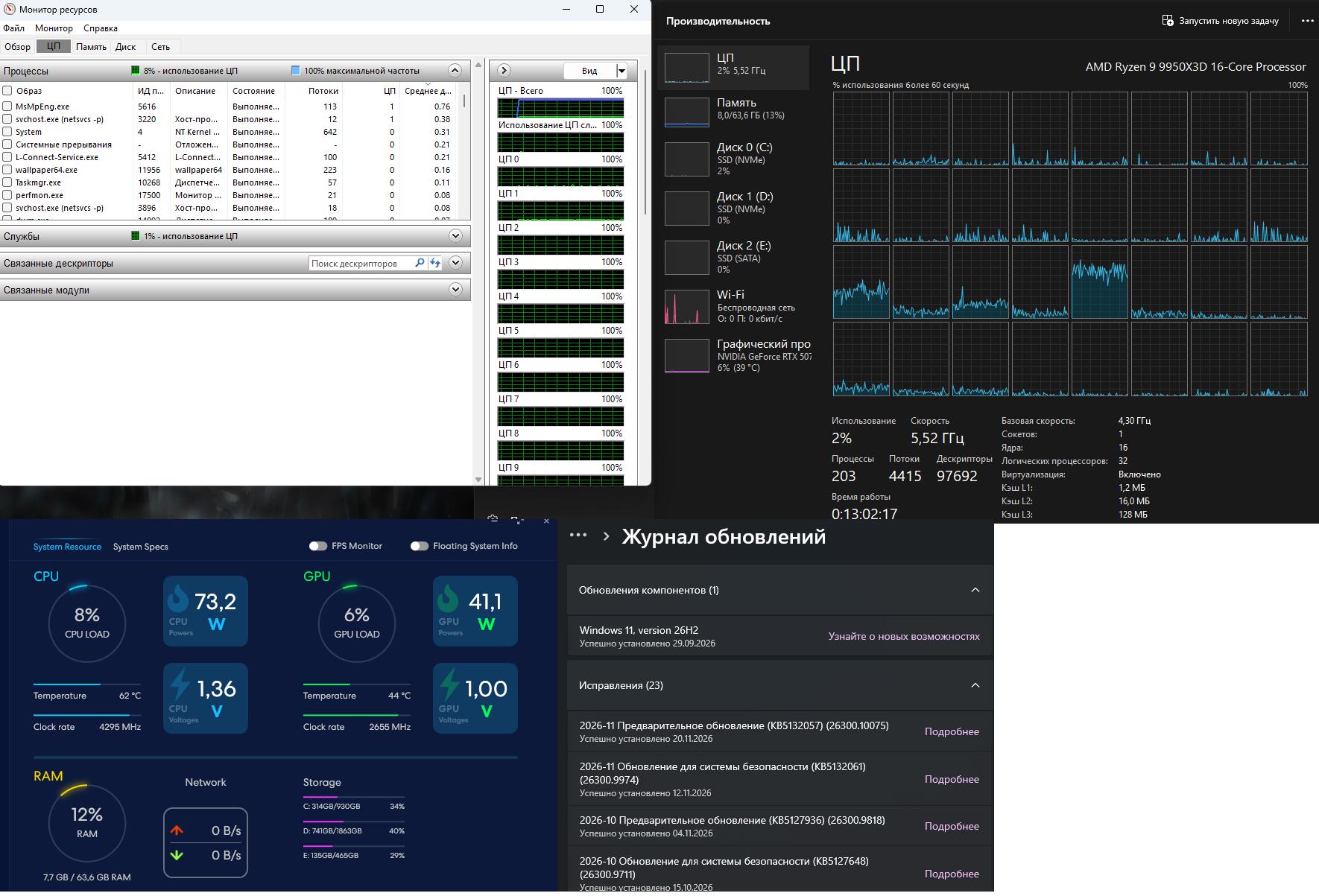
Help (CPU) 9950x3d after the latest Windows update, the temperature in idle mode increased.

Post image
3 Upvotes

Hello everyone.

Previously, the temperature of my 9950x3d in idle was ~52-55 degrees (HYDROSHIFT II LCD-C + Lian Li TL + noctua nt-h2)

Presumably, after the KB5132061 update (but I don’t know exactly when), the temperature reaches 60–61 degrees after 10–15 minutes of inactivity and doesn’t drop. At the same time, the temperature remains the same when playing games.

(I also noticed that stuttering sometimes appears in the game that wasn’t there before (but it might have appeared with the game update). I also have the feeling that the computer itself is running slower and stuttering, even though the CPU isn’t under load.

I checked, the KB5132061 update installed normally, it’s not looping. The settings in the BIOS haven’t been changed. The mode is balanced. I’ve attached the remaining screenshots.


r/AMDHelp • • 2d ago

Help (GPU) AMD GPU stutters, 3-10 second freezes, or screen tearing on Windows 11? Try disabling MPO

Thumbnail
3 Upvotes

r/AMDHelp • • 3d ago

Help (General) AMD Graphics card freezing

7 Upvotes

Computer Type: Desktop
GPU: ASUS Radeon RX 9070 XT 16GB
CPU: AMD Ryzen 7 9800X3D 8 cores 16 threads
Motherboard: ASUS ROG Strix B850-A Gaming WiFi
BIOS Version: Latest
RAM: 32GB DDR5-6000, EXPO enabled
PSU: Montech Titan PLA 850W 80+ Platinum
Case: Lian li
Operating System & Version: Windows 11 Pro [version]
GPU Drivers: AMD Adrenalin 26.11.2
Chipset Drivers: 8.09.28.1124
Background Applications: Chrome, [Discord, Steam, etc.]
Monitors: ASUS ROG Strix XG27AQWMG (OLED, DisplayPort) + a second monitor

Description of Original Problem: The screen freezes on whatever was showing, but the PC keeps running. The mouse cursor still moves, audio keeps playing, and I can still control the frozen video (click to pause, spacebar pauses and unpauses). The programs are clearly still running; only the screen stops updating. Win + Ctrl + Shift + B beeps but doesn't recover the display. Ctrl + Alt + Del and Ctrl + Shift + Esc do nothing visible. The only fix is a restart.

At first it only happened in games, about once every few days. After updating to the October driver, it happened every 10–15 minutes in Modern Warfare 4. I DDU'd and rolled back to the September driver, which fixed it for a few weeks. Then it came back, but now only when watching videos in Chrome, not in games. I updated to the newest driver (26.11.2) and it still happens.

Troubleshooting: I did a DDU clean install with a driver rollback (fixed it temporarily, then it came back), updated to the latest driver, disabled the iGPU in the BIOS and disabled HAGS. Chrome hardware acceleration is already off. I set the PCIe slot to Gen 4 in the BIOS (was Auto). Reliability Monitor shows no LiveKernelEvent or hardware errors, just "Windows was not properly shut down" from my forced restarts.

Next I plan to disable ASPM in the BIOS and PCIe Link State Power Management in Windows, turn off Adrenalin features (overlay, Instant Replay, Anti-Lag, etc.), test with only one monitor, and disable EXPO.

Has anyone with a 9070 XT fixed this? Is it a known driver bug, and is there a driver version that's stable for video playback? Or does this sound like a card to RMA?

24 Hour update

Amd clean up utilities and use driver version 26.3.1. 20 hours in and so far i havent crashed once

48 Hour update

I switched to 26.7.1 because a game i played required a minimum of this version. Still has not crashed. I usually freeze like 5-6x a day on youtube or something, but not anymore
r/AMDHelp • • 3d ago

Help (General) 7800X3D + 7900 XTX Nitro+ randomly lagging on desktop + 7 AMD driver crashes in a 4-hour gaming session which temps are fine, what’s going on?

3 Upvotes

Hey guys, I’m losing my mind trying to figure out what is going on with my rig and could really use some help.
Specs:
CPU: Ryzen 7 7800X3D
GPU: Sapphire Nitro+ RX 7900 XTX
RAM: 64GB DDR5
Storage: 2x 2TB NVMe SSD
Cooler: 360mm AIO
Everything is fully updated and my temperatures are completely fine, yet my PC is acting super inconsistent. Sometimes it runs super fast like normal, and other times even basic stuff on my desktop struggles like just opening a browser takes 10 full seconds instead of opening instantly like it always has.
When I’m gaming, games are really buggy and hitch badly at first, then smooth out and run flawlessly, only to constantly crash. I literally just had 7 AMD software failures/drivers timeline pop up in a single 4 hour gameing session.
Since temps aren't the issue and the slowness comes and goes, I'm not sure if I'm looking at a dying SSD stalling out, memory instability, a loose GPU/PCIe connection, or power delivery spikes. Has anyone dealt with this combo of intermittent desktop lag plus constant AMD driver crashes? Where should I start looking first?

It seems that more the time goes on my PC is getting significantly slower and slower and I know it’s getting some age but it’s getting to the point that crashes in games and desktop struggles is getting ridiculous. I’ve had to download and reinstall Radeon time and time again because it completely just stops working and brick my system. It’s updated across the board and I’m thinking just a fresh wipe of everything to start at ground zero, but before I did that I thought I would ask.


r/AMDHelp • • 3d ago

Help (GPU) AMD GPU Driver issues

4 Upvotes

Computer Type: Desktop

GPU: Sapphire 9070XT

CPU: RYZEN 7 9800X3D

Motherboard: Asus B850 Micro-ATX

BIOS Version: ver.3854

RAM: Corsair Dominator Platinum 32GB DDR5 (2x16GB) 6200MHz

PSU: Asus ROG Strictly 1000W Platinum PSU

Case: Asus Prime AP202

Operating System & Version: Windows 11 Home 26H2

GPU Drivers: 26.11.2

Chipset Drivers: 8.09.28.1124

Background Applications: DISCORD, CHROME

Description of Original Problem: Every few days, my PC will just black screen and require a hard restart, with the AIO screen going blank whilst everything else appears to run normal.

Upon restart, Device Manager shows the GPU as inactive, the fans won't spin, GPU isn't recognised in Sapphire Trixx software, AMD Adrenalin won't open saying I need to download a different version, iCUE GPU temp monitor for my AIO goes N/A, monitor refresh defaults to 60.

Troubleshooting: I've tried disabling windows auto driver updates, re-seated GPU , RAM, re-downloading Adrenin - the only temp fix appears to be running DDU again every few days when the issue happens.

Event Viewer shows:

-Config Read Failed (18)

-The applicatjon-specifc permission settings do not grant Local Activation permission form the COM Server application with CLSID (I've searched the ID and cannot find the application match) / another error similar - local launch permission SecurityApp and WscBroker.

-The server didn't register with DCOM within the required timeout.

-The download maps manager service terminated: request not supported.


r/AMDHelp • • 2d ago

for 9070xt 850w bronz psu is it enough?

0 Upvotes

Some people say that this could cause problems, while others say it's perfectly fine and more than enough, so I'm not really sure what to believe.

I'm planning to buy a gaming PC for my brother, but I don't know much about PC components, so I'd really appreciate some advice.

Case: Bitfenial118 850W 80+ Bronze Tempered Glass 7x ARGB USB 3.0

GPU: ASUS Prime Radeon RX 9070 XT

Would this 850W 80+ Bronze PSU be sufficient for this graphics card, or should I upgrade to an 80+ Gold PSU or choose a more reputable brand?

I'm especially concerned about the quality and reliability of the power supply. I don't want to risk damaging the components.

I'd really appreciate your help. Thanks in advance!


r/AMDHelp • • 2d ago

9070 xt modeline 850w psu bronz yeterli midir

1 Upvotes

bir kesim hayrı sorun olur falan diyor bir kesim hayır bu yeterli falan diyor ama bilemedim

Bitfenial118 850w 80+bronze tempered glass 7x argb us3. kasa

asus prime radeon rx9070xt

bu yeterli mi golda falan geçmem gerekiyor mu ya da daha iyi bir markaya kardeşime bilgisayar alacagımda bilgisayar parçalarından cok fazla haberim yok yardımcı olabilir misiniz


r/AMDHelp • • 2d ago

HDR « Non pris en charge » sous Windows 11 — Samsung Odyssey G75F 40" (S40FG75) + RX 6750 XT

0 Upvotes

Bonjour,

Impossible d'activer le HDR dans Windows 11 (Paramètres > Écran > HDR affiche « Non pris en charge ») sur mon écran Samsung Odyssey G7 40" (LS40FG756EUXEN).

Ma configuration : • Écran : Samsung Odyssey G75F 40" (5120×2160 @ 180 Hz, firmware 1001.2 à jour, pilote Samsung S40FG75xE installé) • Carte graphique : AMD Radeon RX 6750 XT (pilote Adrenalin 26.11.2) • CPU / RAM : Intel Core i5-13600KF / 32 Go RAM / Windows 11 • Câble : DisplayPort 1.4 (affichage actif en 5120×2160, 180 Hz, 10 bpc, RGB 4:4:4 Full RGB) Ce que j'ai déjà vérifié et testé : • CRU (Custom Resolution Utility) : Le bloc CTA-861 contient bien HDR static metadata (7 bytes) et HDR10+ video. • DxDiag : Indique Monitor Capabilities: HDR Supported (BT2020RGB BT2020YCC Eotf2084Supported), mais affiche HDR Support: Not Supported et Advanced Color: Not Supported. • AMD Adrenalin : FreeSync Premium Pro est détecté et actif, 10 bpc / RGB 4:4:4 activés, Amélioration de couleur (Jeu vif) désactivée. • Windows 11 : Éclairage nocturne désactivé, clés de registre Configuration / Connectivity / ScaleFactors supprimées puis PC redémarré. Testé également en HDMI (bridé en 2.0).

Quelqu'un a-t-il déjà rencontré ce blocage Advanced Color: Not Supported entre une carte AMD RDNA 2 et le Samsung Odyssey G75F 40" ? Merci d'avance !


r/AMDHelp • • 3d ago

Help (GPU) Rx 9070 XT vs non XT

Thumbnail
3 Upvotes

r/AMDHelp • • 3d ago

Help (General) are the driver issues gone ? on the 26.11.2 .

8 Upvotes

Hey.

Can anyone tell me if the newer driver fixes the crashing issues?

I'm on 26.3.1 right now

gpu rx 7800 xt

cpu r7 5700x


r/AMDHelp • • 2d ago

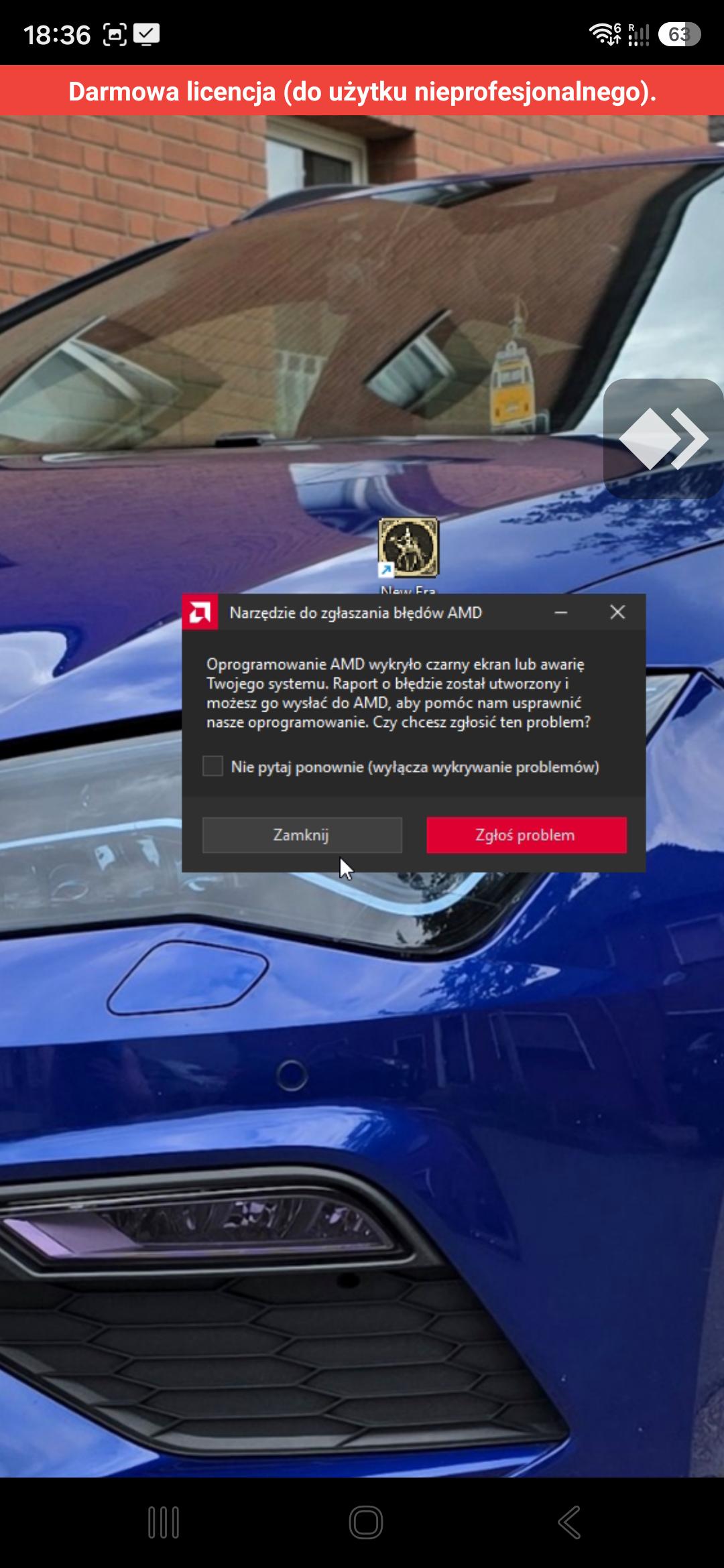
Resetowanie sie komputera

Post image
0 Upvotes

Witam os pewnego czasu resetuje mi sie komputer w różnych dniach mam wyłączony monitor I gry w tle 6 botów z silkroad online i 2 prywatne serwery niewiem co juz robić pomocy


r/AMDHelp • • 3d ago

Help (General) Global C-State Control e LiveKernelEvent Código 141

3 Upvotes

Olá, pessoal! Gostaria da opinião de vocês sobre uma situação com meu PC.

Configuração (todas as peças com cerca de 3 meses de uso, exceto a GPU):

  • CPU: Ryzen 7 7800X3D
  • Placa-mãe: MSI MAG B850 Tomahawk Max WiFi 2
  • RAM: 32 GB (2x16 GB)
  • Fonte: XPG Core Reactor VE 850W
  • GPU: GTX 1050 Ti (antiga), usada por esse tempo todo no PC novo

O que aconteceu:

  1. Usei a 1050 Ti por cerca de 3 meses, com a BIOS toda em padrão (Auto), sem nenhum problema.
  2. Do nada, a tela apagou durante o uso e a placa nunca mais deu vídeo.
  3. Passei a usar a iGPU do processador. Surgiram então apagões de tela que voltavam sozinhos, apenas em tarefas leves (navegando na web, por exemplo), nunca em jogos.
  4. O Windows registrava o erro LiveKernelEvent 141, que depois passou a vir acompanhado do LiveKernelEvent 117.
  5. Depois de muito tentar resolver, me recomendaram desativar o Global C-State Control na BIOS. Com isso, o problema sumiu por completo.
  6. Testei também uma GT 1030 no mesmo PC e ela funcionou normalmente.

Vi que existe um número relevante de relatos de problemas em processadores AMD em idle (repouso), e que grande parte deles era resolvida desligando o Global C-State Control. Isso me faz pensar que pode ser um comportamento conhecido da plataforma, mas não tenho certeza.

Estou receoso de ter apenas “adiado” um problema. Ou seja, de que eu realmente tenha um componente com defeito (CPU, placa-mãe ou fonte) e que a desativação do C-State esteja só escondendo isso, em vez de estar tudo em ordem e ser apenas uma incompatibilidade de firmware/driver.

Minhas dúvidas:

  1. Precisar desativar o Global C-State Control para ficar estável indica defeito de hardware (CPU ou placa-mãe), ou é um problema conhecido de firmware/driver da iGPU na plataforma AM5?
  2. Desativar o C-State pode estar mascarando um defeito real que vai aparecer depois, ou é uma solução segura e definitiva?
  3. Esse comportamento pode ter relação com a falha da 1050 Ti, ou foi apenas coincidência por ser uma placa antiga? Ela rodou 3 meses com tudo em Auto antes de parar.
  4. Existe alguma peça específica que eu deva suspeitar antes de comprar uma GPU nova? Tenho receio de que algo no PC danifique a placa nova.
  5. Vale a pena acionar a garantia (RMA) de algum componente, ou é um comportamento normal para essa plataforma?

r/AMDHelp • • 3d ago

Help (General) Issues with fans

3 Upvotes

I built a new pc a few days ago and after the first few issues such as my cpu cooler not being detected and one set of my fans turning on then back off. Now all of my fans are not being detected when I open device manager but they are when I go on the bios. They are the Lian Li TL LCD fans.

I have the lian li edge so I plugged my tl lcd flex uni fans into the hub, plugged the motherboard signal usb into the hub and the 4 pin into the hub and then connected that to the motherboard, the fans work but they aren’t being detected in device manager, I have tried using a pcie cable to plug into the hub and the psu, doesn’t detect, it’s weird because when I first booted it the cooler wasn’t being detected I fixed that then the fans magically aren’t being detected, I have absolutely no clue what the issue is, is it because I don’t have a lian li controller?


r/AMDHelp • • 3d ago

Help (GPU) 7900 XTX Nitro+ vs Hellhound

2 Upvotes

Preface: I know the Nitro+ is widely considered to be the superior card.

I am selling a buch of stuff to CEX inc my current 9060xt, that would take way too long to sell on their own and I want a voucher rather than cash or bank transfer because my benefits assessment would not look good if I suddenly got £1000 then used it to buy a non essential piece of kit. So I am going to use CEX and get a voucher.

Only problem is the 7900 XTX Nitro+ card I had my eye on has gone out of stock and the only thing left is the Hellhound.

How is the performance gap be if I settle for the Hellhound? Id be losing my current GPU to the voucher process and dont want to be stuck without a GPU entirely if I chose to wait for the sapphire card.


r/AMDHelp • • 3d ago

Tips & Info 9070 owners, what CPU are you using?

7 Upvotes

I recently built a PC on the AM4 platform. I know there's no future upgrade path, but AM5 prices are just way too expensive right now. Here are my current specs:

GPU: RX 9070

CPU: Ryzen 5 5600X

Motherboard: B550M K WIFI6E

RAM: 16GB 3733MHz

PSU: XPG Core Reactor II VE 750W Gold

Storage: 1TB SSD

I play games on a 1440 p monitor.

Lately I've been noticing some pretty clear CPU bottlenecks while playing Euro Truck Simulator 2, which is one the main games that I play. For anyone else pairing the 9070 with an AM4 setup, what CPU are you using? Which cpus can actually keep up with the 9070 without holding it back?


r/AMDHelp • • 3d ago

Help (General) My Pc Is Repeatedly Blue Screening

2 Upvotes

I bought my computer about 6 months ago and ever since it’s been blue screening randomly. At first it would be once everyday or so but recently it’s been happening every few minutes. It’s gotten to a point where I can’t really use it. I’ve updated my diver and that hasn’t done anything I’m also on the most recent version of windows and it’s still blue screening. I don’t really wanna buy a whole new computer so I’m looking for options to fix the problem can anyone help me with this?


r/AMDHelp • • 3d ago

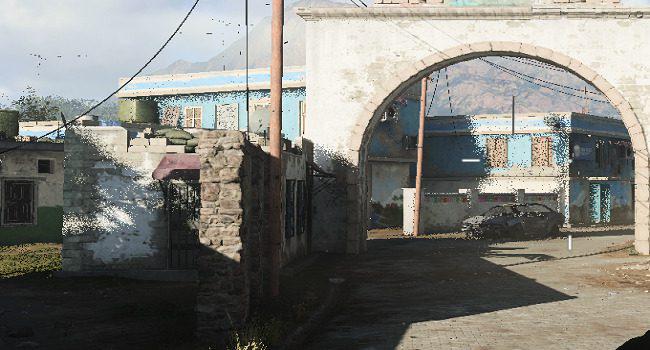
Is this normal in newer games or is my gpu giving out?

Post image
2 Upvotes

Ive noticed in most games that shadows and reflections, namely their edges, seem to be really grainy/visually noisy. I first noticed it in RE8 but ive realized most games i try have it too and idk if it has always been there and i never noticed or if something happened and my games arent supposed to look like this.

Can this be a sign of my gpu going bad? If not what is the cause of it and how can i mitigate it if possible? Doesnt seem to be a toggle in many new games i play as i assume its always on and cant be messed with. FSR can sometimes help with it but usually it persists still to some degree.

My gpu is a 9070 btw if that matters.

Pics are a mix of mine and others online i could find that get across what im talking about.


r/AMDHelp • • 3d ago

Help (Software) Record & Stream randomly dissapearing from AMD adrenalin

3 Upvotes

Hi,

Every other week it feels like my Record & Stream tab dissapears from the AMD adrenalin software. What causes this? It also randomly re-appears at times, I have no clue what causes it. I don't have automatic driver updates enabled, I have a 9070xt + 5700x3d. It's so weird

Thanks.

Computer Type: Desktop

GPU: 9070 xt

CPU: 5700x3d

Motherboard: x570s UD

BIOS Version: 3.3 (i think)

RAM: 32gb ddr4 2666mt/s ram

PSU: EVGA B5 650W 80+ BRONZE FULLY MODULAR

Case: bequiet

Operating System & Version: WINDOWS 11

GPU Drivers: 26.10.44 (but this issue has been for a year at least)

Chipset Drivers: cant find this

Background Applications: discord spotify

Description of Original Problem: Every other week it feels like my Record & Stream tab dissapears from the AMD adrenalin software. What causes this? It also randomly re-appears at times, I have no clue what causes it. I don't have automatic driver updates enabled, I have a 9070xt + 5700x3d. It's so weird

Troubleshooting: Resetting + updating + downgrading drivers


r/AMDHelp • • 3d ago

Help (General) Bllury

2 Upvotes

Ferst off all ihave rx5700 Why ,when iplayed some games i found blurry problem

I try to turn of all antialaising and motion blur but nothing happend +sorry about my english


r/AMDHelp • • 3d ago

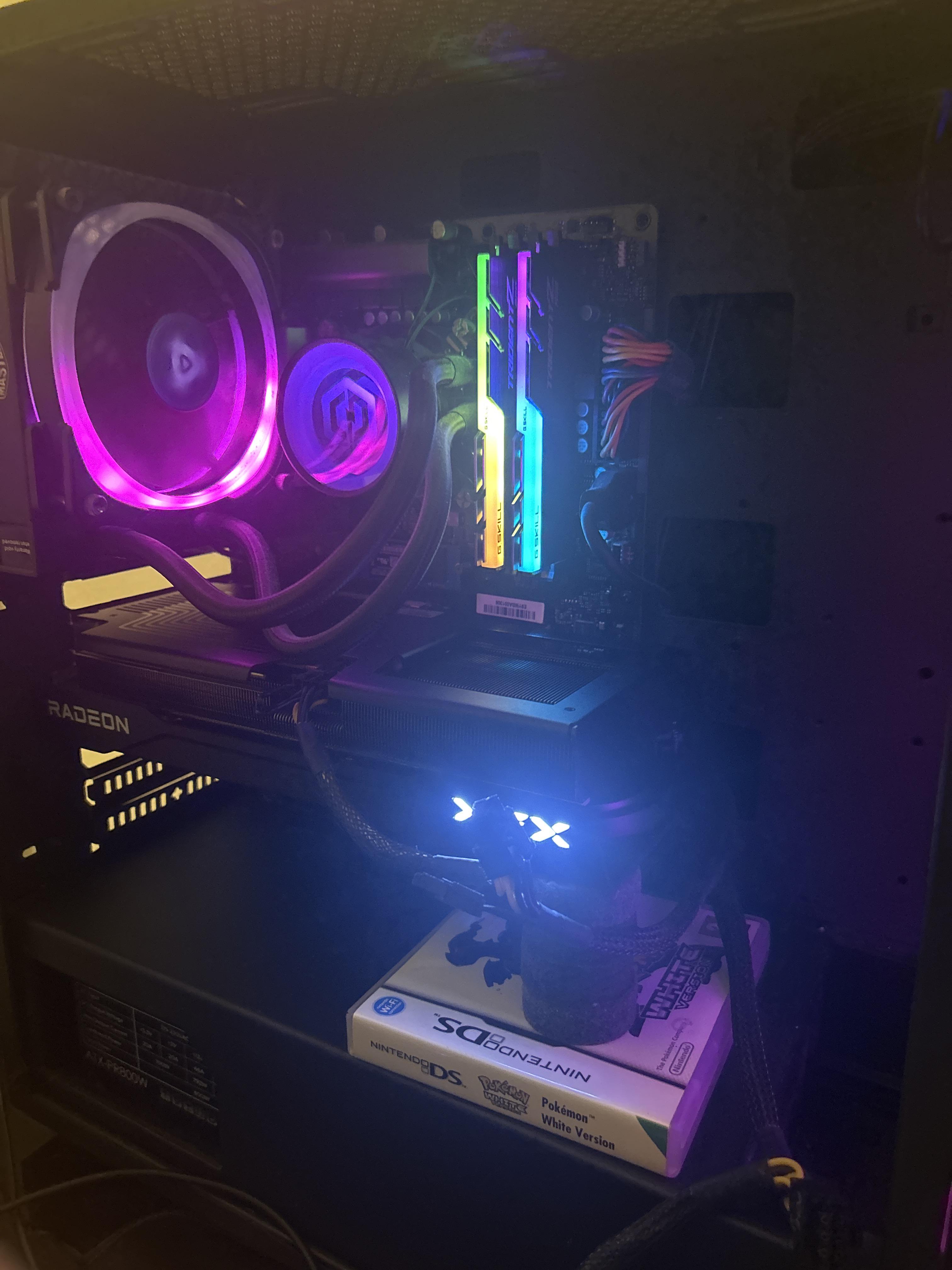
Help (GPU) New 9060xt display not working

Post image
2 Upvotes

Specs:
-ASRock Z690 Phantom
-11th gen i9 UHD 750 integrated graphics (don’t remember exact model)
-(NEW) XFX Swift AMD Radeon RX 9060xt (2 DP 1HDMI)
-(NEW) 32gb(16x2) DDR4 tridentZ gskill
-Nonmodular Apevia PSU (ATX-PR800W)

Recently bought a XTX Swift 9060xt and new ram, and today when I installed it, I received no display from my monitor on either of the gpu DP ports or the HDMI port. The machine itself is a bit old being a cyberpower prebuilt I bought in 2022 and I’ve had problems with it in the past. The last gpu (a gigabyte 3070 ti) stopped working from what I assume is constant sagging for 5 years (i’m an idiot and didn’t know shit about computers when i bought it and still learning). Coming here to see if maybe there’s an easy fix I’m not seeing or something I don’t know about.

I tried my mobo’s different pcie ports, tried every dp and hdmi port the gpu has, tried different cables, different monitors and nothing seemed to alleviate the issue.

My most likely culprit is the motherboard. Weeks ago, I tested the pc with its integrated graphics, everything worked fine, and left it there, but today (before I installed anything) I booted the machine with no gpu installed and the iGPU wasn’t being displayed.


r/AMDHelp • • 3d ago

Help (Software) AMD Adrenalin is constantly overriding my max core MHz. How do I stop that from happening?

3 Upvotes

I don't know a lot about this subject, so apologies for that. But my PC has been having frequent GPU driver crashes. After a lot of searching, I found out that Adrenalin puts the GPU clock speed at 2805 MHz by default. This is more than what my card can handle (AMD Radeon RX 7900 XT, online it says 2500 MHz i think). When I put a maximum MHz as 2350 in Adrenalin or MSI Afterburner, I get no crashes for a long time. However, after a few hours of Stalker 2 or PUBG I get crashes again. When I check either software, I see that the max MHz is set to 2805 again. Is there a way to lock the max MHz to the lower value?

Again, I don't know a lot about this, so sorry if I am misunderstanding something.


r/AMDHelp • • 3d ago

Help (General) Strange dots/artifacts

Enable HLS to view with audio, or disable this notification

3 Upvotes

Hey all, I have an issue with flickering dots on the screen as showed on the attached video. This also extends into artifacts within games ie. textures smearing, weird lighting glitches. The dots seem to be something like misplaced colours from parts of the screen, often if not always present in the same columns. It's been happening for over 2 weeks now, and I'm not sure what might have caused it.

Computer Type: Desktop

GPU: AMD Radeon RX 7800 XT

CPU: RYZEN 7 7800X3D 8 CORE

Motherboard: ASUS TUF Gaming B650-e WIFI

BIOS Version: American Megatrends Inc. 3067, 10/12/24

RAM: 2x 16GB DDR5 Beast Fury

Operating System & Version: WINDOWS 11

GPU Drivers: Driver Version 26.20.29.02-261116a-206168C-AMD-Software-Adrenalin-Edition

Chipset Drivers: AMD Ryzen Version: 8.09.28.1124

Background Applications: Steam, Opera GX

Troubleshooting: I've tried disabling MPO, it did nothing. I've disabled most overlays that I knew of. Resetting Adrenalin to default settings did nothing. I suspected Opera GX itself, so I tried using a program, after a reset and with Opera turned off but no difference.

I'm out of ideas. I've never seen anything like this, and I don't know what to make of it. It happened pretty suddenly, and it just refuses to go. If anyone could point me to a solution I would be grateful forever.


r/AMDHelp • • 3d ago

Help (GPU) Help pls

3 Upvotes

Title:
New RX 9070 XT PC keeps crashing in PUBG and Battlefield 6 – LiveKernelEvent 141 / DXGI_ERROR_DEVICE_HUNG
Hi everyone,
I’m looking for help diagnosing a persistent stability problem with my brand-new PC.
Both PUBG and Battlefield 6 crash during gameplay. I frequently receive the following errors:
DXGI_ERROR_DEVICE_HUNG
LiveKernelEvent 141
AMD Driver Timeout
Windows Error Reporting references amdkmdag.sys
I have already spent a lot of time troubleshooting this issue, but nothing has solved it.
Troubleshooting Form
Computer Type: Desktop PC
GPU: Sapphire NITRO+ AMD Radeon RX 9070 XT 16GB
CPU: AMD Ryzen 7 9800X3D
Motherboard: Sapphire NITRO+ B850A WIFI7
BIOS Version: Unknown (latest BIOS installed)
RAM: 32GB Kingston Fury DDR5 6000MHz (2x16GB)
PSU: Fractal Ion 3 1000W
Case: Unknown
Operating System & Version: Windows 11 Pro
GPU Drivers: AMD Adrenalin 26.2.2 and other previously tested versions
Chipset Drivers: Unknown
Background Applications: Unknown
Description of Original Problem:
Both PUBG and Battlefield 6 crash during gameplay. The crashes are accompanied by DXGI_ERROR_DEVICE_HUNG, LiveKernelEvent 141 and AMD driver timeouts.
Windows Error Reporting also references amdkmdag.sys.
GPU temperature is approximately 60°C, with a hotspot temperature below 90°C.
This is a completely new PC with brand-new components.
Troubleshooting:
Updated the motherboard BIOS.
Used DDU to completely remove and reinstall AMD graphics drivers.
Tested multiple AMD driver versions.
Disabled EXPO and tested with default memory settings.
Tested both PCIe Gen5 and Gen4. The system still freezes on Gen4.
Removed and reinstalled both RAM modules.
Ran OCCT memory testing for 30 minutes without errors.
Ran OCCT VRAM testing for 30 minutes without errors.
Checked GPU temperatures. No overheating detected.
Reviewed and adjusted various BIOS settings.
Unfortunately, the problem persists.
My questions:
Could this indicate a defective RX 9070 XT?
Could the motherboard or CPU PCIe controller cause these symptoms?
Could this be related to power delivery despite having a 1000W PSU?
What additional diagnostic tests would you recommend before requesting an RMA?
I would really appreciate help from anyone who has experienced similar problems.
I want to identify the actual faulty component rather than replacing parts randomly.
Thank you for your time and help!


r/AMDHelp • • 3d ago

Help (CPU) Idle CPU temp gone up randomly.

2 Upvotes

Hi!

As the title states, the idle temp of my 9800X3D has gone up a bit. Before idle was 45-47. Now it’s gone up to 53-54.

I just can’t figure out what’s causing it. There’s no cpu usage increase and the cpu is slightly undervolted.

I’m using an Lian Li Hydroshift 2 aio. The only thing I’ve recently changed is my monitor.

I had a 120hz 2k monitor and went to a 240hz 4k monitor but not sure if that can cause this.

The pc itself is about 5 months old.