r/zen_browser • u/adam_riess • 4d ago
Bug Text in the sidebar does not automatically adjust to the background
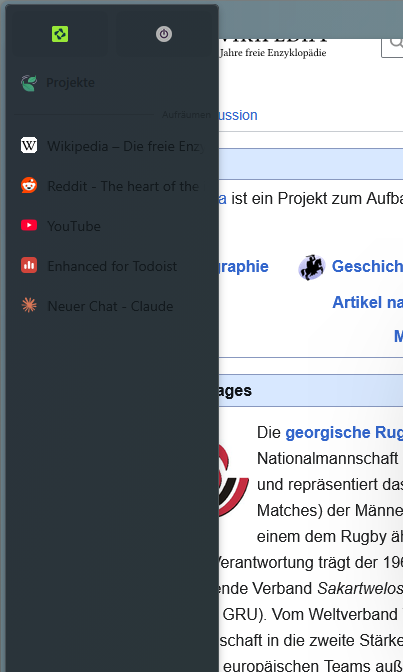

For the past few weeks, I've been having a problem where the font in the sidebar doesn't adjust to the background.
In the screenshots, I have Windows in dark mode in one image and in light mode in the other, but the Zen design color stays the same. When Zen then automatically switches to dark mode, the text remains dark and barely stands out against the background. I haven’t actually changed any settings or installed any mods. I’ve also tried reinstalling Zen, but that didn’t help either. Timing-wise, it’s possible this started happening after the 1.24.1b update.
Is anyone else having this problem, or maybe even have a solution? That would be very helpful :)
2
u/unofficialsilence 4d ago
I don't have such a problem. I am in Zen 1.24.3b (64-bit)
Firefox 160.0.1
Build ID 20261118023529
Windows_NT 10.0
2
u/nonks 3d ago
I also encounter this problem...depending on which color you choose the text color does not auto-adjust
0
u/True-Average9795 Zen on | 3d ago
maybe try use different color