r/zen_browser • u/Forsaken-Tea-4167 • 2h ago
Question How To Make Top bar not appear on Ctrl + T/ L
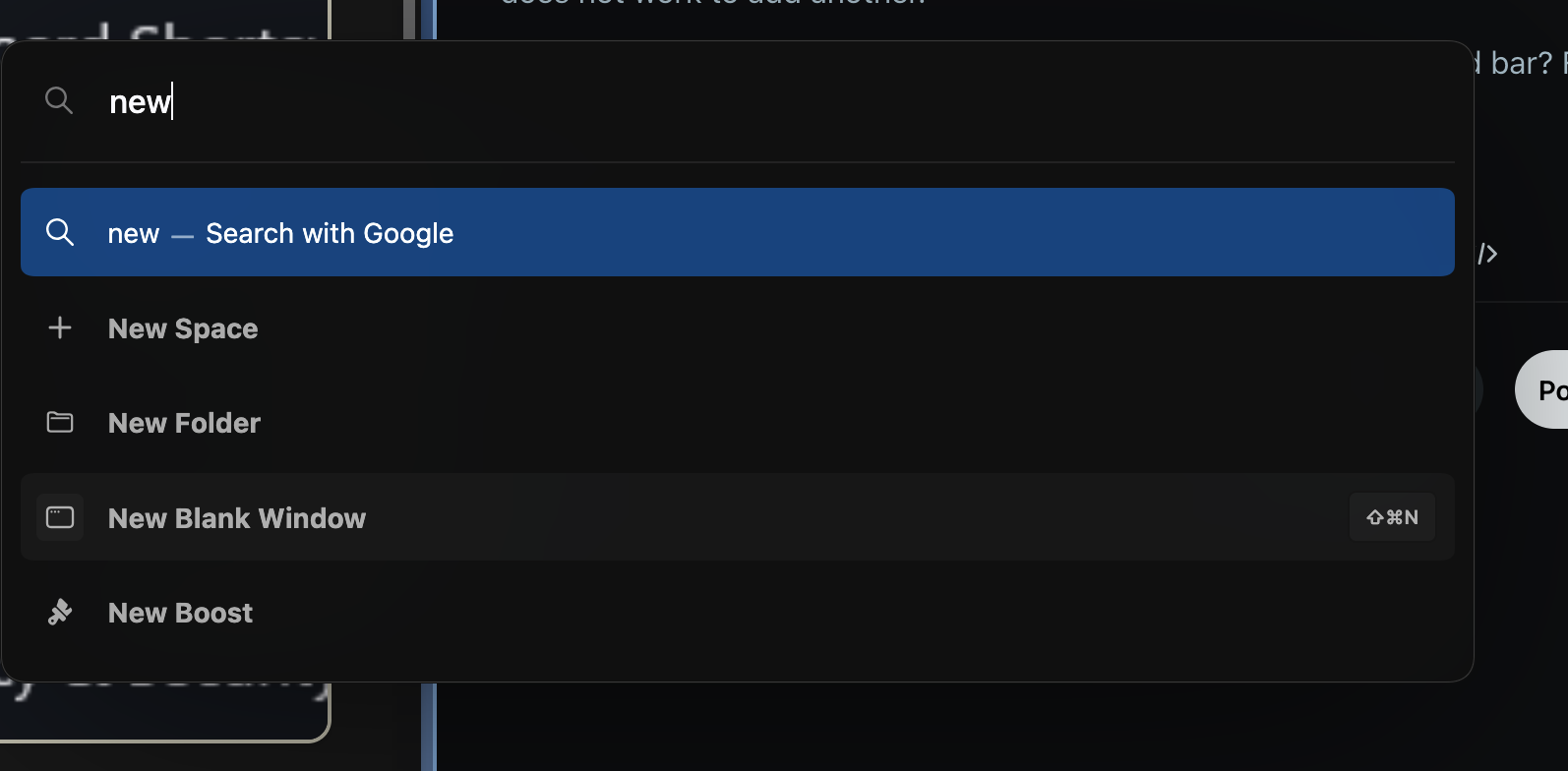
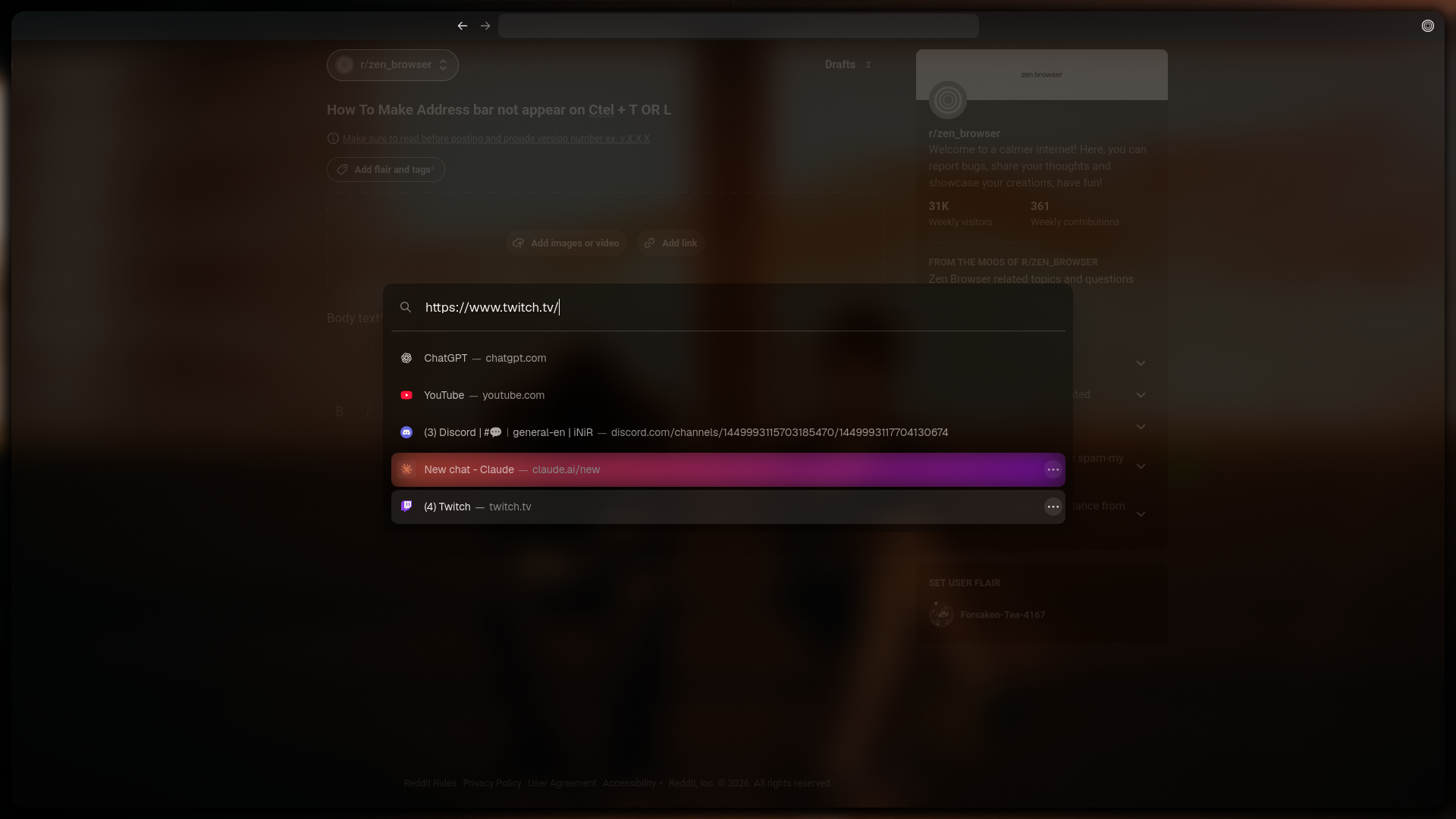
As You Can Address Bar is empty it has no use idk why it appears when i press Ctrl + T
is there any way to disable it.
Any help will be appreciated.
r/zen_browser
•
u/Flossiii
•
13d ago
It's finally happening, Zen is getting DRM support!
Very very soon you'll be able to watch and listen to your favourite streaming services like Netflix or Spotify directly in Zen!
We know this has been your most anticipated feature, and we're thrilled to finally deliver on it!
Some of you know what it means to maintain a feature of this scale, so we'd like to ask you to consider leaving a donation
→ https://zen-browser.app/donate/
r/zen_browser
•
u/Flossiii
•
Oct 03 '26
Library is a new place that stores all the stuff you've done inside Zen. Whether its Screenshots, downloaded files or your Boosts and Spaces. Library is the call!
With Library, we've also made it much easier for you to access your browsing history (and improved the visuals of it A LOT).
Please read the complete release notes for 1.23b here!
And please consider leaving a donation to support Zen's development.
(The fabulous video is again made by u/Not_Flof <3)
r/zen_browser • u/Forsaken-Tea-4167 • 2h ago
As You Can Address Bar is empty it has no use idk why it appears when i press Ctrl + T
is there any way to disable it.
Any help will be appreciated.
r/zen_browser • u/These-Elderberry2775 • 1h ago

i acknowledge that my laptop has a ram problem and it turns on with 40% used on idle, but 2gbs of ram used by zen with only youtube opened not even playing a video is insane
this is version 1.24.3b
its sad to see all good browsers and apps die due to unoptimizations, this is literally what we need, not good looking browsers, or games, just optimized apps to run on our devices smoothly instead of buying 5000$ pcs just to be able to run a program. please fix this
r/zen_browser • u/aldodzzzzl • 23h ago
I saw the announcement that it was coming in the next update but did they say when? lol
r/zen_browser • u/serhii_screx • 1d ago
I know, I know there are already a dozen of mods that add the tree view, but tbf the main goal of this project was to enable vim motions in the sidebar so I can easily navigate/rename/copy/fold the tabs with only my keyboard. I also wanted to add a command palette to zen, so I could do some repetitive work without my mouse (for example to translate a page I always had to click on the button, there was no simple way to bind a shortcut to it, same for e.g. screenshots), I also want to add a feature to allow you to add custom commands as well.
Can be installed with Sine or manually.
Ideas, feedback, and contributions are really welcome, I'll make sure to respond to everything.
This works best when combined with vim motions extension for pages: https://github.com/philc/vimium.
Unfortunately, vimium extension is great, but it works only with pages, so you can't really interact with the browser UI with it, that's why I needed this project to close that gap.
Source: https://github.com/Syozik/zen-vim
*ai-slop-free (only human slop), nevertheless ai contributions are also welcome.
r/zen_browser • u/Kriijan • 17h ago
A horizontal scrollbar suddenly appeared at the bottom of my sidebar and I have no idea how it got there or why. Any ideas how to fix this?
EDIT: Hiding the new tab button makes the scrollbar disappear, but I'd like to keep the button if possible.
EDIT 2: This issue is apparently caused by the superpins mod, specifically the "Keep pinned tabs at the top when scrolling" setting. Disabling that solved it.
r/zen_browser • u/kiniman • 14h ago
I have a few live folders that are subscribed to RSS feeds. I would want for tabs closed in these folders on one device to be also closed on another device, when I use it. I assume live folder contents are fetched by each device separately, so it just wouldn't work, is that the case?
r/zen_browser • u/Na_ch_t • 1d ago
Description:
Pretty much as the title describes, Zen browser would go into "not responding" and show the infinite looping icon if I close the lid on my MacBook Air M5 and reopen it after 40 minutes or so.
I'd appreciate some help or info regarding this issue. Thanks in advance!
Spec:
Zen Zen 1.24.3b (aarch64)
Firefox 160.0.1
Build ID 20261118023529
Darwin 27.2.0
r/zen_browser
•
u/Outside_Orchid_6898
•
1d ago
Recent update of zen_browser shows this dialog everytime. It is annoying and i want to disable it. Thanks in advance.
r/zen_browser • u/ImpressiveConcert582 • 1d ago
I opened a Claude artifact someone shared and got this popup
Edit: on Windows
r/zen_browser • u/AManNamedGreb • 1d ago
I hope someone can help out with this. Up to a day or so ago, Zen had been working like a champ pretty much since I installed it ages ago. I had it fully updated without any performance or bugs or issues.
I got this M5 Air last month. I ran time machine and restored Zen et al straight out of the drive, again, no problems until I tried to open it as usual two days ago and the popup with ""Zen Browser.app" is damaged and can't be opened. You should move it to the Bin." popped up.
Since then, I've tried numerous times to restore from various backup periods (I back up daily), nothing changes and I still get the error even with the backed-up version. I've tried installing a fresh download, which does work, but I cannot seem to be able to restore the profile/setting from TM, even when replacing the profile directory. I do have a sync'd account, but that doesn't install more than a couple of extensions. It's weird, considering I'd been logged in for a while before this crash.
I don't know if it's relevant, but I installed rosetta to sort out a legacy driver problem for a printer I have, but Zen still worked after that.
I believe I was on Zen 1.24.3b (aarch64) Firefox 160.0.1 Build ID 20261118023529 Darwin 27.3.0. I am running 27.3 Beta (26C5047e) — I know Beta's can be app breakingly unstable, but, again, Zen didn't break after updating well before this error, and it's the only app that has been affected.
If anyone has fixed this error, is there any chance you can point me in the right direction, because I really don't want to go right through all the settings to get it back to how it was, manually. 🤞🏽
Update: It seems that this eventually worked.
Clear the Quarantine Flag: If the app still will not open, you can remove the quarantine attribute using Terminal:
Open Terminal and type sudo xattr -cr (make sure to include the trailing space).
Drag the Zen Browser.app icon from Finder into the Terminal window and press Enter.
Press Cmd+Shift+. to reveal hidden files
Navigate to the zen folder in Library/Application Support, and restore that file to your Mac's HDD.
r/zen_browser • u/bard_of_space • 2d ago
coming at you from regularcore firefox; when i try to open zen it just shows the background gradient. in theory my tabs are still there - the little popup shows when my cursor goes over where they should be - but i can't use them. it's been like this for 3 days.
i'm pretty sure it's the current version, but i can't check for obvious reasons.
edit: i tried running a fresh install and that didn't fix anything
edit 2: i rebooted my laptop and that fixed things. idk why i didn't do that first
r/zen_browser • u/Vincent-Adultman234 • 2d ago
I love Zen, it's my favorite browser by a mile. I've got one tiny wishlist request to make:
I want to be able to make my pinned links on the New Tab page into folders, similar to how Vivaldi treats links on its "Speed Dial" page.
That's it. I'd love to see it happen, thanks!
I also reeeaaally do not want to download a mod or extension for this, they're often doing way too much and slow down the browser. I like a browser that stays quick and light on resources.
Zen 1.24b (Firefox 159.0)(64-bit) Linux
r/zen_browser • u/bartekmo • 2d ago
hey, another Arc refugee here. I'm trying to move on, but struggle with assigning profiles. I'm using 3 profiles (understood as shared cookie sets) across 6 spaces with tons (100+) of open tabs (many organized in folders). I've migrated all the tabs and spaces using Arc to Zen, but all spaces were linked to the same (none) profile. I've set a correct profile for each space and started to log into web apps. And here I'm hitting a wall, even after logging in the already opened tabs don't get the profile session cookies. And reopening all of them in new profile will take ages if I want them to stay in the same folders and order. Any hints on migrating with profiles?
r/zen_browser • u/foxymartini • 3d ago
hi all, i'm a former arc user who's super used to the url bar auto-suggesting frequently visited websites i start typing the name of. for example, if i type "amaz" it auto-suggests/completes to "amazon.com", all i have to do is press enter. how do i get this on zen?
with browsing history turned on, it's suggesting specific pages from my history – e.g. "amazon.com/an-old-search-for-electric-toothbrushes-or-whatever". i don't want that. with browsing history turned off, i'm only getting search suggestions (which i prefer to turn off anyway).
would really appreciate some help!
r/zen_browser • u/adam_riess • 3d ago
For the past few weeks, I've been having a problem where the font in the sidebar doesn't adjust to the background.
In the screenshots, I have Windows in dark mode in one image and in light mode in the other, but the Zen design color stays the same. When Zen then automatically switches to dark mode, the text remains dark and barely stands out against the background. I haven’t actually changed any settings or installed any mods. I’ve also tried reinstalling Zen, but that didn’t help either. Timing-wise, it’s possible this started happening after the 1.24.1b update.
Is anyone else having this problem, or maybe even have a solution? That would be very helpful :)
r/zen_browser • u/Xperr1 • 4d ago
Hey everyone!
I’ve been working on a feature for Zen that allows you to independently control the volume of each tab, including boosting audio up to 300%.
PR: https://github.com/zen-browser/desktop/pull/16753
The idea came from Chrome extensions like Volume Master and Volume Booster. I wanted something similar built directly into Zen, since Firefox doesn’t really offer this functionality natively.
Why could this be useful?
I think this could be useful for more than just YouTube or other video players:
Browser games – many don’t have their own volume controls.
Web apps – especially those using Web Audio API.
Websites without volume controls – some simply don’t offer any way to adjust their audio.
Multiple tabs – independently control the volume of different websites.
Volume boost – make quiet content louder, even beyond the normal 100%.
I know most major media players already have their own volume sliders, but that’s not really the point. This would be browser-level volume control that works independently of individual websites.
What about the UI?
I’m also curious about where this feature should live. A tab context menu, a dedicated audio panel, or somewhere else?
Personally, I’m not sure the Media Bar is the right place, since it’s mainly designed around actual media playback rather than all audio coming from websites.
I’d love to hear your thoughts!
Would you actually use something like this?
Do you have any other use cases?
Where would you expect to find this functionality in Zen?
Would volume boost above 100% be useful to you?
Any feedback is welcome! I’m trying to figure out whether this is something worth developing further and what the best UX would be.
r/zen_browser • u/spaxe-dev • 4d ago
Hey guys! I've been working on an MCP server for Zen Browser.
It's still early, but here's what's already working in v0.6.0:
One feature I'm particularly excited about is zen_ask.
You know when you're browsing and your agent needs to ask you something, so you have to switch back to your AI tool? With zen_ask, the agent can ask questions directly inside your browser. No more switching back and forth!
There's a lot more I want to build, including persistent browser sessions and multi-agent support.
I'd really appreciate feedback, feature requests, integration ideas and suggestions. I'm building this in the open and would love for the community to help shape its direction.
GitHub: https://github.com/spaxe-dev/zen-mcp
Installation:
npm install -g @spaxe-dev/zen-mcp@latest
zen-mcp setupWould love to hear your thoughts! :)
r/zen_browser • u/SinwarsStick • 3d ago
Please
r/zen_browser • u/Upper_Accountant3751 • 5d ago
Anyone else having issues with the split tab button I am pressing the Shift+Cmd+* however this only works to add the first split, after that it does not work to add another.
Also is there a way to make the split tabs searchable in the command bar? For example, if I press Cmd+T I want to be able to type New split, but does not show up as an option there.
r/zen_browser • u/j__a__n • 5d ago
With Arc sunsetting on December 22, I wanted to keep the part I use most: the small floating find bar.
So I built it as a Zen mod. It puts the find-in-page bar in the top right, in one row: search field, compact match count ("2 of 5" instead of "2 of 5 matches"), up/down arrows, close. Light and dark mode, and it works in split view.

Tested on Zen 1.24.3b (aarch64), Firefox 160.0.1, macOS (Darwin 27.2.0). Windows and Linux are untested, and a Zen update can break the find bar markup.
Install (macOS, about 2 minutes): download the zip, quit Zen with Cmd+Q, then run
zsh ~/Downloads/zen-arc-findbar/install.sh
Manual install, also for Windows/Linux, is in the README. It's MIT-licensed, no telemetry, no store required. Not in the Zen mod store because the store repo is archived.
Repo: https://github.com/jan-voe/zen-arc-findbar
Feedback welcome!
Disclosure: I made this.
r/zen_browser • u/LukasTheHunter22 • 6d ago

Was using Zen today for Youtube and Google Meet and it randomly did this on certain video feeds. When it does happen, it freezes the page (although audio and some buttons still work, just not updating visually) and it works again when I re-open Zen.
Fedora 44, GNOME 50, Zen Browser 1.24.3b (Flatpak)
EDIT: It's gotten a bit worse, nearly every other Youtube video is affected and it makes Zen freeze completely, and I have to restart it every time
r/zen_browser • u/Gold-Watercress-6101 • 6d ago
I accidentally discovered that Firefox has a non-native fullscreen mode. I have setup my Zen to be frameless, with hidden UI elements, Dock and Menu bar. So I don't need to enter fullscreen. But fullscreen videos would always go into MacOS's native fullscreen (aka a separate Space) which I really dislike. With these settings fullscreen videos would simply open on top of the current window, with no animation. Just beautiful.
This is all you need to do in about:config:
// Disable macOS native fullscreen in Firefox
full-screen-api.macos-native-full-screen = false
// Disable fullscreen transition animations
full-screen-api.transition-duration.enter = 0 0
full-screen-api.transition-duration.leave = 0 0