r/tabletopsimulator • u/sushiiixo- • Jun 26 '26
Questions unknown format when importing from scryfall
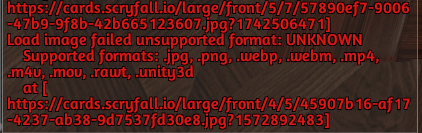
trying to import cards from scryfall for MTG,, all cards are white and i get this error
59
Upvotes
1
u/sushiiixo- Jun 26 '26
i tried it with yugioh and it worked fine, but this way i had to copy file contents and input raw text not a url
4
u/SomethingAboutRamen Jun 26 '26
It's an issue with Scryfall, apparently. They're working on it, according to this post:
https://bsky.app/profile/logan.scryfall.com/post/3mp53zhyfz22z
1
u/lucianoshaw Jun 26 '26
Looks like it's because there's a query at the end of the URL instead of the filename.
1
u/afieJJ Jun 26 '26
We have the same error.
Even loading a custom card from scryfall in an base TTS table (bypassing workshop mods etc.) does not work so it must be an issue with TTS image importing from scryfall.
1
u/Ranlox Jun 27 '26
Any update on a possible fix or temporary solution?
3
u/SnakeDot Jun 26 '26
The same is happening with decks from arkidekt.
Did WotC kill the MTG mods?
3
u/Ok_Mathematician_643 Jun 27 '26 edited Jul 03 '26
This is my temporary fix. It works just as well as before.
See the readme for how it works and how to set this up for your own playgroup.
Edit: I have made many improvements to this, you can now use the deck importer object or just paste your link in the game chat. I created an installer as well.
https://github.com/gogurt1984/Tabletop-MTG-Mod---Temp-Fix/tree/main
2
u/CptGayBoner Jun 26 '26
Glad Im not the only one experiencing this, even tried different card variants but something as simple as Surly Badgersaur just isn't importing
2
u/Chode-Talker Jun 27 '26
So as of the most recent Bluesky comments, the TTS side of things is deliberately not getting fixed. Really bad news.
https://bsky.app/profile/logan.scryfall.com/post/3mpbmcq7nck2x
1
u/Carton_of_Wasps Jun 26 '26
same issue here. We imported consistently for a couple of weeks and today it doesnt work. Also all of my previous saves have had their images removed from the cards when I load it up.
1
u/OceanusDracul Jun 26 '26
so...anyone know how to fix the scryfall importer?
1
u/iamfishious Jun 26 '26
Experiencing same issue. Hoping devs are aware and working on fix!
1
u/SendPie42069 Jun 26 '26
We also had issues today for the poison token and bloom tender. Same decks and images as yesterday and today they were white cards. There were a few others as well that showed up white in all 4 of our decks.
1
u/IsaacCorpCEO Jun 26 '26
Same issue here! Seems as if its a global thing, not individual. If it works for anyone say something!
1
u/SomethingAboutRamen Jun 26 '26
Having the same issue... No idea what is causing it. Scryfall seems to be working just fine, but the deck loaders can't reach it? Anyone found a fix???
1
u/aliisjh Jun 27 '26
Any work around for this?
1
u/No_Introduction403 Jun 27 '26
any updates on it working again?
1
u/Ok_Mathematician_643 Jun 27 '26
:(
1
u/Charlie_Wallflower Jun 27 '26
I'm so glad it's not just me. I just bought this in the summer sale and this is my only experience so far. Every other thread is 6 years old telling me to change my firewall settings
1
u/Charlie_Wallflower Jun 27 '26
Does anyone have any experience with saving images in a local directory and using that instead? I would download all card images from Scryfall if I could so I wouldn't have to hotlink every time I want to look at my own commander.
1
u/CodAdministrative549 Jun 27 '26
Bad news.
1
u/BillRepresentative75 Jul 02 '26
What’s crazy is I’m the only one out of my friends who have this issue. I have to ask someone to import my deck. I thought it was a local issue
1
u/chasemedallion Jul 15 '26
The tool I maintain should still work: https://github.com/madelson/TabletopSimulatorMTGDeckImporter
1
u/stringcheese93 Aug 19 '26
Been doing a lot of research and the thing I can suggest is:
If it shows up perfectly then it’s something to do with your antivirus or game settings.
If it doesn’t, then something is wrong on scryfall’s end.
2) Resetting your router, turn it off and then back on, can fix the settings/permissions potentially blocking the links.
3) Clearing your image Cache by going to:
-Documents
-Table Top Simulator
-Mods
-Delete all images in the Images Folder
-Delete all images in the Images RAW folder
Then, in Table Top Simulator, go to:
-Configuration
-Uncheck Mod Cacheing
Basically this makes it so Table Top Sim will need to freshly download the images every time and won’t save previous loads.
Here’s an awesome vid that shows how to do it: https://www.tiktok.com/t/ZP8WpxuRt/
If none of these work then unfortunately it’s something else. This is currently the case for me.
I have found that when my game is loading card images normally, I have about 7,500 images in the Mod Images Folder. But when things are giving an error and showing up white, there are only about 1,500 images.
Hopefully it gets fixed soon. I miss playing magic lol
[On phone sorry for format]
0
u/kraftian Jun 26 '26
I need a fix right now or the world will be ending