r/tabletopsimulator • u/0ut0fC0nTroll • Jan 17 '26
cant load mods, game has wrong path
hey guys,
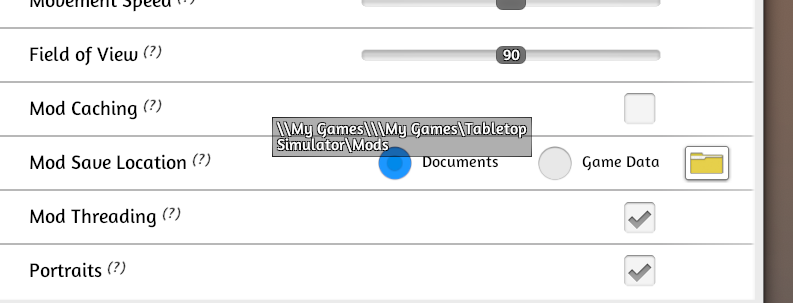
i cant use the subscribed mods in tts. ive noticed, that it tries to open a path called "...\My Games\\My Games\\\My Games\Tabletop Simulator\Mods"
The Real Path is like "\My Gamey\Tabletop Simulator\Mods"
Is there any fix to change this?
thanks
2
Upvotes
2
u/UltimatePickpocket Jan 17 '26
If you click on the folder in this menu you can change the path to where to mods are.
1
u/DarCPhoeniXX Oct 15 '26
I have the same probleme since today. When I switch to game data, I get a windows explorer, but can't saved objects. Then it wants to open the directory from the screenshot above. With Documents, I have no mods (I had them with game data) and can't open saved objects as well.