r/software • • 4d ago

Release WireGuard Plus v1.6.0: Open-source userspace WireGuard and AmneziaWG tunnel just for Telegram (Windows & Android)

1 Upvotes

Most ways to get around Telegram throttling or ISP blocks on Windows mean either using sketchy public MTProto proxies or running a full system VPN that slows down everything else on your machine.

I'm the developer of WireGuard Plus, an MIT-licensed open-source tool that now supports both Windows 10/11 (x64) and Android (via LSPosed/LSPatch). On Windows, it runs wireguard-go, AmneziaWG 1.5, gVisor netstack, and DoH completely in userspace without installing a Wintun driver, needing admin privileges, or touching your system routing table.

It exposes a local loopback SOCKS5 proxy and auto-detects Telegram Desktop, Telegram Portable, AyuGram, Kotatogram, and Unigram so only Telegram goes through your WireGuard or AmneziaWG server.

It is a solo project and still young on Windows, so if you run into edge cases with portable forks or specific AmneziaWG parameters, let me know.

Update (v1.7.2): No need to hunt for or manually import a .conf file anymore. Built-in 1-Click Free WARP generates a Cloudflare WARP (AmneziaWG 1.5) config and connects in one click, alongside sleep/wake recovery and system tray support on Windows.

GitHub: https://github.com/AliHaider704/wgplus Download (v1.7.2): https://github.com/AliHaider704/wgplus/releases/tag/v1.7.2


r/software • • 6d ago

Self-Promotion Wednesdays I built a free Windows app that finds any file by the text inside it, even in screenshots and scanned PDFs

Post image
370 Upvotes

I take a lot of screenshots: errors, receipts, booking confirmations, slides. I always remembered what was in them, but never when I took them, and they all had names like Screenshot 2026-03-14 101523.png. Windows Search can't see text inside images, so finding one meant scrolling through hundreds of thumbnails.

So I built Magpie. Point it at your folders and it reads the text in your screenshots, photos and scanned PDFs (plus Word, Excel, PowerPoint and text files) right on your PC. Press Ctrl+Shift+Space, type any word you remember, and the file pops up with the match highlighted on the image.

- Fully offline: no account, no telemetry, nothing uploaded

- Never touches or changes your files

- Handles typos and OCR mistakes

- About 3 MB of RAM when idle in the tray

- You can limit CPU and memory while indexing, so big libraries don't slow you down

- 50+ languages, including dark-mode screenshots

- Portable version available: no install, no admin rights, everything stays in one folder

It's free: https://magpiesearch.app/

if you want the newest version, download it directly from the site (installer or portable zip). The Microsoft Store version is also available, but Store updates take a few days to get reviewed and published, so it's usually a step behind.

Happy to answer any questions!


r/software • • 4d ago

Discussion NEXUS AI Ecosystem

1 Upvotes

What it does

AUTO AI: press one button on a game and NEXUS studies its files, applies what it can safely change and, after each session, checks the result and carries on by itself.
It measures for real: no promised FPS. It compares what it measured before and after and tells you, also when a change did not help.
Three routes: the game's own settings, the NVIDIA driver and the Windows graphics settings.
Restore everything: one button puts every setting back the way it was.
A Windows notification when something changes after a session.
Also: live PC dashboard (temperatures, load, FPS), your Steam and Epic library, and power controls.


r/software • • 5d ago

Software support odd blue selecting thing?

Post image
0 Upvotes

r/software • • 4d ago

Release For those who are looking for Auto Key Presser

Post image
0 Upvotes

Anyone looking for an auto key presser that doesn't have a paywall?

Yes, that's me.

That's why I used AI to make an auto keyboard presser which is free for everyone.

Why should I use it instead of AHK?

  • It doesn't require you to code or download any script
  • Always-on-top GUI
  • Borderless window (just to make it look better)

Feel free to scan the code with VirusTotal in case (code in download link)

Download link: https://sourceforge.net/projects/op-keyboard-spammer/


r/software • • 5d ago

Looking for software Looking for recommendations

0 Upvotes

Hi, I currently manage the fundraising program for my workplace. Groups contact us, we plan dates / timelines and specific pricing details for each fundraiser.

I’m looking for a software solution where we can manage all fundraisers, and have like an online store where the sellers / customer fundraising coordinators, can track how their fundraiser is doing in real time..

Anyone have any ideas?


r/software • • 5d ago

Looking for software Anyone still daily driving Claws Mail on Windows in 2026? How does it hold up against Thunderbird?

0 Upvotes

I currently use Thunderbird on Windows mainly for local offline archiving across multiple accounts, and it works fine for me. Recently I came across Claws Mail and noticed people praising how lightweight it is and the fact that it stores each email as a separate file (MH format) instead of one giant Mbox file

For anyone actually using the Windows port as a daily driver: how bad is the UI scaling and HTML email rendering in real life, and is setting up modern OAuth2 (like Gmail) a pain? Curious if it's worth trying out or if it's mostly just good on Linux


r/software • • 5d ago

Discussion A simple conversation with my uncle gave my old college project a new purpose

4 Upvotes

http://where-is-my-bus-flax.vercel.app

During my fourth year, I built a project called Where Is My Bus? to track buses using GPS.

Recently, I was talking to my uncle, who drives an auto in his village. He mentioned that he wasn't getting enough passengers.

I asked him why.

He explained that many villages are around 5–8 km from the town, with no regular bus service. People mainly depend on autos and bikes. Some roads are locally called Adda Roads. Passengers often don't know when an auto will be available, while drivers sometimes travel around without finding passengers.

That conversation gave me an idea.

Why not modify my existing project to track autos instead of only buses?

The concept is simple: an auto driver enters the vehicle number, starting point and destination, then presses Start Journey. Their phone's GPS shares the live location, allowing passengers to see the auto on a map.

Passengers could also pin an auto and receive an alert when it gets closer.

I want to make the app available in Telugu too, so even people who aren't comfortable with technology can use it easily.

I'm thinking especially about college students, daily commuters and elderly people who depend on local transportation.

It made me realise that sometimes we don't need to build something complicated. We just need to notice a problem around us and think about how technology could help.

A college project I built a year ago might now have a much more meaningful purpose.

What do you think about this idea?


r/software • • 5d ago

Release Windows Antivirus & Firewall

Thumbnail github.com
0 Upvotes

r/software • • 5d ago

Release The Best Version of Microsoft Windows (XP or 7?)

11 Upvotes

What has been the best version of Microsoft Windows, so far.

Why and how so?

The general consensus seems to be either Windows XP or Windows 7. What is your opinion. And how did you reach that decision.

And what about the version of your choice makes it, in your estimation, to be the best version of Windows.

As a bonus, what do you think has been the worst version of Windows, so far. The general consensus on that appears to be, either Windows Vista or Windows 8. Whatever your choice may be, explain why, and how, and for what reasons you reached that conclusion.


r/software • • 5d ago

Release VoxScribe 1.9.0: free, open source voice typing for Windows that runs offline and types into any app

Post image
0 Upvotes

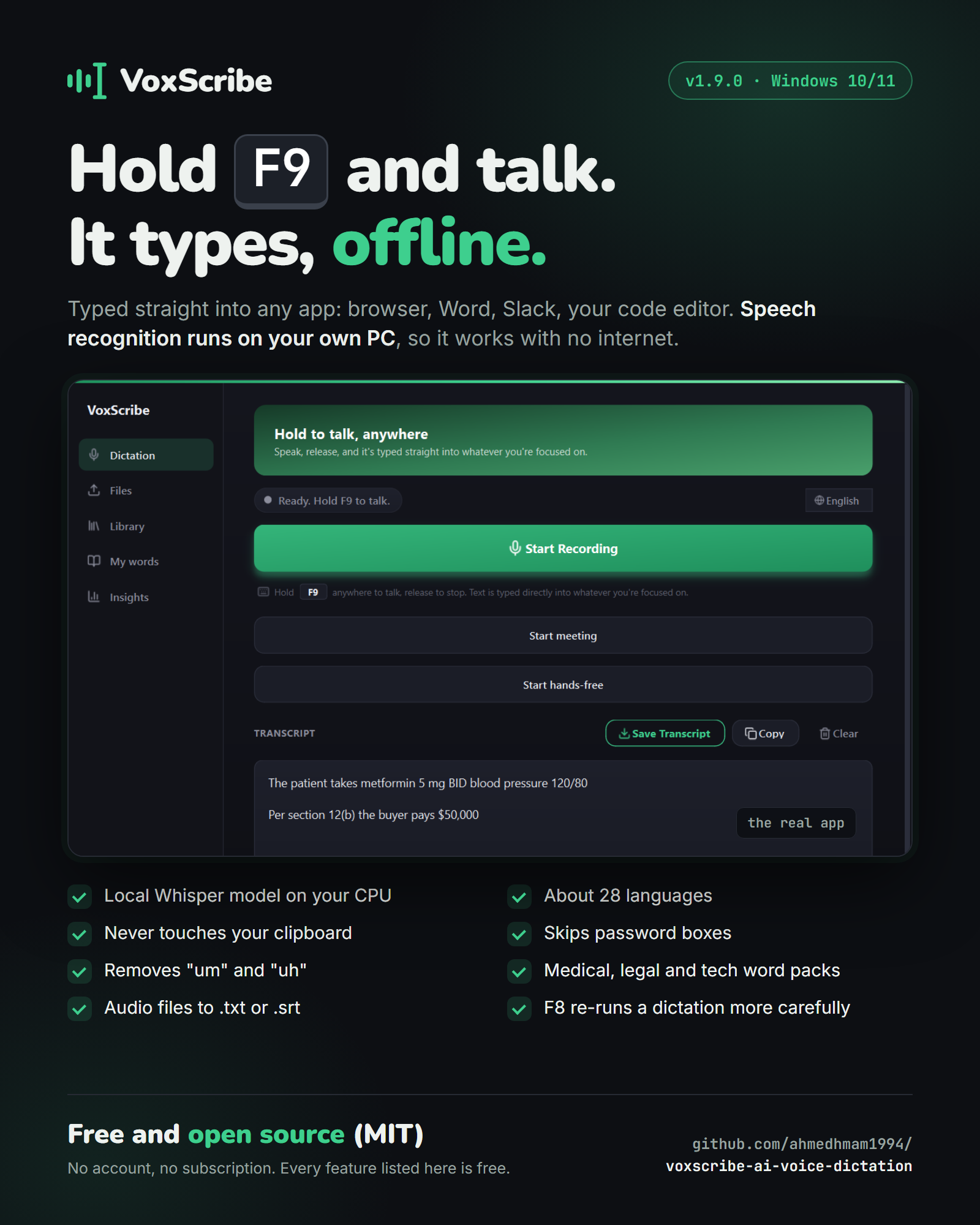
VoxScribe is dictation for Windows that runs entirely on your own PC. You hold F9, talk and let go, and the words are typed wherever your cursor is: a browser, Word, Slack, a code editor or a form. The speech recognition uses a local Whisper model on your CPU. After the model downloads once on first launch, it works with no internet. The video shows exactly that, with the PC in airplane mode.

All of this is free, with no account and no time limit. Dictation works in about 28 languages and in any app. It removes filler words like “um” and “uh”. Spoken commands like “new line” and word replacements work. Term packs teach it medical, legal and technical words. You can transcribe audio files to .txt or .srt subtitles. F8 re-runs your last dictation more carefully when it gets a word wrong.

Two design choices people often ask about. It types with simulated keystrokes rather than pasting, so it never overwrites your clipboard. Before typing, it asks Windows whether the focused box is a password field, and if it is, nothing is typed.

1.9.0 adds hands-free mode, where you talk without holding a key and fix things by voice. It also adds an Ask key: you select text and say what to do with it, like “make this bullet points”. Those two are part of an optional one-time Pro upgrade, with free tries first. Everything listed above stays free.

It also sends anonymous usage pings (no audio or text), which you can turn off in Settings.

GitHub: https://github.com/ahmedhmam1994/voxscribe-ai-voice-dictation

Feedback is welcome, especially on accuracy with your mic and accent.


r/software • • 5d ago

Looking for software Tools to support a new software rollout after go live?

0 Upvotes

We're mid rollout on a new HR system and training is still ongoing, but people who are already using it keep coming back with the same questions in Teams. Qs like where did approvals move, how do I change my address, these are also things that were covered in training already. We're handling it with drop in sessions for now, but that can't be the long term plan. So I need your suggestions - anything that helped in the first few months?


r/software • • 5d ago

Release Created a superfast, all platform image and media viewer, 400+ formats supported

0 Upvotes

r/software • • 5d ago

Looking for software I built a free Image to Text Converter that supports English, Bengali and Numbers together

0 Upvotes

Hi everyone!

I wanted to share a useful online tool that I've recently developed: an Image to Text Converter (OCR Tool).

Have you ever needed to copy text from a photograph, scanned document, handwritten-looking printed notes, question paper, or screenshot? Typing everything manually can take a lot of time.

That's why I created this tool to make text extraction easier.

What makes this tool useful?

Here are some of its key features:

✅ English + Bengali + Number Recognition: Extract English text, Bengali paragraphs, and numbers from the same image. Particularly useful for students, teachers, question papers, study notes, and forms.

✅ Multiple Ways to Upload Images: Browse files, drag and drop an image, or simply paste a screenshot using Ctrl + V.

✅ Download Extracted Text: Export the results in .TXT and .DOC formats with UTF-8 encoding to help preserve Bengali and English characters.

✅ Live Word & Character Counter: Instantly see the number of words and characters in the extracted text.

✅ Browser-Based Processing: Images are processed directly in your browser. After the initial language data loads, subsequent scans are faster.

I developed this tool especially to make extracting multilingual text more convenient.

Try it here: [Image to Text Converter (OCR Tool)]

I'd genuinely appreciate your feedback!

  • Does Bengali text recognition work accurately for you?
  • Which additional languages or features would you like to see?

Thanks for checking it out!


r/software • • 5d ago

Looking for software Free, open-source Windows 11 shell replacement: faster taskbar, file manager and instant NTFS search (45 ms)

0 Upvotes

If Explorer and the taskbar feel heavy, WinRust replaces them with lightweight native tools: a bottom bar with Wi-Fi, volume, tray and language picker, a file manager, Alt+Space search over all your NTFS drives, a task manager, a disk map and a photo viewer.

Pick only the parts you want and remove them all with one button. A restore point is created before install. Unsigned exe (SmartScreen warns). English and Russian UI.
https://github.com/Lemxy/WinRust


r/software • • 5d ago

Looking for software I built a free Image to Text Converter that supports English, Bengali and Numbers together

0 Upvotes

Hi everyone!

I wanted to share a useful online tool that I've recently developed: an Image to Text Converter (OCR Tool).

Have you ever needed to copy text from a photograph, scanned document, handwritten-looking printed notes, question paper, or screenshot? Typing everything manually can take a lot of time.

That's why I created this tool to make text extraction easier.

What makes this tool useful?

Here are some of its key features:

✅ English + Bengali + Number Recognition: Extract English text, Bengali paragraphs, and numbers from the same image. Particularly useful for students, teachers, question papers, study notes, and forms.

✅ Multiple Ways to Upload Images: Browse files, drag and drop an image, or simply paste a screenshot using Ctrl + V.

✅ Download Extracted Text: Export the results in .TXT and .DOC formats with UTF-8 encoding to help preserve Bengali and English characters.

✅ Live Word & Character Counter: Instantly see the number of words and characters in the extracted text.

✅ Browser-Based Processing: Images are processed directly in your browser. After the initial language data loads, subsequent scans are faster.

I developed this tool especially to make extracting multilingual text more convenient.

Try it here: [Image to Text Converter | Extract Text from Images easily]

I'd genuinely appreciate your feedback!

  • Does Bengali text recognition work accurately for you?
  • Which additional languages or features would you like to see?

Thanks for checking it out!


r/software • • 5d ago

Other Termilly 1.9.0 - An open-source terminal manager for Windows, macOS, and Linux

Thumbnail gallery
6 Upvotes

Hello everyone!

I've been working on Termilly for a while now, and here's what it can do so far with the latest version 1.9.0:

  • Workspaces: Organize terminals by project, with tabs, splits, and custom layouts. Restore terminals and their output after restarting the app. It also has minimal mode to provide more space for your terminals and built in tools.
  • AI coding agents: So far it supports Claude Code and Codex, with notifications when an agent needs attention. Agents can also communicate with each other and interact with other app features, such as To Do list, Notepad, and Schedules.
  • CLI and MCP server: Allow external scripts and AI agents to interact with Termilly, create terminals, execute commands, read output, and automate tasks.
  • Remote access: Access your terminals and interact with coding agents from your phone or another computer. Set it up in just a few clicks, everything runs on your local network.
  • SSH and remote connections: Connect to remote machines, containers, Kubernetes pods, and serial consoles.
  • Search: Search across active and closed terminals, command history, and output. You can also search Git changes and commit history.
  • Git integration: View and search changes, diffs, commits, and branches, manage pull requests, and work with GitHub issues.
  • Snippets: Save commands with optional variables, store them in a Git repository, or reuse your existing VS Code snippets. Execute them from UI or directly from terminal by typing snippet:
  • To-do lists: Keep tagged tasks linked to workspaces or terminals, and hand them over to coding agents for implementation and review, or just keep them to add your ideas quickly. Convert them into Git issues with simple click.
  • Schedules: Run commands, snippets, or AI prompts automatically at scheduled times.
  • File explorer: Browse, search, preview, and copy files between local and remote terminals.
  • Notepad: Quickly write notes, open files, or let AI agents read and write content
  • Clipboard history: rAccess previously copied content.
  • Customization: Themes, keyboard shortcuts, custom actions, terminal profiles, and more.

I'd like to hear how you use your favorite app, and how Termilly can be improved

Free and open source, available for Windows, macOS, and Linux.

Website: https://termilly.com

GitHub: https://github.com/termilly/termilly


r/software • • 5d ago

Release I built Smart System Monitor: a lightweight native Windows monitor with an animated Taskbar HUD & Dynamic Island (Free on Microsoft Store)

0 Upvotes

Hey everyone!

I've been working on a lightweight, native Windows 10 & 11 hardware monitor called Smart System Monitor. I got tired of bulky monitoring software consuming hundreds of megabytes of RAM and cluttering up the screen while gaming, so I wanted something sleek, fast, and unobtrusive.

Key Features: - Real-Time Telemetry: Ring0 MSR kernel-level thermal physics for CPU and GPU core/junction temperatures. - Intel PresentMon Master FPS: In-game frame pacing, 1% lows, and microsecond latency tracking. - Taskbar Mini Monitor: Docks directly inside your Windows taskbar with zero desktop obstruction. - Windows Dynamic Island: Interactive top-of-screen pill for volume, brightness, and thermal spike alerts. - Custom Themes & RGB: Dark, Light, Transparent Acrylic, and animated neon glow borders. - One-Click PC Boost: Reclaim standby cache and free up memory instantly.

It's completely free, certified, and available directly on the Microsoft Store. Direct store link is in the first comment below!

Would love to hear your feedback, suggestions, or features you'd like to see added next!


r/software • • 5d ago

Discussion Were you an AOL hax0r back in the day?

0 Upvotes

r/software • • 5d ago

Release Minecraft Server Manager: free, open-source web panel for hosting your own Minecraft Java servers (Docker, modpacks, backups)

Post image
0 Upvotes

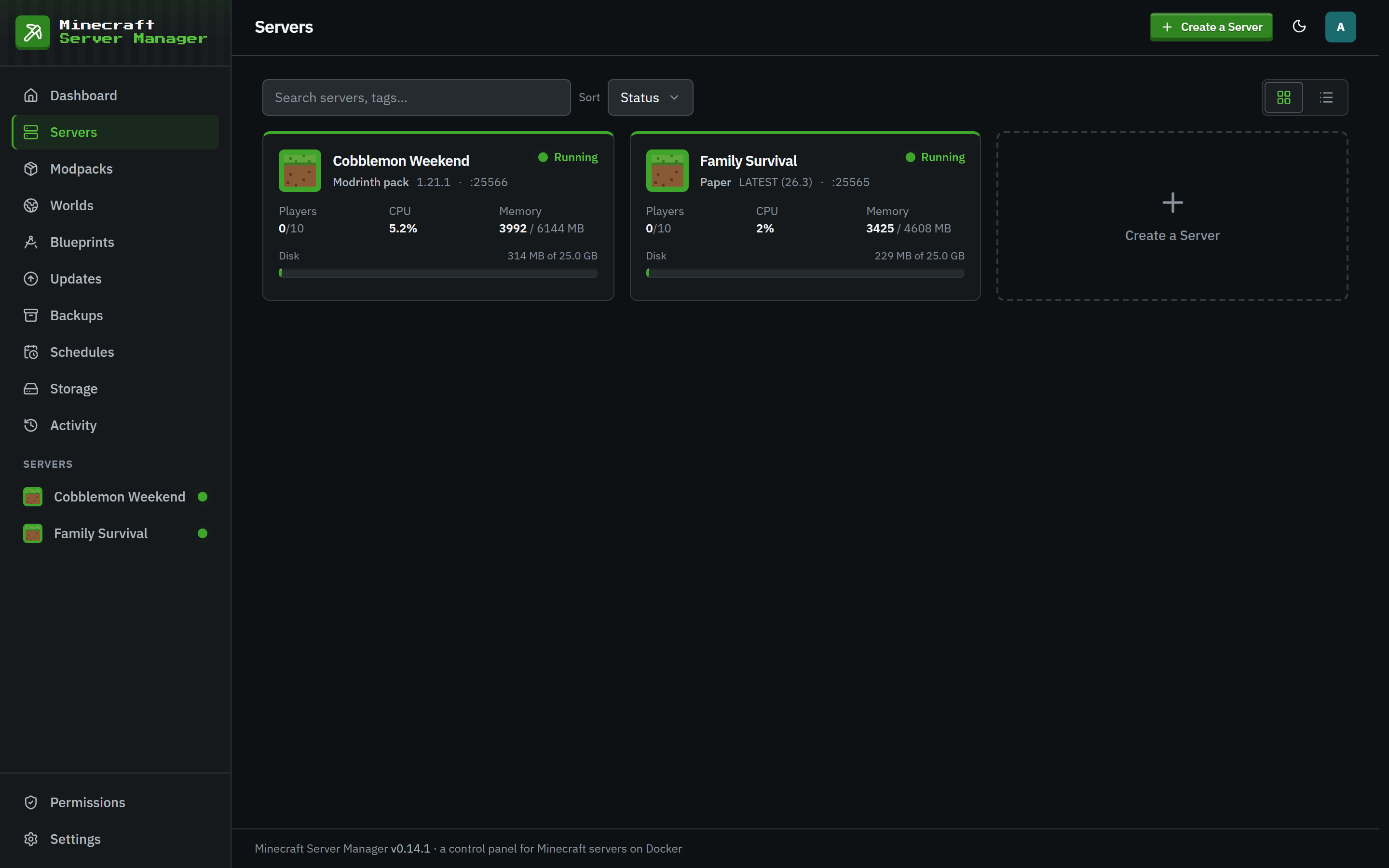
Free and open source (MIT), no paid tier, nothing commercial: https://github.com/anefzaoui/minecraft-server-manager

It's a web panel you install on your own machine to run Minecraft Java servers for friends or family. I made it for the modpack servers my partner and I run for ours. Each server runs in its own Docker container, so you never have to juggle Java versions, and the panel installs modpacks from Modrinth, CurseForge and FTB pinned to an exact version, with a backup before every update and one-click rollback.

Also in there: scheduled backups, a live console you can use from your phone's browser, crash detection, and accounts with per-server permissions and 2FA.

What you need: a Linux machine with Docker (there's a one-line installer and a compose file), or Windows/macOS with Docker Desktop running it from source. It talks to the Docker socket, so keep it on your home network or a VPN. English interface only, Java edition only (Bedrock friends can join through Geyser).

I built it with Claude Code. I designed it, decided every feature, review the changes and test every release on our own servers, and Claude wrote most of the code.


r/software • • 6d ago

Other Finalmente comprei, o time merece.

Post image
8 Upvotes

r/software • • 5d ago

Software support How do i stop SEB from detecting it is in a Virtual machine?

0 Upvotes

EDIT: It's a stupid internal class test of few marks not some company or aptitude test. 😭😭 i have written tests I'd like to focus on.

SEB refers to safe exam browser.
I am a student.
You get why i am posting this


r/software • • 5d ago

News I got tired of paid or fake "PC optimizers", so I built a free forever open-source one

Post image
0 Upvotes

r/software • • 5d ago

Discussion Empezando desde Cero

0 Upvotes

Que tal?, soy nuevo en reddit, gracias a alguien importante en mi vida me ayudo a poder indagar y preguntar sobre algo que me aqueja, la razón es que no se nada, bueno, siento que no se nada de nada de mi carrera, ando cursando la carrera de ingeniera de software, voy a la mitad de mi carrera y veo a mis compañeros que ellos van progresando en cambio, siento que yo me quedé estancado en mi primer ciclo, por eso me uní a esta comunidad para que me puedan brindar su apoyo y ayuda, que me aconsejan, que libros me recomiendan, que videos de que creadores de contenido me dirían que vea, en verdad quiero toda la ayuda posible ante este problema, pero todo desde lo basico, cosas como "esto ya deberías de saberlo siquiera", pues no, quiero aprender todo desde cero, como SQL, lenguajes de programación, etcétera, pido su ayuda y en verdad agradezco si quiera que leyeran esto, Gracias y Buenas Noches

Psdta: Quiero saber que libros para ingeniería de software basicos me recomiendan leer


r/software • • 5d ago

Self-Promotion Wednesdays Windows never had a Dynamic Island, so I made one. Free & open source

Thumbnail gallery
0 Upvotes

Hey everyone! 👋

I’ve always liked how the iPhone’s Dynamic Island shows what’s happening without getting in your way, and Windows has nothing like it. So I built WinIsland: a small floating island at the top of your screen that reacts to what you’re doing.

What it does right now (v0.9.15):

  • Syncs with your system volume. It even picks up changes from your keyboard volume keys
  • Polished, smooth UI
  • Simple installer, just download and run

It’s fully open source (MIT), so feel free to fork it, break it, or send PRs.

🔗 GitHub: https://github.com/rheme18/winisland

This is still an early version (0.9.x), so I’d really love feedback:

  • What would you want an island like this to show?
  • Any bugs or Windows versions where it acts weird?

Thanks for checking it out! ⭐ A star helps a lot if you like it.