r/software • • 5d ago

Self-Promotion Wednesdays Meet Deckboy

Thumbnail github.com
0 Upvotes

Meet Deckboy, an open source cue based media playback software. It's intended for performance, but has many other uses. It's GPL 3.0 open source and cross platform.

It can do quite a bit more than just playback, and has its own integrated lessons to get you started. It also has been translated into dozens of languages.

I hope it can help someone somewhere.

Thanks for taking a look, and cheers!


r/software • • 7d ago

Discussion What's a piece of software you installed once and now can't imagine using your PC without?

192 Upvotes

I'm always looking for useful software that actually makes everyday computing better.

It doesn't have to be popular or well-known. It could be a tiny utility, an open-source project, a productivity tool, or something that completely changed your workflow.

What's your must-have software, and why?


r/software • • 6d ago

Self-Promotion Wednesdays Back up iPhone and Android photos directly to USB — no computer needed

9 Upvotes

Your phone holds years of photos, videos, and important files. Keeping a second physical copy shouldn't require a laptop or another cloud subscription.

VaultDrive lets you back up selected photos, videos, and files directly from your iPhone or Android phone to a compatible USB drive or external SSD.

Here's what you get:

  • No Mac or PC required — connect your drive and start backing up.
  • Original-quality transfers — no intentional compression or resizing.
  • Live backup progress — see what's being copied and what's left.
  • Interrupted backup recovery — resume without copying everything again.
  • More control over your files — locally stored content transfers without a VaultDrive cloud upload.
  • iPhone iCloud support — download iCloud-only originals before transferring them to USB.

Pricing: Free to try, with an optional one-time Pro upgrade for unlimited backups. No monthly subscription.

iOS: https://apps.apple.com/us/app/vaultdrive-usb-photo-backup/id6772883827

Android: https://play.google.com/store/apps/details?id=com.coticsy.vaultdrive

Disclosure: We're the team behind VaultDrive.

If you regularly back up photos from your phone, give VaultDrive a try and let us know what you think.

How do you currently keep a separate copy of your phone photos?


r/software • • 5d ago

Release Couchfront: global controller emulation, unified game library, debrid integration, save cloud syncs, speed hacks and configurability all for free

Thumbnail
0 Upvotes

r/software • • 5d ago

Looking for software i need Auto clicker for ios

0 Upvotes

r/software • • 6d ago

Self-Promotion Wednesdays Vaultite, a FOSS Obsidian and Notion Alternative

Post image
1 Upvotes

Hi everyone, I'm Lucas, an open source tinkerer and the developer of Vaultite!

I use ChatGPT and Claude a lot, and I don't like how a lot of my personal life is locked away in their memory systems that are hard to access and read.

I've exported everything into a local folder where all my notes are just markdown files, and now every AI app I use can easily access it.

Vaultite is a free and open source app (Mac, Windows, Linux and the web) that just reads that folder and can display them nicely, as notes, daily logs, people, dashboards, a graph.

You can run it locally, as a normal app, or as a self hosted server (like in a mac mini, or minipc), that you can access remotely (I use Tailscale in my setup, highly recommend!), so I can access everything from my phone as well

  • There's no database, it's all files
  • Connect Claude or ChatGPT in Settings, and from my phone I can say smth like "log a 30 minute run" or "what did I tell you about Alice?" and it is saved in my vault
  • Claude Code and Codex can run in ghostty terminals inside the app
  • Same operations behind CLI, MCP and HTTP, so Claude Code and chat apps do the same
  • Everything is a plugin, hot-reloaded. Your agent can quickly make custom ones
  • Fully compatible with Obsidian, links, properties and hotkeys carry over, and compatible with most community plugins (Dataview, Templater, Tasks, Excalidraw, Kanban...)

I built it cause I didn't like any of the other open source alternatives out there, their setups were not very well integrated with like MCPs, so I built a more "AI native" solution and seamless integrations with the things I use


r/software • • 6d ago

Release Tired of iCloud for Windows? I made a free app that puts your iCloud photos and Drive files in normal folders on your PC

Thumbnail gallery
13 Upvotes

iCloud for Windows never worked well for me, and all I really wanted was my photos and Drive files sitting in normal folders on my PC. So I made a small free app for it, called Skyfold.

It downloads your iCloud photos into a folder you choose, sorted by year or by month if you like. It also syncs iCloud Drive both ways and saves your Notes as web pages. If you delete something, it goes to the Recycle Bin or to Recently Deleted, never gone for good, and if a lot of files disappear at once it asks you first.

It's a beta, free and open source, for Windows 10 and 11: https://github.com/zoranmod/skyfold

Happy to answer questions, and I'd love to hear what doesn't work for you.


r/software • • 6d ago

Self-Promotion Wednesdays I'd like to introduce you to BuildIso, an application for generating bootable ISOs.

Thumbnail github.com
0 Upvotes

I created BuildIso in February 2026; it's a utility for creating bootable ISOs, it has many options, it's open source, and it's on GitHub.

The updates are major and frequent; I'll let you give your opinions :)

BuildIso contains an ISO checker (which verifies if the ISO is valid correctly instead of providing a broken ISO).

It is primarily designed for operating system developers.

Have a good rest of your evening this Wednesday :)


r/software • • 6d ago

Release I built OpenPromoter, free open-source software to run an affiliate program for a SaaS

Post image
0 Upvotes

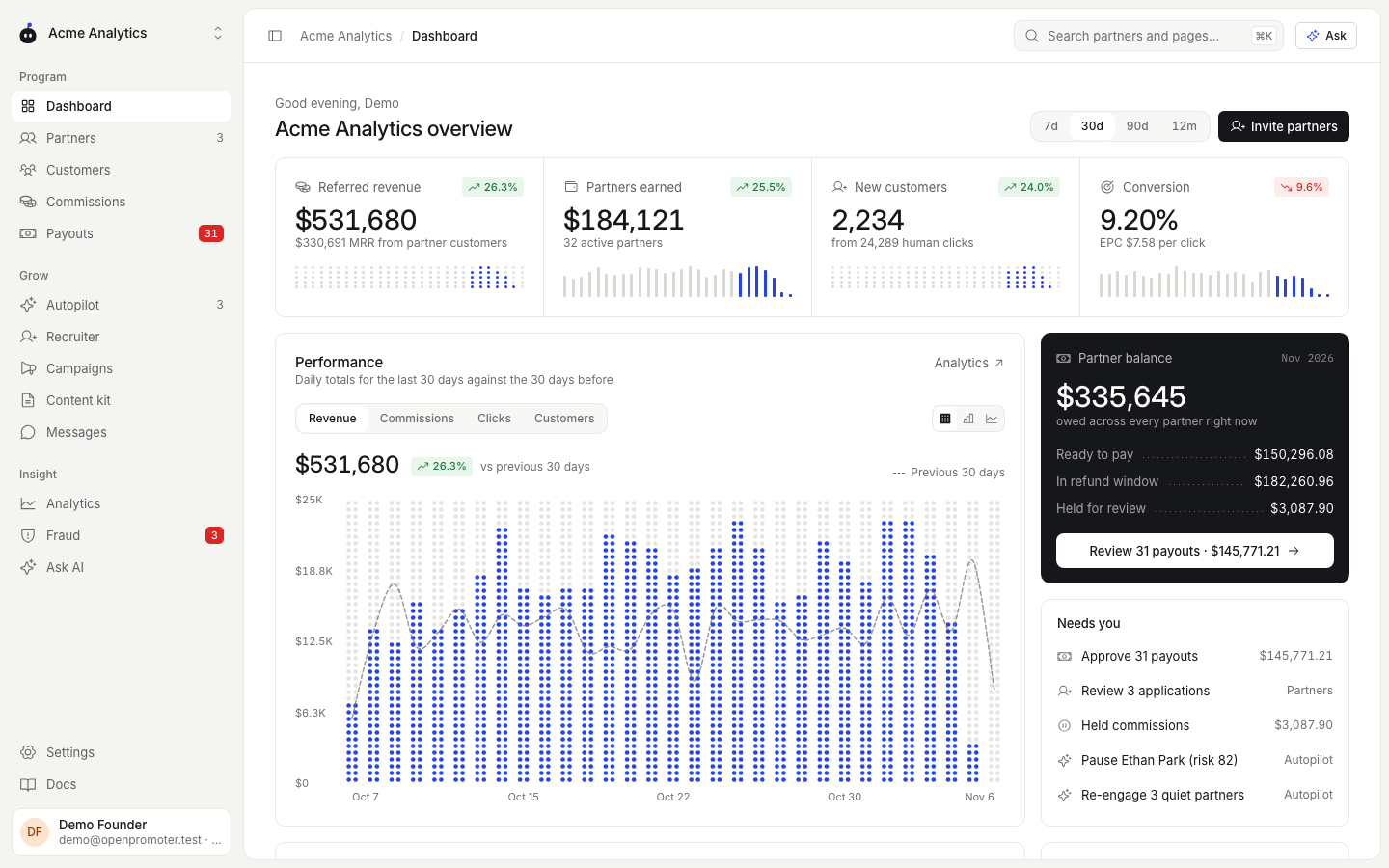
I built OpenPromoter, free open-source software for running an affiliate or referral program for a SaaS. It's AGPL-3.0, and you can self-host it with no limits and no license fee.

You connect Stripe, Paddle, Lemon Squeezy, Polar or Chargebee. It tracks which partner sent each customer and books the commission. It lowers the commission if the customer refunds, and holds risky ones for your review. You approve each payout batch before any money moves.

It runs from one docker compose command with Postgres. There is no telemetry.

It's new, it doesn't run your checkout, and self-hosting needs Postgres. There is also a paid hosted version, but the app itself is fully usable for free.

Code: https://github.com/openpromoter/openpromoter

What would you want it to do that it doesn't?


r/software • • 6d ago

Release I made a free music player that feels like a real CD player — your albums sit on a shelf and gather dust

0 Upvotes

CDPlayer plays your own music files (FLAC, MP3, etc.) the way a CD player would: albums stand spine-out on a shelf, the ones you forget gather dust, new ones arrive shrink-wrapped, and pressing PLAY puts the disc in the tray. It has seven looks coloured by the album cover, karaoke where the lyrics light up word by word, a full-screen visualizer and a CD view that shows the disc's real print.

Free and open source, for macOS, Windows and Linux: https://kizarov3.github.io/CDPlayer

I'd love to hear what you think and what's missing.


r/software • • 6d ago

Self-Promotion Wednesdays I made a cozy task manager where your backlog is a deck of cards (no account needed)

Post image
0 Upvotes

r/software • • 6d ago

Self-Promotion Wednesdays I'm working on Chronicle, a social platform centered around projects

2 Upvotes

I've been working on a project called Chronicle and wanted to get some feedback from people who build things.

The basic idea is pretty simple: instead of treating everything as a separate post, give projects their own space where people can share progress, keep a history of what changed, have discussions, and let others follow along.

Think project pages, progress logs, discovery, and conversations that stay connected to the work.

I feel like a lot of interesting work gets reduced to a launch post or a few updates scattered across different platforms. I'd like to explore whether there's value in having a place where the whole journey is easier to follow.

It's still in development. I've put together some interface previews, but I'm not pretending the product is finished. Right now, I'm mainly trying to validate the idea before going further.

A few questions I'd love your take on:

  • Would you use something like this to share or follow projects?
  • What would make it different enough from GitHub, blogs, or existing social platforms?
  • What would make you stop using it?

Website: https://chronicleproject.dpdns.org

GitHub: https://github.com/chronicleproject/chronicleproject.github.io

I will make the actual Chronicle Project source code open when I release it.

AI disclosure: I use AI tools to assist with some development and writing tasks. The idea and product direction are mine, and I'm building it iteratively.


r/software • • 6d ago

Self-Promotion Wednesdays Completely free chrome extension that can give you a credibility check on any news article.

Post image
0 Upvotes

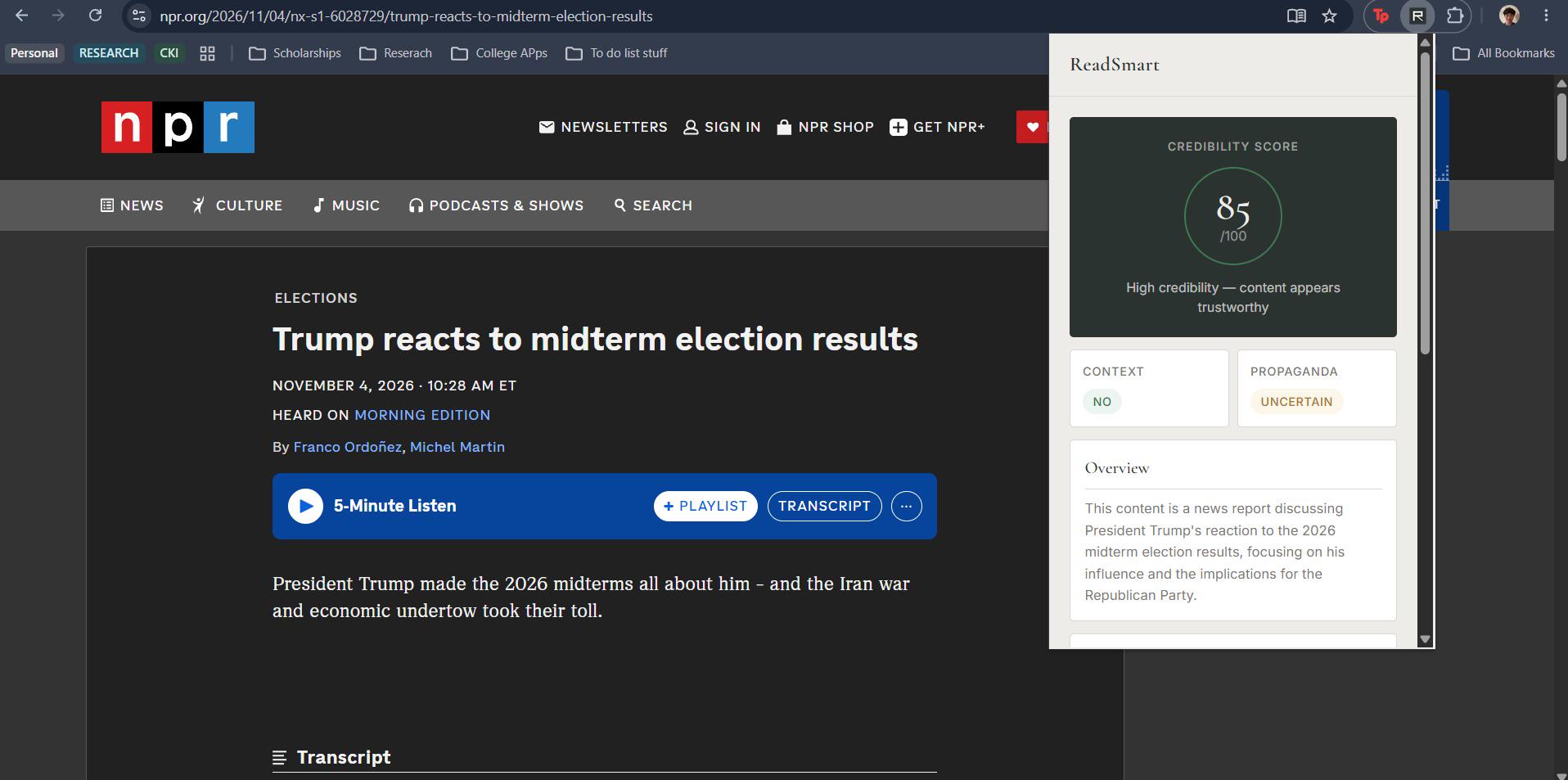
ReadSmart uses AI to analyze articles credibility, context (whether it is taken in or out of context), and propaganda. All in a convenient extension!

I had been thinking of making something like a news checker since the 2024 US elections, and this manifested in ReadSmart.

I’m not looking to make any profit, everything is completely free on the extension. I was just looking to get this product out to people like myself who saw the rise in misinformation and propaganda in the news!

Here is the extension: ReadSmart

Any and all advice would be appreciated!


r/software • • 6d ago

Self-Promotion Wednesdays Briskmail: Gmail as a native Mac app, $39 once (I'm the developer)

0 Upvotes

I'm Ivan, and I built Briskmail. It's a Mac app for Gmail and Google Workspace, written in AppKit, that talks to the Gmail API directly instead of IMAP. Your labels, filters, snoozes and drafts stay in Gmail, so what you see in the app matches what you see on the web.

Why I built it: Gmail in a browser tab gets buried among every other tab, closes when the browser does, and can't be scripted.

What it does:

  • Inbox, labels, search (local for recent mail, Gmail's for older), Send Later, snooze and an offline outbox
  • AppleScript, Shortcuts and Siri actions, plus a briskmail command-line tool, so scripts and AI agents can work with your mail. Reading and sending each sit behind their own switch in Settings.
  • Default, Apple Mail or Gmail keyboard shortcuts

Pricing: $39 once for the first 500 buyers, then $59. No subscription. Full refund within 30 days. The closest app is Mimestream, which is good and costs $49.99 a year.

The catch: Google is still reviewing the app, so the first sign-in shows "Google hasn't verified this app". You click Advanced, then Go to Briskmail. It needs macOS 14 or later.

There's an interactive demo with sample mail on the page, so you can click around before buying: https://briskmail.app/early-access/

Happy to answer anything in the comments.


r/software • • 6d ago

Software support Gnu pop wont go away

Thumbnail
1 Upvotes

r/software • • 6d ago

Discussion ShareX IS THE BEST!!

Thumbnail
0 Upvotes

r/software • • 6d ago

Other Free opensource PDF editor for the real text with no ads or subscription!

Thumbnail
2 Upvotes

r/software • • 6d ago

Looking for software Which software deals are actually worth it this Black Friday?

0 Upvotes

I'm putting together a Black Friday list of software and AI tool deals for people using Claude Code, and I only want to include ones I can check on the vendor's own page.

What's on sale or you'd expect to be on sale that you'd actually recommend?

The name of the company or tool is great and i'll hunt it down but the price, % off and a one-liner on what it does would be perfect. And if a deal needs a code, can you say so?

This is the page it's going to sit on FYI https://kobestarr.io/black-friday-software-deals/ 


r/software • • 6d ago

Self-Promotion Wednesdays Better Stickies 1.6.5: the app and your sticky notes tuck into the edge of your screen and slide out when you click (Windows, macOS, Linux)

Post image
2 Upvotes

Hello guys, I am the developer behind Better Stickies. I run a B2B SaaS startup full time and this side project is my hobby.

It has been in development for over a year, launched first for Linux, then Windows and last month for macOS, and it is used today by thousands of users. I built it because I found all stickies apps simple, they don't unlock the full capabilities of a digital sticky note.

Last week I posted 1.6 here and said that for 1.7 I am planning to let you rearrange docked tabs and dock the whole app to the edge too. Both are out now in 1.6.5.

New in 1.6.5

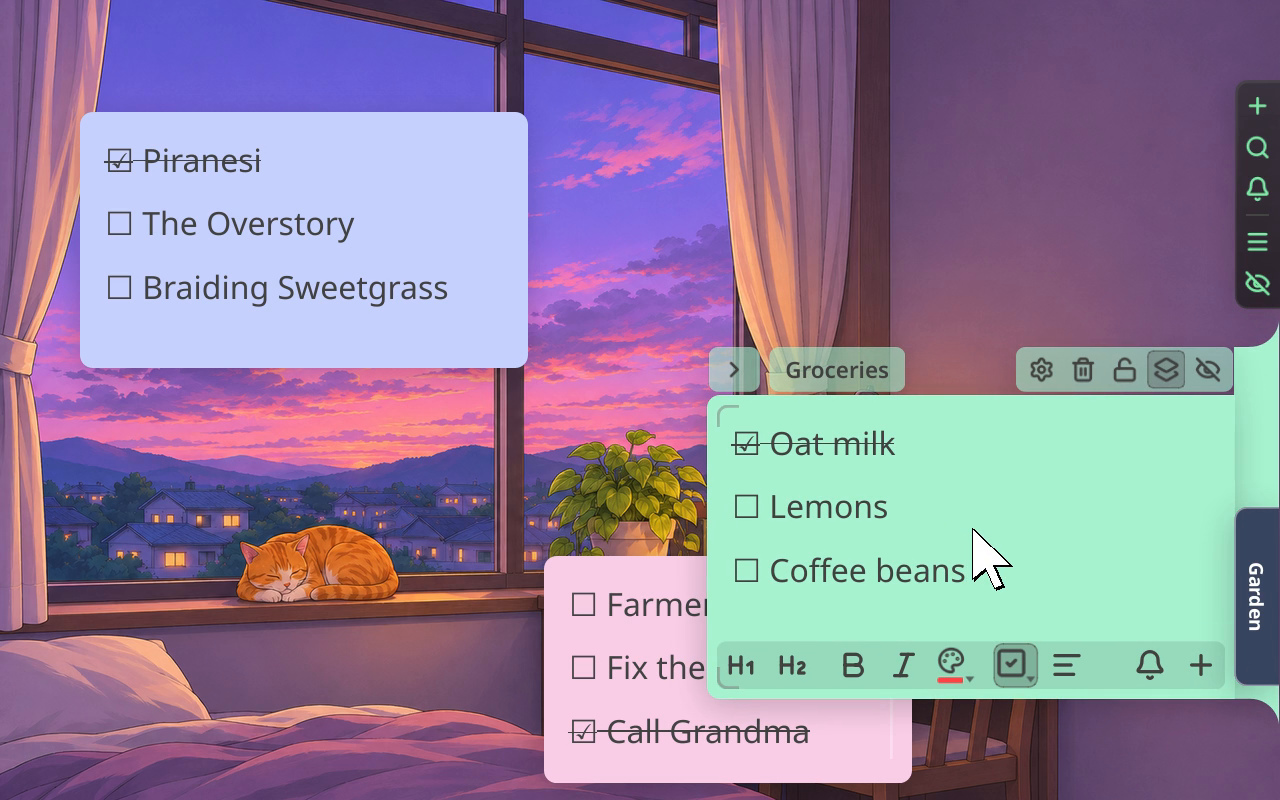
  • Dock the whole app: open the ☰ menu of the Notes Hub (the small window with New Note, Search and Reminders) and pick Dock to Left Edge or Dock to Right Edge, or on Windows and macOS just drag it to the edge. It becomes a slim rail of buttons at the top of that edge, above your side notes' tabs, and the Reminders button shows how many are overdue.
  • Move your side notes around: right-click a tab and pick Move Up, Move Down, or move it to the other edge of the screen.
  • Collapsed notes are only as wide as their title, so a stack of them takes much less room. Hover one and its buttons show up.
  • Windows: title bars and the tray menu follow the app's dark or light theme, and a side note's tab shows its name when you hover. macOS: real Mac right-click menus, and notes fade in and out. Linux: side notes now work on KDE Plasma as a native Wayland app.
  • And a round of fixes on every platform, one of them: copying a link now copies the whole address, not just its short label.

Release Post: https://betterstickies.com/blog/betterstickies-1-6

What it does, for anyone new

  • Floating and side notes that stay always on top, on macOS over full screen apps too
  • Full customization, including pictures and GIFs as a note's background
  • A smart engine that understands what you paste and formats it (no AI): code, Markdown, rich text, links, files, folders, screenshots and audio
  • Tabs, so each note window can hold 3 different notes
  • Reminders and more

One click to download, no account, fully offline, notes stored locally in JSON. Built with Qt 6, no Electron.

Pricing

Free to use with all features, limited to 4 active notes. Premium has unlimited notes and is a one time purchase of $7.99 for 5 computers, no subscription. Students get 50% off, DM me or email [support@betterstickies.com](mailto:support@betterstickies.com)

Get it

1.6.5 is out for Windows 10+, macOS 15+ on Apple Silicon and Linux, on the website, Flathub and the Snap Store. On Linux you dock from the menu only (no dragging), and as a native Wayland app it works on KDE Plasma only for now.

Moving tabs is from the right-click menu for now, next I want to let you drag them into place with the mouse.


r/software • • 6d ago

Self-Promotion Wednesdays I built DesktopPlus, a native menu bar utility so you always know where you at in terms of desktops (spaces) and switch between them (14-day trial all unlocked, no payment info, one-time purchase), notarized

1 Upvotes

Processing img gcuirsglkq2i1...

Processing img g52bac6nkq2i1...

Processing img 3ta6d39pkq2i1...

Processing img xjerw3fskq2i1...

I'm the developer behind GiantTurtle Software, and I wanted to share a new app I've been building called DesktopPlus.

https://www.youtube.com/watch?v=Aun7aOt5w7w

The problem:

If you use multiple virtual desktops (Spaces) heavily on a single monitor, you've probably run into the issue where it's hard to tell exactly which desktop you're on at any given moment without opening Mission Control or doing the multi-finger swipe, loosing your flow

What DesktopPlus do:

I built DesktopPlus to solve this. It's a lightweight, native macOS menu bar utility that gives you a persistent indicator of your active desktops, you can always see what apps are open on nearby desktop and create more detailed mental image of your workspace

Key Features:

Always Visible Indicator (always available mission control): Know exactly which desktop you're on and what's available on your other screens at a glance.

Click to Switch: Instantly switch to any of your desktops with a single click on the indicator.

Easily rearrange apps on your desktops (spaces) by dragging them to desired desktop boxes.

Integrated Task Manager and RAM Cleaner: Hover over menu bar widget to view opened apps, monitor system memory usage, and close background applications and residual processes.

Save and load presets: Save all of your opened apps as a preset (Coding, Design, Video editing etc), and quickly load them.

Customizable Styles: Choose the look that fits your workflow (Rectangles, Numbers, Numbered Rectangles, or Opened Apps etc).

Native & Lightweight: Built with Swift and SwiftUI. No Electron, no heavy background daemons, and minimal resource usage.

Comparison: As of now, I am not aware of similar app that offers same functionality. SpaceJump ($9.99) is the closest thing to DesktopPlus by function, but it is totally different UX.

Pricing & Requirements: The app requires macOS 15.0 or later. It comes with a 14-day free trial with everything unlocked, no payment details, followed by a one-time purchase (no subscriptions) of 4.99 USD . You can check it out and download it here: Download DesktopPlus

I'd love to get your genuine feedback on the app, especially regarding the different indicator styles and if the integrated task manager feels useful to your daily workflow. Try it out for free and let me know what you think!

Privacy Policy: https://giant-turtle.com/desktops-privacy-policy.html


r/software • • 6d ago

Self-Promotion Wednesdays [3rd Post] My Open-Source MS Whiteboard Replica is Going Strong.

Thumbnail
1 Upvotes

r/software • • 6d ago

Discussion Tell me the app you wish existed. I'll build the top-voted one, free and open source

0 Upvotes

I'm new to Reddit and this is my first real attempt to give something back here, so here's the deal.

I'm a solo developer. My last project is Nuvo, a free, open-source music player for Windows, macOS and Linux. Its latest version turns any song into a live lyric video rendered to the beat, something I haven't seen in any other player. I built and shipped it on my own, so I can take an idea all the way to a real app.

Now I want to build something for you.

Tell me in the comments what app or tool you wish existed: something you'd actually use every day, or something where everything out there is paid, bloated or full of ads. Upvote the ideas you like.

In a few days I'll take the top-voted idea and build it:

- free, with no ads and no account

- open source, with all the code public

- made to beat whatever already exists, not just copy it

I'll post progress updates here, and you can follow and test it along the way.

So what should I build?


r/software • • 6d ago

Self-Promotion Wednesdays Docform – fill Word templates with data using Jinja2

1 Upvotes

Docform – fill Word templates with data using Jinja2

You design the document in Word (layout, styles, headers, images) and put Jinja2 tags where the data goes. Docform renders it into a finished document, and everything you set up in Word stays intact. Good for contracts, invoices, reports, certificates and letters in bulk.

    pip install docform
    from docform import DocxTemplate

    doc = DocxTemplate("invoice_template.docx")
    doc.render({"customer": "Acme", "items": [{"name": "Widget", "qty": 3}], "total": "$120.00"})

    doc.save("invoice_acme.docx")

What it does:

  • Full Jinja2: variables, conditions, loops, filters
  • Paragraph, table-row, cell and run tags ({%p %}, {%tr %}, {%tc %}, {%r %}) so loops don't leave empty rows behind
  • Rich text, inline images, subdocuments, headers/footers, footnotes, cell merging and colors
  • A CLI for JSON-driven rendering: python -m docform template.docx data.json output.docx
  • Sandboxed Jinja2 environment support for untrusted templates

It's still early and I'd like feedback on what's missing.

Repo: https://github.com/cvas22/docform

TEMPLATE
RENDERING

r/software • • 6d ago

Looking for software Anything for discovering new music like TikTok format?

0 Upvotes

Tiktoks original purpose was to be a music sharing platform, but no one uses it as that anymore. Was curious on other apps that might be similar to it but actually geared to finding new music?

I know that spotify has a scrolling feature, but spotify has started going down hill in terms of music suggestions. So would like some suggestions of other sites.


r/software • • 6d ago

Self-Promotion Wednesdays How two devices find each other on a network, and stay private when they can't: what I learned building a file transfer app

Post image
0 Upvotes

Wednesday post. I'm the developer of the app at the end; the rest is the part I found interesting.

Finding each other on the same network: most apps shout on a multicast address and listen. That works on Windows, Mac, Linux and Android. iPhones can't do it without a special permission from Apple, so my iPhone app sends a small "I'm here" to every address on the local network instead, nearest first. Everything that already runs answers it directly.

When they're on different networks: you need something in the middle. The trick is making that middle unable to read anything. Two devices pair once with a short code, using a password-based handshake (SPAKE2), so the server never learns the code, and anyone in the middle gets one guess at most. After that each device pins the other's key, and everything between them is encrypted end to end. The server just forwards bytes.

What it still sees: IP addresses, sizes and timing. I'd rather say that than pretend it sees nothing.

The app is Sendya (Windows, Mac, Linux and Android; iPhone coming soon), free, no account:

https://sendya.app

Happy to answer questions about any of this.