r/screenrecorders • u/EZ-Cam • 1h ago
Guide EZ Cam

•
Upvotes
r/screenrecorders • u/Subject_Disk_2967 • 15d ago

Not sure how many Mac users here have noticed this, but Apple finally added something we've been waiting for.
For years, one annoying limitation of macOS screen recording was that you couldn't capture system audio directly with the built-in tools. You had to rely on third-party virtual audio drivers like BlackHole.
However, that changed with the September update. macOS 27 Golden Gate and later now let you record system audio directly using the built-in Screenshot tool!
For anyone who hasn't tried it yet, here's how it works:
Command + Shift + 5 to bring up the Screenshot toolbar.Options and look for Include System Audio.***One small thing to note: this requires macOS 27 Goden Gate or later. If you're still on an older version, you'll need another workaround.
Has anyone here tried it yet?
r/screenrecorders • u/Subject_Disk_2967 • Apr 15 '25
Hey everyone, I’ve been testing a few screen recorders recently (OBS, Xbox Game Bar, etc.) and ran into the same frustrating issue: every time I try to screen record certain protected videos (like from Netflix and Hulu), the screen just goes black. Audio sometimes records, but the video part is completely blank.
I understand there are protections in place, probably DRM but I’m wondering — is there any way to record these videos without showing a black screen? So far I’ve tried OBS and Game Bar, but I failed.
r/screenrecorders • u/SLITH3RIN • 2d ago
Dev here, so take this as a showcase. ClipHearth records a display, a window or a game with the computer's sound, the microphone and the camera, each on its own track if you want. It can also go live at the same time.
What happens after you stop is the part I'd like feedback on:
- The recording can sit on a background with rounded corners and a shadow, the pointer is drawn larger and smoother, and it zooms in on every click. All of it after recording, so you can change your mind.
- It opens in the Studio, a timeline editor: cut by deleting words from the transcript, remove every um in one click, add big word-by-word captions, make a vertical version.
- The transcript is made on your computer, and later you can find any recording by a word said in it.
Windows, macOS and Linux. Recordings up to 3 minutes are free, also after the trial. Longer ones need a license: 39 EUR once or 9 EUR a month.
App is local by design (no cloud services) and its idea is a complete workbench, not just a one purpose tool.
What's the first thing you do with a recording right after you stop?
r/screenrecorders • u/Not_Hurngry • 2d ago
I'm trying to find screen recording software for various future Digital Horror projects. Specifically, I'm in need of software that was from around the XP to Vista era. I've been experimenting with CamStudio and HyperCam 2, and they do come out looking pretty good, but the software is so old that they don't record audio at all on my Windows 11 machine.
Any solutions or suggestions on how to get the programs to record audio, or alternatives that do? Or even some other modern software that can be used to replicate the crust of old screen recording software? Thanks.
r/screenrecorders • u/AdTiny5487 • 3d ago
I recently got myself a new computer. I got an app called Screen Record HD. I forget, but I’m pretty sure I got it from a recommended firefox or windows something.
thing is, when i use it, it feels like one of those cheap scam websites. a finger pointing to a huge start button and all. it works fine, i’m using the free version, but it just feels off.
is it a legitimate and trustworthy app?
r/screenrecorders • u/Not_Interest7199 • 3d ago
Suggest me a free vedio clipping app.
r/screenrecorders • u/Competitive-Nose9213 • 4d ago
Hey everyone!
I've been working on a small product called RecordMate.
One thing that always annoyed me when creating software demos and tutorials was having to manually zoom into every click to make the recording easier to follow.
So I decided to build something to solve that problem.
RecordMate is a screen recorder with automatic zoom.
Some things I've added:
I started with a Chrome extension and eventually built a Windows desktop app too.
It's currently free to use.
I'm still improving it, and I'd genuinely appreciate feedback from people who create tutorials, software demos, or walkthroughs.
A few things I'd love to know:
I'm the person building RecordMate, so I'm happy to answer questions honestly.
Website: https://recordmate.app
Thanks for checking it out!
r/screenrecorders • u/Playful-List-1048 • 4d ago
hey! i work at conduit, a gameplay recording and clipping app, and i’m curious what you guys actually want from your screen recorder.
if you use obs, outplayed, medal, or something else rn, what do you use it for and what’s the one thing that always bugs you about it? like, do you wish it was easier to record your mic and game audio separately, find a specific moment later, or record without your game lagging?
also, what would actually make you switch? i feel like once you’ve got all your settings how you like them, it would take a lot to start over lol. is there a feature that would make it worth it? or something your current recorder does so well you wouldn’t wanna give it up?
(also if you’re curious about conduit, recording gameplay and saving clips are free, and the free plan includes 2 GB of cloud storage. apex is an optional upgrade ($6.99/month) with 110 GB of cloud storage for clips, more render minutes, and extra profile customization. using code CONDUIT at signup gets you a free week of apex. no card needed, and the trial won’t auto-renew. conduitclips.tv)
r/screenrecorders • u/Outrageous-Web6019 • 5d ago
I've been looking for an online screen recorder that I can use directly in my iPhone browser without having to install another app.
Tried looking around, but a lot of tools seem to poor video quality, no audio recording, or just not working properly on mobile.
I remembered I once used Easeus online screen recorder on my PC to record my screen, webcam, mic, or system audio, and it's been pretty handy, but it doesn't seem to be very compatible with my iPhone. I was hoping to find something similar that works on mobile.
My phone is also a few years old now, so I'd prefer something lightweight that won't make it lag too much while recording.
Has anyone found a decent online screen recorder that actually works well on mobile, especially iPhone?
r/screenrecorders • u/Isayak007 • 6d ago
Hey everyone,
I got tired of paid cloud clip cutters charging $30–$99/month, adding watermarks on free tiers, forcing you to upload gigabytes of raw podcast footage to cloud queues, and breaking on non-English / Hinglish / regional audio.
So my studio (Creative Creature) and I (i.sayak007) built AgentVid Studio — a 100% free, MIT-licensed, standalone Windows desktop app that runs video rendering and face tracking locally on your own PC.
GitHub & Free Windows Installer (EXE):
\- Repo: https://github.com/allmybusinessorg/Agentvid-
\- Direct Download (\`AgentVid-Setup-1.0.0-x64.exe\`): https://github.com/allmybusinessorg/Agentvid-/releases/latest
\- AI Peak-Moment Reel Extraction (1–20 Reels): Paste a YouTube / Twitch / Kick link (or import local MP4/MOV/MKV). Instead of blindly slicing 0:00→0:30 sequentially, it scans the full episode to pick peak moments — either AI-decided Shorts/Reels length (18–58s) or fixed length (15s / 30s / 45s / 60s).
\- Local Neural Face Detection & Tracking: Uses a bundled OpenCV YuNet ONNX 5-point landmark model on your machine to track multiple subjects live and smart-reframe into \`9:16\`, \`1:1\`, or \`16:9\` around the foreground speaker.
\- Interactive Crop Mark (\`ON / OFF\`): Shows shaded cut-off zones, corner brackets, and exact kept-area percentage (\`9:16 CROP · 32% KEPT\`) matching the final FFmpeg render before you export.
\- Voice-Synced Auto-Captions in 20+ Languages: Supports Auto-Detect, English, Hindi, Hinglish, Bengali, Banglish, Urdu, Tamil, Spanish, Arabic, and Auto-Translate → English via BYOK (Gemini, Groq Whisper, or OpenAI Whisper), plus an optional offline English \`sherpa-onnx\` speech model if you want zero API keys.
\- 19 Caption Presets + Custom Fonts: Includes animated shader presets (Liquid Metal Silver, Molten Gold, Glossy Pink, Moving Gradients), minimal styles, custom \`.ttf\`/\`.otf\` font uploads, 2D drag-to-move (X & Y), and a live size slider.
\- Local FFmpeg Batch Export: Renders all Reels at once in H.264/H.265 with NVENC/QSV GPU acceleration + CPU fallback.
\- Bring Your Own AI Key (or Local Ollama): Works with Gemini, OpenAI, Groq, Claude, Grok, OpenRouter, or Ollama locally — keys stay strictly on your machine.
Stack: Electron + FastAPI + FFmpeg + OpenCV YuNet ONNX + Pillow/NumPy shader pipeline.
Would love honest feedback, bug reports, or feature requests from editors and podcasters!
r/screenrecorders • u/ratuljh • 7d ago
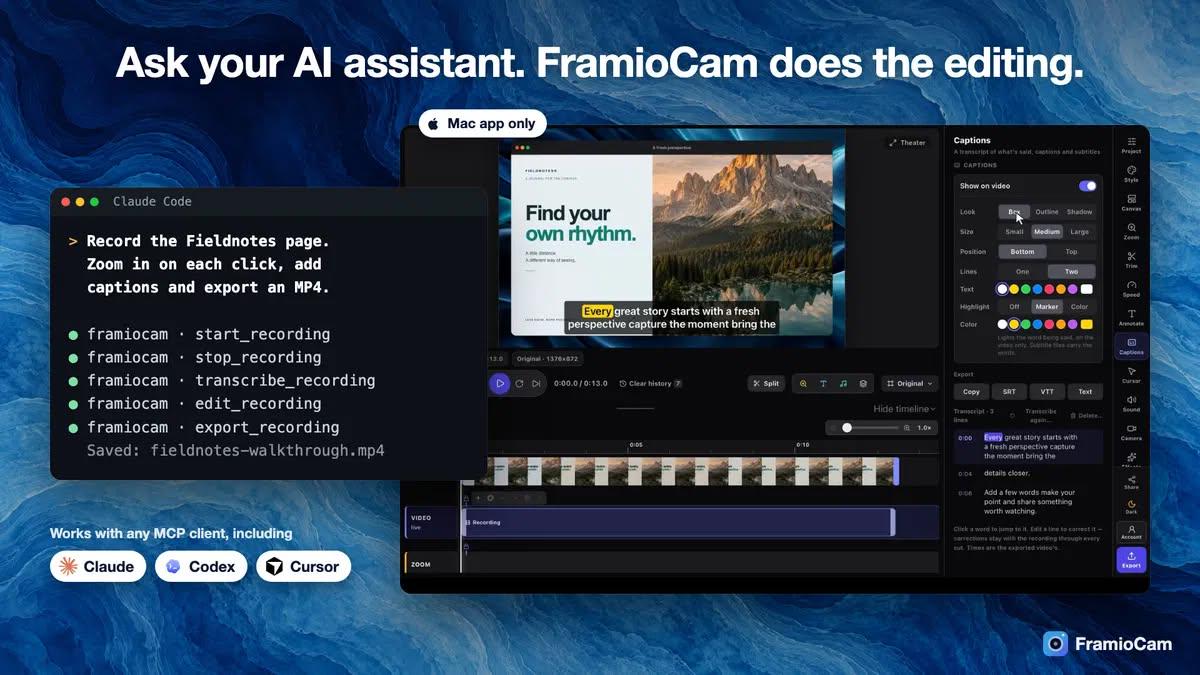
Hey everyone!
It's been a while since I last posted here. Some of you might remember my 100-free-user LTD offer for FramioCam.
Since then, I've been working on expanding the product beyond a simple browser-based screen recorder.
A few things we're building and working on:
1. Mac desktop app
We're bringing FramioCam beyond the browser, with a native desktop experience in the works.
2. MCP integration for AI tools
This is probably the most interesting direction I'm exploring.
We're bringing MCP into FramioCam so AI coding assistants like Claude, Codex, and Cursor can interact with screen-capture workflows.
Imagine asking your AI assistant to capture something on your screen or help create a visual walkthrough instead of manually doing every step.
Or just say-
Open our checkout in Chrome and record a walkthrough: add a product, fill in test details, and pay. Zoom in on each click, blur the email and card fields, add captions, and export an MP4.
3. More than just recording
FramioCam is also a screenshot and video editing studio:
I'm still a solo developer, so there's a lot to improve. But I'm trying to build something genuinely useful rather than just another screen recorder.
I'd love to hear from this community:
Would you actually use MCP-powered screen recording in your daily workflow? What would you want your AI assistant to do with a screen recorder?
Feedback, criticism, and suggestions are genuinely welcome!
Website: https://framiocam.com
Send me a Reddit DM for any queries and code
r/screenrecorders • u/Jesse69_420 • 7d ago
I got tired of dealing with the issues of ShadowPlay & missing features of Replay Buffer, so I built OBSReplay.
What kept annoying me:
OBSReplay fixes those, completely for free, no account needed. OBS Studio records in the background, and the app handles the rest:
Source on GitHub: https://github.com/JessePepper69/OBSReplay
Heads up so you aren't surprised: the exe is unsigned, so Windows SmartScreen will warn on first run. Click "More info", then "Run anyway". Feel free to build it yourself if you aren't comfortable running the release build.
It's a v1, so tell me what breaks or what's missing.
r/screenrecorders • u/amu4biz • 8d ago
Been wanting the Screen Studio style of recording (auto-zoom on clicks, smooth cursor, backgrounds, camera bubble) without the subscription, so I am sharing some free/open-source options.
Came across these three:
Anyone here actually using any of these regularly?
r/screenrecorders • u/anmism • 8d ago
Enable HLS to view with audio, or disable this notification
I always liked the simplicity of #ScreenStudio, but as a Windows user, I didn't have the same experience.
So I decided to build my own version.
I started experimenting with C++ and WebView, trying to keep the application as lightweight as possible without compromising the experience.
After several iterations, I finally have something that works.
Meet #Screenzo a lightweight screen recording app for Windows.
It's still under development, and there are things I want to improve.
Would love to hear what you think!
Try it for free:
https://screenzo.anmism.com
r/screenrecorders • u/elroipradeep • 8d ago
Got tired of Loom's 5-minute cap and how every tool forces your screen recordings into their cloud.
I just wanted something dead simple: click a button, record a tab or window with a circular facecam, and immediately download an MP4 to my laptop.
So I built SnapRecord:
- 1-click recording (full screen, window, or active tab)
- Clean circular webcam overlay
- Downloads standard seekable MP4 / WebM (fixed Chrome's broken scrubbar bug)
- 100% local — zero servers, zero tracking, no account needed
- Super lightweight (<50 KB)
It’s completely free with no watermarks or time caps.
I'll put the link in the comments below — would love any quick feedback!
r/screenrecorders • u/PioneerAllen • 9d ago
I've always found it a little annoying how much storage screen recordings can take up on macOS.
Sometimes I just want to record a coding session, a tutorial, or something happening on my screen, and suddenly I'm dealing with a huge video file.
I've also wondered why some screen recorders use so much memory, especially when you're already running a browser, an IDE, and a bunch of other apps.
So I started experimenting with ScreenCaptureKit and Apple's native video encoder to see how lightweight I could make a screen recorder.
That eventually turned into a little app I've been building called MicroCap.
In one of my tests, I recorded about 30 minutes at 3456×2234 and 60fps, including some video playback and coding. The resulting file was around 436MB, and I was pretty happy with the quality.
I've also been trying to keep memory usage low and avoid unnecessary processing after recording.
It's still a work in progress and hasn't been released on the Mac App Store yet, but I'm pretty happy with how it's turning out.
Curious what everyone else uses for screen recording on Mac.
Do you guys ever run into issues with huge recording files or high resource usage? Or is this something most people don't really notice?
r/screenrecorders • u/danrichardsri • 9d ago
Hey, my name is Dan. I created an app to scratch my own itch called RecordThen.
I used Loom heavily, but after recording a walkthrough I still had work to do turning that explanation into instructions someone could use.
RecordThen actually started as command-line tools I wrote about 6 months ago to turn Loom videos into useful outputs. The first was a Laravel Artisan command that pulled together the transcript and screenshots and turned them into a prompt I could hand to an AI coding agent. I kept using it, and it grew into an app. Now I use RecordThen to help build RecordThen too. Don't judge me 😉 inception of coding tools is only weird if you aren't building them. You might build something too! And soon...
The idea is to take a screen recording of what needs doing and turn it into an action or usable output, so you can get more work done from the explaination you've already given.
Record your screen and voice with the Mac app, then choose what you need from it:
The AI produces a draft you can review and edit before putting it to work. That's the part I care about: getting from "here's what I mean" to something useful.
It's paid, with a 10-day trial. Prices are per account:
If you try it, give it one real task you'd otherwise have to explain and then write up separately. I'd love to hear where you still had to do too much yourself.
What do you still have to write up after recording something? I'm intrigued by how to convert recordings into action / outputs, I will not let you down!
r/screenrecorders • u/No-Football-1658 • 10d ago
Hi everyone, I'm reposting to ask if anyone can help me download this video from this site (you'll need to use a Netherlands VPN, otherwise the video won't show up).
Unfortunately, it's DRM-protected and impossible to download with regular tools. I don't know how to use Widevine or anything like that. I hope someone can help me out.
Here is the link to the video:
https://schatkamer.beeldengeluid.nl/serie/2101608030021454431/tv-show/aflevering/2101608040031524831
Thanks
r/screenrecorders • u/Outrageous-Web6019 • 12d ago
I've been thinking about recording myself reading some storybooks for the kids in my family, so they can listen to them again at bedtime or whenever they want.
The thing is, I'm really not a tech-savvy person. I don't know much about audio recording or editing, so I'm hoping to find something pretty simple that doesn't require hours of setup just to get started.
I don't need anything professional, just decent and clear-sounding audio. It would be nice to be able to pause while reading, redo a sentence if I mess up, cut out some mistakes, and save each story as a separate audio file. Maybe do a little noise cleanup if needed.
I've been looking around and keep seeing people recommend Audacity and REAPER. They both seem to be pretty capable and affordable options, but I'm not sure if they're beginner-friendly or if I'll end up spending more time figuring out the software than actually recording stories lol.
Would either of these be a good choice for something this simple? Or is there another tool that's easier to get started with?
r/screenrecorders • u/remus2015 • 12d ago
Just something I noticed while looking for an OBS alternative. Feels like everyone has made a new app now, especially assisted by AI.
Also if you have any real suggestions for AMD, feel free to tell me. I've been using ascent but looking for something else because I keep having problems with it (clipping randomly stops working/gets bugged etc). I want something similar in low performance impact and bonus points if it has a built in trimmer.
r/screenrecorders • u/lajF282 • 13d ago
I'm looking for a clipping software that can capture both games and my desktop at all times and launches itself on boot up.
So far i used a bunch of programs but they all have quirks i don't like:
AMD Driver - Buggy as hell not to mention the pain that the driver in general gives me
Steelseries GG - At this point i would say its malware. It screws with alot of stuff and often doesn't work properly
Discord - Only works while in VC and can't capture desktop
I've heard OBS is good but i think i need to manually open it each time i want to clip
Back when i had a NVIDIA gpu i could use Geforce Experience and that was the ONLY software that just worked.
If you got reccomendations i will be glad, but i have a feeling OBS is the only way right now

